wheel Hyundai Creta 2016 Owner's Guide
[x] Cancel search | Manufacturer: HYUNDAI, Model Year: 2016, Model line: Creta, Model: Hyundai Creta 2016Pages: 512, PDF Size: 11.54 MB
Page 222 of 512
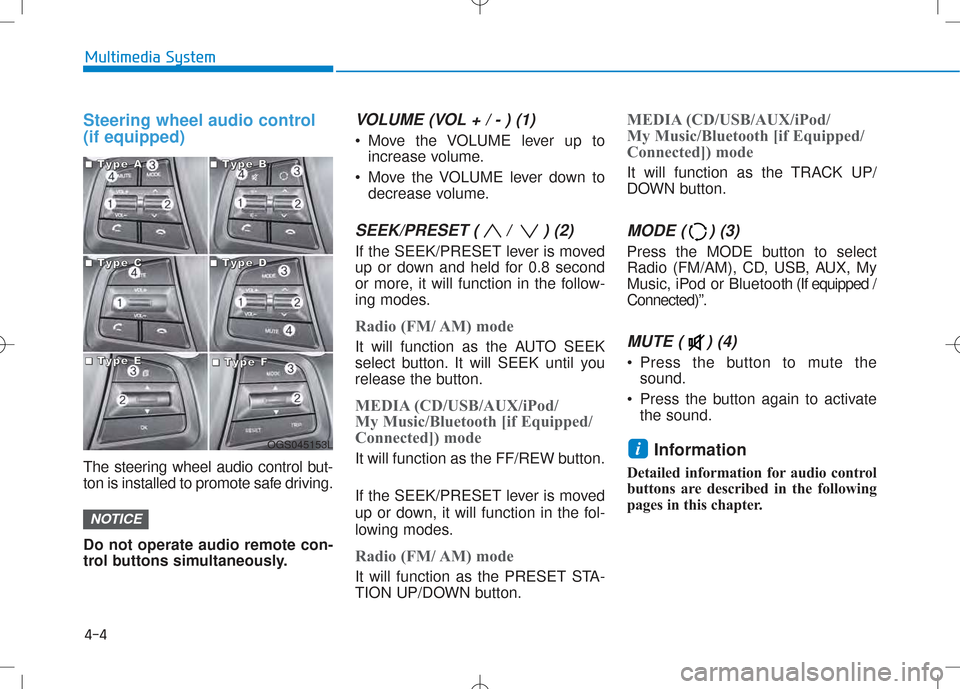
Steering wheel audio control (if equipped)
The steering wheel audio control but-
ton is installed to promote safe driving. Do not operate audio remote con-
trol buttons simultaneously.
VOLUME (VOL + / - ) (1)
Move the VOLUME lever up toincrease volume.
Move the VOLUME lever down to decrease volume.
SEEK/PRESET ( / ) (2)
If the SEEK/PRESET lever is moved
up or down and held for 0.8 second
or more, it will function in the follow-
ing modes.
Radio (FM/ AM) mode
It will function as the AUTO SEEK
select button. It will SEEK until you
release the button.
MEDIA (CD/USB/AUX/iPod/
My Music/Bluetooth [if Equipped/
Connected]) mode
It will function as the FF/REW button.
If the SEEK/PRESET lever is moved
up or down, it will function in the fol-
lowing modes.
Radio (FM/ AM) mode
It will function as the PRESET STA-
TION UP/DOWN button.
MEDIA (CD/USB/AUX/iPod/
My Music/Bluetooth [if Equipped/
Connected]) mode
It will function as the TRACK UP/
DOWN button.
MODE ( ) (3)
Press the MODE button to select
Radio (FM/AM), CD, USB, AUX, My
Music, iPod or Bluetooth (If equipped /
Connected)”.
MUTE ( ) (4)
Press the button to mute the sound.
Press the button again to activate the sound.
Information
Detailed information for audio control
buttons are described in the following
pages in this chapter.
i
NOTICE
4-4
Multimedia System
OGS045153L
■■■■TTTTyyyyppppeeee AAAA■■■■TTTTyyyyppppeeee BBBB
■■■■TTTTyyyyppppeeee CCCC■■■■TTTTyyyyppppeeee DDDD
■■■■TTTTyyyyppppeeee EEEE■■■■TTTTyyyyppppeeee FFFF
Page 240 of 512
4-22
Multimedia System
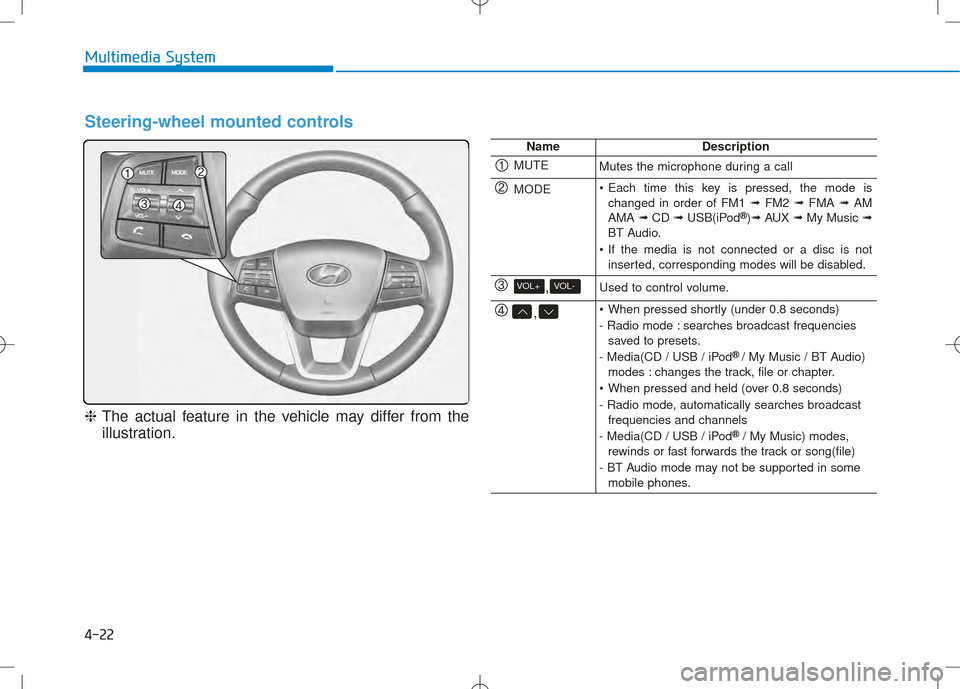
Steering-wheel mounted controls
❈The actual feature in the vehicle may differ from the
illustration.
NameDescription
MUTEMutes the microphone during a call
MODE Each time this key is pressed, the mode is changed in order of FM1 ➟FM2 ➟FMA ➟AM
AMA ➟CD ➟USB(iPod ®
)➟ AUX ➟My Music ➟
BT Audio.
If the media is not connected or a disc is not inserted, corresponding modes will be disabled.
,VOL-VOL+Used to control volume.
, When pressed shortly (under 0.8 seconds)
- Radio mode : searches broadcast frequenciessaved to presets.
- Media(CD / USB / iPod ®
/ My Music / BT Audio)
modes : changes the track, file or chapter.
When pressed and held (over 0.8 seconds)
- Radio mode, automatically searches broadcast frequencies and channels
- Media(CD / USB / iPod ®
/ My Music) modes,
rewinds or fast forwards the track or song(file)
- BT Audio mode may not be supported in some mobile phones.
Page 315 of 512
Before entering the vehicle
• Be sure all windows, outside mirror(s), and outside lights are clean
and unobstructed.
• Remove frost, snow, or ice.
• Visually check the tires for uneven wear and damage.
• Check under the vehicle for any sign of leaks.
• Be sure there are no obstacles behind you if you intend to back up.
Before starting
• Make sure the hood, the tailgate,and the doors are securely closed
and locked.
• Adjust the position of the seat and steering wheel.
• Adjust the inside and outside rearview mirrors.
• Verify all the lights work.
• Fasten your seatbelt. Check that all passengers have fastened their
seatbelts. • Check the gauges and indicators in
the instrument panel and the mes
sages on the instrument display
when the ignition switch is in the
ON position.
• Check that any items you are car rying are stored properly or fas
tened down securely.
BEFORE DRIVING
5-3
Driving your vehicle
5
Page 317 of 512
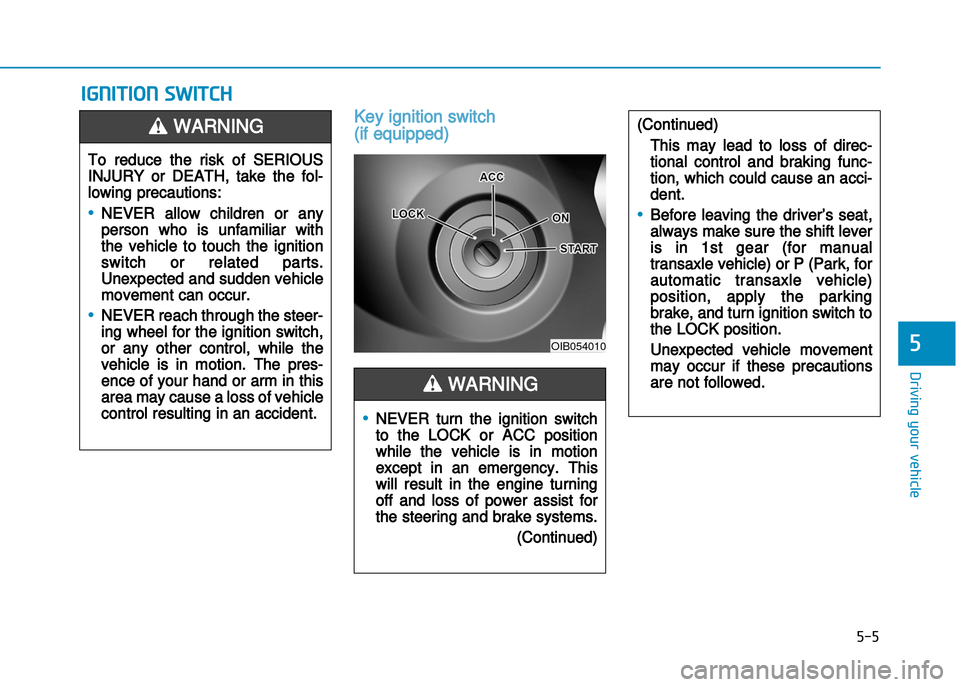
Key ignition switch
(if equipped)
IGNITION SWITCH
5-5
Driving your vehicle
5OIB054010
To reduce the risk of SERIOUS
INJURY or DEATH, take the fol
lowing precautions:
•NEVER allow children or any
person who is unfamiliar with
the vehicle to touch the ignition
switch or related parts.
Unexpected and sudden vehicle
movement can occur.
•NEVER reach through the steer
ing wheel for the ignition switch,
or any other control, while the
vehicle is in motion. The pres
ence of your hand or arm in this
area may cause a loss of vehicle
control resulting in an accident.
WARNING
•NEVER turn the ignition switch
to the LOCK or ACC position
while the vehicle is in motion
except in an emergency. This
will result in the engine turning
off and loss of power assist for
the steering and brake systems.
(Continued)
(Continued)
This may lead to loss of direc
tional control and braking func
tion, which could cause an acci
dent.
•Before leaving the driver’s seat,
always make sure the shift lever
is in 1st gear (for manual
transaxle vehicle) or P (Park, for
automatic transaxle vehicle)
position, apply the parking
brake, and turn ignition switch to
the LOCK position.
Unexpected vehicle movement
may occur if these precautions
are not followed.WARNING
Page 318 of 512
5-6
Driving your vehicle
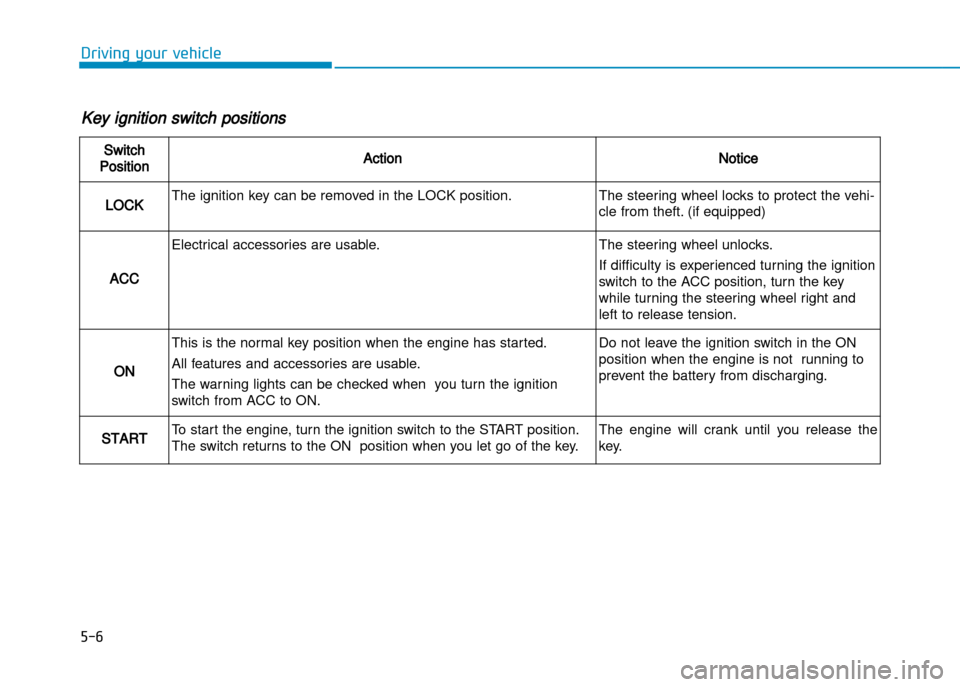
Key ignition switch positions
Switch
PositionActionNotice
LOCKThe ignition key can be removed in the LOCK position.The steering wheel locks to protect the vehi
cle from theft. (if equipped)
ACC
Electrical accessories are usable.The steering wheel unlocks.
If difficulty is experienced turning the ignition
switch to the ACC position, turn the key
while turning the steering wheel right and
left to release tension.
ON
This is the normal key position when the engine has started.
All features and accessories are usable.
The warning lights can be checked when you turn the ignition
switch from ACC to ON.Do not leave the ignition switch in the ON
position when the engine is not running to
prevent the battery from discharging.
STARTTo start the engine, turn the ignition switch to the START position.
The switch returns to the ON position when you let go of the key.The engine will crank until you release the
key.
Page 322 of 512
5-10
Driving your vehicle
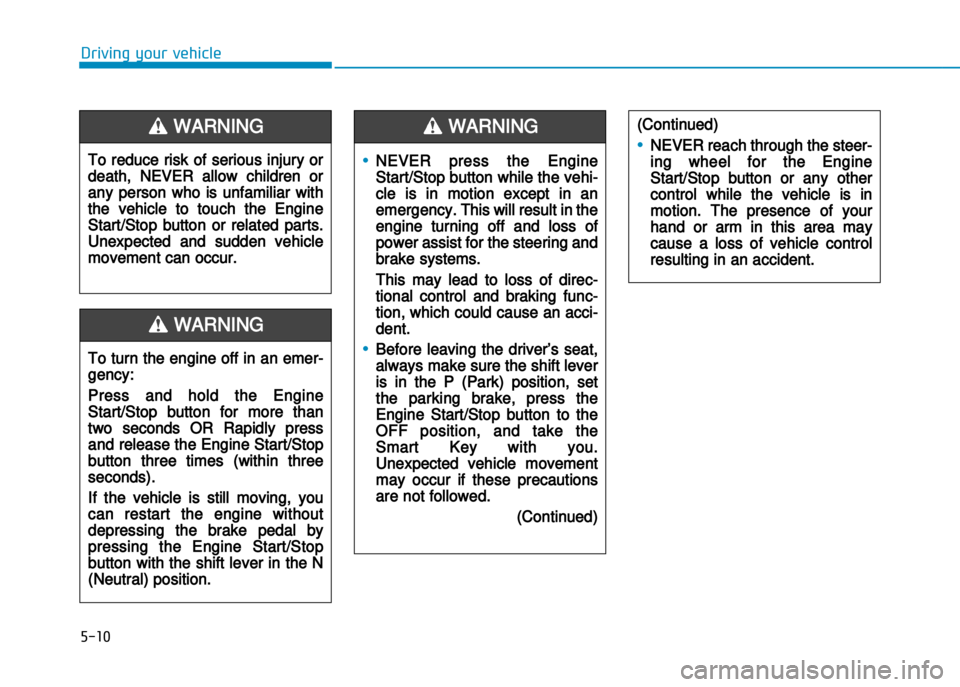
•NEVER press the Engine
Start/Stop button while the vehi
cle is in motion except in an
emergency. This will result in the
engine turning off and loss of
power assist for the steering and
brake systems.
This may lead to loss of direc
tional control and braking func
tion, which could cause an acci
dent.
•Before leaving the driver’s seat,
always make sure the shift lever
is in the P (Park) position, set
the parking brake, press the
Engine Start/Stop button to the
OFF position, and take the
Smart Key with you.
Unexpected vehicle movement
may occur if these precautions
are not followed.
(Continued)
WARNING
To turn the engine off in an emer
gency:
Press and hold the Engine
Start/Stop button for more than
two seconds OR Rapidly press
and release the Engine Start/Stop
button three times (within three
seconds).
If the vehicle is still moving, you
can restart the engine without
depressing the brake pedal by
pressing the Engine Start/Stop
button with the shift lever in the N
(Neutral) position.
(Continued)
•NEVER reach through the steer
ing wheel for the Engine
Start/Stop button or any other
control while the vehicle is in
motion. The presence of your
hand or arm in this area may
cause a loss of vehicle control
resulting in an accident.
WARNING
To reduce risk of serious injury or
death, NEVER allow children or
any person who is unfamiliar with
the vehicle to touch the Engine
Start/Stop button or related parts.
Unexpected and sudden vehicle
movement can occur.
WARNING
Page 323 of 512
5-11
Driving your vehicle
5
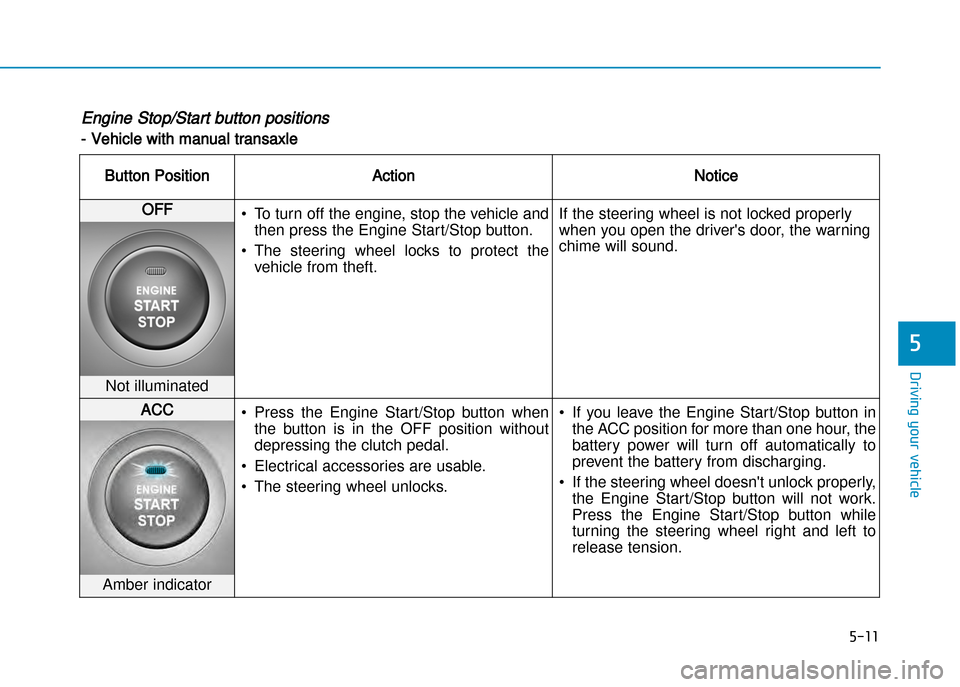
Engine Stop/Start button positions
Vehicle with manual transaxle
Button PositionActionNotice
OFF• To turn off the engine, stop the vehicle and
then press the Engine Start/Stop button.
• The steering wheel locks to protect the vehicle from theft. If the steering wheel is not locked properly
when you open the driver's door, the warning
chime will sound.
Not illuminated
ACC
• Press the Engine Start/Stop button when
the button is in the OFF position without
depressing the clutch pedal.
• Electrical accessories are usable.
• The steering wheel unlocks. • If you leave the Engine Start/Stop button in
the ACC position for more than one hour, the
battery power will turn off automatically to
prevent the battery from discharging.
• If the steering wheel doesn't unlock properly, the Engine Start/Stop button will not work.
Press the Engine Start/Stop button while
turning the steering wheel right and left to
release tension.
Amber indicator
Page 325 of 512
5-13
Driving your vehicle
5
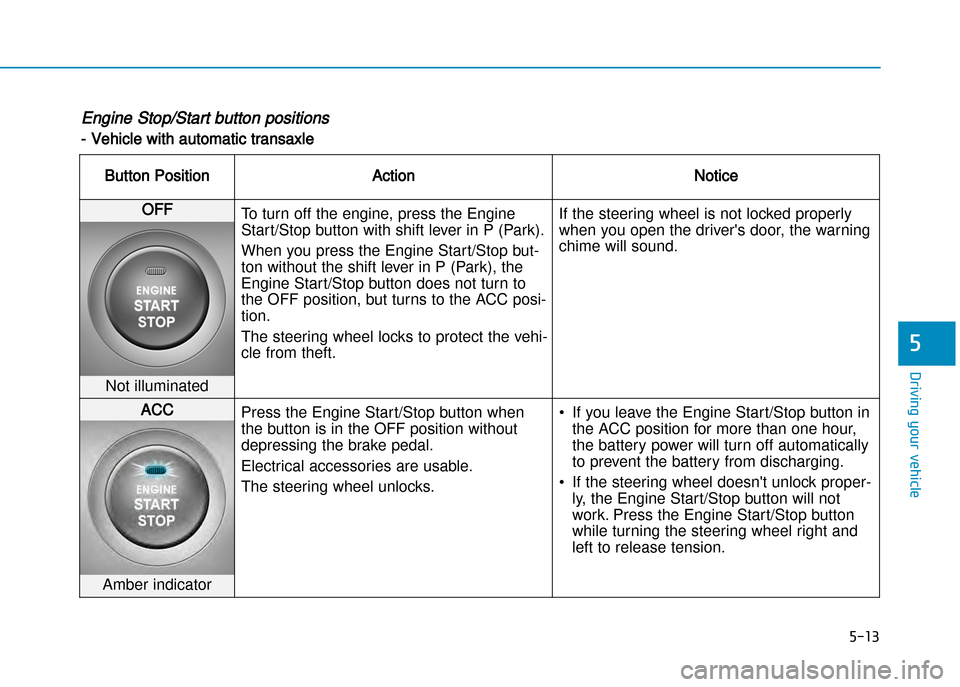
Engine Stop/Start button positions
Vehicle with automatic transaxle
Button PositionActionNotice
OFFTo turn off the engine, press the Engine
Start/Stop button with shift lever in P (Park).
When you press the Engine Start/Stop but
ton without the shift lever in P (Park), the
Engine Start/Stop button does not turn to
the OFF position, but turns to the ACC posi
tion.
The steering wheel locks to protect the vehi
cle from theft. If the steering wheel is not locked properly
when you open the driver's door, the warning
chime will sound.
Not illuminated
ACC
Press the Engine Start/Stop button when
the button is in the OFF position without
depressing the brake pedal.
Electrical accessories are usable.
The steering wheel unlocks. • If you leave the Engine Start/Stop button in
the ACC position for more than one hour,
the battery power will turn off automatically
to prevent the battery from discharging.
• If the steering wheel doesn't unlock proper ly, the Engine Start/Stop button will not
work. Press the Engine Start/Stop button
while turning the steering wheel right and
left to release tension.
Amber indicator
Page 333 of 512
5-21
Driving your vehicle
5
To prevent damage to the engine,
clutch and transaxle:
•When downshifting from 5th gear
to 4th gear, be careful not to inad
vertently push the shift lever side
ways engaging the 2nd gear. A
drastic downshift may cause the
engine speed to increase to the
point the tachometer will enter the
redzone.
•Do not downshift more than two
gear at a time or downshift the
gear when the engine is running at
high speed (5,000 RPM or higher).
Such a downshifting may damage
the engine, clutch and the
transaxle.
Good driving practices
• Never take the vehicle out of gearand coast down a hill. This is
extremely dangerous.
• Don't "ride" the brakes. This can cause the brakes and related parts
to overheat and malfunction.
When you are driving down a long
hill, slow down and shift to a lower
gear. Engine braking will help slow
down the vehicle.
• Slow down before shifting to a lower gear. This will help avoid
overrevving the engine, which can
cause damage.
• Slow down when you encounter cross winds. This gives you much
better control of your vehicle.
• Be sure the vehicle is completely stopped before you shift into R
(Reverse) to prevent damage to
the transaxle. • Exercise extreme caution when
driving on a slippery surface. Be
especially careful when braking,
accelerating or shifting gears. On a
slippery surface, an abrupt change
in vehicle speed can cause the
drive wheels to lose traction and
may cause loss of vehicle control
resulting in an accident
NOTICE
Do not use the engine brake (shift
ing from a higher gear to lower
gear) rapidly on slippery roads.
The vehicle may slip causing an
accident.
WARNING
Page 334 of 512
5-22
Driving your vehicle
To reduce the risk of SERIOUS
INJURY or DEATH:
•ALWAYS wear your seatbelt. In
a collision, an unbelted occu
pant is significantly more likely
to be seriously injured or killed
than a properly belted occupant.
•Avoid high speeds when corner
ing or turning.
•Do not make quick steering
wheel movements, such as
sharp lane changes or fast,
sharp turns.
•The risk of rollover is greatly
increased if you lose control of
your vehicle at highway speeds.
•Loss of control often occurs if
two or more wheels drop off the
roadway and the driver over
steers to reenter the roadway.
(Continued)
(Continued)
•In the event your vehicle leaves
the roadway, do not steer
sharply. Instead, slow down
before pulling back into the trav
el lanes.
•HYUNDAI recommends you fol
low all posted speed limits.
WARNING