display Hyundai Creta 2016 Manual PDF
[x] Cancel search | Manufacturer: HYUNDAI, Model Year: 2016, Model line: Creta, Model: Hyundai Creta 2016Pages: 512, PDF Size: 11.54 MB
Page 293 of 512
![Hyundai Creta 2016 Manual PDF 4-75
Multimedia System
4
Turning Bluetooth System Off
Press the key Select
[Phone] Select [Bluetooth SystemOff] Once
Bluetooth®Wireless Technology
is turned off,
Bluetooth®Wireless
Technology re](/img/35/14533/w960_14533-292.png "Hyundai Creta 2016 Manual PDF 4-75
Multimedia System
4
Turning Bluetooth System Off
Press the key Select
[Phone] Select [Bluetooth SystemOff] Once
Bluetooth®Wireless Technology
is turned off,
Bluetooth®Wireless
Technology re")
4-75
Multimedia System
4
Turning Bluetooth System Off
Press the key Select
[Phone] Select [Bluetooth SystemOff] Once
Bluetooth®Wireless Technology
is turned off,
Bluetooth®Wireless
Technology related features will not be
supported within the audio system. Information
To turn Bluetooth ®
Wireless Technology
back on, go to [Phone] and
press “Yes”.
System Setting
Memory Information
Press the key Select
[System] Select [Memory Information]
This feature displays information
related to system memory.
1) Using : Displays capacity currently in use
2) Capacity : Displays total capacity
SETUP
SETUP
i
SETUP
Page 294 of 512
![Hyundai Creta 2016 Manual PDF 4-76
Multimedia System
Language
Press the key Select
[System] Select [Language]
This feature is used to change the system. If the language is changed, the sys-
tem will restart and apply the selec](/img/35/14533/w960_14533-293.png "Hyundai Creta 2016 Manual PDF 4-76
Multimedia System
Language
Press the key Select
[System] Select [Language]
This feature is used to change the system. If the language is changed, the sys-
tem will restart and apply the selec")
4-76
Multimedia System
Language
Press the key Select
[System] Select [Language]
This feature is used to change the system. If the language is changed, the sys-
tem will restart and apply the select-
ed language.
SSEE TT UU PP (( EE xxccee pp tt RR DD SS MM ooddeell))
Starting Mode
Press the key to display the Setup screen.
You can select and control options
related to [Display], [Sound], [Phone]and [System].
Display Settings
Adjusting the Brightness
Press the key Select
[Display] Select [Brightness]
Use the , buttons to adjust the
screen brightness or set the
Brightness on Automatic, Daylight, or
Night mode.
Press the button to reset.
1) Automatic : Adjusts the brightness
automatically
2) Day : Always maintains the bright- ness on high
3) Night : Always maintains the brightness on low
Default
SETUP
SETUP
SETUP
Page 295 of 512
![Hyundai Creta 2016 Manual PDF 4-77
Multimedia System
4
Mode Pop up
Press the key Select
[Display] Select [Mode Pop up]
This feature is used to display the
Mode Pop up screen when entering
radio and media modes.
When this feat](/img/35/14533/w960_14533-294.png "Hyundai Creta 2016 Manual PDF 4-77
Multimedia System
4
Mode Pop up
Press the key Select
[Display] Select [Mode Pop up]
This feature is used to display the
Mode Pop up screen when entering
radio and media modes.
When this feat")
4-77
Multimedia System
4
Mode Pop up
Press the key Select
[Display] Select [Mode Pop up]
This feature is used to display the
Mode Pop up screen when entering
radio and media modes.
When this feature is turned on,
pressing the or key
will display the Mode Pop up screen.Information
The media Mode Pop up screen can be
displayed only when two or more
media modes have been connected.
Text Scroll (If equipped)
Press the key Select
[Display] Select [Text Scroll]
This feature is used to scroll text dis-
played on the screen when it is too
long to be displayed at once.
When turned on, the text is repeat-
edly scrolled. When turned off, the
text is scrolled just once.
Media Display
Press the key Select
[Display] Select [Media Display]
This feature is used to change the
information displayed within USB
and MP3 CD modes.
1) Folder File : Displays file name and folder name
2) Album Artist Song : Displays album name/artist name/songSETUP SETUP
i
MEDIA FM/AM
SETUP
Page 298 of 512
![Hyundai Creta 2016 Manual PDF 4-80
Multimedia System
Downloading Contacts
Press the key Select
[Phone] Select [Contacts Download]
The contacts is downloaded from the
mobile phone and the download
progress is displayed.Informat](/img/35/14533/w960_14533-297.png "Hyundai Creta 2016 Manual PDF 4-80
Multimedia System
Downloading Contacts
Press the key Select
[Phone] Select [Contacts Download]
The contacts is downloaded from the
mobile phone and the download
progress is displayed.Informat")
4-80
Multimedia System
Downloading Contacts
Press the key Select
[Phone] Select [Contacts Download]
The contacts is downloaded from the
mobile phone and the download
progress is displayed.Information
Up to 1,000 contacts entries can be copied into car contacts.
Up to 1,000 contacts entries can be saved for each paired device.
Upon downloading contacts data, previously saved contacts data will
be deleted. However, contacts
entries saved to other paired phones
are not deleted.
Auto Download (Contacts)
(If equipped)
Press the key Select
[Phone] Select [Auto Download]
This feature is used to automatically
download mobile contacts entriesonce a
Bluetooth®Wireless
Technology phone is connected.
Information
The Auto Download feature will download mobile contacts entries
every time the phone is connected.
The download time may differ
depending on the number of saved
contacts entries and the communi-
cation state.
When downloading a contacts, first check to see that your mobile phone
supports the contacts download fea-
ture.
Outgoing Volume
Press the key Select
[Phone] Select [Outgoing Volume]
Use the , buttons to adjust the
outgoing volume level.
Turning Bluetooth System Off
Press the key Select
[Phone] Select [Bluetooth SystemOff] Once
Bluetooth®Wireless Technology
is turned off,
Bluetooth®Wireless
Technology related features will not be
supported within the audio system.
SETUP
SETUP
i
SETUP
i
SETUP
Page 299 of 512
![Hyundai Creta 2016 Manual PDF 4-81
Multimedia System
4
Information
To turn Bluetooth ®
Wireless Technology
back on, go to [Phone] and
press “Yes”.
System Setting
Memory Information
Press the key Select
[System] Select [M](/img/35/14533/w960_14533-298.png "Hyundai Creta 2016 Manual PDF 4-81
Multimedia System
4
Information
To turn Bluetooth ®
Wireless Technology
back on, go to [Phone] and
press “Yes”.
System Setting
Memory Information
Press the key Select
[System] Select [M")
4-81
Multimedia System
4
Information
To turn Bluetooth ®
Wireless Technology
back on, go to [Phone] and
press “Yes”.
System Setting
Memory Information
Press the key Select
[System] Select [Memory Information]
This feature displays information
related to system memory.
1) Using : Displays capacity currently in use
2) Capacity : Displays total capacity
Language (For Colombia Model)
Press the key Select
[System] Select [Language] ❈ This feature is used to change the
system and voice recognition lan-
guage.
❈ if the language is changed, the
system will restart and apply the
selected language.SETUP
SETUP
SETUP
i
Page 302 of 512
4-84
Multimedia System
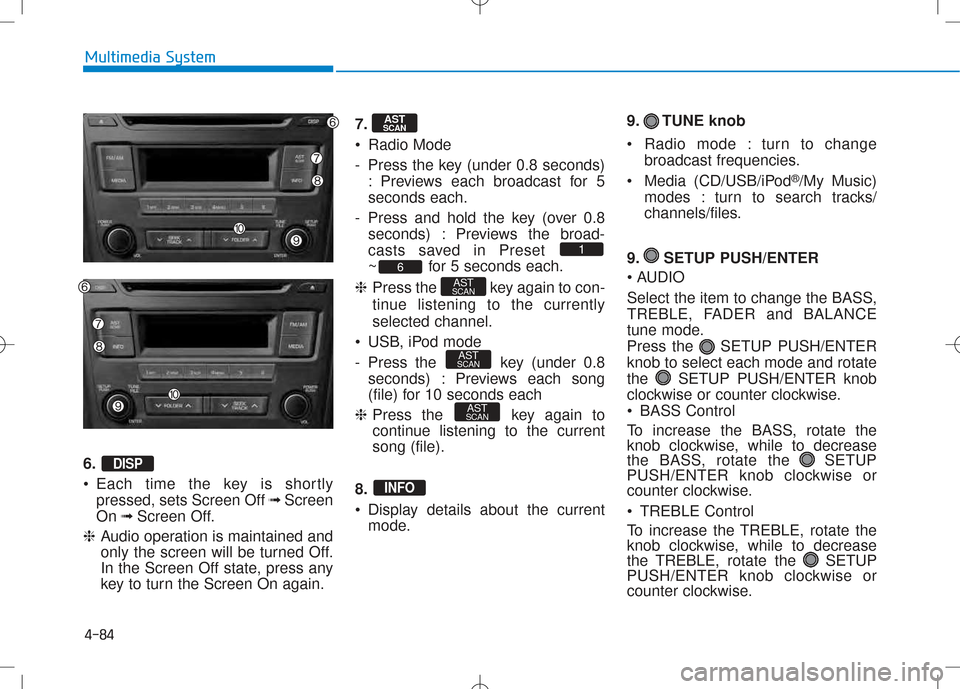
6. •Each time the key is shortly
pressed, sets Screen Off ➟Screen
On ➟Screen Off.
❈ Audio operation is maintained and
only the screen will be turned Off.
In the Screen Off state, press any
key to turn the Screen On again. 7.
Radio Mode
- Press the key (under 0.8 seconds)
: Previews each broadcast for 5 seconds each.
- Press and hold the key (over 0.8 seconds) : Previews the broad-
casts saved in Preset
~ for 5 seconds each.
❈ Press the key again to con-
tinue listening to the currentlyselected channel.
USB, iPod mode
- Press the key (under 0.8 seconds) : Previews each song
(file) for 10 seconds each
❈ Press the key again to
continue listening to the currentsong (file).
8.
Display details about the current mode. 9. TUNE knob
Radio mode : turn to change
broadcast frequencies.
Media (CD/USB/iPod ®
/My Music)
modes : turn to search tracks/
channels/files.
9. SETUP PUSH/ENTER
AUDIO
Select the item to change the BASS,
TREBLE, FADER and BALANCE
tune mode.
Press the SETUP PUSH/ENTERknob to select each mode and rotate
the SETUP PUSH/ENTER knob
clockwise or counter clockwise.
BASS Control
To increase the BASS, rotate the
knob clockwise, while to decrease
the BASS, rotate the SETUP
PUSH/ENTER knob clockwise or
counter clockwise.
TREBLE Control
To increase the TREBLE, rotate the
knob clockwise, while to decrease
the TREBLE, rotate the SETUP
PUSH/ENTER knob clockwise or
counter clockwise.
INFO
AST
SCAN
AST
SCAN
AST
SCAN6
1
AST
SCAN
DISP
Page 303 of 512
4-85
Multimedia System
4
•FADER Control
Turn the control SETUP PUSH/
ENTER knob clockwise to empha-
size rear speaker sound (front
speaker sound will be attenuated).
When the control SETUP PUSH/
ENTER knob is turned counterclock-
wise, front speaker sound will be
emphasized (rear speaker sound will
be attenuated).
BALANCE Control
Rotare the SETUP PUSH/
ENTER knob clockwise to empha-
size right speaker sound (left speak-
er sound will be attenuted). When the
control SETUP PUSH/ ENTER
knob is turnde counter clockwise, left
speaker sound will be emphasized
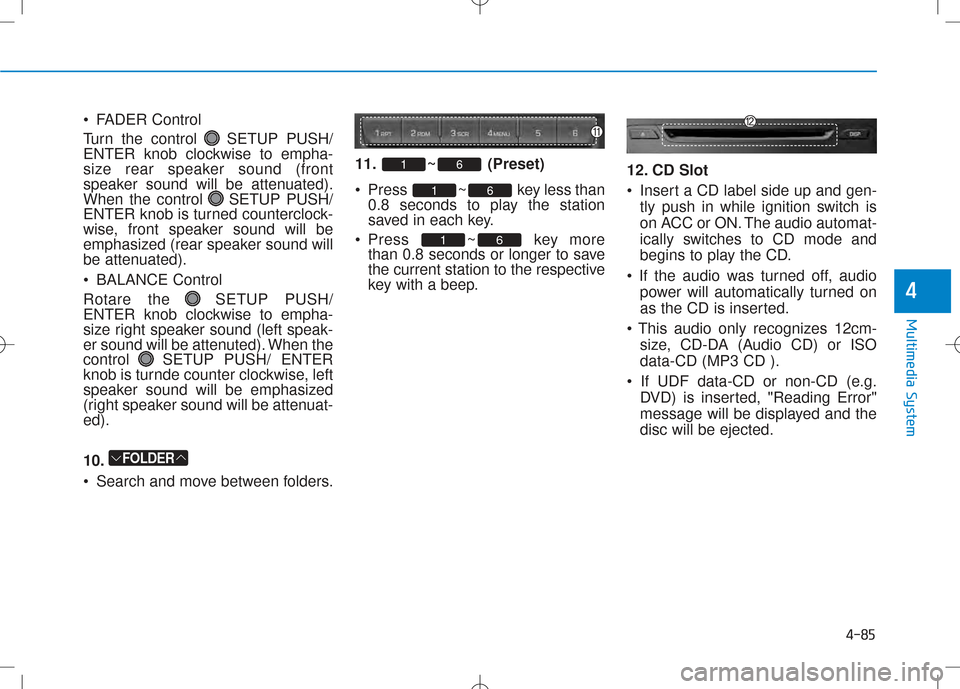
(right speaker sound will be attenuat-ed). 10.
Search and move between folders. 11. ~ (Preset)
Press ~ key less
than
0.8 seconds to play the station
saved in each key.
Press ~ key more than 0.8 seconds or longer to save
the current station to the respective
key with a beep. 12. CD Slot
Insert a CD label side up and gen-
tly push in while ignition switch is
on ACC or ON. The audio automat-
ically switches to CD mode and
begins to play the CD.
power will automatically turned on
as the CD is inserted.
size, CD-DA (Audio CD) or ISOdata-CD (MP3 CD ).
DVD) is inserted, "Reading Error"
message will be displayed and thedisc will be ejected.
61
61
61
FOLDER
Page 305 of 512
4-87
Multimedia System
4
BBAA SSIICC MM EETT HH OO DD OO FF UU SSEE :: CC DD
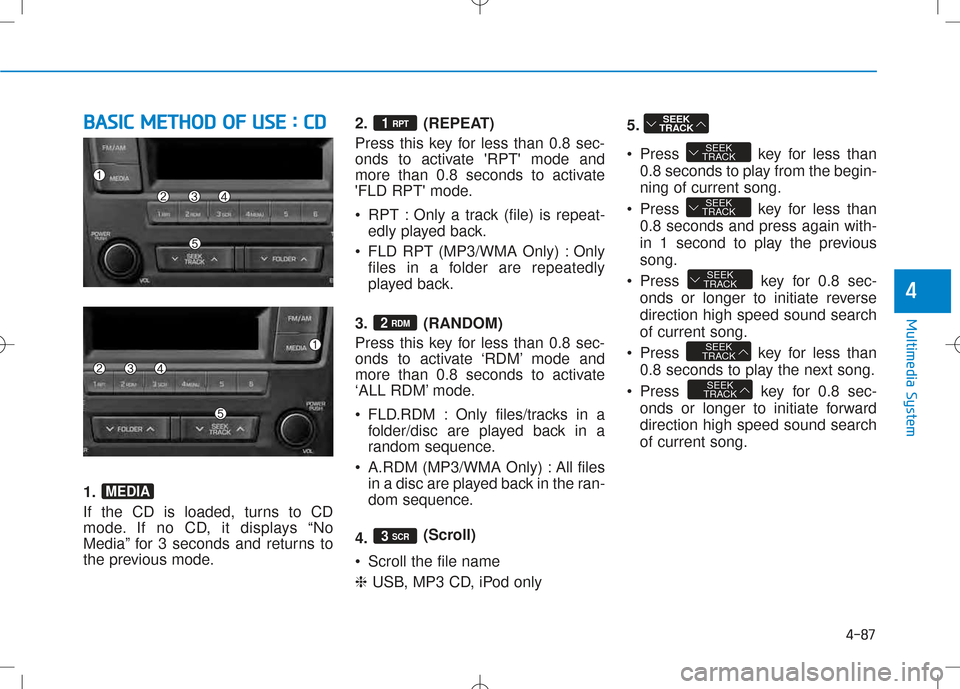
1.
If the CD is loaded, turns to CD
mode. If no CD, it displays “No
Media” for 3 seconds and returns to
the previous mode. 2. (REPEAT)
Press this key for less than 0.8 sec-
onds to activate 'RPT' mode and
more than 0.8 seconds to activate
'FLD RPT' mode.
RPT : Only a track (file) is repeat-
edly played back.
FLD RPT (MP3/WMA Only) : Only files in a folder are repeatedly
played back.
3. (RANDOM)
Press this key for less than 0.8 sec-
onds to activate ‘RDM’ mode and
more than 0.8 seconds to activate
‘ALL RDM’ mode.
FLD.RDM : Only files/tracks in a folder/disc are played back in a
random sequence.
A.RDM (MP3/WMA Only) : All files in a disc are played back in the ran-
dom sequence.
4. (Scroll)
Scroll the file name ❈ USB, MP3 CD, iPod only 5.
Press key for less than
0.8 seconds to play from the begin- ning of current song.
Press key for less than 0.8 seconds and press again with-
in 1 second to play the previoussong.
Press key for 0.8 sec- onds or longer to initiate reversedirection high speed sound searchof current song.
Press key for less than 0.8 seconds to play the next song.
Press key for 0.8 sec- onds or longer to initiate forwarddirection high speed sound searchof current song.
SEEK
TRACK
SEEK
TRACK
SEEK
TRACK
SEEK
TRACK
SEEK
TRACK
SEEK
TRACK
3 SCR
2 RDM
1 RPT
MEDIA
Page 306 of 512
4-88
Multimedia System
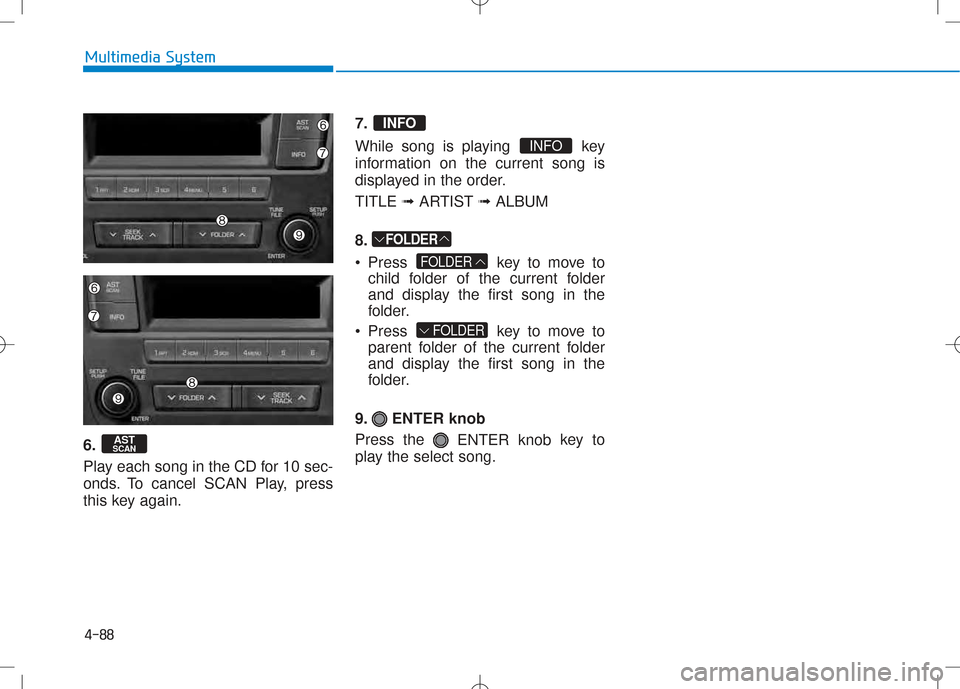
6.
Play each song in the CD for 10 sec-
onds. To cancel SCAN Play, press
this key again.7.
While song is playing key
information on the current song is
displayed in the order. TITLE
➟ARTIST ➟ALBUM
8.
Press key to move to child folder of the current folder
and display the first song in the
folder.
Press key to move to parent folder of the current folder
and display the first song in the
folder.
9. ENTER knob Press the ENTER knob key to
play the select song.
FOLDER
FOLDER
FOLDER
INFO
INFO
AST
SCAN
Page 310 of 512
4-92
Multimedia System
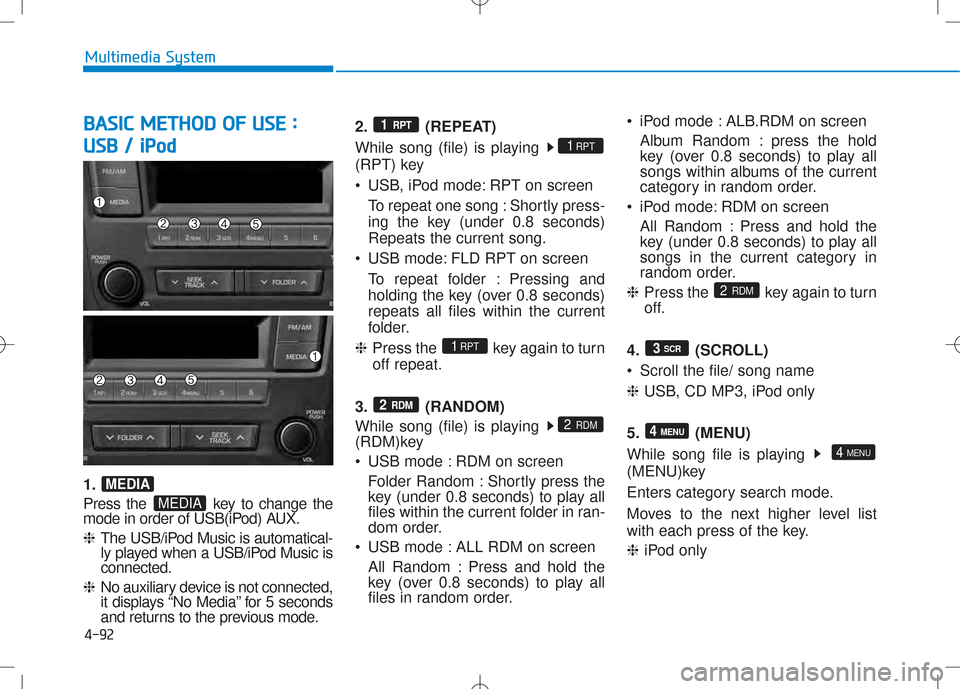
BBAA SSIICC MM EETT HH OO DD OO FF UU SSEE ::
U
U SSBB // iiPP oodd
1.
Press the key to change the
mode in order of USB(iPod) AUX. ❈ The USB/iPod Music is automatical-
ly played when a USB/iPod Music isconnected.
❈ No auxiliary device is not connected,
it displays “No Media” for 5 seconds
and returns to the previous mode. 2. (REPEAT)
While song (file) is playing
(RPT) key
USB, iPod mode: RPT on screen
To repeat one song : Shortly press-
ing the key (under 0.8 seconds)Repeats the current song.
USB mode: FLD RPT on screen To repeat folder : Pressing and
holding the key (over 0.8 seconds)repeats all files within the current
folder.
❈ Press the key again to turnoff repeat.
3. (RANDOM)
While song (file) is playing
(RDM)key
USB mode : RDM on screen Folder Random : Shortly press the
key (under 0.8 seconds) to play all
files within the current folder in ran-
dom order.
USB mode : ALL RDM on screen
All Random : Press and hold the
key (over 0.8 seconds) to play all
files in random order. iPod mode : ALB.RDM on screen
Album Random : press the hold
key (over 0.8 seconds) to play all
songs within albums of the current
category in random order.
iPod mode: RDM on screen
All Random : Press and hold the
key (under 0.8 seconds) to play all
songs in the current category in
random order.
❈ Press the key again to turn
off.
4. (SCROLL)
Scroll the file/ song name❈ USB, CD MP3, iPod only
5. (MENU)
While song file is playing
(MENU)key
Enters category search mode.
Moves to the next higher level list
with each press of the key. ❈ iPod only
4 MENU
4 MENU
3
SCR
2
RDM
2 RDM
2 RDM
1RPT
1RPT
1 RPT
MEDIA
MEDIA