ad blue Hyundai Creta 2016 Owner's Manual
[x] Cancel search | Manufacturer: HYUNDAI, Model Year: 2016, Model line: Creta, Model: Hyundai Creta 2016Pages: 512, PDF Size: 11.54 MB
Page 14 of 512
F14F14Driver assist system ............................................3-84
Rear view camera ...........................................................3-84
Rear parking assist system .........................................3-85
Climate control system........................................3-88 Defroster ...........................................................................3-88
Manual climate control system ..................................3-89
Automatic climate control system .............................3-98
Windshield defrosting and defogging .....................3-109
Storage compartment ........................................3-113 Center console storage ...............................................3-113
Glove box ........................................................................3-114
Sunglass holder ............................................................3-114
Interior features.................................................3-115 Digital clock ...................................................................3-115
Cigarette lighter ...........................................................3-115
Ashtray ...........................................................................3-116
Cup holder.......................................................................3-117
Sunvisor ...........................................................................3-118
Power outlet .................................................................3-118
Clothes hanger .............................................................3-120
Floor mat anchor(s) ....................................................3-120
Luggage net holder .....................................................3-121
Cargo area cover ..........................................................3-122
Exterior features ...............................................3-123 Roof rack ........................................................................3-123 Multimedia system .................................................4-2
AUX, USB and iPod ®
port ...............................................4-2
Antenna ...............................................................................4-3
Steering wheel audio control .........................................4-4
How vehicle audio works ................................................4-5
Caring for disc....................................................................4-7
System controllers and functions .....................4-18 Audio Head Unit (For RDS model) ..............................4-18
Audio Head Unit (Except RDS model) ........................4-20
Steering-wheel mounted controls ..............................4-22
RADIO MODE (For RDS model)....................................4-24
RADIO MODE (Except RDS model) .............................4-28
RADIO MODE (For Colombia Model) ..........................4-30
MEDIA MODE ...................................................................4-32
AUDIO CD MODE .............................................................4-33
MP3 CD MODE .................................................................4-36
USB MODE ........................................................................4-39
iPod ®
MODE .....................................................................4-42
AUX MODE........................................................................4-45
MY MUSIC MODE............................................................4-46
Bluetooth®Wireless Technology AUDIO MODE......4-49
Bluetooth®Wireless Technology ................................4-50
4Multimedia system
Page 205 of 512
3-111
Convenient features of your vehicle
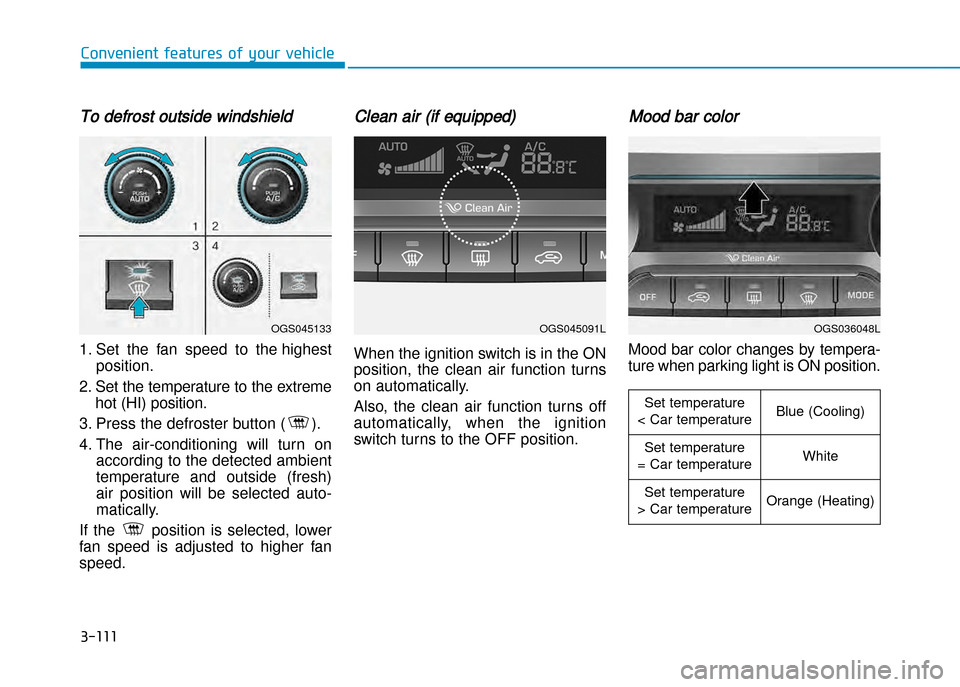
To defrost outside windshield
1. Set the fan speed to the highestposition.
2. Set the temperature to the extreme hot (HI) position.
3. Press the defroster button ( ).
4. The airconditioning will turn on according to the detected ambient
temperature and outside (fresh)
air position will be selected auto
matically.
If the position is selected, lower
fan speed is adjusted to higher fanspeed.
Clean air (if equipped)
When the ignition switch is in the ON
position, the clean air function turns
on automatically.
Also, the clean air function turns off
automatically, when the ignition
switch turns to the OFF position.
Mood bar color
Mood bar color changes by tempera
ture when parking light is ON position.
OGS045133OGS045091LOGS036048L
Set temperature
< Car temperatureBlue (Cooling)
Set temperature
= Car temperatureWhite
Set temperature
> Car temperatureOrange (Heating)
Page 219 of 512
Multimedia System
Multimedia system .................................................4-2AUX, USB and iPod ®
port ...............................................4-2
Antenna ...............................................................................4-3
Steering wheel audio control .........................................4-4
How vehicle audio works ................................................4-5
Caring for disc....................................................................4-7
System controllers and functions .....................4-18 Audio Head Unit (For RDS model) ..............................4-18
Audio Head Unit (Except RDS model) ........................4-20
Steering-wheel mounted controls ..............................4-22
RADIO MODE (For RDS model)....................................4-24
RADIO MODE (Except RDS model) .............................4-28
RADIO MODE (For Colombia Model) ..........................4-30
MEDIA MODE ...................................................................4-32
AUDIO CD MODE .............................................................4-33
MP3 CD MODE .................................................................4-36
USB MODE ........................................................................4-39
iPod ®
MODE .....................................................................4-42
AUX MODE........................................................................4-45
MY MUSIC MODE............................................................4-46
Bluetooth®Wireless Technology AUDIO MODE......4-49
Bluetooth®Wireless Technology ................................4-50
SETUP (For RDS model) ................................................4-70
SETUP (Except RDS model) ..........................................4-76
REAR VIEW CAMERA .....................................................4-82 System controllers and functions .....................4-83
Audio Head Unit ..............................................................4-83
Caring for disc .................................................................4-86
BASIC METHOD OF USE : CD .......................................4-87
BASIC METHOD OF USE : USB / iPod .......................4-92
AUX .....................................................................................4-94
4
Page 222 of 512
Steering wheel audio control (if equipped)
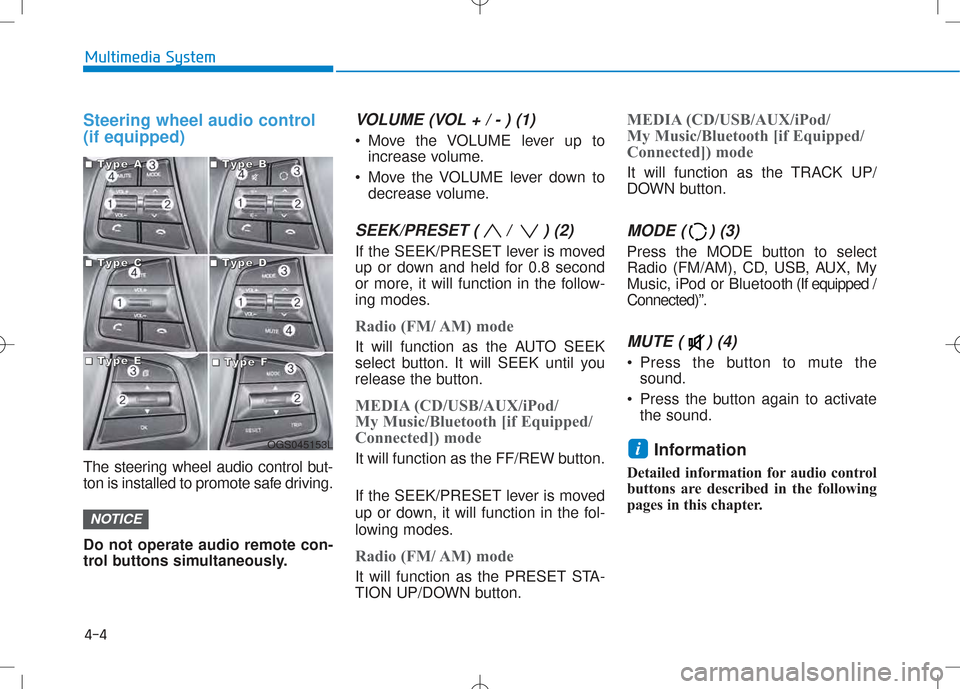
The steering wheel audio control but-
ton is installed to promote safe driving. Do not operate audio remote con-
trol buttons simultaneously.
VOLUME (VOL + / - ) (1)
Move the VOLUME lever up toincrease volume.
Move the VOLUME lever down to decrease volume.
SEEK/PRESET ( / ) (2)
If the SEEK/PRESET lever is moved
up or down and held for 0.8 second
or more, it will function in the follow-
ing modes.
Radio (FM/ AM) mode
It will function as the AUTO SEEK
select button. It will SEEK until you
release the button.
MEDIA (CD/USB/AUX/iPod/
My Music/Bluetooth [if Equipped/
Connected]) mode
It will function as the FF/REW button.
If the SEEK/PRESET lever is moved
up or down, it will function in the fol-
lowing modes.
Radio (FM/ AM) mode
It will function as the PRESET STA-
TION UP/DOWN button.
MEDIA (CD/USB/AUX/iPod/
My Music/Bluetooth [if Equipped/
Connected]) mode
It will function as the TRACK UP/
DOWN button.
MODE ( ) (3)
Press the MODE button to select
Radio (FM/AM), CD, USB, AUX, My
Music, iPod or Bluetooth (If equipped /
Connected)”.
MUTE ( ) (4)
Press the button to mute the sound.
Press the button again to activate the sound.
Information
Detailed information for audio control
buttons are described in the following
pages in this chapter.
i
NOTICE
4-4
Multimedia System
OGS045153L
■■■■TTTTyyyyppppeeee AAAA■■■■TTTTyyyyppppeeee BBBB
■■■■TTTTyyyyppppeeee CCCC■■■■TTTTyyyyppppeeee DDDD
■■■■TTTTyyyyppppeeee EEEE■■■■TTTTyyyyppppeeee FFFF
Page 233 of 512
4-15
Multimedia System
4
(Continued)
When the EQ features of an exter-nal device, such as the iPod ®
, and
the audio system are both active,
EQ effects could overlap and cause
sound deterioration and distortion.
Whenever possible, turn off the EQ
feature within the external device
upon use by connecting with the
audio system.
Noise may occur when an iPod ®
or
AUX device is connected. When
such devices are not being used, dis-
connect the device for storage.
When the iPod ®
or AUX device
power is connected to the power
jack, playing the external device
may result in noise. In such cases,
disconnect the power connection
before use.
Skipping or improper operation may occur depending on the characteris-
tics of your iPod ®
/Phone ®
device.
(Continued) (Continued)
If your iPhone
®
is connected to both
the Bluetooth ®
Wireless Technology
and USB, the sound may not be
properly played. In your iPhone ®
,
select the Dock connector or
Bluetooth ®
Wireless Technology to
change the sound output (source).
iPod mode cannot be operated when the iPod ®
cannot be recognized due
to versions that do not support com-
munication protocols.
For fifth generation iPod ®
Nano
devices, the iPod ®
may not be recog-
nized when the battery level is low.
Please charge the iPod ®
for use.
Search/play orders shown within the iPod ®
device may differ with the
orders shown within the audio sys-
tem.
If the iPod ®
malfunctions due to an
iPod ®
device defect, reset the iPod ®
and try again. (To learn more, refer
to your iPod ®
manual)
(Continued) (Continued)
Some iPod
®
s may not sync with the
System depending on its version. If
the Media is removed before the
Media is recognized, then the sys-
tem may not properly restore the
previously operated mode. (iPad ®
charging is not supported.)
Beside support 1M cable when pur- chasing iPod/iPhone products, Long
Cable cannot be recognized.
Page 234 of 512
4-16
Multimedia System
Information - Using the AUX
device
If an external device connector is connected with the AUX terminal,
then AUX mode will automatically
operate. Once the connector is dis-
connected, the previous mode will
be restored.
AUX mode can be used only when an external audio player (cam-
corder, car VCR, etc.) has been con-
nected.
The AUX volume can be controlled separately from other audio modes.
Connecting a connector jack to the AUX terminal without an external
device will convert the system to
AUX mode, but only output noise.
When an external device is not
being used, also remove the connec-
tor jack.
When the external device power is connected to the power jack, play-
ing the external device may output
noise. In such cases, disconnect the
power connection before use.
Fully insert the AUX cable to the AUX jack upon use. Information
- Before using
the Bluetooth ®
handsfree
What is Bluetooth ®
?
Bluetooth ®
refers to a short-dis-
tance wireless networking technolo-
gy which uses a 2.4GHz ~ 2.48GHz
frequency to connect various
devices within a certain distance.
Supported within PCs, external devices, Bluetooth ®
phones, Personal
Digital Assistant, various electronic
devices, and automotive environ-
ments, Bluetooth ®
allows data to be
transmitted at high speeds without
having to use a connector cable.
Bluetooth ®
Handsfree refers to a
device which allows the user to con-
veniently make phone calls with
Bluetooth ®
mobile phones through
the audio system.
Bluetooth ®
Handsfree may not be
supported in some mobile phones.
To learn more about mobile device
compatibility. Information
- Precautions for
safe driving
Bluetooth ®
Handsfree is a feature
that enables drivers to practice safe
driving. Connecting the head unit
with a Bluetooth ®
phone allows the
user to conveniently make and
receive calls and use contacts.
Before using Bluetooth ®
, carefully
read the contents of this user’s man-
ual.
Excessive use or operations while driving may lead to negligent driv-
ing practices and result in accidents.
Refrain from excessive operations
while driving.
Viewing the screen for prolonged periods of time is dangerous and
may lead to accidents. When driv-
ing, view the screen only for short
periods of time.iii
Page 235 of 512
4-17
Multimedia System
4
Information -When connect-
ing a Bluetooth ®
phone
Before connecting the head unit with the mobile phone, check to see
that the mobile phone supports
Bluetooth ®
features.
Even if the phone supports Bluetooth ®
, the phone will not be
found during device searches if the
phone has been set to hidden state
or the Bluetooth ®
power is turned
off. Disable the hidden state or turn
on the Bluetooth ®
power prior to
searching/connecting with the Head
unit.
Bluetooth phone is automatically connected when the ignition on.
If you do not want automatic con- nection with your Bluetooth ®
device, turn off the Bluetooth ®
fea-
ture within your mobile phone.
The Handsfree call volume and quality may differ depending on the
mobile phone.
(Continued)(Continued)
Park the vehicle when connecting
the head unit with the mobile phone.
Bluetooth ®
connection may become
intermittently disconnected in some
mobile phones. Follow these steps to
try again.
1. Within the mobile phone, turn the Bluetooth ®
function off/on and try
again.
2. Turn the mobile phone power Off/On and try again.
3. Completely remove the mobile phone battery, reboot, and then
again.
4. Reboot the Audio System and try again.
5. Delete all paired devices, pair and try again.
Handsfree call quality and volume may differ depending on the model
of your mobile phone.i
Page 241 of 512
4-23
Multimedia System
4
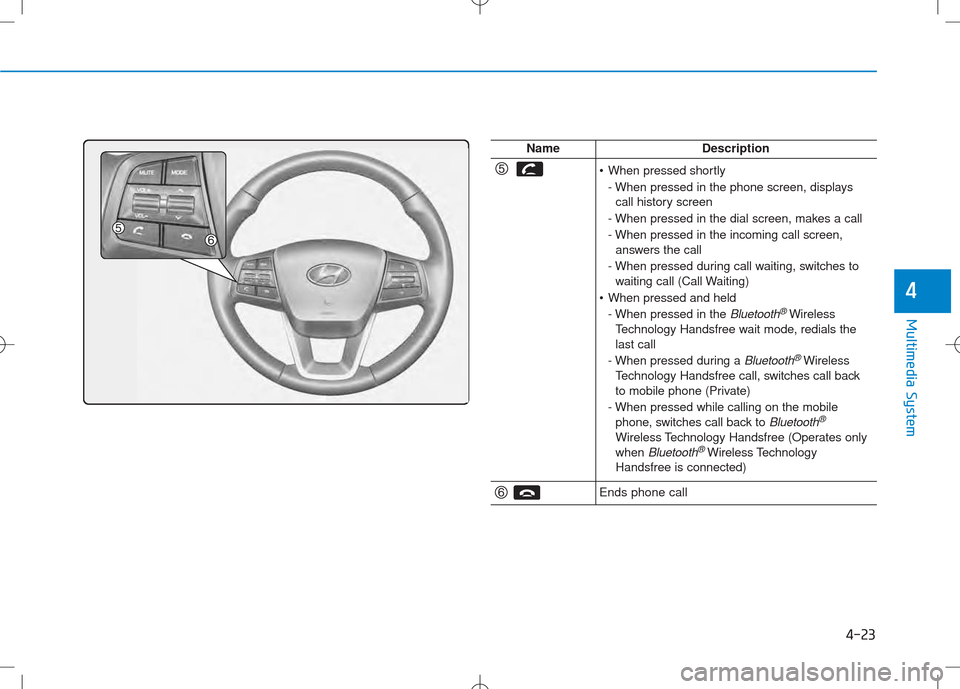
NameDescription
•When pressed shortly
- When pressed in the phone screen, displays call history screen
- When pressed in the dial screen, makes a call
- When pressed in the incoming call screen, answers the call
- When pressed during call waiting, switches to waiting call (Call Waiting)
When pressed and held
- When pressed in the
Bluetooth®Wireless
Technology Handsfree wait mode, redials the last call
- When pressed during a
Bluetooth®Wireless
Technology Handsfree call, switches call back
to mobile phone (Private)
- When pressed while calling on the mobile phone, switches call back to
Bluetooth®
Wireless Technology Handsfree (Operates onlywhen Bluetooth®Wireless Technology
Handsfree is connected)
Ends phone call
Page 250 of 512
![Hyundai Creta 2016 Owners Manual 4-32
Multimedia System
MMEEDD IIAA MM OODDEE
Pressing the key will change
the operating mode in order of CD
➟
USB(iPod®) ➟ AUX ➟ My Music ➟BT
Audio.
If [Mode Pop up] is turned on within](/img/35/14533/w960_14533-249.png "Hyundai Creta 2016 Owners Manual 4-32
Multimedia System
MMEEDD IIAA MM OODDEE
Pressing the key will change
the operating mode in order of CD
➟
USB(iPod®) ➟ AUX ➟ My Music ➟BT
Audio.
If [Mode Pop up] is turned on within")
4-32
Multimedia System
MMEEDD IIAA MM OODDEE
Pressing the key will change
the operating mode in order of CD
➟
USB(iPod®) ➟ AUX ➟ My Music ➟BT
Audio.
If [Mode Pop up] is turned on within
[Display], then pressing the
key will display the Media
Pop-up Mode screen.
Turn the TUNE knob to move the
focus. Press the knob to select.
Information
The media mode pop up screen can be
displayed only when there are two or
more media modes turned on.
Title Icon
When a Bluetooth®Wireless
Technology, iPod®, USB, or AUX
device is connected or a CD is
inserted, the corresponding mode
icon will be displayed.
Icon Title
Bluetooth®Wireless Technology
CD
iPod®
USB
AUX
i
MEDIA
SETUP
MEDIA
Page 267 of 512
4-49
Multimedia System
4
BBlluu eettoo oo tthh®®WW iirr ee llee ssss
T
T eecchh nnoo lloo ggyy AAUU DDIIOO MM OODDEE
Using Bluetooth®Wireless
Technology Audio Mode
Playing/Pausing Bluetooth®
Wireless TechnologyAudio
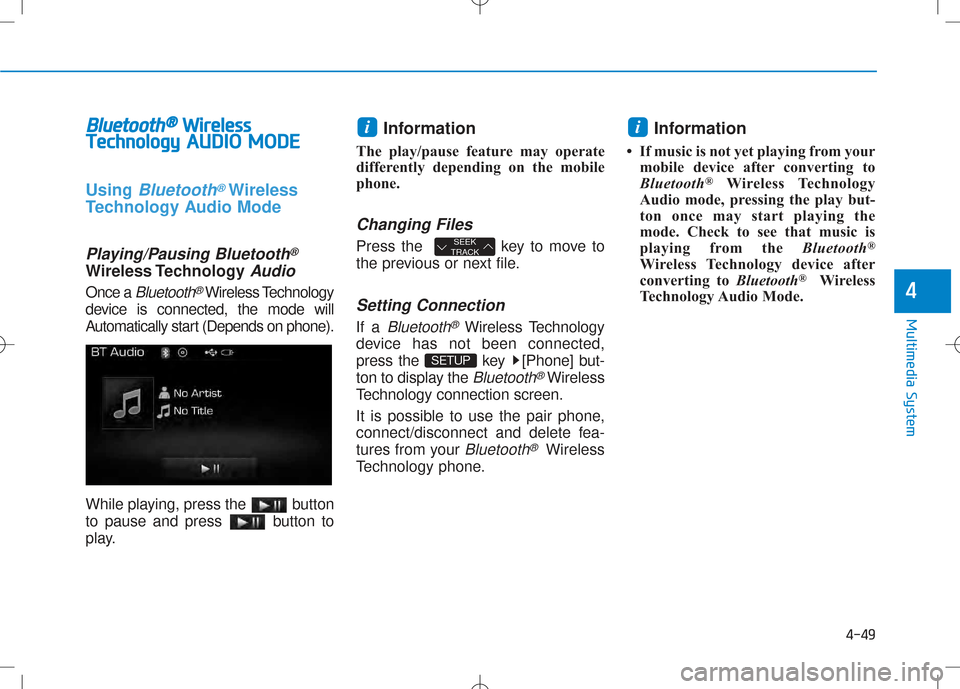
Once a Bluetooth®Wireless Technology
device is connected, the mode will
Automatically start (Depends on phone).
While playing, press the button
to pause and press button to
play. Information
The play/pause feature may operate
differently depending on the mobile
phone.
Changing Files
Press the key to move to
the previous or next file.
Setting Connection
If a Bluetooth®Wireless Technology
device has not been connected,
press the key [Phone] but-
ton to display the
Bluetooth®Wireless
Technology connection screen.
It is possible to use the pair phone,
connect/disconnect and delete fea-
tures from your
Bluetooth®Wireless
Technology phone. Information
If music is not yet playing from your mobile device after converting to
Bluetooth ®
Wireless Technology
Audio mode, pressing the play but-
ton once may start playing the
mode. Check to see that music is
playing from the Bluetooth®
Wireless Technology device after
converting to Bluetooth®
Wireless
Technology Audio Mode.
i
SETUP
SEEK
TRACK
i