clock Hyundai Creta 2016 Owner's Manual
[x] Cancel search | Manufacturer: HYUNDAI, Model Year: 2016, Model line: Creta, Model: Hyundai Creta 2016Pages: 512, PDF Size: 11.54 MB
Page 14 of 512
F14F14Driver assist system ............................................3-84
Rear view camera ...........................................................3-84
Rear parking assist system .........................................3-85
Climate control system........................................3-88 Defroster ...........................................................................3-88
Manual climate control system ..................................3-89
Automatic climate control system .............................3-98
Windshield defrosting and defogging .....................3-109
Storage compartment ........................................3-113 Center console storage ...............................................3-113
Glove box ........................................................................3-114
Sunglass holder ............................................................3-114
Interior features.................................................3-115 Digital clock ...................................................................3-115
Cigarette lighter ...........................................................3-115
Ashtray ...........................................................................3-116
Cup holder.......................................................................3-117
Sunvisor ...........................................................................3-118
Power outlet .................................................................3-118
Clothes hanger .............................................................3-120
Floor mat anchor(s) ....................................................3-120
Luggage net holder .....................................................3-121
Cargo area cover ..........................................................3-122
Exterior features ...............................................3-123 Roof rack ........................................................................3-123 Multimedia system .................................................4-2
AUX, USB and iPod ®
port ...............................................4-2
Antenna ...............................................................................4-3
Steering wheel audio control .........................................4-4
How vehicle audio works ................................................4-5
Caring for disc....................................................................4-7
System controllers and functions .....................4-18 Audio Head Unit (For RDS model) ..............................4-18
Audio Head Unit (Except RDS model) ........................4-20
Steering-wheel mounted controls ..............................4-22
RADIO MODE (For RDS model)....................................4-24
RADIO MODE (Except RDS model) .............................4-28
RADIO MODE (For Colombia Model) ..........................4-30
MEDIA MODE ...................................................................4-32
AUDIO CD MODE .............................................................4-33
MP3 CD MODE .................................................................4-36
USB MODE ........................................................................4-39
iPod ®
MODE .....................................................................4-42
AUX MODE........................................................................4-45
MY MUSIC MODE............................................................4-46
Bluetooth®Wireless Technology AUDIO MODE......4-49
Bluetooth®Wireless Technology ................................4-50
4Multimedia system
Page 96 of 512
Climate control system........................................3-88Defroster ...........................................................................3-88
Manual climate control system ..................................3-89
Automatic climate control system .............................3-98
Windshield defrosting and defogging .....................3-109
Storage compartment ........................................3-113 Center console storage ...............................................3-113
Glove box ........................................................................3-114
Sunglass holder ............................................................3-114
Interior features.................................................3-115 Digital clock ...................................................................3-115
Cigarette lighter ...........................................................3-115
Ashtray ...........................................................................3-116
Cup holder.......................................................................3-117
Sunvisor ...........................................................................3-118
Power outlet .................................................................3-118
Clothes hanger .............................................................3-120
Floor mat anchor(s) ....................................................3-120
Luggage net holder .....................................................3-121
Cargo area cover ..........................................................3-122
Exterior features ...............................................3-123 Roof rack ........................................................................3-123
3
Page 122 of 512
3-28
Convenient features of your vehicle
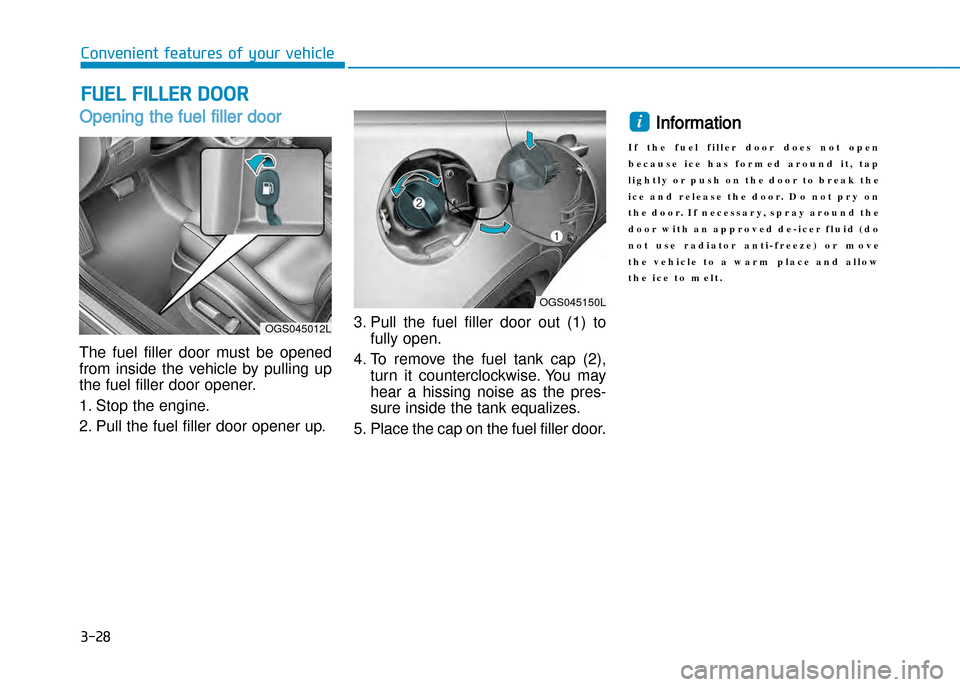
Opening the fuel filler door
The fuel filler door must be opened
from inside the vehicle by pulling up
the fuel filler door opener.
1. Stop the engine.
2. Pull the fuel filler door opener up.3. Pull the fuel filler door out (1) to
fully open.
4. To remove the fuel tank cap (2), turn it counterclockwise. You may
hear a hissing noise as the pres
sure inside the tank equalizes.
5. Place the cap on the fuel filler door.
Information
I f t h e f u e l f i l l e r d o o r d o e s n o t o p e n
b e c a u s e i c e h a s f o r m e d a r o u n d i t , t a p
l i g h t l y o r p u s h o n t h e d o o r t o b r e a k t h e
i c e a n d r e l e a s e t h e d o o r . D o n o t p r y o n
t h e d o o r . I f n e c e s s a r y , s p r a y a r o u n d t h e
d o o r w i t h a n a p p r o v e d d e i c e r f l u i d ( d o
n o t u s e r a d i a t o r a n t i f r e e z e ) o r m o v e
t h e v e h i c l e t o a w a r m p l a c e a n d a l l o w
t h e i c e t o m e l t .i
FUEL FILLER DOOR
OGS045012L
OGS045150L
Page 123 of 512
3-29
Convenient features of your vehicle
3
Closing the fuel filler door
1. To install the fuel tank cap (2), turnit clockwise until it “clicks” once.
This indicates that the cap is
securely tightened.
2. Close the fuel filler door (1) and push it lightly and make sure that it
is securely closed.
Gasoline is highly flammable and
explosive. Failure to follow these
guidelines may result in SERIOUS
INJURY or DEATH:
•Read and follow all warnings
posted at the gas station.
•Before refueling, note the loca
tion of the Emergency Gasoline
ShutOff, if available, at the gas
station.
(Continued)
(Continued)
•Before touching the fuel nozzle,
you should eliminate the poten
tial buildup of static electricity
by touching a metal part of the
vehicle, a safe distance away
from the fuel filler neck, nozzle,
or other gas source, with your
bare hand.
•Do not use cellular phones while
refueling. Electric current and/or
electronic interference from cel
lular phones can potentially
ignite fuel vapors and cause a
fire.
•Do not get back into a vehicle
once you have begun refueling.
You can generate a buildup of
static electricity by touching,
rubbing or sliding against any
item or fabric capable of produc
ing static electricity. Static elec
tricity discharge can ignite fuel
vapors causing a fire.
(Continued)
(Continued)
If you must reenter the vehicle,
you should once again eliminate
potentially dangerous static
electricity discharge by touching
a metal part of the vehicle, away
from the fuel filler neck, nozzle
or other gasoline source, with
your bare hand.
•When using an approved
portable fuel container, be sure
to place the container on the
ground prior to refueling. Static
electricity discharge from the
container can ignite fuel vapors
causing a fire. Once refueling
has begun, contact between
your bare hand and the vehicle
should be maintained until the
filling is complete.
•Use only approved portable plastic
fuel containers designed to carry
and store gasoline.
(Continued)
(Continued)
WARNING
Page 209 of 512
3-115
Convenient features of your vehicle
iNtERioR FEAtURES
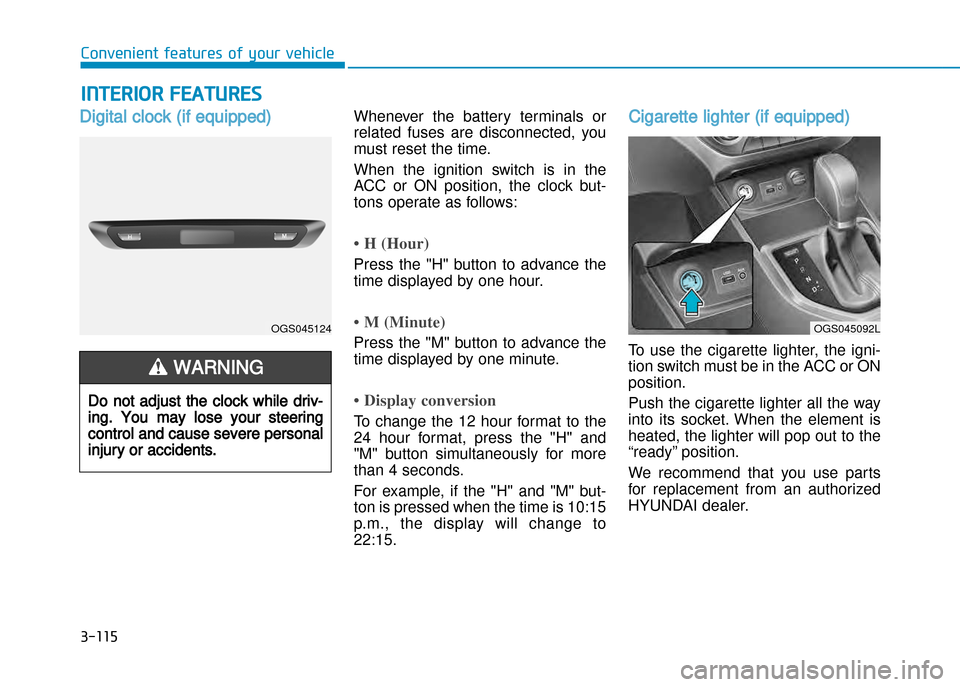
Digital clock (if equipped)Whenever the battery terminals or
related fuses are disconnected, you
must reset the time.
When the ignition switch is in the
ACC or ON position, the clock but
tons operate as follows:
• H (Hour)
Press the "H" button to advance the
time displayed by one hour.
• M (Minute)
Press the "M" button to advance the
time displayed by one minute.
• Display conversion
To change the 12 hour format to the
24 hour format, press the "H" and
"M" button simultaneously for more
than 4 seconds.
For example, if the "H" and "M" but
ton is pressed when the time is 10:15
p.m., the display will change to22:15.
Cigarette lighter (if equipped)
To use the cigarette lighter, the igni
tion switch must be in the ACC or ONposition.
Push the cigarette lighter all the way
into its socket. When the element is
heated, the lighter will pop out to the
“ready” position.
We recommend that you use parts
for replacement from an authorized
HYUNDAI dealer.
Do not adjust the clock while driv
ing. You may lose your steering
control and cause severe personal
injury or accidents.
WARNING
OGS045124OGS045092L
Page 221 of 512
Antenna
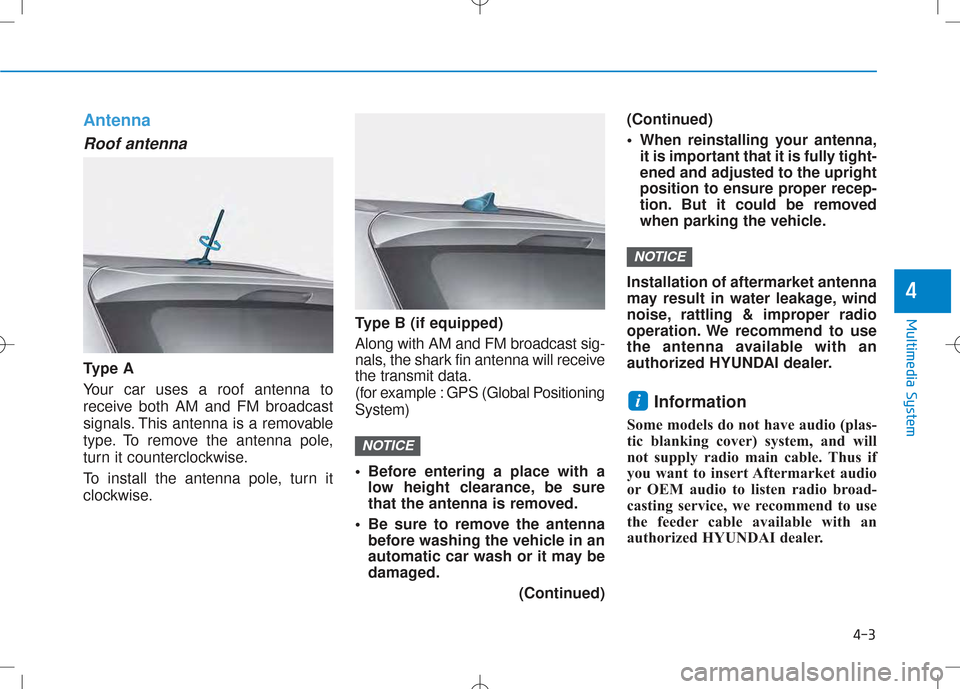
Roof antenna
Ty p e A Your car uses a roof antenna to
receive both AM and FM broadcast
signals. This antenna is a removable
type. To remove the antenna pole,
turn it counterclockwise.
To install the antenna pole, turn it
clockwise. Type B (if equipped) Along with AM and FM broadcast sig-
nals, the shark fin antenna will receive
the transmit data.
(for example : GPS (Global PositioningSystem)
• Before entering a place with a
low height clearance, be sure
that the antenna is removed.
• Be sure to remove the antenna before washing the vehicle in an
automatic car wash or it may be
damaged.
(Continued)(Continued)
• When reinstalling your antenna,
it is important that it is fully tight- ened and adjusted to the upright
position to ensure proper recep-
tion. But it could be removed
when parking the vehicle.
Installation of aftermarket antenna
may result in water leakage, wind
noise, rattling & improper radio
operation. We recommend to use
the antenna available with an
authorized HYUNDAI dealer. Information
Some models do not have audio (plas-
tic blanking cover) system, and will
not supply radio main cable. Thus if
you want to insert Aftermarket audio
or OEM audio to listen radio broad-
casting service, we recommend to use
the feeder cable available with an
authorized HYUNDAI dealer.
i
NOTICE
NOTICE
4-3
Multimedia System
4
Page 301 of 512
4-83
Multimedia System
4
SSYY SSTT EEMM CC OO NNTTRR OO LLLL EE RR SS AA NN DD
F
F UU NNCCTT IIOO NNSS
Audio Head Unit
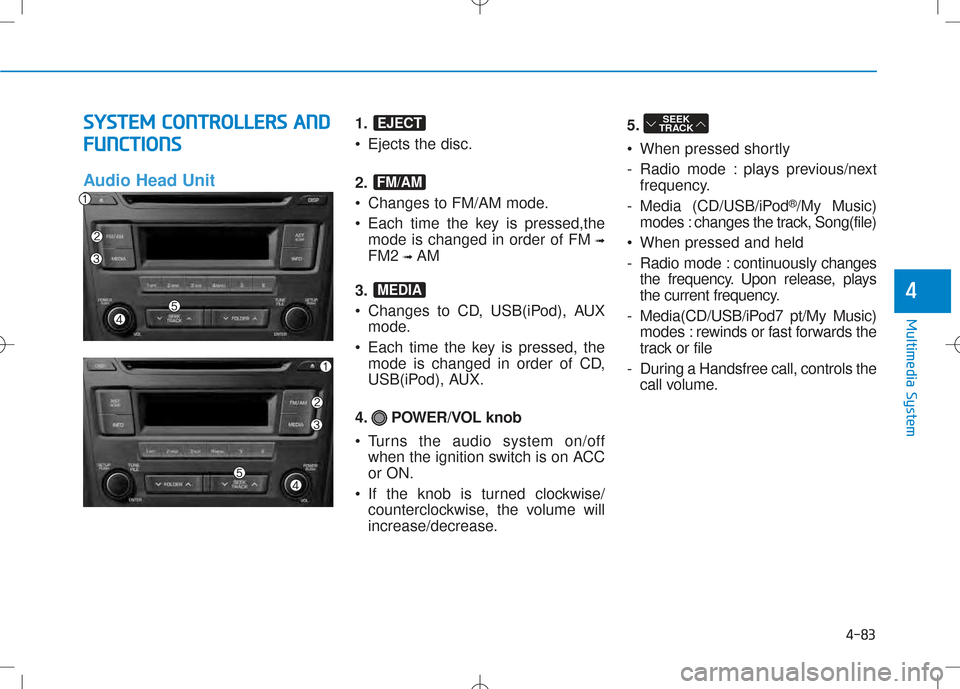
1. • Ejects the disc.
2.
Changes to FM/AM mode.
Each time the key is pressed,the mode is changed in order of FM ➟
FM2 ➟AM
3.
Changes to CD, USB(iPod), AUX mode.
Each time the key is pressed, the mode is changed in order of CD,
USB(iPod), AUX.
4. POWER/VOL knob
Turns the audio system on/off when the ignition switch is on ACC or ON.
If the knob is turned clockwise/ counterclockwise, the volume will
increase/decrease. 5.
When pressed shortly
- Radio mode : plays previous/next
frequency.
- Media (CD/USB/iPod ®
/My Music)
modes : changes the track, Song(file)
When pressed and held
- Radio mode : continuously changes
the frequency. Upon release, plays
the current frequency.
- Media(CD/USB/iPod7 pt/My Music) modes : rewinds or fast forwards the
track or file
- During a Handsfree call, controls the call volume.SEEK
TRACK
MEDIA
FM/AM
EJECT
Page 302 of 512
4-84
Multimedia System
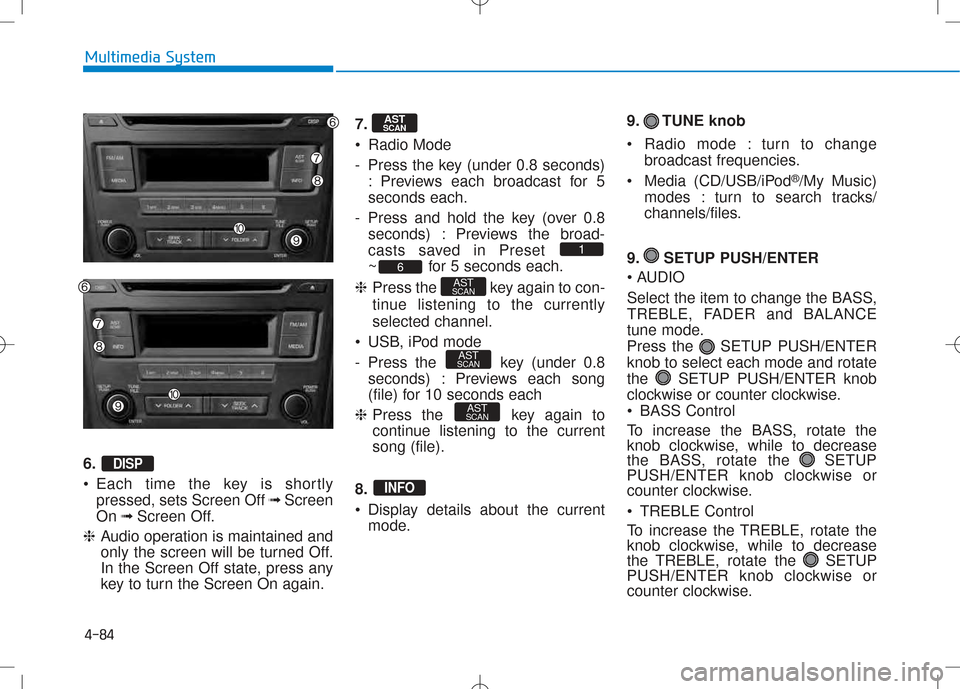
6. •Each time the key is shortly
pressed, sets Screen Off ➟Screen
On ➟Screen Off.
❈ Audio operation is maintained and
only the screen will be turned Off.
In the Screen Off state, press any
key to turn the Screen On again. 7.
Radio Mode
- Press the key (under 0.8 seconds)
: Previews each broadcast for 5 seconds each.
- Press and hold the key (over 0.8 seconds) : Previews the broad-
casts saved in Preset
~ for 5 seconds each.
❈ Press the key again to con-
tinue listening to the currentlyselected channel.
USB, iPod mode
- Press the key (under 0.8 seconds) : Previews each song
(file) for 10 seconds each
❈ Press the key again to
continue listening to the currentsong (file).
8.
Display details about the current mode. 9. TUNE knob
Radio mode : turn to change
broadcast frequencies.
Media (CD/USB/iPod ®
/My Music)
modes : turn to search tracks/
channels/files.
9. SETUP PUSH/ENTER
AUDIO
Select the item to change the BASS,
TREBLE, FADER and BALANCE
tune mode.
Press the SETUP PUSH/ENTERknob to select each mode and rotate
the SETUP PUSH/ENTER knob
clockwise or counter clockwise.
BASS Control
To increase the BASS, rotate the
knob clockwise, while to decrease
the BASS, rotate the SETUP
PUSH/ENTER knob clockwise or
counter clockwise.
TREBLE Control
To increase the TREBLE, rotate the
knob clockwise, while to decrease
the TREBLE, rotate the SETUP
PUSH/ENTER knob clockwise or
counter clockwise.
INFO
AST
SCAN
AST
SCAN
AST
SCAN6
1
AST
SCAN
DISP
Page 303 of 512
4-85
Multimedia System
4
•FADER Control
Turn the control SETUP PUSH/
ENTER knob clockwise to empha-
size rear speaker sound (front
speaker sound will be attenuated).
When the control SETUP PUSH/
ENTER knob is turned counterclock-
wise, front speaker sound will be
emphasized (rear speaker sound will
be attenuated).
BALANCE Control
Rotare the SETUP PUSH/
ENTER knob clockwise to empha-
size right speaker sound (left speak-
er sound will be attenuted). When the
control SETUP PUSH/ ENTER
knob is turnde counter clockwise, left
speaker sound will be emphasized
(right speaker sound will be attenuat-ed). 10.
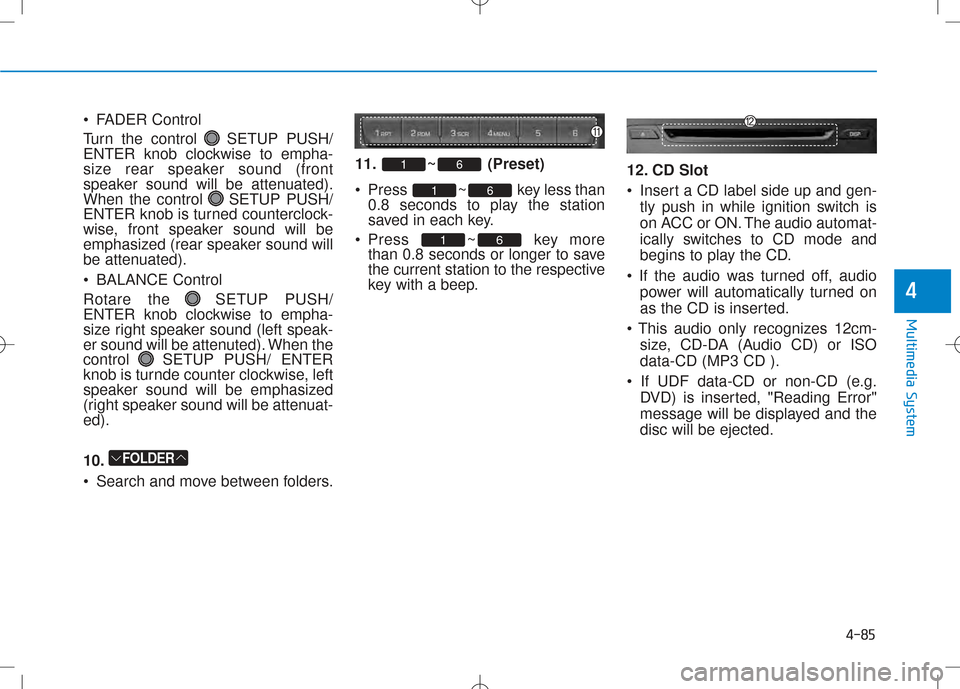
Search and move between folders. 11. ~ (Preset)
Press ~ key less
than
0.8 seconds to play the station
saved in each key.
Press ~ key more than 0.8 seconds or longer to save
the current station to the respective
key with a beep. 12. CD Slot
Insert a CD label side up and gen-
tly push in while ignition switch is
on ACC or ON. The audio automat-
ically switches to CD mode and
begins to play the CD.
power will automatically turned on
as the CD is inserted.
size, CD-DA (Audio CD) or ISOdata-CD (MP3 CD ).
DVD) is inserted, "Reading Error"
message will be displayed and thedisc will be ejected.
61
61
61
FOLDER
Page 311 of 512
4-93
Multimedia System
4
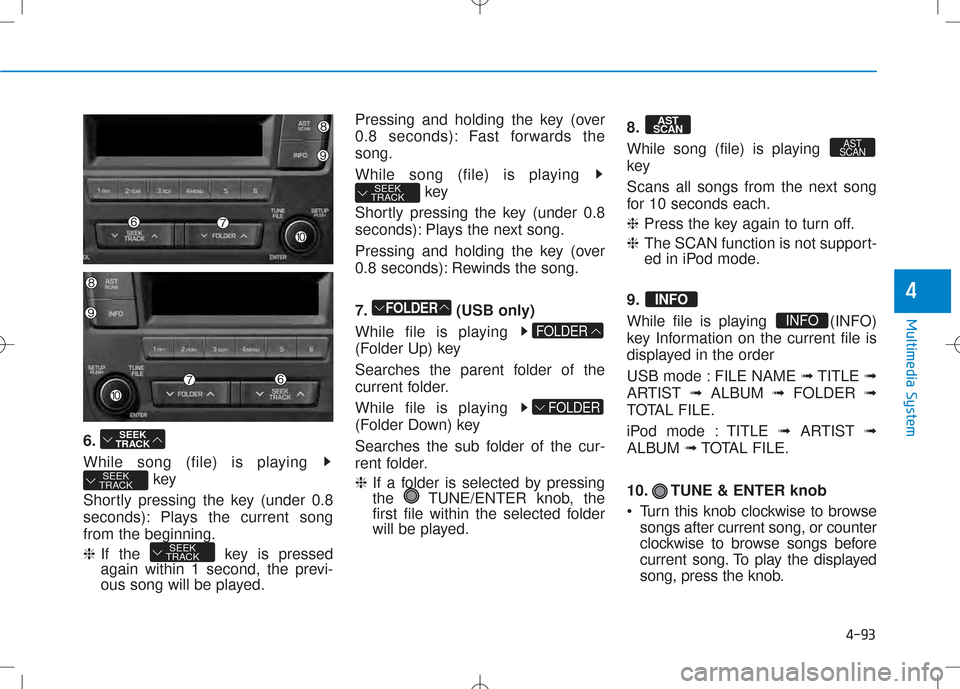
6.
While song (file) is playing key
Shortly pressing the key (under 0.8
seconds): Plays the current songfrom the beginning. ❈ If the key is pressed
again within 1 second, the previ-
ous song will be played. Pressing and holding the key (over
0.8 seconds): Fast forwards thesong.
While song (file) is playing
key
Shortly pressing the key (under 0.8
seconds): Plays the next song.
Pressing and holding the key (over
0.8 seconds): Rewinds the song.
7. (USB only)
While file is playing
(Folder Up) key
Searches the parent folder of the
current folder.
While file is playing
(Folder Down) key
Searches the sub folder of the cur-
rent folder. ❈ If a folder is selected by pressing
the TUNE/ENTER knob, the
first file within the selected folder
will be played. 8.
While song (file) is playing
key
Scans all songs from the next song
for 10 seconds each. ❈
Press the key again to turn off.
❈ The SCAN function is not support-
ed in iPod mode.
9.
While file is playing (INFO)
key Information on the current file is
displayed in the order
USB mode : FILE NAME ➟TITLE ➟
ARTIST ➟ALBUM ➟FOLDER ➟
TOTAL FILE.
iPod mode : TITLE ➟ARTIST ➟
ALBUM ➟TOTAL FILE.
10. TUNE & ENTER knob
Turn this knob clockwise to browse songs after current song, or counter
clockwise to browse songs before
current song. To play the displayed
song, press the knob.
INFO
INFO
AST
SCAN
AST
SCAN
FOLDER
FOLDER
FOLDER
SEEK
TRACK
SEEK
TRACK
SEEK
TRACK
SEEK
TRACK