Instrument Hyundai Creta 2018 User Guide
[x] Cancel search | Manufacturer: HYUNDAI, Model Year: 2018, Model line: Creta, Model: Hyundai Creta 2018Pages: 472, PDF Size: 11.87 MB
Page 83 of 472
2-63
Safety system of your vehicle
2
SRS Care
The SRS is virtually maintenance-
free and so there are no parts you
can safely service by yourself. If the
SRS air bag warning light does not
illuminate, or continuously remains
on, we recommend that the system
be inspected by an authorized
HYUNDAI dealer.
We recommend that the any work on
the SRS system, such as removing,
installing, repairing, or any work on
the steering wheel, the front passen-
ger's panel, front seats and roof rails
be performed by an authorized
HYUNDAI dealer. Improper handling
of the SRS system may result in seri-
ous personal injury.(Continued)If the air bags inflate, we rec-
ommend that the system be
replaced by an authorized
HYUNDAI dealer.
Do not tamper with or discon-
nect SRS wiring, or other
components of the SRS sys-
tem. Doing so could result in
injury, due to accidental infla-
tion of the air bags or by ren-
dering the SRS inoperative.
If components of the air bag
system must be discarded, or if
the vehicle must be scrapped,
certain safety precautions
must be observed. An author-
ized HYUNDAI dealer knows
these precautions and can
give you the necessary infor-
mation. Failure to follow these
precautions and procedures
could increase the risk of per-
sonal injury.
If your car was flooded and
has soaked carpeting or water
on the flooring, you shouldn't
try to start the engine; we rec-
ommend that you contact an
authorized HYUNDAI dealer.
Modification to SRS compo-
nents or wiring, including the
addition of any kind of badges
to the pad covers or modifica-
tions to the body structure,
can adversely affect SRS per-
formance and lead to possible
injury.
For cleaning the air bag pad
covers, use only a soft, dry
cloth or one which has been
moistened with plain water.
Solvents or cleaners could
adversely affect the air bag
covers and proper deploy-
ment of the system.
No objects should be placed
over or near the air bag mod-
ules on the steering wheel,
instrument panel, and the
front passenger's panel above
the glove box, because any
such object could cause harm
if the vehicle is in a crash
severe enough to cause the
air bags to inflate.
(Continued)
WARNING
Page 86 of 472
Convenient features of your vehicle
Accessing your vehicle .........................................3-3
Remote key .........................................................................3-3
Remote key precautions..................................................3-5
Smart key ............................................................................3-7
Smart key precautions...................................................3-10
Immobilizer system .........................................................3-12
Door locks .............................................................3-13
Operating door locks from outside the vehicle ......3-13
Operating door locks from inside the vehicle .........3-15
Auto door lock/unlock features..................................3-17
Child-protector rear door locks ..................................3-17
Theft-alarm system.............................................3-18
Windows ................................................................3-19
Power windows ................................................................3-19
Sunroof..................................................................3-24
Sunroof opening and closing .......................................3-25
Tilting the sunroof ..........................................................3-25
Sunshade ...........................................................................3-26
Resetting the sunroof ....................................................3-26
Sunroof open warning ...................................................3-27
Hood.......................................................................3-28
Opening the hood ...........................................................3-28
Closing the hood .............................................................3-29
Fuel filler door .....................................................3-30
Opening the fuel filler door .........................................3-30
Closing the fuel filler door ...........................................3-31
Tailgate ..................................................................3-33
Opening the tailgate .......................................................3-33
Closing the tailgate .........................................................3-33
Emergency tailgate safety release .............................3-34
Steering wheel......................................................3-36
Electric power steering (EPS) ......................................3-36
Tilt steering.......................................................................3-37
Horn ....................................................................................3-37
Mirrors ...................................................................3-38
Inside rearview mirror....................................................3-38
Outside rearview mirror ................................................3-40
Instrument cluster................................................3-43
Instrument Cluster Control............................................3-44
Gauges ...............................................................................3-45
Transaxle shift indicator ...............................................3-48
Warning and indicator lights ........................................3-50
Warning Messages (for Type B) .................................3-61
LCD display .......................................................................3-67
Trip computer ...................................................................3-74
3
Page 121 of 472
3-36
Convenient features of your vehicle
Electric power steering (EPS)
(if equipped)
The system assists you with steering
the vehicle. If the engine is off or if
the power steering system becomes
inoperative, the vehicle may still be
steered, but it will require increased
steering effort.
Also, the steering effort becomes
heavier as the vehicle’s speed
increases and becomes lighter as
the vehicle’s speed decreases for
better control of the steering wheel.
Should you notice any change in the
effort required to steer during normal
vehicle operation, we recommend
that the system be checked by an
authorized HYUNDAI dealer.If the Electric Power Steering
System does not operate normal-
ly, the warning light ( ) will illu-
minate on the instrument cluster.
The steering wheel may become
difficult to control or operate. Take
your vehicle to an authorized
HYUNDAI dealer and have the sys-
tem checked as soon as possible.
Information
The following symptoms may occur
during normal vehicle operation:
• The steering effort may be high
immediately after placing the igni-
tion switch in the ON position.
This happens as the system per-
forms the EPS system diagnostics.
When the diagnostics is completed,
the steering wheel will return to its
normal condition.
• A click noise may be heard from the
EPS relay after the ignition switch is
placed to the ON or LOCK/OFF
position.
• Motor noise may be heard when the
vehicle is at stop or at a low driving
speed.
• When you operate the steering
wheel in low temperature, abnormal
noise may occur. If temperature
rises, the noise will disappear. This
is a normal condition.
iNOTICE
S ST
TE
EE
ER
RI
IN
NG
G
W
WH
HE
EE
EL
L
Page 129 of 472
3-44
Convenient features of your vehicle
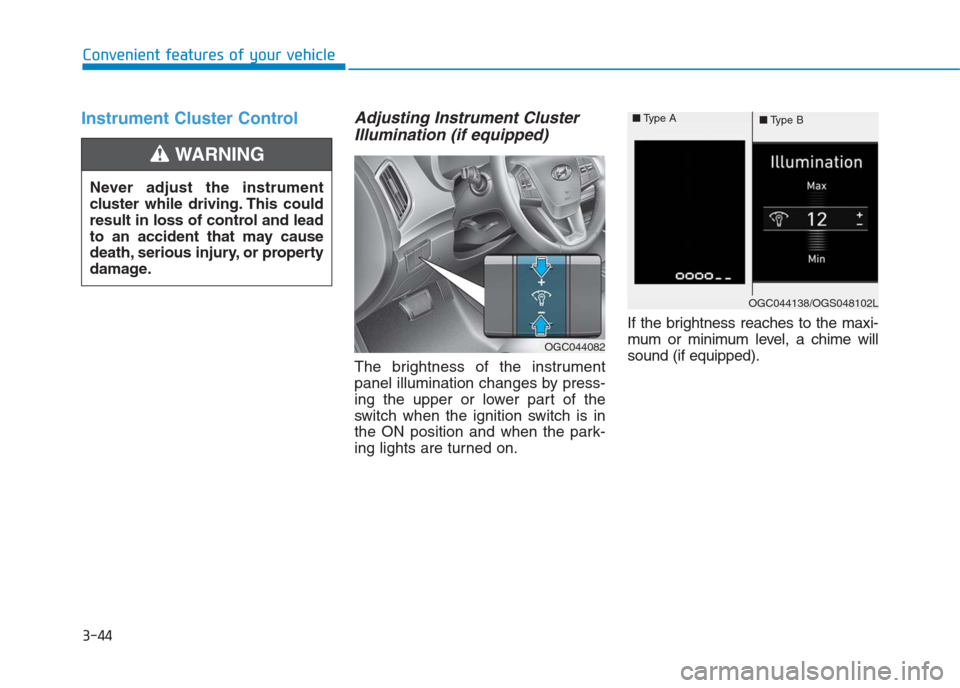
Instrument Cluster ControlAdjusting Instrument Cluster
Illumination (if equipped)
The brightness of the instrument
panel illumination changes by press-
ing the upper or lower part of the
switch when the ignition switch is in
the ON position and when the park-
ing lights are turned on.If the brightness reaches to the maxi-
mum or minimum level, a chime will
sound (if equipped). Never adjust the instrument
cluster while driving. This could
result in loss of control and lead
to an accident that may cause
death, serious injury, or property
damage.
WARNING
OGC044082
OGC044138/OGS048102L ■Type A
■Type B
Page 156 of 472

3-71
Convenient features of your vehicle
3
ItemsExplanation
Auto Lock
Disable : The auto door lock operation will be deactivated.
Enable on Speed : All doors will be automatically locked when the vehicle speed exceeds
15 km/h.
Enable on Shift : All doors will be automatically locked if the automatic transaxle shift lever is
shifted from the P (Park) position to the R (Reverse), N (Neutral), or D (Drive)
position.
Auto Unlock
Disable : The auto door unlock operation will be canceled.
Vehicle Off : All doors will be automatically unlocked when the ignition key is removed from the
ignition switch or the Engine Star/Stop button is set to the OFF position.
On Shift to P : All doors will be automatically unlocked if the automatic transaxle shift lever is
shifted to the P (Park) position.
Door
User settings mode
In this mode, you can change setting of the instrument cluster, doors, lamps, and so on.
Page 163 of 472
3-78
Convenient features of your vehicle
L LI
IG
GH
HT
T
Exterior lights
Lighting control
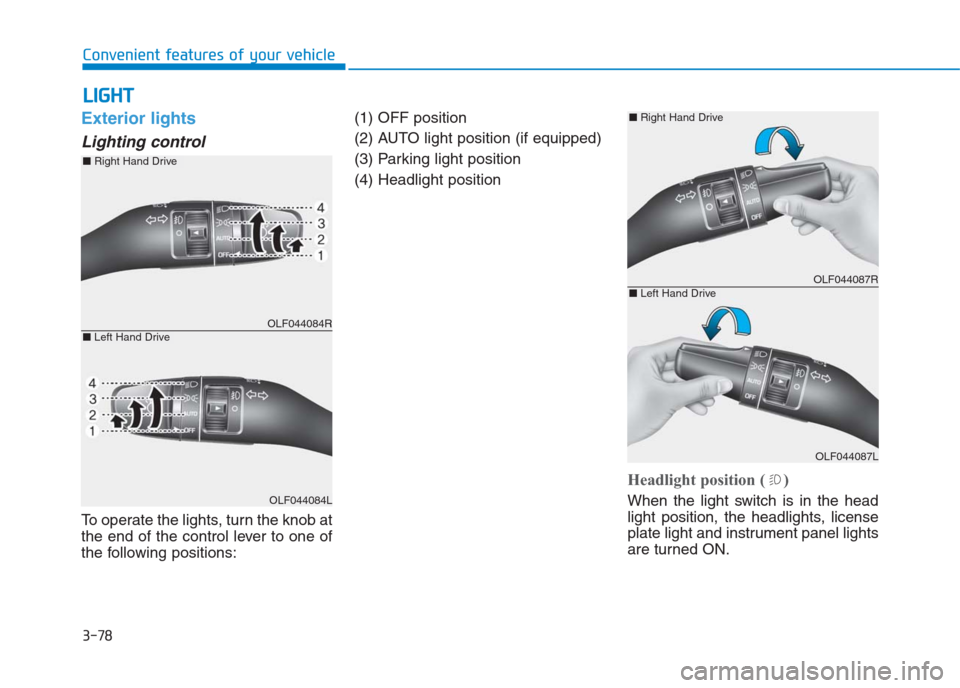
To operate the lights, turn the knob at
the end of the control lever to one of
the following positions:(1) OFF position
(2) AUTO light position (if equipped)
(3) Parking light position
(4) Headlight position
Headlight position ( )
When the light switch is in the head
light position, the headlights, license
plate light and instrument panel lights
are turned ON.
OLF044084R
OLF044084L
■Right Hand Drive
■Left Hand Drive
OLF044087R
OLF044087L
■Right Hand Drive
■Left Hand Drive
Page 164 of 472
3-79
Convenient features of your vehicle
3
Information
The ignition switch must be in the ON
position to turn on the headlights.
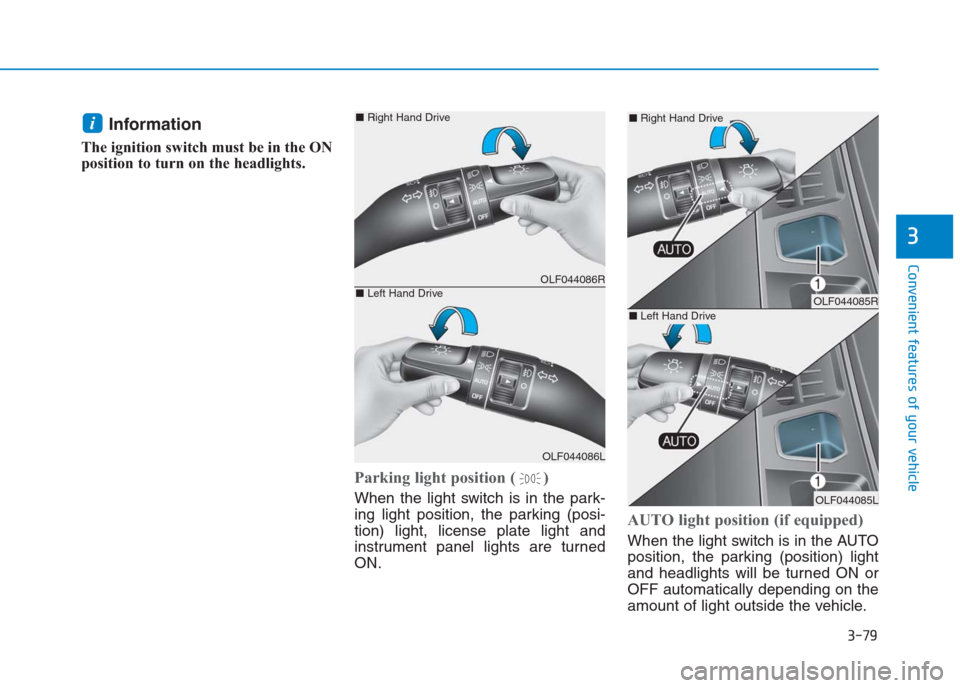
Parking light position ( )
When the light switch is in the park-
ing light position, the parking (posi-
tion) light, license plate light and
instrument panel lights are turned
ON.
AUTO light position (if equipped)
When the light switch is in the AUTO
position, the parking (position) light
and headlights will be turned ON or
OFF automatically depending on the
amount of light outside the vehicle.
i
OLF044086R
OLF044086L
■Right Hand Drive
■Left Hand DriveOLF044085R
OLF044085L
■Right Hand Drive
■Left Hand Drive
Page 165 of 472
3-80
Convenient features of your vehicle
Even with the AUTO light feature in
operation, it is recommended to
manually turn ON the lights when
driving at night or in a fog, or when
you enter dark areas, such as tun-
nels and parking facilities.
• Do not cover or spill anything on
the sensor (1) located on the
instrument panel.
Do not clean the sensor using a
window cleaner, the cleanser may
leave a light film which could
interfere with sensor operation.
If your vehicle has window tint
or other types of metallic coat-
ing on the front windshield, the
AUTO light system may not work
properly.
High beam operation
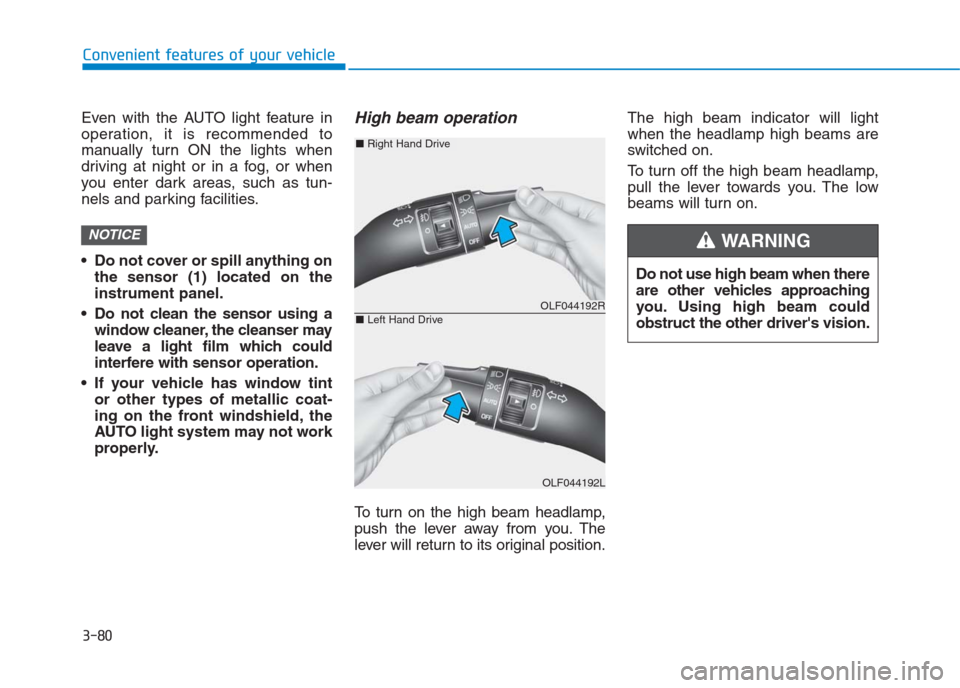
To turn on the high beam headlamp,
push the lever away from you. The
lever will return to its original position.The high beam indicator will light
when the headlamp high beams are
switched on.
To turn off the high beam headlamp,
pull the lever towards you. The low
beams will turn on.
NOTICE
Do not use high beam when there
are other vehicles approaching
you. Using high beam could
obstruct the other driver's vision.
WARNING
OLF044192R
OLF044192L
■Right Hand Drive
■Left Hand Drive
Page 180 of 472
3-95
Convenient features of your vehicle
3
Defroster
To prevent damage to the conduc-
tors bonded to the inside surface
of the rear window, never use
sharp instruments or window
cleaners containing abrasives to
clean the window.
If you want to defrost and defog
the front windshield, refer to
“Windshield defrosting and defog-
ging” in this section.
Rear window defroster
(if equipped)
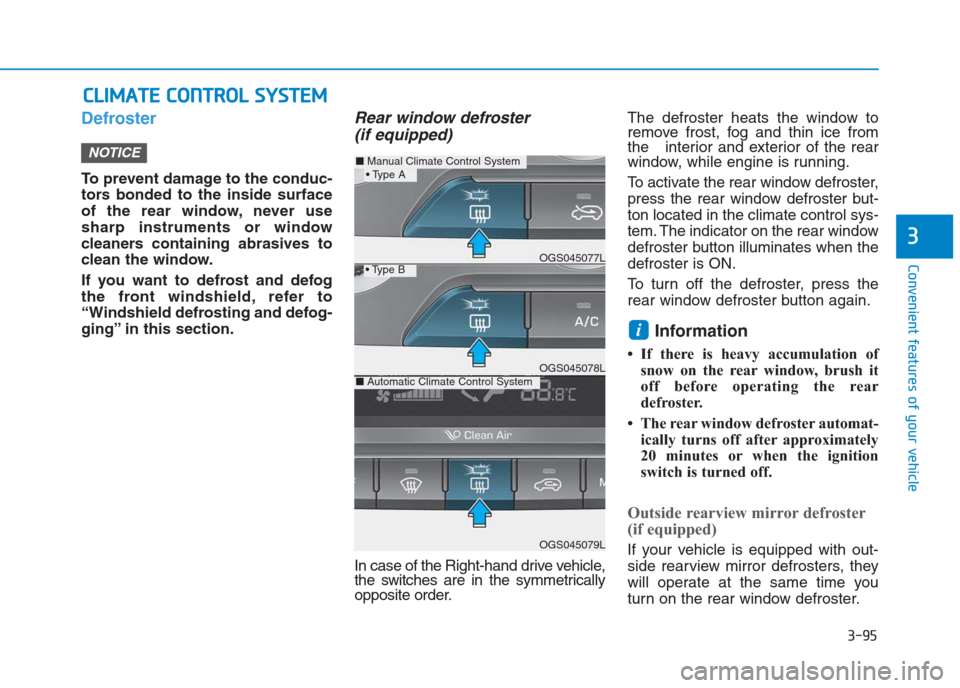
In case of the Right-hand drive vehicle,
the switches are in the symmetrically
opposite order.The defroster heats the window to
remove frost, fog and thin ice from
the interior and exterior of the rear
window, while engine is running.
To activate the rear window defroster,
press the rear window defroster but-
ton located in the climate control sys-
tem. The indicator on the rear window
defroster button illuminates when the
defroster is ON.
To turn off the defroster, press the
rear window defroster button again.
Information
• If there is heavy accumulation of
snow on the rear window, brush it
off before operating the rear
defroster.
• The rear window defroster automat-
ically turns off after approximately
20 minutes or when the ignition
switch is turned off.
Outside rearview mirror defroster
(if equipped)
If your vehicle is equipped with out-
side rearview mirror defrosters, they
will operate at the same time you
turn on the rear window defroster.
i
NOTICE
C CL
LI
IM
MA
AT
TE
E
C
CO
ON
NT
TR
RO
OL
L
S
SY
YS
ST
TE
EM
M
■Manual Climate Control System
OGS045079L
■Automatic Climate Control SystemOGS045078L
OGS045077L
Page 184 of 472
3-99
Convenient features of your vehicle
3
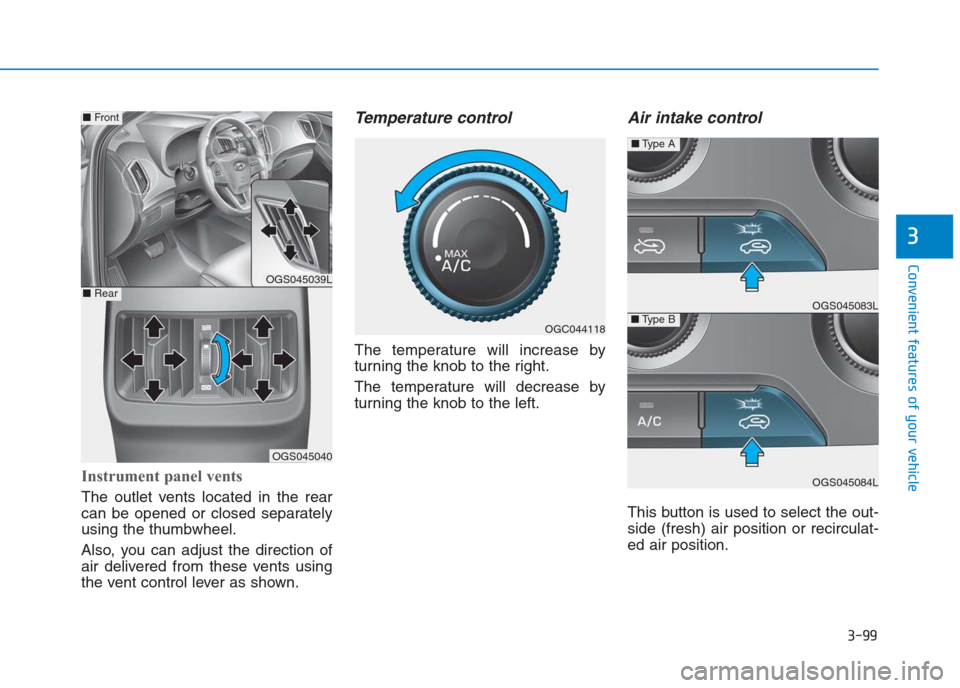
Instrument panel vents
The outlet vents located in the rear
can be opened or closed separately
using the thumbwheel.
Also, you can adjust the direction of
air delivered from these vents using
the vent control lever as shown.
Temperature control
The temperature will increase by
turning the knob to the right.
The temperature will decrease by
turning the knob to the left.
Air intake control
This button is used to select the out-
side (fresh) air position or recirculat-
ed air position.
OGC044118
OGS045039L
OGS045040
■Front
■RearOGS045083L
OGS045084L
■Type B
■Type A