led Hyundai Creta 2019 Owner's Guide
[x] Cancel search | Manufacturer: HYUNDAI, Model Year: 2019, Model line: Creta, Model: Hyundai Creta 2019Pages: 472, PDF Size: 13.39 MB
Page 156 of 472
3-71
Convenient features of your vehicle
3
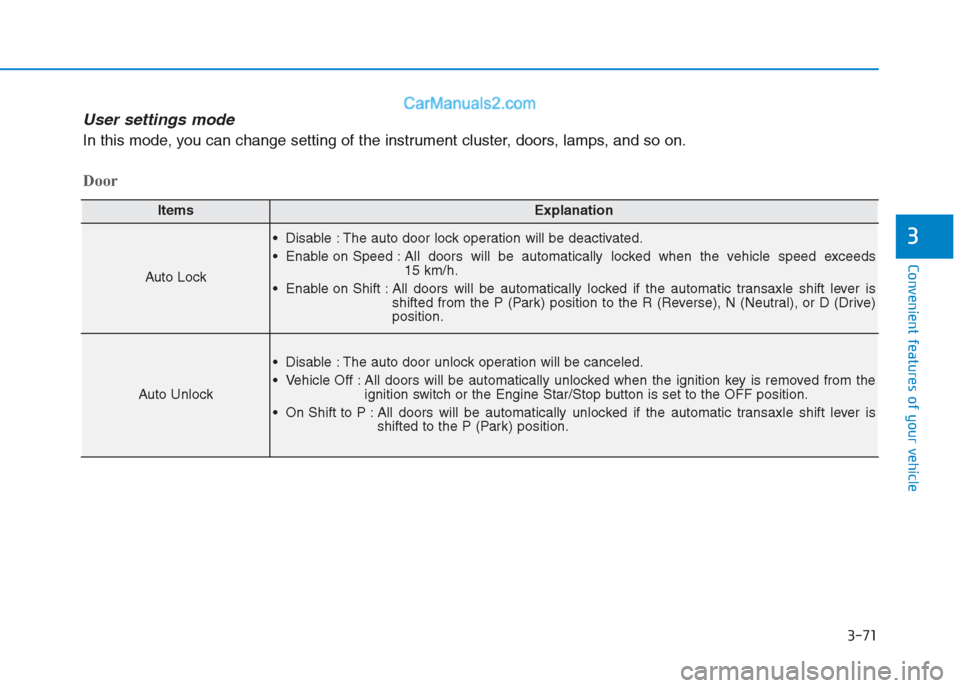
ItemsExplanation
Auto Lock
Disable : The auto door lock operation will be deactivated.
Enable on Speed : All doors will be automatically locked when the vehicle speed exceeds
15 km/h.
Enable on Shift : All doors will be automatically locked if the automatic transaxle shift lever is
shifted from the P (Park) position to the R (Reverse), N (Neutral), or D (Drive)
position.
Auto Unlock
Disable : The auto door unlock operation will be canceled.
Vehicle Off : All doors will be automatically unlocked when the ignition key is removed from the
ignition switch or the Engine Star/Stop button is set to the OFF position.
On Shift to P : All doors will be automatically unlocked if the automatic transaxle shift lever is
shifted to the P (Park) position.
Door
User settings mode
In this mode, you can change setting of the instrument cluster, doors, lamps, and so on.
Page 159 of 472
3-74
Convenient features of your vehicle
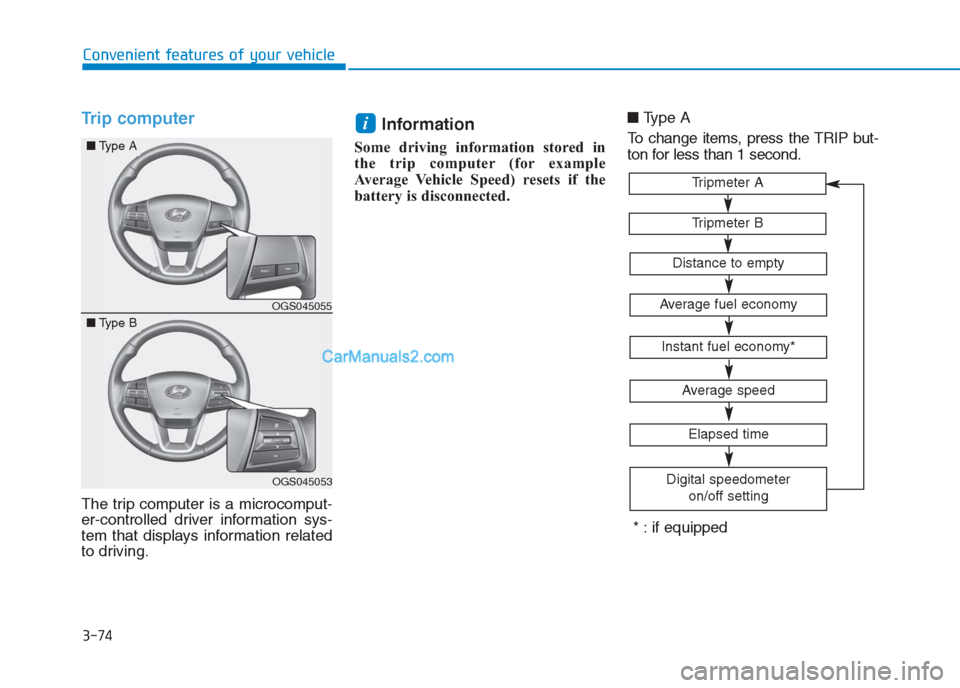
Trip computer
The trip computer is a microcomput-
er-controlled driver information sys-
tem that displays information related
to driving.
Information
Some driving information stored in
the trip computer (for example
Average Vehicle Speed) resets if the
battery is disconnected.■Type A
To change items, press the TRIP but-
ton for less than 1 second.
i
Tripmeter B
Tripmeter A
Average fuel economy
Instant fuel economy*
Average speed
Elapsed time
Digital speedometer
on/off setting
Distance to empty
* : if equipped
OGS045055
OGS045053
■Type A
■Type B
Page 176 of 472
3-91
Convenient features of your vehicle
3
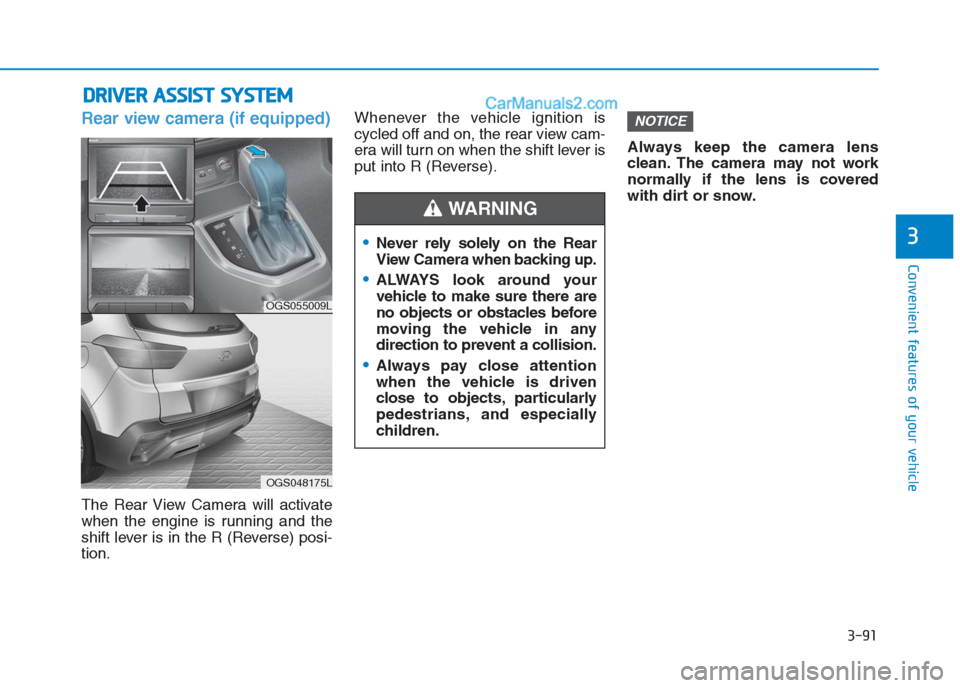
Rear view camera (if equipped)
The Rear View Camera will activate
when the engine is running and the
shift lever is in the R (Reverse) posi-
tion.Whenever the vehicle ignition is
cycled off and on, the rear view cam-
era will turn on when the shift lever is
put into R (Reverse).Always keep the camera lens
clean. The camera may not work
normally if the lens is covered
with dirt or snow.
NOTICE
D DR
RI
IV
VE
ER
R
A
AS
SS
SI
IS
ST
T
S
SY
YS
ST
TE
EM
M
Never rely solely on the Rear
View Camera when backing up.
ALWAYS look around your
vehicle to make sure there are
no objects or obstacles before
moving the vehicle in any
direction to prevent a collision.
Always pay close attention
when the vehicle is driven
close to objects, particularly
pedestrians, and especially
children.
WARNING
OGS055009L
OGS048175L
Page 177 of 472
3-92
Convenient features of your vehicle
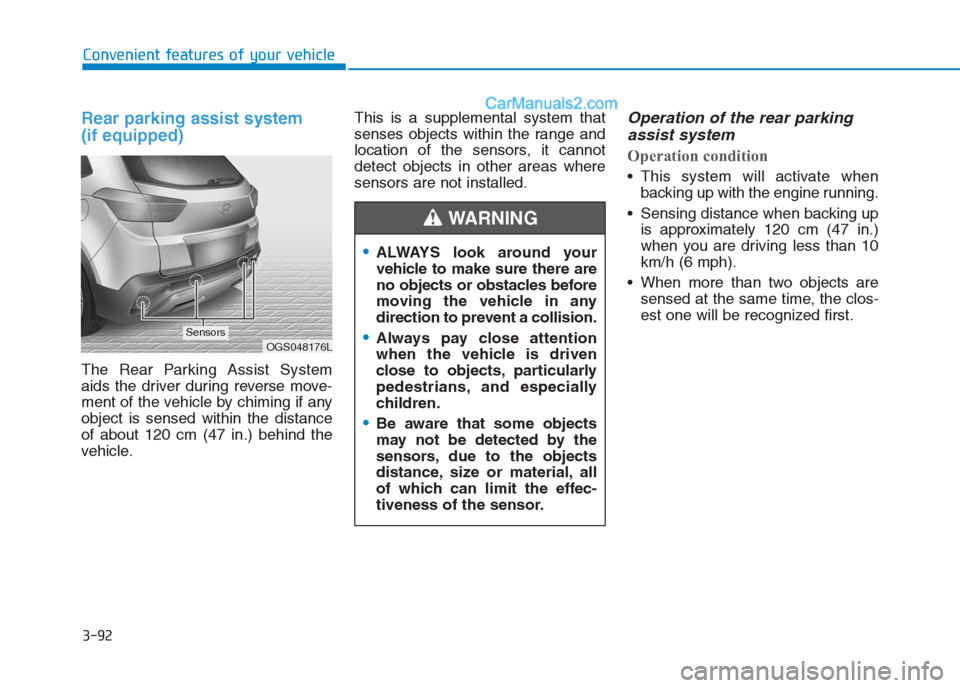
Rear parking assist system
(if equipped)
The Rear Parking Assist System
aids the driver during reverse move-
ment of the vehicle by chiming if any
object is sensed within the distance
of about 120 cm (47 in.) behind the
vehicle.This is a supplemental system that
senses objects within the range and
location of the sensors, it cannot
detect objects in other areas where
sensors are not installed.
Operation of the rear parking
assist system
Operation condition
This system will activate when
backing up with the engine running.
Sensing distance when backing up
is approximately 120 cm (47 in.)
when you are driving less than 10
km/h (6 mph).
When more than two objects are
sensed at the same time, the clos-
est one will be recognized first.
ALWAYS look around your
vehicle to make sure there are
no objects or obstacles before
moving the vehicle in any
direction to prevent a collision.
Always pay close attention
when the vehicle is driven
close to objects, particularly
pedestrians, and especially
children.
Be aware that some objects
may not be detected by the
sensors, due to the objects
distance, size or material, all
of which can limit the effec-
tiveness of the sensor.
WARNING
OGS048176LSensors
Page 178 of 472
3-93
Convenient features of your vehicle
3
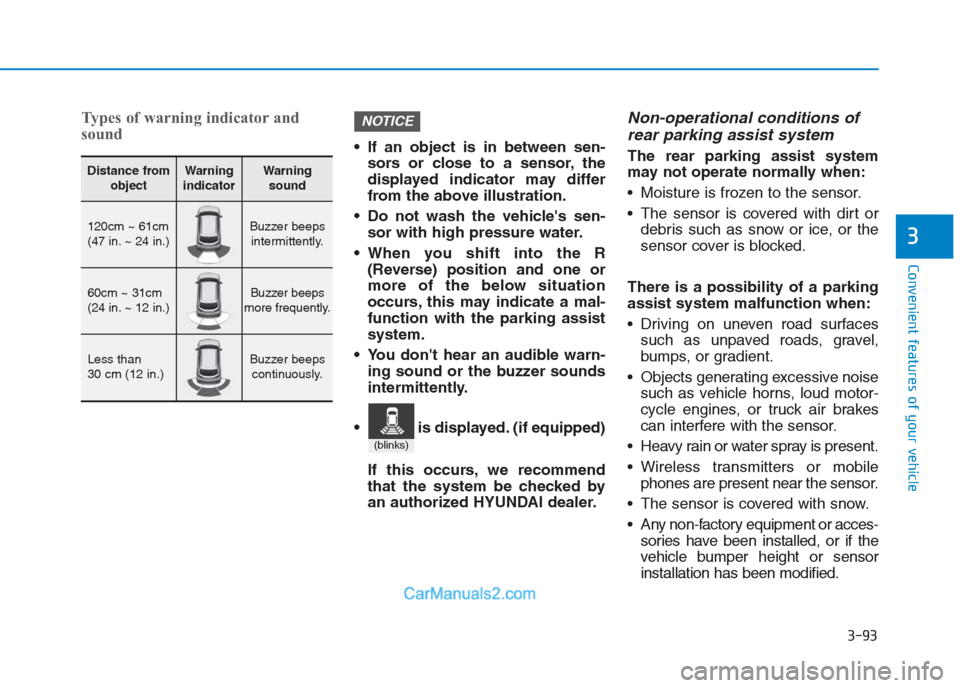
Types of warning indicator and
sound
If an object is in between sen-
sors or close to a sensor, the
displayed indicator may differ
from the above illustration.
Do not wash the vehicle's sen-
sor with high pressure water.
When you shift into the R
(Reverse) position and one or
more of the below situation
occurs, this may indicate a mal-
function with the parking assist
system.
You don't hear an audible warn-
ing sound or the buzzer sounds
intermittently.
If this occurs, we recommend
that the system be checked by
an authorized HYUNDAI dealer.
Non-operational conditions of
rear parking assist system
The rear parking assist system
may not operate normally when:
Moisture is frozen to the sensor.
The sensor is covered with dirt or
debris such as snow or ice, or the
sensor cover is blocked.
There is a possibility of a parking
assist system malfunction when:
Driving on uneven road surfaces
such as unpaved roads, gravel,
bumps, or gradient.
Objects generating excessive noise
such as vehicle horns, loud motor-
cycle engines, or truck air brakes
can interfere with the sensor.
Heavy rain or water spray is present.
Wireless transmitters or mobile
phones are present near the sensor.
The sensor is covered with snow.
Any non-factory equipment or acces-
sories have been installed, or if the
vehicle bumper height or sensor
installation has been modified.
NOTICE
Distance from
objectWarning
indicatorWarning
sound
120cm ~ 61cm
(47 in. ~ 24 in.)Buzzer beeps
intermittently.
60cm ~ 31cm
(24 in. ~ 12 in.)Buzzer beeps
more frequently.
Less than
30 cm (12 in.)Buzzer beeps
continuously.
(blinks)
is displayed. (if equipped)
Page 183 of 472
3-98
Convenient features of your vehicle
Mode selection
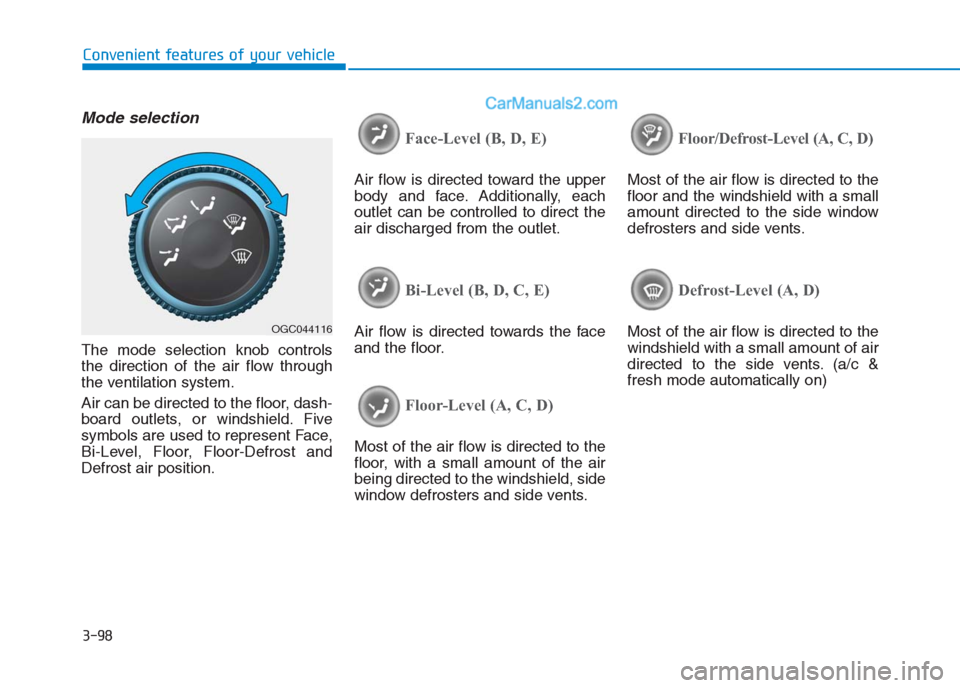
The mode selection knob controls
the direction of the air flow through
the ventilation system.
Air can be directed to the floor, dash-
board outlets, or windshield. Five
symbols are used to represent Face,
Bi-Level, Floor, Floor-Defrost and
Defrost air position.
Face-Level (B, D, E)
Air flow is directed toward the upper
body and face. Additionally, each
outlet can be controlled to direct the
air discharged from the outlet.
Bi-Level (B, D, C, E)
Air flow is directed towards the face
and the floor.
Floor-Level (A, C, D)
Most of the air flow is directed to the
floor, with a small amount of the air
being directed to the windshield, side
window defrosters and side vents.
Floor/Defrost-Level (A, C, D)
Most of the air flow is directed to the
floor and the windshield with a small
amount directed to the side window
defrosters and side vents.
Defrost-Level (A, D)
Most of the air flow is directed to the
windshield with a small amount of air
directed to the side vents. (a/c &
fresh mode automatically on)OGC044116
Page 185 of 472
3-100
Convenient features of your vehicle
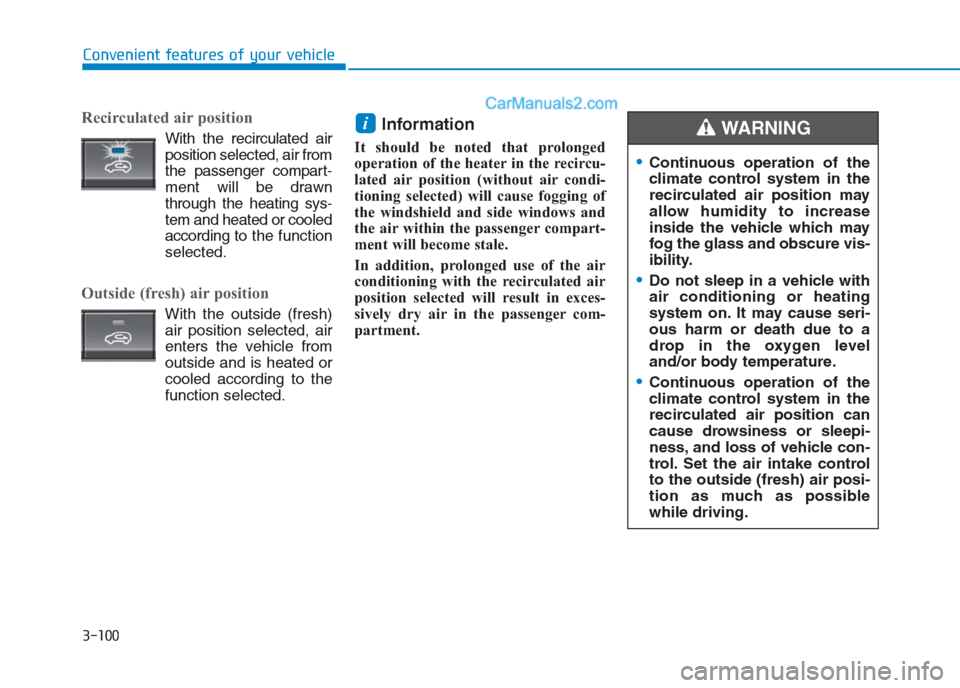
Recirculated air position
With the recirculated air
position selected, air from
the passenger compart-
ment will be drawn
through the heating sys-
tem and heated or cooled
according to the function
selected.
Outside (fresh) air position
With the outside (fresh)
air position selected, air
enters the vehicle from
outside and is heated or
cooled according to the
function selected.
Information
It should be noted that prolonged
operation of the heater in the recircu-
lated air position (without air condi-
tioning selected) will cause fogging of
the windshield and side windows and
the air within the passenger compart-
ment will become stale.
In addition, prolonged use of the air
conditioning with the recirculated air
position selected will result in exces-
sively dry air in the passenger com-
partment.
i
Continuous operation of the
climate control system in the
recirculated air position may
allow humidity to increase
inside the vehicle which may
fog the glass and obscure vis-
ibility.
Do not sleep in a vehicle with
air conditioning or heating
system on. It may cause seri-
ous harm or death due to a
drop in the oxygen level
and/or body temperature.
Continuous operation of the
climate control system in the
recirculated air position can
cause drowsiness or sleepi-
ness, and loss of vehicle con-
trol. Set the air intake control
to the outside (fresh) air posi-
tion as much as possible
while driving.
WARNING
Page 187 of 472
3-102
Convenient features of your vehicle
Operation Tips
To keep dust or unpleasant fumes
from entering the car through the
ventilation system, temporarily set
the air intake control to the recircu-
lated air position. Return the con-
trol to the fresh air position when
the irritation has passed. This will
help keep the driver alert and com-
fortable.
To prevent inside of the windshield
from fogging, set the air intake con-
trol to the fresh air position and fan
speed to the desired position, turn
on the air conditioning system, and
adjust the temperature control to
desired temperature.
Air conditioning (if equipped)
HYUNDAI Air Conditioning Systems
are filled with environmentally friendly
refrigerant.
1. Start the engine.
2. Push the air conditioning button.
3. Set the mode to the Face Level
mode.
4. Set the air intake control to the
recirculated air position. However,
prolonged operation of the recircu-
lated air position will excessively
dry the air. In this case, change the
air position.
5. Adjust the fan speed control and
temperature control to maintain
maximum comfort.
When maximum cooling is desired,
set the temperature control to the
extreme left position then set the fan
speed control to the highest speed.When using the air conditioning
system, monitor the temperature
gauge closely while driving up
hills or in heavy traffic when out-
side temperatures are high. Air
conditioning system operation
may cause engine overheating.
Continue to use the blower fan but
turn the air conditioning system
off if the engine temperature
gauge indicates engine overheat-
ing.
NOTICE
Page 188 of 472
3-103
Convenient features of your vehicle
3
Air conditioning system operation
tips
If the vehicle has been parked in
direct sunlight during hot weather,
open the windows for a short time
to let the hot air inside the vehicle
escape.
After sufficient cooling has been
achieved, switch back from the
recirculated air to the fresh outside
air position.
To help reduce moisture inside of
the windows on rainy or humid
days, decrease the humidity inside
the vehicle by operating the air
conditioning system with the win-
dows closed.
Use the air conditioning system
every month only for a few minutes
to ensure maximum system per-
formance. If you operate air conditioner
excessively, the difference between
the temperature of the outside air
and that of the windshield could
cause the outer surface of the
windshield to fog up, causing loss
of visibility. In this case, set the
mode selection knob or button to
the position and fan speed
control to the lower speed.
System maintenance
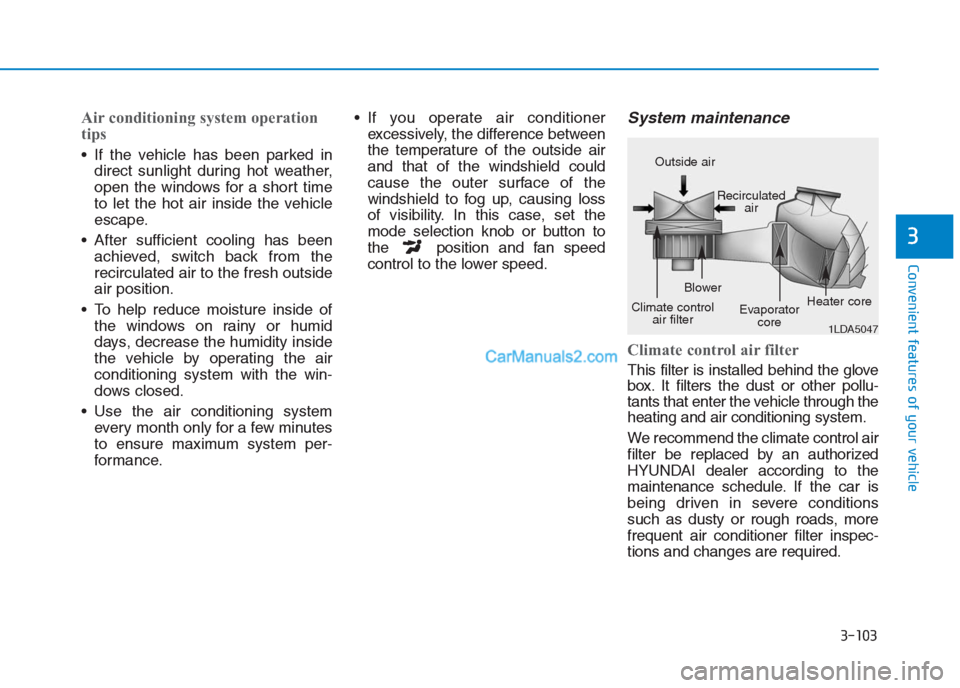
Climate control air filter
This filter is installed behind the glove
box. It filters the dust or other pollu-
tants that enter the vehicle through the
heating and air conditioning system.
We recommend the climate control air
filter be replaced by an authorized
HYUNDAI dealer according to the
maintenance schedule. If the car is
being driven in severe conditions
such as dusty or rough roads, more
frequent air conditioner filter inspec-
tions and changes are required.
1LDA5047
Outside air
Recirculated
air
Climate control
air filterBlower
Evaporator
coreHeater core
Page 191 of 472
3-106
Convenient features of your vehicle
Automatic heating and air con-
ditioning
The Automatic Climate Control System
is controlled by setting the desired tem-
perature.
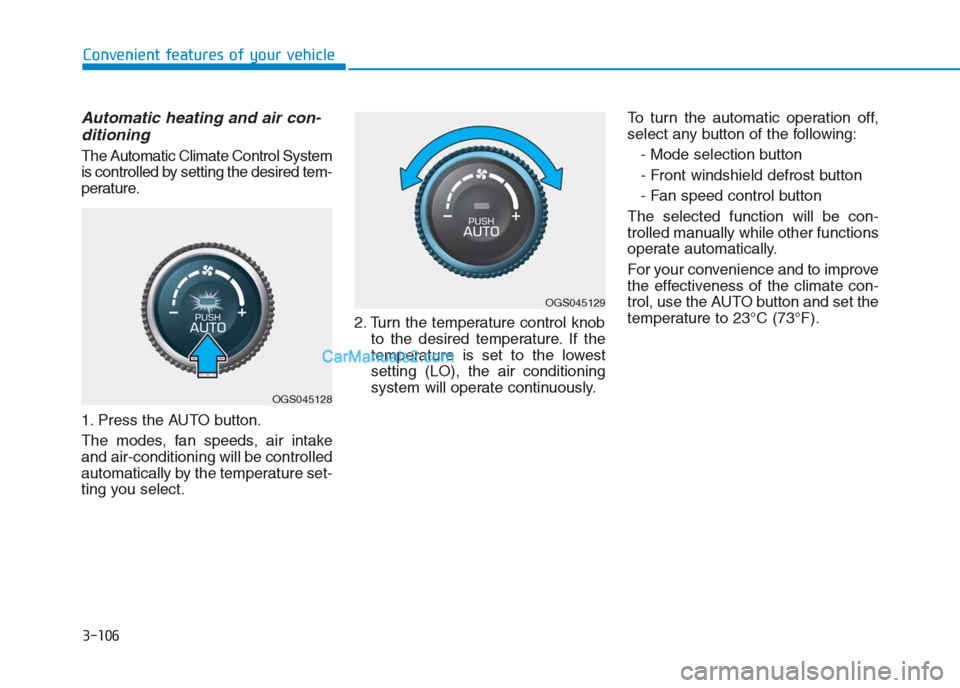
1. Press the AUTO button.
The modes, fan speeds, air intake
and air-conditioning will be controlled
automatically by the temperature set-
ting you select.2. Turn the temperature control knob
to the desired temperature. If the
temperature is set to the lowest
setting (LO), the air conditioning
system will operate continuously.To turn the automatic operation off,
select any button of the following:
- Mode selection button
- Front windshield defrost button
- Fan speed control button
The selected function will be con-
trolled manually while other functions
operate automatically.
For your convenience and to improve
the effectiveness of the climate con-
trol, use the AUTO button and set the
temperature to 23°C (73°F).
OGS045128
OGS045129