IAT Hyundai Elantra 2003 User Guide
[x] Cancel search | Manufacturer: HYUNDAI, Model Year: 2003, Model line: Elantra, Model: Hyundai Elantra 2003Pages: 172, PDF Size: 2.82 MB
Page 36 of 172
FEATURES OF YOUR HYUNDAI FEATURES OF YOUR HYUNDAIFEATURES OF YOUR HYUNDAI FEATURES OF YOUR HYUNDAI
FEATURES OF YOUR HYUNDAI
1- 27
B250A02E-AAT
INSTRUMENTS AND CONTROLS INSTRUMENTS AND CONTROLSINSTRUMENTS AND CONTROLS INSTRUMENTS AND CONTROLS
INSTRUMENTS AND CONTROLS
CAUTION: CAUTION:CAUTION: CAUTION:
CAUTION:
When installing a container of liquid air When installing a container of liquid airWhen installing a container of liquid air When installing a container of liquid air
When installing a container of liquid air
freshener inside a vehicle, do not place it freshener inside a vehicle, do not place itfreshener inside a vehicle, do not place it freshener inside a vehicle, do not place it
freshener inside a vehicle, do not place it
near the instrument cluster nor on the near the instrument cluster nor on thenear the instrument cluster nor on the near the instrument cluster nor on the
near the instrument cluster nor on the
instrument panel
pad surface. pad surface. pad surface. pad surface.
pad surface.
If there is any leakage from the air fresh- If there is any leakage from the air fresh-If there is any leakage from the air fresh- If there is any leakage from the air fresh-
If there is any leakage from the air fresh-
ener onto these areas (instrument cluster, ener onto these areas (instrument cluster,ener onto these areas (instrument cluster, ener onto these areas (instrument cluster,
ener onto these areas (instrument cluster,
instrument panel
pad or air ventilator), it pad or air ventilator), it pad or air ventilator), it pad or air ventilator), it
pad or air ventilator), it
may damage these parts. may damage these parts.may damage these parts. may damage these parts.
may damage these parts.
If the liquid from the air freshener does leak If the liquid from the air freshener does leakIf the liquid from the air freshener does leak If the liquid from the air freshener does leak
If the liquid from the air freshener does leak
onto these areas, wash them with water onto these areas, wash them with wateronto these areas, wash them with water onto these areas, wash them with water
onto these areas, wash them with water
immediately. immediately.immediately. immediately.
immediately.
B250A02E-3
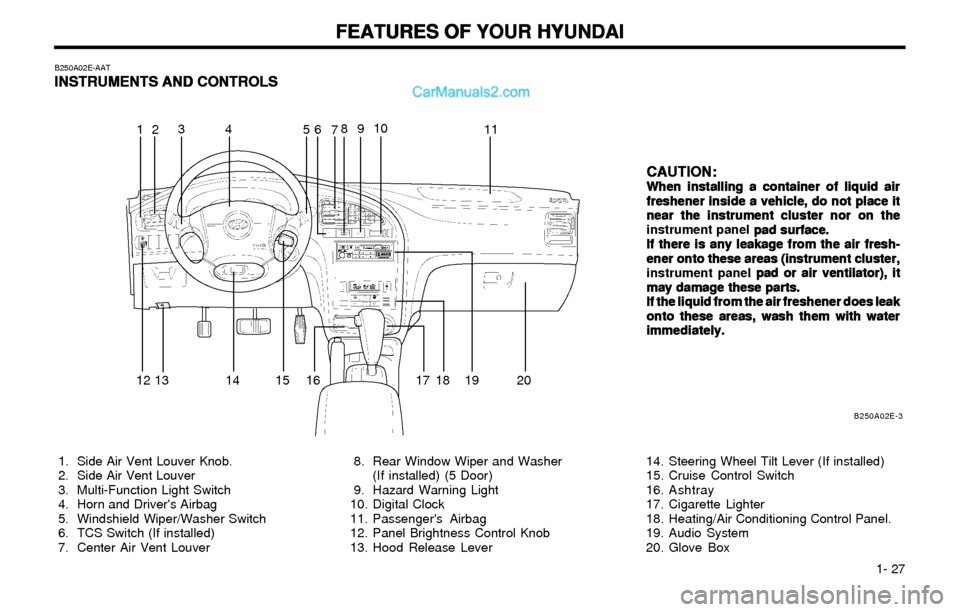
8. Rear Window Wiper and Washer
(If installed) (5 Door)
9. Hazard Warning Light
10. Digital Clock
11. Passenger's Airbag
12. Panel Brightness Control Knob
13. Hood Release Lever 1. Side Air Vent Louver Knob.
2. Side Air Vent Louver
3. Multi-Function Light Switch
4. Horn and Driver's Airbag
5. Windshield Wiper/Washer Switch
6. TCS Switch (If installed)
7. Center Air Vent Louver14. Steering Wheel Tilt Lever (If installed)
15. Cruise Control Switch
16. Ashtray
17. Cigarette Lighter
18. Heating/Air Conditioning Control Panel.
19. Audio System
20. Glove Box
6
723
145910
11
12
17 18 19 2016 14 1315
8
Page 40 of 172
FEATURES OF YOUR HYUNDAI FEATURES OF YOUR HYUNDAIFEATURES OF YOUR HYUNDAI FEATURES OF YOUR HYUNDAI
FEATURES OF YOUR HYUNDAI
1- 31
B260H03A-AAT
Parking Brake/ Parking Brake/Parking Brake/ Parking Brake/
Parking Brake/
Low Brake Fluid Level Low Brake Fluid LevelLow Brake Fluid Level Low Brake Fluid Level
Low Brake Fluid Level
Level Warning Light Level Warning LightLevel Warning Light Level Warning Light
Level Warning Light
WARNING: WARNING:WARNING: WARNING:
WARNING:
If you suspect brake trouble, have your If you suspect brake trouble, have yourIf you suspect brake trouble, have your If you suspect brake trouble, have your
If you suspect brake trouble, have your
brakes checked by a Hyundai dealer as brakes checked by a Hyundai dealer asbrakes checked by a Hyundai dealer as brakes checked by a Hyundai dealer as
brakes checked by a Hyundai dealer as
soon as possible. Driving your car with a soon as possible. Driving your car with asoon as possible. Driving your car with a soon as possible. Driving your car with a
soon as possible. Driving your car with a
problem in either the brake electrical sys- problem in either the brake electrical sys-problem in either the brake electrical sys- problem in either the brake electrical sys-
problem in either the brake electrical sys-
tem or brake hydraulic system is danger- tem or brake hydraulic system is danger-tem or brake hydraulic system is danger- tem or brake hydraulic system is danger-
tem or brake hydraulic system is danger-
ous, and could result in a serious injury or ous, and could result in a serious injury orous, and could result in a serious injury or ous, and could result in a serious injury or
ous, and could result in a serious injury or
death. death.death. death.
death.
Warning Light Operation Warning Light OperationWarning Light Operation Warning Light Operation
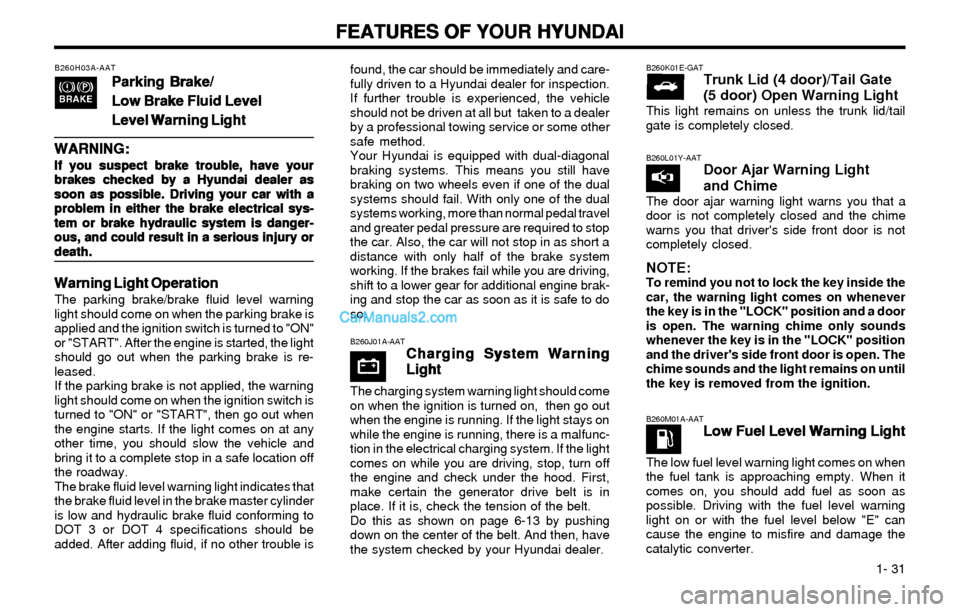
Warning Light OperationThe parking brake/brake fluid level warning
light should come on when the parking brake is
applied and the ignition switch is turned to "ON"
or "START". After the engine is started, the light
should go out when the parking brake is re-
leased.
If the parking brake is not applied, the warning
light should come on when the ignition switch is
turned to "ON" or "START", then go out when
the engine starts. If the light comes on at any
other time, you should slow the vehicle and
bring it to a complete stop in a safe location off
the roadway.
The brake fluid level warning light indicates that
the brake fluid level in the brake master cylinder
is low and hydraulic brake fluid conforming to
DOT 3 or DOT 4 specifications should be
added. After adding fluid, if no other trouble isfound, the car should be immediately and care-
fully driven to a Hyundai dealer for inspection.
If further trouble is experienced, the vehicle
should not be driven at all but taken to a dealer
by a professional towing service or some other
safe method.
Your Hyundai is equipped with dual-diagonal
braking systems. This means you still have
braking on two wheels even if one of the dual
systems should fail. With only one of the dual
systems working, more than normal pedal travel
and greater pedal pressure are required to stop
the car. Also, the car will not stop in as short a
distance with only half of the brake system
working. If the brakes fail while you are driving,
shift to a lower gear for additional engine brak-
ing and stop the car as soon as it is safe to do
so.
B260J01A-AATCharging System Warning Charging System WarningCharging System Warning Charging System Warning
Charging System Warning
Light LightLight Light
Light
The charging system warning light should come
on when the ignition is turned on, then go out
when the engine is running. If the light stays on
while the engine is running, there is a malfunc-
tion in the electrical charging system. If the light
comes on while you are driving, stop, turn off
the engine and check under the hood. First,
make certain the generator drive belt is in
place. If it is, check the tension of the belt.
Do this as shown on page 6-13 by pushing
down on the center of the belt. And then, have
the system checked by your Hyundai dealer.
B260M01A-AATLow Fuel Level Warning Light Low Fuel Level Warning LightLow Fuel Level Warning Light Low Fuel Level Warning Light
Low Fuel Level Warning Light
The low fuel level warning light comes on when
the fuel tank is approaching empty. When it
comes on, you should add fuel as soon as
possible. Driving with the fuel level warning
light on or with the fuel level below "E" can
cause the engine to misfire and damage the
catalytic converter.
B260L01Y-AATDoor Ajar Warning Light
and Chime
The door ajar warning light warns you that a
door is not completely closed and the chime
warns you that driver's side front door is not
completely closed.
NOTE:To remind you not to lock the key inside the
car, the warning light comes on whenever
the key is in the "LOCK" position and a door
is open. The warning chime only sounds
whenever the key is in the "LOCK" position
and the driver's side front door is open. The
chime sounds and the light remains on until
the key is removed from the ignition.
B260K01E-GATTrunk Lid (4 door)/Tail Gate
(5 door) Open Warning Light
This light remains on unless the trunk lid/tail
gate is completely closed.
Page 41 of 172
FEATURES OF YOUR HYUNDAI FEATURES OF YOUR HYUNDAIFEATURES OF YOUR HYUNDAI FEATURES OF YOUR HYUNDAI
FEATURES OF YOUR HYUNDAI
1- 32
B260N01A-AATMalfunction Indicator Light
This light illuminates when there is a malfunc-
tion of an exhaust gas related component, and
the system is not functioning properly so that
the exhaust gas regulation values are not sat-
isfied. This light will also illuminate when the
ignition key is turned to the "ON" position, and
will go out in a few seconds. If it illuminates
while driving, or does not illuminate when the
ignition key is turned to the "ON" position, take
your car to your nearest authorized Hyundai
dealer and have the system checked.
B270A01A-AATBRAKE PAD WEAR WARNING SOUND BRAKE PAD WEAR WARNING SOUNDBRAKE PAD WEAR WARNING SOUND BRAKE PAD WEAR WARNING SOUND
BRAKE PAD WEAR WARNING SOUNDThe front disc brake pads have wear indicators
that should make a high-pitched squealing or
scraping noise when new pads are needed.
The sound may come and go or be heard all the
time when the vehicle is moving. It may also be
heard when the brake pedal is pushed down
firmly. Expensive rotor damage will result if the
worn pads are not replaced. See your Hyundai
dealer immediately.
B260Q01E-GATCruise Indicator (If Installed)
The cruise indicator light in the instrument
cluster is illuminated when the cruise control
main switch on the end of the barrel is pushed.
The indicator light does not illuminate when the
cruise control main switch is pushed a second
time.
Information on the use of cruise control may be
found on page 1-52.
B260A01B-GATFront Fog Indicator Light
(If Installed)
Front fog indicator light comes on whenever the
fog light switch is on.
B280B01E
B280A01E
Without Trip Computer
With Trip Computer
CRUISE
B280A01A-AATFUEL GAUGE
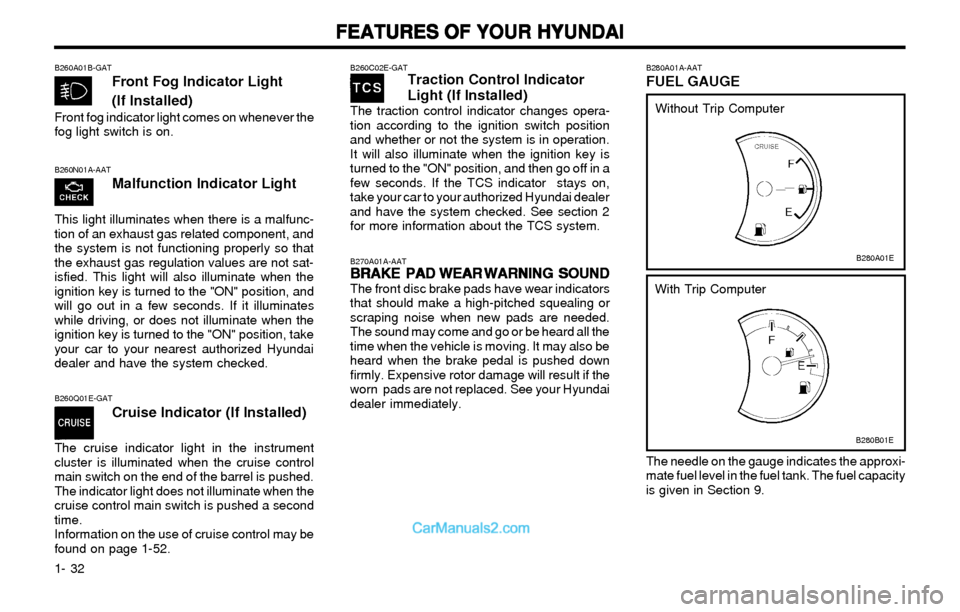
The needle on the gauge indicates the approxi-
mate fuel level in the fuel tank. The fuel capacity
is given in Section 9.
B260C02E-GATTraction Control Indicator
Light (If Installed)
The traction control indicator changes opera-
tion according to the ignition switch position
and whether or not the system is in operation.
It will also illuminate when the ignition key is
turned to the "ON" position, and then go off in a
few seconds. If the TCS indicator stays on,
take your car to your authorized Hyundai dealer
and have the system checked. See section 2
for more information about the TCS system.
Page 42 of 172
FEATURES OF YOUR HYUNDAI FEATURES OF YOUR HYUNDAIFEATURES OF YOUR HYUNDAI FEATURES OF YOUR HYUNDAI
FEATURES OF YOUR HYUNDAI
1- 33
B290A01E B290A02A-AAT
ENGINE COOLANT TEMPERATURE
GAUGE
B290B01E
Without Trip Computer
With Trip Computer
WARNINGNever remove the radiator cap when the
engine is hot. The engine coolant is under
pressure and could erupt and cause severe
burns. Wait until the engine is cool before
removing the radiator cap.
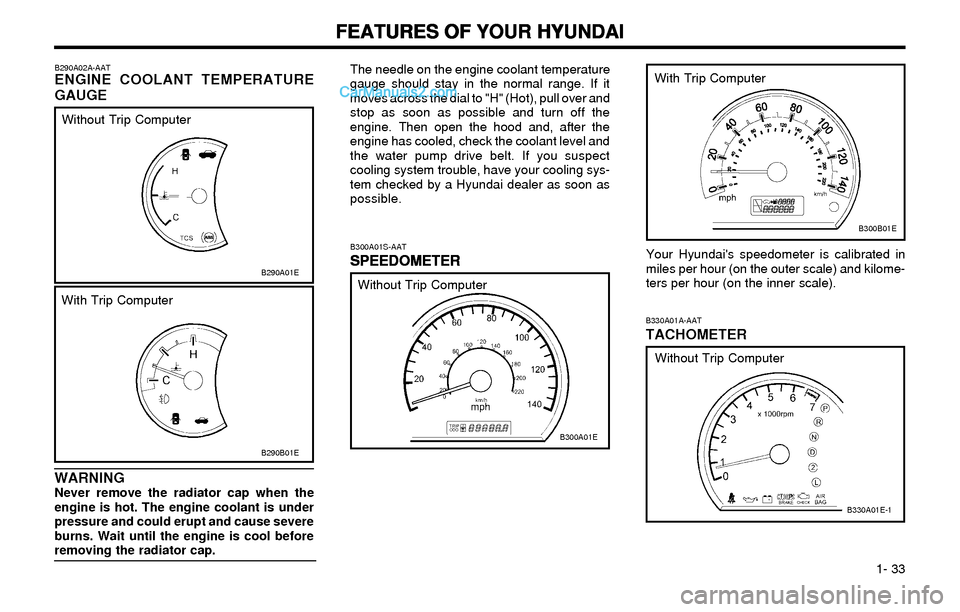
The needle on the engine coolant temperature
gauge should stay in the normal range. If it
moves across the dial to "H" (Hot), pull over and
stop as soon as possible and turn off the
engine. Then open the hood and, after the
engine has cooled, check the coolant level and
the water pump drive belt. If you suspect
cooling system trouble, have your cooling sys-
tem checked by a Hyundai dealer as soon as
possible.
B300A01S-AAT
SPEEDOMETER SPEEDOMETERSPEEDOMETER SPEEDOMETER
SPEEDOMETERYour Hyundai's speedometer is calibrated in
miles per hour (on the outer scale) and kilome-
ters per hour (on the inner scale).
B300A01E
B300B01E
Without Trip ComputerWith Trip Computer
B330A01A-AATTACHOMETER
Without Trip Computer
B330A01E-1
Page 43 of 172
FEATURES OF YOUR HYUNDAI FEATURES OF YOUR HYUNDAIFEATURES OF YOUR HYUNDAI FEATURES OF YOUR HYUNDAI
FEATURES OF YOUR HYUNDAI
1- 34
HLZ.079T
B310B01E
1
2
3
Reset switch
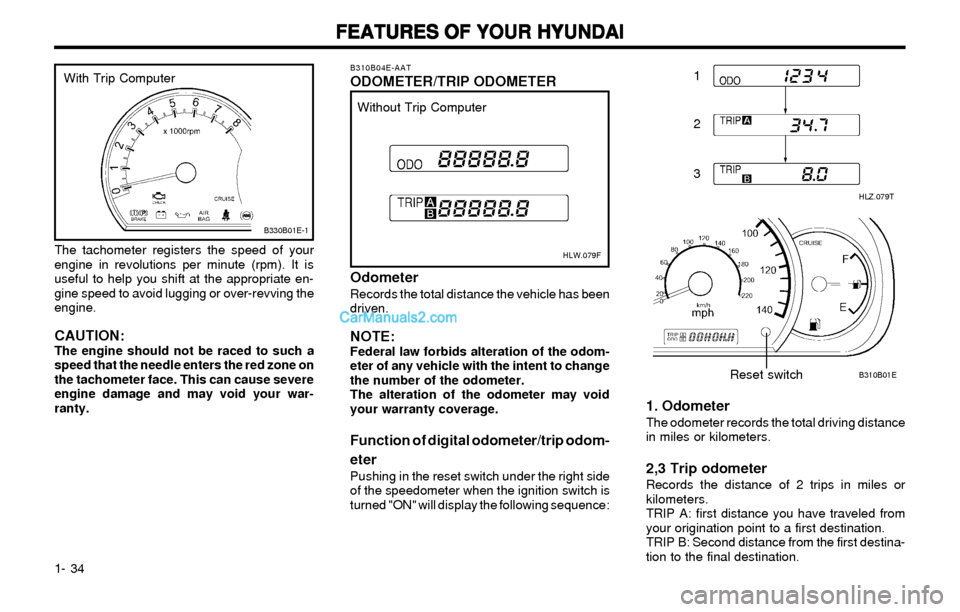
B310B04E-AATODOMETER/TRIP ODOMETER
HLW.079F
Without Trip Computer
OdometerRecords the total distance the vehicle has been
driven.
NOTE:Federal law forbids alteration of the odom-
eter of any vehicle with the intent to change
the number of the odometer.
The alteration of the odometer may void
your warranty coverage.
Function of digital odometer/trip odom-
eter
Pushing in the reset switch under the right side
of the speedometer when the ignition switch is
turned "ON" will display the following sequence:
1. OdometerThe odometer records the total driving distance
in miles or kilometers.
2,3 Trip odometerRecords the distance of 2 trips in miles or
kilometers.
TRIP A: first distance you have traveled from
your origination point to a first destination.
TRIP B: Second distance from the first destina-
tion to the final destination. The tachometer registers the speed of your
engine in revolutions per minute (rpm). It is
useful to help you shift at the appropriate en-
gine speed to avoid lugging or over-revving the
engine.
CAUTION:The engine should not be raced to such a
speed that the needle enters the red zone on
the tachometer face. This can cause severe
engine damage and may void your war-
ranty.
B330B01E-1
With Trip Computer
Page 54 of 172
FEATURES OF YOUR HYUNDAI FEATURES OF YOUR HYUNDAIFEATURES OF YOUR HYUNDAI FEATURES OF YOUR HYUNDAI
FEATURES OF YOUR HYUNDAI
1- 45
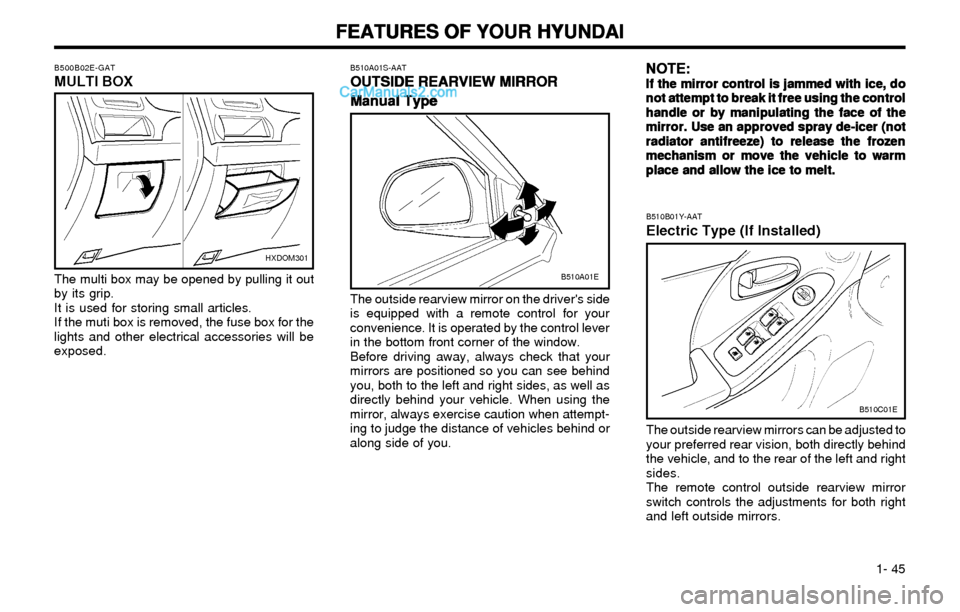
B510A01S-AAT
OUTSIDE REARVIEW MIRROR OUTSIDE REARVIEW MIRROROUTSIDE REARVIEW MIRROR OUTSIDE REARVIEW MIRROR
OUTSIDE REARVIEW MIRROR
Manual Type Manual TypeManual Type Manual Type
Manual Type
The outside rearview mirror on the driver's side
is equipped with a remote control for your
convenience. It is operated by the control lever
in the bottom front corner of the window.
Before driving away, always check that your
mirrors are positioned so you can see behind
you, both to the left and right sides, as well as
directly behind your vehicle. When using the
mirror, always exercise caution when attempt-
ing to judge the distance of vehicles behind or
along side of you.
B510B01Y-AAT
Electric Type (If Installed)
B510C01E
The outside rearview mirrors can be adjusted to
your preferred rear vision, both directly behind
the vehicle, and to the rear of the left and right
sides.
The remote control outside rearview mirror
switch controls the adjustments for both right
and left outside mirrors.
B510A01E
NOTE: NOTE:NOTE: NOTE:
NOTE:If the mirror control is jammed with ice, do If the mirror control is jammed with ice, doIf the mirror control is jammed with ice, do If the mirror control is jammed with ice, do
If the mirror control is jammed with ice, do
not attempt to break it free using the control not attempt to break it free using the controlnot attempt to break it free using the control not attempt to break it free using the control
not attempt to break it free using the control
handle or by manipulating the face of the handle or by manipulating the face of thehandle or by manipulating the face of the handle or by manipulating the face of the
handle or by manipulating the face of the
mirror. Use an approved spray de-icer (not mirror. Use an approved spray de-icer (notmirror. Use an approved spray de-icer (not mirror. Use an approved spray de-icer (not
mirror. Use an approved spray de-icer (not
radiator antifreeze) to release the frozen radiator antifreeze) to release the frozenradiator antifreeze) to release the frozen radiator antifreeze) to release the frozen
radiator antifreeze) to release the frozen
mechanism or move the vehicle to warm mechanism or move the vehicle to warmmechanism or move the vehicle to warm mechanism or move the vehicle to warm
mechanism or move the vehicle to warm
place and allow the ice to melt. place and allow the ice to melt.place and allow the ice to melt. place and allow the ice to melt.
place and allow the ice to melt.
HXDOM301
The multi box may be opened by pulling it out
by its grip.
It is used for storing small articles.
If the muti box is removed, the fuse box for the
lights and other electrical accessories will be
exposed.
B500B02E-GATMULTI BOX
Page 55 of 172
FEATURES OF YOUR HYUNDAI FEATURES OF YOUR HYUNDAIFEATURES OF YOUR HYUNDAI FEATURES OF YOUR HYUNDAI
FEATURES OF YOUR HYUNDAI
1- 46
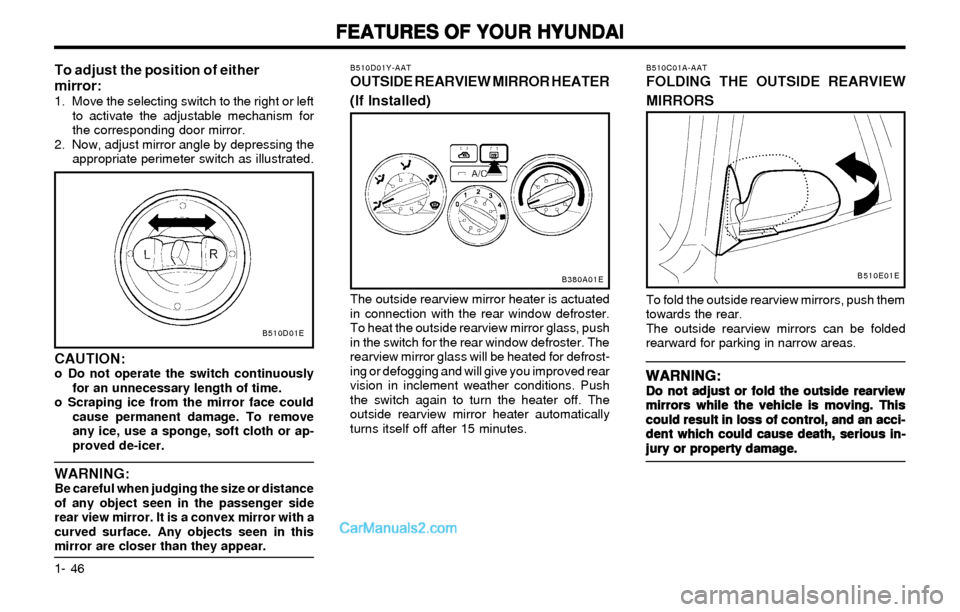
B510C01A-AATFOLDING THE OUTSIDE REARVIEW
MIRRORS
To fold the outside rearview mirrors, push them
towards the rear.
The outside rearview mirrors can be folded
rearward for parking in narrow areas.
WARNING: WARNING:WARNING: WARNING:
WARNING:Do not adjust or fold the outside rearview Do not adjust or fold the outside rearviewDo not adjust or fold the outside rearview Do not adjust or fold the outside rearview
Do not adjust or fold the outside rearview
mirrors while the vehicle is moving. This mirrors while the vehicle is moving. Thismirrors while the vehicle is moving. This mirrors while the vehicle is moving. This
mirrors while the vehicle is moving. This
could result in loss of control, and an acci- could result in loss of control, and an acci-could result in loss of control, and an acci- could result in loss of control, and an acci-
could result in loss of control, and an acci-
dent which could cause death, serious in- dent which could cause death, serious in-dent which could cause death, serious in- dent which could cause death, serious in-
dent which could cause death, serious in-
jury or property damage. jury or property damage.jury or property damage. jury or property damage.
jury or property damage.
B510D01Y-AATOUTSIDE REARVIEW MIRROR HEATER
(If Installed)
The outside rearview mirror heater is actuated
in connection with the rear window defroster.
To heat the outside rearview mirror glass, push
in the switch for the rear window defroster. The
rearview mirror glass will be heated for defrost-
ing or defogging and will give you improved rear
vision in inclement weather conditions. Push
the switch again to turn the heater off. The
outside rearview mirror heater automatically
turns itself off after 15 minutes.
B380A01EB510E01E
CAUTION:o Do not operate the switch continuously
for an unnecessary length of time.
o Scraping ice from the mirror face could
cause permanent damage. To remove
any ice, use a sponge, soft cloth or ap-
proved de-icer.
WARNING:Be careful when judging the size or distance
of any object seen in the passenger side
rear view mirror. It is a convex mirror with a
curved surface. Any objects seen in this
mirror are closer than they appear.
B510D01E
To adjust the position of either
mirror:
1. Move the selecting switch to the right or left
to activate the adjustable mechanism for
the corresponding door mirror.
2. Now, adjust mirror angle by depressing the
appropriate perimeter switch as illustrated.
Page 58 of 172
FEATURES OF YOUR HYUNDAI FEATURES OF YOUR HYUNDAIFEATURES OF YOUR HYUNDAI FEATURES OF YOUR HYUNDAI
FEATURES OF YOUR HYUNDAI
1- 49
WARNING: WARNING:WARNING: WARNING:
WARNING:o oo o
o
The fuel cap must be tightened at least 3 The fuel cap must be tightened at least 3The fuel cap must be tightened at least 3 The fuel cap must be tightened at least 3
The fuel cap must be tightened at least 3
clicks, otherwise light will illuminate. clicks, otherwise light will illuminate.clicks, otherwise light will illuminate. clicks, otherwise light will illuminate.
clicks, otherwise light will illuminate.
o oo o
o
Gasoline vapors are dangerous. Before Gasoline vapors are dangerous. BeforeGasoline vapors are dangerous. Before Gasoline vapors are dangerous. Before
Gasoline vapors are dangerous. Before
refueling, always stop the engine and refueling, always stop the engine andrefueling, always stop the engine and refueling, always stop the engine and
refueling, always stop the engine and
never allow sparks or open flames near never allow sparks or open flames nearnever allow sparks or open flames near never allow sparks or open flames near
never allow sparks or open flames near
the filler area. If you need to replace the the filler area. If you need to replace thethe filler area. If you need to replace the the filler area. If you need to replace the
the filler area. If you need to replace the
filler cap, use a genuine Hyundai re- filler cap, use a genuine Hyundai re-filler cap, use a genuine Hyundai re- filler cap, use a genuine Hyundai re-
filler cap, use a genuine Hyundai re-
placement part. placement part.placement part. placement part.
placement part.
o oo o
o
If you open the fuel filler cap during high If you open the fuel filler cap during highIf you open the fuel filler cap during high If you open the fuel filler cap during high
If you open the fuel filler cap during high
ambient temperatures, a slight "pres- ambient temperatures, a slight "pres-ambient temperatures, a slight "pres- ambient temperatures, a slight "pres-
ambient temperatures, a slight "pres-
sure sound" may be heard. This is nor- sure sound" may be heard. This is nor-sure sound" may be heard. This is nor- sure sound" may be heard. This is nor-
sure sound" may be heard. This is nor-
mal and not a cause for concern. mal and not a cause for concern.mal and not a cause for concern. mal and not a cause for concern.
mal and not a cause for concern.
Whenever you open the fuel filler cap, Whenever you open the fuel filler cap,Whenever you open the fuel filler cap, Whenever you open the fuel filler cap,
Whenever you open the fuel filler cap,
turn it slowly. turn it slowly.turn it slowly. turn it slowly.
turn it slowly.
o oo o
o
Make sure the fuel filler cap is replaced and Make sure the fuel filler cap is replaced andMake sure the fuel filler cap is replaced and Make sure the fuel filler cap is replaced and
Make sure the fuel filler cap is replaced and
securely seated after fueling. Failure to securely seated after fueling. Failure tosecurely seated after fueling. Failure to securely seated after fueling. Failure to
securely seated after fueling. Failure to
replace or fully seat the fuel filler cap will replace or fully seat the fuel filler cap willreplace or fully seat the fuel filler cap will replace or fully seat the fuel filler cap will
replace or fully seat the fuel filler cap will
result in fuel vapors escaping into the atmo- result in fuel vapors escaping into the atmo-result in fuel vapors escaping into the atmo- result in fuel vapors escaping into the atmo-
result in fuel vapors escaping into the atmo-
sphere and the MIL indicator sphere and the MIL indicator sphere and the MIL indicator sphere and the MIL indicator
sphere and the MIL indicator
illu illuillu illu
illu
- -- -
-
minating. minating.minating. minating.
minating.
B560B01E
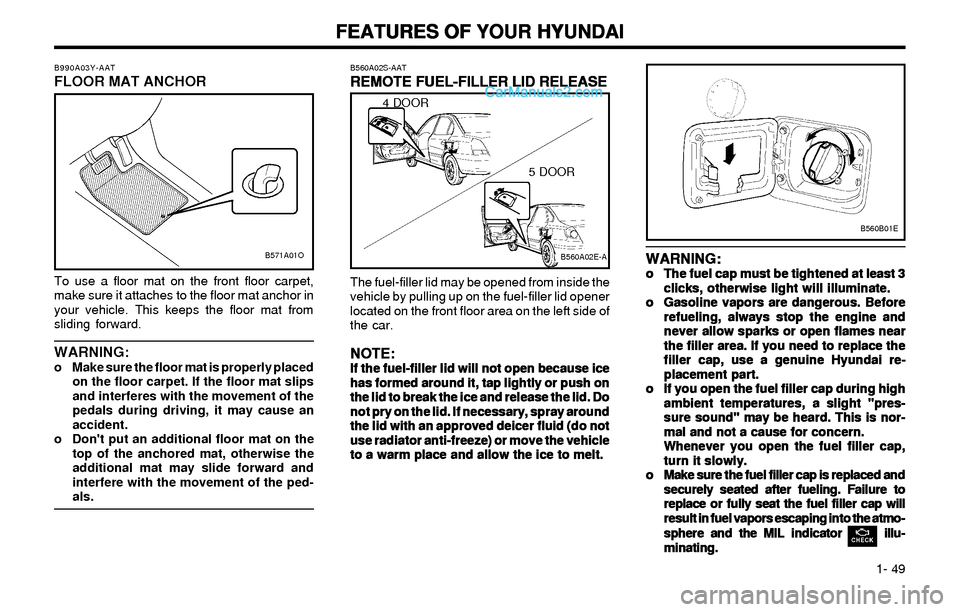
B560A02S-AAT
REMOTE FUEL-FILLER LID RELEASE REMOTE FUEL-FILLER LID RELEASEREMOTE FUEL-FILLER LID RELEASE REMOTE FUEL-FILLER LID RELEASE
REMOTE FUEL-FILLER LID RELEASE
The fuel-filler lid may be opened from inside the
vehicle by pulling up on the fuel-filler lid opener
located on the front floor area on the left side of
the car.
NOTE: NOTE:NOTE: NOTE:
NOTE:If the fuel-filler lid will not open because ice If the fuel-filler lid will not open because iceIf the fuel-filler lid will not open because ice If the fuel-filler lid will not open because ice
If the fuel-filler lid will not open because ice
has formed around it, tap lightly or push on has formed around it, tap lightly or push onhas formed around it, tap lightly or push on has formed around it, tap lightly or push on
has formed around it, tap lightly or push on
the lid to break the ice and release the lid. Do the lid to break the ice and release the lid. Dothe lid to break the ice and release the lid. Do the lid to break the ice and release the lid. Do
the lid to break the ice and release the lid. Do
not pry on the lid. If necessary, spray around not pry on the lid. If necessary, spray aroundnot pry on the lid. If necessary, spray around not pry on the lid. If necessary, spray around
not pry on the lid. If necessary, spray around
the lid with an approved deicer fluid (do not the lid with an approved deicer fluid (do notthe lid with an approved deicer fluid (do not the lid with an approved deicer fluid (do not
the lid with an approved deicer fluid (do not
use radiator anti-freeze) or move the vehicle use radiator anti-freeze) or move the vehicleuse radiator anti-freeze) or move the vehicle use radiator anti-freeze) or move the vehicle
use radiator anti-freeze) or move the vehicle
to a warm place and allow the ice to melt. to a warm place and allow the ice to melt.to a warm place and allow the ice to melt. to a warm place and allow the ice to melt.
to a warm place and allow the ice to melt.
B560A02E-A
4 DOOR
5 DOOR
B571A01O B990A03Y-AAT
FLOOR MAT ANCHOR
To use a floor mat on the front floor carpet,
make sure it attaches to the floor mat anchor in
your vehicle. This keeps the floor mat from
sliding forward.
WARNING:o Make sure the floor mat is properly placed
on the floor carpet. If the floor mat slips
and interferes with the movement of the
pedals during driving, it may cause an
accident.
o Don't put an additional floor mat on the
top of the anchored mat, otherwise the
additional mat may slide forward and
interfere with the movement of the ped-
als.
Page 71 of 172
FEATURES OF YOUR HYUNDAI FEATURES OF YOUR HYUNDAIFEATURES OF YOUR HYUNDAI FEATURES OF YOUR HYUNDAI
FEATURES OF YOUR HYUNDAI
1- 62
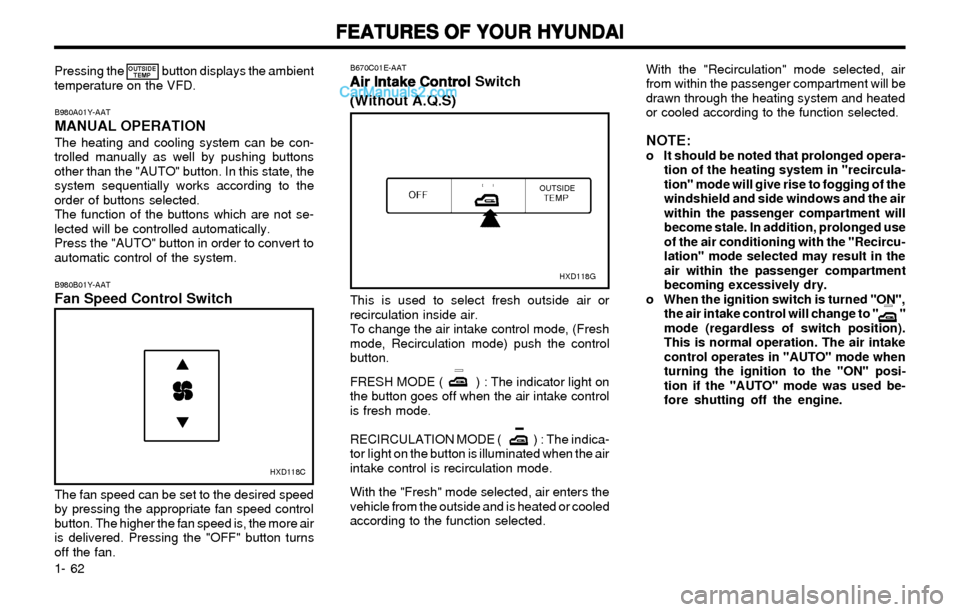
B980B01Y-AATFan Speed Control Switch
HXD118C
The fan speed can be set to the desired speed
by pressing the appropriate fan speed control
button. The higher the fan speed is, the more air
is delivered. Pressing the "OFF" button turns
off the fan.
B670C01E-AAT
Air Intake Control Air Intake ControlAir Intake Control Air Intake Control
Air Intake Control Switch
(Without A.Q.S)
HXD118G
This is used to select fresh outside air or
recirculation inside air.
To change the air intake control mode, (Fresh
mode, Recirculation mode) push the control
button.
FRESH MODE ( ) : The indicator light on
the button goes off when the air intake control
is fresh mode.
RECIRCULATION MODE ( ) : The indica-
tor light on the button is illuminated when the air
intake control is recirculation mode.
With the "Fresh" mode selected, air enters the
vehicle from the outside and is heated or cooled
according to the function selected.
With the "Recirculation" mode selected, air
from within the passenger compartment will be
drawn through the heating system and heated
or cooled according to the function selected.
NOTE:o It should be noted that prolonged opera-
tion of the heating system in "recircula-
tion" mode will give rise to fogging of the
windshield and side windows and the air
within the passenger compartment will
become stale. In addition, prolonged use
of the air conditioning with the "Recircu-
lation" mode selected may result in the
air within the passenger compartment
becoming excessively dry.
o When the ignition switch is turned "ON",
the air intake control will change to " "
mode (regardless of switch position).
This is normal operation. The air intake
control operates in "AUTO" mode when
turning the ignition to the "ON" posi-
tion if the "AUTO" mode was used be-
fore shutting off the engine.
B980A01Y-AATMANUAL OPERATIONThe heating and cooling system can be con-
trolled manually as well by pushing buttons
other than the "AUTO" button. In this state, the
system sequentially works according to the
order of buttons selected.
The function of the buttons which are not se-
lected will be controlled automatically.
Press the "AUTO" button in order to convert to
automatic control of the system. Pressing the button displays the ambient
temperature on the VFD.
OUTSIDE
TEMP
Page 78 of 172
FEATURES OF YOUR HYUNDAI FEATURES OF YOUR HYUNDAIFEATURES OF YOUR HYUNDAI FEATURES OF YOUR HYUNDAI
FEATURES OF YOUR HYUNDAI
1- 69
FAD (Fader Control) KnobPull the treble control knob further out.
Turn the control knob counterclockwise to em-
phasize front speaker sound. (Rear speaker
sound will be attenuated)
When the control knob is turned clockwise, rear
speaker sound will be emphasized.
(Front speaker sound will be attenuated)
4. TUNE (Manual) Select ButtonPress the side or side to increase or to
decrease the frequency. Press either button
and hold down to continuously scroll. Release
button once the desired station is reached.
SEEK Operation (Automatic Channel
Selection)
Press the TUNE select button 0.5 sec or more.
Releasing it will automatically tune to the next
available station with a beep sound.
When the side is pressed longer than 0.5
second, releasing will automatically tune to the
next higher frequency and when the side is
pressed longer than 0.5 second, releasing will
automatically tune to the next lower frequency.
5. BAND SelectorPressing the button changes the AM, FM1
and FM2 bands. The mode selected is dis-
played on LCD.
6. PRESET STATION SELECT ButtonSix (6) stations for AM, FM and FM2 respective-
ly can be preset in the electronic memory circuit
on this unit.
HOW TO PRESET STATIONSSix AM and twelve FM stations may be pro-
grammed into the memory of the radio. Then,
by simply pressing the band select button and/
or one of the six station select buttons, you may
recall any of these stations instantly. To pro-
gram the stations, follow these steps:
o Press band selector to set the band for AM,
FM, or FM2.
o Select the desired station to be stored by
seek or manual tuning.
o Determine the preset station select button
you wish to use to access that station.
o Press the station select button for more than
two seconds. A select button indicator will
show in the display indicating which select
button you have depressed. The frequency
display will flash after it has been stored into
the memory with a beep sound. You should
then release the button, and proceed to
program the next desired station. A total of
18 stations can be programmed by select-
ing one AM and two FM stations per button.
o When completed, any preset station may be
recalled by selecting AM, FM or FM2 band
and the appropriate station button.
H240B03O-AAT1. POWER ON-OFF Control KnobThe radio unit may be operated when the
ignition key is in the "ACC" or "ON" position.
Press the knob to switch the power on. The
LCD shows the radio frequency in the radio
mode or the tape direction indicator in the tape
mode. To switch the power off, press the knob
again.
VOLUME ControlRotate the knob clockwise to increase the
volume and turn the knob counterclockwise to
reduce the volume.
2. BASS Control KnobPress to pop the knob out and turn to the left or
right for the desired bass tone.
BAL (Balance Control) KnobPull the bass control knob further out. Turn the
control knob clockwise to emphasize right
speaker sound. (Left speaker sound will be
attenuated)
When the control knob is turned counterclock-
wise, left speaker sound will be emphasized.
(Right speaker sound will be attenuated)
3. TREB (Treble Control) KnobPress to pop the knob out and turn to the left or
right for the desired treble tone.
FM/AM