battery Hyundai Elantra 2003 Owner's Manual
[x] Cancel search | Manufacturer: HYUNDAI, Model Year: 2003, Model line: Elantra, Model: Hyundai Elantra 2003Pages: 172, PDF Size: 2.82 MB
Page 15 of 172
FEATURES OF YOUR HYUNDAI FEATURES OF YOUR HYUNDAIFEATURES OF YOUR HYUNDAI FEATURES OF YOUR HYUNDAI
FEATURES OF YOUR HYUNDAI
1- 6
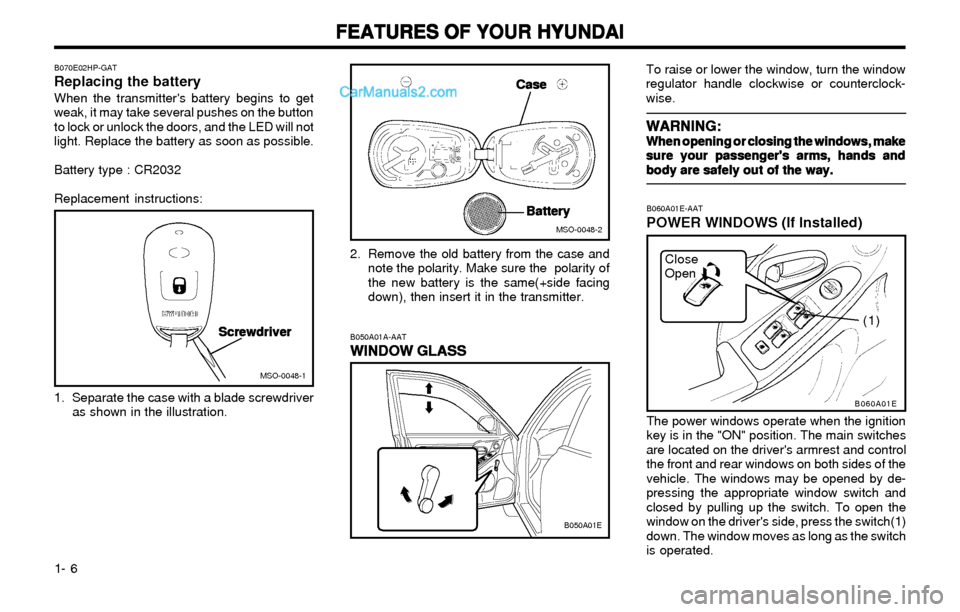
To raise or lower the window, turn the window
regulator handle clockwise or counterclock-
wise.
WARNING: WARNING:WARNING: WARNING:
WARNING:When opening or closing the windows, make When opening or closing the windows, makeWhen opening or closing the windows, make When opening or closing the windows, make
When opening or closing the windows, make
sure your passenger's arms, hands and sure your passenger's arms, hands andsure your passenger's arms, hands and sure your passenger's arms, hands and
sure your passenger's arms, hands and
body are safely out of the way. body are safely out of the way.body are safely out of the way. body are safely out of the way.
body are safely out of the way.
Close
Open
B060A01E
(1)
B060A01E-AAT
POWER WINDOWS (If Installed)
The power windows operate when the ignition
key is in the "ON" position. The main switches
are located on the driver's armrest and control
the front and rear windows on both sides of the
vehicle. The windows may be opened by de-
pressing the appropriate window switch and
closed by pulling up the switch. To open the
window on the driver's side, press the switch(1)
down. The window moves as long as the switch
is operated.
B070E02HP-GATReplacing the batteryWhen the transmitter's battery begins to get
weak, it may take several pushes on the button
to lock or unlock the doors, and the LED will not
light. Replace the battery as soon as possible.
Battery type : CR2032
Replacement instructions:
1. Separate the case with a blade screwdriver
as shown in the illustration.2. Remove the old battery from the case and
note the polarity. Make sure the polarity of
the new battery is the same(+side facing
down), then insert it in the transmitter.
MSO-0048-1
MSO-0048-2
Screwdriver ScrewdriverScrewdriver Screwdriver
Screwdriver
Case CaseCase Case
Case
Battery BatteryBattery Battery
Battery
B050A01A-AAT
WINDOW GLASS WINDOW GLASSWINDOW GLASS WINDOW GLASS
WINDOW GLASS
B050A01E
Page 33 of 172
FEATURES OF YOUR HYUNDAI FEATURES OF YOUR HYUNDAIFEATURES OF YOUR HYUNDAI FEATURES OF YOUR HYUNDAI
FEATURES OF YOUR HYUNDAI
1- 24
B990B03Y-GATSide Impact Airbag (If Installed)
B990B02Y
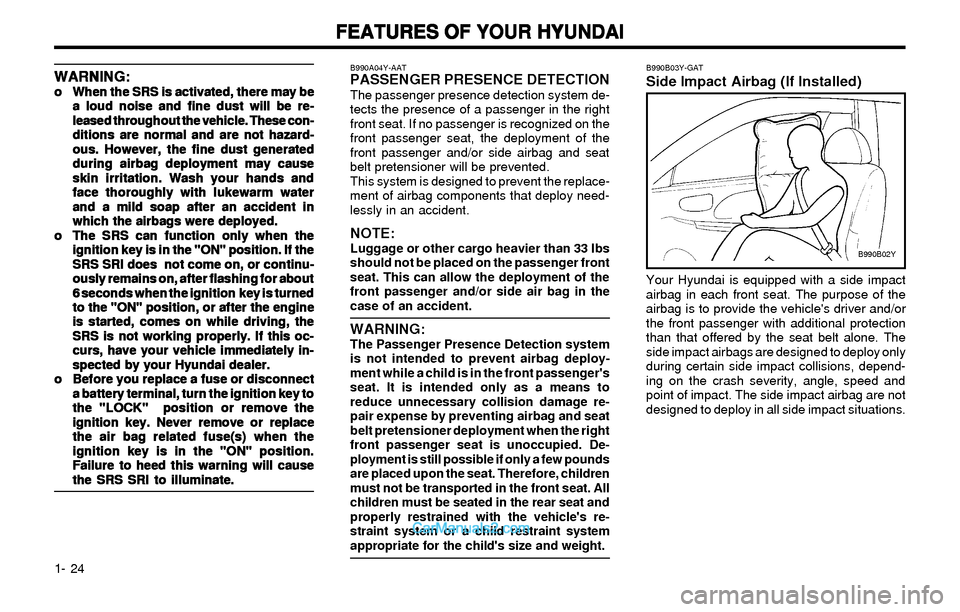
Your Hyundai is equipped with a side impact
airbag in each front seat. The purpose of the
airbag is to provide the vehicle's driver and/or
the front passenger with additional protection
than that offered by the seat belt alone. The
side impact airbags are designed to deploy only
during certain side impact collisions, depend-
ing on the crash severity, angle, speed and
point of impact. The side impact airbag are not
designed to deploy in all side impact situations.
WARNING: WARNING:WARNING: WARNING:
WARNING:o oo o
o
When the SRS is activated, there may be When the SRS is activated, there may beWhen the SRS is activated, there may be When the SRS is activated, there may be
When the SRS is activated, there may be
a loud noise and fine dust will be re- a loud noise and fine dust will be re-a loud noise and fine dust will be re- a loud noise and fine dust will be re-
a loud noise and fine dust will be re-
leased throughout the vehicle. These con- leased throughout the vehicle. These con-leased throughout the vehicle. These con- leased throughout the vehicle. These con-
leased throughout the vehicle. These con-
ditions are normal and are not hazard- ditions are normal and are not hazard-ditions are normal and are not hazard- ditions are normal and are not hazard-
ditions are normal and are not hazard-
ous. However, the fine dust generated ous. However, the fine dust generatedous. However, the fine dust generated ous. However, the fine dust generated
ous. However, the fine dust generated
during airbag deployment may cause during airbag deployment may causeduring airbag deployment may cause during airbag deployment may cause
during airbag deployment may cause
skin irritation. Wash your hands and skin irritation. Wash your hands andskin irritation. Wash your hands and skin irritation. Wash your hands and
skin irritation. Wash your hands and
face thoroughly with lukewarm water face thoroughly with lukewarm waterface thoroughly with lukewarm water face thoroughly with lukewarm water
face thoroughly with lukewarm water
and a mild soap after an accident in and a mild soap after an accident inand a mild soap after an accident in and a mild soap after an accident in
and a mild soap after an accident in
which the airbags were deployed. which the airbags were deployed.which the airbags were deployed. which the airbags were deployed.
which the airbags were deployed.
o oo o
o
The SRS can function only when the The SRS can function only when theThe SRS can function only when the The SRS can function only when the
The SRS can function only when the
ignition key is in the "ON" position. If the ignition key is in the "ON" position. If theignition key is in the "ON" position. If the ignition key is in the "ON" position. If the
ignition key is in the "ON" position. If the
SRS SRI does not come on, or continu- SRS SRI does not come on, or continu-SRS SRI does not come on, or continu- SRS SRI does not come on, or continu-
SRS SRI does not come on, or continu-
ously remains on, after flashing for about ously remains on, after flashing for aboutously remains on, after flashing for about ously remains on, after flashing for about
ously remains on, after flashing for about
6 seconds when the ignition key is turned 6 seconds when the ignition key is turned6 seconds when the ignition key is turned 6 seconds when the ignition key is turned
6 seconds when the ignition key is turned
to the "ON" position, or after the engine to the "ON" position, or after the engineto the "ON" position, or after the engine to the "ON" position, or after the engine
to the "ON" position, or after the engine
is started, comes on while driving, the is started, comes on while driving, theis started, comes on while driving, the is started, comes on while driving, the
is started, comes on while driving, the
SRS is not working properly. If this oc- SRS is not working properly. If this oc-SRS is not working properly. If this oc- SRS is not working properly. If this oc-
SRS is not working properly. If this oc-
curs, have your vehicle immediately in- curs, have your vehicle immediately in-curs, have your vehicle immediately in- curs, have your vehicle immediately in-
curs, have your vehicle immediately in-
spected by your Hyundai dealer. spected by your Hyundai dealer.spected by your Hyundai dealer. spected by your Hyundai dealer.
spected by your Hyundai dealer.
o oo o
o
Before you replace a fuse or disconnect Before you replace a fuse or disconnectBefore you replace a fuse or disconnect Before you replace a fuse or disconnect
Before you replace a fuse or disconnect
a battery terminal, turn the ignition key to a battery terminal, turn the ignition key toa battery terminal, turn the ignition key to a battery terminal, turn the ignition key to
a battery terminal, turn the ignition key to
the "LOCK" position or remove the the "LOCK" position or remove thethe "LOCK" position or remove the the "LOCK" position or remove the
the "LOCK" position or remove the
ignition key. Never remove or replace ignition key. Never remove or replaceignition key. Never remove or replace ignition key. Never remove or replace
ignition key. Never remove or replace
the air bag related fuse(s) when the the air bag related fuse(s) when thethe air bag related fuse(s) when the the air bag related fuse(s) when the
the air bag related fuse(s) when the
ignition key is in the "ON" position. ignition key is in the "ON" position.ignition key is in the "ON" position. ignition key is in the "ON" position.
ignition key is in the "ON" position.
Failure to heed this warning will cause Failure to heed this warning will causeFailure to heed this warning will cause Failure to heed this warning will cause
Failure to heed this warning will cause
the SRS SRI to illuminate. the SRS SRI to illuminate.the SRS SRI to illuminate. the SRS SRI to illuminate.
the SRS SRI to illuminate.
B990A04Y-AATPASSENGER PRESENCE DETECTIONThe passenger presence detection system de-
tects the presence of a passenger in the right
front seat. If no passenger is recognized on the
front passenger seat, the deployment of the
front passenger and/or side airbag and seat
belt pretensioner will be prevented.
This system is designed to prevent the replace-
ment of airbag components that deploy need-
lessly in an accident.
NOTE:Luggage or other cargo heavier than 33 lbs
should not be placed on the passenger front
seat. This can allow the deployment of the
front passenger and/or side air bag in the
case of an accident.
WARNING:The Passenger Presence Detection system
is not intended to prevent airbag deploy-
ment while a child is in the front passenger's
seat. It is intended only as a means to
reduce unnecessary collision damage re-
pair expense by preventing airbag and seat
belt pretensioner deployment when the right
front passenger seat is unoccupied. De-
ployment is still possible if only a few pounds
are placed upon the seat. Therefore, children
must not be transported in the front seat. All
children must be seated in the rear seat and
properly restrained with the vehicle's re-
straint system or a child restraint system
appropriate for the child's size and weight.
Page 44 of 172
FEATURES OF YOUR HYUNDAI FEATURES OF YOUR HYUNDAIFEATURES OF YOUR HYUNDAI FEATURES OF YOUR HYUNDAI
FEATURES OF YOUR HYUNDAI
1- 35
B310A01S-AAT
ODOMETER
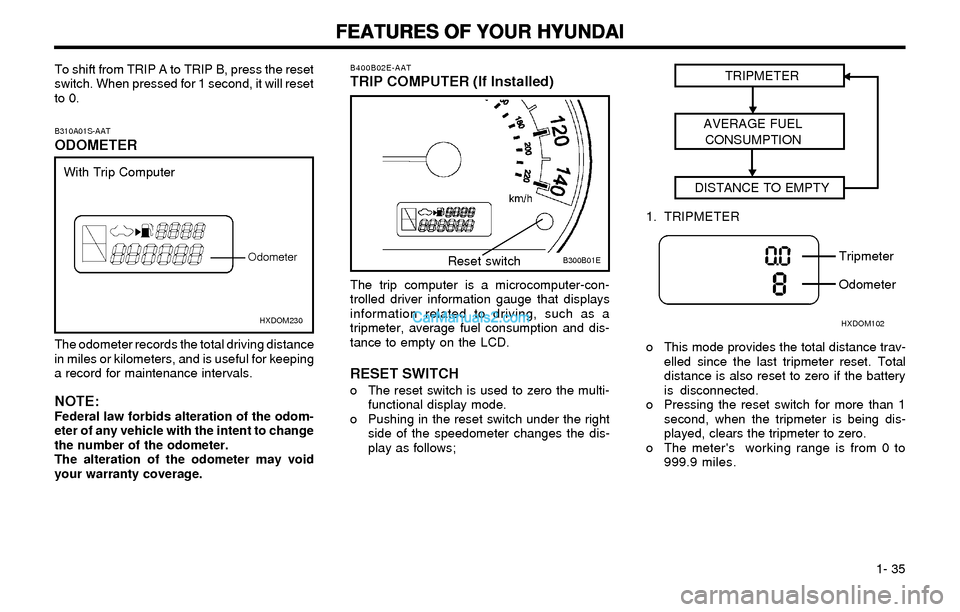
The odometer records the total driving distance
in miles or kilometers, and is useful for keeping
a record for maintenance intervals.
NOTE:Federal law forbids alteration of the odom-
eter of any vehicle with the intent to change
the number of the odometer.
The alteration of the odometer may void
your warranty coverage.
HXDOM230
With Trip Computer
Odometer
To shift from TRIP A to TRIP B, press the reset
switch. When pressed for 1 second, it will reset
to 0.
The trip computer is a microcomputer-con-
trolled driver information gauge that displays
information related to driving, such as a
tripmeter, average fuel consumption and dis-
tance to empty on the LCD.
RESET SWITCHo The reset switch is used to zero the multi-
functional display mode.
o Pushing in the reset switch under the right
side of the speedometer changes the dis-
play as follows;
B300B01E B400B02E-AAT
TRIP COMPUTER (If Installed)
Reset switchTRIPMETER
AVERAGE FUEL
CONSUMPTION
DISTANCE TO EMPTY
o This mode provides the total distance trav-
elled since the last tripmeter reset. Total
distance is also reset to zero if the battery
is disconnected.
o Pressing the reset switch for more than 1
second, when the tripmeter is being dis-
played, clears the tripmeter to zero.
o The meter's working range is from 0 to
999.9 miles.
HXDOM102
Tripmeter
Odometer 1. TRIPMETER
Page 70 of 172
FEATURES OF YOUR HYUNDAI FEATURES OF YOUR HYUNDAIFEATURES OF YOUR HYUNDAI FEATURES OF YOUR HYUNDAI
FEATURES OF YOUR HYUNDAI
1- 61
B970C02E-AATAutomatic Operation
HXD118D
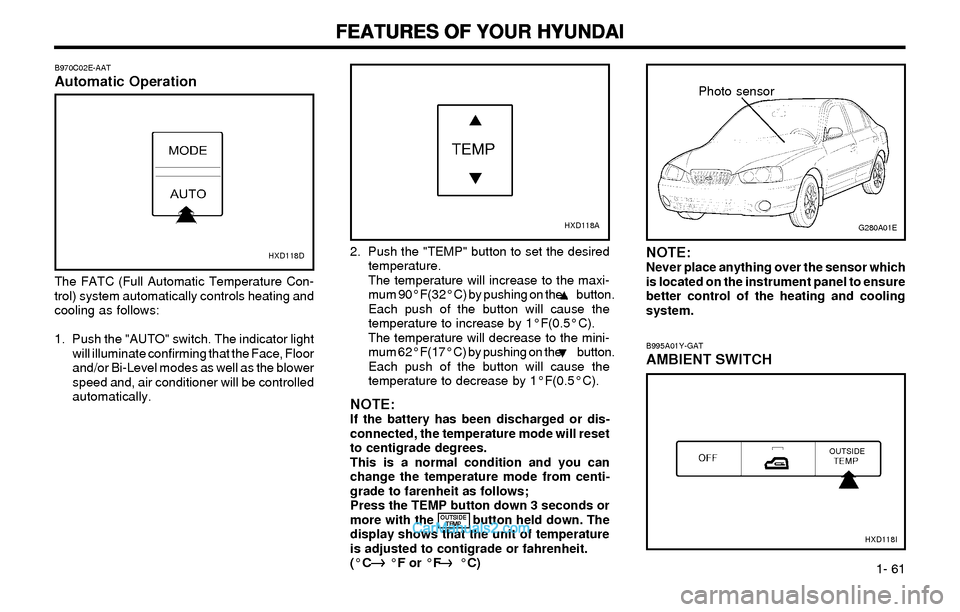
The FATC (Full Automatic Temperature Con-
trol) system automatically controls heating and
cooling as follows:
1. Push the "AUTO" switch. The indicator light
will illuminate confirming that the Face, Floor
and/or Bi-Level modes as well as the blower
speed and, air conditioner will be controlled
automatically.2. Push the "TEMP" button to set the desired
temperature.
The temperature will increase to the maxi-
mum 90°F(32°C) by pushing on the button.
Each push of the button will cause the
temperature to increase by 1°F(0.5°C).
The temperature will decrease to the mini-
mum 62°F(17°C) by pushing on the button.
Each push of the button will cause the
temperature to decrease by 1°F(0.5°C).
NOTE:If the battery has been discharged or dis-
connected, the temperature mode will reset
to centigrade degrees.
This is a normal condition and you can
change the temperature mode from centi-
grade to farenheit as follows;
Press the TEMP button down 3 seconds or
more with the button held down. The
display shows that the unit of temperature
is adjusted to contigrade or fahrenheit.
(°C °F or °F °C)
G280A01E
B995A01Y-GAT
AMBIENT SWITCH
HXD118I
Photo sensor
HXD118A
NOTE:Never place anything over the sensor which
is located on the instrument panel to ensure
better control of the heating and cooling
system.
OUTSIDE
TEMP
Page 86 of 172
FEATURES OF YOUR HYUNDAI FEATURES OF YOUR HYUNDAIFEATURES OF YOUR HYUNDAI FEATURES OF YOUR HYUNDAI
FEATURES OF YOUR HYUNDAI
1- 77
B260D02O-AAT
1. Playing CDo Insert the CD with the label facing upward.
o Insert the CD to start CD playback, during
radio operation.
o When a disc is in the CD deck, if you press
the play button, the CD player will begin
playing even if the radio is being used.
o The CD player can be used when the igni-
tion switch is in either the "ON" or "ACC"
position.
2. FF/REW ( / )If you want to fast forward or reverse through
the compact disc track, push and hold in the FF
( ) or REW ( ) button.
When you release the button, the compact disc
player will resume playing.
3. TRACK UP/DOWNo The desired track on the disc currently being
played can be selected using the track
number.
o Press once to skip forward to the beginn-
ing of the next track. Press once to skip
back to the beginning of the track.
4. SCAN Buttono Press the SCAN button to playback the first
10 seconds of each track.
o Press the SCAN button again within 10 sec.
for the desired track.
5. REPEAT Buttono To repeat the music you are listening to,
press the RPT button. To cancel , press
again.
o If you do not release RPT operation, when
the track ends, it will automatically be re-
played.
This process will be continued until you
push the button again.
6. EJECT ButtonWhen the EJECT button is pressed with the
CD loaded, the CD is ejected.
NOTE:o oo o
o
If the CD does not operate properly or if If the CD does not operate properly or ifIf the CD does not operate properly or if If the CD does not operate properly or if
If the CD does not operate properly or if
the ER2 fault code is displayed, use one the ER2 fault code is displayed, use onethe ER2 fault code is displayed, use one the ER2 fault code is displayed, use one
the ER2 fault code is displayed, use one
of two methods to reset the CD deck of two methods to reset the CD deckof two methods to reset the CD deck of two methods to reset the CD deck
of two methods to reset the CD deck
function. function.function. function.
function.
- -- -
-
Remove the audio fuse for 5 minutes. Remove the audio fuse for 5 minutes.Remove the audio fuse for 5 minutes. Remove the audio fuse for 5 minutes.
Remove the audio fuse for 5 minutes.
Then, reinstall the audio fuse. Then, reinstall the audio fuse.Then, reinstall the audio fuse. Then, reinstall the audio fuse.
Then, reinstall the audio fuse.
- -- -
-
Disconnect the negative terminal of Disconnect the negative terminal ofDisconnect the negative terminal of Disconnect the negative terminal of
Disconnect the negative terminal of
the battery and wait 5 minutes. the battery and wait 5 minutes.the battery and wait 5 minutes. the battery and wait 5 minutes.
the battery and wait 5 minutes.
Then reconnect the negative battery Then reconnect the negative batteryThen reconnect the negative battery Then reconnect the negative battery
Then reconnect the negative battery
terminal. terminal.terminal. terminal.
terminal.
o oo o
o
To assure proper operation of the unit, To assure proper operation of the unit,To assure proper operation of the unit, To assure proper operation of the unit,
To assure proper operation of the unit,
keep the vehicle interior temperature keep the vehicle interior temperaturekeep the vehicle interior temperature keep the vehicle interior temperature
keep the vehicle interior temperature
within a normal range by using the within a normal range by using thewithin a normal range by using the within a normal range by using the
within a normal range by using the
vehicle's air conditioning or heating vehicle's air conditioning or heatingvehicle's air conditioning or heating vehicle's air conditioning or heating
vehicle's air conditioning or heating
system. system.system. system.
system.
o oo o
o
When replacing the fuse, replace it with When replacing the fuse, replace it withWhen replacing the fuse, replace it with When replacing the fuse, replace it with
When replacing the fuse, replace it with
a fuse having the correct capacity. a fuse having the correct capacity.a fuse having the correct capacity. a fuse having the correct capacity.
a fuse having the correct capacity.
o oo o
o
The preset station frequencies are all The preset station frequencies are allThe preset station frequencies are all The preset station frequencies are all
The preset station frequencies are all
erased when the car battery is discon- erased when the car battery is discon-erased when the car battery is discon- erased when the car battery is discon-
erased when the car battery is discon-
nected. Therefore, all data will have to nected. Therefore, all data will have tonected. Therefore, all data will have to nected. Therefore, all data will have to
nected. Therefore, all data will have to
be set again if this should occur. be set again if this should occur.be set again if this should occur. be set again if this should occur.
be set again if this should occur.
o oo o
o
Do not add any oil to the rotating parts. Do not add any oil to the rotating parts.Do not add any oil to the rotating parts. Do not add any oil to the rotating parts.
Do not add any oil to the rotating parts.
Keep magnets, screwdrivers and other Keep magnets, screwdrivers and otherKeep magnets, screwdrivers and other Keep magnets, screwdrivers and other
Keep magnets, screwdrivers and other
metallic objects away from the tape metallic objects away from the tapemetallic objects away from the tape metallic objects away from the tape
metallic objects away from the tape
mechanism and head. mechanism and head.mechanism and head. mechanism and head.
mechanism and head.
o This equipment is designed to be used
only in a 12 volt DC battery system with
negative ground.
o This unit is made of precision parts. Do
not attempt to disassemble or adjust any
parts.
o When driving your vehicle, be sure to
keep the volume of the unit set low enough
to allow you to hear sounds coming from
the outside.
o Do not expose this equipment (including
the speakers) to water or excessive mois-
ture.
Page 88 of 172
FEATURES OF YOUR HYUNDAI FEATURES OF YOUR HYUNDAIFEATURES OF YOUR HYUNDAI FEATURES OF YOUR HYUNDAI
FEATURES OF YOUR HYUNDAI
1- 79
B260F01E-AATThe CD auto changer is located in the left side
of the trunk.
o To use the CD auto changer.
1. Open the sliding lid of the CD auto chang-
er.
2. To eject the compact disc magazine,
press the EJECT button located inside
the CD auto changer.
3. Insert the discs into the magazine.
4. Push the magazine into the CD auto
changer and close the sliding lid.
o The CD auto changer can be used when the
ignition switch is in either the "ON" or "ACC"
position.
1. CD Select ButtonWhen the CD changer magazine contains discs,
press the "CD" button and the CD changer can
be used even if the radio is being used. The
Hyundai CD changer can hold up to eight discs.
The disc number will be lit, and the track
number, and elapsed time will be displayed.
2. DISC Select ButtonTo select the CD you want, push " " to
change the disc number.
3. TRACK UP/DOWNo The desired track on the disc currently being
played can be selected using the track
number.
o Press once to skip forward to the begin-
ning of the next track. Press once to skip
back to the beginning of the track.
4. FF/REW ( / )If you want to fast forward or reverse through
the compact disc track, push and hold in the FF
( ) or REW ( ) button.
When you release the button, the compact disc
player will resume playing.
5. REPEATo To repeat the music you are listening to,
press the RPT button. To cancel , press
again.
o If you do not release RPT operation when
the track ends, it will automatically be re-
played.
This process will be continued until you
push the button again.
6. SCAN Buttono Press the SCAN button to playback the first
10 seconds of each track.
o Press the SCAN button again within 10 sec.
for the desired track.
NOTE:o When replacing the fuse, replace it with a
fuse having the correct capacity.
o This equipment is designed to be used
only in a 12 volt DC battery system with
negative ground.
o This unit is made of precision parts. Do
not attempt to disassemble or adjust any
parts.
o When driving your vehicle, be sure to
keep the volume of the unit set low enough
to allow you to hear sounds coming from
the outside.
TUNE
DISC
Page 95 of 172

FEATURES OF YOUR HYUNDAI FEATURES OF YOUR HYUNDAIFEATURES OF YOUR HYUNDAI FEATURES OF YOUR HYUNDAI
FEATURES OF YOUR HYUNDAI
1- 86
H290F01O-GAT1. CD Select Buttono Insert the CD with the label facing upward.
o Insert the CD to start CD playback, during
radio operation or cassette tape playing.
o When a disc is in the CD deck, if you press
the CD button the CD player will begin
playing even if the radio or cassette player
is being used.
o The CD player can be used when the igni-
tion switch is in either the "ON" or "ACC"
position.
2. FF/REW ( / )If you want to fast forward or reverse through
the compact disc track, push and hold the FF
( ) or REW ( ) button.
When you release the button, the compact disc
player will resume playing.
3. TRACK UP/DOWNo The desired track on the disc currently being
played can be selected using the track
number.
o Press button once to skip forward to the
beginning of the next track. Press button
once to skip back to the beginning of the
track.
4. REPEAT
o To repeat the track you are currently listen-
ing to, press the RPT button. To cancel,
press again.
o If you do not release RPT operation when
the track ends, it will automatically be re-
played.
This process will be continued until you
push the button again.
5. EQUALIZER Button
Press the EQ button to select the CLASSIC,
JAZZ, ROCK and DEFEAT MODE for the de-
sired tone quality. Each press of the button
changes the display as follows;
NOTE:o To assure proper operation of the unit,
keep the vehicle interior temperature
within a normal range by using the
vehicle's air conditioning or heating
system.
o When replacing the fuse, replace it with a
fuse having the correct capacity.
o The preset station frequencies are all
erased when the car battery is discon-
nected. Therefore, all data will have to be
set again if this should occur.
o Do not add any oil to the rotating parts.
Keep magnets, screwdrivers and other
metallic objects away from the tape
mechanism and head.
o This equipment is designed to be used
only in a 12 volt DC battery system with
negative ground.
o This unit is made of precision parts. Do
not attempt to disassemble or adjust any
parts.
o When driving your vehicle, be sure to
keep the volume of the unit set low enough
to allow you to hear sounds coming from
the outside.
o Do not expose this equipment (including
the speakers and tape) to water or exces-
sive moisture.
CLASSIC ® JAZZ ® ROCK ® DEFEAT
6. CD EJECT ButtonWhen the button is pressed with a CD loaded,
the CD will eject.
7. SCAN Buttono Press the SCAN button to playback the first
10 seconds of each track.
o Press the SCAN button again within 10 sec.
When you have reached the desired track.
Page 97 of 172

FEATURES OF YOUR HYUNDAI FEATURES OF YOUR HYUNDAIFEATURES OF YOUR HYUNDAI FEATURES OF YOUR HYUNDAI
FEATURES OF YOUR HYUNDAI
1- 88
3. TRACK UP/DOWNo The desired track on the disc currently being
played can be selected using the track
number.
o Press once to skip forward to the begin-
ning of the next track. Press once to skip
back to the beginning of the track.
4. FF/REW ( / )If you want to fast forward or reverse through
the compact disc track, push and hold in the FF
( ) or REW ( ) button.
When you release the button, the compact disc
player will resume playing.
5. REPEATo To repeat the track you are currently listen-
ing to, press the RPT button. To cancel,
press again.
o If you do not release RPT operation when
the track ends, it will automatically be re-
played.
This process will be continued until you
push the button again.
B290H01E-GATThe CD auto changer is located in the left side
of the trunk.
o To use the CD auto changer.
1. Open the sliding lid of the CD auto chang-
er.
2. To eject the compact disc magazine,
press the EJECT button located inside
the CD auto changer.
3. Insert the discs into the magazine.
4. Push the magazine into the CD auto
changer and close the sliding lid.
o The CD auto changer can be used when the
ignition switch is in either "ON" or "ACC"
position.
1. CD CHANGER Select ButtonWhen the CD changer magazine contains discs,
press the "CD/CDC" button and the CD changer
can be used even if the radio or cassette player
is being used. The Hyundai CD changer can
hold up to eight discs. The disc number will be
lit, and the track number, and elapsed time will
be displayed.
2. DISC Select ButtonTo select the CD you want, push " " to
change the disc number.
6. SCAN Buttono Press the SCAN button to playback the first
10 seconds of each track.
o Press the SCAN button again within 10 sec.
When you have reached the desired track.
TUNE
DISC
7. EQ Button
Press the EQ button to select the CLASSIC,
JAZZ, ROCK and DEFEAT MODE for the de-
sired tone quality. Each press of the button
changes the display as follows;
CLASSIC ® JAZZ ® ROCK ® DEFEAT
NOTE:o When replacing the fuse, replace it with a
fuse having the correct capacity.
o This equipment is designed to be used
only in a 12 volt DC battery system with
negative ground.
o This unit is made of precision parts. Do
not attempt to disassemble or adjust any
parts.
o When driving your vehicle, be sure to
keep the volume of the unit set low enough
to allow you to hear sounds coming from
the outside.
Page 103 of 172
DRIVING YOUR HYUNDAI DRIVING YOUR HYUNDAIDRIVING YOUR HYUNDAI DRIVING YOUR HYUNDAI
DRIVING YOUR HYUNDAI
2- 2
C020A01A-AAT
BEFORE STARTING THE ENGINE BEFORE STARTING THE ENGINEBEFORE STARTING THE ENGINE BEFORE STARTING THE ENGINE
BEFORE STARTING THE ENGINEBefore you start the engine, you should always:
1. Look around the vehicle to be sure there are
no flat tires, puddles of oil, water or other
indications of possible trouble.
2. After entering the car, check to be sure the
parking brake is engaged.
3. Check that all windows, and lights are clean.
4. Check that the interior and exterior mirrors
are clean and in position.
5. Check your seat, seatback and headrest to
be sure they are in their proper positions.
6. Lock all the doors.
7. Fasten your seat belt and be sure that all
other occupants have fastened theirs.
8. Turn off all lights and accessories that are not
needed.
9. When you turn the ignition switch to "ON",
check that all appropriate warning lights are
operating and that you have sufficient fuel.
10. Check the operation of warning lights and all
bulbs when key is in the "ON" position.o To start the engine, insert the ignition key and
turn it to the "START" position. Release it as
soon as the engine starts. Do not hold the key
in the "START" position for more than 15
seconds.
NOTE: NOTE:NOTE: NOTE:
NOTE:o oo o
o
For safety, the engine will not start if the For safety, the engine will not start if theFor safety, the engine will not start if the For safety, the engine will not start if the
For safety, the engine will not start if the
clutch pedal is not depressed fully (Manual clutch pedal is not depressed fully (Manualclutch pedal is not depressed fully (Manual clutch pedal is not depressed fully (Manual
clutch pedal is not depressed fully (Manual
Transaxle) or the shift lever is not in "P" or Transaxle) or the shift lever is not in "P" orTransaxle) or the shift lever is not in "P" or Transaxle) or the shift lever is not in "P" or
Transaxle) or the shift lever is not in "P" or
"N" Position (Automatic Transaxle). "N" Position (Automatic Transaxle)."N" Position (Automatic Transaxle). "N" Position (Automatic Transaxle).
"N" Position (Automatic Transaxle).
o oo o
o
The ignition key cannot be turned from The ignition key cannot be turned fromThe ignition key cannot be turned from The ignition key cannot be turned from
The ignition key cannot be turned from
"ACC" position to "LOCK" position un- "ACC" position to "LOCK" position un-"ACC" position to "LOCK" position un- "ACC" position to "LOCK" position un-
"ACC" position to "LOCK" position un-
less the shift lever is in the "P" (Park) less the shift lever is in the "P" (Park)less the shift lever is in the "P" (Park) less the shift lever is in the "P" (Park)
less the shift lever is in the "P" (Park)
position or the negative battery terminal is position or the negative battery terminal isposition or the negative battery terminal is position or the negative battery terminal is
position or the negative battery terminal is
disconnected from the battery. To remove disconnected from the battery. To removedisconnected from the battery. To remove disconnected from the battery. To remove
disconnected from the battery. To remove
the key, always confirm that the shift lever the key, always confirm that the shift leverthe key, always confirm that the shift lever the key, always confirm that the shift lever
the key, always confirm that the shift lever
is securely positioned in "P" (Park) (For is securely positioned in "P" (Park) (Foris securely positioned in "P" (Park) (For is securely positioned in "P" (Park) (For
is securely positioned in "P" (Park) (For
Automatic Transaxle) Automatic Transaxle)Automatic Transaxle) Automatic Transaxle)
Automatic Transaxle)
o oo o
o
For additional information about starting, For additional information about starting,For additional information about starting, For additional information about starting,
For additional information about starting,
see page 2-3. see page 2-3.see page 2-3. see page 2-3.
see page 2-3.
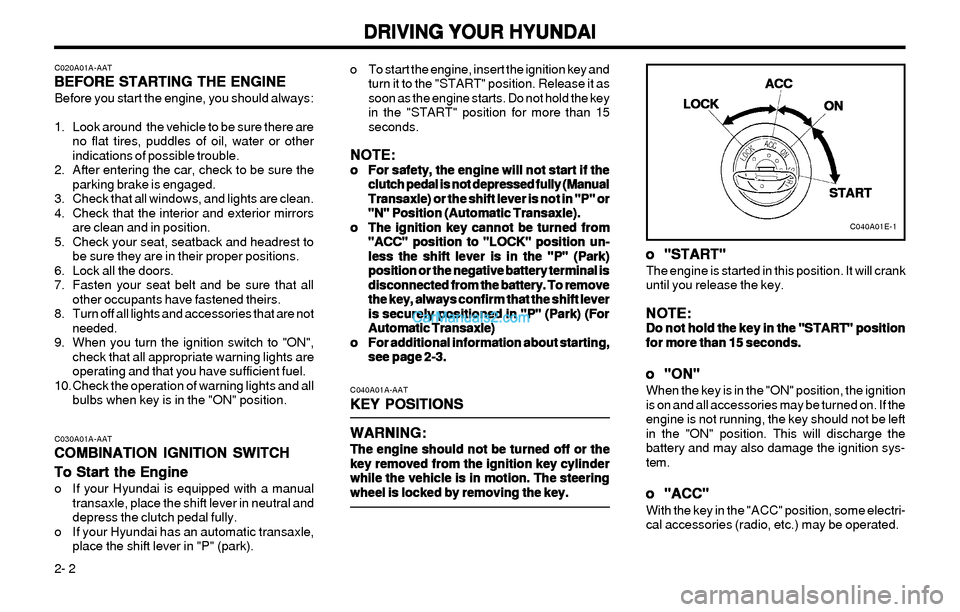
C040A01A-AAT
KEY POSITIONS KEY POSITIONSKEY POSITIONS KEY POSITIONS
KEY POSITIONS
WARNING: WARNING:WARNING: WARNING:
WARNING:
The engine should not be turned off or the The engine should not be turned off or theThe engine should not be turned off or the The engine should not be turned off or the
The engine should not be turned off or the
key removed from the ignition key cylinder key removed from the ignition key cylinderkey removed from the ignition key cylinder key removed from the ignition key cylinder
key removed from the ignition key cylinder
while the vehicle is in motion. The steering while the vehicle is in motion. The steeringwhile the vehicle is in motion. The steering while the vehicle is in motion. The steering
while the vehicle is in motion. The steering
wheel is locked by removing the key. wheel is locked by removing the key.wheel is locked by removing the key. wheel is locked by removing the key.
wheel is locked by removing the key.C030A01A-AAT
COMBINATION IGNITION SWITCH COMBINATION IGNITION SWITCHCOMBINATION IGNITION SWITCH COMBINATION IGNITION SWITCH
COMBINATION IGNITION SWITCH
To Start the Engine To Start the EngineTo Start the Engine To Start the Engine
To Start the Engine
o If your Hyundai is equipped with a manual
transaxle, place the shift lever in neutral and
depress the clutch pedal fully.
o If your Hyundai has an automatic transaxle,
place the shift lever in "P" (park).
C040A01E-1
LOCK LOCKLOCK LOCK
LOCKACC ACCACC ACC
ACC
ON ONON ON
ON
START STARTSTART START
START
o oo o
o
"START" "START""START" "START"
"START"The engine is started in this position. It will crank
until you release the key.
NOTE: NOTE:NOTE: NOTE:
NOTE:Do not hold the key in the "START" position Do not hold the key in the "START" positionDo not hold the key in the "START" position Do not hold the key in the "START" position
Do not hold the key in the "START" position
for more than 15 seconds. for more than 15 seconds.for more than 15 seconds. for more than 15 seconds.
for more than 15 seconds.
o oo o
o
"ON" "ON""ON" "ON"
"ON"When the key is in the "ON" position, the ignition
is on and all accessories may be turned on. If the
engine is not running, the key should not be left
in the "ON" position. This will discharge the
battery and may also damage the ignition sys-
tem.
o oo o
o
"ACC" "ACC""ACC" "ACC"
"ACC"With the key in the "ACC" position, some electri-
cal accessories (radio, etc.) may be operated.
Page 106 of 172
DRIVING YOUR HYUNDAI DRIVING YOUR HYUNDAIDRIVING YOUR HYUNDAI DRIVING YOUR HYUNDAI
DRIVING YOUR HYUNDAI
2- 5
C090B01E
C090A02Y-AAT
AUTOMATIC TRANSAXLE AUTOMATIC TRANSAXLEAUTOMATIC TRANSAXLE AUTOMATIC TRANSAXLE
AUTOMATIC TRANSAXLE
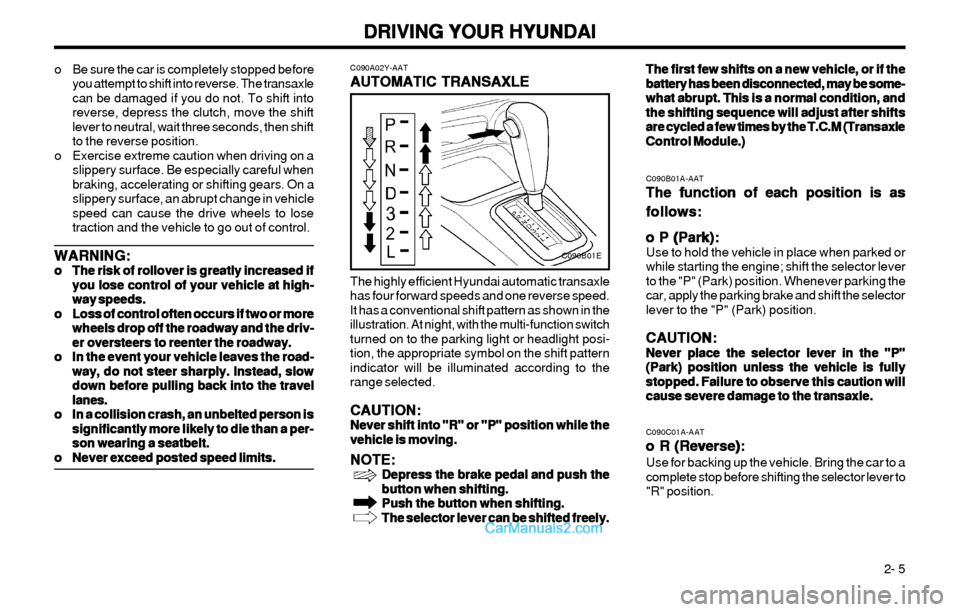
The highly efficient Hyundai automatic transaxle
has four forward speeds and one reverse speed.
It has a conventional shift pattern as shown in the
illustration. At night, with the multi-function switch
turned on to the parking light or headlight posi-
tion, the appropriate symbol on the shift pattern
indicator will be illuminated according to the
range selected.
CAUTION: CAUTION:CAUTION: CAUTION:
CAUTION:Never shift into "R" or "P" position while the Never shift into "R" or "P" position while theNever shift into "R" or "P" position while the Never shift into "R" or "P" position while the
Never shift into "R" or "P" position while the
vehicle is moving. vehicle is moving.vehicle is moving. vehicle is moving.
vehicle is moving.
NOTE: NOTE:NOTE: NOTE:
NOTE:Depress the brake pedal and push the Depress the brake pedal and push theDepress the brake pedal and push the Depress the brake pedal and push the
Depress the brake pedal and push the
button when shifting. button when shifting.button when shifting. button when shifting.
button when shifting.
Push the button when shifting. Push the button when shifting.Push the button when shifting. Push the button when shifting.
Push the button when shifting.
The selector lever can be shifted freely. The selector lever can be shifted freely.The selector lever can be shifted freely. The selector lever can be shifted freely.
The selector lever can be shifted freely.
C090B01A-AAT
The function of each position is as The function of each position is asThe function of each position is as The function of each position is as
The function of each position is as
follows: follows:follows: follows:
follows:
o P (Park): o P (Park):o P (Park): o P (Park):
o P (Park):
Use to hold the vehicle in place when parked or
while starting the engine; shift the selector lever
to the "P" (Park) position. Whenever parking the
car, apply the parking brake and shift the selector
lever to the "P" (Park) position.
CAUTION: CAUTION:CAUTION: CAUTION:
CAUTION:Never place the selector lever in the "P" Never place the selector lever in the "P"Never place the selector lever in the "P" Never place the selector lever in the "P"
Never place the selector lever in the "P"
(Park) position unless the vehicle is fully (Park) position unless the vehicle is fully(Park) position unless the vehicle is fully (Park) position unless the vehicle is fully
(Park) position unless the vehicle is fully
stopped. Failure to observe this caution will stopped. Failure to observe this caution willstopped. Failure to observe this caution will stopped. Failure to observe this caution will
stopped. Failure to observe this caution will
cause severe damage to the transaxle. cause severe damage to the transaxle.cause severe damage to the transaxle. cause severe damage to the transaxle.
cause severe damage to the transaxle.
C090C01A-AAT
o R (Reverse): o R (Reverse):o R (Reverse): o R (Reverse):
o R (Reverse):Use for backing up the vehicle. Bring the car to a
complete stop before shifting the selector lever to
"R" position.The first few shifts on a new vehicle, or if the The first few shifts on a new vehicle, or if theThe first few shifts on a new vehicle, or if the The first few shifts on a new vehicle, or if the
The first few shifts on a new vehicle, or if the
battery has been disconnected, may be some- battery has been disconnected, may be some-battery has been disconnected, may be some- battery has been disconnected, may be some-
battery has been disconnected, may be some-
what abrupt. This is a normal condition, and what abrupt. This is a normal condition, andwhat abrupt. This is a normal condition, and what abrupt. This is a normal condition, and
what abrupt. This is a normal condition, and
the shifting sequence will adjust after shifts the shifting sequence will adjust after shiftsthe shifting sequence will adjust after shifts the shifting sequence will adjust after shifts
the shifting sequence will adjust after shifts
are cycled a few times by the T.C.M (Transaxle are cycled a few times by the T.C.M (Transaxleare cycled a few times by the T.C.M (Transaxle are cycled a few times by the T.C.M (Transaxle
are cycled a few times by the T.C.M (Transaxle
Control Module.) Control Module.)Control Module.) Control Module.)
Control Module.) o Be sure the car is completely stopped before
you attempt to shift into reverse. The transaxle
can be damaged if you do not. To shift into
reverse, depress the clutch, move the shift
lever to neutral, wait three seconds, then shift
to the reverse position.
o Exercise extreme caution when driving on a
slippery surface. Be especially careful when
braking, accelerating or shifting gears. On a
slippery surface, an abrupt change in vehicle
speed can cause the drive wheels to lose
traction and the vehicle to go out of control.
WARNING: WARNING:WARNING: WARNING:
WARNING:o oo o
o
The risk of rollover is greatly increased if The risk of rollover is greatly increased ifThe risk of rollover is greatly increased if The risk of rollover is greatly increased if
The risk of rollover is greatly increased if
you lose control of your vehicle at high- you lose control of your vehicle at high-you lose control of your vehicle at high- you lose control of your vehicle at high-
you lose control of your vehicle at high-
way speeds. way speeds.way speeds. way speeds.
way speeds.
o oo o
o
Loss of control often occurs if two or more Loss of control often occurs if two or moreLoss of control often occurs if two or more Loss of control often occurs if two or more
Loss of control often occurs if two or more
wheels drop off the roadway and the driv- wheels drop off the roadway and the driv-wheels drop off the roadway and the driv- wheels drop off the roadway and the driv-
wheels drop off the roadway and the driv-
er oversteers to reenter the roadway. er oversteers to reenter the roadway.er oversteers to reenter the roadway. er oversteers to reenter the roadway.
er oversteers to reenter the roadway.
o oo o
o
In the event your vehicle leaves the road- In the event your vehicle leaves the road-In the event your vehicle leaves the road- In the event your vehicle leaves the road-
In the event your vehicle leaves the road-
way, do not steer sharply. Instead, slow way, do not steer sharply. Instead, slowway, do not steer sharply. Instead, slow way, do not steer sharply. Instead, slow
way, do not steer sharply. Instead, slow
down before pulling back into the travel down before pulling back into the traveldown before pulling back into the travel down before pulling back into the travel
down before pulling back into the travel
lanes. lanes.lanes. lanes.
lanes.
o oo o
o
In a collision crash, an unbelted person is In a collision crash, an unbelted person isIn a collision crash, an unbelted person is In a collision crash, an unbelted person is
In a collision crash, an unbelted person is
significantly more likely to die than a per- significantly more likely to die than a per-significantly more likely to die than a per- significantly more likely to die than a per-
significantly more likely to die than a per-
son wearing a seatbelt. son wearing a seatbelt.son wearing a seatbelt. son wearing a seatbelt.
son wearing a seatbelt.
o oo o
o
Never exceed posted speed limits. Never exceed posted speed limits.Never exceed posted speed limits. Never exceed posted speed limits.
Never exceed posted speed limits.