fuse Hyundai Elantra 2003 Owner's Manual
[x] Cancel search | Manufacturer: HYUNDAI, Model Year: 2003, Model line: Elantra, Model: Hyundai Elantra 2003Pages: 172, PDF Size: 2.82 MB
Page 33 of 172
FEATURES OF YOUR HYUNDAI FEATURES OF YOUR HYUNDAIFEATURES OF YOUR HYUNDAI FEATURES OF YOUR HYUNDAI
FEATURES OF YOUR HYUNDAI
1- 24
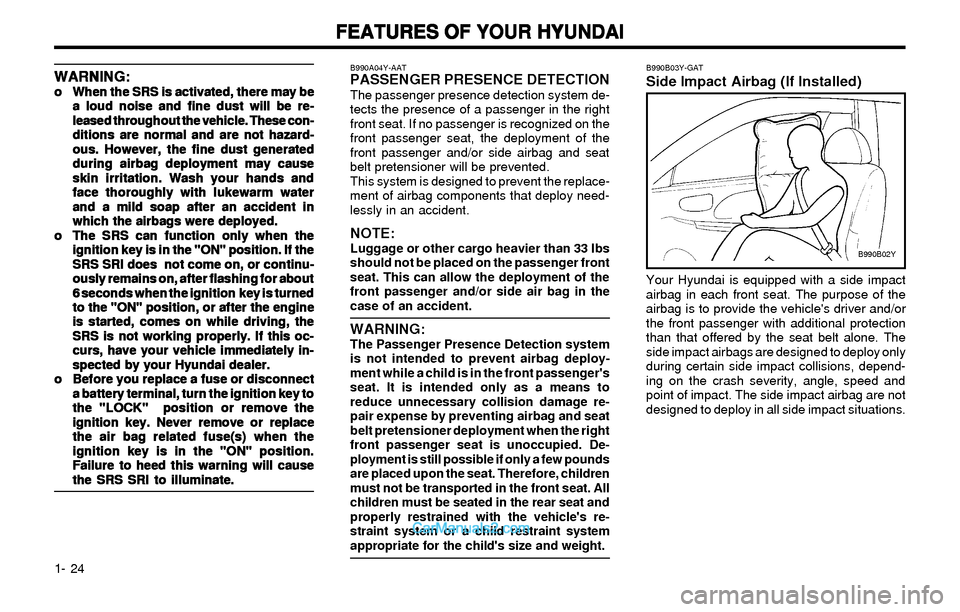
B990B03Y-GATSide Impact Airbag (If Installed)
B990B02Y
Your Hyundai is equipped with a side impact
airbag in each front seat. The purpose of the
airbag is to provide the vehicle's driver and/or
the front passenger with additional protection
than that offered by the seat belt alone. The
side impact airbags are designed to deploy only
during certain side impact collisions, depend-
ing on the crash severity, angle, speed and
point of impact. The side impact airbag are not
designed to deploy in all side impact situations.
WARNING: WARNING:WARNING: WARNING:
WARNING:o oo o
o
When the SRS is activated, there may be When the SRS is activated, there may beWhen the SRS is activated, there may be When the SRS is activated, there may be
When the SRS is activated, there may be
a loud noise and fine dust will be re- a loud noise and fine dust will be re-a loud noise and fine dust will be re- a loud noise and fine dust will be re-
a loud noise and fine dust will be re-
leased throughout the vehicle. These con- leased throughout the vehicle. These con-leased throughout the vehicle. These con- leased throughout the vehicle. These con-
leased throughout the vehicle. These con-
ditions are normal and are not hazard- ditions are normal and are not hazard-ditions are normal and are not hazard- ditions are normal and are not hazard-
ditions are normal and are not hazard-
ous. However, the fine dust generated ous. However, the fine dust generatedous. However, the fine dust generated ous. However, the fine dust generated
ous. However, the fine dust generated
during airbag deployment may cause during airbag deployment may causeduring airbag deployment may cause during airbag deployment may cause
during airbag deployment may cause
skin irritation. Wash your hands and skin irritation. Wash your hands andskin irritation. Wash your hands and skin irritation. Wash your hands and
skin irritation. Wash your hands and
face thoroughly with lukewarm water face thoroughly with lukewarm waterface thoroughly with lukewarm water face thoroughly with lukewarm water
face thoroughly with lukewarm water
and a mild soap after an accident in and a mild soap after an accident inand a mild soap after an accident in and a mild soap after an accident in
and a mild soap after an accident in
which the airbags were deployed. which the airbags were deployed.which the airbags were deployed. which the airbags were deployed.
which the airbags were deployed.
o oo o
o
The SRS can function only when the The SRS can function only when theThe SRS can function only when the The SRS can function only when the
The SRS can function only when the
ignition key is in the "ON" position. If the ignition key is in the "ON" position. If theignition key is in the "ON" position. If the ignition key is in the "ON" position. If the
ignition key is in the "ON" position. If the
SRS SRI does not come on, or continu- SRS SRI does not come on, or continu-SRS SRI does not come on, or continu- SRS SRI does not come on, or continu-
SRS SRI does not come on, or continu-
ously remains on, after flashing for about ously remains on, after flashing for aboutously remains on, after flashing for about ously remains on, after flashing for about
ously remains on, after flashing for about
6 seconds when the ignition key is turned 6 seconds when the ignition key is turned6 seconds when the ignition key is turned 6 seconds when the ignition key is turned
6 seconds when the ignition key is turned
to the "ON" position, or after the engine to the "ON" position, or after the engineto the "ON" position, or after the engine to the "ON" position, or after the engine
to the "ON" position, or after the engine
is started, comes on while driving, the is started, comes on while driving, theis started, comes on while driving, the is started, comes on while driving, the
is started, comes on while driving, the
SRS is not working properly. If this oc- SRS is not working properly. If this oc-SRS is not working properly. If this oc- SRS is not working properly. If this oc-
SRS is not working properly. If this oc-
curs, have your vehicle immediately in- curs, have your vehicle immediately in-curs, have your vehicle immediately in- curs, have your vehicle immediately in-
curs, have your vehicle immediately in-
spected by your Hyundai dealer. spected by your Hyundai dealer.spected by your Hyundai dealer. spected by your Hyundai dealer.
spected by your Hyundai dealer.
o oo o
o
Before you replace a fuse or disconnect Before you replace a fuse or disconnectBefore you replace a fuse or disconnect Before you replace a fuse or disconnect
Before you replace a fuse or disconnect
a battery terminal, turn the ignition key to a battery terminal, turn the ignition key toa battery terminal, turn the ignition key to a battery terminal, turn the ignition key to
a battery terminal, turn the ignition key to
the "LOCK" position or remove the the "LOCK" position or remove thethe "LOCK" position or remove the the "LOCK" position or remove the
the "LOCK" position or remove the
ignition key. Never remove or replace ignition key. Never remove or replaceignition key. Never remove or replace ignition key. Never remove or replace
ignition key. Never remove or replace
the air bag related fuse(s) when the the air bag related fuse(s) when thethe air bag related fuse(s) when the the air bag related fuse(s) when the
the air bag related fuse(s) when the
ignition key is in the "ON" position. ignition key is in the "ON" position.ignition key is in the "ON" position. ignition key is in the "ON" position.
ignition key is in the "ON" position.
Failure to heed this warning will cause Failure to heed this warning will causeFailure to heed this warning will cause Failure to heed this warning will cause
Failure to heed this warning will cause
the SRS SRI to illuminate. the SRS SRI to illuminate.the SRS SRI to illuminate. the SRS SRI to illuminate.
the SRS SRI to illuminate.
B990A04Y-AATPASSENGER PRESENCE DETECTIONThe passenger presence detection system de-
tects the presence of a passenger in the right
front seat. If no passenger is recognized on the
front passenger seat, the deployment of the
front passenger and/or side airbag and seat
belt pretensioner will be prevented.
This system is designed to prevent the replace-
ment of airbag components that deploy need-
lessly in an accident.
NOTE:Luggage or other cargo heavier than 33 lbs
should not be placed on the passenger front
seat. This can allow the deployment of the
front passenger and/or side air bag in the
case of an accident.
WARNING:The Passenger Presence Detection system
is not intended to prevent airbag deploy-
ment while a child is in the front passenger's
seat. It is intended only as a means to
reduce unnecessary collision damage re-
pair expense by preventing airbag and seat
belt pretensioner deployment when the right
front passenger seat is unoccupied. De-
ployment is still possible if only a few pounds
are placed upon the seat. Therefore, children
must not be transported in the front seat. All
children must be seated in the rear seat and
properly restrained with the vehicle's re-
straint system or a child restraint system
appropriate for the child's size and weight.
Page 46 of 172
FEATURES OF YOUR HYUNDAI FEATURES OF YOUR HYUNDAIFEATURES OF YOUR HYUNDAI FEATURES OF YOUR HYUNDAI
FEATURES OF YOUR HYUNDAI
1- 37
B340B01A-AAT
Lane Change Signal Lane Change SignalLane Change Signal Lane Change Signal
Lane Change Signal
signal indicator light blinks more rapidly than
usual, goes on but does not blink, or does not
go on at all, there is a malfunction in the system.
Check for a burned-out fuse or bulb or see your
Hyundai dealer.
3A9CA42
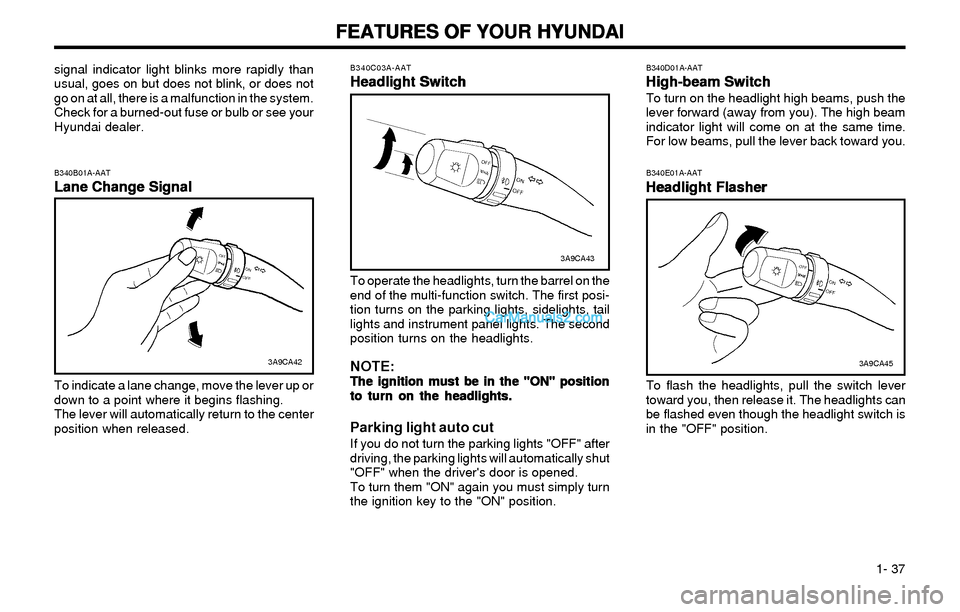
To indicate a lane change, move the lever up or
down to a point where it begins flashing.
The lever will automatically return to the center
position when released.
B340C03A-AAT
Headlight Switch Headlight SwitchHeadlight Switch Headlight Switch
Headlight Switch
To operate the headlights, turn the barrel on the
end of the multi-function switch. The first posi-
tion turns on the parking lights, sidelights, tail
lights and instrument panel lights. The second
position turns on the headlights.
NOTE:The ignition must be in the "ON" position The ignition must be in the "ON" positionThe ignition must be in the "ON" position The ignition must be in the "ON" position
The ignition must be in the "ON" position
to turn on the headlights. to turn on the headlights.to turn on the headlights. to turn on the headlights.
to turn on the headlights.
Parking light auto cutIf you do not turn the parking lights "OFF" after
driving, the parking lights will automatically shut
"OFF" when the driver's door is opened.
To turn them "ON" again you must simply turn
the ignition key to the "ON" position.
3A9CA43
B340E01A-AAT
Headlight Flasher Headlight FlasherHeadlight Flasher Headlight Flasher
Headlight Flasher
To flash the headlights, pull the switch lever
toward you, then release it. The headlights can
be flashed even though the headlight switch is
in the "OFF" position.
B340D01A-AAT
High-beam Switch High-beam SwitchHigh-beam Switch High-beam Switch
High-beam SwitchTo turn on the headlight high beams, push the
lever forward (away from you). The high beam
indicator light will come on at the same time.
For low beams, pull the lever back toward you.
3A9CA45
Page 54 of 172
FEATURES OF YOUR HYUNDAI FEATURES OF YOUR HYUNDAIFEATURES OF YOUR HYUNDAI FEATURES OF YOUR HYUNDAI
FEATURES OF YOUR HYUNDAI
1- 45
B510A01S-AAT
OUTSIDE REARVIEW MIRROR OUTSIDE REARVIEW MIRROROUTSIDE REARVIEW MIRROR OUTSIDE REARVIEW MIRROR
OUTSIDE REARVIEW MIRROR
Manual Type Manual TypeManual Type Manual Type
Manual Type
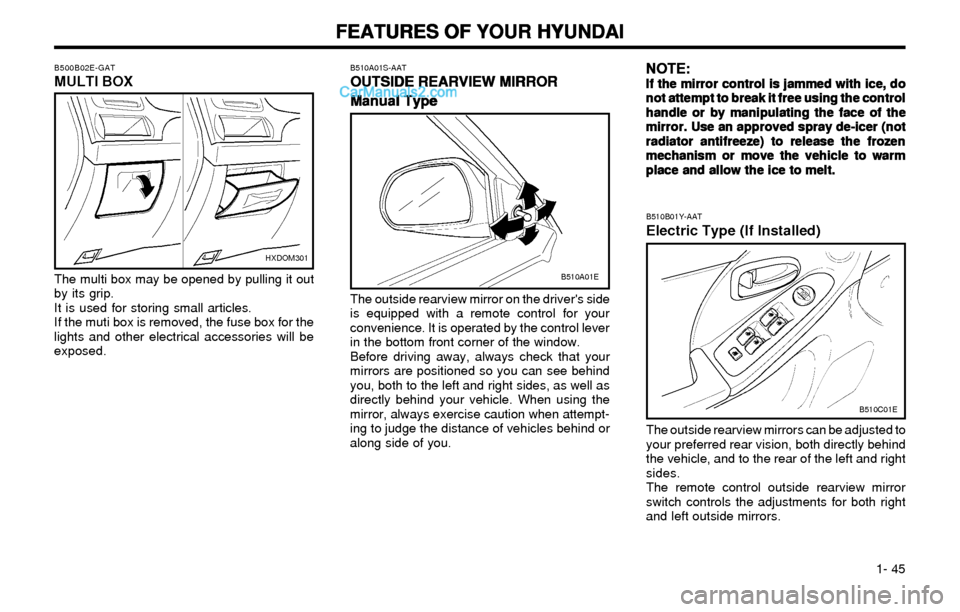
The outside rearview mirror on the driver's side
is equipped with a remote control for your
convenience. It is operated by the control lever
in the bottom front corner of the window.
Before driving away, always check that your
mirrors are positioned so you can see behind
you, both to the left and right sides, as well as
directly behind your vehicle. When using the
mirror, always exercise caution when attempt-
ing to judge the distance of vehicles behind or
along side of you.
B510B01Y-AAT
Electric Type (If Installed)
B510C01E
The outside rearview mirrors can be adjusted to
your preferred rear vision, both directly behind
the vehicle, and to the rear of the left and right
sides.
The remote control outside rearview mirror
switch controls the adjustments for both right
and left outside mirrors.
B510A01E
NOTE: NOTE:NOTE: NOTE:
NOTE:If the mirror control is jammed with ice, do If the mirror control is jammed with ice, doIf the mirror control is jammed with ice, do If the mirror control is jammed with ice, do
If the mirror control is jammed with ice, do
not attempt to break it free using the control not attempt to break it free using the controlnot attempt to break it free using the control not attempt to break it free using the control
not attempt to break it free using the control
handle or by manipulating the face of the handle or by manipulating the face of thehandle or by manipulating the face of the handle or by manipulating the face of the
handle or by manipulating the face of the
mirror. Use an approved spray de-icer (not mirror. Use an approved spray de-icer (notmirror. Use an approved spray de-icer (not mirror. Use an approved spray de-icer (not
mirror. Use an approved spray de-icer (not
radiator antifreeze) to release the frozen radiator antifreeze) to release the frozenradiator antifreeze) to release the frozen radiator antifreeze) to release the frozen
radiator antifreeze) to release the frozen
mechanism or move the vehicle to warm mechanism or move the vehicle to warmmechanism or move the vehicle to warm mechanism or move the vehicle to warm
mechanism or move the vehicle to warm
place and allow the ice to melt. place and allow the ice to melt.place and allow the ice to melt. place and allow the ice to melt.
place and allow the ice to melt.
HXDOM301
The multi box may be opened by pulling it out
by its grip.
It is used for storing small articles.
If the muti box is removed, the fuse box for the
lights and other electrical accessories will be
exposed.
B500B02E-GATMULTI BOX
Page 86 of 172
FEATURES OF YOUR HYUNDAI FEATURES OF YOUR HYUNDAIFEATURES OF YOUR HYUNDAI FEATURES OF YOUR HYUNDAI
FEATURES OF YOUR HYUNDAI
1- 77
B260D02O-AAT
1. Playing CDo Insert the CD with the label facing upward.
o Insert the CD to start CD playback, during
radio operation.
o When a disc is in the CD deck, if you press
the play button, the CD player will begin
playing even if the radio is being used.
o The CD player can be used when the igni-
tion switch is in either the "ON" or "ACC"
position.
2. FF/REW ( / )If you want to fast forward or reverse through
the compact disc track, push and hold in the FF
( ) or REW ( ) button.
When you release the button, the compact disc
player will resume playing.
3. TRACK UP/DOWNo The desired track on the disc currently being
played can be selected using the track
number.
o Press once to skip forward to the beginn-
ing of the next track. Press once to skip
back to the beginning of the track.
4. SCAN Buttono Press the SCAN button to playback the first
10 seconds of each track.
o Press the SCAN button again within 10 sec.
for the desired track.
5. REPEAT Buttono To repeat the music you are listening to,
press the RPT button. To cancel , press
again.
o If you do not release RPT operation, when
the track ends, it will automatically be re-
played.
This process will be continued until you
push the button again.
6. EJECT ButtonWhen the EJECT button is pressed with the
CD loaded, the CD is ejected.
NOTE:o oo o
o
If the CD does not operate properly or if If the CD does not operate properly or ifIf the CD does not operate properly or if If the CD does not operate properly or if
If the CD does not operate properly or if
the ER2 fault code is displayed, use one the ER2 fault code is displayed, use onethe ER2 fault code is displayed, use one the ER2 fault code is displayed, use one
the ER2 fault code is displayed, use one
of two methods to reset the CD deck of two methods to reset the CD deckof two methods to reset the CD deck of two methods to reset the CD deck
of two methods to reset the CD deck
function. function.function. function.
function.
- -- -
-
Remove the audio fuse for 5 minutes. Remove the audio fuse for 5 minutes.Remove the audio fuse for 5 minutes. Remove the audio fuse for 5 minutes.
Remove the audio fuse for 5 minutes.
Then, reinstall the audio fuse. Then, reinstall the audio fuse.Then, reinstall the audio fuse. Then, reinstall the audio fuse.
Then, reinstall the audio fuse.
- -- -
-
Disconnect the negative terminal of Disconnect the negative terminal ofDisconnect the negative terminal of Disconnect the negative terminal of
Disconnect the negative terminal of
the battery and wait 5 minutes. the battery and wait 5 minutes.the battery and wait 5 minutes. the battery and wait 5 minutes.
the battery and wait 5 minutes.
Then reconnect the negative battery Then reconnect the negative batteryThen reconnect the negative battery Then reconnect the negative battery
Then reconnect the negative battery
terminal. terminal.terminal. terminal.
terminal.
o oo o
o
To assure proper operation of the unit, To assure proper operation of the unit,To assure proper operation of the unit, To assure proper operation of the unit,
To assure proper operation of the unit,
keep the vehicle interior temperature keep the vehicle interior temperaturekeep the vehicle interior temperature keep the vehicle interior temperature
keep the vehicle interior temperature
within a normal range by using the within a normal range by using thewithin a normal range by using the within a normal range by using the
within a normal range by using the
vehicle's air conditioning or heating vehicle's air conditioning or heatingvehicle's air conditioning or heating vehicle's air conditioning or heating
vehicle's air conditioning or heating
system. system.system. system.
system.
o oo o
o
When replacing the fuse, replace it with When replacing the fuse, replace it withWhen replacing the fuse, replace it with When replacing the fuse, replace it with
When replacing the fuse, replace it with
a fuse having the correct capacity. a fuse having the correct capacity.a fuse having the correct capacity. a fuse having the correct capacity.
a fuse having the correct capacity.
o oo o
o
The preset station frequencies are all The preset station frequencies are allThe preset station frequencies are all The preset station frequencies are all
The preset station frequencies are all
erased when the car battery is discon- erased when the car battery is discon-erased when the car battery is discon- erased when the car battery is discon-
erased when the car battery is discon-
nected. Therefore, all data will have to nected. Therefore, all data will have tonected. Therefore, all data will have to nected. Therefore, all data will have to
nected. Therefore, all data will have to
be set again if this should occur. be set again if this should occur.be set again if this should occur. be set again if this should occur.
be set again if this should occur.
o oo o
o
Do not add any oil to the rotating parts. Do not add any oil to the rotating parts.Do not add any oil to the rotating parts. Do not add any oil to the rotating parts.
Do not add any oil to the rotating parts.
Keep magnets, screwdrivers and other Keep magnets, screwdrivers and otherKeep magnets, screwdrivers and other Keep magnets, screwdrivers and other
Keep magnets, screwdrivers and other
metallic objects away from the tape metallic objects away from the tapemetallic objects away from the tape metallic objects away from the tape
metallic objects away from the tape
mechanism and head. mechanism and head.mechanism and head. mechanism and head.
mechanism and head.
o This equipment is designed to be used
only in a 12 volt DC battery system with
negative ground.
o This unit is made of precision parts. Do
not attempt to disassemble or adjust any
parts.
o When driving your vehicle, be sure to
keep the volume of the unit set low enough
to allow you to hear sounds coming from
the outside.
o Do not expose this equipment (including
the speakers) to water or excessive mois-
ture.
Page 88 of 172
FEATURES OF YOUR HYUNDAI FEATURES OF YOUR HYUNDAIFEATURES OF YOUR HYUNDAI FEATURES OF YOUR HYUNDAI
FEATURES OF YOUR HYUNDAI
1- 79
B260F01E-AATThe CD auto changer is located in the left side
of the trunk.
o To use the CD auto changer.
1. Open the sliding lid of the CD auto chang-
er.
2. To eject the compact disc magazine,
press the EJECT button located inside
the CD auto changer.
3. Insert the discs into the magazine.
4. Push the magazine into the CD auto
changer and close the sliding lid.
o The CD auto changer can be used when the
ignition switch is in either the "ON" or "ACC"
position.
1. CD Select ButtonWhen the CD changer magazine contains discs,
press the "CD" button and the CD changer can
be used even if the radio is being used. The
Hyundai CD changer can hold up to eight discs.
The disc number will be lit, and the track
number, and elapsed time will be displayed.
2. DISC Select ButtonTo select the CD you want, push " " to
change the disc number.
3. TRACK UP/DOWNo The desired track on the disc currently being
played can be selected using the track
number.
o Press once to skip forward to the begin-
ning of the next track. Press once to skip
back to the beginning of the track.
4. FF/REW ( / )If you want to fast forward or reverse through
the compact disc track, push and hold in the FF
( ) or REW ( ) button.
When you release the button, the compact disc
player will resume playing.
5. REPEATo To repeat the music you are listening to,
press the RPT button. To cancel , press
again.
o If you do not release RPT operation when
the track ends, it will automatically be re-
played.
This process will be continued until you
push the button again.
6. SCAN Buttono Press the SCAN button to playback the first
10 seconds of each track.
o Press the SCAN button again within 10 sec.
for the desired track.
NOTE:o When replacing the fuse, replace it with a
fuse having the correct capacity.
o This equipment is designed to be used
only in a 12 volt DC battery system with
negative ground.
o This unit is made of precision parts. Do
not attempt to disassemble or adjust any
parts.
o When driving your vehicle, be sure to
keep the volume of the unit set low enough
to allow you to hear sounds coming from
the outside.
TUNE
DISC
Page 95 of 172

FEATURES OF YOUR HYUNDAI FEATURES OF YOUR HYUNDAIFEATURES OF YOUR HYUNDAI FEATURES OF YOUR HYUNDAI
FEATURES OF YOUR HYUNDAI
1- 86
H290F01O-GAT1. CD Select Buttono Insert the CD with the label facing upward.
o Insert the CD to start CD playback, during
radio operation or cassette tape playing.
o When a disc is in the CD deck, if you press
the CD button the CD player will begin
playing even if the radio or cassette player
is being used.
o The CD player can be used when the igni-
tion switch is in either the "ON" or "ACC"
position.
2. FF/REW ( / )If you want to fast forward or reverse through
the compact disc track, push and hold the FF
( ) or REW ( ) button.
When you release the button, the compact disc
player will resume playing.
3. TRACK UP/DOWNo The desired track on the disc currently being
played can be selected using the track
number.
o Press button once to skip forward to the
beginning of the next track. Press button
once to skip back to the beginning of the
track.
4. REPEAT
o To repeat the track you are currently listen-
ing to, press the RPT button. To cancel,
press again.
o If you do not release RPT operation when
the track ends, it will automatically be re-
played.
This process will be continued until you
push the button again.
5. EQUALIZER Button
Press the EQ button to select the CLASSIC,
JAZZ, ROCK and DEFEAT MODE for the de-
sired tone quality. Each press of the button
changes the display as follows;
NOTE:o To assure proper operation of the unit,
keep the vehicle interior temperature
within a normal range by using the
vehicle's air conditioning or heating
system.
o When replacing the fuse, replace it with a
fuse having the correct capacity.
o The preset station frequencies are all
erased when the car battery is discon-
nected. Therefore, all data will have to be
set again if this should occur.
o Do not add any oil to the rotating parts.
Keep magnets, screwdrivers and other
metallic objects away from the tape
mechanism and head.
o This equipment is designed to be used
only in a 12 volt DC battery system with
negative ground.
o This unit is made of precision parts. Do
not attempt to disassemble or adjust any
parts.
o When driving your vehicle, be sure to
keep the volume of the unit set low enough
to allow you to hear sounds coming from
the outside.
o Do not expose this equipment (including
the speakers and tape) to water or exces-
sive moisture.
CLASSIC ® JAZZ ® ROCK ® DEFEAT
6. CD EJECT ButtonWhen the button is pressed with a CD loaded,
the CD will eject.
7. SCAN Buttono Press the SCAN button to playback the first
10 seconds of each track.
o Press the SCAN button again within 10 sec.
When you have reached the desired track.
Page 97 of 172

FEATURES OF YOUR HYUNDAI FEATURES OF YOUR HYUNDAIFEATURES OF YOUR HYUNDAI FEATURES OF YOUR HYUNDAI
FEATURES OF YOUR HYUNDAI
1- 88
3. TRACK UP/DOWNo The desired track on the disc currently being
played can be selected using the track
number.
o Press once to skip forward to the begin-
ning of the next track. Press once to skip
back to the beginning of the track.
4. FF/REW ( / )If you want to fast forward or reverse through
the compact disc track, push and hold in the FF
( ) or REW ( ) button.
When you release the button, the compact disc
player will resume playing.
5. REPEATo To repeat the track you are currently listen-
ing to, press the RPT button. To cancel,
press again.
o If you do not release RPT operation when
the track ends, it will automatically be re-
played.
This process will be continued until you
push the button again.
B290H01E-GATThe CD auto changer is located in the left side
of the trunk.
o To use the CD auto changer.
1. Open the sliding lid of the CD auto chang-
er.
2. To eject the compact disc magazine,
press the EJECT button located inside
the CD auto changer.
3. Insert the discs into the magazine.
4. Push the magazine into the CD auto
changer and close the sliding lid.
o The CD auto changer can be used when the
ignition switch is in either "ON" or "ACC"
position.
1. CD CHANGER Select ButtonWhen the CD changer magazine contains discs,
press the "CD/CDC" button and the CD changer
can be used even if the radio or cassette player
is being used. The Hyundai CD changer can
hold up to eight discs. The disc number will be
lit, and the track number, and elapsed time will
be displayed.
2. DISC Select ButtonTo select the CD you want, push " " to
change the disc number.
6. SCAN Buttono Press the SCAN button to playback the first
10 seconds of each track.
o Press the SCAN button again within 10 sec.
When you have reached the desired track.
TUNE
DISC
7. EQ Button
Press the EQ button to select the CLASSIC,
JAZZ, ROCK and DEFEAT MODE for the de-
sired tone quality. Each press of the button
changes the display as follows;
CLASSIC ® JAZZ ® ROCK ® DEFEAT
NOTE:o When replacing the fuse, replace it with a
fuse having the correct capacity.
o This equipment is designed to be used
only in a 12 volt DC battery system with
negative ground.
o This unit is made of precision parts. Do
not attempt to disassemble or adjust any
parts.
o When driving your vehicle, be sure to
keep the volume of the unit set low enough
to allow you to hear sounds coming from
the outside.
Page 116 of 172
WHAT TO DO IN AN EMERGENCY WHAT TO DO IN AN EMERGENCYWHAT TO DO IN AN EMERGENCY WHAT TO DO IN AN EMERGENCY
WHAT TO DO IN AN EMERGENCY
3-1
3 . WHAT TO DO IN AN
EMERGENCY
D010A01A-AAT
IF THE ENGINE WILL NOT START IF THE ENGINE WILL NOT STARTIF THE ENGINE WILL NOT START IF THE ENGINE WILL NOT START
IF THE ENGINE WILL NOT START
WARNING: WARNING:WARNING: WARNING:
WARNING:
If the engine will not start, do not push or pull If the engine will not start, do not push or pullIf the engine will not start, do not push or pull If the engine will not start, do not push or pull
If the engine will not start, do not push or pull
the car to start it. This could result in a the car to start it. This could result in athe car to start it. This could result in a the car to start it. This could result in a
the car to start it. This could result in a
collision or cause other damage. In addition, collision or cause other damage. In addition,collision or cause other damage. In addition, collision or cause other damage. In addition,
collision or cause other damage. In addition,
push or pull starting may cause the catalytic push or pull starting may cause the catalyticpush or pull starting may cause the catalytic push or pull starting may cause the catalytic
push or pull starting may cause the catalytic
converter to be overloaded and create a fire converter to be overloaded and create a fireconverter to be overloaded and create a fire converter to be overloaded and create a fire
converter to be overloaded and create a fire
hazard. hazard.hazard. hazard.
hazard.
D010B02A-AATIf Engine Doesn't Turn Over or Turns If Engine Doesn't Turn Over or TurnsIf Engine Doesn't Turn Over or Turns If Engine Doesn't Turn Over or Turns
If Engine Doesn't Turn Over or Turns
Over Slowly Over SlowlyOver Slowly Over Slowly
Over Slowly
1. If your car has an automatic transaxle, be
sure the gear selector lever is in "N" or "P" and
the emergency brake is set.
2. Check the battery connections to be sure
they are clean and tight.
3. Turn on the interior light. If the light dims or
goes out when you operate the starter, the
battery is discharged.
4. Check the starter connections to be sure they
are securely tightened.
5. Do not push or pull the vehicle to start it. See
instructions for "Jump Starting".
SSA3020C D010C01A-AAT
If Engine Turns Over Normally but Does If Engine Turns Over Normally but DoesIf Engine Turns Over Normally but Does If Engine Turns Over Normally but Does
If Engine Turns Over Normally but Does
Not Start Not StartNot Start Not Start
Not Start
1. Check fuel level.
2. Check all connectors at ignition, coil and
spark plugs. Reconnect any that may be
disconnected or loose.
D010D01A-AAT
If the Engine Stalls While Driving If the Engine Stalls While DrivingIf the Engine Stalls While Driving If the Engine Stalls While Driving
If the Engine Stalls While Driving1. Reduce your speed gradually, keeping a
straight line. Move cautiously off the road to a
safe place.
2. Turn on your emergency flashers.
3. Try to start the engine again. If your vehicle
will not start, contact a Hyundai dealer or seek
other qualified assistance.
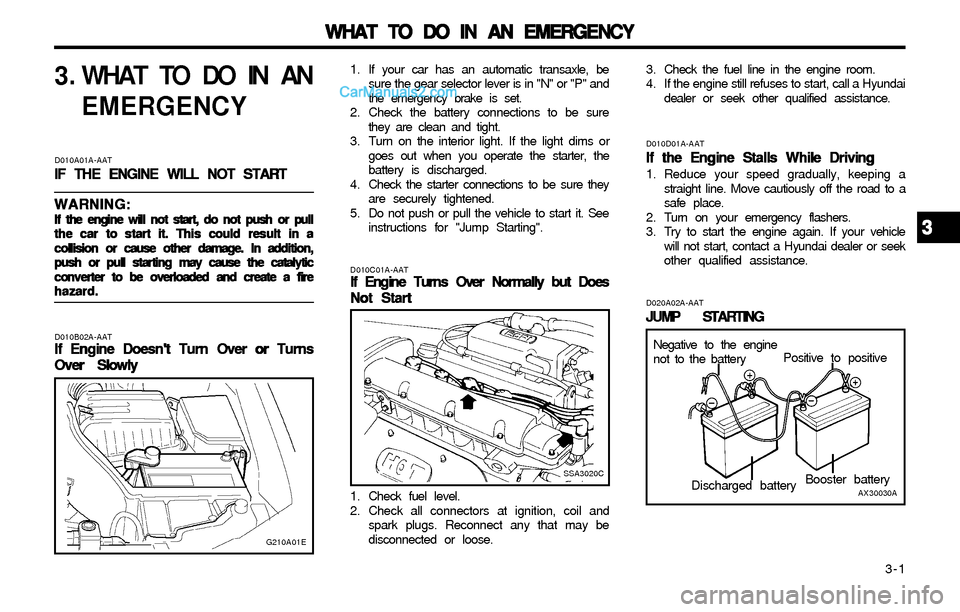
D020A02A-AAT
JUMP STARTING JUMP STARTINGJUMP STARTING JUMP STARTING
JUMP STARTING
G210A01E
Negative to the engine
not to the batteryPositive to positive
Booster battery
AX30030ADischarged battery
3 33 3
3
3. Check the fuel line in the engine room.
4. If the engine still refuses to start, call a Hyundai
dealer or seek other qualified assistance.
Page 151 of 172
DO-IT-YOURSELF MAINTENANCE DO-IT-YOURSELF MAINTENANCEDO-IT-YOURSELF MAINTENANCE DO-IT-YOURSELF MAINTENANCE
DO-IT-YOURSELF MAINTENANCE
6-15
G200B01E-AAT
Replacing Accessory Fuse Replacing Accessory FuseReplacing Accessory Fuse Replacing Accessory Fuse
Replacing Accessory Fuse
The fuse box for the lights and other electrical
accessories will be found in the backside of multi
box located in the left side of driver. Inside the box
you will find a list showing the circuits protected
by each fuse.
If any of your car's lights or other electrical
accessories stop working, a blown fuse could
be the reason. If the fuse has burned out, you
will see that the metal strip inside the fuse has
burned through. If you suspect a blown fuse,
follow this procedure:
1. Turn off the ignition and all other switches.
2. Open the fuse box and examine each fuse.
Remove each fuse by pulling it toward you
(a small "fuse puller" tool is contained in the
fuse box to simplify this operation).
3. Be sure to check all other fuses even if you
find one that appears to have burned out.
B200B01E
G190A01A-AAT
CHECKING DRIVE BELTS CHECKING DRIVE BELTSCHECKING DRIVE BELTS CHECKING DRIVE BELTS
CHECKING DRIVE BELTS
G200A01A-AAT
CHECKING AND REPLACING CHECKING AND REPLACINGCHECKING AND REPLACING CHECKING AND REPLACING
CHECKING AND REPLACING
FUSES FUSESFUSES FUSES
FUSES
Replacing a Fusible Link Replacing a Fusible LinkReplacing a Fusible Link Replacing a Fusible Link
Replacing a Fusible Link
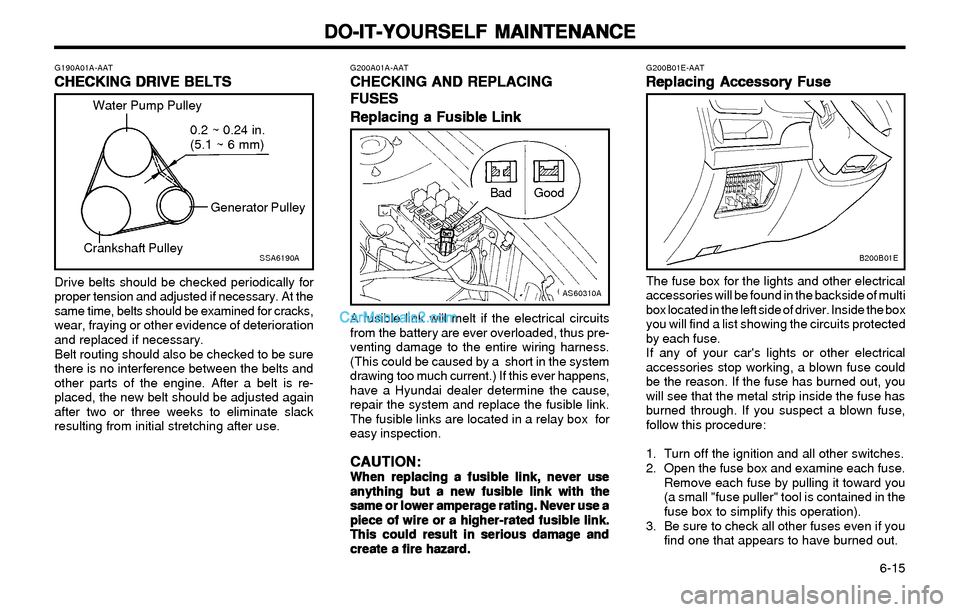
Drive belts should be checked periodically for
proper tension and adjusted if necessary. At the
same time, belts should be examined for cracks,
wear, fraying or other evidence of deterioration
and replaced if necessary.
Belt routing should also be checked to be sure
there is no interference between the belts and
other parts of the engine. After a belt is re-
placed, the new belt should be adjusted again
after two or three weeks to eliminate slack
resulting from initial stretching after use.A fusible link will melt if the electrical circuits
from the battery are ever overloaded, thus pre-
venting damage to the entire wiring harness.
(This could be caused by a short in the system
drawing too much current.) If this ever happens,
have a Hyundai dealer determine the cause,
repair the system and replace the fusible link.
The fusible links are located in a relay box for
easy inspection.
CAUTION: CAUTION:CAUTION: CAUTION:
CAUTION:When replacing a fusible link, never use When replacing a fusible link, never useWhen replacing a fusible link, never use When replacing a fusible link, never use
When replacing a fusible link, never use
anything but a new fusible link with the anything but a new fusible link with theanything but a new fusible link with the anything but a new fusible link with the
anything but a new fusible link with the
same or lower amperage rating. Never use a same or lower amperage rating. Never use asame or lower amperage rating. Never use a same or lower amperage rating. Never use a
same or lower amperage rating. Never use a
piece of wire or a higher-rated fusible link. piece of wire or a higher-rated fusible link.piece of wire or a higher-rated fusible link. piece of wire or a higher-rated fusible link.
piece of wire or a higher-rated fusible link.
This could result in serious damage and This could result in serious damage andThis could result in serious damage and This could result in serious damage and
This could result in serious damage and
create a fire hazard. create a fire hazard.create a fire hazard. create a fire hazard.
create a fire hazard.
SSA6190A
Water Pump Pulley
Generator Pulley
Crankshaft Pulley0.2 ~ 0.24 in.
(5.1 ~ 6 mm)
GoodBad
AS60310A
Page 152 of 172
DO-IT-YOURSELF MAINTENANCE DO-IT-YOURSELF MAINTENANCEDO-IT-YOURSELF MAINTENANCE DO-IT-YOURSELF MAINTENANCE
DO-IT-YOURSELF MAINTENANCE
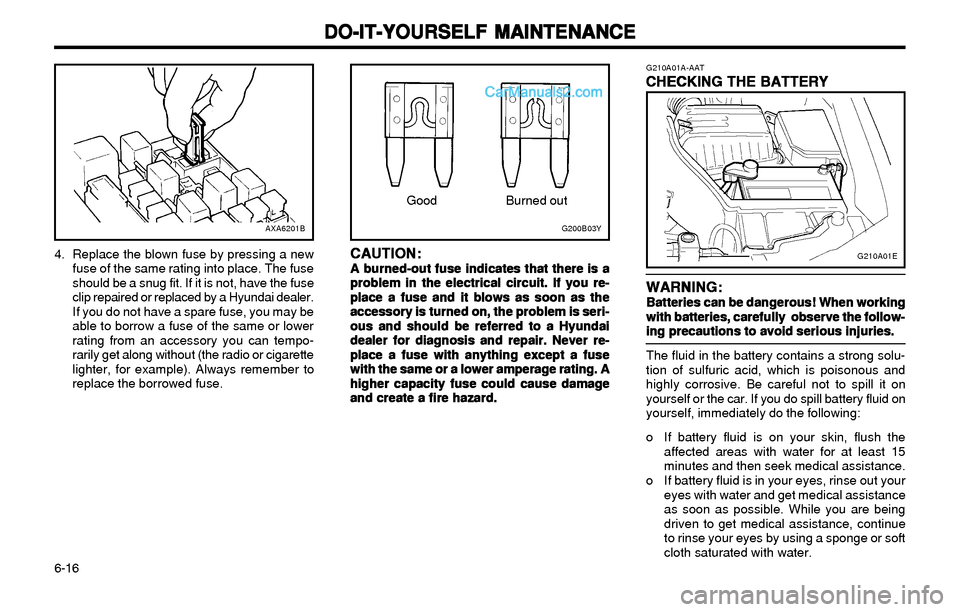
6-16 4. Replace the blown fuse by pressing a new
fuse of the same rating into place. The fuse
should be a snug fit. If it is not, have the fuse
clip repaired or replaced by a Hyundai dealer.
If you do not have a spare fuse, you may be
able to borrow a fuse of the same or lower
rating from an accessory you can tempo-
rarily get along without (the radio or cigarette
lighter, for example). Always remember to
replace the borrowed fuse.
CAUTION: CAUTION:CAUTION: CAUTION:
CAUTION:A burned-out fuse indicates that there is a A burned-out fuse indicates that there is aA burned-out fuse indicates that there is a A burned-out fuse indicates that there is a
A burned-out fuse indicates that there is a
problem in the electrical circuit. If you re- problem in the electrical circuit. If you re-problem in the electrical circuit. If you re- problem in the electrical circuit. If you re-
problem in the electrical circuit. If you re-
place a fuse and it blows as soon as the place a fuse and it blows as soon as theplace a fuse and it blows as soon as the place a fuse and it blows as soon as the
place a fuse and it blows as soon as the
accessory is turned on, the problem is seri- accessory is turned on, the problem is seri-accessory is turned on, the problem is seri- accessory is turned on, the problem is seri-
accessory is turned on, the problem is seri-
ous and should be referred to a Hyundai ous and should be referred to a Hyundaious and should be referred to a Hyundai ous and should be referred to a Hyundai
ous and should be referred to a Hyundai
dealer for diagnosis and repair. Never re- dealer for diagnosis and repair. Never re-dealer for diagnosis and repair. Never re- dealer for diagnosis and repair. Never re-
dealer for diagnosis and repair. Never re-
place a fuse with anything except a fuse place a fuse with anything except a fuseplace a fuse with anything except a fuse place a fuse with anything except a fuse
place a fuse with anything except a fuse
with the same or a lower amperage rating. A with the same or a lower amperage rating. Awith the same or a lower amperage rating. A with the same or a lower amperage rating. A
with the same or a lower amperage rating. A
higher capacity fuse could cause damage higher capacity fuse could cause damagehigher capacity fuse could cause damage higher capacity fuse could cause damage
higher capacity fuse could cause damage
and create a fire hazard. and create a fire hazard.and create a fire hazard. and create a fire hazard.
and create a fire hazard.
AXA6201B
Burned out
G200B03Y
Good
WARNING: WARNING:WARNING: WARNING:
WARNING:Batteries can be dangerous! When working Batteries can be dangerous! When workingBatteries can be dangerous! When working Batteries can be dangerous! When working
Batteries can be dangerous! When working
with batteries, carefully observe the follow- with batteries, carefully observe the follow-with batteries, carefully observe the follow- with batteries, carefully observe the follow-
with batteries, carefully observe the follow-
ing precautions to avoid serious injuries. ing precautions to avoid serious injuries.ing precautions to avoid serious injuries. ing precautions to avoid serious injuries.
ing precautions to avoid serious injuries.
The fluid in the battery contains a strong solu-
tion of sulfuric acid, which is poisonous and
highly corrosive. Be careful not to spill it on
yourself or the car. If you do spill battery fluid on
yourself, immediately do the following:
o If battery fluid is on your skin, flush the
affected areas with water for at least 15
minutes and then seek medical assistance.
o If battery fluid is in your eyes, rinse out your
eyes with water and get medical assistance
as soon as possible. While you are being
driven to get medical assistance, continue
to rinse your eyes by using a sponge or soft
cloth saturated with water.
G210A01A-AAT
CHECKING THE BATTERY CHECKING THE BATTERYCHECKING THE BATTERY CHECKING THE BATTERY
CHECKING THE BATTERY
G210A01E