trunk Hyundai Elantra 2004 User Guide
[x] Cancel search | Manufacturer: HYUNDAI, Model Year: 2004, Model line: Elantra, Model: Hyundai Elantra 2004Pages: 241, PDF Size: 6.5 MB
Page 86 of 241
1FEATURES OF YOUR HYUNDAI
75
!WARNING:Avoid eye injury. DO NOT overstretch. AL-
WAYS keep face and body out of recoil path.
DO NOT use when strap has visible signs of
wear or damage.
CAUTION:To prevent damage to the goods or the
vehicle, care should be taken when carrying
fragile or bulky objects in the trunk.
!
LUGGAGE NET
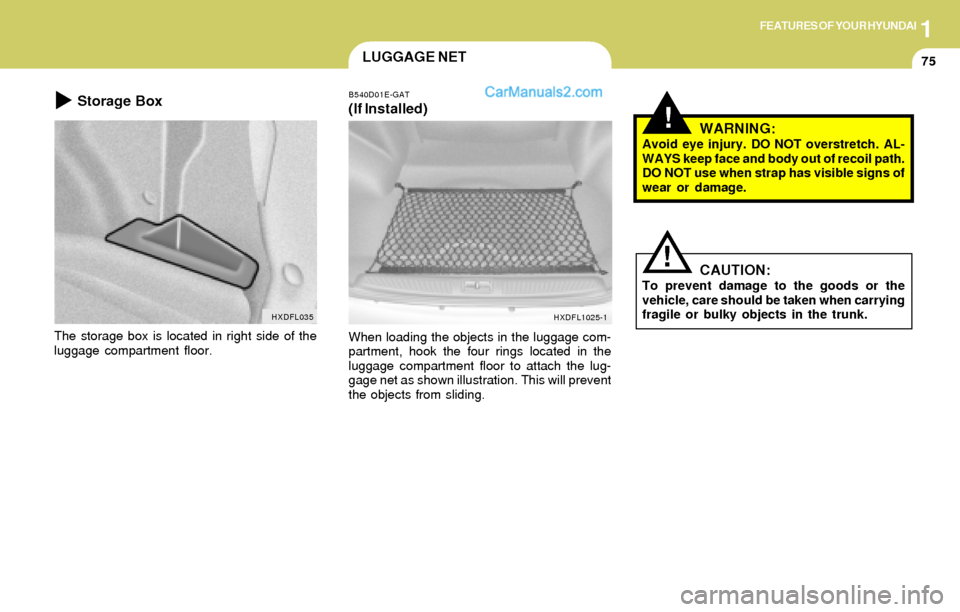
The storage box is located in right side of the
luggage compartment floor.
HXDFL035
Storage BoxB540D01E-GAT
(If Installed)
When loading the objects in the luggage com-
partment, hook the four rings located in the
luggage compartment floor to attach the lug-
gage net as shown illustration. This will prevent
the objects from sliding.
HXDFL1025-1
Page 87 of 241
1FEATURES OF YOUR HYUNDAI
76STEERING WHEEL TILT LEVERCD AUTO CHANGER
!
B600A01A-AAT
(If Installed)
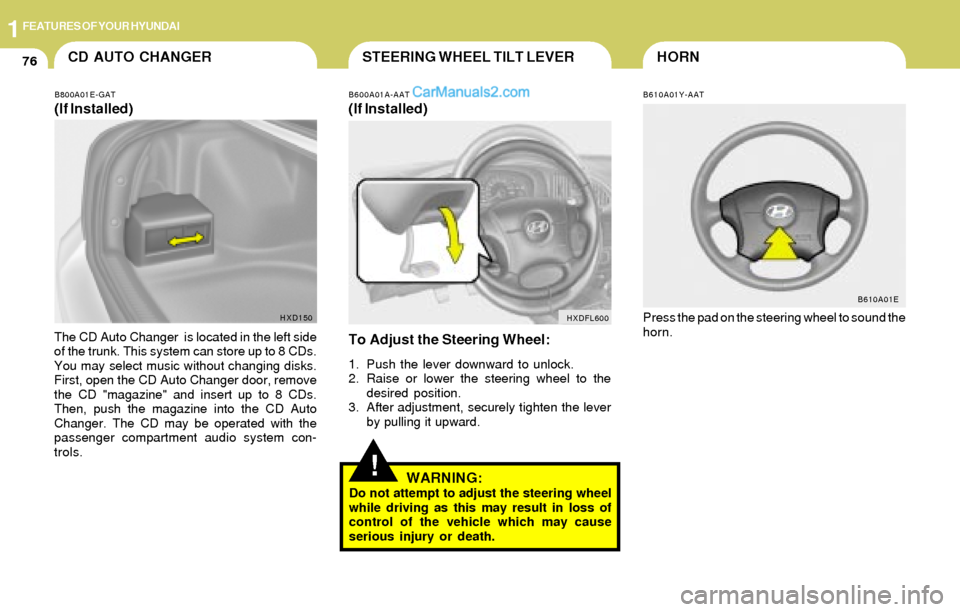
To Adjust the Steering Wheel:
1. Push the lever downward to unlock.
2. Raise or lower the steering wheel to the
desired position.
3. After adjustment, securely tighten the lever
by pulling it upward.
WARNING:Do not attempt to adjust the steering wheel
while driving as this may result in loss of
control of the vehicle which may cause
serious injury or death.
B800A01E-GAT
(If Installed)
The CD Auto Changer is located in the left side
of the trunk. This system can store up to 8 CDs.
You may select music without changing disks.
First, open the CD Auto Changer door, remove
the CD "magazine" and insert up to 8 CDs.
Then, push the magazine into the CD Auto
Changer. The CD may be operated with the
passenger compartment audio system con-
trols.
HXDFL600 HXD150
HORN
B610A01Y-AAT
Press the pad on the steering wheel to sound the
horn.
B610A01E
Page 123 of 241
1FEATURES OF YOUR HYUNDAI
112
3. TRACK UP/DOWN
o The desired track on the disc currently being
played can be selected using the track
number.
o Press once to skip forward to the begin-
ning of the next track. Press once to skip
back to the beginning of the track.
4. FF/REW ( / )
If you want to fast forward or reverse through
the compact disc track, push and hold in the FF
( ) or REW ( ) button.
When you release the button, the compact disc
player will resume playing.
5. REPEAT
o To repeat the track you are listening to,
press the RPT button. To cancel , press
again.
o If you do not release RPT operation when the
track ends, it will automatically be replayed.
This process will be continued until you push
the button again.
6. SCAN Button
o Press the SCAN button to playback the first
10 seconds of each track.
o Press the SCAN button again within 10 sec.
for the desired track.
B260F02E-AAT
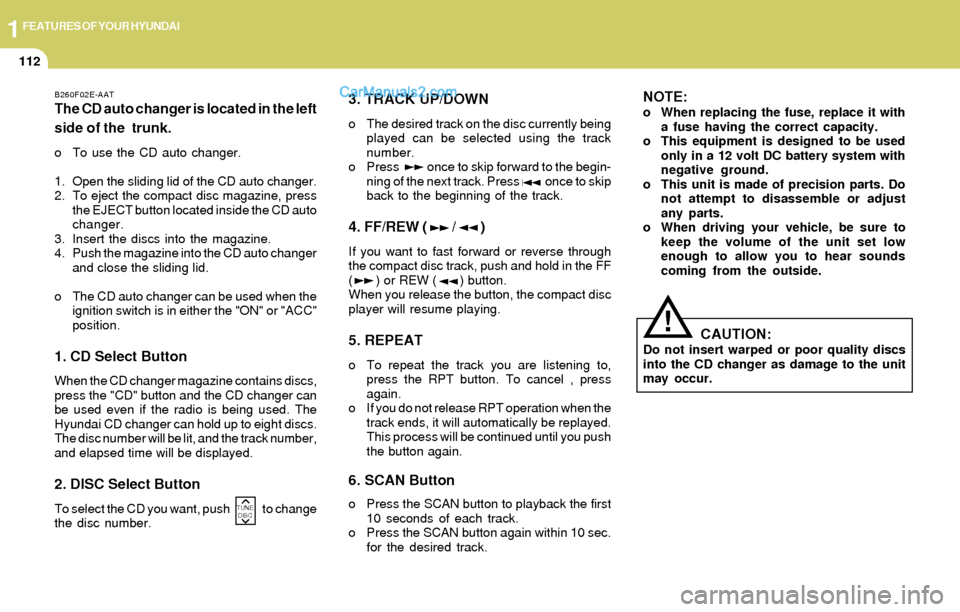
The CD auto changer is located in the left
side of the trunk.
o To use the CD auto changer.
1. Open the sliding lid of the CD auto changer.
2. To eject the compact disc magazine, press
the EJECT button located inside the CD auto
changer.
3. Insert the discs into the magazine.
4. Push the magazine into the CD auto changer
and close the sliding lid.
o The CD auto changer can be used when the
ignition switch is in either the "ON" or "ACC"
position.
1. CD Select Button
When the CD changer magazine contains discs,
press the "CD" button and the CD changer can
be used even if the radio is being used. The
Hyundai CD changer can hold up to eight discs.
The disc number will be lit, and the track number,
and elapsed time will be displayed.
2. DISC Select Button
To select the CD you want, push to change
the disc number.
NOTE:o When replacing the fuse, replace it with
a fuse having the correct capacity.
o This equipment is designed to be used
only in a 12 volt DC battery system with
negative ground.
o This unit is made of precision parts. Do
not attempt to disassemble or adjust
any parts.
o When driving your vehicle, be sure to
keep the volume of the unit set low
enough to allow you to hear sounds
coming from the outside.
TUNE
DISC
CAUTION:Do not insert warped or poor quality discs
into the CD changer as damage to the unit
may occur.
!
Page 133 of 241
1FEATURES OF YOUR HYUNDAI
122
3. TRACK UP/DOWN
o The desired track on the disc currently being
played can be selected using the track
number.
o Press once to skip forward to the begin-
ning of the next track. Press once to skip
back to the beginning of the track.
4. FF/REW ( / )
If you want to fast forward or reverse through
the compact disc track, push and hold in the FF
( ) or REW ( ) button.
When you release the button, the compact disc
player will resume playing.
5. REPEAT
o To repeat the track you are currently listen-
ing to, press the RPT button. To cancel,
press again.
o If you do not release RPT operation when the
track ends, it will automatically be replayed.
This process will be continued until you push
the button again.
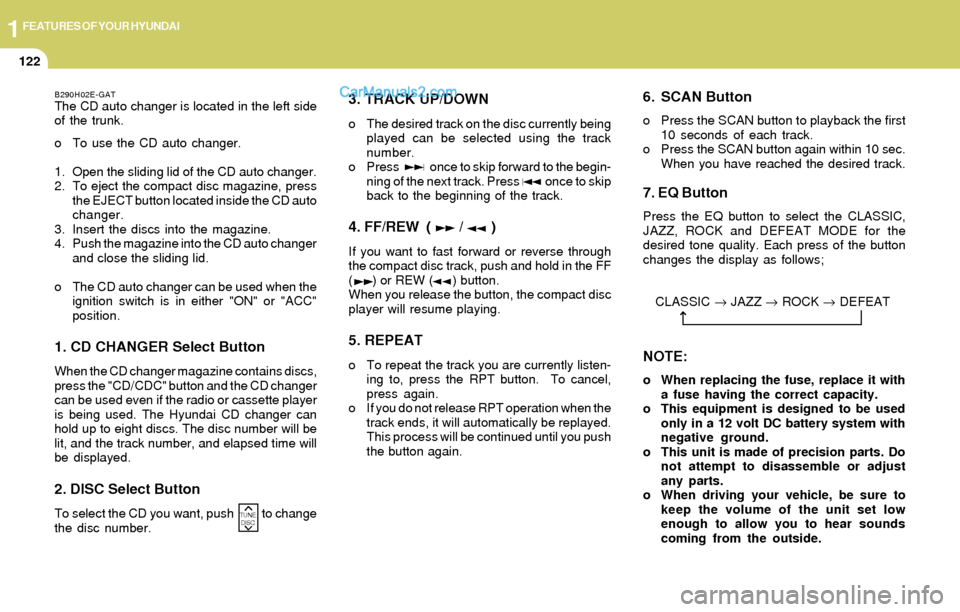
B290H02E-GATThe CD auto changer is located in the left side
of the trunk.
o To use the CD auto changer.
1. Open the sliding lid of the CD auto changer.
2. To eject the compact disc magazine, press
the EJECT button located inside the CD auto
changer.
3. Insert the discs into the magazine.
4. Push the magazine into the CD auto changer
and close the sliding lid.
o The CD auto changer can be used when the
ignition switch is in either "ON" or "ACC"
position.
1. CD CHANGER Select Button
When the CD changer magazine contains discs,
press the "CD/CDC" button and the CD changer
can be used even if the radio or cassette player
is being used. The Hyundai CD changer can
hold up to eight discs. The disc number will be
lit, and the track number, and elapsed time will
be displayed.
2. DISC Select Button
To select the CD you want, push to change
the disc number.
6. SCAN Button
o Press the SCAN button to playback the first
10 seconds of each track.
o Press the SCAN button again within 10 sec.
When you have reached the desired track.
7. EQ Button
Press the EQ button to select the CLASSIC,
JAZZ, ROCK and DEFEAT MODE for the
desired tone quality. Each press of the button
changes the display as follows;
TUNE
DISC
NOTE:
o When replacing the fuse, replace it with
a fuse having the correct capacity.
o This equipment is designed to be used
only in a 12 volt DC battery system with
negative ground.
o This unit is made of precision parts. Do
not attempt to disassemble or adjust
any parts.
o When driving your vehicle, be sure to
keep the volume of the unit set low
enough to allow you to hear sounds
coming from the outside. CLASSIC → JAZZ → ROCK → DEFEAT
Page 141 of 241
2DRIVING YOUR HYUNDAI
2
!WARNING: ENGINE EXHAUST CAN BE DANGEROUS!
C010A02A-AATEngine exhaust fumes can be extremely dangerous. If, at any time, you smell exhaust fumes inside the vehicle, open the windows immediately.
o Do not inhale exhaust fumes.
Exhaust fumes contain carbon monoxide, a colorless, odorless gas that can cause unconsciousness and death by asphyxiation.
o Be sure the exhaust system does not leak.
The exhaust system should be checked whenever the vehicle is raised to change the oil or for any other purpose. If you hear a change
in the sound of the exhaust or if you drive over something that strikes the underneath side of the car, have the exhaust system checked
as soon as possible by your Hyundai dealer.
o Do not run the engine in an enclosed area.
Letting the engine idle in your garage, even with the garage door open, is a hazardous practice. Never run the engine in your garage any
longer than it takes to start the engine and back the car out.
o Avoid idling the engine for prolonged periods with people inside the car.
If it is necessary to idle the engine for a prolonged period with people inside the car, be sure to do so only in an open area with the air intake
set at "Fresh" and fan operating at one of the higher speeds so fresh air is drawn into the interior.
If you must drive with the trunk /tail gate open because you are carrying objects that make this necessary:
1. Close all windows.
2. Open side vents.
3. Set the air intake control at "Fresh", the air flow control at "Floor" or "Face" and the fan at one of the higher speeds.
To assure proper operation of the ventilation system, be sure the ventilation air intakes located just in front of the windshield are kept clear
of snow, ice, leaves or other obstructions.
!PROPOSITION 65 WARNING:Engine exhaust and a wide variety of automobile components and parts, including components found in the interior furnishings
in a vehicle, contain or emit chemicals known to the State of California to cause cancer and birth defects and reproductive harm.
In addition, certain fluids contained in vehicles and certain products of component wear contain or emit chemicals known to
the State of California to cause cancer and birth defects or other reproductive harm.
Page 157 of 241
2DRIVING YOUR HYUNDAI
18
C190E02L
Gross Axle WeightGross Vehicle
Weight
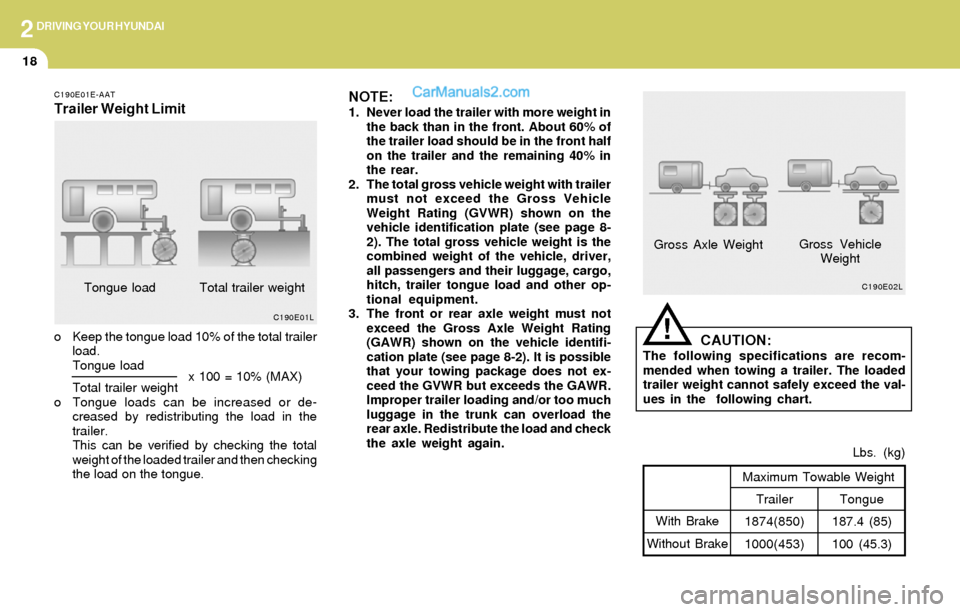
C190E01L
Tongue
187.4 (85)
100 (45.3)Lbs. (kg)Trailer
1874(850)
1000(453) Maximum Towable Weight
With Brake
Without Brake
!CAUTION:The following specifications are recom-
mended when towing a trailer. The loaded
trailer weight cannot safely exceed the val-
ues in the following chart.
NOTE:1. Never load the trailer with more weight in
the back than in the front. About 60% of
the trailer load should be in the front half
on the trailer and the remaining 40% in
the rear.
2. The total gross vehicle weight with trailer
must not exceed the Gross Vehicle
Weight Rating (GVWR) shown on the
vehicle identification plate (see page 8-
2). The total gross vehicle weight is the
combined weight of the vehicle, driver,
all passengers and their luggage, cargo,
hitch, trailer tongue load and other op-
tional equipment.
3. The front or rear axle weight must not
exceed the Gross Axle Weight Rating
(GAWR) shown on the vehicle identifi-
cation plate (see page 8-2). It is possible
that your towing package does not ex-
ceed the GVWR but exceeds the GAWR.
Improper trailer loading and/or too much
luggage in the trunk can overload the
rear axle. Redistribute the load and check
the axle weight again.
C190E01E-AAT
Trailer Weight Limit
o Keep the tongue load 10% of the total trailer
load.
Tongue load
Total trailer weight
o Tongue loads can be increased or de-
creased by redistributing the load in the
trailer.
This can be verified by checking the total
weight of the loaded trailer and then checking
the load on the tongue.Tongue load
x 100 = 10% (MAX)Total trailer weight
Page 164 of 241
3WHAT TO DO IN AN EMERGENCY
6CHANGING A FLAT TIREIF YOU HAVE A FLAT TIRE
D060B01E-AAT
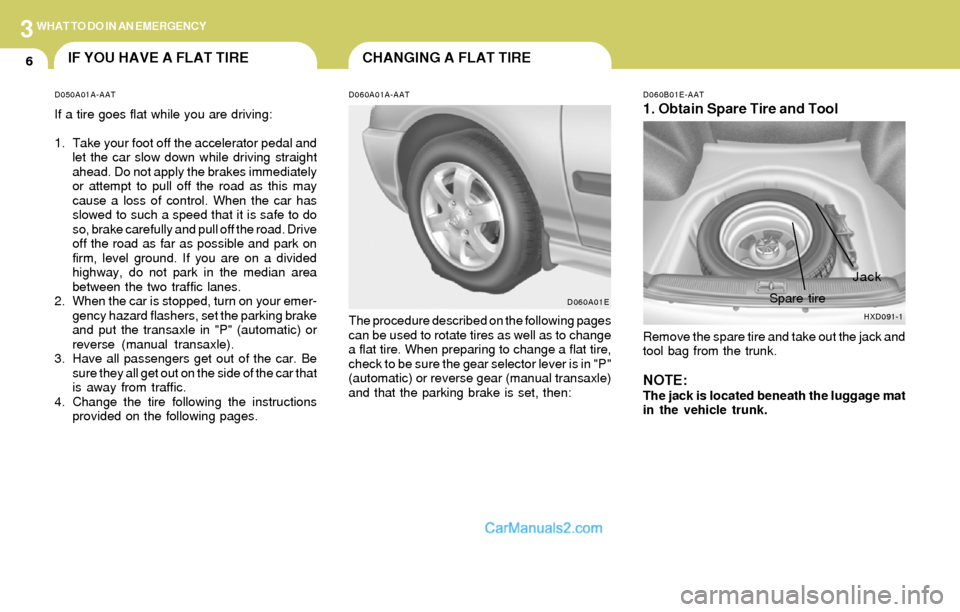
1. Obtain Spare Tire and Tool
Remove the spare tire and take out the jack and
tool bag from the trunk.
NOTE:The jack is located beneath the luggage mat
in the vehicle trunk.
D060A01A-AAT
The procedure described on the following pages
can be used to rotate tires as well as to change
a flat tire. When preparing to change a flat tire,
check to be sure the gear selector lever is in "P"
(automatic) or reverse gear (manual transaxle)
and that the parking brake is set, then:
D060A01E D050A01A-AAT
If a tire goes flat while you are driving:
1. Take your foot off the accelerator pedal and
let the car slow down while driving straight
ahead. Do not apply the brakes immediately
or attempt to pull off the road as this may
cause a loss of control. When the car has
slowed to such a speed that it is safe to do
so, brake carefully and pull off the road. Drive
off the road as far as possible and park on
firm, level ground. If you are on a divided
highway, do not park in the median area
between the two traffic lanes.
2. When the car is stopped, turn on your emer-
gency hazard flashers, set the parking brake
and put the transaxle in "P" (automatic) or
reverse (manual transaxle).
3. Have all passengers get out of the car. Be
sure they all get out on the side of the car that
is away from traffic.
4. Change the tire following the instructions
provided on the following pages.
HXD091-1
Jack
Spare tire
Page 167 of 241
3WHAT TO DO IN AN EMERGENCY
9
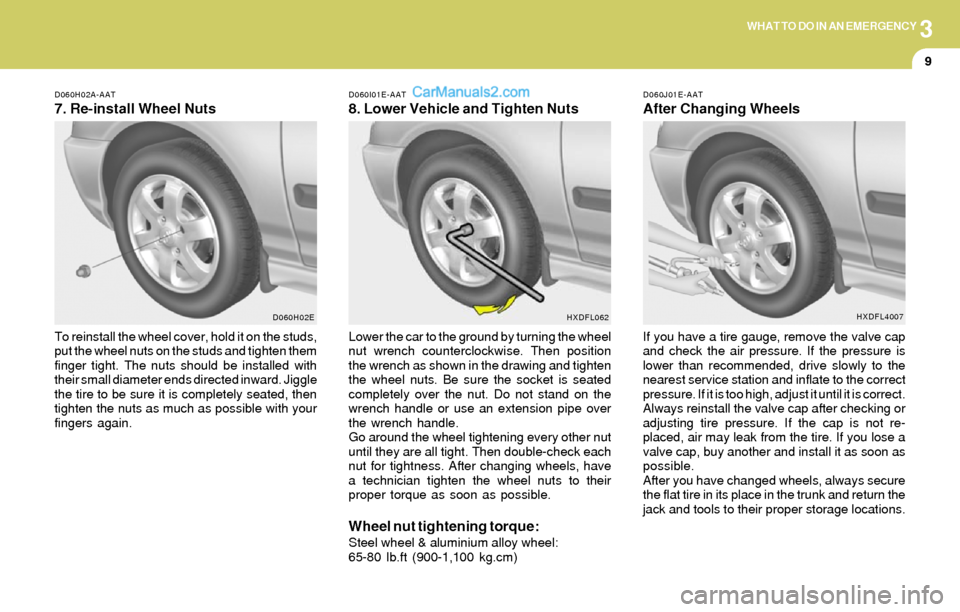
To reinstall the wheel cover, hold it on the studs,
put the wheel nuts on the studs and tighten them
finger tight. The nuts should be installed with
their small diameter ends directed inward. Jiggle
the tire to be sure it is completely seated, then
tighten the nuts as much as possible with your
fingers again.
D060H02A-AAT
7. Re-install Wheel Nuts
D060H02ED060I01E-AAT
8. Lower Vehicle and Tighten Nuts
D060J01E-AAT
After Changing Wheels
Lower the car to the ground by turning the wheel
nut wrench counterclockwise. Then position
the wrench as shown in the drawing and tighten
the wheel nuts. Be sure the socket is seated
completely over the nut. Do not stand on the
wrench handle or use an extension pipe over
the wrench handle.
Go around the wheel tightening every other nut
until they are all tight. Then double-check each
nut for tightness. After changing wheels, have
a technician tighten the wheel nuts to their
proper torque as soon as possible.
Wheel nut tightening torque:Steel wheel & aluminium alloy wheel:
65-80 lb.ft (900-1,100 kg.cm)If you have a tire gauge, remove the valve cap
and check the air pressure. If the pressure is
lower than recommended, drive slowly to the
nearest service station and inflate to the correct
pressure. If it is too high, adjust it until it is correct.
Always reinstall the valve cap after checking or
adjusting tire pressure. If the cap is not re-
placed, air may leak from the tire. If you lose a
valve cap, buy another and install it as soon as
possible.
After you have changed wheels, always secure
the flat tire in its place in the trunk and return the
jack and tools to their proper storage locations.
HXDFL062HXDFL4007
Page 212 of 241
6DO-IT-YOURSELF MAINTENANCE
28
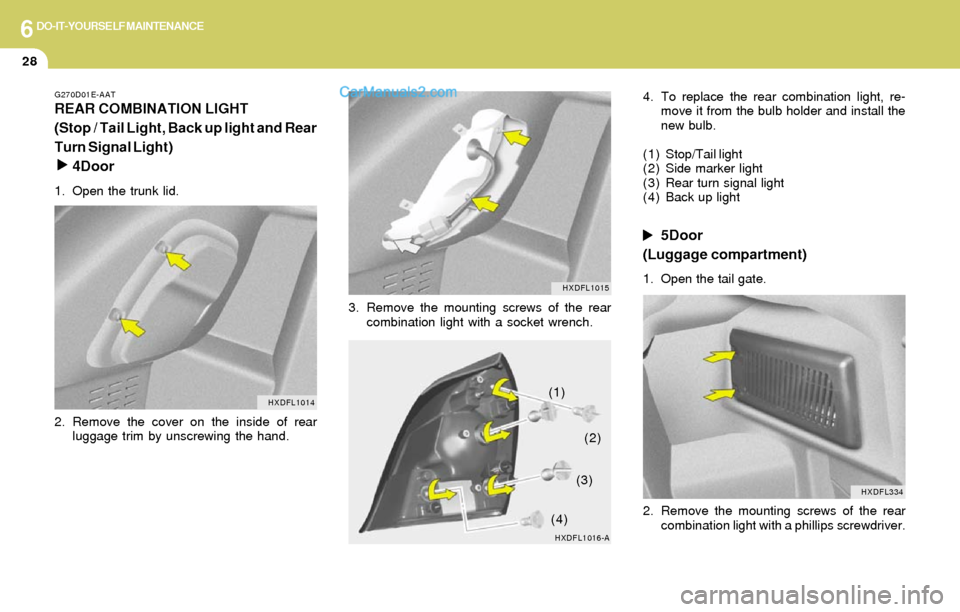
G270D01E-AAT
REAR COMBINATION LIGHT
(Stop / Tail Light, Back up light and Rear
Turn Signal Light)
4Door
1. Open the trunk lid.
2. Remove the cover on the inside of rear
luggage trim by unscrewing the hand.
HXDFL1014
3. Remove the mounting screws of the rear
combination light with a socket wrench.4. To replace the rear combination light, re-
move it from the bulb holder and install the
new bulb.
(1) Stop/Tail light
(2) Side marker light
(3) Rear turn signal light
(4) Back up light
5Door
(Luggage compartment)
1. Open the tail gate.
2. Remove the mounting screws of the rear
combination light with a phillips screwdriver.
HXDFL1016-AHXDFL1015
(1)
(2)
(3)
(4)
HXDFL334
Page 214 of 241
6DO-IT-YOURSELF MAINTENANCE
30
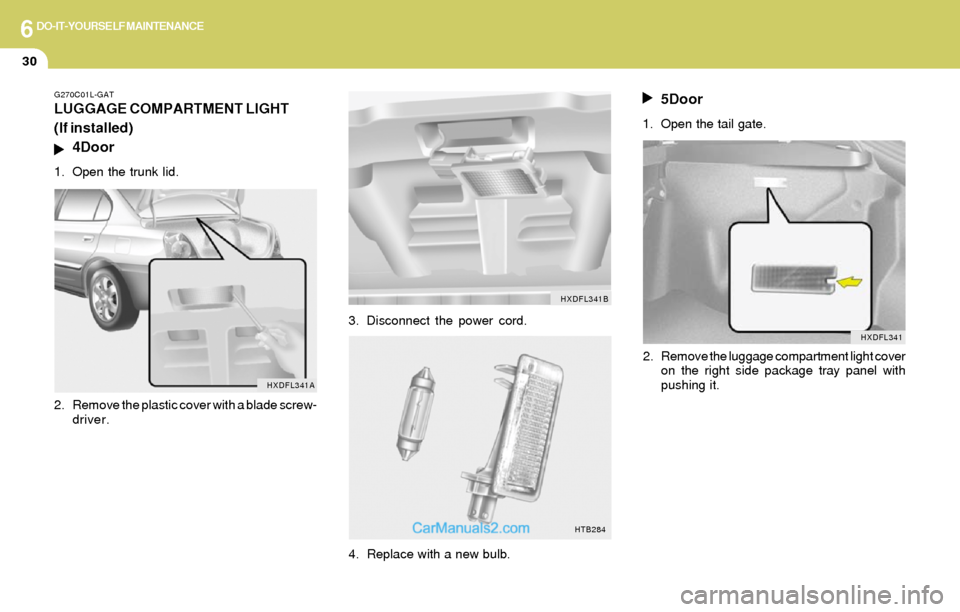
G270C01L-GAT
LUGGAGE COMPARTMENT LIGHT
(If installed)
4Door
1. Open the trunk lid.
2. Remove the plastic cover with a blade screw-
driver.
HXDFL341A
3. Disconnect the power cord.
HTB284
4. Replace with a new bulb.
5Door
1. Open the tail gate.
2. Remove the luggage compartment light cover
on the right side package tray panel with
pushing it.
HXDFL341B
HXDFL341