audio Hyundai Elantra 2005 User Guide
[x] Cancel search | Manufacturer: HYUNDAI, Model Year: 2005, Model line: Elantra, Model: Hyundai Elantra 2005Pages: 256, PDF Size: 10.4 MB
Page 122 of 256
1
FEATURES OF YOUR HYUNDAI
111
o This equipment is designed to be used
only in a 12 volt DC battery system with
negative ground.
o This unit is made of precision parts. Do
not attempt to disassemble or adjust
any parts.
o When driving your vehicle, be sure to
keep the volume of the unit set low
enough to allow you to hear sounds
coming from the outside.
o Do not expose this equipment (includ-
ing the speakers) to water or excessive
moisture.
!
CAUTION:
o Do not insert warped or poor quality
discs into the CD player as damage to the
unit may occur.
o Do not insert anything like coins into the
player slot as damage to the unit may
occur.
o Do not place beverages close to the
audio system. The playback mechanism
may be damaged if you spill them.
o Do not impact or strike the audio system,
or the playback mechanism could be
damaged.
o Driving on the off-roads or other vibra-
tions may skip your compact disc.
Do not use the audio system on off-
roads as the discs could be scratched
and damaged.
o Do not grip or pull out the disc with your
hand while the disc is being pulled into
the unit by the self loading mechanism.
These can cause poor disc scratching to
occur or damage the compact disc player.
o Avoid using CD-Recordable or CD-
Rewritable as the player could not be
operated in recording way of the CD
maker. When using the compact disc
player, professionally recorded CDs are
recommended.
xdflhma-1b.p652/5/2008, 2:06 PM 111
Page 125 of 256
1FEATURES OF YOUR HYUNDAI
114
!
CAUTION:
o Do not insert warped or poor quality
discs into the CD changer as damage to
the unit may occur.
o Do not insert anything like coins into the
changer slot as damage to the unit may
occur.
o Do not place beverages close to the
audio system. The playback mechanism
may be damaged if you spill them.
o Do not impact or strike the audio system,
or the playback mechanism could be
damaged.
o Driving on the off-roads or other vibra-
tions may skip your compact disc.
Do not use the audio system on off-
roads as the discs could be scratched
and damaged.
o Do not grip or pull out the disc with your
hand while the disc is being pulled into
the unit by the self loading mechanism.
These can cause poor disc scratching to
occur or damage the compact disc player.
o Avoid using CD-Recordable or CD-
Rewritable as the player could not be
operated in recording way of the CD
maker. When using the compact disc
player, professionally recorded CDs are
recommended.
xdflhma-1b.p652/5/2008, 2:06 PM 114
Page 128 of 256
1
FEATURES OF YOUR HYUNDAI
117
H290A01O
HOW TO PRESET STATIONSSix AM and twelve FM stations may be pro-
grammed into the memory of the radio. Then, by
simply pressing the band select button and/or
one of the six station select buttons, you may
recall any of these stations instantly. To pro-
gram the stations, follow these steps:
o Press band selector to set the band for AM,
FM1 or FM2.
o Select the desired station to be stored by
seek or manual tuning.
o Determine the preset station select button
you wish to use to access that station.
o Press the station select button for more than
two seconds. A select button indicator will
show in the display indicating which select
button you have depressed. The frequency
display will flash after it has been stored into
the memory with a beep sound. You should
then release the button, and proceed to
program the next desired station. A total of
18 stations can be programmed by selecting
one AM and two FM station per button.
o When completed, any preset station may be
recalled by selecting AM, FM1 or FM2 band
and the appropriate station button.CLASSIC → JAZZ → ROCK → DEFEAT
6. BAND SelectorPressing the button changes the AM,
FM1 and FM2 bands. The mode selected is
shown on the display.7. EQUALIZER ButtonPress the EQ button to select the CLASSIC,
JAZZ, ROCK and DEFEAT MODE for the
desired tone quality. Each press of the button
changes the display as follows;8. SCAN ButtonWhen the scan button is pressed, the frequency
will increase and the receivable stations will be
tuned in one after another, receiving each sta-
tion for 5 seconds. To stop scanning, press the
scan button again.
FM/AM
CAUTION:
o Do not place beverages close to the
audio system. The playback mechanism
may be damaged if you spill them.
o Do not impact or strike the audio system,
or the playback mechanism could be
damaged.
!
xdflhma-1b.p652/5/2008, 2:07 PM 117
Page 130 of 256
1
FEATURES OF YOUR HYUNDAI
119
H290D02O-GAT1. FF/REW Buttono Fast forward tape winding starts when the
FF ( ) button is pressed during PLAY or
REW mode.
o Tape PLAY starts when the FF ( ) button
is pressed again during FF mode.
o Tape rewinding starts when the REW ( )
button is pressed during PLAY or FF mode.
o Tape PLAY starts when the REW ( ) button
pressed again during REW mode.2. AUTO MUSIC Select ButtonPress the button to find the starting point of each
song in a prerecorded music tape. The quiet
space between songs (must have at least a 4
sec. gap) can be identified by the AUTO MUSIC
Select button.
o Pressing the button will play the begin-
ning of the next music segment.
o Pressing the button will start replay at
the beginning of the music just listened to.
3. TAPE PROGRAM ButtonThis allows you to play the reverse side of the
tape by merely depressing the program button.
An arrow will appear in the display to show tape
direction.4. TAPE EJECT buttono When the button is pressed with a cass-
ette loaded, the cassette will eject.
o When the button is pressed during FF/
REW mode, the cassette will eject.5. EQ ButtonPress the EQ button to select the CLASSIC,
JAZZ, ROCK and DEFEAT MODE for the
desired tone quality. Each press of the button
changes the display as follows;
CLASSIC → JAZZ → ROCK → DEFEAT
6. DOLBY ButtonIf you get background noise during tape PLAY,
you can reduce this considerably by merely
pressing the DOLBY button. If you want to
cancel the DOLBY feature, press the button
again.
!
CAUTION:
o Do not insert anything like coins into the
player slot as damage to the unit may
occur.
o Do not place beverages close to the
audio system. The playback mechanism
may be damaged if you spill them.
o Do not impact or strike the audio system,
or the playback mechanism could be
damaged.
xdflhma-1b.p652/5/2008, 2:07 PM 119
Page 133 of 256
1FEATURES OF YOUR HYUNDAI
122
o This equipment is designed to be used
only in a 12 volt DC battery system with
negative ground.
o This unit is made of precision parts. Do
not attempt to disassemble or adjust
any parts.
o When driving your vehicle, be sure to
keep the volume of the unit set low
enough to allow you to hear sounds
coming from the outside.
o Do not expose this equipment (includ-
ing the speakers and tape) to water or
excessive moisture.
!
CAUTION:
o Do not insert warped or poor quality
discs into the CD player as damage to the
unit may occur.
o Do not insert anything like coins into the
player slot as damage to the unit may
occur.
o Do not place beverages close to the
audio system. The playback mechanism
may be damaged if you spill them.
o Do not impact or strike the audio system,
or the playback mechanism could be
damaged.
o Driving on the off-roads or other vibra-
tions may skip your compact disc.
Do not use the audio system on off-
roads as the discs could be scratched
and damaged.
o Do not grip or pull out the disc with your
hand while the disc is being pulled into
the unit by the self loading mechanism.
These can cause poor disc scratching to
occur or damage the compact disc player.
o Avoid using CD-Recordable or CD-
Rewritable as the player could not be
operated in recording way of the CD
maker. When using the compact disc
player, professionally recorded CDs are
recommended.
xdflhma-1b.p652/5/2008, 2:07 PM 122
Page 136 of 256
1
FEATURES OF YOUR HYUNDAI
125
CAUTION:
o Do not insert warped or poor quality
discs into the CD changer as damage to
the unit may occur.
o Do not insert anything like coins into the
changer slot as damage to the unit may
occur.
o Do not place beverages close to the
audio system. The playback mechanism
may be damaged if you spill them.
o Do not impact or strike the audio system,
or the playback mechanism could be
damaged.
o Driving on the off-roads or other vibra-
tions may skip your compact disc.
Do not use the audio system on off-
roads as the discs could be scratched
and damaged.
o Do not grip or pull out the disc with your
hand while the disc is being pulled into
the unit by the self loading mechanism.
These can cause poor disc scratching to
occur or damage the compact disc player.
o Avoid using CD-Recordable or CD-
Rewritable as the player could not be
operated in recording way of the CD
maker. When using the compact disc
player, professionally recorded CDs are
recommended.
!
xdflhma-1b.p652/5/2008, 2:07 PM 125
Page 137 of 256

1FEATURES OF YOUR HYUNDAI
126
AUDIO FAULT CODEINDICATION
Er2
Er3
Er6
Er8
HHH
no CDB890A01Y-AATIf you see any error indication in the display while using the system in the CD or Tape mode, find the cause in the chart below.
If you cannot clear the error indication, take the car to your Hyundai dealer.
SOLUTION
After resetting the audio system, push the eject button.
If disc is not ejected, consult your Hyundai dealer.
Make sure the disc is not scratched or damaged.
Press the eject button and pull out the disc.
Then insert a normal CD disc.
Check if the disc is inserted correctly in the CD player.
Make sure the disc is not scratched or damaged.
After resetting the audio system, push the eject button.
If tape does not eject, consult your Hyundai dealer.
Fault code will reset automatically when the temperature returns to normal.
Insert disc in magazine or insert CD magazine in the auto changer. CAUSE
CD DECK MECHANICAL ERROR
(EJECT ERROR, LOADING ERROR)
FOCUS ERROR
DATA READ ERROR
DISC ERROR
TAPE DECK ERROR
TAPE EJECT ERROR
TEMPERATURE IS TOO HIGH
NO DISC IN MAGAZINE
NO CD MAGAZINE IN THE AUTO CHANGER
xdflhma-1b.p652/5/2008, 2:07 PM 126
Page 139 of 256
1FEATURES OF YOUR HYUNDAI
128
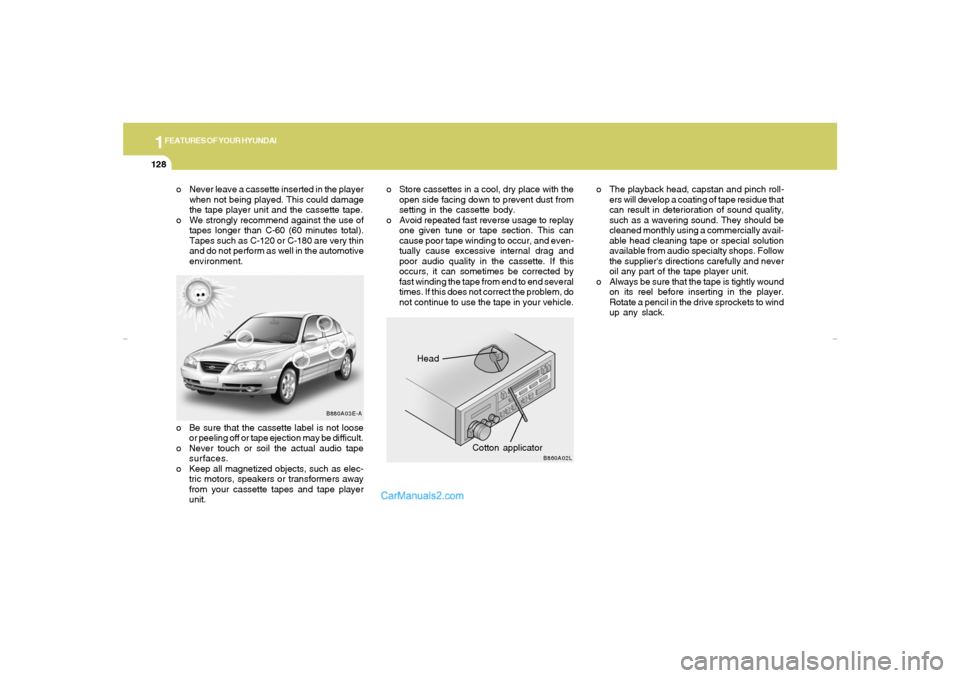
Head
Cotton applicator
B880A03E-A
B860A02L
o Never leave a cassette inserted in the player
when not being played. This could damage
the tape player unit and the cassette tape.
o We strongly recommend against the use of
tapes longer than C-60 (60 minutes total).
Tapes such as C-120 or C-180 are very thin
and do not perform as well in the automotive
environment.o The playback head, capstan and pinch roll-
ers will develop a coating of tape residue that
can result in deterioration of sound quality,
such as a wavering sound. They should be
cleaned monthly using a commercially avail-
able head cleaning tape or special solution
available from audio specialty shops. Follow
the supplier's directions carefully and never
oil any part of the tape player unit.
o Always be sure that the tape is tightly wound
on its reel before inserting in the player.
Rotate a pencil in the drive sprockets to wind
up any slack.o Be sure that the cassette label is not loose
or peeling off or tape ejection may be difficult.
o Never touch or soil the actual audio tape
surfaces.
o Keep all magnetized objects, such as elec-
tric motors, speakers or transformers away
from your cassette tapes and tape player
unit.o Store cassettes in a cool, dry place with the
open side facing down to prevent dust from
setting in the cassette body.
o Avoid repeated fast reverse usage to replay
one given tune or tape section. This can
cause poor tape winding to occur, and even-
tually cause excessive internal drag and
poor audio quality in the cassette. If this
occurs, it can sometimes be corrected by
fast winding the tape from end to end several
times. If this does not correct the problem, do
not continue to use the tape in your vehicle.
xdflhma-1b.p652/5/2008, 2:07 PM 128
Page 228 of 256
6
DO-IT-YOURSELF MAINTENANCE
35
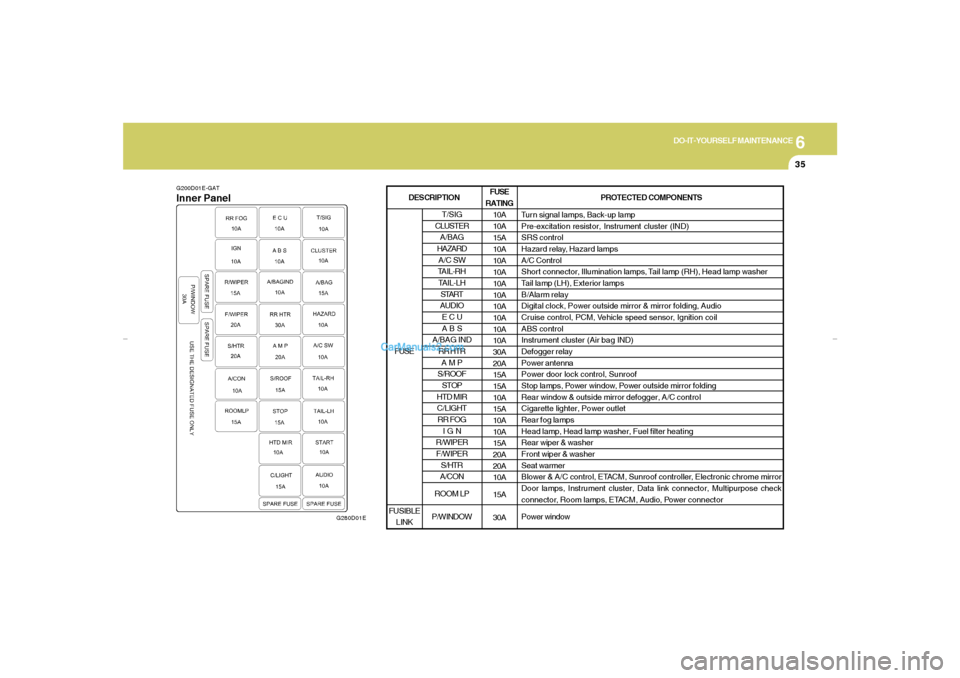
G200D01E-GATInner Panel
G280D01E
FUSE
RATING
10A
10A
15A
10A
10A
10A
10A
10A
10A
10A
10A
10A
30A
20A
15A
15A
10A
15A
10A
10A
15A
20A
20A
10A
15A
30APROTECTED COMPONENTS
Turn signal lamps, Back-up lamp
Pre-excitation resistor, Instrument cluster (IND)
SRS control
Hazard relay, Hazard lamps
A/C Control
Shor t connector, Illumination lamps, Tail lamp (RH), Head lamp washer
Tail lamp (LH), Exterior lamps
B/Alarm relay
Digital clock, Power outside mirror & mirror folding, Audio
Cruise control, PCM, Vehicle speed sensor, Ignition coil
ABS control
Instrument cluster (Air bag IND)
Defogger relay
Power antenna
Power door lock control, Sunroof
Stop lamps, Power window, Power outside mirror folding
Rear window & outside mirror defogger, A/C control
Cigarette lighter, Power outlet
Rear fog lamps
Head lamp, Head lamp washer, Fuel filter heating
Rear wiper & washer
Front wiper & washer
Seat warmer
Blower & A/C control, ETACM, Sunroof controller, Electronic chrome mirror
Door lamps, Instrument cluster, Data link connector, Multipurpose check
connector, Room lamps, ETACM, Audio, Power connector
Power window
T/SIG
CLUSTER
A/BAG
HAZARD
A/C SW
TAIL-RH
TAIL-LH
START
AUDIO
E C U
A B S
A/BAG IND
RR HTR
A M P
S/ROOF
STOP
HTD MIR
C/LIGHT
RR FOG
I G N
R/WIPER
F/WIPER
S/HTR
A/CON
ROOM LP
P/WINDOW FUSE
FUSIBLE
LINK
DESCRIPTION
xdflhma-6.p652/5/2008, 2:15 PM 35
Page 251 of 256

10
INDEX
2
A
Air bag ...............................................................................................1-31
Air Cleaner Filter ...............................................................................6-11
Air Conditioning
Care..............................................................................................6-17
Operation............................................................................ 1-88, 6-17
Switch...........................................................................................1-87
Antenna..........................................................................................1-129
Ashtray..............................................................................................1-62
Audio System
Cassete tape player operation (H240, H290)............... 1-104, 1-118
CD auto changer (H260, H290) ....................................1-112, 1-123
Compact disc player operation (H260, H290) .............. 1-109, 1-120
Stereo radio operation (H240, H260, H290) ..... 1-101, 1-106, 1-115
B
Battery..................................................................................... 2-15, 6-22
Binding Arbitration.............................................................................8-13
Brake
Anti-lock brake system ................................................................2-11
Checking the brakes ....................................................................6-15
Fluid ..............................................................................................6-15
Pedal clearance...........................................................................6-20
Pedal freeplay ..............................................................................6-19
Breaking-In your New Hyundai .......................................................... 1-3
C
Care of Cassette Tapes ................................................................1-127
Care of Disc ...................................................................................1-127Catalytic Converter............................................................................. 7-3
Changing the Air Filter.......................................................................6-18
Child-Protector Rear Door Lock ......................................................... 1-7
Child Restraint System.....................................................................1-23
Installing a Child Restraint System with
"Tether Anchorage" System .....................................................1-25
Securing the Child Restraint Seat with the "ISOFIX" System ....1-28
Cigarette Lighter................................................................................1-61
Clock.................................................................................................1-60
Clutch
Checking fluid...............................................................................6-16
Pedal freeplay ..............................................................................6-19
Combination Light
Auto light.......................................................................................1-56
Headlight flasher..........................................................................1-56
Headlight switch...........................................................................1-55
High-beam switch........................................................................1-56
Lane change signal ......................................................................1-55
Parking light auto off .....................................................................1-56
Turn signal operation...................................................................1-55
Consumer Information......................................................................8-10
Cooling Fans.....................................................................................6-23
Corrosion protection
Cleaning the interior....................................................................... 4-5
Protecting your Hyundai from corrosion....................................... 4-2
Washing and waxing...................................................................... 4-3
Cruise Control...................................................................................1-78
xdflhma-10.p652/5/2008, 2:18 PM 2