audio Hyundai Elantra 2005 Owner's Manual
[x] Cancel search | Manufacturer: HYUNDAI, Model Year: 2005, Model line: Elantra, Model: Hyundai Elantra 2005Pages: 256, PDF Size: 10.4 MB
Page 10 of 256
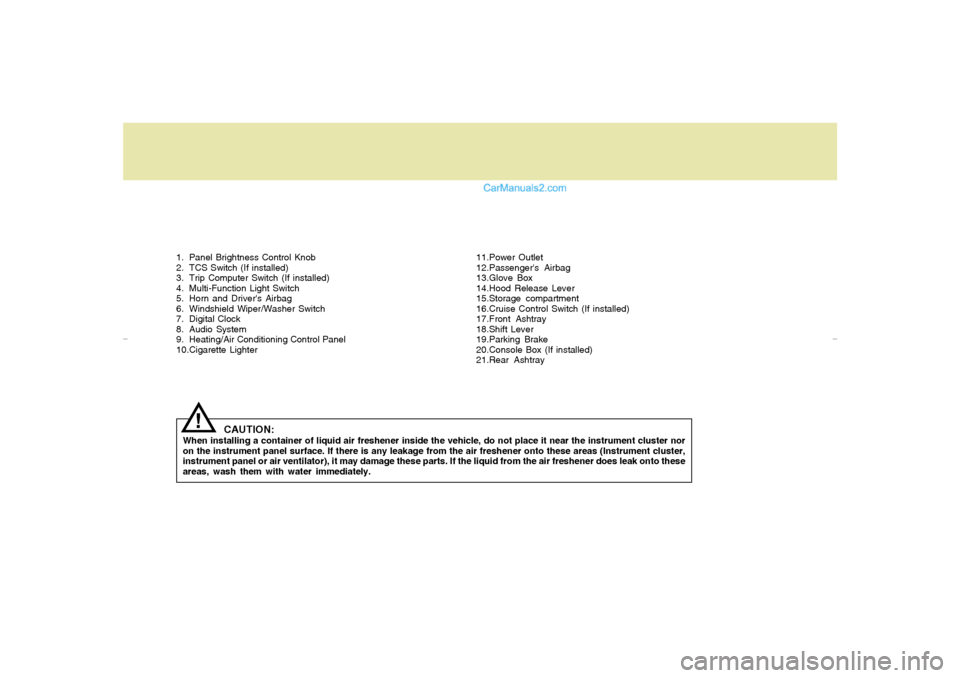
1. Panel Brightness Control Knob
2. TCS Switch (If installed)
3. Trip Computer Switch (If installed)
4. Multi-Function Light Switch
5. Horn and Driver's Airbag
6. Windshield Wiper/Washer Switch
7. Digital Clock
8. Audio System
9. Heating/Air Conditioning Control Panel
10.Cigarette Lighter11.Power Outlet
12.Passenger's Airbag
13.Glove Box
14.Hood Release Lever
15.Storage compartment
16.Cruise Control Switch (If installed)
17.Front Ashtray
18.Shift Lever
19.Parking Brake
20.Console Box (If installed)
21.Rear Ashtray
CAUTION:
When installing a container of liquid air freshener inside the vehicle, do not place it near the instrument cluster nor
on the instrument panel surface. If there is any leakage from the air freshener onto these areas (Instrument cluster,
instrument panel or air ventilator), it may damage these parts. If the liquid from the air freshener does leak onto these
areas, wash them with water immediately.
!
xdflhma-0.p652/5/2008, 1:59 PM 11
Page 12 of 256
FEATURES OF YOUR HYUNDAI
1
Fuel Recommendations ................................................ 1-2
Breaking in Your New Hyundai ..................................... 1-3
Keys.............................................................................. 1-3
Door .............................................................................. 1-4
Theft-Alarm System ...................................................... 1-8
Window .......................................................................1-10
Seat ............................................................................. 1-11
Seat Belts....................................................................1-17
Child Restraint System ...............................................1-23
Supplemental Restraint (AIRBAG) System ................1-31
Instrument Cluster and Indicator .................................1-42
Warning and Indicator Lights......................................1-46
Multi-Function Light Switch .........................................1-55
Windshield Wiper/Washer Switch...............................1-57
Sunroof.......................................................................1-64
Mirror...........................................................................1-68
Hood Release .............................................................1-72
Cruise Control.............................................................1-78
Heating and Cooling Control .......................................1-81
Stereo Sound System.................................................1-99
Audio System............................................................1-101
Antenna.....................................................................1-129
1
xdflhma-1a.p652/5/2008, 2:02 PM 1
Page 72 of 256
1
FEATURES OF YOUR HYUNDAI
61
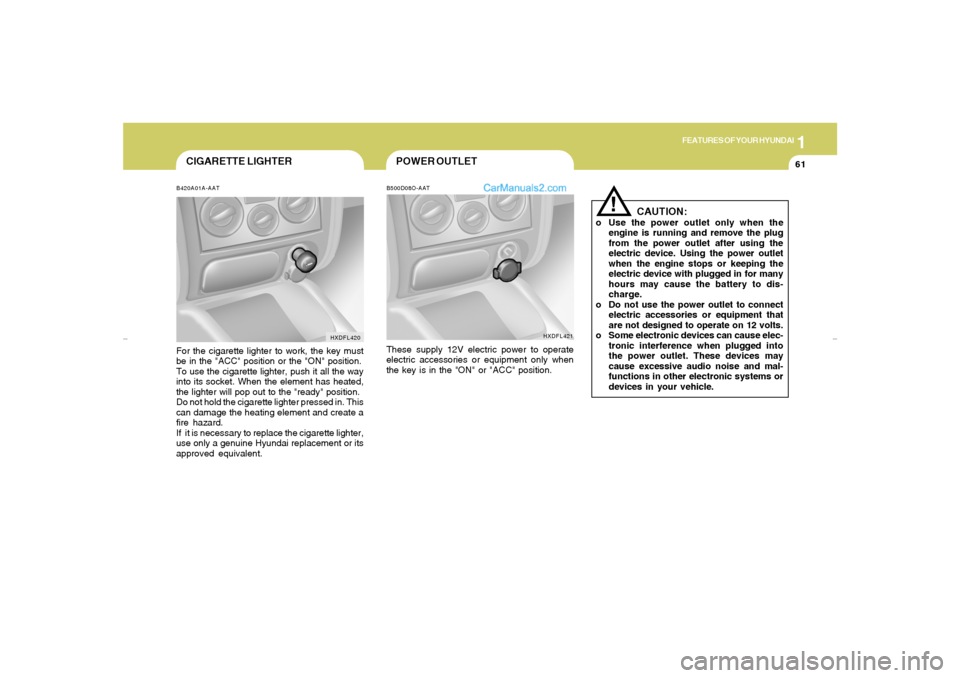
CIGARETTE LIGHTERB420A01A-AATFor the cigarette lighter to work, the key must
be in the "ACC" position or the "ON" position.
To use the cigarette lighter, push it all the way
into its socket. When the element has heated,
the lighter will pop out to the "ready" position.
Do not hold the cigarette lighter pressed in. This
can damage the heating element and create a
fire hazard.
If it is necessary to replace the cigarette lighter,
use only a genuine Hyundai replacement or its
approved equivalent.
HXDFL420
!
B500D08O-AATThese supply 12V electric power to operate
electric accessories or equipment only when
the key is in the "ON" or "ACC" position.
CAUTION:
o Use the power outlet only when the
engine is running and remove the plug
from the power outlet after using the
electric device. Using the power outlet
when the engine stops or keeping the
electric device with plugged in for many
hours may cause the battery to dis-
charge.
o Do not use the power outlet to connect
electric accessories or equipment that
are not designed to operate on 12 volts.
o Some electronic devices can cause elec-
tronic interference when plugged into
the power outlet. These devices may
cause excessive audio noise and mal-
functions in other electronic systems or
devices in your vehicle.
HXDFL421
POWER OUTLET
xdflhma-1a.p652/5/2008, 2:03 PM 61
Page 110 of 256
1
FEATURES OF YOUR HYUNDAI
99
STEREO SOUND SYSTEM
Ionosphere
B750A02L
AM reception
Mountains
BuildingsUnobstructed
area FM radio station
B750A03L
FM reception
B750A01L
Obstructed areaIron bridges
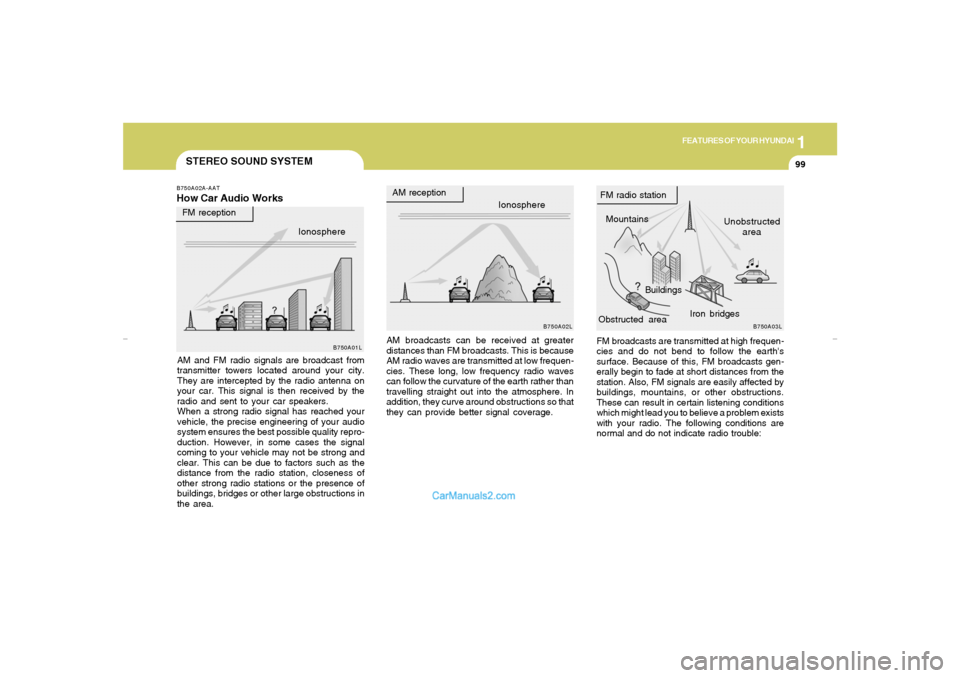
FM broadcasts are transmitted at high frequen-
cies and do not bend to follow the earth's
surface. Because of this, FM broadcasts gen-
erally begin to fade at short distances from the
station. Also, FM signals are easily affected by
buildings, mountains, or other obstructions.
These can result in certain listening conditions
which might lead you to believe a problem exists
with your radio. The following conditions are
normal and do not indicate radio trouble: AM broadcasts can be received at greater
distances than FM broadcasts. This is because
AM radio waves are transmitted at low frequen-
cies. These long, low frequency radio waves
can follow the curvature of the earth rather than
travelling straight out into the atmosphere. In
addition, they curve around obstructions so that
they can provide better signal coverage.
B750A02A-AATHow Car Audio WorksAM and FM radio signals are broadcast from
transmitter towers located around your city.
They are intercepted by the radio antenna on
your car. This signal is then received by the
radio and sent to your car speakers.
When a strong radio signal has reached your
vehicle, the precise engineering of your audio
system ensures the best possible quality repro-
duction. However, in some cases the signal
coming to your vehicle may not be strong and
clear. This can be due to factors such as the
distance from the radio station, closeness of
other strong radio stations or the presence of
buildings, bridges or other large obstructions in
the area.Ionosphere
xdflhma-1b.p652/5/2008, 2:06 PM 99
Page 111 of 256
1FEATURES OF YOUR HYUNDAI
100
!
B750A04L B750A05L
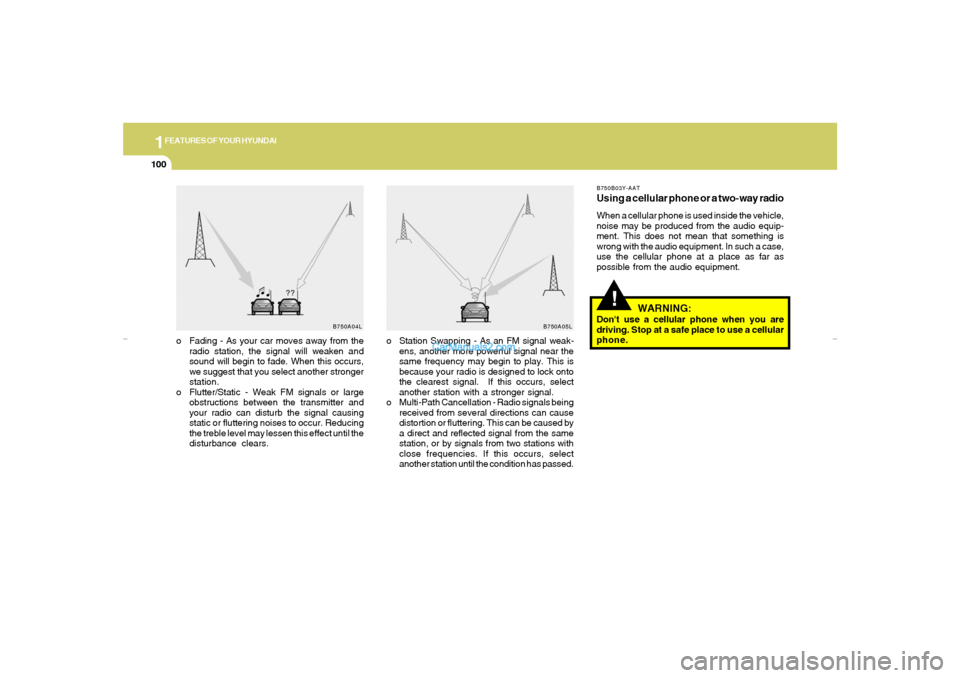
o Station Swapping - As an FM signal weak-
ens, another more powerful signal near the
same frequency may begin to play. This is
because your radio is designed to lock onto
the clearest signal. If this occurs, select
another station with a stronger signal.
o Multi-Path Cancellation - Radio signals being
received from several directions can cause
distortion or fluttering. This can be caused by
a direct and reflected signal from the same
station, or by signals from two stations with
close frequencies. If this occurs, select
another station until the condition has passed. o Fading - As your car moves away from the
radio station, the signal will weaken and
sound will begin to fade. When this occurs,
we suggest that you select another stronger
station.
o Flutter/Static - Weak FM signals or large
obstructions between the transmitter and
your radio can disturb the signal causing
static or fluttering noises to occur. Reducing
the treble level may lessen this effect until the
disturbance clears.
B750B03Y-AATUsing a cellular phone or a two-way radioWhen a cellular phone is used inside the vehicle,
noise may be produced from the audio equip-
ment. This does not mean that something is
wrong with the audio equipment. In such a case,
use the cellular phone at a place as far as
possible from the audio equipment.
WARNING:
Don't use a cellular phone when you are
driving. Stop at a safe place to use a cellular
phone.
xdflhma-1b.p652/5/2008, 2:06 PM 100
Page 112 of 256
1
FEATURES OF YOUR HYUNDAI
101
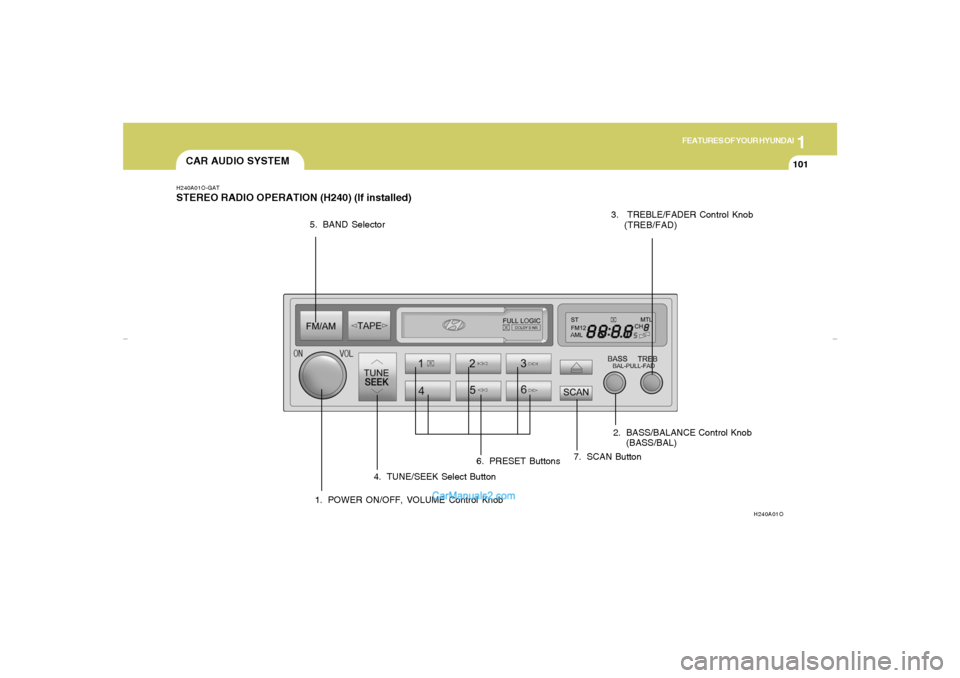
CAR AUDIO SYSTEMH240A01O-GATSTEREO RADIO OPERATION (H240) (If installed)
H240A01O
1. POWER ON/OFF, VOLUME Control Knob2. BASS/BALANCE Control Knob
(BASS/BAL) 3. TREBLE/FADER Control Knob
(TREB/FAD)
4. TUNE/SEEK Select Button 5. BAND Selector
6. PRESET Buttons7. SCAN Button
xdflhma-1b.p652/5/2008, 2:06 PM 101
Page 114 of 256
1
FEATURES OF YOUR HYUNDAI
103
HOW TO PRESET STATIONSSix AM and twelve FM stations may be pro-
grammed into the memory of the radio. Then, by
simply pressing the band select button and/or
one of the six station select buttons, you may
recall any of these stations instantly. To pro-
gram the stations, follow these steps:
o Press band selector to set the band for AM,
FM1, or FM2.
o Select the desired station to be stored by
seek or manual tuning.
o Determine the preset station select button
you wish to use to access that station.
o Press the station select button for more than
two seconds. A select button indicator will
show in the display indicating which select
button you have depressed. The frequency
display will flash after it has been stored into
the memory with a beep sound. You should
then release the button, and proceed to
program the next desired station. A total of
18 stations can be programmed by selecting
one AM and two FM stations per button.
o When completed, any preset station may be
recalled by selecting AM, FM1 or FM2 band
and the appropriate station button.
7. SCAN ButtonWhen the scan button is pressed, the frequency
will increase and the receivable stations will be
tuned in one after another, receiving each sta-
tion for 5 seconds. To stop scanning, press the
scan button again.
CAUTION:
o Do not place beverages close to the
audio system. The playback mechanism
may be damaged if you spill them.
o Do not impact or strike the audio system,
or the playback mechanism could be
damaged.
!
xdflhma-1b.p652/5/2008, 2:06 PM 103
Page 116 of 256
1
FEATURES OF YOUR HYUNDAI
105
H240A03O-GAT1. FF/REW Buttono The FF (fast forward tape winding) starts
when the button is pressed during the
PLAY or REW.
o The play starts when the button is press-
ed again during the FF.
o The REW (rewinding) starts when the bu-
tton is pressed during the PLAY or FF.
o The play starts when the button is press-
ed again during the REW.2. AUTO MUSIC SELECT ButtonPress the button to find the starting point of each
song in a prerecorded music tape.
The quiet space between songs (must have at
least a 4 sec. gap) can be identified by the AUTO
MUSIC SELECT button.
o Pressing the button will play the beginn-
ing of the next music segment.
o Pressing the button will start replay at
the beginning of the music just listened to.
3. TAPE PROGRAM ButtonThis allows you to play the reverse side of the
tape by merely depressing the program button.
An arrow will appear in the display to show tape
direction.NOTE:When tape operation is abnormal or ER8
fault code is displayed, press the eject
button more than 5 seconds to reset the
deck function.4. EJECT Buttono When the EJECT button is pressed with the
cassette loaded, the cassette is ejected.
o When the EJECT button is pressed during
the FF/REW, the cassette is ejected.5. DOLBY SELECT ButtonIf you get background noise during PLAY, you
can reduce this considerably by merely press-
ing DOLBY SELECT button.
If you want to release, press the button again.
!
CAUTION:
o Do not insert anything like coins into the
player slot as damage to the unit may
occur.
o Do not place beverages close to the
audio system. The playback mechanism
may be damaged if you spill them.
o Do not impact or strike the audio system,
or the playback mechanism could be
damaged.
xdflhma-1b.p652/5/2008, 2:06 PM 105
Page 119 of 256
1FEATURES OF YOUR HYUNDAI
108
HOW TO PRESET STATIONSSix AM and twelve FM stations may be pro-
grammed into the memory of the radio. Then, by
simply pressing the band select button and/or
one of the six station select buttons, you may
recall any of these stations instantly.
To program the stations, follow these steps:
o Press band selector to set the band for AM,
FM1 or FM2.
o Select the desired station to be stored by
seek, scan or manual tuning.
o Determine the preset station select button
you wish to use to access that station.
o Press the station select button for more than
two seconds. A select button indicator will
show in the display indicating which select
button you have depressed. The frequency
display will flash after it has been stored into
the memory.
You should then release the button, and
proceed to program the next desired station.
A total of 18 stations can be programmed by
selecting one AM and two FM stations per
button.
o When completed, any preset station may be
recalled by selecting AM, FM1 or FM2 band
and the appropriate station button.
CAUTION:
o Do not place beverages close to the
audio system. The playback mechanism
may be damaged if you spill them.
o Do not impact or strike the audio system,
or the playback mechanism could be
damaged.
!
xdflhma-1b.p652/5/2008, 2:06 PM 108
Page 121 of 256
1FEATURES OF YOUR HYUNDAI
110
B260D04O-AAT1. Playing CDo Insert the CD with the label facing upward.
o Insert the CD to start CD playback, during
radio operation.
o When a disc is in the CD deck, if you press
the play button, the CD player will begin
playing even if the radio is being used.
o The CD player can be used when the ignition
switch is in either the "ON" or "ACC" position.2. FF/REW ( / )If you want to fast forward or reverse through
the compact disc track, push and hold in the FF
( ) or REW ( ) button.
When you release the button, the compact disc
player will resume playing.3. TRACK UP/DOWNo The desired track on the disc currently being
played can be selected using the track
number.
o Press once to skip forward to the beginn-
ing of the next track. Press once to skip
back to the beginning of the track.
4. SCAN Buttono Press the SCAN button to playback the first
10 seconds of each track.
o Press the SCAN button again within 10 sec.
for the desired track.5. REPEAT Buttono To repeat the track you are listening to,
press the RPT button. To cancel , press
again.
o If you do not release RPT operation, when
the track ends, it will automatically be re-
played.
This process will be continued until you push
the button again.6. EJECT ButtonWhen the EJECT button is pressed with the
CD loaded, the CD is ejected.
NOTE:o If the CD does not operate properly or if
the ER2 fault code is displayed, use one
of two methods to reset the CD deck
function.
- Remove the audio fuse for 5 minutes.
Then, reinstall the audio fuse.
- Disconnect the negative terminal of
the battery and wait 5 minutes.
Then reconnect the negative battery
terminal.
o To assure proper operation of the unit,
keep the vehicle interior temperature
within a normal range by using the
vehicle's air conditioning or heating
system.
o When replacing the fuse, replace it with
a fuse having the correct capacity.
o The preset station frequencies are all
erased when the car battery is discon-
nected. Therefore, all data will have to be
set again if this should occur.
o Do not add any oil to the rotating parts.
Keep magnets, screwdrivers and other
metallic objects away from the tape
mechanism and head.
xdflhma-1b.p652/5/2008, 2:06 PM 110