key Hyundai Elantra 2006 Owner's Guide
[x] Cancel search | Manufacturer: HYUNDAI, Model Year: 2006, Model line: Elantra, Model: Hyundai Elantra 2006Pages: 277, PDF Size: 10.18 MB
Page 96 of 277
1FEATURES OF YOUR HYUNDAI
82
HXDFL1025-1
B540D01E-GAT (If installed)
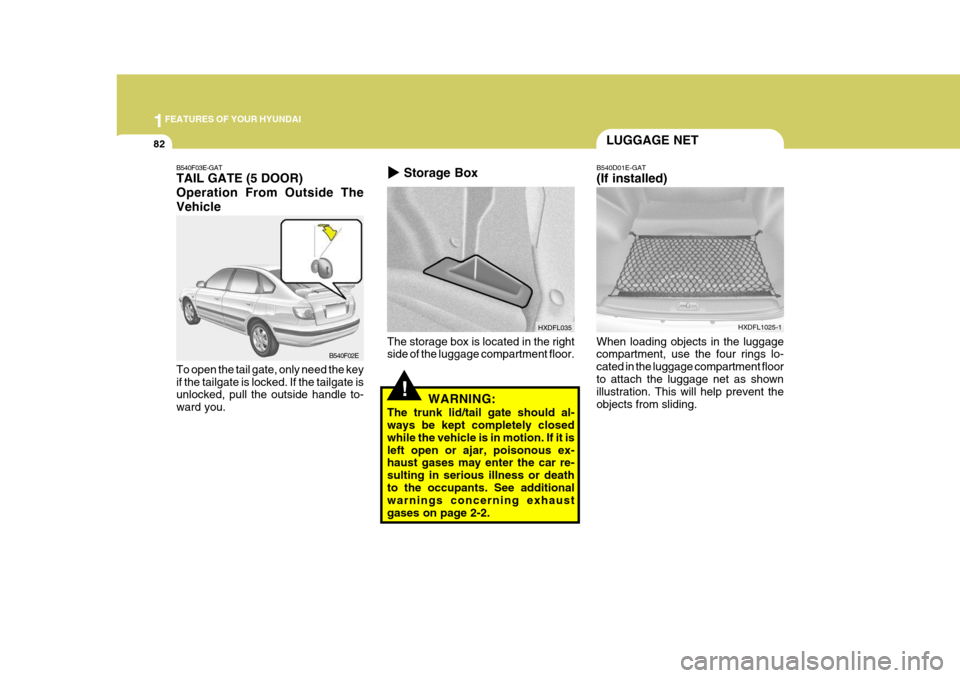
When loading objects in the luggage compartment, use the four rings lo- cated in the luggage compartment floorto attach the luggage net as shown illustration. This will help prevent the objects from sliding.
The storage box is located in the right side of the luggage compartment floor.
HXDFL035
Storage Box
LUGGAGE NET
!WARNING:
The trunk lid/tail gate should al- ways be kept completely closed while the vehicle is in motion. If it isleft open or ajar, poisonous ex- haust gases may enter the car re- sulting in serious illness or deathto the occupants. See additional warnings concerning exhaust gases on page 2-2.
B540F03E-GAT TAIL GATE (5 DOOR) Operation From Outside TheVehicle To open the tail gate, only need the key if the tailgate is locked. If the tailgate is unlocked, pull the outside handle to- ward you. B540F02E
Page 121 of 277
1
FEATURES OF YOUR HYUNDAI
107
H210B03O-AAT
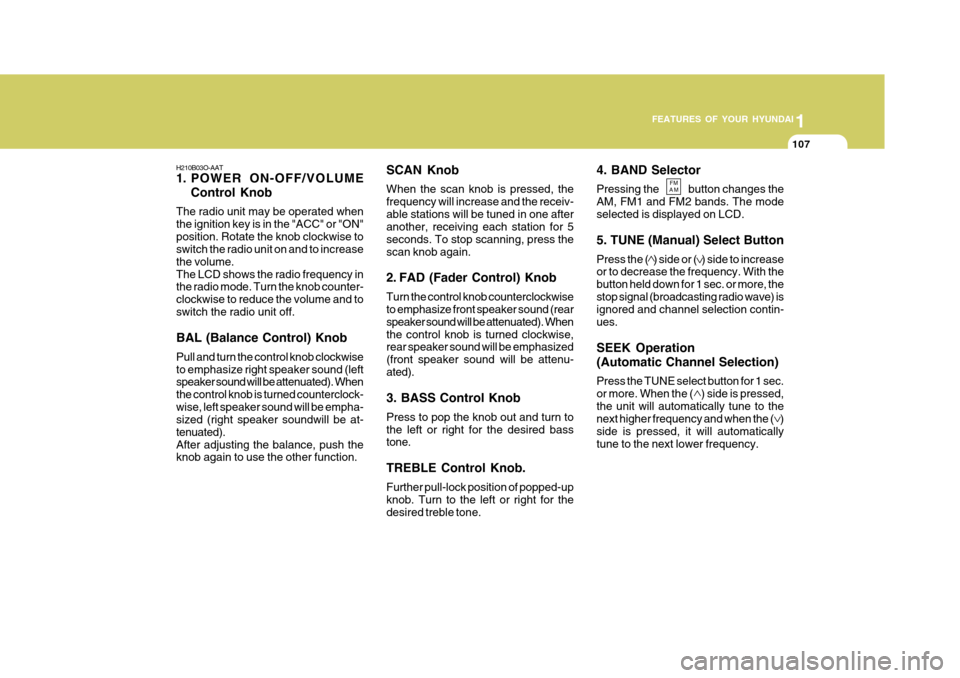
1. POWER ON-OFF/VOLUME
Control Knob
The radio unit may be operated when the ignition key is in the "ACC" or "ON"position. Rotate the knob clockwise to switch the radio unit on and to increase the volume.The LCD shows the radio frequency in the radio mode. Turn the knob counter- clockwise to reduce the volume and toswitch the radio unit off. BAL (Balance Control) Knob Pull and turn the control knob clockwise to emphasize right speaker sound (left speaker sound will be attenuated). When the control knob is turned counterclock-wise, left speaker sound will be empha- sized (right speaker soundwill be at- tenuated).After adjusting the balance, push the knob again to use the other function. 4. BAND Selector Pressing the button changes the AM, FM1 and FM2 bands. The modeselected is displayed on LCD. 5. TUNE (Manual) Select Button Press the ( ) side or ( ) side to increase or to decrease the frequency. With the button held down for 1 sec. or more, thestop signal (broadcasting radio wave) is ignored and channel selection contin- ues. SEEK Operation (Automatic Channel Selection) Press the TUNE select button for 1 sec. or more. When the ( ) side is pressed,the unit will automatically tune to the next higher frequency and when the ( ) side is pressed, it will automaticallytune to the next lower frequency.
SCAN Knob When the scan knob is pressed, the frequency will increase and the receiv-able stations will be tuned in one after another, receiving each station for 5 seconds. To stop scanning, press thescan knob again.
2. FAD (Fader Control) Knob Turn the control knob counterclockwise to emphasize front speaker sound (rear speaker sound will be attenuated). Whenthe control knob is turned clockwise, rear speaker sound will be emphasized (front speaker sound will be attenu-ated). 3. BASS Control Knob Press to pop the knob out and turn to the left or right for the desired bass tone. TREBLE Control Knob. Further pull-lock position of popped-up knob. Turn to the left or right for thedesired treble tone.
FM
AM
Page 124 of 277
1FEATURES OF YOUR HYUNDAI
110
H240B03O-GAT
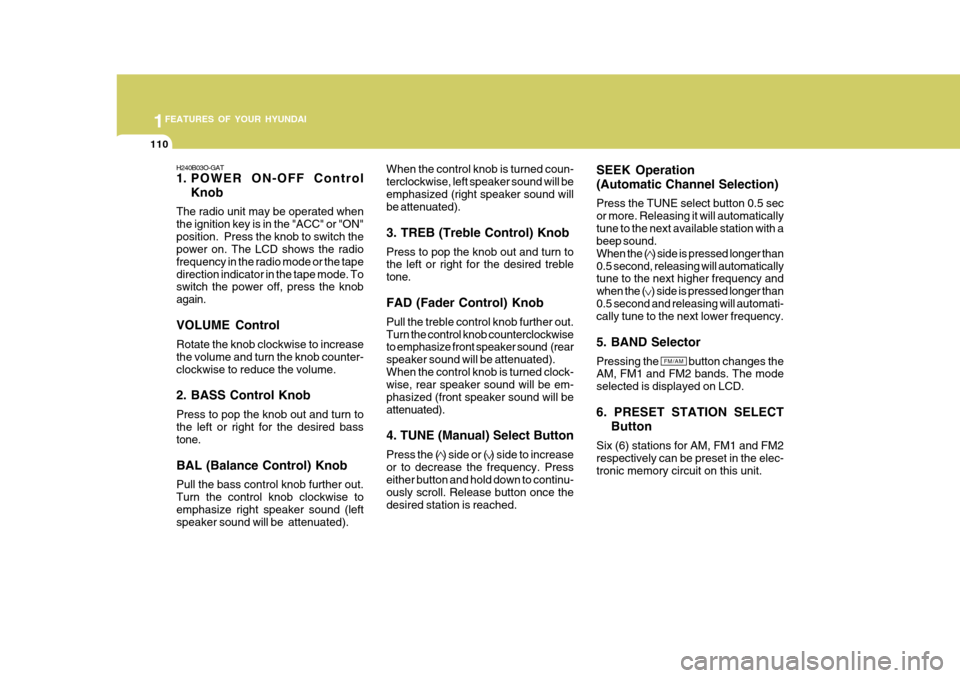
1. POWER ON-OFF ControlKnob
The radio unit may be operated when the ignition key is in the "ACC" or "ON"position. Press the knob to switch the power on. The LCD shows the radio frequency in the radio mode or the tapedirection indicator in the tape mode. To switch the power off, press the knob again. VOLUME Control Rotate the knob clockwise to increase the volume and turn the knob counter-clockwise to reduce the volume. 2. BASS Control Knob Press to pop the knob out and turn to the left or right for the desired bass tone. BAL (Balance Control) Knob Pull the bass control knob further out. Turn the control knob clockwise toemphasize right speaker sound (left speaker sound will be attenuated). When the control knob is turned coun- terclockwise, left speaker sound will beemphasized (right speaker sound will be attenuated). 3. TREB (Treble Control) Knob Press to pop the knob out and turn to the left or right for the desired treble tone. FAD (Fader Control) Knob Pull the treble control knob further out. Turn the control knob counterclockwise to emphasize front speaker sound (rear speaker sound will be attenuated).When the control knob is turned clock- wise, rear speaker sound will be em- phasized (front speaker sound will beattenuated). 4. TUNE (Manual) Select Button Press the ( ) side or ( ) side to increase or to decrease the frequency. Press either button and hold down to continu- ously scroll. Release button once thedesired station is reached.
SEEK Operation (Automatic Channel Selection) Press the TUNE select button 0.5 sec or more. Releasing it will automaticallytune to the next available station with a beep sound. When the ( ) side is pressed longer than0.5 second, releasing will automatically tune to the next higher frequency and when the ( ) side is pressed longer than0.5 second and releasing will automati- cally tune to the next lower frequency. 5. BAND Selector Pressing the button changes the AM, FM1 and FM2 bands. The mode selected is displayed on LCD. 6. PRESET STATION SELECT
Button
Six (6) stations for AM, FM1 and FM2 respectively can be preset in the elec-tronic memory circuit on this unit.
FM/AM
Page 129 of 277
1
FEATURES OF YOUR HYUNDAI
115
H260B03E-AAT
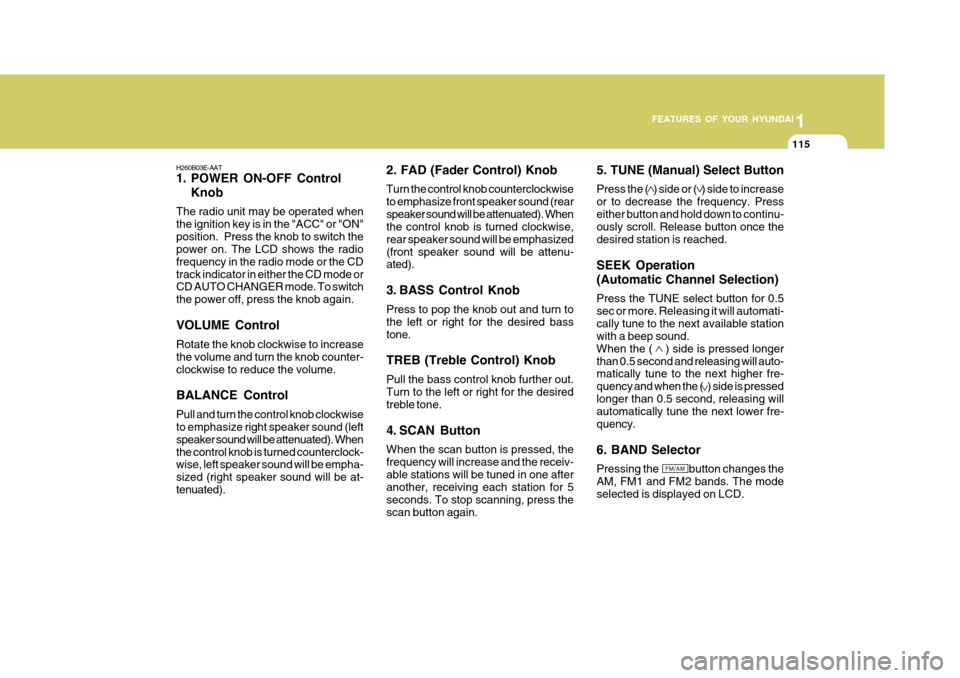
1. POWER ON-OFF Control Knob
The radio unit may be operated when the ignition key is in the "ACC" or "ON"position. Press the knob to switch the power on. The LCD shows the radio frequency in the radio mode or the CDtrack indicator in either the CD mode or CD AUTO CHANGER mode. To switch the power off, press the knob again. VOLUME Control Rotate the knob clockwise to increase the volume and turn the knob counter-clockwise to reduce the volume. BALANCE Control Pull and turn the control knob clockwise to emphasize right speaker sound (left speaker sound will be attenuated). Whenthe control knob is turned counterclock- wise, left speaker sound will be empha- sized (right speaker sound will be at-tenuated). 2. FAD (Fader Control) Knob Turn the control knob counterclockwise to emphasize front speaker sound (rearspeaker sound will be attenuated). When the control knob is turned clockwise, rear speaker sound will be emphasized(front speaker sound will be attenu- ated).
3. BASS Control Knob Press to pop the knob out and turn to the left or right for the desired basstone. TREB (Treble Control) Knob Pull the bass control knob further out. Turn to the left or right for the desired treble tone.
4. SCAN Button When the scan button is pressed, the frequency will increase and the receiv-able stations will be tuned in one after another, receiving each station for 5 seconds. To stop scanning, press thescan button again.5. TUNE (Manual) Select Button Press the ( ) side or ( ) side to increase or to decrease the frequency. Presseither button and hold down to continu- ously scroll. Release button once the desired station is reached. SEEK Operation (Automatic Channel Selection) Press the TUNE select button for 0.5 sec or more. Releasing it will automati-cally tune to the next available station with a beep sound. When the ( ) side is pressed longerthan 0.5 second and releasing will auto- matically tune to the next higher fre- quency and when the ( ) side is pressedlonger than 0.5 second, releasing will automatically tune the next lower fre- quency. 6. BAND Selector Pressing the button changes the AM, FM1 and FM2 bands. The mode selected is displayed on LCD.
FM/AM
Page 138 of 277
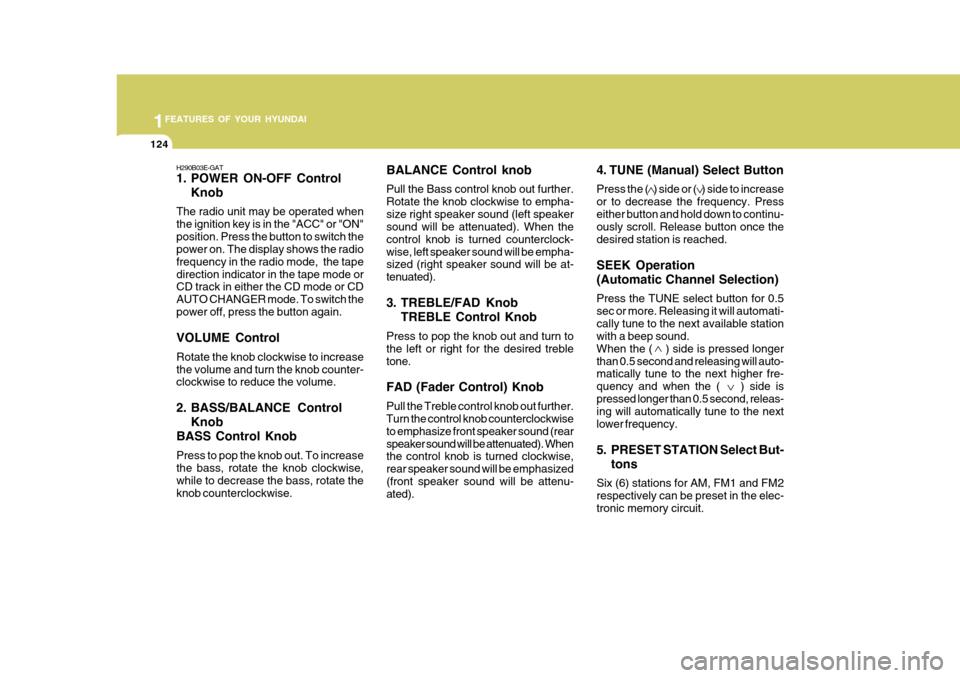
1FEATURES OF YOUR HYUNDAI
124
BALANCE Control knob Pull the Bass control knob out further. Rotate the knob clockwise to empha-size right speaker sound (left speaker sound will be attenuated). When the control knob is turned counterclock-wise, left speaker sound will be empha- sized (right speaker sound will be at- tenuated).
3. TREBLE/FAD KnobTREBLE Control Knob
Press to pop the knob out and turn to the left or right for the desired trebletone. FAD (Fader Control) Knob Pull the Treble control knob out further. Turn the control knob counterclockwise to emphasize front speaker sound (rearspeaker sound will be attenuated). When the control knob is turned clockwise, rear speaker sound will be emphasized(front speaker sound will be attenu- ated).
H290B03E-GAT
1. POWER ON-OFF Control
Knob
The radio unit may be operated when the ignition key is in the "ACC" or "ON"position. Press the button to switch the power on. The display shows the radio frequency in the radio mode, the tapedirection indicator in the tape mode or CD track in either the CD mode or CD AUTO CHANGER mode. To switch thepower off, press the button again. VOLUME Control Rotate the knob clockwise to increase the volume and turn the knob counter- clockwise to reduce the volume.
2. BASS/BALANCE Control Knob
BASS Control Knob Press to pop the knob out. To increase the bass, rotate the knob clockwise, while to decrease the bass, rotate theknob counterclockwise. 4. TUNE (Manual) Select Button Press the ( ) side or ( ) side to increase or to decrease the frequency. Presseither button and hold down to continu- ously scroll. Release button once the desired station is reached. SEEK Operation (Automatic Channel Selection) Press the TUNE select button for 0.5 sec or more. Releasing it will automati-cally tune to the next available station with a beep sound. When the ( ) side is pressed longerthan 0.5 second and releasing will auto- matically tune to the next higher fre- quency and when the ( ) side ispressed longer than 0.5 second, releas- ing will automatically tune to the next lower frequency.
5. PRESET STATION Select But-
tons
Six (6) stations for AM, FM1 and FM2 respectively can be preset in the elec-tronic memory circuit.
Page 139 of 277
1
FEATURES OF YOUR HYUNDAI
125
FM/AM
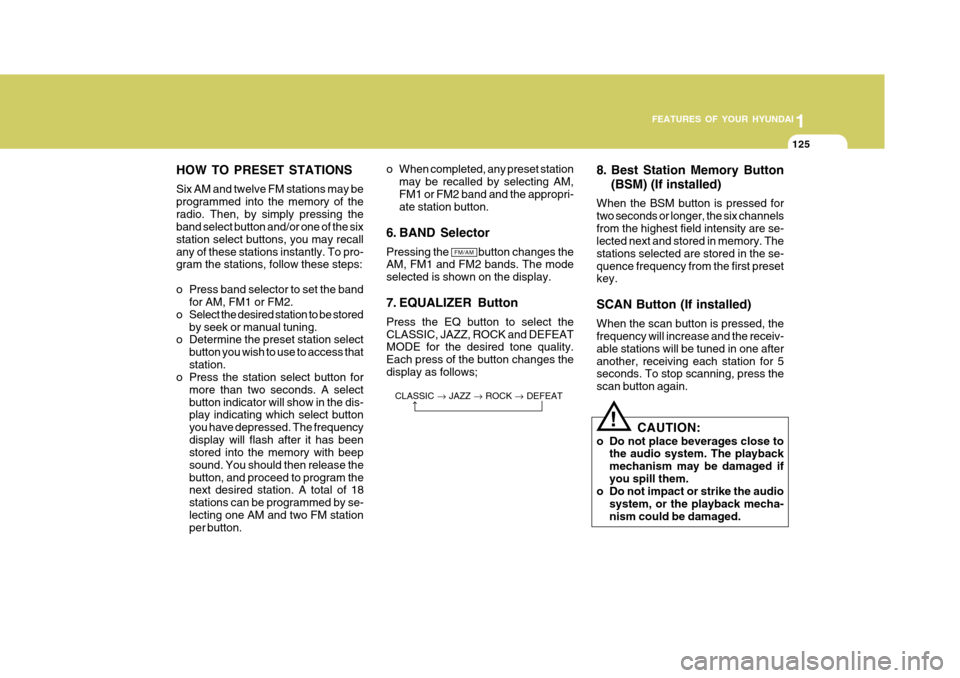
HOW TO PRESET STATIONS Six AM and twelve FM stations may be programmed into the memory of theradio. Then, by simply pressing the band select button and/or one of the six station select buttons, you may recallany of these stations instantly. To pro- gram the stations, follow these steps:
o Press band selector to set the band
for AM, FM1 or FM2.
o Select the desired station to be stored by seek or manual tuning.
o Determine the preset station select
button you wish to use to access that station.
o Press the station select button for
more than two seconds. A selectbutton indicator will show in the dis- play indicating which select button you have depressed. The frequencydisplay will flash after it has been stored into the memory with beep sound. You should then release thebutton, and proceed to program the next desired station. A total of 18 stations can be programmed by se-lecting one AM and two FM station per button. 8. Best Station Memory Button
(BSM) (If installed)
When the BSM button is pressed for two seconds or longer, the six channelsfrom the highest field intensity are se- lected next and stored in memory. The stations selected are stored in the se-quence frequency from the first preset key. SCAN Button (If installed) When the scan button is pressed, the frequency will increase and the receiv- able stations will be tuned in one afteranother, receiving each station for 5 seconds. To stop scanning, press the scan button again.
o When completed, any preset station
may be recalled by selecting AM,FM1 or FM2 band and the appropri- ate station button.
6. BAND Selector Pressing the button changes the AM, FM1 and FM2 bands. The mode selected is shown on the display.
7. EQUALIZER Button Press the EQ button to select the CLASSIC, JAZZ, ROCK and DEFEAT MODE for the desired tone quality. Each press of the button changes thedisplay as follows;
CLASSIC JAZZ ROCK DEFEAT
!
CAUTION:
o Do not place beverages close to the audio system. The playback mechanism may be damaged ifyou spill them.
o Do not impact or strike the audio
system, or the playback mecha-nism could be damaged.
Page 152 of 277
1FEATURES OF YOUR HYUNDAI
138
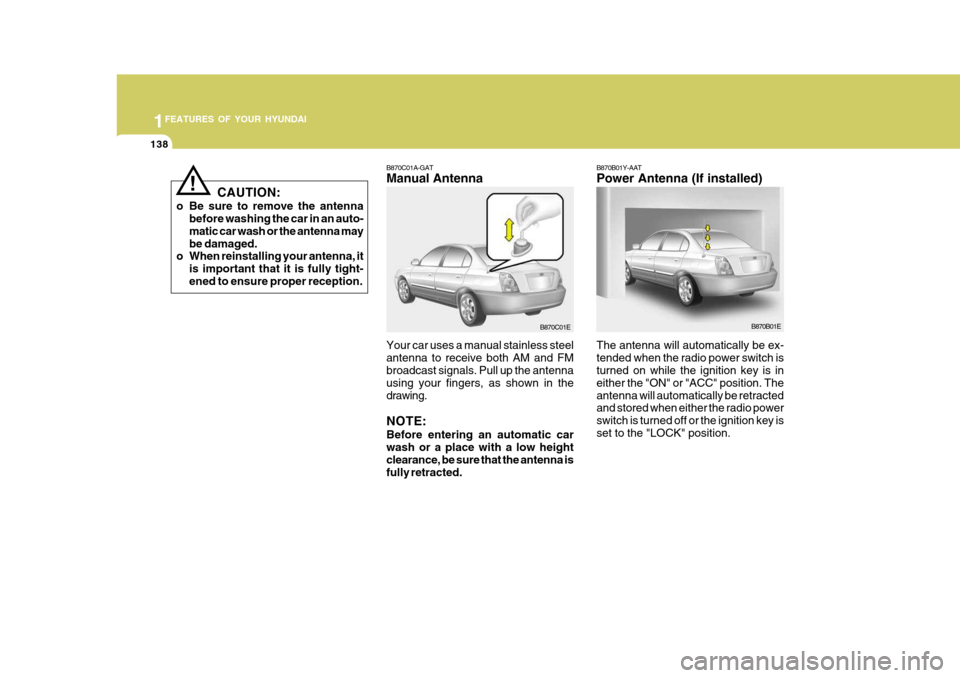
B870C01A-GAT Manual Antenna Your car uses a manual stainless steel antenna to receive both AM and FM broadcast signals. Pull up the antenna using your fingers, as shown in thedrawing. NOTE: Before entering an automatic car wash or a place with a low height clearance, be sure that the antenna is fully retracted. B870B01Y-AAT Power Antenna (If installed) The antenna will automatically be ex- tended when the radio power switch is turned on while the ignition key is in either the "ON" or "ACC" position. Theantenna will automatically be retracted and stored when either the radio power switch is turned off or the ignition key isset to the "LOCK" position.
B870C01E
B870B01E
CAUTION:
o Be sure to remove the antenna before washing the car in an auto-matic car wash or the antenna maybe damaged.
o When reinstalling your antenna, it
is important that it is fully tight-ened to ensure proper reception.
!
Page 153 of 277
1
FEATURES OF YOUR HYUNDAI
139
B870D01E
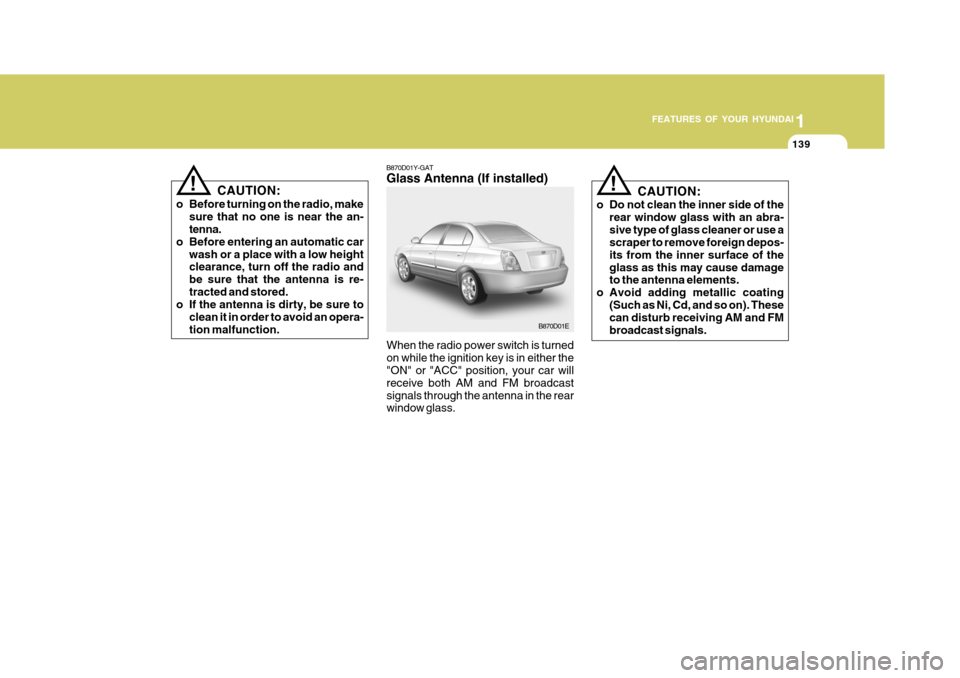
B870D01Y-GAT Glass Antenna (If installed)
When the radio power switch is turned on while the ignition key is in either the "ON" or "ACC" position, your car will receive both AM and FM broadcastsignals through the antenna in the rear window glass. CAUTION:
o Do not clean the inner side of the rear window glass with an abra- sive type of glass cleaner or use a scraper to remove foreign depos- its from the inner surface of theglass as this may cause damage to the antenna elements.
o Avoid adding metallic coating (Such as Ni, Cd, and so on). Thesecan disturb receiving AM and FM broadcast signals.
!
CAUTION:
o Before turning on the radio, make sure that no one is near the an- tenna.
o Before entering an automatic car
wash or a place with a low heightclearance, turn off the radio and be sure that the antenna is re-tracted and stored.
o If the antenna is dirty, be sure to
clean it in order to avoid an opera-tion malfunction.!
Page 154 of 277
2
Before Starting the Engine ........................................... 2-3
Key Positions ................................................................ 2-4Starting......................................................................... 2-5
Operating the Manual Transaxle ................................. 2-7
Automatic Transaxle .................................................... 2-9
Anti-Lock Brake System (ABS) .................................. 2-14
Traction Control System (TCS) .................................. 2-15
Driving for Economy ................................................... 2-17
Smooth Cornering ...................................................... 2-19
Winter Driving ............................................................. 2-19
Trailer or Vehicle Towing ........................................... 2-22
DRIVING YOUR HYUNDAI
2
Page 156 of 277
2
DRIVING YOUR HYUNDAI
3
!
TO START THE ENGINEBEFORE STARTING THE ENGINE
C020A01O-GAT Before you start the engine, you should always:
1. Look around the vehicle to be sure
there are no flat tires, puddles of oil, water or other indications of pos- sible trouble.
2. After entering the car, check to be sure the parking brake is engaged.
3. Check that all windows and lights are clean.
4. Check that the interior and exterior
mirrors are clean and in position.
5. Check your seat, seatback and headrest to be sure they are in theirproper positions.
6. Lock all the doors.
7. Fasten your seat belt and be sure
that all other occupants have fas- tened theirs.
8. Turn off all lights and accessories
that are not needed. C030A01A-GAT COMBINATION IGNITION SWITCH Before starting the engine:
o If your Hyundai is equipped with a
manual transaxle, place the shift lever in neutral and depress the clutch pedal fully.
o If your Hyundai has an automatic transaxle, place the shift lever in "P"(park).
o To start the engine, insert the igni- tion key and turn it to the "START"position. Release it as soon as the engine starts. Do not hold the key inthe "START" position for more than 15 seconds.
NOTE: For safety, the engine will not start if the shift lever is not in "P" or "N" Position (Automatic Transaxle).
WARNING (DIESEL ENGINE):
To ensure that sufficient vacuum exists within the brake system dur- ing cold weather start-up condi-tions, it is necessary to run the engine at idle for several seconds after starting the engine.
9. When you turn the ignition switch to
"ON", check that all appropriatewarning lights are operating and that you have sufficient fuel.
10.Check the operation of warning lights and all bulbs when key is inthe "ON" position.