ignition Hyundai Elantra 2012 - RHD (UK. Australia) Owner's Guide
[x] Cancel search | Manufacturer: HYUNDAI, Model Year: 2012, Model line: Elantra, Model: Hyundai Elantra 2012Pages: 384, PDF Size: 26.92 MB
Page 97 of 384
423
Features of your vehicle
Power windows
The ignition switch must be in the ON
position for power windows to operate.
Each door has a power window switch
that controls the door's window. The driv-
er has a master power window switch
that controls all the windows in the vehi-
cle. Also, a power window lock switch
which that can block the operation of rear
passenger windows. The power windows
can be operated for approximately 30
seconds after the ignition key is removed
or turned to the ACC or LOCK position.
However, if the front doors are opened,
the power windows cannot be operated
within the 30 seconds period.✽✽NOTICE
Whilst driving with the rear windows
down or with the sunroof (if equipped)
opened (or partially opened), your vehi-
cle may demonstrate a wind buffeting or
pulsation noise. This noise is a normal
occurrence and can be reduced or elim-
inated by taking the following actions.
If the noise occurs with one or both of
the rear windows down, partially lower
both front windows approximately one
inch. If you experience the noise with
the sunroof open, slightly reduce the size
of the sunroof opening
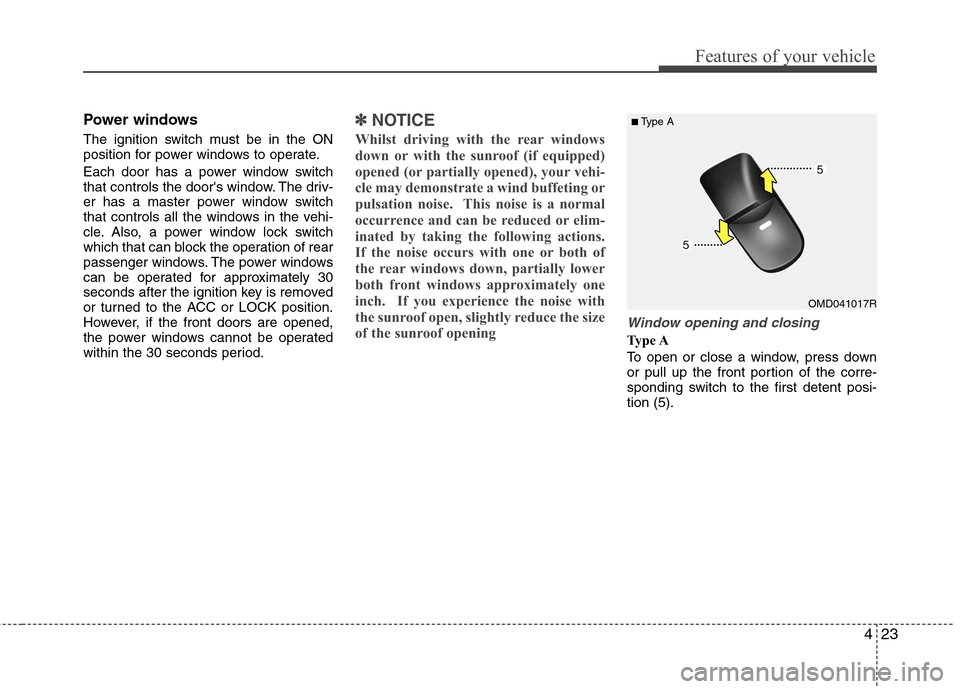
Window opening and closing
Type A
To open or close a window, press down
or pull up the front portion of the corre-
sponding switch to the first detent posi-tion (5).
OMD041017R
■
Type A
Page 98 of 384
Features of your vehicle
24
4
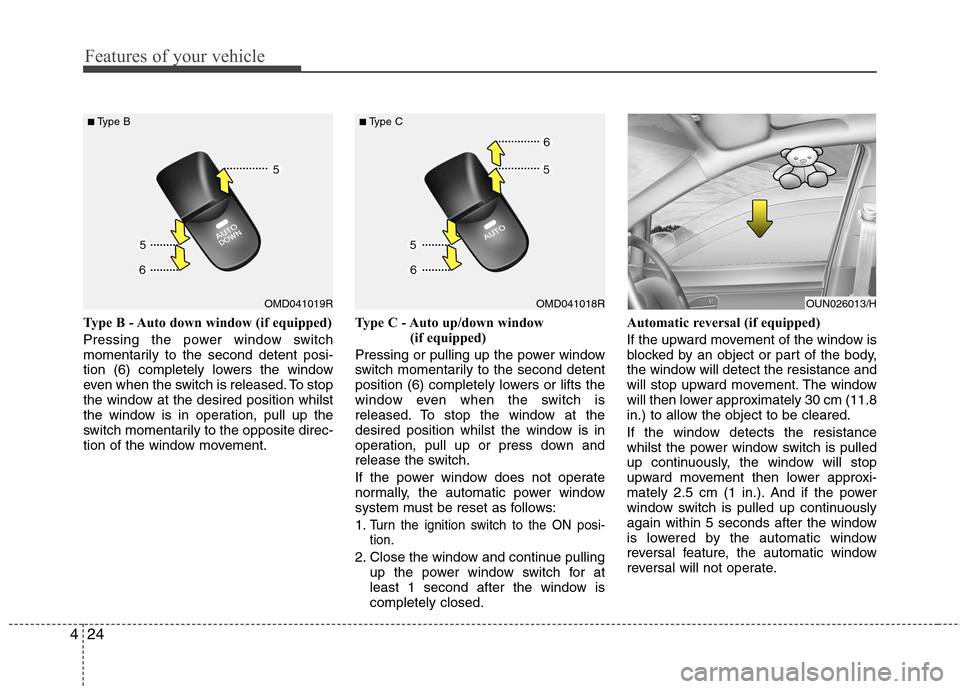
Type B - Auto down window (if equipped)
Pressing the power window switch
momentarily to the second detent posi-
tion (6) completely lowers the window
even when the switch is released. To stop
the window at the desired position whilst
the window is in operation, pull up the
switch momentarily to the opposite direc-
tion of the window movement. Type C - Auto up/down window
(if equipped)
Pressing or pulling up the power window
switch momentarily to the second detent
position (6) completely lowers or lifts the
window even when the switch is
released. To stop the window at the
desired position whilst the window is in
operation, pull up or press down and
release the switch.
If the power window does not operate
normally, the automatic power window
system must be reset as follows: 1.
Turn the ignition switch to the ON posi- tion.
2. Close the window and continue pulling up the power window switch for at
least 1 second after the window iscompletely closed. Automatic reversal (if equipped)
If the upward movement of the window is
blocked by an object or part of the body,
the window will detect the resistance and
will stop upward movement. The window
will then lower approximately 30 cm (11.8
in.) to allow the object to be cleared.
If the window detects the resistance
whilst the power window switch is pulled
up continuously, the window will stop
upward movement then lower approxi-
mately 2.5 cm (1 in.). And if the power
window switch is pulled up continuously
again within 5 seconds after the window
is lowered by the automatic window
reversal feature, the automatic window
reversal will not operate.
OMD041019R
■
Type BOMD041018R
■
Type COUN026013/H
Page 100 of 384
Features of your vehicle
26
4
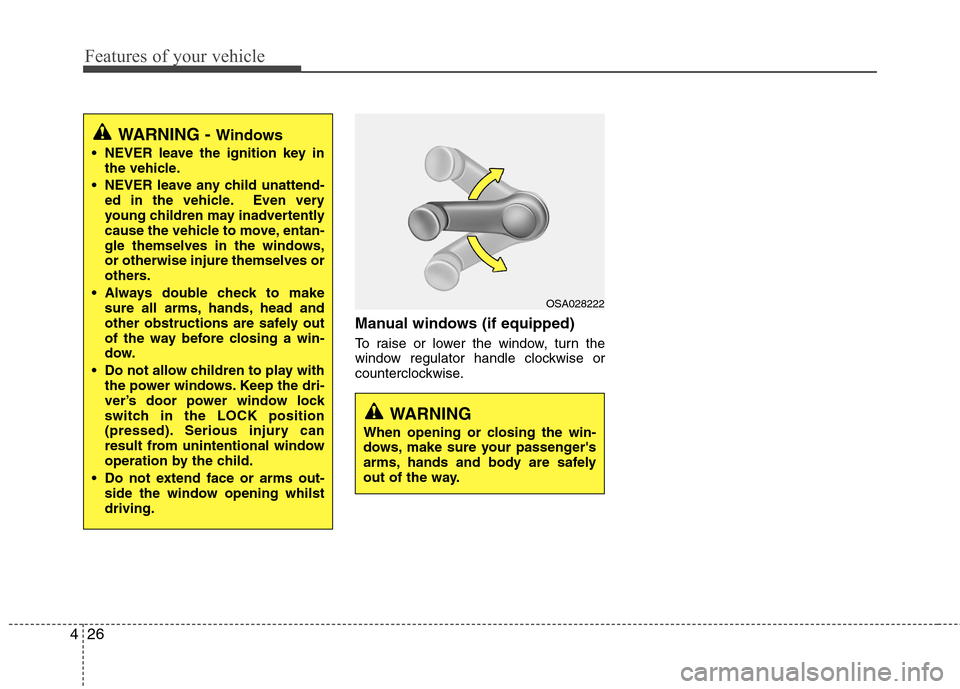
Manual windows (if equipped)
To raise or lower the window, turn the
window regulator handle clockwise or
counterclockwise.
WARNING - Windows
NEVER leave the ignition key in the vehicle.
NEVER leave any child unattend- ed in the vehicle. Even very
young children may inadvertently
cause the vehicle to move, entan-
gle themselves in the windows,or otherwise injure themselves or
others.
Always double check to make sure all arms, hands, head and
other obstructions are safely out
of the way before closing a win-
dow.
Do not allow children to play with the power windows. Keep the dri-
ver’s door power window lock
switch in the LOCK position
(pressed). Serious injury can
result from unintentional window
operation by the child.
Do not extend face or arms out- side the window opening whilstdriving.
WARNING
When opening or closing the win-
dows, make sure your passenger's
arms, hands and body are safely
out of the way.
OSA028222
Page 106 of 384
Features of your vehicle
32
4
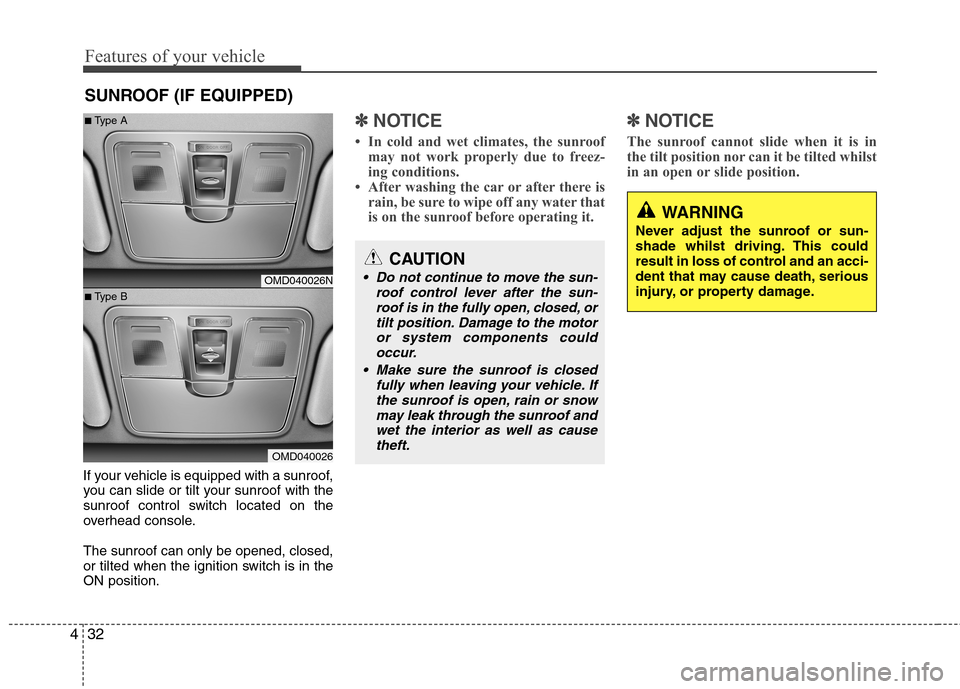
If your vehicle is equipped with a sunroof,
you can slide or tilt your sunroof with the
sunroof control switch located on the
overhead console. The sunroof can only be opened, closed,
or tilted when the ignition switch is in theON position.
✽✽
NOTICE
In cold and wet climates, the sunroof may not work properly due to freez-
ing conditions.
After washing the car or after there is
rain, be sure to wipe off any water that
is on the sunroof before operating it. ✽✽
NOTICE
The sunroof cannot slide when it is in
the tilt position nor can it be tilted whilst
in an open or slide position.
SUNROOF (IF EQUIPPED)
CAUTION
Do not continue to move the sun- roof control lever after the sun-roof is in the fully open, closed, ortilt position. Damage to the motor
or system components couldoccur.
Make sure the sunroof is closed fully when leaving your vehicle. If
the sunroof is open, rain or snow may leak through the sunroof andwet the interior as well as cause theft.
WARNING
Never adjust the sunroof or sun-
shade whilst driving. This could
result in loss of control and an acci-
dent that may cause death, serious
injury, or property damage.
OMD040026N
OMD040026
■
Type A
■ Type B
Page 109 of 384
435
Features of your vehicle
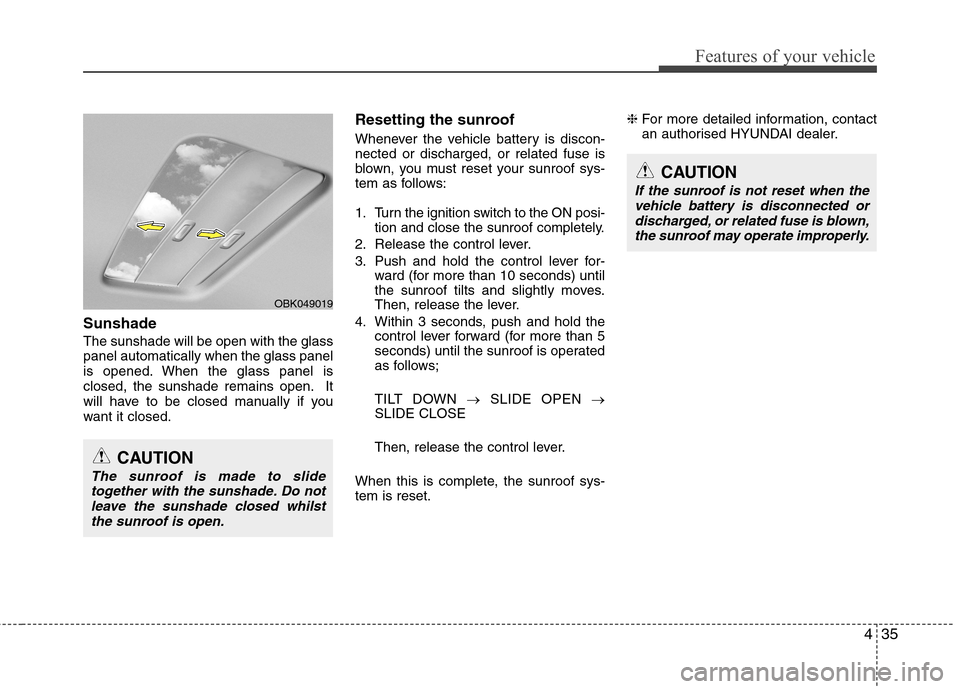
Sunshade The sunshade will be open with the glass panel automatically when the glass panel
is opened. When the glass panel is
closed, the sunshade remains open. It
will have to be closed manually if you
want it closed.Resetting the sunroof
Whenever the vehicle battery is discon- nected or discharged, or related fuse is
blown, you must reset your sunroof sys-
tem as follows:
1. Turn the ignition switch to the ON posi-
tion and close the sunroof completely.
2. Release the control lever.
3. Push and hold the control lever for- ward (for more than 10 seconds) until
the sunroof tilts and slightly moves.
Then, release the lever.
4. Within 3 seconds, push and hold the control lever forward (for more than 5
seconds) until the sunroof is operated
as follows;
TILT DOWN SLIDE OPEN
SLIDE CLOSE
Then, release the control lever.
When this is complete, the sunroof sys- tem is reset. ❈
For more detailed information, contact
an authorised HYUNDAI dealer.
CAUTION
If the sunroof is not reset when the
vehicle battery is disconnected or
discharged, or related fuse is blown,the sunroof may operate improperly.
CAUTION
The sunroof is made to slide together with the sunshade. Do notleave the sunshade closed whilstthe sunroof is open.
OBK049019
Page 110 of 384
Features of your vehicle
36
4
Electric power steering (EPS)
Power steering uses an electric motor to
assist you in steering the vehicle. If the
engine is off or if the power steering sys-
tem becomes inoperative, the vehicle
may still be steered, but it will require an
increased steering effort.
The motor driven power steering is con-
trolled by the power steering control unit
which senses the steering wheel torque
and vehicle speed to command the
motor.
The steering effort becomes heavier as
the vehicle’s speed increases and
becomes lighter as the vehicle’s speed
decreases for better control of the steer-ing wheel.
Should you notice any change in the
effort required to steer during normal
vehicle operation, have the power steer-
ing checked by an authorised HYUNDAI
dealer.✽✽
NOTICE
The following symptoms may occur dur-
ing normal vehicle operation:
The EPS warning light does not illu- minate.
The steering effort is high immediate- ly after turning the ignition switch on.
This happens as the EPS system per-
forms the diagnostics. When the diag-
nostics is completed, the steering
effort will return to its normal condi-
tion.
A click noise may be heard from the
EPS relay after the ignition switch is
turned to the ON or LOCK position.
Motor noise may be heard when the vehicle is at a stop or at a low driving
speed.
If the Electric Power Steering System
does not operate normally, the warn-
ing light will illuminate on the instru-
ment cluster. The steering wheel may
become difficult to control or operate
abnormally. Take your vehicle to an
authorised HYUNDAI dealer and
have the vehicle checked as soon as
possible. (Continued)(Continued)
When the vehicle is stationary, if you
turn the steering wheel all the way to
the left or right continuously, the
steering wheel becomes heavier
towards the end. This is for your safe-
ty, not a system malfunction. As time
passes, the steering wheel return to its
normal condition.
The steering effort increases if the
steering wheel is rotated continuously
when the vehicle is not in motion.
However, after a few minutes, it will
return to its normal conditions.
When you operate the steering wheel in low temperature, abnormal noise
could occur. If temperature rises, the
noise will disappear. This is a normal
condition.
When the charging system warning light comes on or the voltage is low
(When the alternator (or battery) does
not operate normally or it malfunc-
tions), the steering wheel may get
heavy and become difficult to control
operate abnormally.
STEERING WHEEL
Page 113 of 384
439
Features of your vehicle
Electrochromic mirror (ECM) (if equipped)
The electric rearview mirror automatical- ly controls the glare from the headlights
of the car behind you in nighttime or low
light driving conditions. The sensormounted in the mirror senses the light
level around the vehicle, and automati-cally controls the headlight glare from
vehicles behind you.
When the engine is running, the glare is
automatically controlled by the sensor
mounted in the rearview mirror.
Whenever the shift lever is shifted into
reverse, the mirror will automatically go
to the brightest setting in order to
improve the drivers view behind the vehi-
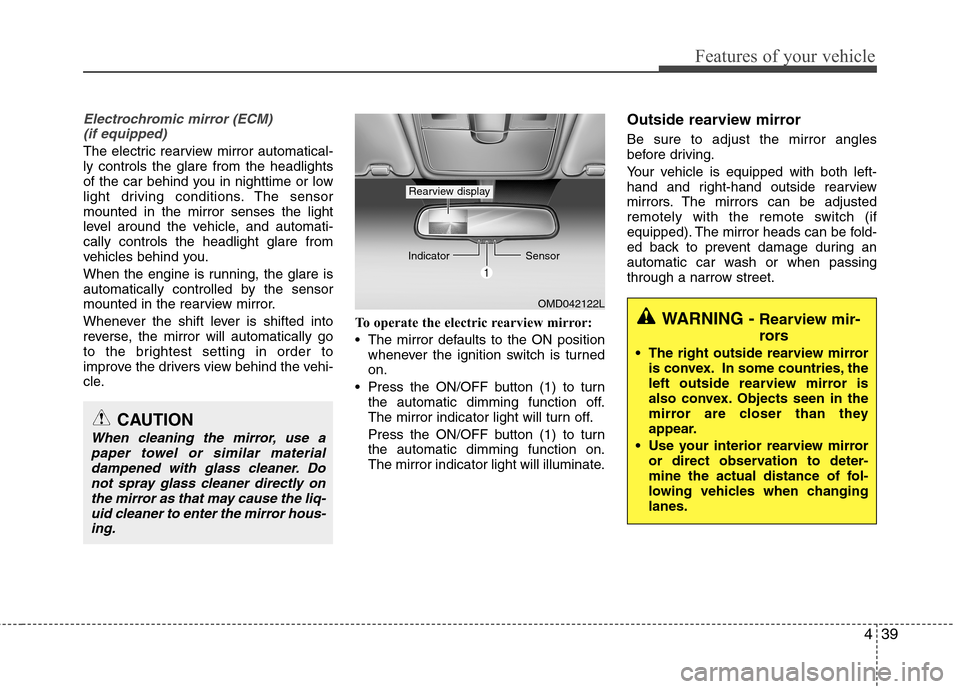
cle. To operate the electric rearview mirror:
The mirror defaults to the ON position
whenever the ignition switch is turned on.
Press the ON/OFF button (1) to turn the automatic dimming function off.
The mirror indicator light will turn off.
Press the ON/OFF button (1) to turn the automatic dimming function on.
The mirror indicator light will illuminate. Outside rearview mirror Be sure to adjust the mirror angles
before driving.
Your vehicle is equipped with both left-
hand and right-hand outside rearview
mirrors. The mirrors can be adjusted
remotely with the remote switch (if
equipped). The mirror heads can be fold-
ed back to prevent damage during an
automatic car wash or when passing
through a narrow street.
CAUTION
When cleaning the mirror, use a
paper towel or similar materialdampened with glass cleaner. Do
not spray glass cleaner directly onthe mirror as that may cause the liq-uid cleaner to enter the mirror hous- ing.
OMD042122L
Indicator
Sensor
Rearview display
WARNING - Rearview mir-
rors
The right outside rearview mirror is convex. In some countries, the
left outside rearview mirror is
also convex. Objects seen in the
mirror are closer than they
appear.
Use your interior rearview mirror or direct observation to deter-
mine the actual distance of fol-
lowing vehicles when changinglanes.
Page 118 of 384
Features of your vehicle
44
4
The tachometer pointer may move slight-
ly when the ignition switch is in ON posi-
tion with the engine OFF. This movement
is normal and will not affect the accuracy
of the tachometer once the engine is run-ning.
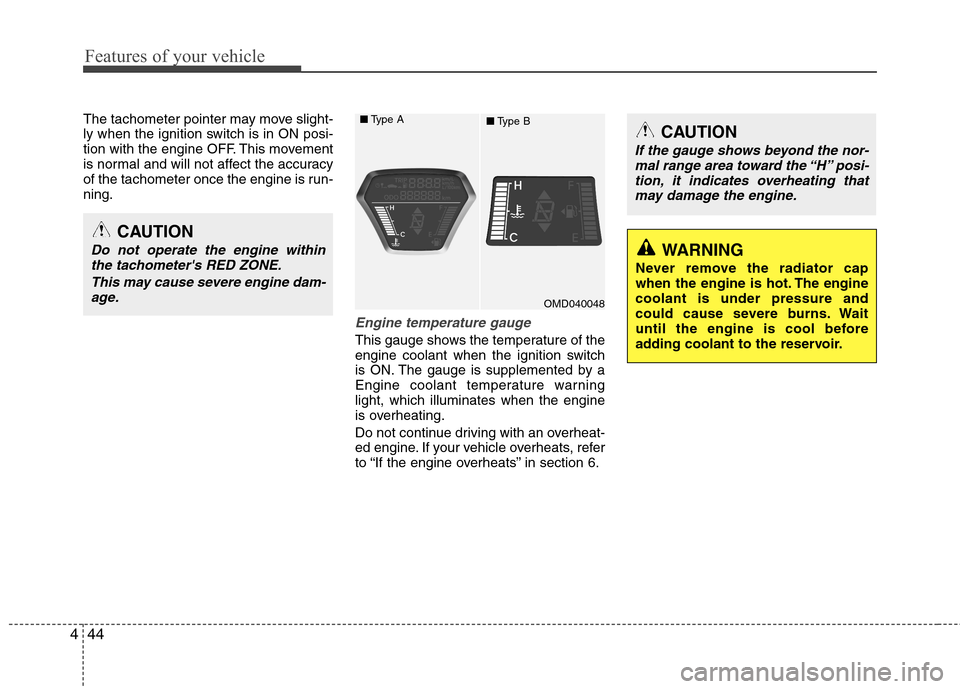
Engine temperature gauge
This gauge shows the temperature of the
engine coolant when the ignition switch
is ON. The gauge is supplemented by a
Engine coolant temperature warninglight, which illuminates when the engine
is overheating.
Do not continue driving with an overheat-
ed engine. If your vehicle overheats, refer
to “If the engine overheats” in section 6.
OMD040048
■
Type A
■Type B
CAUTION
Do not operate the engine within
the tachometer's RED ZONE.
This may cause severe engine dam-age.
CAUTION
If the gauge shows beyond the nor- mal range area toward the “H” posi-
tion, it indicates overheating that may damage the engine.
WARNING
Never remove the radiator cap
when the engine is hot. The enginecoolant is under pressure and
could cause severe burns. Wait
until the engine is cool before
adding coolant to the reservoir.
Page 120 of 384
Features of your vehicle
46
4
✽✽
NOTICE
It is forbidden to alter the odometer of
all vehicles with the intent to change the
mileage registered on the odometer. The
alteration may void your warranty cov-
erage.
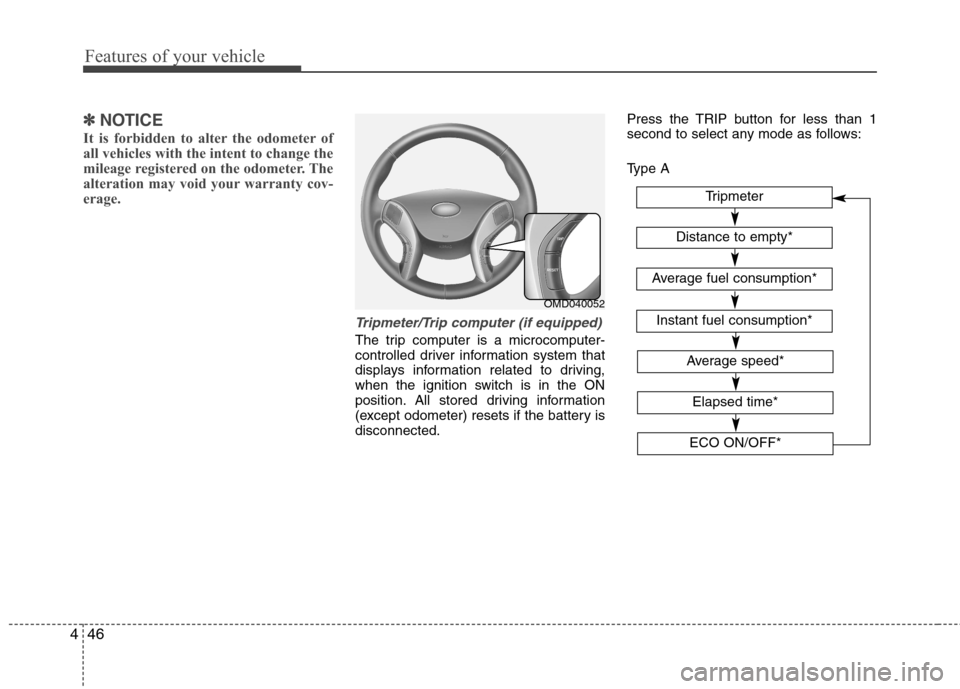
Tripmeter/Trip computer (if equipped)
The trip computer is a microcomputer-
controlled driver information system that
displays information related to driving,
when the ignition switch is in the ON
position. All stored driving information
(except odometer) resets if the battery isdisconnected. Press the TRIP button for less than 1
second to select any mode as follows:
Type A
OMD040052
Tripmeter
Instant fuel consumption*
Distance to empty*
Average fuel consumption*
Elapsed time*
Average speed*
ECO ON/OFF*
Page 124 of 384
Features of your vehicle
50
4
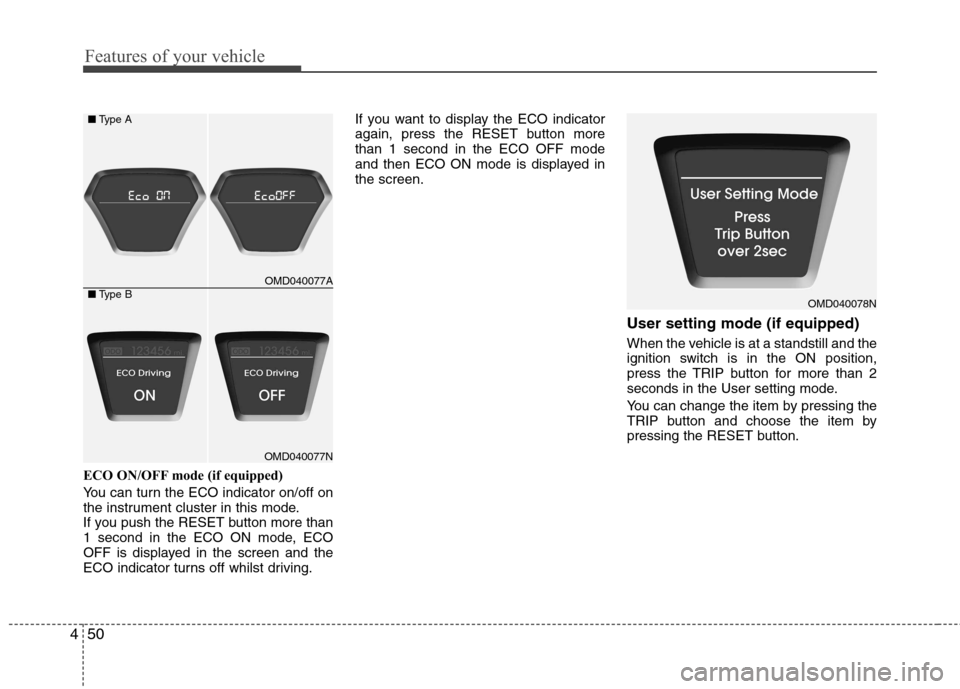
ECO ON/OFF mode (if equipped)
You can turn the ECO indicator on/off on
the instrument cluster in this mode.
If you push the RESET button more than
1 second in the ECO ON mode, ECO
OFF is displayed in the screen and the
ECO indicator turns off whilst driving. If you want to display the ECO indicator
again, press the RESET button morethan 1 second in the ECO OFF mode
and then ECO ON mode is displayed inthe screen.
User setting mode (if equipped)
When the vehicle is at a standstill and the
ignition switch is in the ON position,
press the TRIP button for more than 2
seconds in the User setting mode.
You can change the item by pressing the
TRIP button and choose the item by
pressing the RESET button.
OMD040077A
OMD040077N
■
Type A
■ Type B
OMD040078N