audio Hyundai Elantra 2013 Owner's Guide
[x] Cancel search | Manufacturer: HYUNDAI, Model Year: 2013, Model line: Elantra, Model: Hyundai Elantra 2013Pages: 383, PDF Size: 8.94 MB
Page 204 of 383
Features of your vehicle
126 4
■Making a Phone Call
➀Press button.
➁Say the following command.
- Call
- Call
the call to John’s mobile phone number.
- Call
the call to john’s home number.
- Call
the call to John’s office number.
Note:
Calls can be immediately connected
to contacts who name or voice tag are
saved in the phonebook(or contacts).
A phone call can be made by speaking
names registered in the audio system.
➀Press button.
➁Say “Call”.
➂Say “By name” when prompted.
➃Say desired name (in Phonebook or
voice tag).
➄Say desired location (phone number
type). Only stored locations can be
selected.
➅ Say “Yes” to confirm and make a call.✽ ✽
Tip
A shortcut to each of the following func-
tions is available:
1. Say “Call Name”
A phone call can be made by dialing the
spoken numbers. The system can recog-
nize single digits from zero to nine.
➀Press button.
➁Say “Call”.
➂Say “By number” when prompted.
➃Say desired phone numbers.
➄Say “Dial” to complete the number and
make a call.
✽ ✽
Tip
A shortcut to each of the following func-
tions is available:
➀Say “Dial Number”
➁Say “Dial
✽ ✽
Tip
■Voice Operation
To get the best performance out of the
Voice Recognition System, observe the
followings:
- Keep the interior of the vehicle as
quiet as possible. Close the window
to eliminate surrounding noise
(traffic noise, vibration sounds,
etc), which may disturb recogniz-
ing the voice command correctly.
- Speak a command after a beep
sound within 5 seconds. Otherwise
the command will not be received
properly.
- Speak in a natural voice without
pausing between words.
- While receiving voice commands,
press the button on the steer-
ing wheel remote controller to ter-
minate guidance. Voice command
will convert back to waiting mode
to allow the user to say a new voice
command.
Page 205 of 383
4127
Features of your vehicle
■Phone Book (In-Vehicle)
Phone numbers and voice tags can be
registered. Entries registered in the
phone can also be transferred.
➀Press button.
➁Say "Phonebook".
- The system replies with all available
commands.
- To skip the information message,
press again and then a beep is
heard.
➂Say “Add Entry”.
➃Say “By Voice” to proceed.
➄Say the name of the entry when
prompted.
➅Say “Yes” to confirm.
➆Say the phone number of that entry
when prompted.
➇Say “Store” if phone number input is
finished.
➈ Say a phone number type. “Home”,
“Work”, “Mobile”, “Other” or “Default” is
available.
➉ Say “Yes” to complete adding entry.
Say “Yes” to store additional location
for this contact, or say “Cancel” to fin-
ish the process.
✽ ✽
NOTICE
- The system can recognize single digits
from zero to nine. Numbers that are
ten or greater cannot be recognized.
- You can enter each digit individually
or group digits together in preferred
string lengths.
- To speed up input, it is a good idea to
group all digits into a continuous string.
- Recommend to enter the numbers
constituted an grouping within all
digit numbers to dial 995 / 734 / 0000
- The display corresponding to each
operation appears on the screen as fol-
lows:
Input operation example:
1. Say: “Nine, nine, five”
➟ Display: “995”
2. And say: “Seven, three, four”
➟ Display: “995734”
➀Press button.
➁Say "Phonebook".
➂Say "Add Entry" after prompt.
➃Say "By Phone" to proceed.
➄Say “Yes” to confirm.
➅ Your phone will start to transfer
phone/contact list to the audio system.
This process may take over 10 min-
utes depending on the phone model
and number of entries
➆Wait till the audio displays “Transfer
Complete” message.
Changing Name
The registered names can be modified.
➀Press button.
➁Say “Phonebook”.
➂Say “Change Name” after prompt.
➃Say the name of the entry (voice tag).
➄Say “Yes” to confirm.
➅ Say new desired name.
11
Page 206 of 383
Features of your vehicle
128 4
Deleting Name
The registered names can be deleted.
➀Press button.
➁Say “Phonebook”.
➂Say “Delete Name” after prompt.
➃Say the name of the entry (voice tag).
➄Say “Yes” to confirm.
■Bluetooth®Audio Speaker Adaptation
Speaker adaptation will improve perform-
ance of voice recognition system to a
particular user voice.
This will degrade the performance for
other users.
➀Press button for 10sec.
➁Say “Record profile”.
➂Say “Yes”.
➃Say the word displayed on Radio.
➀Press button for 10sec.
➁Say “Delete profile”.
➂Say “Yes”.
Page 211 of 383
Driving your vehicle
4 5
Before starting
Close and lock all doors.
Position the seat so that all controls are
easily reached.
Adjust the inside and outside rearview
mirrors.
Be sure that all lights work.
Check all gauges.
Check the operation of warning lights
when the ignition switch is turned to
the ON position.
Release the parking brake and make
sure the brake warning light goes out.
For safe operation, be sure you are famil-
iar with your vehicle and its equipment.WARNING
Always check the surrounding
areas near your vehicle for people,
especially children, before putting a
car into D (Drive) or R (Reverse).
WARNING- Driving under
the influence of alcohol or
drugs
Drinking and driving is dangerous.
Drunk driving is the number one
contributor to the highway death
toll each year. Even a small amount
of alcohol will affect your reflexes,
perceptions and judgment. Driving
while under the influence of drugs
is as dangerous or more dangerous
than driving drunk.
You are much more likely to have a
serious accident if you drink or
take drugs and drive.
If you are drinking or taking drugs,
don’t drive. Do not ride with a driv-
er who has been drinking or taking
drugs. Choose a designated driver
or call a cab.
WARNING
When you intend to park or stop
the vehicle with the engine on, be
careful not to depress the accel-
erator pedal for a long period of
time. It may overheat the engine
or exhaust system and cause fire.
When you make a sudden stop or
turn the steering wheel rapidly,
loose objects may drop on the
floor and it could interfere with
the operation of the foot pedals,
possibly causing an accident.
Keep all things in the vehicle
safely stored.
If you do not focus on driving, it
may cause an accident. Be care-
ful when operating what may dis-
turb driving such as audio or
heater. It is the responsibility of
the driver to always drive safely.
WARNING
All passengers must be properly
belted whenever the vehicle is mov-
ing. Refer to “Seat belts” in section
3 for more information on their
proper use.
Page 323 of 383
735
Maintenance
Reset items
Items should be reset after the battery
has been discharged or the battery has
been disconnected.
Auto up/down window (See section 4)
Sunroof (See section 4)
Trip computer (See section 4)
Climate control system
(See section 4)
Clock (See section 4)
Audio (See section 4)WARNING
Before performing maintenance
or recharging the battery, turn off
all accessories and stop the
engine.
The negative battery cable must
be removed first and installed
last when the battery is discon-
nected.
Operation related to the battery
should be done in an authorized
HYUNDAI dealer.
WARNING- Recharging
battery
When recharging the battery,
observe the following precautions:
The battery must be removed
from the vehicle and placed in an
area with good ventilation.
Do not allow cigarettes, sparks,
or flame near the battery.
Watch the battery during charg-
ing, and stop or reduce the charg-
ing rate if the battery cells begin
gassing (boiling) violently or if
the temperature of the electrolyte
of any cell exceeds 120°F (49°C).
Wear eye protection when check-
ing the battery during charging.
Disconnect the battery charger in
the following order.
1. Turn off the battery charger main
switch.
2. Unhook the negative clamp from
the negative battery terminal.
3. Unhook the positive clamp from
the positive battery terminal.
Page 339 of 383
751
Maintenance
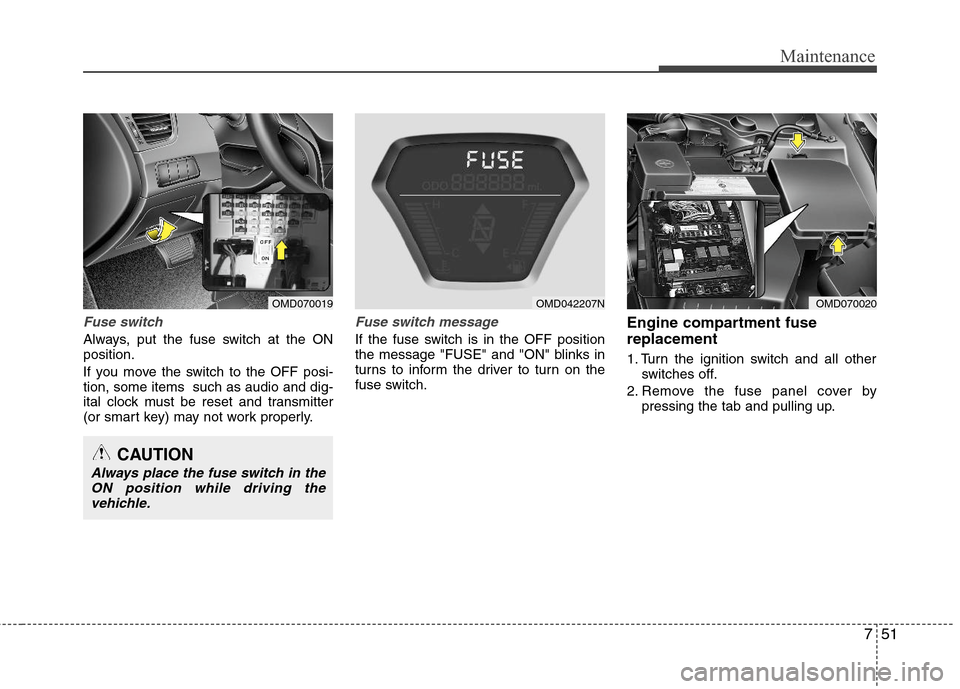
Fuse switch
Always, put the fuse switch at the ON
position.
If you move the switch to the OFF posi-
tion, some items such as audio and dig-
ital clock must be reset and transmitter
(or smart key) may not work properly.
Fuse switch message
If the fuse switch is in the OFF position
the message "FUSE" and "ON" blinks in
turns to inform the driver to turn on the
fuse switch.
Engine compartment fuse
replacement
1. Turn the ignition switch and all other
switches off.
2. Remove the fuse panel cover by
pressing the tab and pulling up.
OMD070019OMD070020
CAUTION
Always place the fuse switch in the
ON position while driving the
vehichle.
OMD042207N
Page 342 of 383
Maintenance
54 7
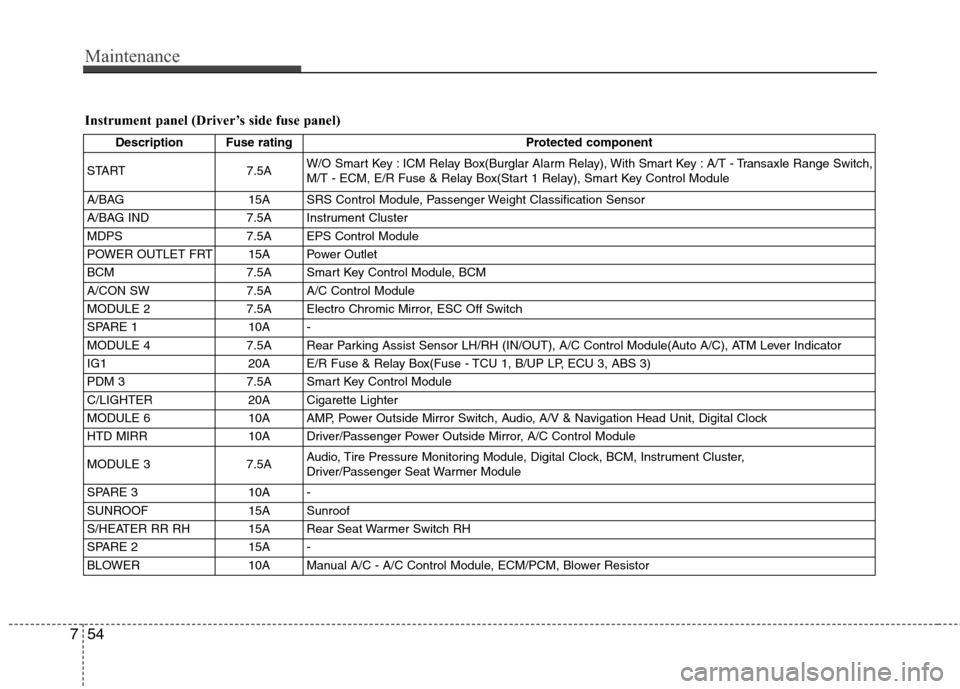
Instrument panel (Driver’s side fuse panel)
Description Fuse rating Protected component
START 7.5AW/O Smart Key : ICM Relay Box(Burglar Alarm Relay), With Smart Key : A/T - Transaxle Range Switch,
M/T - ECM, E/R Fuse & Relay Box(Start 1 Relay), Smart Key Control Module
A/BAG 15A SRS Control Module, Passenger Weight Classification Sensor
A/BAG IND 7.5A Instrument Cluster
MDPS 7.5A EPS Control Module
POWER OUTLET FRT 15A Power Outlet
BCM 7.5A Smart Key Control Module, BCM
A/CON SW 7.5A A/C Control Module
MODULE 2 7.5A Electro Chromic Mirror, ESC Off Switch
SPARE 1 10A -
MODULE 4 7.5A Rear Parking Assist Sensor LH/RH (IN/OUT), A/C Control Module(Auto A/C), ATM Lever Indicator
IG1 20A E/R Fuse & Relay Box(Fuse - TCU 1, B/UP LP, ECU 3, ABS 3)
PDM 3 7.5A Smart Key Control Module
C/LIGHTER 20A Cigarette Lighter
MODULE 6 10A AMP, Power Outside Mirror Switch, Audio, A/V & Navigation Head Unit, Digital Clock
HTD MIRR 10A Driver/Passenger Power Outside Mirror, A/C Control Module
MODULE 3 7.5AAudio, Tire Pressure Monitoring Module, Digital Clock, BCM, Instrument Cluster,
Driver/Passenger Seat Warmer Module
SPARE 3 10A -
SUNROOF 15A Sunroof
S/HEATER RR RH 15A Rear Seat Warmer Switch RH
SPARE 2 15A -
BLOWER 10A Manual A/C - A/C Control Module, ECM/PCM, Blower Resistor
Page 343 of 383
755
Maintenance
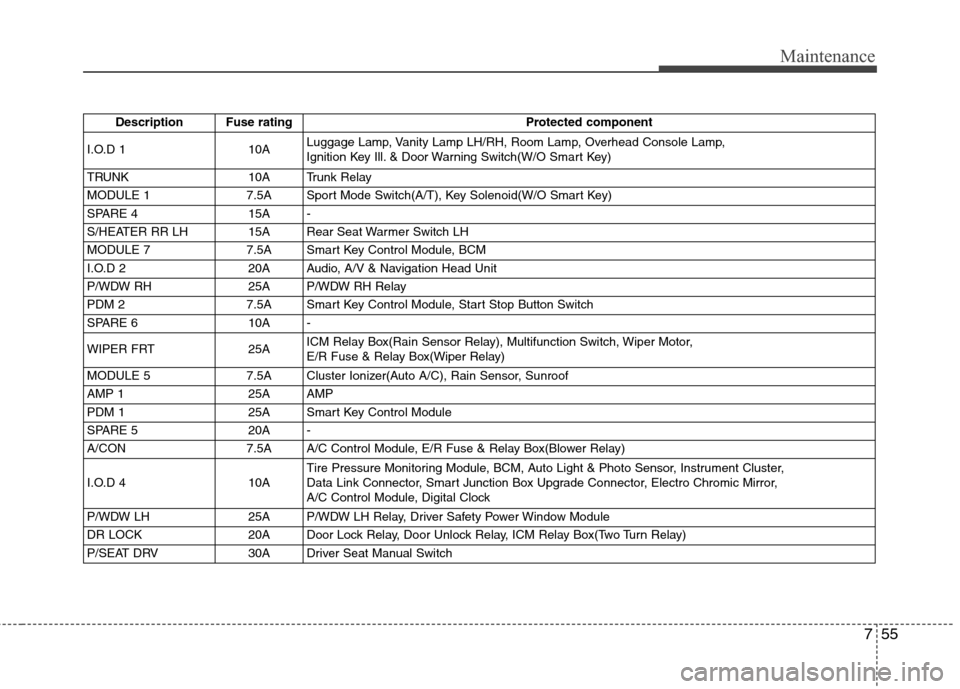
Description Fuse rating Protected component
I.O.D 1 10ALuggage Lamp, Vanity Lamp LH/RH, Room Lamp, Overhead Console Lamp,
Ignition Key Ill. & Door Warning Switch(W/O Smart Key)
TRUNK 10A Trunk Relay
MODULE 1 7.5A Sport Mode Switch(A/T), Key Solenoid(W/O Smart Key)
SPARE 4 15A -
S/HEATER RR LH 15A Rear Seat Warmer Switch LH
MODULE 7 7.5A Smart Key Control Module, BCM
I.O.D 2 20A Audio, A/V & Navigation Head Unit
P/WDW RH 25A P/WDW RH Relay
PDM 2 7.5A Smart Key Control Module, Start Stop Button Switch
SPARE 6 10A -
WIPER FRT 25AICM Relay Box(Rain Sensor Relay), Multifunction Switch, Wiper Motor,
E/R Fuse & Relay Box(Wiper Relay)
MODULE 5 7.5A Cluster Ionizer(Auto A/C), Rain Sensor, Sunroof
AMP 1 25A AMP
PDM 1 25A Smart Key Control Module
SPARE 5 20A -
A/CON 7.5A A/C Control Module, E/R Fuse & Relay Box(Blower Relay)
I.O.D 4 10ATire Pressure Monitoring Module, BCM, Auto Light & Photo Sensor, Instrument Cluster,
Data Link Connector, Smart Junction Box Upgrade Connector, Electro Chromic Mirror,
A/C Control Module, Digital Clock
P/WDW LH 25A P/WDW LH Relay, Driver Safety Power Window Module
DR LOCK 20A Door Lock Relay, Door Unlock Relay, ICM Relay Box(Two Turn Relay)
P/SEAT DRV 30A Driver Seat Manual Switch
Page 375 of 383
Index
2I
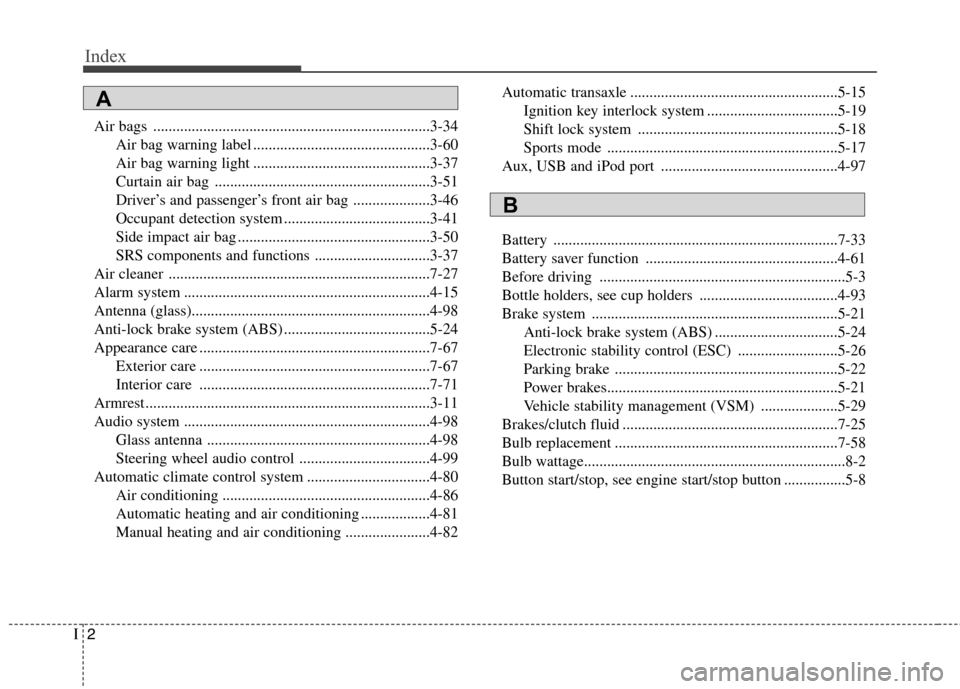
Air bags ........................................................................3-34
Air bag warning label ..............................................3-60
Air bag warning light ..............................................3-37
Curtain air bag ........................................................3-51
Driver’s and passenger’s front air bag ....................3-46
Occupant detection system ......................................3-41
Side impact air bag ..................................................3-50
SRS components and functions ..............................3-37
Air cleaner ....................................................................7-27
Alarm system ................................................................4-15
Antenna (glass)..............................................................4-98
Anti-lock brake system (ABS) ......................................5-24
Appearance care ............................................................7-67
Exterior care ............................................................7-67
Interior care ............................................................7-71
Armrest ..........................................................................3-11
Audio system ................................................................4-98
Glass antenna ..........................................................4-98
Steering wheel audio control ..................................4-99
Automatic climate control system ................................4-80
Air conditioning ......................................................4-86
Automatic heating and air conditioning ..................4-81
Manual heating and air conditioning ......................4-82Automatic transaxle ......................................................5-15
Ignition key interlock system ..................................5-19
Shift lock system ....................................................5-18
Sports mode ............................................................5-17
Aux, USB and iPod port ..............................................4-97
Battery ..........................................................................7-33
Battery saver function ..................................................4-61
Before driving ................................................................5-3
Bottle holders, see cup holders ....................................4-93
Brake system ................................................................5-21
Anti-lock brake system (ABS) ................................5-24
Electronic stability control (ESC) ..........................5-26
Parking brake ..........................................................5-22
Power brakes............................................................5-21
Vehicle stability management (VSM) ....................5-29
Brakes/clutch fluid ........................................................7-25
Bulb replacement ..........................................................7-58
Bulb wattage....................................................................8-2
Button start/stop, see engine start/stop button ................5-8
A
B
Page 381 of 383
Index
8I
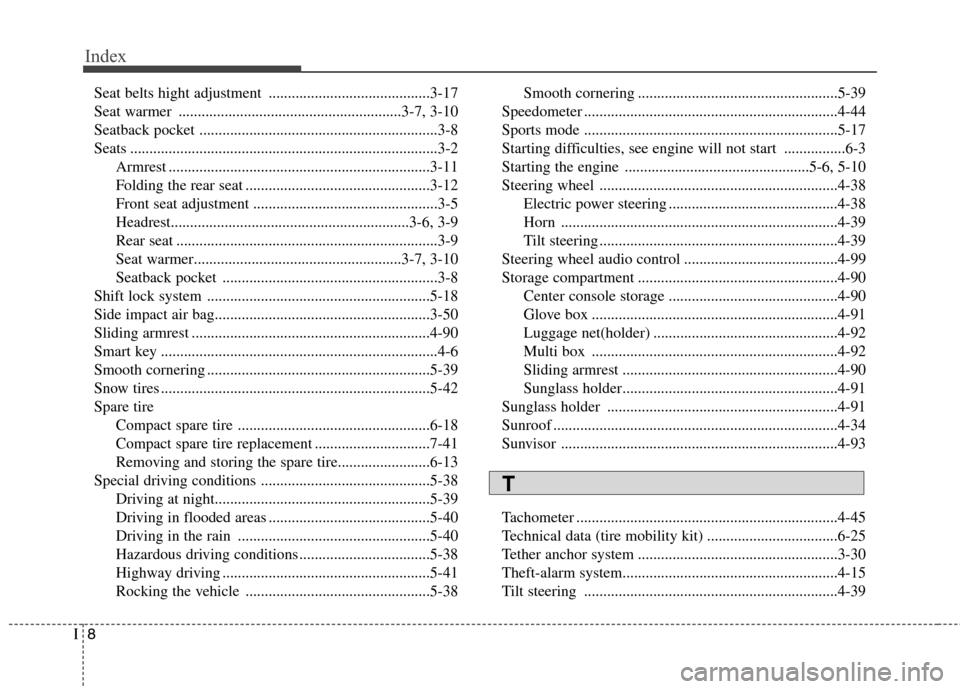
Seat belts hight adjustment ..........................................3-17
Seat warmer ..........................................................3-7, 3-10
Seatback pocket ..............................................................3-8
Seats ................................................................................3-2
Armrest ....................................................................3-11
Folding the rear seat ................................................3-12
Front seat adjustment ................................................3-5
Headrest..............................................................3-6, 3-9
Rear seat ....................................................................3-9
Seat warmer......................................................3-7, 3-10
Seatback pocket ........................................................3-8
Shift lock system ..........................................................5-18
Side impact air bag........................................................3-50
Sliding armrest ..............................................................4-90
Smart key ........................................................................4-6
Smooth cornering ..........................................................5-39
Snow tires ......................................................................5-42
Spare tire
Compact spare tire ..................................................6-18
Compact spare tire replacement ..............................7-41
Removing and storing the spare tire........................6-13
Special driving conditions ............................................5-38
Driving at night........................................................5-39
Driving in flooded areas ..........................................5-40
Driving in the rain ..................................................5-40
Hazardous driving conditions ..................................5-38
Highway driving ......................................................5-41
Rocking the vehicle ................................................5-38Smooth cornering ....................................................5-39
Speedometer ..................................................................4-44
Sports mode ..................................................................5-17
Starting difficulties, see engine will not start ................6-3
Starting the engine ................................................5-6, 5-10
Steering wheel ..............................................................4-38
Electric power steering ............................................4-38
Horn ........................................................................4-39
Tilt steering ..............................................................4-39
Steering wheel audio control ........................................4-99
Storage compartment ....................................................4-90
Center console storage ............................................4-90
Glove box ................................................................4-91
Luggage net(holder) ................................................4-92
Multi box ................................................................4-92
Sliding armrest ........................................................4-90
Sunglass holder........................................................4-91
Sunglass holder ............................................................4-91
Sunroof ..........................................................................4-34
Sunvisor ........................................................................4-93
Tachometer ....................................................................4-45
Technical data (tire mobility kit) ..................................6-25
Tether anchor system ....................................................3-30
Theft-alarm system........................................................4-15
Tilt steering ..................................................................4-39
T