AUX Hyundai Elantra 2016 Owner's Manual - RHD (UK. Australia)
[x] Cancel search | Manufacturer: HYUNDAI, Model Year: 2016, Model line: Elantra, Model: Hyundai Elantra 2016Pages: 498, PDF Size: 9.45 MB
Page 82 of 498
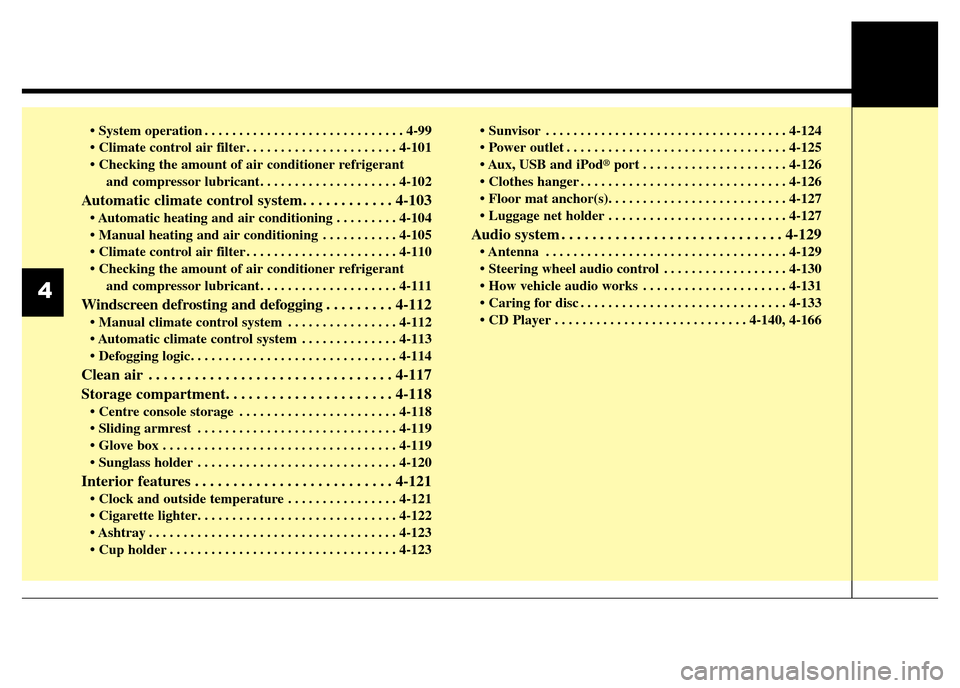
• System operation . . . . . . . . . . . . . . . . . . . . . . . . . . . . . 4-99
• Climate control air filter . . . . . . . . . . . . . . . . . . . . . . 4-101
• Checking the amount of air conditioner refrigerant
and compressor lubricant. . . . . . . . . . . . . . . . . . . . 4-102
Automatic climate control system. . . . . . . . . . . . 4-103
• Automatic heating and air conditioning . . . . . . . . . 4-104
• Manual heating and air conditioning . . . . . . . . . . . 4-105
• Climate control air filter . . . . . . . . . . . . . . . . . . . . . . 4-110
• Checking the amount of air conditioner refrigerant
and compressor lubricant. . . . . . . . . . . . . . . . . . . . 4-111
Windscreen defrosting and defogging . . . . . . . . . 4-112
• Manual climate control system . . . . . . . . . . . . . . . . 4-112
• Automatic climate control system . . . . . . . . . . . . . . 4-113
• Defogging logic. . . . . . . . . . . . . . . . . . . . . . . . . . . . . . 4-114
Clean air . . . . . . . . . . . . . . . . . . . . . . . . . . . . . . . . 4-117
Storage compartment. . . . . . . . . . . . . . . . . . . . . . 4-118
• Centre console storage . . . . . . . . . . . . . . . . . . . . . . . 4-118
• Sliding armrest . . . . . . . . . . . . . . . . . . . . . . . . . . . . . 4-119
• Glove box . . . . . . . . . . . . . . . . . . . . . . . . . . . . . . . . . . 4-119
• Sunglass holder . . . . . . . . . . . . . . . . . . . . . . . . . . . . . 4-120
Interior features . . . . . . . . . . . . . . . . . . . . . . . . . . 4-121
• Clock and outside temperature . . . . . . . . . . . . . . . . 4-121
• Cigarette lighter. . . . . . . . . . . . . . . . . . . . . . . . . . . . . 4-122
• Ashtray . . . . . . . . . . . . . . . . . . . . . . . . . . . . . . . . . . . . 4-123
• Cup holder . . . . . . . . . . . . . . . . . . . . . . . . . . . . . . . . . 4-123• Sunvisor . . . . . . . . . . . . . . . . . . . . . . . . . . . . . . . . . . . 4-124
• Power outlet . . . . . . . . . . . . . . . . . . . . . . . . . . . . . . . . 4-125
• Aux, USB and iPod
®port . . . . . . . . . . . . . . . . . . . . . 4-126
• Clothes hanger . . . . . . . . . . . . . . . . . . . . . . . . . . . . . . 4-126
• Floor mat anchor(s). . . . . . . . . . . . . . . . . . . . . . . . . . 4-127
• Luggage net holder . . . . . . . . . . . . . . . . . . . . . . . . . . 4-127
Audio system . . . . . . . . . . . . . . . . . . . . . . . . . . . . . 4-129
• Antenna . . . . . . . . . . . . . . . . . . . . . . . . . . . . . . . . . . . 4-129
• Steering wheel audio control . . . . . . . . . . . . . . . . . . 4-130
• How vehicle audio works . . . . . . . . . . . . . . . . . . . . . 4-131
• Caring for disc . . . . . . . . . . . . . . . . . . . . . . . . . . . . . . 4-133
• CD Player . . . . . . . . . . . . . . . . . . . . . . . . . . . . 4-140, 4-166
4
Page 206 of 498
Features of your vehicle
126 4
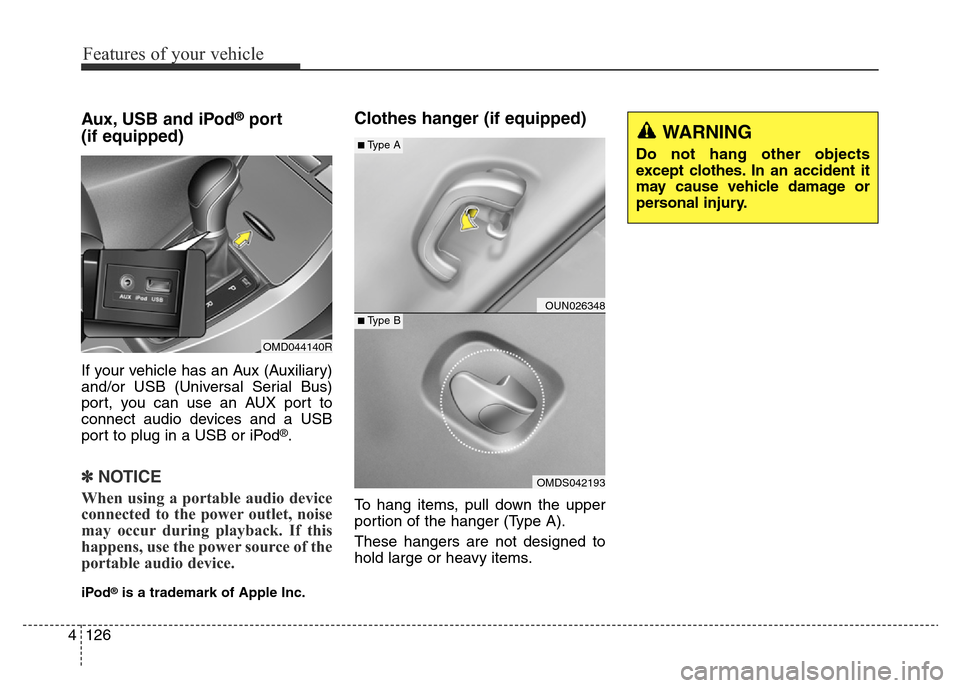
Aux, USB and iPod®port
(if equipped)
If your vehicle has an Aux (Auxiliary)
and/or USB (Universal Serial Bus)
port, you can use an AUX port to
connect audio devices and a USB
port to plug in a USB or iPod
®.
✽NOTICE
When using a portable audio device
connected to the power outlet, noise
may occur during playback. If this
happens, use the power source of the
portable audio device.
iPod®is a trademark of Apple Inc.
Clothes hanger (if equipped)
To hang items, pull down the upper
portion of the hanger (Type A).
These hangers are not designed to
hold large or heavy items.
OUN026348
OMDS042193
■Type A
■Type B
OMD044140R
WARNING
Do not hang other objects
except clothes. In an accident it
may cause vehicle damage or
personal injury.
Page 210 of 498
Features of your vehicle
130 4
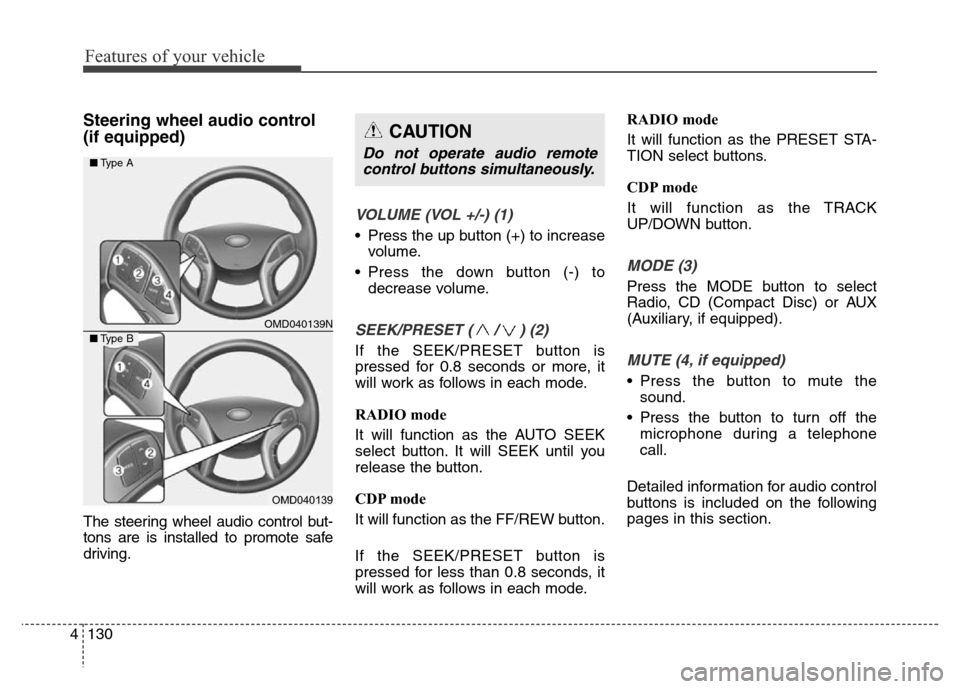
Steering wheel audio control
(if equipped)
The steering wheel audio control but-
tons are is installed to promote safe
driving.
VOLUME (VOL +/-) (1)
• Press the up button (+) to increase
volume.
• Press the down button (-) to
decrease volume.
SEEK/PRESET ( / ) (2)
If the SEEK/PRESET button is
pressed for 0.8 seconds or more, it
will work as follows in each mode.
RADIO mode
It will function as the AUTO SEEK
select button. It will SEEK until you
release the button.
CDP mode
It will function as the FF/REW button.
If the SEEK/PRESET button is
pressed for less than 0.8 seconds, it
will work as follows in each mode.RADIO mode
It will function as the PRESET STA-
TION select buttons.
CDP mode
It will function as the TRACK
UP/DOWN button.
MODE (3)
Press the MODE button to select
Radio, CD (Compact Disc) or AUX
(Auxiliary, if equipped).
MUTE (4, if equipped)
• Press the button to mute the
sound.
• Press the button to turn off the
microphone during a telephone
call.
Detailed information for audio control
buttons is included on the following
pages in this section.
CAUTION
Do not operate audio remote
control buttons simultaneously.
OMD040139N
OMD040139
■Type A
■Type B
Page 221 of 498
4141
Features of your vehicle
SYSTEM CONTROLS AND
FUNCTIONS
❈Display and settings may differ
depending on the selected audio.
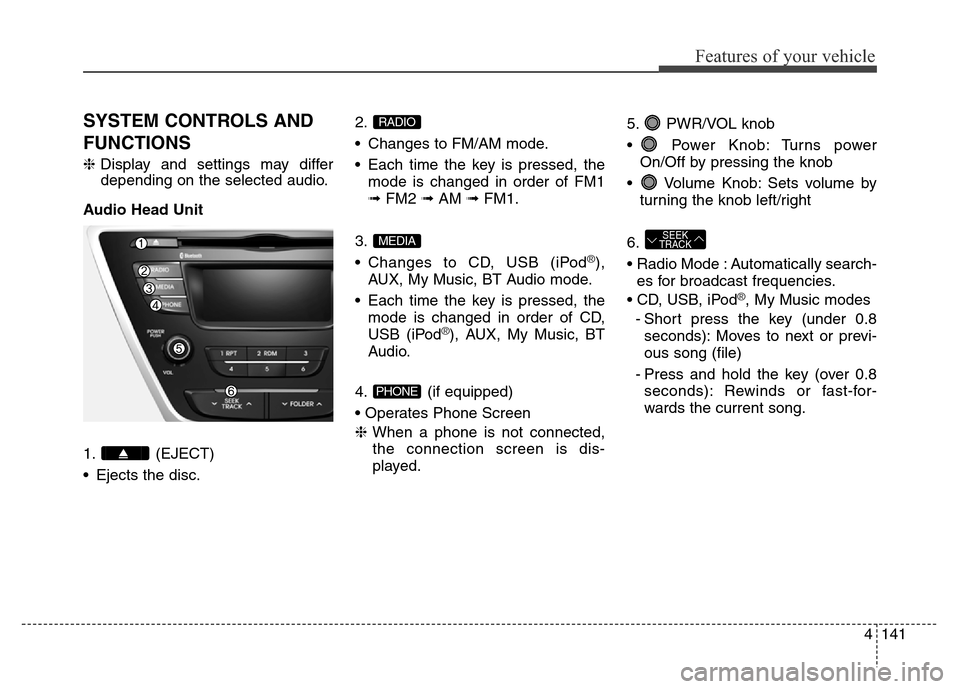
Audio Head Unit
1. (EJECT)
• Ejects the disc.2.
• Changes to FM/AM mode.
• Each time the key is pressed, the
mode is changed in order of FM1
➟FM2 ➟AM ➟FM1.
3.
• Changes to CD, USB (iPod
®),
AUX, My Music, BT Audio mode.
• Each time the key is pressed, the
mode is changed in order of CD,
USB (iPod
®), AUX, My Music, BT
Audio.
4. (if equipped)
• Operates Phone Screen
❈When a phone is not connected,
the connection screen is dis-
played.5. PWR/VOL knob
• Power Knob: Turns power
On/Off by pressing the knob
• Volume Knob: Sets volume by
turning the knob left/right
6.
• Radio Mode : Automatically search-
es for broadcast frequencies.
• CD, USB, iPod
®, My Music modes
- Short press the key (under 0.8
seconds): Moves to next or previ-
ous song (file)
- Press and hold the key (over 0.8
seconds): Rewinds or fast-for-
wards the current song.
SEEK
TRACK
PHONE
MEDIA
RADIO
Page 234 of 498
Features of your vehicle
154 4
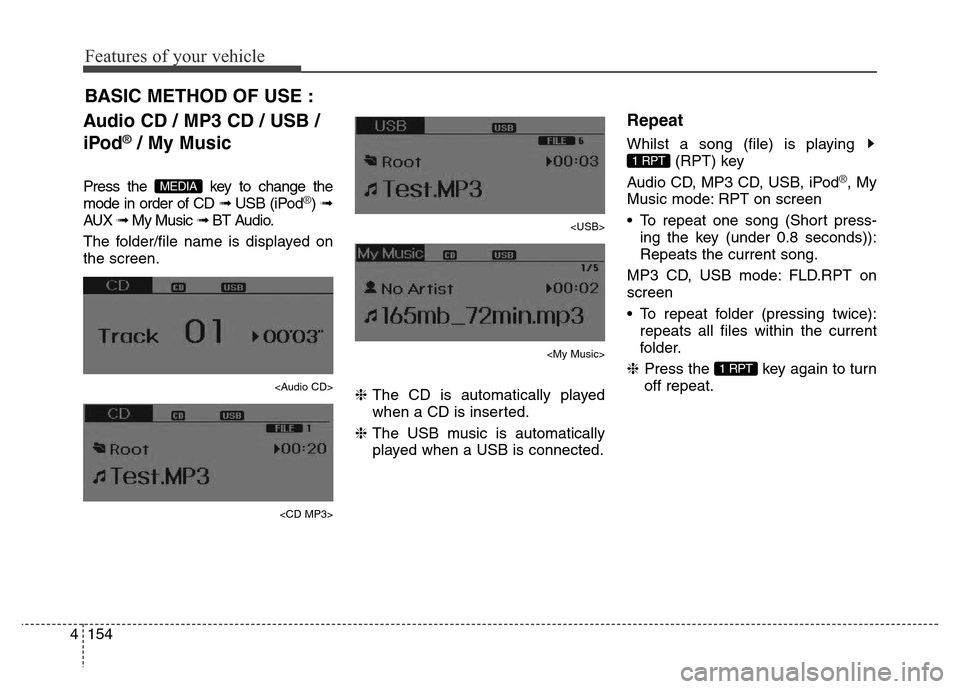
Audio CD / MP3 CD / USB /
iPod
®/ My Music
Press the key to change the
mode in order of CD ➟ USB (iPod®) ➟
AUX ➟ My Music ➟ BT Audio.
The folder/file name is displayed on
the screen.
Page 237 of 498
4157
Features of your vehicle
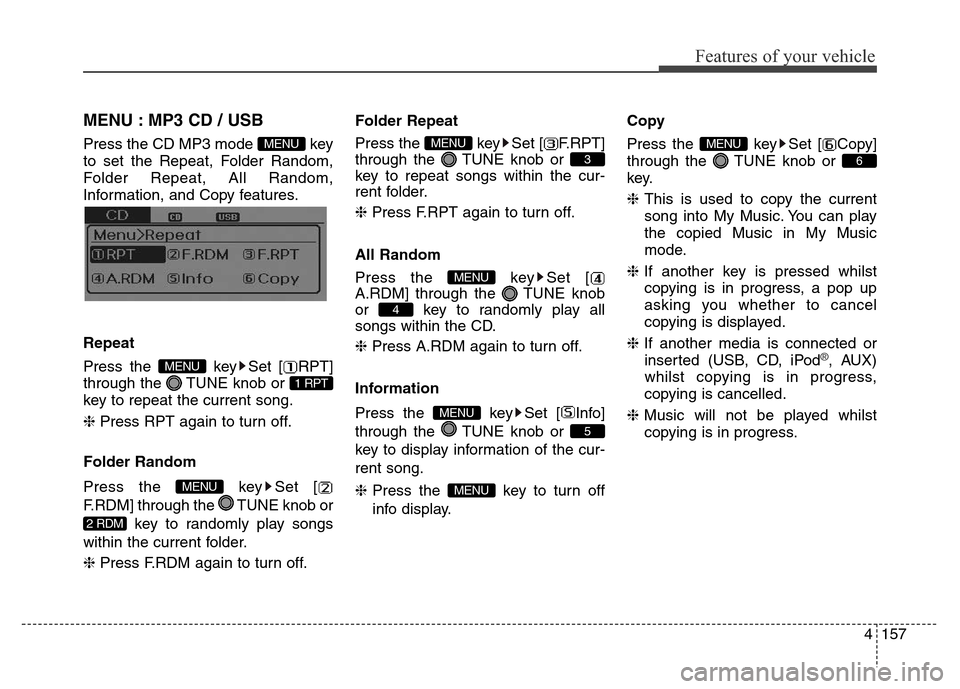
MENU : MP3 CD / USB
Press the CD MP3 mode key
to set the Repeat, Folder Random,
Folder Repeat, All Random,
Information, and Copy features.
Information, and Copy features.
Repeat
Press the key Set [ RPT]
through the TUNE knob or
key to repeat the current song.
❈ Press RPT again to turn off.
Folder Random
Press the key Set [
F.RDM] through the TUNE knob or
key to randomly play songs
within the current folder.
❈ Press F.RDM again to turn off.Folder Repeat
Press the key Set [ F.RPT]
through the TUNE knob or
key to repeat songs within the cur-
rent folder.
❈ Press F.RPT again to turn off.
All Random
Press the key Set [
A.RDM] through the TUNE knob
or key to randomly play all
songs within the CD.
❈ Press A.RDM again to turn off.
Information
Press the key Set [ Info]
through the TUNE knob or
key to display information of the cur-
rent song.
❈Press the key to turn off
info display.Copy
Press the key Set [ Copy]
through the TUNE knob or
key.
❈This is used to copy the current
song into My Music. You can play
the copied Music in My Music
mode.
❈If another key is pressed whilst
copying is in progress, a pop up
asking you whether to cancel
copying is displayed.
❈If another media is connected or
inserted (USB, CD, iPod
®, AUX)
whilst copying is in progress,
copying is cancelled.
❈Music will not be played whilst
copying is in progress.
6
MENU
MENU
5
MENU
4
MENU
3
MENU
2 RDM
MENU
1 RPT
MENU
MENU
Page 240 of 498
![Hyundai Elantra 2016 Owners Manual - RHD (UK. Australia) Features of your vehicle
160 4
Delete All
Press the key Set [ Del.All]
through the TUNE knob or
key.
Deletes all songs of My Music.
Delete Selection
Press the key Set [
Del.Sel] through the TUNE](/img/35/14552/w960_14552-239.png "Hyundai Elantra 2016 Owners Manual - RHD (UK. Australia) Features of your vehicle
160 4
Delete All
Press the key Set [ Del.All]
through the TUNE knob or
key.
Deletes all songs of My Music.
Delete Selection
Press the key Set [
Del.Sel] through the TUNE")
Features of your vehicle
160 4
Delete All
Press the key Set [ Del.All]
through the TUNE knob or
key.
Deletes all songs of My Music.
Delete Selection
Press the key Set [
Del.Sel] through the TUNE knob
or key.
Songs within My Music are selected
and deleted.
➀Select the songs you wish to
delete from the list.➁After selecting, press the
key and select the delete menu.
✽NOTICE- Using My Music
• Even if memory is available, a
maximum of 6,000 songs can be
stored.
• The same song can be copied up to
1,000 times.
• Memory info can be checked in
the System menu of Setup.
AUX
AUX is used to play external MEDIA
currently connected to the AUX ter-
minal.
AUX mode will automatically start
when an external device is connect-
ed to the AUX terminal.
If an external device is connected,
you can also press the key to
change to AUX mode.
❈AUX mode cannot be started
unless there is an external device
connected to the AUX terminal.
✽NOTICE - USING THE AUX
Fully insert the AUX cable into the
AUX terminal for use.
MEDIA
MENU
6
MENU
5
MENU
Page 241 of 498
4161
Features of your vehicle
Bluetooth®Wireless
Technology AUDIO
(if equipped)
What is Bluetooth®Wireless
Technology?
Bluetooth®Wireless Technology
allows devices to be connected over
a short distance, including hands-
free devices, stereo headsets, wire-
less remote controls, etc. For more
information, visit the
Bluetooth®
Wireless Technology website at
www.Bluetooth.com
Before using Bluetooth®Wireless
Technology audio features
•
Bluetooth®Wireless Technology
audio may not be supported
depending on the compatibility of
your
Bluetooth®Wireless
Technology mobile phone.
• In order to use
Bluetooth® Wireless
Technology audio, you must first
pair and connect the
Bluetooth®
Wireless Technology mobile
phone.• The
Bluetooth®word mark and
logos are registered trademarks
owned by
Bluetooth®SIG, Inc. and
any use of such marks is under
licence. Other trademarks and trade
names are those of their respective
owners. A
Bluetooth®enabled
mobile phone is required to use
Bluetooth®Wireless Technology.
•
Bluetooth®Wireless Technology
audio can be used only when the
[Audio Streaming] of the phone is
turned On.
❈Setting
Bluetooth®Wireless
Technology Audio Streaming :
Press the key Select
[Phone] through the tune knob
Select [Audio Streaming] through
the TUNE knob Set
/
Starting Bluetooth®Wireless
Technology Audio
• Press the key to change the
mode in order of CD ➟ USB ➟ AUX
➟ My Music ➟ BT Audio.
• If BT Audio is selected,
Bluetooth®
Wireless Technology audio will start
playing.
❈Audio may not automatically start
playing on some mobile phones.
Using the
Bluetooth®Wireless
Technologyaudio features
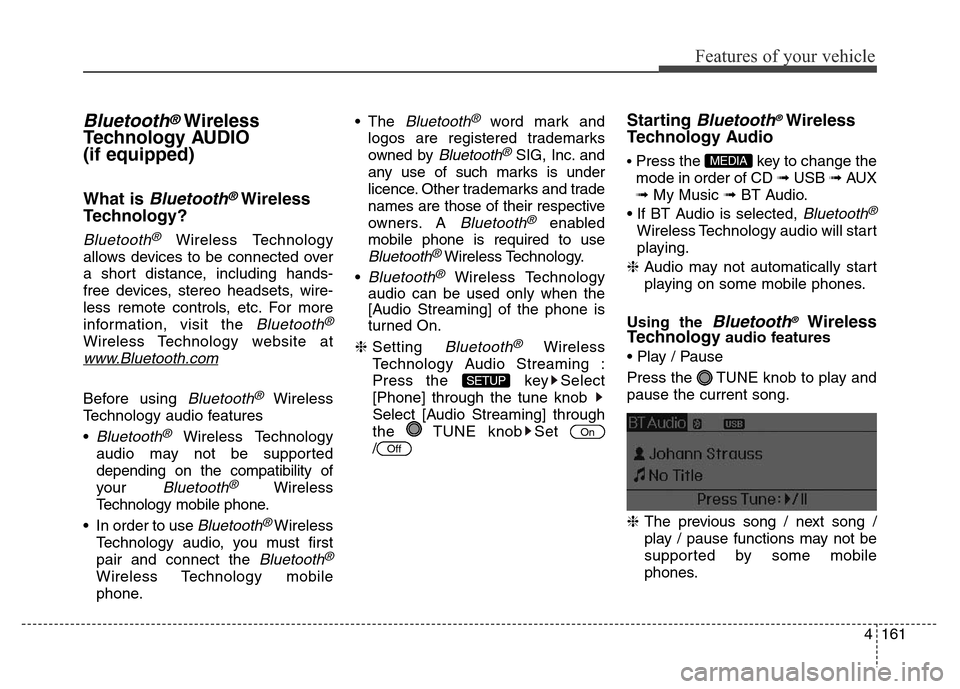
• Play / Pause
Press the TUNE knob to play and
pause the current song.
❈The previous song / next song /
play / pause functions may not be
supported by some mobile
phones.
MEDIA
Off
On
SETUP
Page 247 of 498
4167
Features of your vehicle
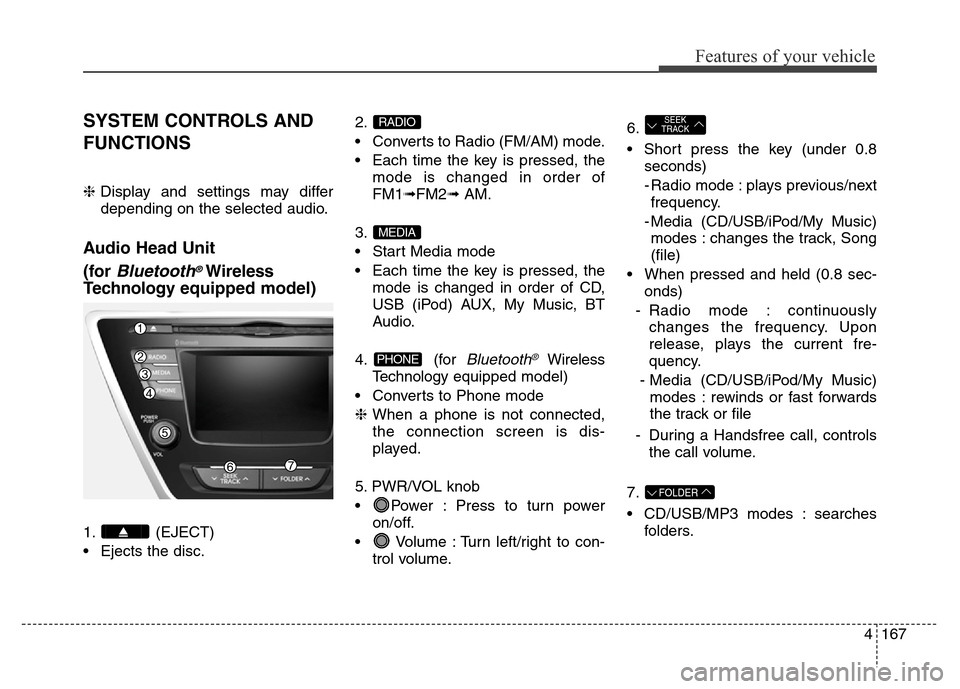
SYSTEM CONTROLS AND
FUNCTIONS
❈Display and settings may differ
depending on the selected audio.
Audio Head Unit
(for
Bluetooth®Wireless
Technologyequipped model)
1. (EJECT)
• Ejects the disc.2.
• Converts to Radio (FM/AM) mode.
• Each time the key is pressed, the
mode is changed in order of
FM1➟FM2➟ AM.
3.
• Start Media mode
• Each time the key is pressed, the
mode is changed in order of CD,
USB (iPod) AUX, My Music, BT
Audio.
4. (for
Bluetooth®Wireless
Technologyequipped model)
• Converts to Phone mode
❈When a phone is not connected,
the connection screen is dis-
played.
5. PWR/VOL knob
• Power : Press to turn power
on/off.
• Volume : Turn left/right to con-
trol volume.6.
• Short press the key (under 0.8
seconds)
- Radio mode : plays previous/next
frequency.
- Media (CD/USB/iPod/My Music)
modes : changes the track, Song
(file)
• When pressed and held (0.8 sec-
onds)
- Radio mode : continuously
changes the frequency. Upon
release, plays the current fre-
quency.
- Media (CD/USB/iPod/My Music)
modes : rewinds or fast forwards
the track or file
- During a Handsfree call, controls
the call volume.
7.
• CD/USB/MP3 modes : searches
folders.
FOLDER
SEEK
TRACK
PHONE
MEDIA
RADIO
Page 248 of 498
Features of your vehicle
168 4
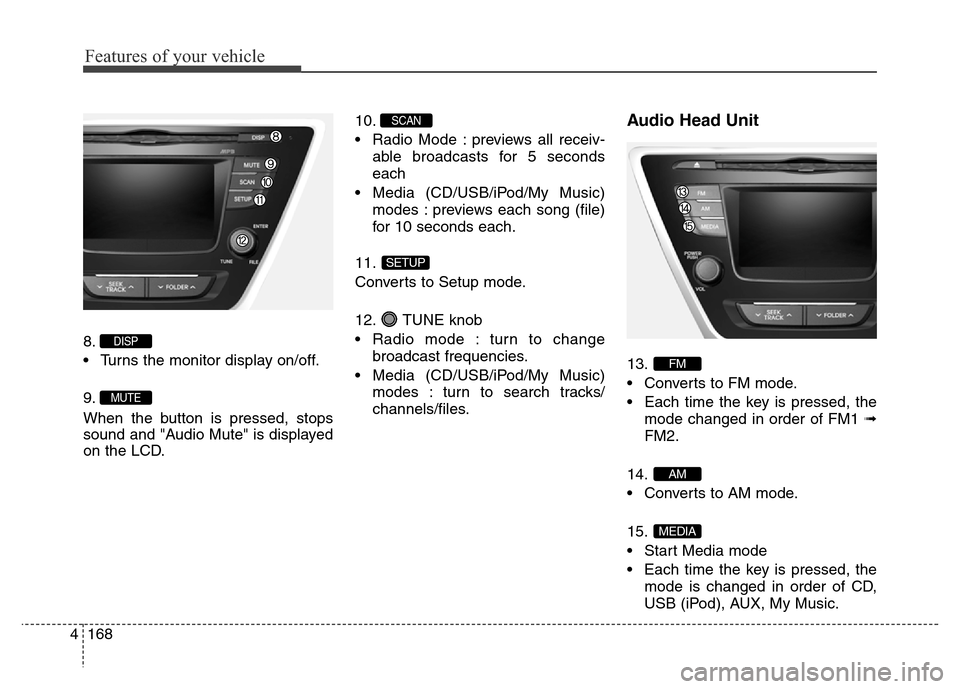
8.
• Turns the monitor display on/off.
9.
When the button is pressed, stops
sound and "Audio Mute" is displayed
on the LCD.10.
• Radio Mode : previews all receiv-
able broadcasts for 5 seconds
each
• Media (CD/USB/iPod/My Music)
modes : previews each song (file)
for 10 seconds each.
11.
Converts to Setup mode.
12. TUNE knob
• Radio mode : turn to change
broadcast frequencies.
• Media (CD/USB/iPod/My Music)
modes : turn to search tracks/
channels/files.
Audio Head Unit
13.
• Converts to FM mode.
• Each time the key is pressed, the
mode changed in order of FM1 ➟
FM2.
14.
• Converts to AM mode.
15.
• Start Media mode
• Each time the key is pressed, the
mode is changed in order of CD,
USB (iPod), AUX, My Music.
MEDIA
AM
FM
SETUP
SCAN
MUTE
DISP