Ok button Hyundai Elantra 2016 User Guide
[x] Cancel search | Manufacturer: HYUNDAI, Model Year: 2016, Model line: Elantra, Model: Hyundai Elantra 2016Pages: 669, PDF Size: 31.96 MB
Page 63 of 669
Safety features of your vehicle
44
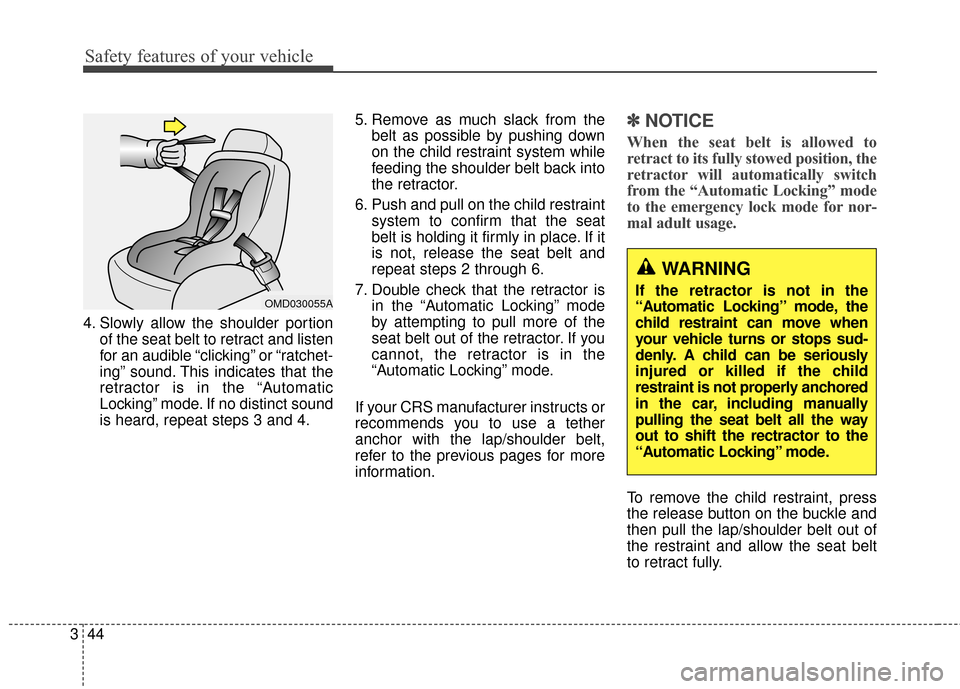
3 4. Slowly allow the shoulder portion
of the seat belt to retract and listen
for an audible “clicking” or “ratchet-
ing” sound. This indicates that the
retractor is in the “Automatic
Locking” mode. If no distinct sound
is heard, repeat steps 3 and 4. 5. Remove as much slack from the
belt as possible by pushing down
on the child restraint system while
feeding the shoulder belt back into
the retractor.
6. Push and pull on the child restraint system to confirm that the seat
belt is holding it firmly in place. If it
is not, release the seat belt and
repeat steps 2 through 6.
7. Double check that the retractor is in the “Automatic Locking” mode
by attempting to pull more of the
seat belt out of the retractor. If you
cannot, the retractor is in the
“Automatic Locking” mode.
If your CRS manufacturer instructs or
recommends you to use a tether
anchor with the lap/shoulder belt,
refer to the previous pages for more
information.
✽ ✽ NOTICE
When the seat belt is allowed to
retract to its fully stowed position, the
retractor will automatically switch
from the “Automatic Locking” mode
to the emergency lock mode for nor-
mal adult usage.
To remove the child restraint, press
the release button on the buckle and
then pull the lap/shoulder belt out of
the restraint and allow the seat belt
to retract fully.
OMD030055A
WARNING
If the retractor is not in the
“Automatic Locking” mode, the
child restraint can move when
your vehicle turns or stops sud-
denly. A child can be seriously
injured or killed if the child
restraint is not properly anchored
in the car, including manually
pulling the seat belt all the way
out to shift the rectractor to the
“Automatic Locking” mode.
Page 89 of 669
43
Features of your vehicle
Remote key
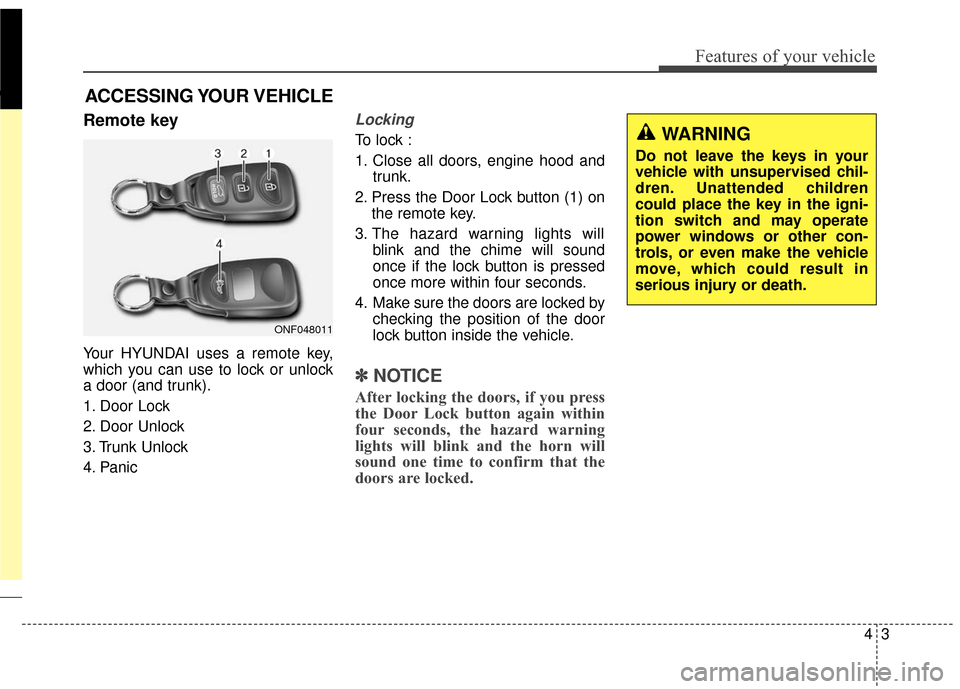
Your HYUNDAI uses a remote key,
which you can use to lock or unlock
a door (and trunk).
1. Door Lock
2. Door Unlock
3. Trunk Unlock
4. Panic
Locking
To lock :
1. Close all doors, engine hood andtrunk.
2. Press the Door Lock button (1) on the remote key.
3. The hazard warning lights will blink and the chime will sound
once if the lock button is pressed
once more within four seconds.
4. Make sure the doors are locked by checking the position of the door
lock button inside the vehicle.
✽ ✽NOTICE
After locking the doors, if you press
the Door Lock button again within
four seconds, the hazard warning
lights will blink and the horn will
sound one time to confirm that the
doors are locked.
ACCESSING YOUR VEHICLE
ONF048011
WARNING
Do not leave the keys in your
vehicle with unsupervised chil-
dren. Unattended children
could place the key in the igni-
tion switch and may operate
power windows or other con-
trols, or even make the vehicle
move, which could result in
serious injury or death.
Page 90 of 669
Features of your vehicle
44
Unlocking
To unlock:
1. Press the Door Unlock button (2)on the remote key.
2. The driver’s door will unlock. The hazard warning lights will blink two
times.
If you press the Door Unlock button
again within four seconds, then all
the doors will unlock.
✽ ✽ NOTICE
After unlocking the doors, the doors
will lock automatically after 30 sec-
onds unless a door is opened.
Trunk unlocking
To unlock:
1. Press the Trunk Unlock button (3)
on the remote key for more than
one second.
2. The hazard warning lights will blink two times. Once the trunk is
opened and then closed, the trunk
will lock automatically.
✽ ✽NOTICE
• After unlocking the trunk, the
trunk will lock automatically.
• The word "HOLD" is written on the button to inform you that you
must press and hold the button for
more than one second.
Panic button
Press the Panic button (4) for more
than one second. The horn sounds
and hazard warning lights flash for
about 30 seconds.
To cancel the panic mode, press any
button on the remote key.
Start-up
For detailed information refer to “Key
Ignition Switch” in chapter 5.
CAUTION
To prevent damaging the remote
key:
• Keep the remote key away from water or any liquid andfire. If the inside of the remotekey gets damp (due to drinksor moisture), or is heated,internal circuit may malfunc-tion, excluding the car fromthe warranty.
Avoid dropping or throwing the remote key.
Protect the remote key from extreme temperatures.
Page 93 of 669
47
Features of your vehicle
Smart key
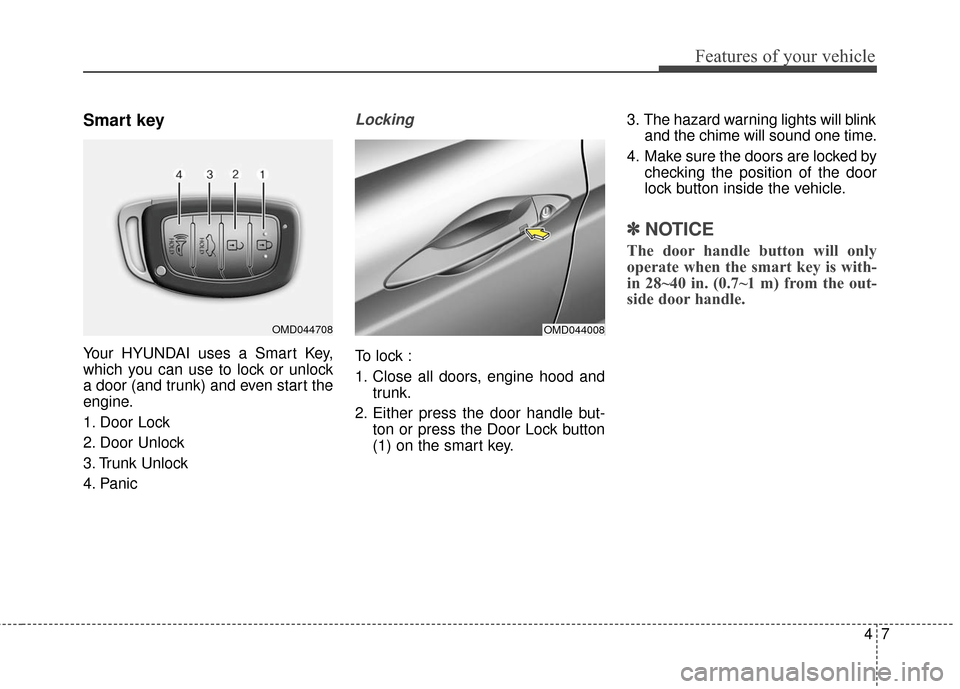
Your HYUNDAI uses a Smart Key,
which you can use to lock or unlock
a door (and trunk) and even start the
engine.
1. Door Lock
2. Door Unlock
3. Trunk Unlock
4. Panic
Locking
To lock :
1. Close all doors, engine hood andtrunk.
2. Either press the door handle but- ton or press the Door Lock button
(1) on the smart key. 3. The hazard warning lights will blink
and the chime will sound one time.
4. Make sure the doors are locked by checking the position of the door
lock button inside the vehicle.
✽ ✽NOTICE
The door handle button will only
operate when the smart key is with-
in 28~40 in. (0.7~1 m) from the out-
side door handle.
OMD044008OMD044708
Page 94 of 669
Features of your vehicle
84
Even though you press the outside
door handle button, the doors will not
lock and the chime will sound for
three seconds if any of the following
occur:
The Smart Key is in the vehicle.
The Engine Start/Stop button is inACC or ON position.
Any door except the trunk is open.Unlocking
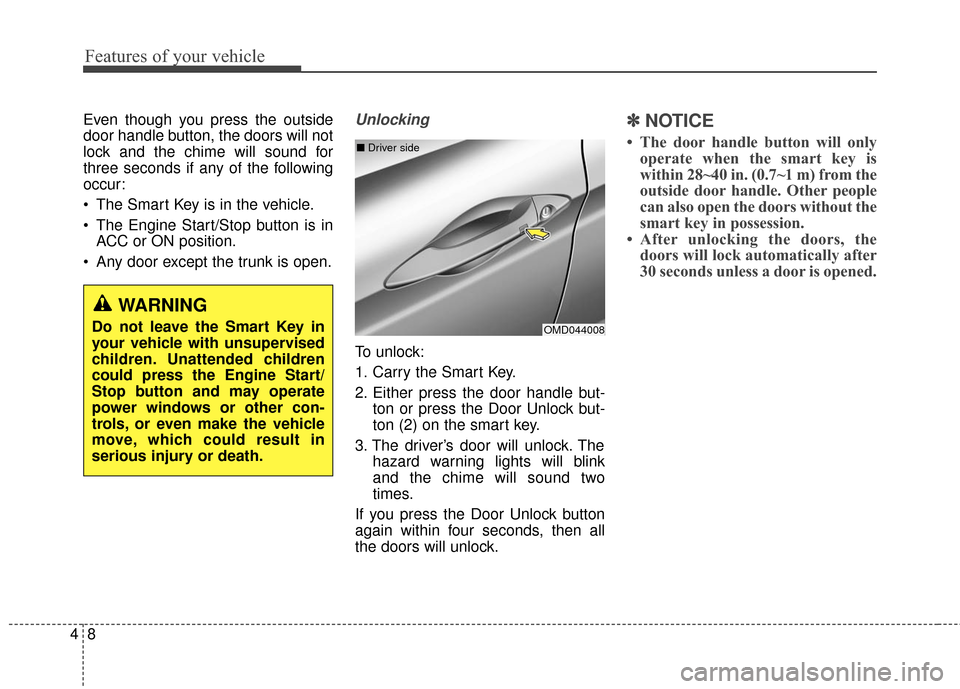
To unlock:
1. Carry the Smart Key.
2. Either press the door handle but- ton or press the Door Unlock but-
ton (2) on the smart key.
3. The driver’s door will unlock. The hazard warning lights will blink
and the chime will sound two
times.
If you press the Door Unlock button
again within four seconds, then all
the doors will unlock.
✽ ✽ NOTICE
• The door handle button will only
operate when the smart key is
within 28~40 in. (0.7~1 m) from the
outside door handle. Other people
can also open the doors without the
smart key in possession.
• After unlocking the doors, the doors will lock automatically after
30 seconds unless a door is opened.
OMD044008
■
Driver side
WARNING
Do not leave the Smart Key in
your vehicle with unsupervised
children. Unattended children
could press the Engine Start/
Stop button and may operate
power windows or other con-
trols, or even make the vehicle
move, which could result in
serious injury or death.
Page 95 of 669
49
Features of your vehicle
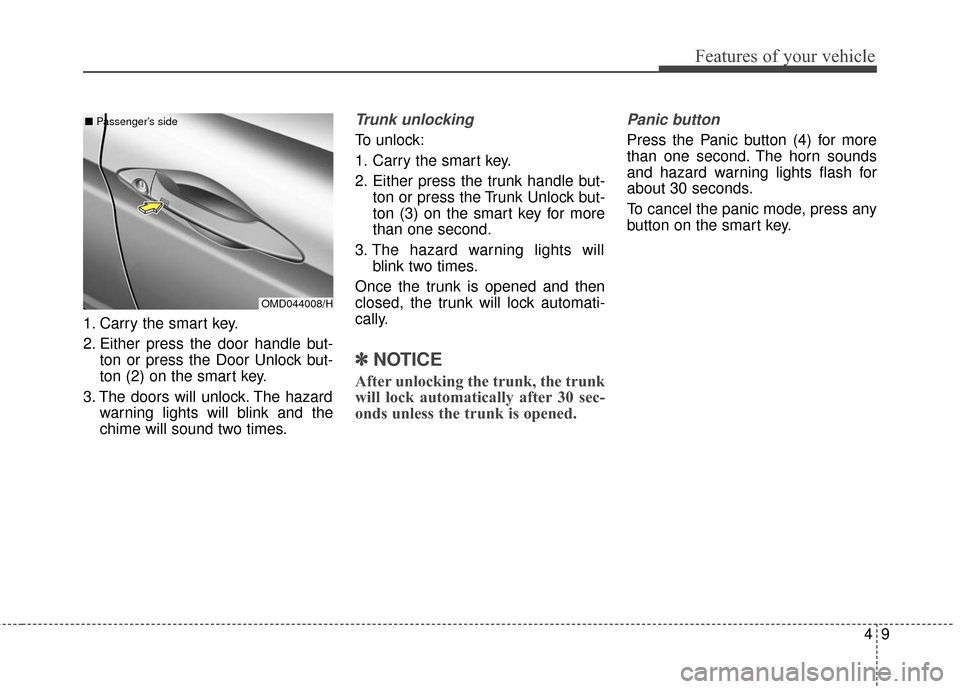
1. Carry the smart key.
2. Either press the door handle but-ton or press the Door Unlock but-
ton (2) on the smart key.
3. The doors will unlock. The hazard warning lights will blink and the
chime will sound two times.
Trunk unlocking
To unlock:
1. Carry the smart key.
2. Either press the trunk handle but- ton or press the Trunk Unlock but-
ton (3) on the smart key for more
than one second.
3. The hazard warning lights will blink two times.
Once the trunk is opened and then
closed, the trunk will lock automati-
cally.
✽ ✽ NOTICE
After unlocking the trunk, the trunk
will lock automatically after 30 sec-
onds unless the trunk is opened.
Panic button
Press the Panic button (4) for more
than one second. The horn sounds
and hazard warning lights flash for
about 30 seconds.
To cancel the panic mode, press any
button on the smart key.
OMD044008/H
■
Passenger’s side
Page 96 of 669
Features of your vehicle
10
4
Start-up
You can start the engine without
inserting the key. For detailed infor-
mation refer to the Engine Start/Stop
button in chapter 5.
Mechanical key
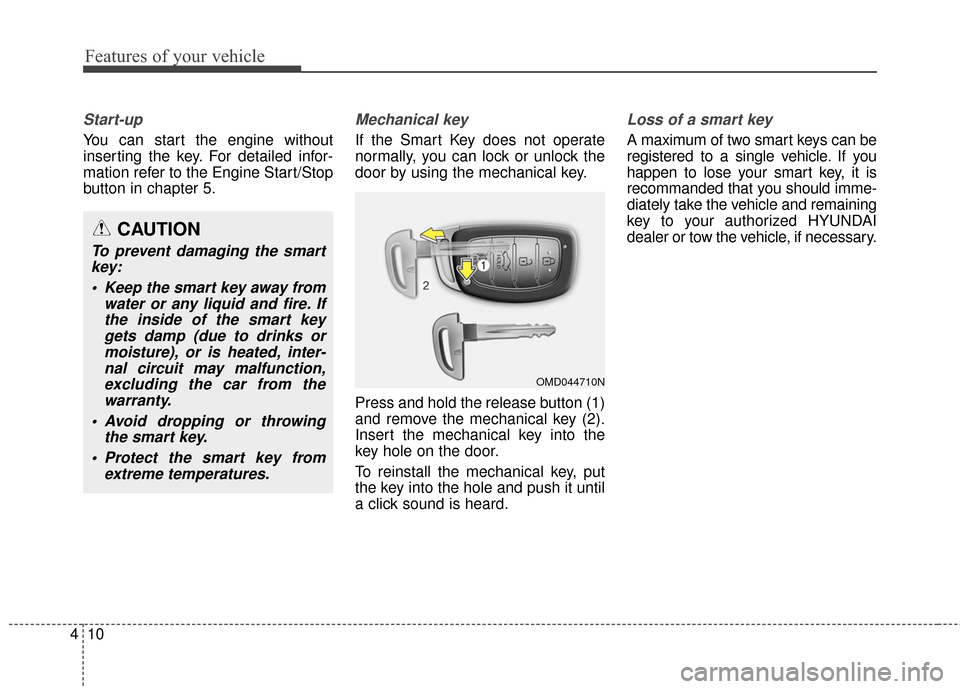
If the Smart Key does not operate
normally, you can lock or unlock the
door by using the mechanical key.
Press and hold the release button (1)
and remove the mechanical key (2).
Insert the mechanical key into the
key hole on the door.
To reinstall the mechanical key, put
the key into the hole and push it until
a click sound is heard.
Loss of a smart key
A maximum of two smart keys can be
registered to a single vehicle. If you
happen to lose your smart key, it is
recommanded that you should imme-
diately take the vehicle and remaining
key to your authorized HYUNDAI
dealer or tow the vehicle, if necessary.
OMD044710N
CAUTION
To prevent damaging the smart
key:
Keep the smart key away from water or any liquid and fire. Ifthe inside of the smart keygets damp (due to drinks ormoisture), or is heated, inter-nal circuit may malfunction,excluding the car from thewarranty.
Avoid dropping or throwing the smart key.
Protect the smart key from extreme temperatures.
Page 100 of 669
Features of your vehicle
14
4
Operating door locks from
outside the vehicle
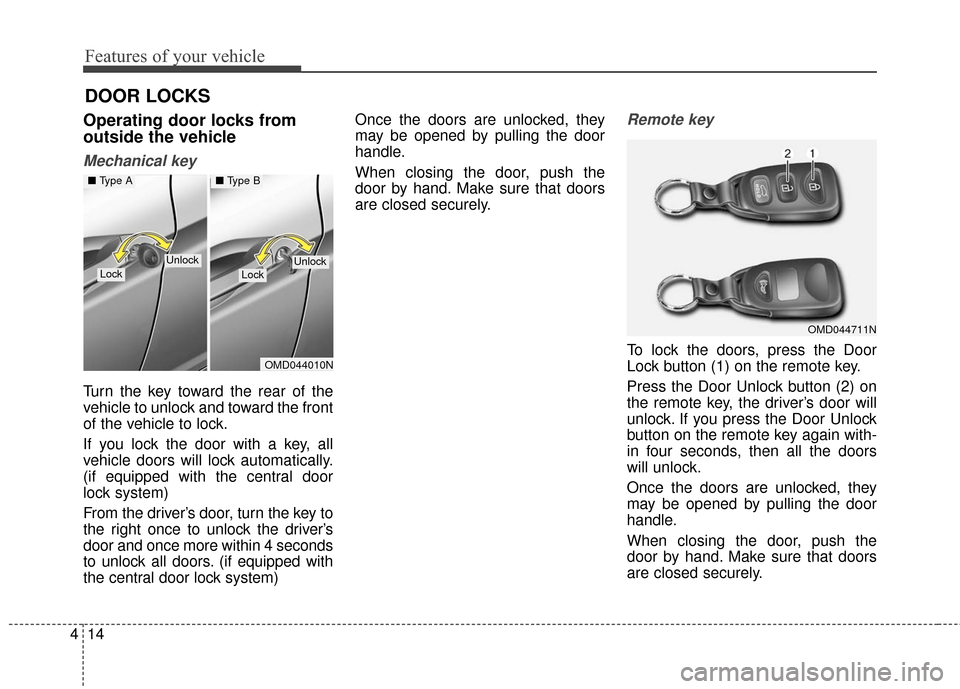
Mechanical key
Turn the key toward the rear of the
vehicle to unlock and toward the front
of the vehicle to lock.
If you lock the door with a key, all
vehicle doors will lock automatically.
(if equipped with the central door
lock system)
From the driver’s door, turn the key to
the right once to unlock the driver’s
door and once more within 4 seconds
to unlock all doors. (if equipped with
the central door lock system) Once the doors are unlocked, they
may be opened by pulling the door
handle.
When closing the door, push the
door by hand. Make sure that doors
are closed securely.
Remote key
To lock the doors, press the Door
Lock button (1) on the remote key.
Press the Door Unlock button (2) on
the remote key, the driver’s door will
unlock. If you press the Door Unlock
button on the remote key again with-
in four seconds, then all the doors
will unlock.
Once the doors are unlocked, they
may be opened by pulling the door
handle.
When closing the door, push the
door by hand. Make sure that doors
are closed securely.
DOOR LOCKS
OMD044711N
OMD044010N
LockLockUnlockUnlock
■
Type A■ Type B
Page 101 of 669
415
Features of your vehicle
✽
✽NOTICE
• In cold and wet climates, door lock
and door mechanisms may not
work properly due to freezing con-
ditions.
• If the door is locked/unlocked multiple times in rapid succession
with either the vehicle key or door
lock switch, the system may stop
operating temporarily in order to
protect the circuit and prevent
damage to system components.
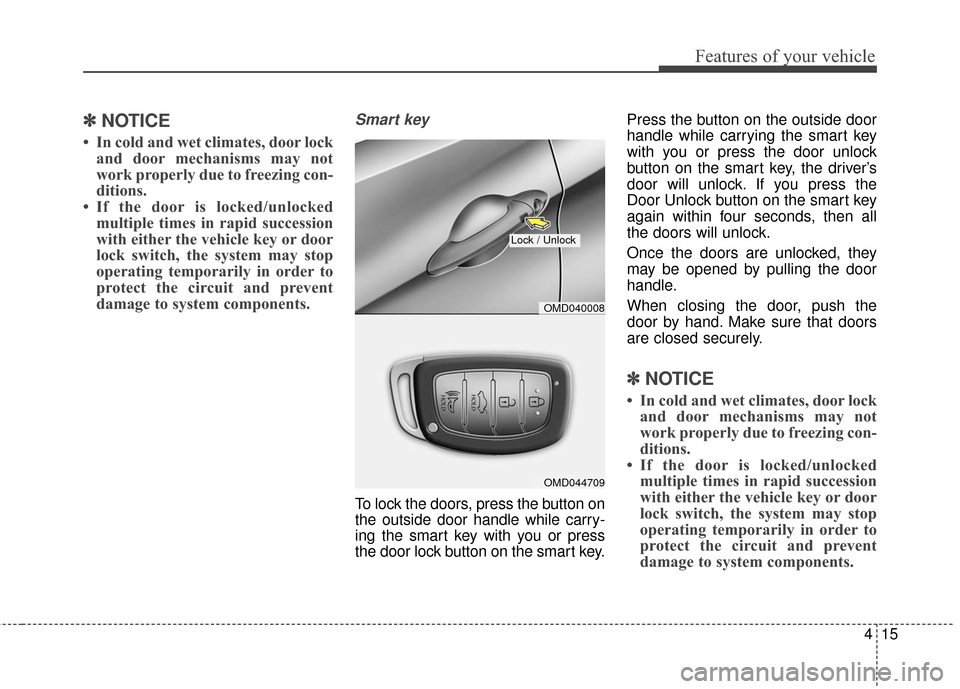
Smart key
To lock the doors, press the button on
the outside door handle while carry-
ing the smart key with you or press
the door lock button on the smart key. Press the button on the outside door
handle while carrying the smart key
with you or press the door unlock
button on the smart key, the driver’s
door will unlock. If you press the
Door Unlock button on the smart key
again within four seconds, then all
the doors will unlock.
Once the doors are unlocked, they
may be opened by pulling the door
handle.
When closing the door, push the
door by hand. Make sure that doors
are closed securely.
✽ ✽
NOTICE
• In cold and wet climates, door lock
and door mechanisms may not
work properly due to freezing con-
ditions.
• If the door is locked/unlocked multiple times in rapid succession
with either the vehicle key or door
lock switch, the system may stop
operating temporarily in order to
protect the circuit and prevent
damage to system components.
OMD044709
Lock / Unlock
OMD040008
Page 102 of 669
Features of your vehicle
16
4
Operating door locks from
inside the vehicle
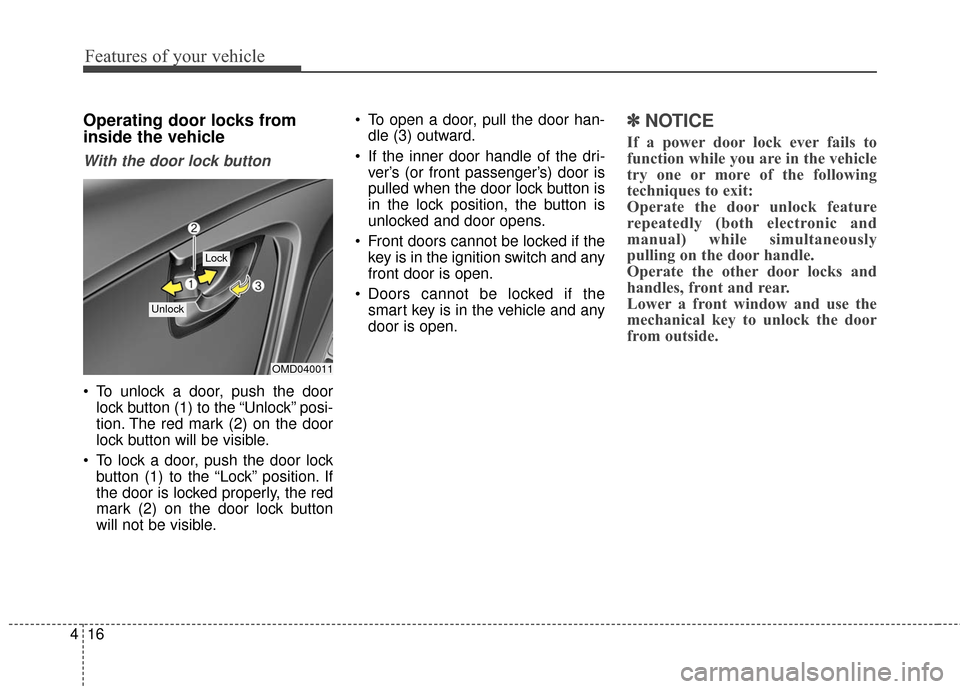
With the door lock button
To unlock a door, push the door
lock button (1) to the “Unlock” posi-
tion. The red mark (2) on the door
lock button will be visible.
To lock a door, push the door lock button (1) to the “Lock” position. If
the door is locked properly, the red
mark (2) on the door lock button
will not be visible. To open a door, pull the door han-
dle (3) outward.
If the inner door handle of the dri- ver’s (or front passenger’s) door is
pulled when the door lock button is
in the lock position, the button is
unlocked and door opens.
Front doors cannot be locked if the key is in the ignition switch and any
front door is open.
Doors cannot be locked if the smart key is in the vehicle and any
door is open.
✽ ✽ NOTICE
If a power door lock ever fails to
function while you are in the vehicle
try one or more of the following
techniques to exit:
Operate the door unlock feature
repeatedly (both electronic and
manual) while simultaneously
pulling on the door handle.
Operate the other door locks and
handles, front and rear.
Lower a front window and use the
mechanical key to unlock the door
from outside.
OMD040011
Lock
Unlock