tow Hyundai Elantra 2016 Owner's Guide
[x] Cancel search | Manufacturer: HYUNDAI, Model Year: 2016, Model line: Elantra, Model: Hyundai Elantra 2016Pages: 669, PDF Size: 31.96 MB
Page 208 of 669
Features of your vehicle
122
4
3. MODE
Press the button to change audio
source.
- FM(1~2)
➟ AM ➟ SAT(1~3) ➟ CD
➟ USB AUX(iPod) FM...
4. MUTE (if equipped)
Press the button to mute the
sound.
Press the button to turn off the microphone during a telephone
call.
Detailed information for audio control
buttons are described in the following
pages in this chapter.
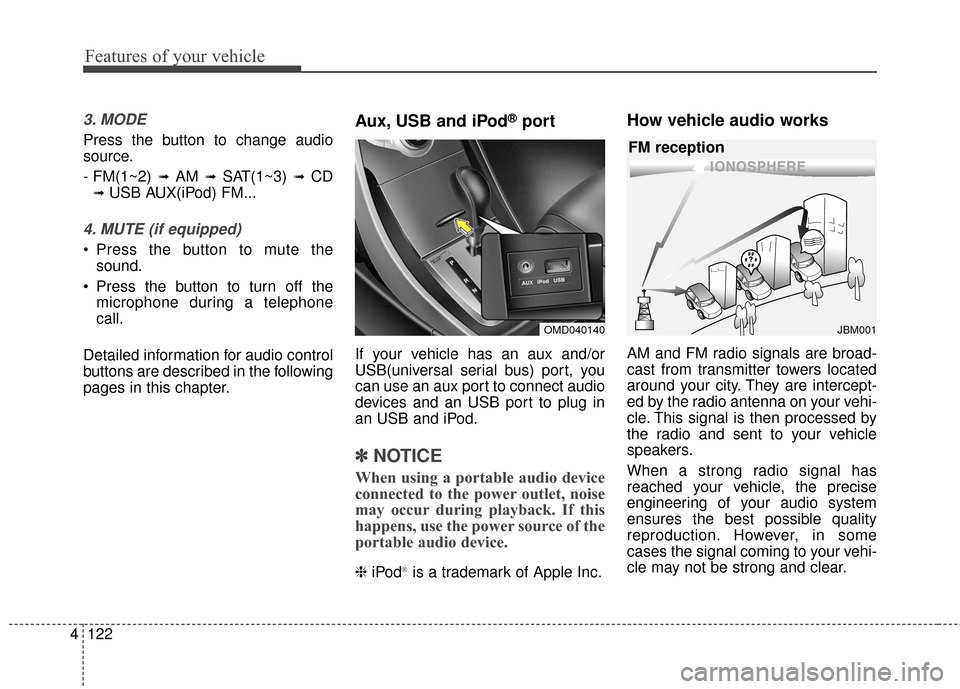
Aux, USB and iPod®port
If your vehicle has an aux and/or
USB(universal serial bus) port, you
can use an aux port to connect audio
devices and an USB port to plug in
an USB and iPod.
✽ ✽ NOTICE
When using a portable audio device
connected to the power outlet, noise
may occur during playback. If this
happens, use the power source of the
portable audio device.
❈ iPod®is a trademark of Apple Inc.
How vehicle audio works
AM and FM radio signals are broad-
cast from transmitter towers located
around your city. They are intercept-
ed by the radio antenna on your vehi-
cle. This signal is then processed by
the radio and sent to your vehicle
speakers.
When a strong radio signal has
reached your vehicle, the precise
engineering of your audio system
ensures the best possible quality
reproduction. However, in some
cases the signal coming to your vehi-
cle may not be strong and clear.
OMD040140
¢¢¢
JBM001
FM reception
Page 458 of 669
Driving your vehicle
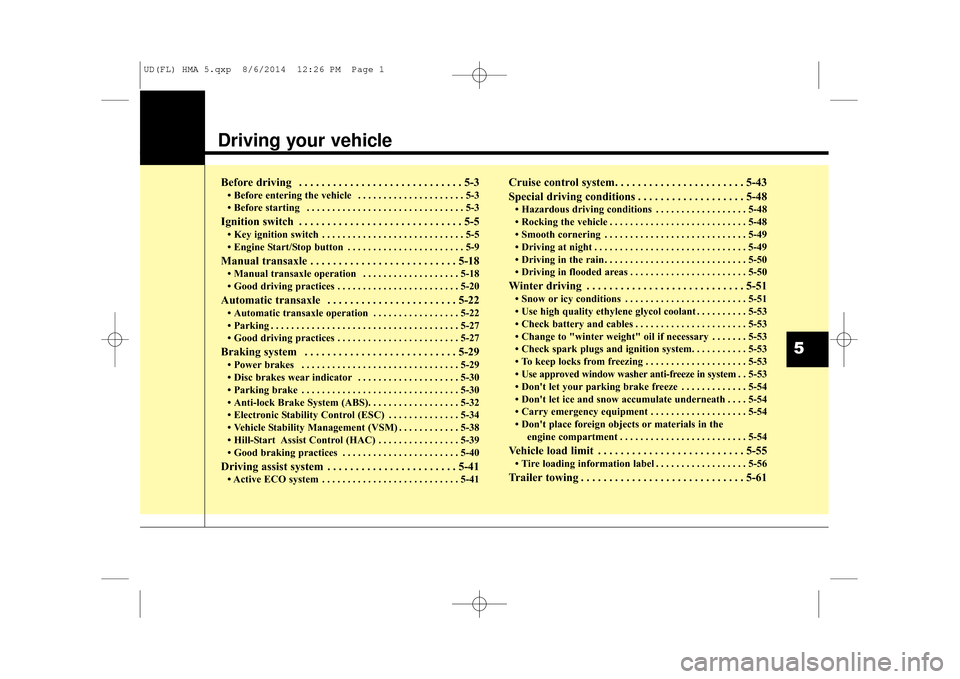
Before driving . . . . . . . . . . . . . . . . . . . . . . . . . . . . . 5-3
• Before entering the vehicle . . . . . . . . . . . . . . . . . . . . . 5-3
• Before starting . . . . . . . . . . . . . . . . . . . . . . . . . . . . . . . 5-3
Ignition switch . . . . . . . . . . . . . . . . . . . . . . . . . . . . . 5-5
• Key ignition switch . . . . . . . . . . . . . . . . . . . . . . . . . . . . 5-5
• Engine Start/Stop button . . . . . . . . . . . . . . . . . . . . . . . 5-9
Manual transaxle . . . . . . . . . . . . . . . . . . . . . . . . . . 5-18
• Manual transaxle operation . . . . . . . . . . . . . . . . . . . 5-18
• Good driving practices . . . . . . . . . . . . . . . . . . . . . . . . 5-20
Automatic transaxle . . . . . . . . . . . . . . . . . . . . . . . 5-22
• Automatic transaxle operation . . . . . . . . . . . . . . . . . 5-22
• Parking . . . . . . . . . . . . . . . . . . . . . . . . . . . . . . . . . . . . \
. 5-27
• Good driving practices . . . . . . . . . . . . . . . . . . . . . . . . 5-27
Braking system . . . . . . . . . . . . . . . . . . . . . . . . . . . 5-29
• Power brakes . . . . . . . . . . . . . . . . . . . . . . . . . . . . . . . 5-29
• Disc brakes wear indicator . . . . . . . . . . . . . . . . . . . . 5-30
• Parking brake . . . . . . . . . . . . . . . . . . . . . . . . . . . . . . . 5-30
• Anti-lock Brake System (ABS). . . . . . . . . . . . . . . . . . 5-32
• Electronic Stability Control (ESC) . . . . . . . . . . . . . . 5-34
• Vehicle Stability Management (VSM) . . . . . . . . . . . . 5-38
• Hill-Start Assist Control (HAC) . . . . . . . . . . . . . . . . 5-39
• Good braking practices . . . . . . . . . . . . . . . . . . . . . . . 5-40
Driving assist system . . . . . . . . . . . . . . . . . . . . . . . 5-41
• Active ECO system . . . . . . . . . . . . . . . . . . . . . . . . . . . 5-41
Cruise control system. . . . . . . . . . . . . . . . . . . . . . . 5-43
Special driving conditions . . . . . . . . . . . . . . . . . . . 5-48
• Hazardous driving conditions . . . . . . . . . . . . . . . . . . 5-48
• Rocking the vehicle . . . . . . . . . . . . . . . . . . . . . . . . . . . 5-48
• Smooth cornering . . . . . . . . . . . . . . . . . . . . . . . . . . . . 5-49
• Driving at night . . . . . . . . . . . . . . . . . . . . . . . . . . . . . . 5-49
• Driving in the rain . . . . . . . . . . . . . . . . . . . . . . . . . . . . 5-50
• Driving in flooded areas . . . . . . . . . . . . . . . . . . . . . . . 5-50
Winter driving . . . . . . . . . . . . . . . . . . . . . . . . . . . . 5-51
• Snow or icy conditions . . . . . . . . . . . . . . . . . . . . . . . . 5-51
• Use high quality ethylene glycol coolant . . . . . . . . . . 5-53
• Check battery and cables . . . . . . . . . . . . . . . . . . . . . . 5-53
• Change to "winter weight" oil if necessary . . . . . . . 5-53
• Check spark plugs and ignition system. . . . . . . . . . . 5-53
• To keep locks from freezing . . . . . . . . . . . . . . . . . . . . 5-53
• Use approved window washer anti-freeze in system . . 5-53
• Don't let your parking brake freeze . . . . . . . . . . . . . 5-54
• Don't let ice and snow accumulate underneath . . . . 5-54
• Carry emergency equipment . . . . . . . . . . . . . . . . . . . 5-54
• Don't place foreign objects or materials in the engine compartment . . . . . . . . . . . . . . . . . . . . . . . . . 5-54
Vehicle load limit . . . . . . . . . . . . . . . . . . . . . . . . . . 5-55
• Tire loading information label . . . . . . . . . . . . . . . . . . 5-56
Trailer towing . . . . . . . . . . . . . . . . . . . . . . . . . . . . . 5-61
5
UD(FL) HMA 5.qxp 8/6/2014 12:26 PM Page 1
Page 464 of 669
57
Driving your vehicle
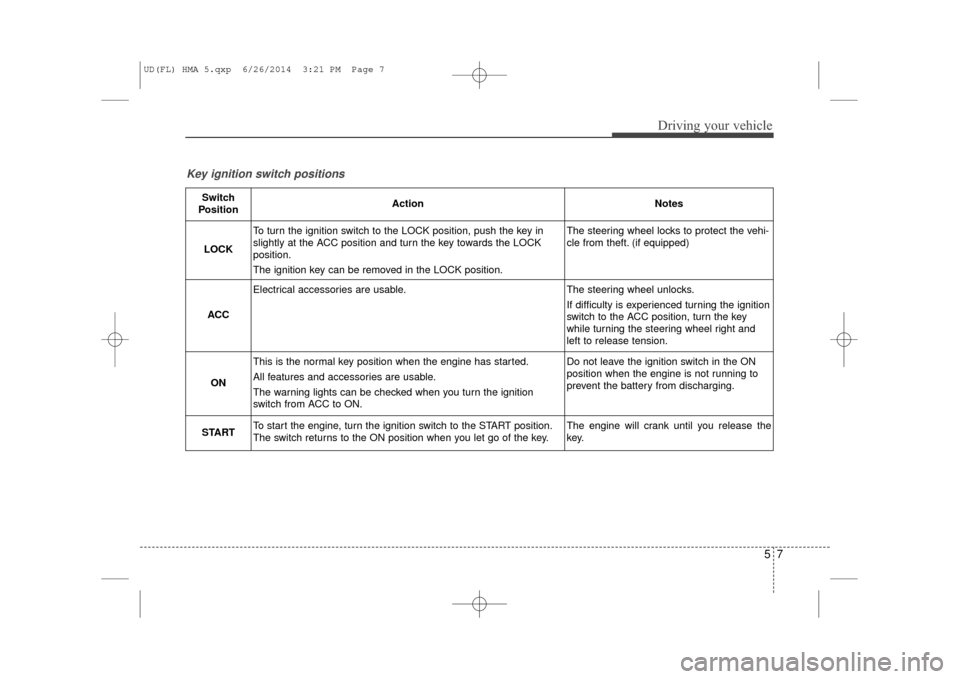
Key ignition switch positions
Switch
PositionActionNotes
LOCK
To turn the ignition switch to the LOCK position, push the key in
slightly at the ACC position and turn the key towards the LOCK
position.
The ignition key can be removed in the LOCK position.The steering wheel locks to protect the vehi-
cle from theft. (if equipped)
ACC
Electrical accessories are usable.The steering wheel unlocks.
If difficulty is experienced turning the ignition
switch to the ACC position, turn the key
while turning the steering wheel right and
left to release tension.
ON
This is the normal key position when the engine has started.
All features and accessories are usable.
The warning lights can be checked when you turn the ignition
switch from ACC to ON.Do not leave the ignition switch in the ON
position when the engine is not running to
prevent the battery from discharging.
STARTTo start the engine, turn the ignition switch to the START position.
The switch returns to the ON position when you let go of the key.The engine will crank until you release the
key.
UD(FL) HMA 5.qxp 6/26/2014 3:21 PM Page 7
Page 466 of 669
59
Driving your vehicle
✽
✽NOTICE
• Do not wait for the engine to warm
up while the vehicle remains sta-
tionary.
Start driving at moderate engine
speeds. (Steep accelerating and
decelerating should be avoided.)
• Always start the vehicle with your foot on the brake pedal. Do not
depress the accelerator while
starting the vehicle. Do not race
the engine while warming it up.
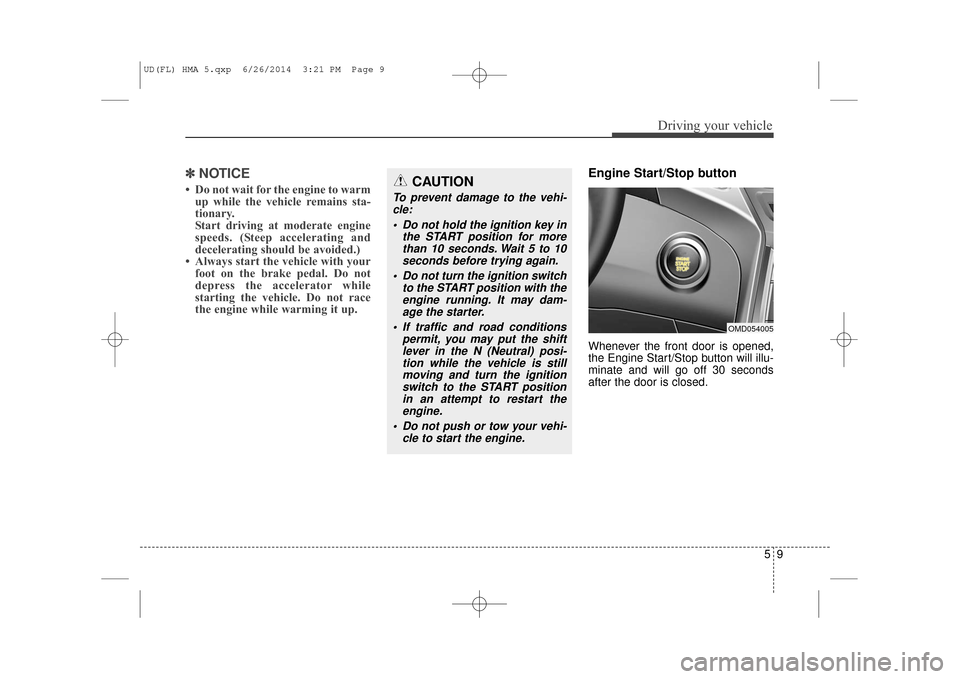
Engine Start/Stop button
Whenever the front door is opened,
the Engine Start/Stop button will illu-
minate and will go off 30 seconds
after the door is closed.
CAUTION
To prevent damage to the vehi-
cle:
Do not hold the ignition key in the START position for morethan 10 seconds. Wait 5 to 10seconds before trying again.
Do not turn the ignition switch to the START position with theengine running. It may dam-age the starter.
If traffic and road conditions permit, you may put the shiftlever in the N (Neutral) posi-tion while the vehicle is stillmoving and turn the ignitionswitch to the START positionin an attempt to restart theengine.
Do not push or tow your vehi- cle to start the engine.
OMD054005
UD(FL) HMA 5.qxp 6/26/2014 3:21 PM Page 9
Page 473 of 669
Driving your vehicle
16
5
Vehicle with automatic transaxle:
1.Always carry the smart key with
you.
2.Make sure the parking brake is applied.
3.Make sure the shift lever is in P (Park).
4.Depress the brake pedal.
5 Press the Engine Start/Stop but- ton.
✽ ✽ NOTICE
• Do not wait for the engine to warm
up while the vehicle remains sta-
tionary.
Start driving at moderate engine
speeds. (Steep accelerating and
decelerating should be avoided.)
• Always start the vehicle with your foot on the brake pedal. Do not
depress the accelerator while
starting the vehicle. Do not race
the engine while warming it up.
CAUTION
To prevent damage to the vehi-
cle:
If the engine stalls while you are in motion, do not attemptto move the shift lever to the P(Park) position.
If traffic and road conditionspermit, you may put the shiftlever in the N (Neutral) posi-tion while the vehicle is stillmoving and press the EngineStart/Stop button in anattempt to restart the engine.
Do not push or tow your vehi- cle to start the engine.
CAUTION
To prevent damage to the vehi-cle:
Do not press the EngineStart/Stop button for more than10 seconds except when thestop lamp fuse is blown.
When the stop lamp fuse isblown, you can't start the enginenormally. Replace the fuse witha new one. If you are not able toreplace the fuse, you can startthe engine by pressing andholding the Engine Start/Stopbutton for 10 seconds with theEngine Start/Stop button in theACC position.
For your safety always depressthe brake and/or clutch pedalbefore starting the engine.
UD(FL) HMA 5.qxp 6/26/2014 3:21 PM Page 16
Page 505 of 669
Driving your vehicle
48
5
SPECIAL DRIVING CONDITIONS
Hazardous driving conditions
When hazardous driving conditions
are encountered such as water,
snow, ice, mud or sand:
Drive cautiously and allow extra dis-
tance for braking.
Avoid sudden movements in braking
or steering.
If stuck in snow, mud, or sand, use
second gear. Accelerate slowly to
avoid spinning the drive wheels.
Use sand, rock salt, or other non-slip
material under the drive wheels to
provide traction when stalled in ice,
snow, or mud.
Rocking the vehicle
If it is necessary to rock the vehicle
to free it from snow, sand, or mud,
first turn the steering wheel right and
left to clear the area around your
front wheels. Then, shift back and
forth between 1st and R (Reverse,
for manual transaxle vehicle) or R
(Reverse) and a forward gear (for
automatic transaxle vehicle). Try to
avoid spinning the wheels, and do
not race the engine.
To prevent transaxle wear, wait until
the wheels stop spinning before
shifting gears. Release the accelera-
tor pedal while shifting, and press
lightly on the accelerator pedal while
the transaxle is in gear. Slowly spin-
ning the wheels in forward and
reverse directions causes a rocking
motion that may free the vehicle.
WARNING
Downshifting with an automatic
transaxle, while driving on slip-
pery surfaces can cause an
accident. The sudden change in
tire speed could cause the tires
to skid. Be careful when down-
shifting on slippery surfaces.
WARNING
If the tires spin at high speed
the tires can explode, and you
or others may be injured. Do not
attempt this procedure if people
or objects are anywhere near
the vehicle.
The vehicle can overheat caus-
ing an engine compartment fire
or other damage. Spin the
wheels as little as possible and
avoid spinning the wheels at
speeds over 35 mph (56 km/h)
as indicated on the speedome-
ter.
CAUTION
If you are still stuck after rock-
ing the vehicle a few times, havethe vehicle pulled out by a towvehicle to avoid engine over-heating, possible damage to thetransaxle, and tire damage. See“Towing” in chapter 6.
To prevent damage to thetransaxle, turn OFF the ESCprior to rocking the vehicle.
UD(FL) HMA 5.qxp 6/26/2014 3:23 PM Page 48
Page 508 of 669
551
Driving your vehicle
Snow or icy conditions
You need to keep sufficient distance
between your vehicle and the vehicle
in front of you.
Apply the brakes gently. Speeding,
rapid acceleration, sudden brake
applications, and sharp turns are
potentially very hazardous practices.
During deceleration, use engine
braking to the fullest extent. Sudden
brake applications on snowy or icy
roads may cause skids to occur.
To drive your vehicle in deep snow, it
may be necessary to use snow tires
or to install tire chains on your tires.
Always carry emergency equipment.
Some of the items you may want to
carry include, tow straps or chains, a
flashlight, emergency flares, sand, a
shovel, jumper cables, a window
scraper, gloves, ground cloth, cover-
alls, a blanket, etc.
Snow tires
If you mount snow tires on your vehi-
cle, make sure to use radial tires of
the same size and load range as the
original tires. Mount snow tires on all
four wheels to balance your vehicle’s
handling in all weather conditions.
The traction provided by snow tires
on dry roads may not be as high as
your vehicle's original equipment
tires. Check with the tire dealer for
maximum speed recommendations.
✽ ✽NOTICE
Do not install studded tires without
first checking local and municipal
regulations for possible restrictions
against their use.
Tire chains
Since the sidewalls of radial tires are
thinner than other types of tires, they
may be damaged by mounting some
types of tire chains on them.
Therefore, the use of snow tires is
recommended instead of tire chains.
Do not mount tire chains on vehicles
equipped with aluminum wheels; if
unavoidable use a wire type chain. If
tire chains must be used, use gen-
uine HYUNDAI parts and install the
tire chain after reviewing the instruc-
tions provided with the tire chains.
Damage to your vehicle caused by
improper tire chain use is not cov-
ered by your vehicle manufacturer’s
warranty.
WINTER DRIVING
WARNING
Snow tires should be equivalent
in size and type to the vehicle's
standard tires. Otherwise, the
safety and handling of your
vehicle may be adversely affect-
ed.
OED050200
UD(FL) HMA 5.qxp 6/26/2014 3:23 PM Page 51
Page 511 of 669
Driving your vehicle
54
5
Don't let your parking brake
freeze
Under some conditions your parking
brake can freeze in the engaged
position. This is most likely to happen
when there is an accumulation of
snow or ice around or near the rear
brakes or if the brakes are wet. If
there is a risk the parking brake may
freeze, apply it only temporarily while
you put the shift lever in P (automat-
ic transaxle) or in first or reverse gear
(manual transaxle) and block the
rear wheels so the vehicle cannot
roll. Then release the parking brake.
Don't let ice and snow accu-
mulate underneath
Under some conditions, snow and
ice can build up under the fenders
and interfere with the steering. When
driving in severe winter conditions
where this may happen, you should
periodically check underneath the
vehicle to be sure the movement of
the front wheels and the steering
components is not obstructed.
Carry emergency equipment
Depending on the severity of the
weather, you should carry appropri-
ate emergency equipment. Some of
the items you may want to carry
include tire chains, tow straps or
chains, flashlight, emergency flares,
sand, a shovel, jumper cables, a win-
dow scraper, gloves, ground cloth,
coveralls, a blanket, etc.
Don't place foreign objects or
materials in the engine com-
partment
Placement of foreign objects or
materials which prevent cooling of
the engine, in the engine compart-
ment, may cause a failure or com-
bustion. The manufacturer is not
responsible for the damage caused
by such placement.
UD(FL) HMA 5.qxp 6/26/2014 3:23 PM Page 54
Page 514 of 669
557
Driving your vehicle
Vehicle capacity weight
849 lbs. (385 kg)
Vehicle capacity weight is the maxi-
mum combined weight of occupants
and cargo. If your vehicle is equipped
with a trailer, the combined weight
includes the tongue load.
Seating capacity
Total : 5 persons (Front seat : 2 persons,
Rear seat : 3 persons)
Seating capacity is the maximum
number of occupants including a
driver, your vehicle may carry.
However, the seating capacity may
be reduced based upon the weight of
all of the occupants, and the weight
of the cargo being carried or towed.
Do not overload the vehicle as there
is a limit to the total weight, or load
limit including occupants and cargo,
the vehicle can carry.
Towing capacity
We do not recommend using this
vehicle for trailer towing.
Cargo capacity
The cargo capacity of your vehicle
will increase or decrease depending
on the weight and the number of
occupants and the tongue load, if
your vehicle is equipped with a trail-
er.
UD(FL) HMA 5.qxp 6/26/2014 3:24 PM Page 57
Page 515 of 669
Driving your vehicle
58
5
Steps for determining correct
load limit
1.Locate the statement "The com- bined weight of occupants and
cargo should never exceed XXX kg
or XXX lbs.'' on your vehicle's plac-
ard.
2.Determine the combined weight of the driver and passengers that will
be riding in your vehicle.
3.Subtract the combined weight of the driver and passengers from
XXX kg or XXX lbs.
4.The resulting figure equals the available amount of cargo and lug-
gage load capacity. For example, if
the "XXX" amount equals 1400 lbs.
and there will be five 150 lb. pas-
sengers in your vehicle, the
amount of available cargo and lug-
gage load capacity is 650 lbs.
(1400 - 750 (5 x 150) = 650 lbs.)
5.Determine the combined weight of luggage and cargo being loaded
on the vehicle. That weight may not
safely exceed the available cargo
and luggage load capacity calcu-
lated in Step 4. 6.If your vehicle will be towing a trail-
er, load from your trailer will be
transferred to your vehicle. Consult
this manual to determine how this
reduces the available cargo and
luggage load capacity of your vehi-
cle
WARNING
Do not overload the vehicle as
there is a limit to the total
weight, or load limit, including
occupants and cargo, the vehi-
cle can carry. Overloading can
shorten the life of the vehicle. If
the GVWR or the GAWR is
exceeded, parts on the vehicle
can break, and it can change
the handling of your vehicle.
These could cause you to lose
control and result in an acci-
dent.
UD(FL) HMA 5.qxp 6/26/2014 3:24 PM Page 58