bluetooth Hyundai Elantra 2016 Workshop Manual
[x] Cancel search | Manufacturer: HYUNDAI, Model Year: 2016, Model line: Elantra, Model: Hyundai Elantra 2016Pages: 669, PDF Size: 31.96 MB
Page 339 of 669
4253
Features of your vehicle
iPod®is a registered trademark of
Apple Inc. iPod®mobile digital
device sold separately. The
Bluetooth
®word mark and logos
are registered trademarks owned
by Bluetooth SIG, Inc. and any use
of such marks by Hyundai is
under license. SiriusXM services
require a subscription sold sepa-
rately, or as a package, by Sirius
XM Radio Inc. If you decide to
continue service after your trial,
the subscription plan you choose
will automatically renew thereafter
and you will be charged according
to your chosen payment method
at then-current rates. Fees and
taxes apply. To cancel you must
call SiriusXM at 1-866-635-2349.
See SiriusXM Customer
Agreement for complete terms at
www.siriusxm.com. SiriusXM U.S.
satellite and data services are
available only in the 48 contigu-
ous USA, DC and PR (with cover-
age limitations). SiriusXM satellite
service is also available in
Canada; see www.siriusxm.ca. All
fees and programming subject to
change. Sirius, XM and all related marks
and logos are trademarks of
Sirius XM Radio Inc. Android™ is
a trademark of Google, Inc.
BlackBerry is a registered trade-
mark of Research In Motion
Limited (RIM). All other marks,
channel names and logos are the
property of their respective own-
ers. All rights reserved.
Page 341 of 669
4255
Features of your vehicle
■
■
CD Player : AM180MDKN F/L, AM180MDAN F/L
❋ No logo will be shown if the
Bluetooth®Wireless Technology feature is not supported.
Page 344 of 669
Features of your vehicle
258
4
Audio Head Unit
(For NON Bluetooth model)
14.
Changes to FM mode.
Each time the key is pressed, the
mode changed in order of FM1 ➟
FM2 ➟ AM.
15.
Changes to SiriusXM
TMmode.
SAT
FM/AM
Page 346 of 669
Features of your vehicle
260
4
■
■
CD Player : AM110MDAN F/L
❋ No will be shown if the SiriusXM
TMfeature is not supported.
❋ No logo will be shown if the
Bluetooth®Wireless Technology feature is not supported.
Page 349 of 669
4263
Features of your vehicle
Audio Head Unit
(For NON Bluetooth model)
14.
Changes to FM mode.
Each time the key is pressed, themode changed in order of FM1 ➟
FM2.
15.
AM
FM
Page 364 of 669
Features of your vehicle
278
4
Bluetooth®Wireless
Technology AUDIO
What is
Bluetooth®Wireless
Technology?
Bluetooth®Wireless Technology allows
devices to be connected in a short dis-
tance, including hands-free devices,
stereo headsets, wireless remote con-
trollers, etc. For more information, visit
the
Bluetooth®Wireless Technology
website
at www.Bluetooth.com
Before using Bluetooth®Wireless
Technology audio features
Bluetooth®Wireless Technology
audio may not be supported
depending on the compatibility of
your
Bluetooth®Wireless
Technology mobile phone.
In order to use
Bluetooth®Wireless
Technology audio, you must first
pair and connect the
Bluetooth®
Wireless Technology mobile phone.
Bluetooth®Wireless Technology
audio can be used only when the
[Audio Streaming] of Phone is
turned .
❈ Setting
Bluetooth®Wireless
Technology Audio Streaming :
Press the key Select
[Phone] through the tune knob or key Select [Audio Streaming]
through the TUNE knob Set
/
Starting Bluetooth®Wireless
Technology Audio
Press the key to change
the mode in order of CD ➟ USB ➟
AUX ➟ My Music ➟ BT Audio.
If BT Audio is selected,
Bluetooth®
Wireless Technology audio will
start playing.
❈ Audio may not automatically start
playing in some mobile phones.
Using the Bluetooth®Wireless
Technology audio features
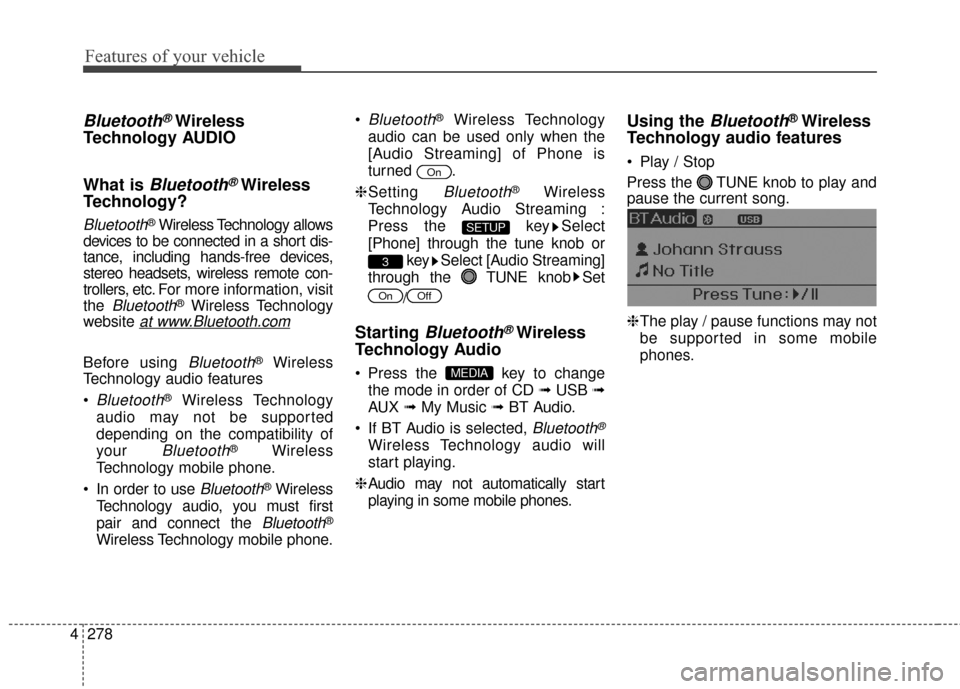
Play / Stop
Press the TUNE knob to play and
pause the current song.
❈ The play / pause functions may not
be supported in some mobile
phones.
MEDIA
OffOn
3
SETUP
On
Page 365 of 669
4279
Features of your vehicle
PHONE (IF EQUIPPED)
Before using the Bluetooth®Wireless
Technology phone features
In order to use
Bluetooth®Wireless
Technology phone, you must first
pair and connect the
Bluetooth®
Wireless Technology mobile phone.
If the mobile phone is not paired or connected, it is not possible to
enter Phone mode. Once a phone
is paired or connected, the guid-
ance screen will be displayed.
If Priority is set upon vehicle igni- tion(IGN/ACC ON), the
Bluetooth®
Wireless Technology phone will be
automatically connected. Even if
you are outside, the first
Bluetooth®Wireless Technology
phone will be automatically connect-
ed once you are in the vicinity of the
vehicle. If you do not want automatic
Bluetooth®Wireless Technology
phone connection, set the
Bluetooth®Wireless Technology
power to OFF.
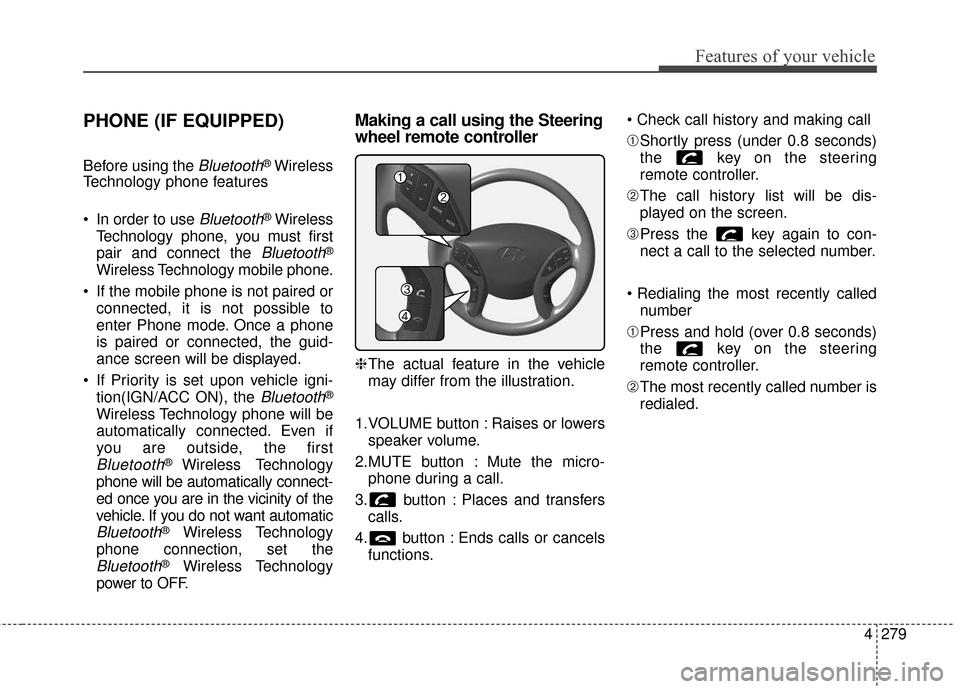
Making a call using the Steering
wheel remote controller
❈ The actual feature in the vehicle
may differ from the illustration.
1.VOLUME button : Raises or lowers speaker volume.
2.MUTE button : Mute the micro- phone during a call.
3. button : Places and transfers calls.
4. button : Ends calls or cancels functions.
➀
Shortly press (under 0.8 seconds)
the key on the steering
remote controller.
➁ The call history list will be dis-
played on the screen.
\b Press the key again to con-
nect a call to the selected number.
number
➀ Press and hold (over 0.8 seconds)
the key on the steering
remote controller.
➁ The most recently called number is
redialed.
Page 366 of 669
Features of your vehicle
280
4
Bluetooth®Wireless Technology
Pairing a
Bluetooth®Wireless
Technology Device
What is Bluetooth®Wireless
Technology Pairing?
Pairing refers to the process of syn-
chronizing your
Bluetooth®Wireless
Technology phone or device with the
car audio system for connection.
Pairing is necessary to connect and
use the
Bluetooth®Wireless
Technology feature.
WARNING
Driving while distracted can
result in a loss of vehicle con-
trol that may lead to an acci-
dent, severe personal injury,
and death. The driver’s primary
responsibility is in the safe and
legal operation of a vehicle, and
use of any handheld devices,
other equipment, or vehicle sys-
tems which take the driver’s
eyes, attention and focus away
from the safe operation of a
vehicle or which are not permis-
sible by law should never be
used during operation of the
vehicle.
Page 367 of 669
4281
Features of your vehicle
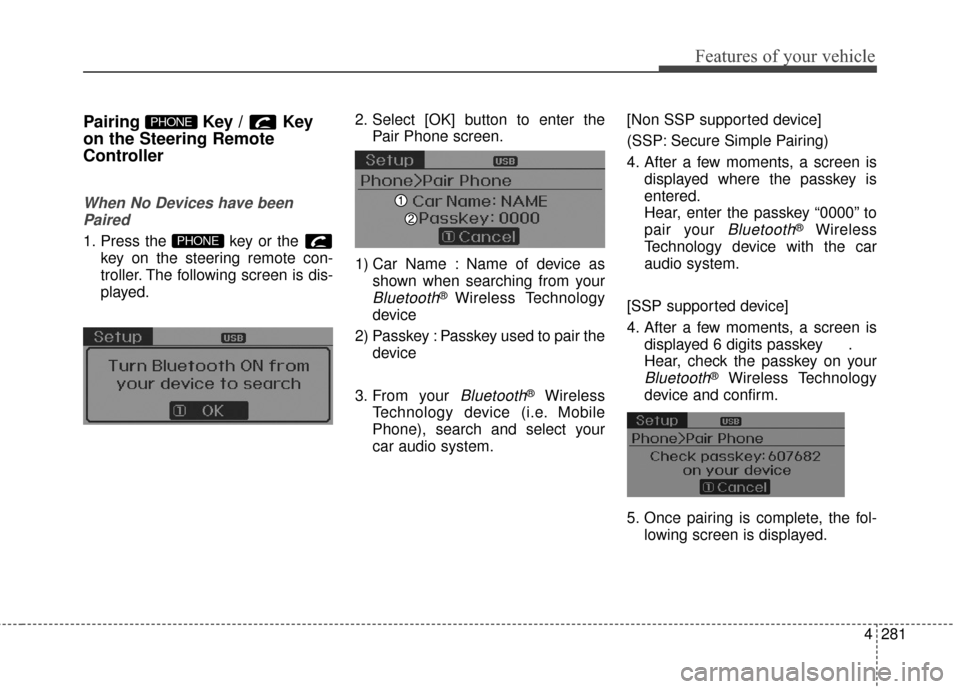
Pairing Key / Key
on the Steering Remote
Controller
When No Devices have beenPaired
1. Press the key or the key on the steering remote con-
troller. The following screen is dis-
played. 2. Select [OK] button to enter the
Pair Phone screen.
1) Car Name : Name of device as shown when searching from your
Bluetooth®Wireless Technology
device
2) Passkey : Passkey used to pair the device
3. From your
Bluetooth®Wireless
Technology device (i.e. Mobile
Phone), search and select your
car audio system. [Non SSP supported device]
(SSP: Secure Simple Pairing)
4. After a few moments, a screen is
displayed where the passkey is
entered.
Hear, enter the passkey “0000” to
pair your
Bluetooth®Wireless
Technology device with the car
audio system.
[SSP supported device]
4. After a few moments, a screen is displayed 6 digits passkey .
Hear, check the passkey on your
Bluetooth®Wireless Technology
device and confirm.
5. Once pairing is complete, the fol- lowing screen is displayed.
PHONE
PHONE
Page 368 of 669
Features of your vehicle
282
4
During the pairing process, make sure
that all connection requests on the
phone are accepted for phonebook
download and to allow acceptance of
all future connection requests. Visit
http://www.hyundaiusa.com/Bluetooth
for additional information on pairing
your Bluetooth-enabled mobile
phone, and to view a phone compat-
ibility list.
✽ ✽
NOTICE
If Bluetooth®Wireless Technology
devices are paired but none are cur-
rently connected, pressing the key or the key on the
steering wheel displays the following
screen. Select [Pair] button to pair a
new device or select [Connect] to
connect a previously paired device.
PHONE