lock Hyundai Elantra 2016 Repair Manual
[x] Cancel search | Manufacturer: HYUNDAI, Model Year: 2016, Model line: Elantra, Model: Hyundai Elantra 2016Pages: 669, PDF Size: 31.96 MB
Page 199 of 669
4113
Features of your vehicle
INTERIOR FEATURES
Clock
With Audio system
Whenever the battery terminals or
related fuses are disconnected, you
must reset the time.
To set the time:
The ignition switch must be in the
ACC position or the ON position.
• H (Hour)
Each time you press the "H" button,
the clock will change backward by
one hour. Pressing and holding the
"H" button will change the clock
backward continuously.
Release the button at the desired
time.
• M (Minute)
Each time you press the "M" button,
the clock will change backward by
one minute. Pressing and holding the
"M" button will change the clock
backward continuously.
Release the button at the desired
time.• Display conversion
To change the 12 hour format to the
24 hour format, press the "H" and
"M" button simultaneously for more
than 4 seconds.
For example, if the "H" and "M" but-
ton is pressed when the time is 10:15
p.m., the display will change to 22:15
With Navigation system
The clock automatically sets itself to
the correct time.
OMD044138L
WARNING
Do not adjust the clock while
driving, you may lose steering
control and cause an accident
that results in severe personal
injury or death.
Page 202 of 669
Features of your vehicle
116
4
Sunvisor
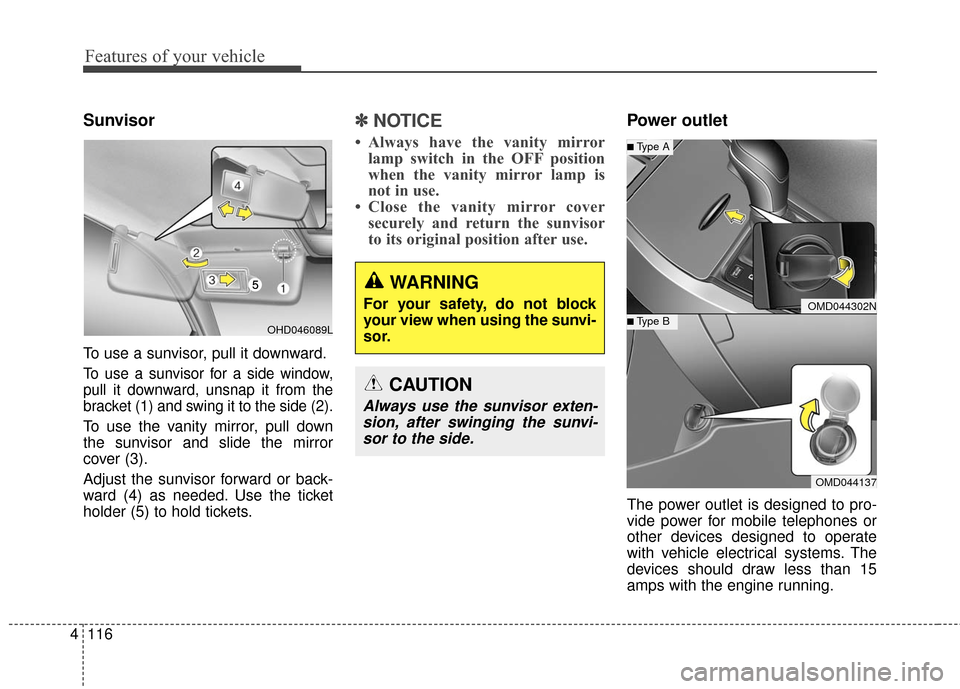
To use a sunvisor, pull it downward.
To use a sunvisor for a side window,
pull it downward, unsnap it from the
bracket (1) and swing it to the side (2).
To use the vanity mirror, pull down
the sunvisor and slide the mirror
cover (3).
Adjust the sunvisor forward or back-
ward (4) as needed. Use the ticket
holder (5) to hold tickets.
✽ ✽
NOTICE
• Always have the vanity mirror
lamp switch in the OFF position
when the vanity mirror lamp is
not in use.
• Close the vanity mirror cover securely and return the sunvisor
to its original position after use.
Power outlet
The power outlet is designed to pro-
vide power for mobile telephones or
other devices designed to operate
with vehicle electrical systems. The
devices should draw less than 15
amps with the engine running.
WARNING
For your safety, do not block
your view when using the sunvi-
sor.
CAUTION
Always use the sunvisor exten-
sion, after swinging the sunvi-sor to the side.
OMD044302N
OMD044137
■Type B
■Type A
OHD046089L
Page 210 of 669
Features of your vehicle
124
4
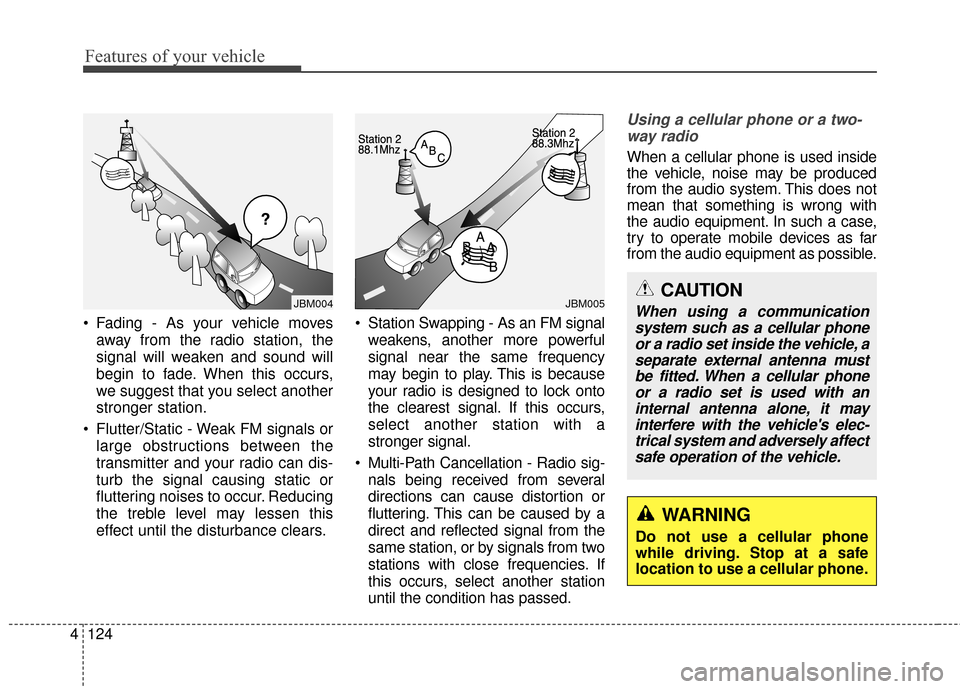
Fading - As your vehicle moves
away from the radio station, the
signal will weaken and sound will
begin to fade. When this occurs,
we suggest that you select another
stronger station.
Flutter/Static - Weak FM signals or large obstructions between the
transmitter and your radio can dis-
turb the signal causing static or
fluttering noises to occur. Reducing
the treble level may lessen this
effect until the disturbance clears. Station Swapping - As an FM signal
weakens, another more powerful
signal near the same frequency
may begin to play. This is because
your radio is designed to lock onto
the clearest signal. If this occurs,
select another station with a
stronger signal.
Multi-Path Cancellation - Radio sig- nals being received from several
directions can cause distortion or
fluttering. This can be caused by a
direct and reflected signal from the
same station, or by signals from two
stations with close frequencies. If
this occurs, select another station
until the condition has passed.
Using a cellular phone or a two-way radio
When a cellular phone is used inside
the vehicle, noise may be produced
from the audio system. This does not
mean that something is wrong with
the audio equipment. In such a case,
try to operate mobile devices as far
from the audio equipment as possible.
¢¢¢
JBM004JBM005CAUTION
When using a communicationsystem such as a cellular phoneor a radio set inside the vehicle, aseparate external antenna mustbe fitted. When a cellular phoneor a radio set is used with aninternal antenna alone, it mayinterfere with the vehicle's elec-trical system and adversely affectsafe operation of the vehicle.
WARNING
Do not use a cellular phone
while driving. Stop at a safe
location to use a cellular phone.
Page 280 of 669
Features of your vehicle
194
4
SIRIUSXM™RADIO MODE
Features of your vehicle
Satellite radio reception
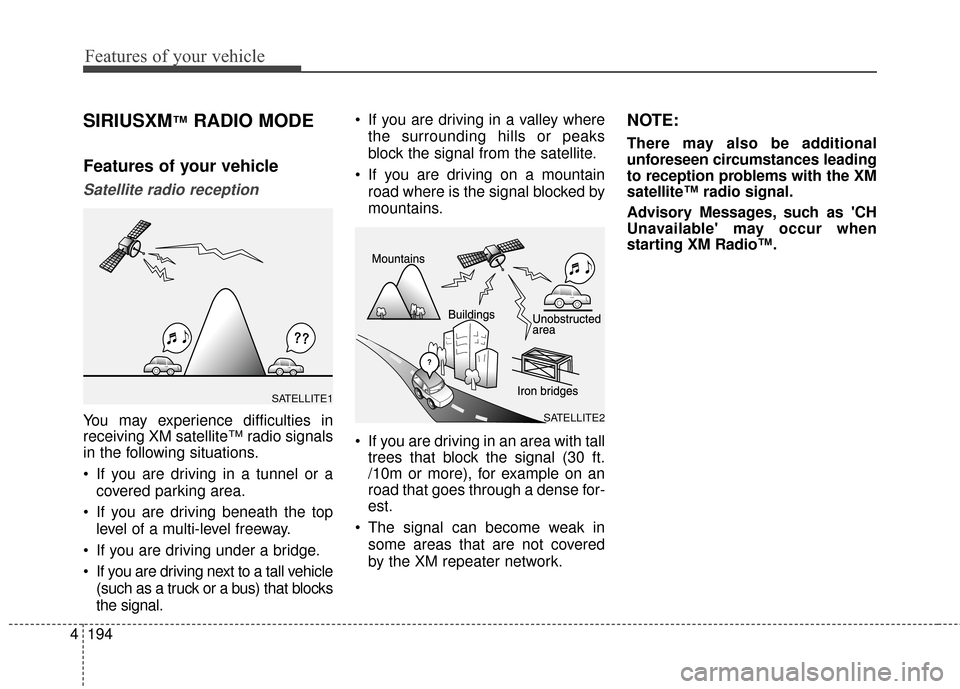
You may experience difficulties in
receiving XM satellite™ radio signals
in the following situations.
If you are driving in a tunnel or a
covered parking area.
If you are driving beneath the top level of a multi-level freeway.
If you are driving under a bridge.
If you are driving next to a tall vehicle (such as a truck or a bus) that blocks
the signal. If you are driving in a valley where
the surrounding hills or peaks
block the signal from the satellite.
If you are driving on a mountain road where is the signal blocked by
mountains.
If you are driving in an area with tall trees that block the signal (30 ft.
/10m or more), for example on an
road that goes through a dense for-
est.
The signal can become weak in some areas that are not covered
by the XM repeater network.
NOTE:
There may also be additional
unforeseen circumstances leading
to reception problems with the XM
satellite™ radio signal.
Advisory Messages, such as 'CH
Unavailable' may occur when
starting XM Radio™.
SATELLITE2
SATELLITE1
Page 294 of 669
Features of your vehicle
208
4
(Continued)
• Charging through the USB may
not work for some mobile devices.
• The device may not support nor- mal operation when using a USB
memory type besides (Metal
Cover Type) USB Memory.
• The device may not support nor- mal operation when using formats
such as HDD Type, CF, or SD
Memory.
• The device will not support files locked by DRM (Digital Rights
Management.)
• USB memory sticks used by con- necting an Adaptor (SD Type or
CF Type) may not be properly rec-
ognized.
• The device may not operate prop- erly when using USB HDDs or
USBs subject to connection fail-
ures caused by vehicle vibrations.
(e.g. i-stick type) (Continued)(Continued)
• Avoid use of USB
memory products that
can also be used as key
chains or mobile phone
accessories. Use of such products
may cause damage to the USB
jack.
• Connecting an MP3 device or phone through various channels,
such as AUX/BT or Audio/ USB
mode may result in pop noises or
abnormal operation.
Page 331 of 669
![Hyundai Elantra 2016 Repair Manual 4245
Features of your vehicle
SETUP
Starting Mode
Press the key to display the
Setup screen.
You can select and control options
related to [Display], [Sound],
[Clock/Calendar], [Phone] and
[System].](/img/35/14551/w960_14551-330.png "Hyundai Elantra 2016 Repair Manual 4245
Features of your vehicle
SETUP
Starting Mode
Press the key to display the
Setup screen.
You can select and control options
related to [Display], [Sound],
[Clock/Calendar], [Phone] and
[System].")
4245
Features of your vehicle
SETUP
Starting Mode
Press the key to display the
Setup screen.
You can select and control options
related to [Display], [Sound],
[Clock/Calendar], [Phone] and
[System].
Display Settings
Adjusting the Brightness
Press the key Select
[Display] Select [Brightness]
Use the , buttons to adjust the
screen brightness or set the
Brightness on Automatic, Daylight, or
Night mode.
Press the button to reset.
1) Automatic : Adjusts the brightnessautomatically
2) Daylight : Always maintains the brightness on high
3) Night : Always maintains the
brightness on low
Mode pop up
Press the key Select
[Display] Select [Mode Pop up]
This feature is used to display the
Pop-up Mode screen when entering
radio and media modes.
When this feature is turned on,
pressing the or key
will display the Pop-up Mode screen.
✽ ✽ NOTICE
The media Mode pop up screen can
be displayed only when two or more
media modes have been connected.
MEDIA RADIO
SETUP
Default
SETUP SETUP
Page 398 of 669
Features of your vehicle
312
4
SIRIUSXM™RADIO MODE
Features of your vehicle
Satellite radio reception
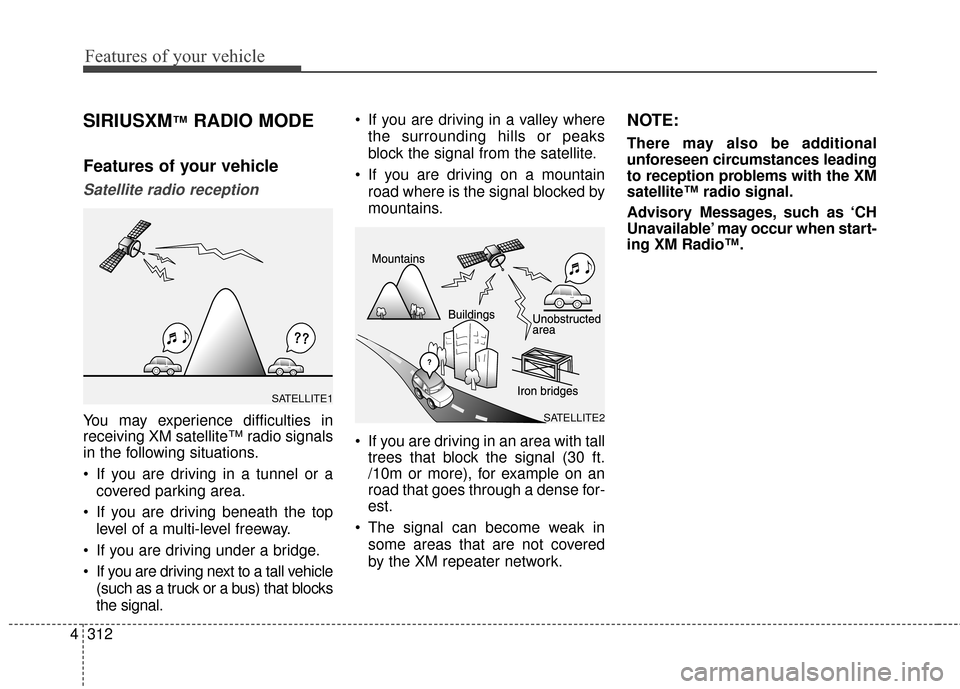
You may experience difficulties in
receiving XM satellite™ radio signals
in the following situations.
If you are driving in a tunnel or a
covered parking area.
If you are driving beneath the top level of a multi-level freeway.
If you are driving under a bridge.
If you are driving next to a tall vehicle (such as a truck or a bus) that blocks
the signal. If you are driving in a valley where
the surrounding hills or peaks
block the signal from the satellite.
If you are driving on a mountain road where is the signal blocked by
mountains.
If you are driving in an area with tall trees that block the signal (30 ft.
/10m or more), for example on an
road that goes through a dense for-
est.
The signal can become weak in some areas that are not covered
by the XM repeater network.
NOTE:
There may also be additional
unforeseen circumstances leading
to reception problems with the XM
satellite™ radio signal.
Advisory Messages, such as ‘CH
Unavailable’ may occur when start-
ing XM Radio™.
SATELLITE2
SATELLITE1
Page 410 of 669
Features of your vehicle
324
4
(Continued)
• Charging through the USB may
not work for some mobile devices.
• The device may not support nor- mal operation when using a USB
memory type besides (Metal
Cover Type) USB Memory.
• The device may not support nor- mal operation when using formats
such as HDD Type, CF, or SD
Memory.
• The device will not support files locked by DRM (Digital Rights
Management.)
• USB memory sticks used by con- necting an Adaptor (SD Type or
CF Type) may not be properly rec-
ognized.
• The device may not operate prop- erly when using USB HDDs or
USBs subject to connection fail-
ures caused by vehicle vibrations.
(e.g. i-stick type) (Continued)(Continued)
• Avoid use of USB
memory products that
can also be used as key
chains or mobile phone
accessories. Use of such products
may cause damage to the USB
jack.
• Connecting an MP3 device or phone through various channels,
such as AUX/BT or Audio/ USB
mode may result in pop noises or
abnormal operation.
Page 447 of 669
![Hyundai Elantra 2016 Repair Manual SETUP
Starting Mode
Press the key to display the
Setup screen.
You can select and control options
related to [Display], [Sound],
[Clock/Calendar], [Phone] and
[System].
Display Settings
Adjusting the](/img/35/14551/w960_14551-446.png "Hyundai Elantra 2016 Repair Manual SETUP
Starting Mode
Press the key to display the
Setup screen.
You can select and control options
related to [Display], [Sound],
[Clock/Calendar], [Phone] and
[System].
Display Settings
Adjusting the")
SETUP
Starting Mode
Press the key to display the
Setup screen.
You can select and control options
related to [Display], [Sound],
[Clock/Calendar], [Phone] and
[System].
Display Settings
Adjusting the Brightness
Press the key Select
[Display] Select [Brightness]
Use the , buttons to adjust the
screen brightness or set the
Brightness on Automatic, Daylight, or
Night mode.
Press the button to reset.
1) Automatic : Adjusts the brightnessautomatically
2) Daylight : Always maintains the brightness on high
3) Night : Always maintains the
brightness on low
Mode pop up
Press the key Select
[Display] Select [Mode Pop up]
This feature is used to display the
Pop-up Mode screen when entering
radio and media modes.
When this feature is turned on,
pressing the or key
will display the Pop-up Mode screen.
✽ ✽ NOTICE
The media Mode pop up screen can
be displayed only when two or more
media modes have been connected.
MEDIA RADIO
SETUP
Default
SETUP SETUP
Features of your vehicle
361
4
Page 458 of 669
Driving your vehicle
Before driving . . . . . . . . . . . . . . . . . . . . . . . . . . . . . 5-3
• Before entering the vehicle . . . . . . . . . . . . . . . . . . . . . 5-3
• Before starting . . . . . . . . . . . . . . . . . . . . . . . . . . . . . . . 5-3
Ignition switch . . . . . . . . . . . . . . . . . . . . . . . . . . . . . 5-5
• Key ignition switch . . . . . . . . . . . . . . . . . . . . . . . . . . . . 5-5
• Engine Start/Stop button . . . . . . . . . . . . . . . . . . . . . . . 5-9
Manual transaxle . . . . . . . . . . . . . . . . . . . . . . . . . . 5-18
• Manual transaxle operation . . . . . . . . . . . . . . . . . . . 5-18
• Good driving practices . . . . . . . . . . . . . . . . . . . . . . . . 5-20
Automatic transaxle . . . . . . . . . . . . . . . . . . . . . . . 5-22
• Automatic transaxle operation . . . . . . . . . . . . . . . . . 5-22
• Parking . . . . . . . . . . . . . . . . . . . . . . . . . . . . . . . . . . . . \
. 5-27
• Good driving practices . . . . . . . . . . . . . . . . . . . . . . . . 5-27
Braking system . . . . . . . . . . . . . . . . . . . . . . . . . . . 5-29
• Power brakes . . . . . . . . . . . . . . . . . . . . . . . . . . . . . . . 5-29
• Disc brakes wear indicator . . . . . . . . . . . . . . . . . . . . 5-30
• Parking brake . . . . . . . . . . . . . . . . . . . . . . . . . . . . . . . 5-30
• Anti-lock Brake System (ABS). . . . . . . . . . . . . . . . . . 5-32
• Electronic Stability Control (ESC) . . . . . . . . . . . . . . 5-34
• Vehicle Stability Management (VSM) . . . . . . . . . . . . 5-38
• Hill-Start Assist Control (HAC) . . . . . . . . . . . . . . . . 5-39
• Good braking practices . . . . . . . . . . . . . . . . . . . . . . . 5-40
Driving assist system . . . . . . . . . . . . . . . . . . . . . . . 5-41
• Active ECO system . . . . . . . . . . . . . . . . . . . . . . . . . . . 5-41
Cruise control system. . . . . . . . . . . . . . . . . . . . . . . 5-43
Special driving conditions . . . . . . . . . . . . . . . . . . . 5-48
• Hazardous driving conditions . . . . . . . . . . . . . . . . . . 5-48
• Rocking the vehicle . . . . . . . . . . . . . . . . . . . . . . . . . . . 5-48
• Smooth cornering . . . . . . . . . . . . . . . . . . . . . . . . . . . . 5-49
• Driving at night . . . . . . . . . . . . . . . . . . . . . . . . . . . . . . 5-49
• Driving in the rain . . . . . . . . . . . . . . . . . . . . . . . . . . . . 5-50
• Driving in flooded areas . . . . . . . . . . . . . . . . . . . . . . . 5-50
Winter driving . . . . . . . . . . . . . . . . . . . . . . . . . . . . 5-51
• Snow or icy conditions . . . . . . . . . . . . . . . . . . . . . . . . 5-51
• Use high quality ethylene glycol coolant . . . . . . . . . . 5-53
• Check battery and cables . . . . . . . . . . . . . . . . . . . . . . 5-53
• Change to "winter weight" oil if necessary . . . . . . . 5-53
• Check spark plugs and ignition system. . . . . . . . . . . 5-53
• To keep locks from freezing . . . . . . . . . . . . . . . . . . . . 5-53
• Use approved window washer anti-freeze in system . . 5-53
• Don't let your parking brake freeze . . . . . . . . . . . . . 5-54
• Don't let ice and snow accumulate underneath . . . . 5-54
• Carry emergency equipment . . . . . . . . . . . . . . . . . . . 5-54
• Don't place foreign objects or materials in the engine compartment . . . . . . . . . . . . . . . . . . . . . . . . . 5-54
Vehicle load limit . . . . . . . . . . . . . . . . . . . . . . . . . . 5-55
• Tire loading information label . . . . . . . . . . . . . . . . . . 5-56
Trailer towing . . . . . . . . . . . . . . . . . . . . . . . . . . . . . 5-61
5
UD(FL) HMA 5.qxp 8/6/2014 12:26 PM Page 1