audio Hyundai Elantra 2017 User Guide
[x] Cancel search | Manufacturer: HYUNDAI, Model Year: 2017, Model line: Elantra, Model: Hyundai Elantra 2017Pages: 637, PDF Size: 15.02 MB
Page 263 of 637

4-6
Multimedia System
How vehicle radio works
FM reception
AM and FM radio signals are broad-
cast from transmitter towers located
around your city. They are intercept-
ed by the radio antenna on your vehi-
cle. This signal is then received by
the radio and sent to your vehicle
speakers.
When a strong radio signal has
reached your vehicle, the precise
engineering of your audio system
ensures the best possible quality
reproduction. However, in some
cases the signal coming to your vehi-
cle may not be strong and clear.This can be due to factors, such as
the distance from the radio station,
closeness of other strong radio sta-
tions or the presence of buildings,
bridges or other large obstructions in
the area.
AM (MW, LW) reception
AM broadcasts can be received at
greater distances than FM broad-
casts. This is because AM radio
waves are transmitted at low fre-
quencies. These long, low frequency
radio waves can follow the curvature
of the earth rather than travelling
straight out into the atmosphere. In
addition, they curve around obstruc-
tions so that they can provide better
signal coverage.
OJF045309L
OJF045308L
Page 265 of 637
4-8
Multimedia System
Using a cellular phone or a two-
way radio
When a cellular phone is used inside
the vehicle, noise may be produced
from the audio system. This does not
mean that something is wrong with the
audio equipment. In such a case, use
the cellular phone at a place as far as
possible from the audio equipment.
When using a communication
system such as a cellular phone
or a radio set inside the vehicle, a
separate external antenna must be
fitted. When a cellular phone or a
radio set is used with an internal
antenna alone, it may interfere
with the vehicle's electrical sys-
tem and adversely affect safe
operation of the vehicle.
NOTICE
Do not use a cellular phone
while driving. Stop at a safe
location to use a cellular phone.
WARNING
Page 266 of 637
4-9
Multimedia System
4
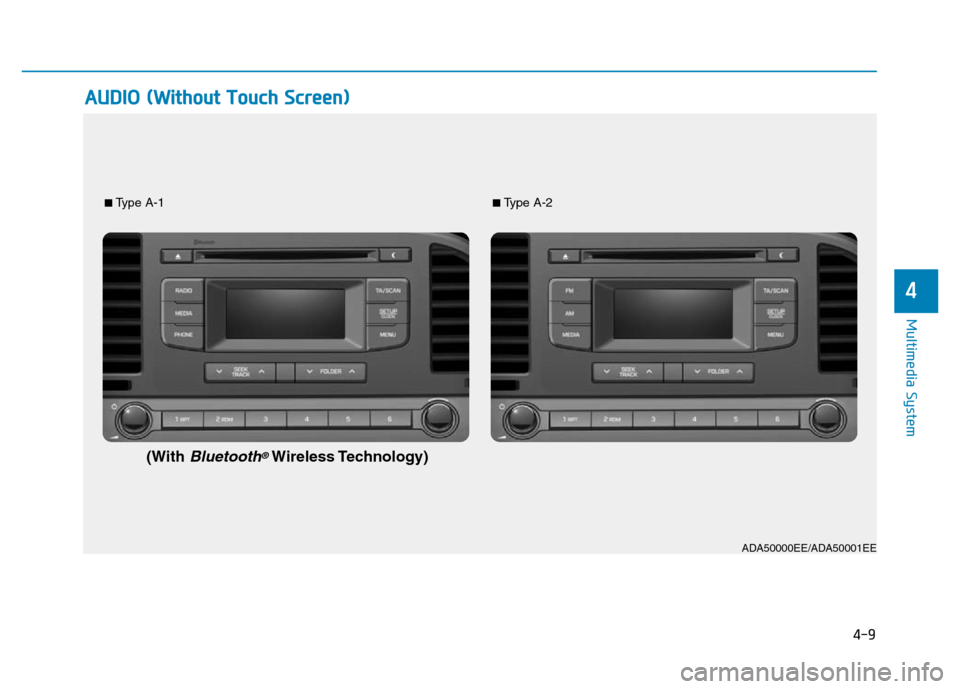
AUDIO (Without Touch Screen)
■Type A-1■Type A-2
(WithBluetooth®Wireless Technology)
ADA50000EE/ADA50001EE
Page 267 of 637
4-10
Multimedia System
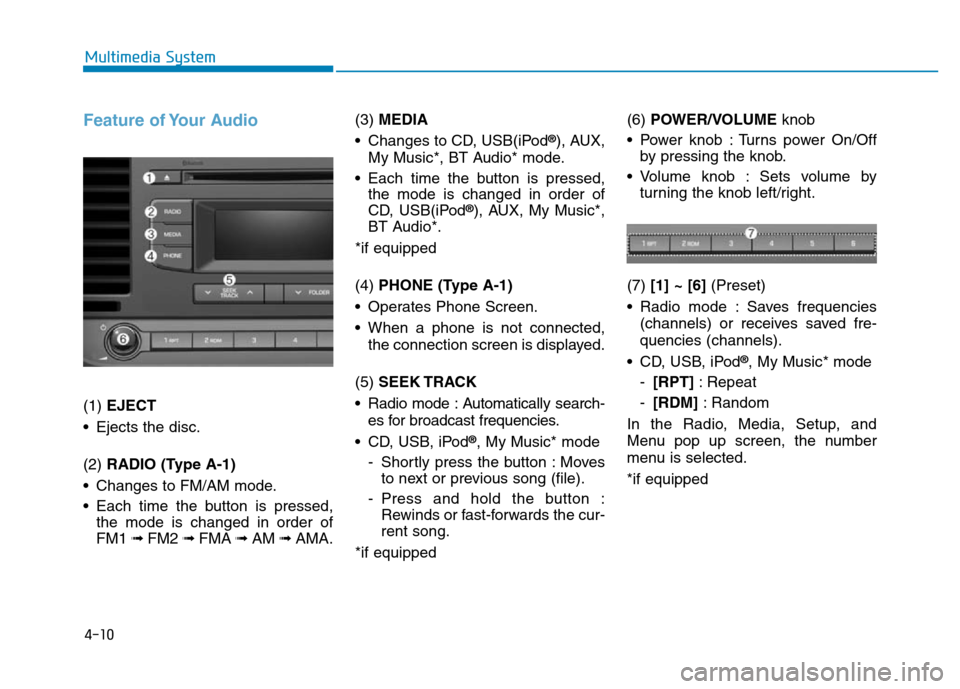
Feature of Your Audio
(1) EJECT
• Ejects the disc.
(2) RADIO (Type A-1)
• Changes to FM/AM mode.
• Each time the button is pressed,
the mode is changed in order of
FM1 ➟ FM2 ➟FMA ➟AM ➟AMA.(3) MEDIA
• Changes to CD, USB(iPod
®), AUX,
My Music*, BT Audio* mode.
• Each time the button is pressed,
the mode is changed in order of
CD, USB(iPod
®), AUX, My Music*,
BT Audio*.
*if equipped
(4) PHONE (Type A-1)
• Operates Phone Screen.
• When a phone is not connected,
the connection screen is displayed.
(5) SEEK TRACK
• Radio mode : Automatically search-
es for broadcast frequencies.
• CD, USB, iPod
®, My Music* mode
- Shortly press the button : Moves
to next or previous song (file).
- Press and hold the button :
Rewinds or fast-forwards the cur-
rent song.
*if equipped(6) POWER/VOLUMEknob
• Power knob : Turns power On/Off
by pressing the knob.
• Volume knob : Sets volume by
turning the knob left/right.
(7) [1] ~ [6](Preset)
• Radio mode : Saves frequencies
(channels) or receives saved fre-
quencies (channels).
• CD, USB, iPod
®, My Music* mode
-[RPT]: Repeat
-[RDM]: Random
In the Radio, Media, Setup, and
Menu pop up screen, the number
menu is selected.
*if equipped
Page 268 of 637
4-11
Multimedia System
4
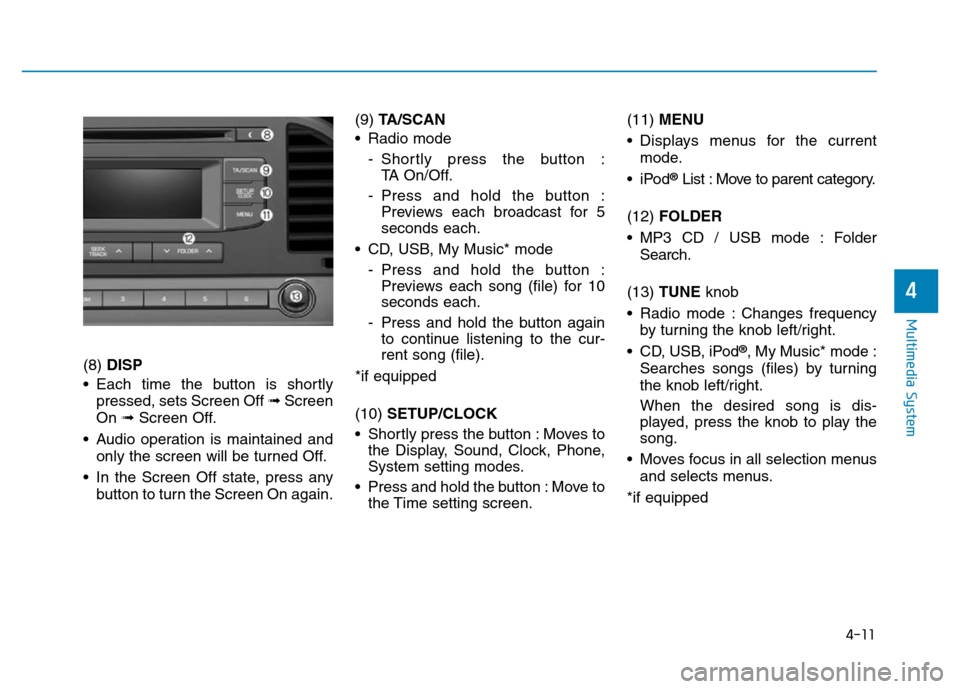
(8) DISP
• Each time the button is shortly
pressed, sets Screen Off ➟Screen
On ➟Screen Off.
• Audio operation is maintained and
only the screen will be turned Off.
• In the Screen Off state, press any
button to turn the Screen On again.(9) TA/SCAN
• Radio mode
- Shortly press the button :
TA On/Off.
- Press and hold the button :
Previews each broadcast for 5
seconds each.
• CD, USB, My Music* mode
- Press and hold the button :
Previews each song (file) for 10
seconds each.
- Press and hold the button again
to continue listening to the cur-
rent song (file).
*if equipped
(10) SETUP/CLOCK
• Shortly press the button : Moves to
the Display, Sound, Clock, Phone,
System setting modes.
• Press and hold the button : Move to
the Time setting screen.(11) MENU
• Displays menus for the current
mode.
•iPod
®List : Move to parent category.
(12) FOLDER
• MP3 CD / USB mode : Folder
Search.
(13) TUNE knob
• Radio mode : Changes frequency
by turning the knob left/right.
• CD, USB, iPod
®, My Music* mode :
Searches songs (files) by turning
the knob left/right.
When the desired song is dis-
played, press the knob to play the
song.
• Moves focus in all selection menus
and selects menus.
*if equipped
Page 271 of 637
4-14
Multimedia System
Feature of Your Audio
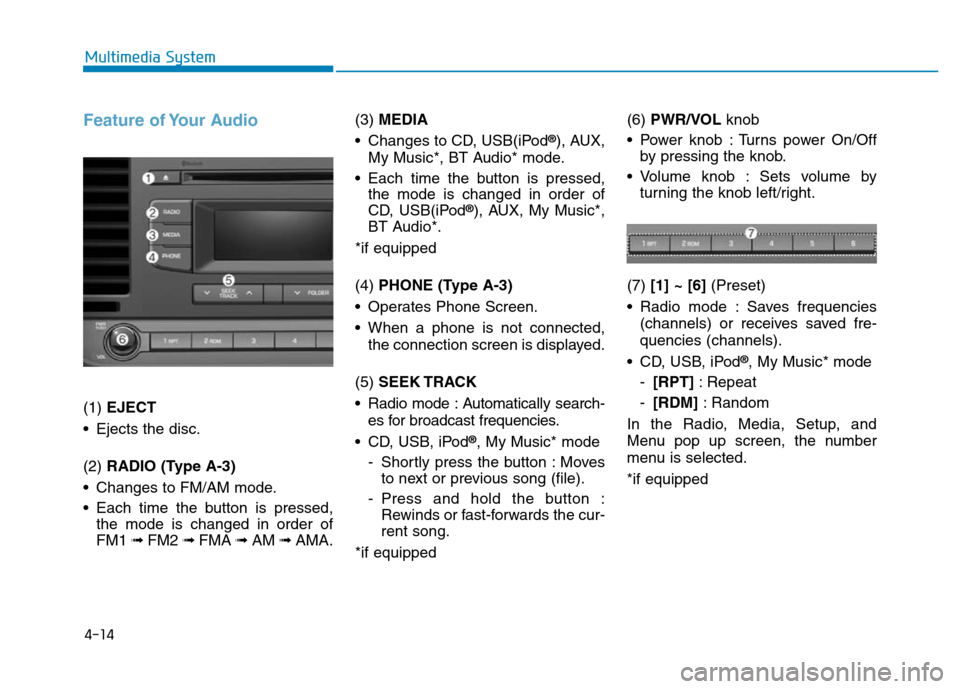
(1) EJECT
• Ejects the disc.
(2) RADIO (Type A-3)
• Changes to FM/AM mode.
• Each time the button is pressed,
the mode is changed in order of
FM1 ➟ FM2 ➟FMA ➟AM ➟AMA.(3) MEDIA
• Changes to CD, USB(iPod
®), AUX,
My Music*, BT Audio* mode.
• Each time the button is pressed,
the mode is changed in order of
CD, USB(iPod
®), AUX, My Music*,
BT Audio*.
*if equipped
(4) PHONE (Type A-3)
• Operates Phone Screen.
• When a phone is not connected,
the connection screen is displayed.
(5) SEEK TRACK
• Radio mode : Automatically search-
es for broadcast frequencies.
• CD, USB, iPod
®, My Music* mode
- Shortly press the button : Moves
to next or previous song (file).
- Press and hold the button :
Rewinds or fast-forwards the cur-
rent song.
*if equipped(6) PWR/VOL knob
• Power knob : Turns power On/Off
by pressing the knob.
• Volume knob : Sets volume by
turning the knob left/right.
(7) [1] ~ [6](Preset)
• Radio mode : Saves frequencies
(channels) or receives saved fre-
quencies (channels).
• CD, USB, iPod
®, My Music* mode
-[RPT]: Repeat
-[RDM]: Random
In the Radio, Media, Setup, and
Menu pop up screen, the number
menu is selected.
*if equipped
Page 272 of 637
4-15
Multimedia System
4
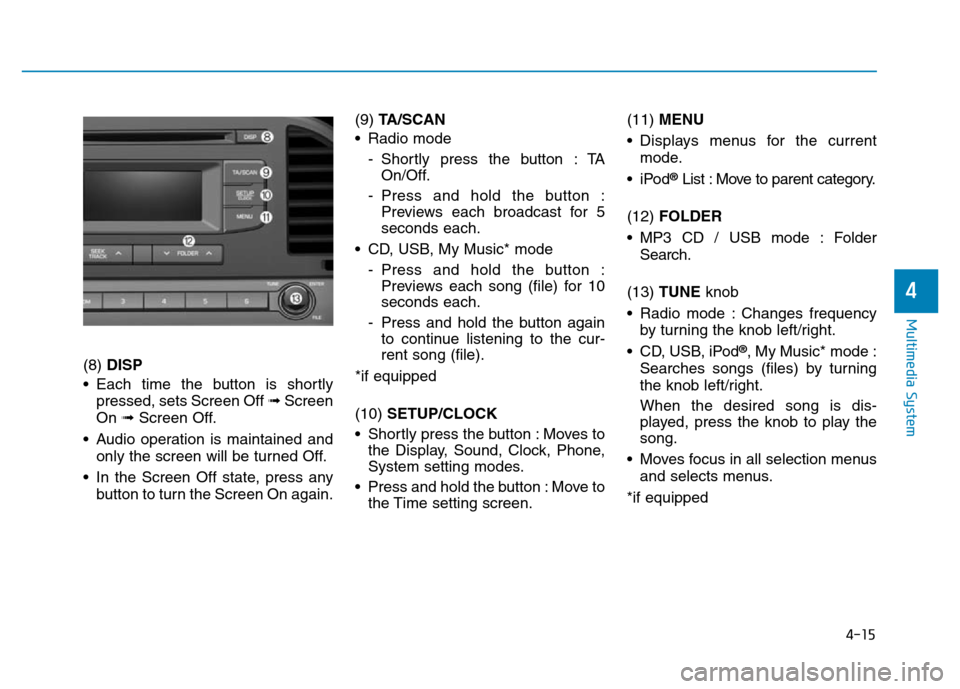
(8) DISP
• Each time the button is shortly
pressed, sets Screen Off ➟Screen
On ➟Screen Off.
• Audio operation is maintained and
only the screen will be turned Off.
• In the Screen Off state, press any
button to turn the Screen On again.(9) TA/SCAN
• Radio mode
- Shortly press the button : TA
On/Off.
- Press and hold the button :
Previews each broadcast for 5
seconds each.
• CD, USB, My Music* mode
- Press and hold the button :
Previews each song (file) for 10
seconds each.
- Press and hold the button again
to continue listening to the cur-
rent song (file).
*if equipped
(10) SETUP/CLOCK
• Shortly press the button : Moves to
the Display, Sound, Clock, Phone,
System setting modes.
• Press and hold the button : Move to
the Time setting screen.(11) MENU
• Displays menus for the current
mode.
•iPod
®List : Move to parent category.
(12) FOLDER
• MP3 CD / USB mode : Folder
Search.
(13) TUNE knob
• Radio mode : Changes frequency
by turning the knob left/right.
• CD, USB, iPod
®, My Music* mode :
Searches songs (files) by turning
the knob left/right.
When the desired song is dis-
played, press the knob to play the
song.
• Moves focus in all selection menus
and selects menus.
*if equipped
Page 275 of 637
4-18
Multimedia System
Feature of Your Audio
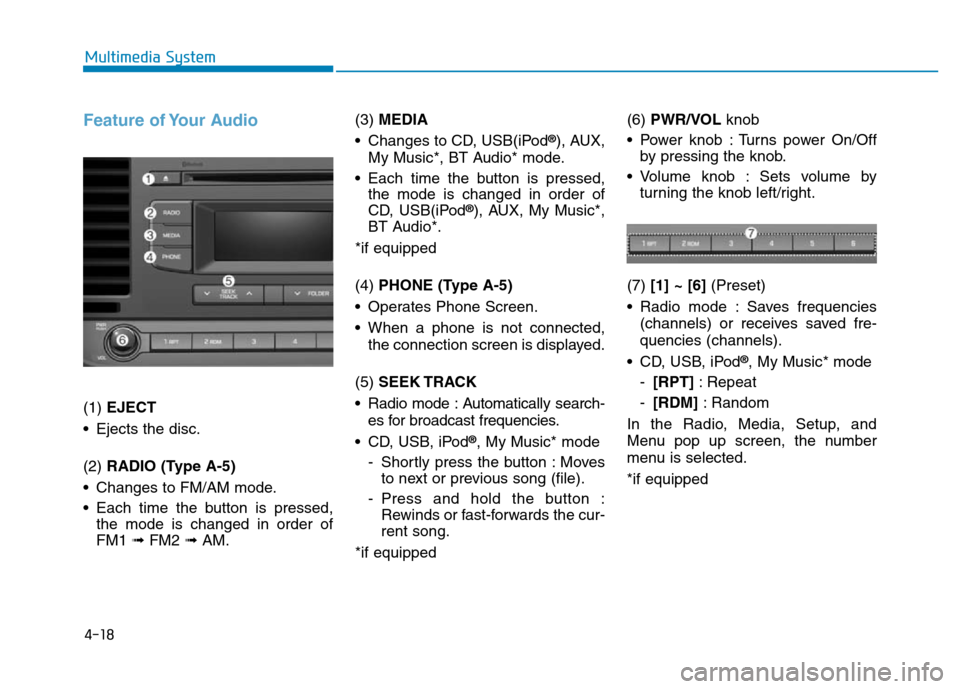
(1) EJECT
• Ejects the disc.
(2) RADIO (Type A-5)
• Changes to FM/AM mode.
• Each time the button is pressed,
the mode is changed in order of
FM1 ➟ FM2 ➟AM.(3) MEDIA
• Changes to CD, USB(iPod
®), AUX,
My Music*, BT Audio* mode.
• Each time the button is pressed,
the mode is changed in order of
CD, USB(iPod
®), AUX, My Music*,
BT Audio*.
*if equipped
(4) PHONE (Type A-5)
• Operates Phone Screen.
• When a phone is not connected,
the connection screen is displayed.
(5) SEEK TRACK
• Radio mode : Automatically search-
es for broadcast frequencies.
• CD, USB, iPod
®, My Music* mode
- Shortly press the button : Moves
to next or previous song (file).
- Press and hold the button :
Rewinds or fast-forwards the cur-
rent song.
*if equipped(6) PWR/VOL knob
• Power knob : Turns power On/Off
by pressing the knob.
• Volume knob : Sets volume by
turning the knob left/right.
(7) [1] ~ [6](Preset)
• Radio mode : Saves frequencies
(channels) or receives saved fre-
quencies (channels).
• CD, USB, iPod
®, My Music* mode
-[RPT]: Repeat
-[RDM]: Random
In the Radio, Media, Setup, and
Menu pop up screen, the number
menu is selected.
*if equipped
Page 276 of 637
4-19
Multimedia System
4
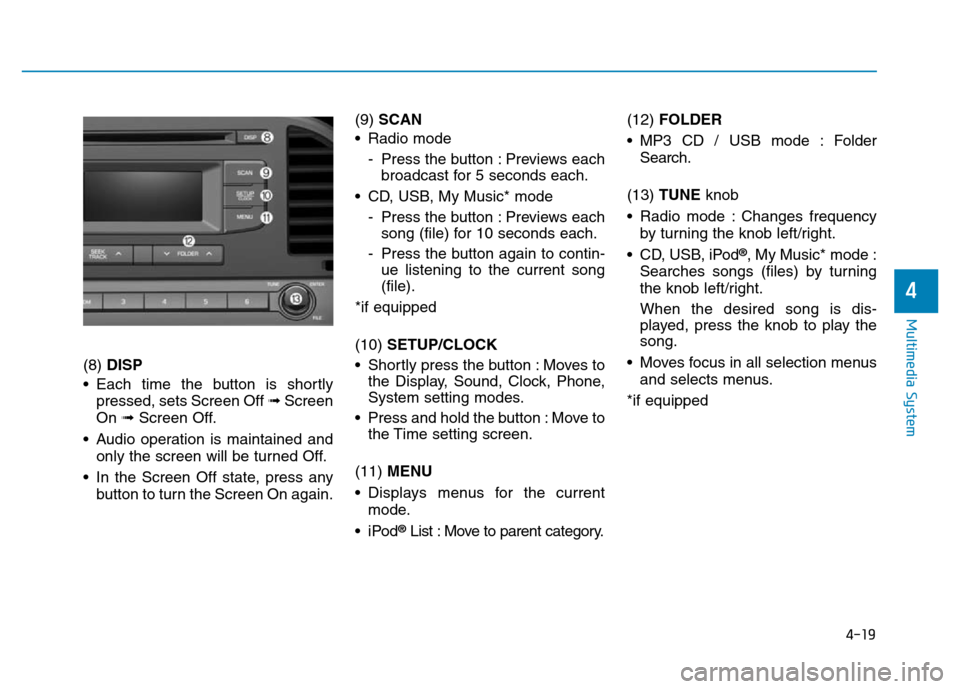
(8) DISP
• Each time the button is shortly
pressed, sets Screen Off ➟Screen
On ➟Screen Off.
• Audio operation is maintained and
only the screen will be turned Off.
• In the Screen Off state, press any
button to turn the Screen On again.(9) SCAN
• Radio mode
- Press the button : Previews each
broadcast for 5 seconds each.
• CD, USB, My Music* mode
- Press the button : Previews each
song (file) for 10 seconds each.
- Press the button again to contin-
ue listening to the current song
(file).
*if equipped
(10) SETUP/CLOCK
• Shortly press the button : Moves to
the Display, Sound, Clock, Phone,
System setting modes.
• Press and hold the button : Move to
the Time setting screen.
(11) MENU
• Displays menus for the current
mode.
•iPod
®List : Move to parent category.(12) FOLDER
• MP3 CD / USB mode : Folder
Search.
(13) TUNE knob
• Radio mode : Changes frequency
by turning the knob left/right.
• CD, USB, iPod
®, My Music* mode :
Searches songs (files) by turning
the knob left/right.
When the desired song is dis-
played, press the knob to play the
song.
• Moves focus in all selection menus
and selects menus.
*if equipped
Page 277 of 637
4-20
Multimedia System
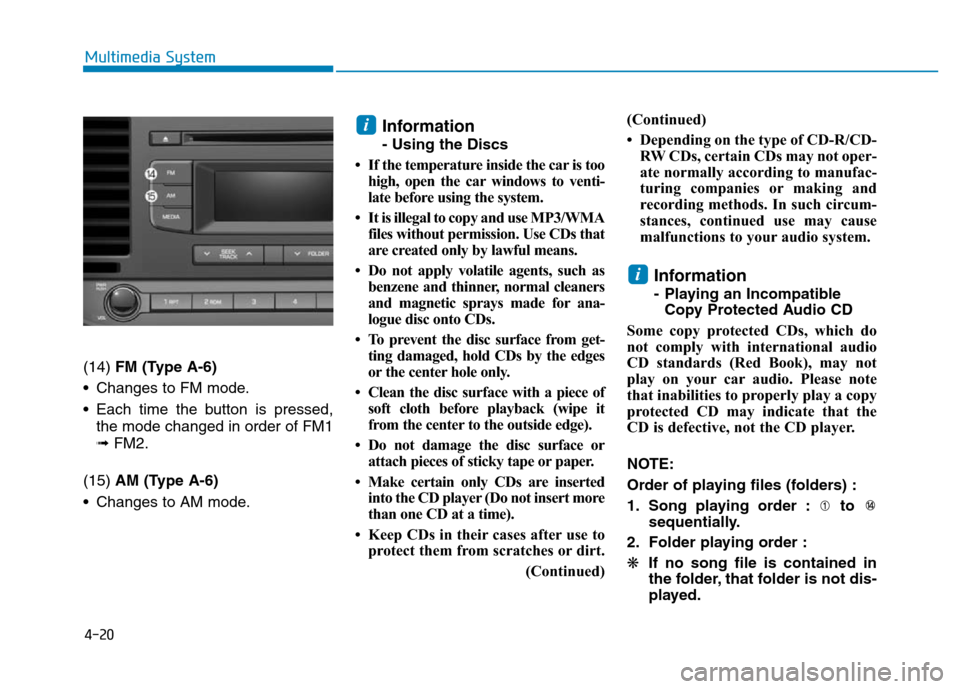
(14) FM (Type A-6)
• Changes to FM mode.
• Each time the button is pressed,
the mode changed in order of FM1
➟ FM2.
(15) AM (Type A-6)
• Changes to AM mode.
Information
- Using the Discs
• If the temperature inside the car is too
high, open the car windows to venti-
late before using the system.
• It is illegal to copy and use MP3/WMA
files without permission. Use CDs that
are created only by lawful means.
• Do not apply volatile agents, such as
benzene and thinner, normal cleaners
and magnetic sprays made for ana-
logue disc onto CDs.
• To prevent the disc surface from get-
ting damaged, hold CDs by the edges
or the center hole only.
• Clean the disc surface with a piece of
soft cloth before playback (wipe it
from the center to the outside edge).
• Do not damage the disc surface or
attach pieces of sticky tape or paper.
• Make certain only CDs are inserted
into the CD player (Do not insert more
than one CD at a time).
• Keep CDs in their cases after use to
protect them from scratches or dirt.
(Continued)(Continued)
• Depending on the type of CD-R/CD-
RW CDs, certain CDs may not oper-
ate normally according to manufac-
turing companies or making and
recording methods. In such circum-
stances, continued use may cause
malfunctions to your audio system.
Information
- Playing an Incompatible
Copy Protected Audio CD
Some copy protected CDs, which do
not comply with international audio
CD standards (Red Book), may not
play on your car audio. Please note
that inabilities to properly play a copy
protected CD may indicate that the
CD is defective, not the CD player.
NOTE:
Order of playing files (folders) :
1. Song playing order : to
sequentially.
2. Folder playing order :
❋If no song file is contained in
the folder, that folder is not dis-
played.
i
i