engine lights Hyundai Elantra 2017 User Guide
[x] Cancel search | Manufacturer: HYUNDAI, Model Year: 2017, Model line: Elantra, Model: Hyundai Elantra 2017Pages: 637, PDF Size: 15.02 MB
Page 162 of 637
3-67
Convenient features of your vehicle
3
AUTO STOP Indicator
Light (if equipped)
This indicator light illuminates:
• When the engine enters the Idle
Stop mode of the ISG (Idle Stop and
Go) system.
• When the automatic starting occurs,
the AUTO STOP indicator on the
cluster will blink for 5 seconds.
For more details, refer to the “ISG
(Idle Stop and Go) system” in chap-
ter 5.
Information
When the engine automatically starts
by the ISG system, some warning
lights(ABS, ESC, ESC OFF, EPS or
Parking brake warning light) may
turn on for a few seconds.
This happens because of low battery
voltage. It does not mean the system
has malfunctioned.
Immobilizer Indicator
Light (without smart
key) (if equipped)
This indicator light illuminates:
• When the vehicle detects the
immobilizer in the key with the igni-
tion switch in the ON position.
- At this time, you can start the
engine.
- The indicator light goes off after
starting the engine.
This indicator light blinks:
• When there is a malfunction with
the immobilizer system.
In this case, we recommend that
you have the vehicle inspected by
an authorized HYUNDAI dealer.
Immobilizer Indicator
Light (with smart key)
(if equipped)
This indicator light illuminates for
up to 30 seconds:
• When the vehicle detects the
smart key in the vehicle with the
Engine Start/Stop button in the
ACC or ON position.
- At this time, you can start the
engine.
- The indicator light goes off after
starting the engine.
This indicator light blinks for a few
seconds:
• When the smart key is not in the
vehicle.
- At this time, you cannot start the
engine.
i
Page 163 of 637
3-68
Convenient features of your vehicle
This indicator light illuminates for
2 seconds and goes off:
• If the smart key is in the vehicle
and the Engine Start/Stop button is
ON., but the vehicle cannot detect
the smart key.
In this case, we recommend that
you have the vehicle inspected by
an authorized HYUNDAI dealer.
This indicator light blinks:
• When the battery voltage of the
smart key is low.
- At this time, you can not start the
engine. However, you can start
the engine if you press the
Engine Start/Stop button with the
smart key.(For more details,
refer to "Starting the Engine"
in chapter 5).
• When there is a malfunction with
the immobilizer system.
In this case, we recommend that
you have the vehicle inspected by
an authorized HYUNDAI dealer.
Turn Signal Indicator
Light
This indicator light blinks:
• When you operate the turn signal
indicator light.
If any of the following occurs, there
may be a malfunction with the turn
signal system.
- The turn signal indicator light illumi-
nates but does not blink
- The turn signal indicator light blinks
rapidly
- The turn signal indicator light does
not illuminate at all
If either of these conditions occur, we
recommend you to have your vehicle
inspected by an authorized HYUNDAI
dealer.
Low Beam Indicator
Light (if equipped)
This indicator light illuminates:
• When the headlights are on.
High Beam Indicator
Light
This indicator light illuminates:
• When the headlights are on and in
the high beam position
• When the turn signal lever is pulled
into the Flash-to-Pass position.
Page 176 of 637
3-81
Convenient features of your vehicle
3
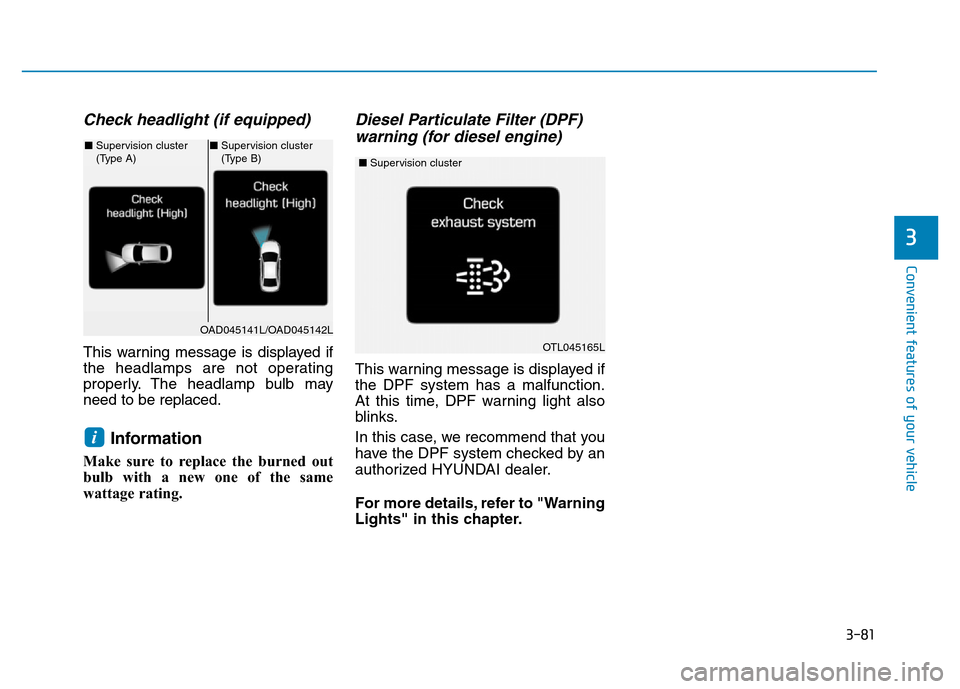
Check headlight (if equipped)
This warning message is displayed if
the headlamps are not operating
properly. The headlamp bulb may
need to be replaced.
Information
Make sure to replace the burned out
bulb with a new one of the same
wattage rating.
Diesel Particulate Filter (DPF)
warning (for diesel engine)
This warning message is displayed if
the DPF system has a malfunction.
At this time, DPF warning light also
blinks.
In this case, we recommend that you
have the DPF system checked by an
authorized HYUNDAI dealer.
For more details, refer to "Warning
Lights" in this chapter.
i
OAD045141L/OAD045142L
■Supervision cluster
(Type A)■Supervision cluster
(Type B)
OTL045165L
■Supervision cluster
Page 200 of 637
3-105
Convenient features of your vehicle
3
If the driver gets out of the vehicle
through other doors (except dri-
ver's door), the battery saver func-
tion does not operate and the
headlamp delay function does not
turn off automatically. Therefore, It
causes the battery to be dis-
charged. In this case, make sure to
turn off the lamp before getting out
of the vehicle.
Daytime running light (DRL)
(if equipped)
The Daytime Running Lights (DRL)
can make it easier for others to see
the front of your vehicle during the
day, especially after dawn and before
sunset.
The DRL system will turn the dedi-
cated lamp OFF when:
1. The headlights or front fog lights
are in the ON position.
2. The engine is turned off.
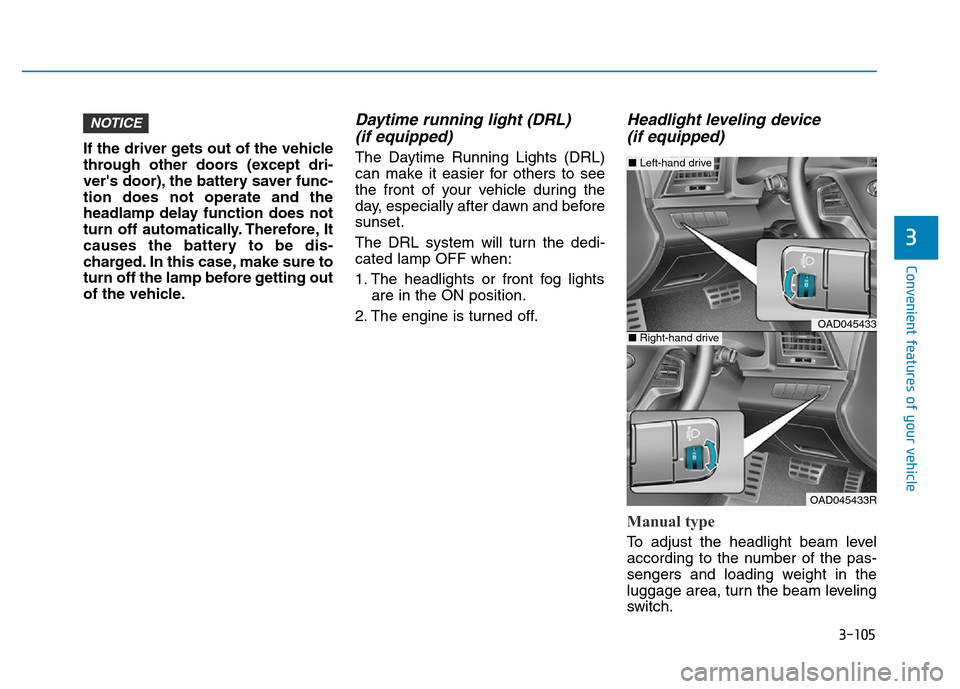
Headlight leveling device
(if equipped)
Manual type
To adjust the headlight beam level
according to the number of the pas-
sengers and loading weight in the
luggage area, turn the beam leveling
switch.
NOTICE
OAD045433
OAD045433R
■Left-hand drive
■Right-hand drive
Page 202 of 637
3-107
Convenient features of your vehicle
3
Interior lamp
When the interior lamp switch is in
the DOOR position and all doors (and
trunk) are closed and locked, the
room lamp will come on for 30 sec-
onds if any of the below is performed.
• When the door unlock button is
pressed on the remote key or
smart key.
• When the button of the outside
door handle is pressed.
At this time, if you press the door lock
or unlock button, the room lamp will
turn off immediately.
Interior lights
Do not use the interior lights for
extended periods when the engine
is turned off or the battery will dis-
charge.
Interior lamp AUTO cut
The interior lamps will automatically
go off approximately 20 minutes after
the engine is turned off and the
doors closed. If a door is opened, the
lamp will go off 40 minutes after the
engine is turned off. If the doors are
locked by the smart key and the vehi-
cle enters the armed stage of the
theft alarm system, the lamps will go
off five seconds later.NOTICE
If it does not work properly even
though your car is inclined
backward according to passen-
ger's posture, or the headlight
beam is irradiated to the high or
low position, we recommend
that the system be inspected by
an authorized HYUNDAI dealer.
Do not attempt to inspect or
replace the wiring yourself.
WARNING
Page 393 of 637
5-7
Driving your vehicle
5
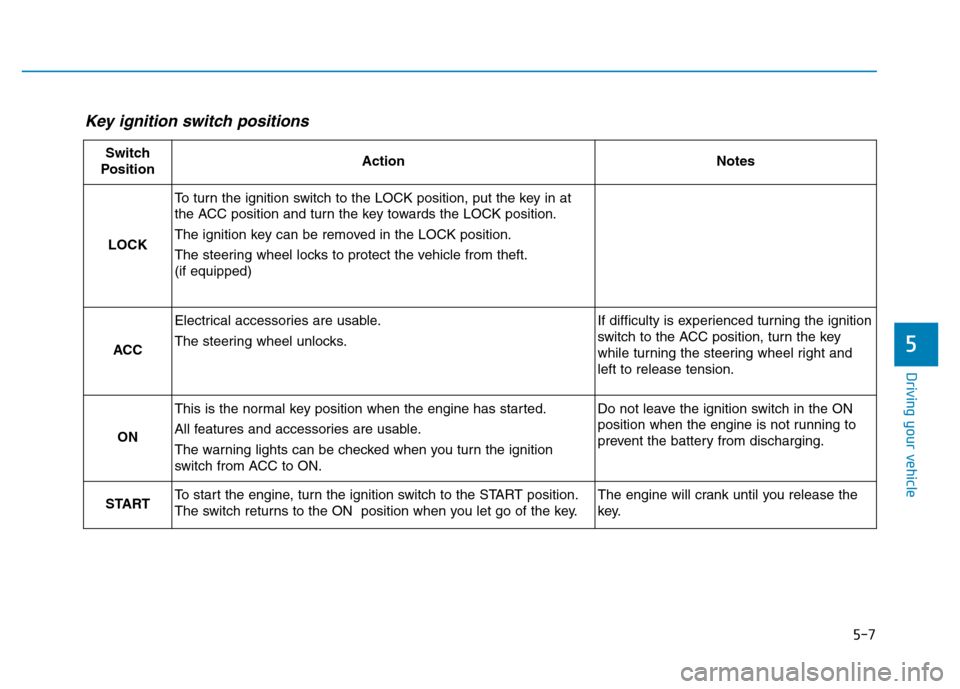
Key ignition switch positions
Switch
PositionActionNotes
LOCK
To turn the ignition switch to the LOCK position, put the key in at
the ACC position and turn the key towards the LOCK position.
The ignition key can be removed in the LOCK position.
The steering wheel locks to protect the vehicle from theft.
(if equipped)
ACC
Electrical accessories are usable.
The steering wheel unlocks.If difficulty is experienced turning the ignition
switch to the ACC position, turn the key
while turning the steering wheel right and
left to release tension.
ON
This is the normal key position when the engine has started.
All features and accessories are usable.
The warning lights can be checked when you turn the ignition
switch from ACC to ON.Do not leave the ignition switch in the ON
position when the engine is not running to
prevent the battery from discharging.
STARTTo start the engine, turn the ignition switch to the START position.
The switch returns to the ON position when you let go of the key.The engine will crank until you release the
key.
Page 399 of 637
5-13
Driving your vehicle
5
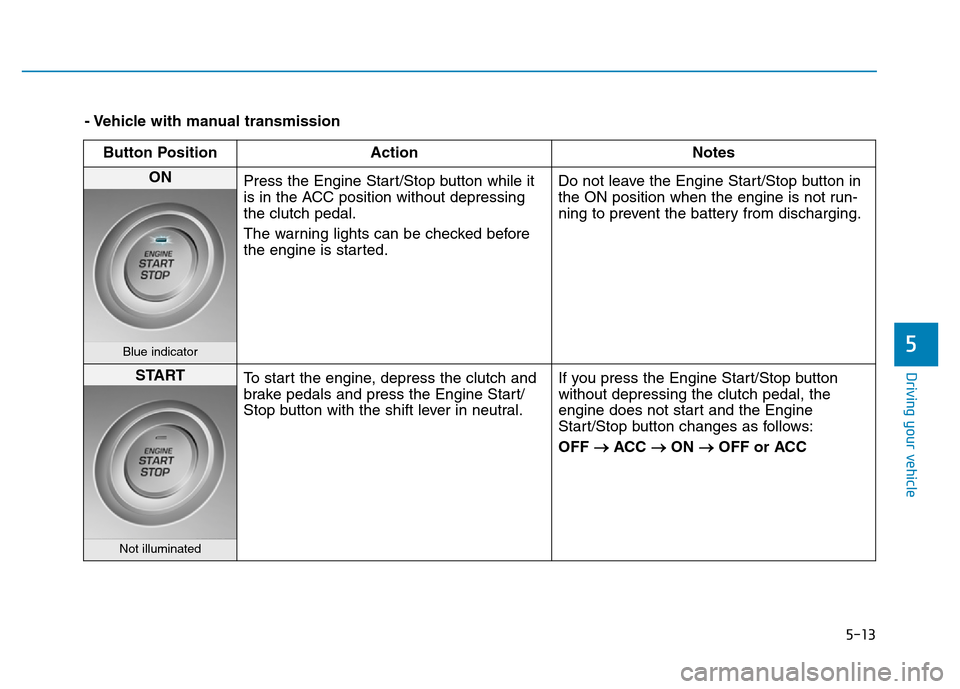
- Vehicle with manual transmission
Button Position Action Notes
ON
Press the Engine Start/Stop button while it
is in the ACC position without depressing
the clutch pedal.
The warning lights can be checked before
the engine is started.Do not leave the Engine Start/Stop button in
the ON position when the engine is not run-
ning to prevent the battery from discharging.
Blue indicator
START
To start the engine, depress the clutch and
brake pedals and press the Engine Start/
Stop button with the shift lever in neutral.If you press the Engine Start/Stop button
without depressing the clutch pedal, the
engine does not start and the Engine
Start/Stop button changes as follows:
OFF
→ACC →ON →OFF or ACC
Not illuminated
Page 401 of 637
5-15
Driving your vehicle
5
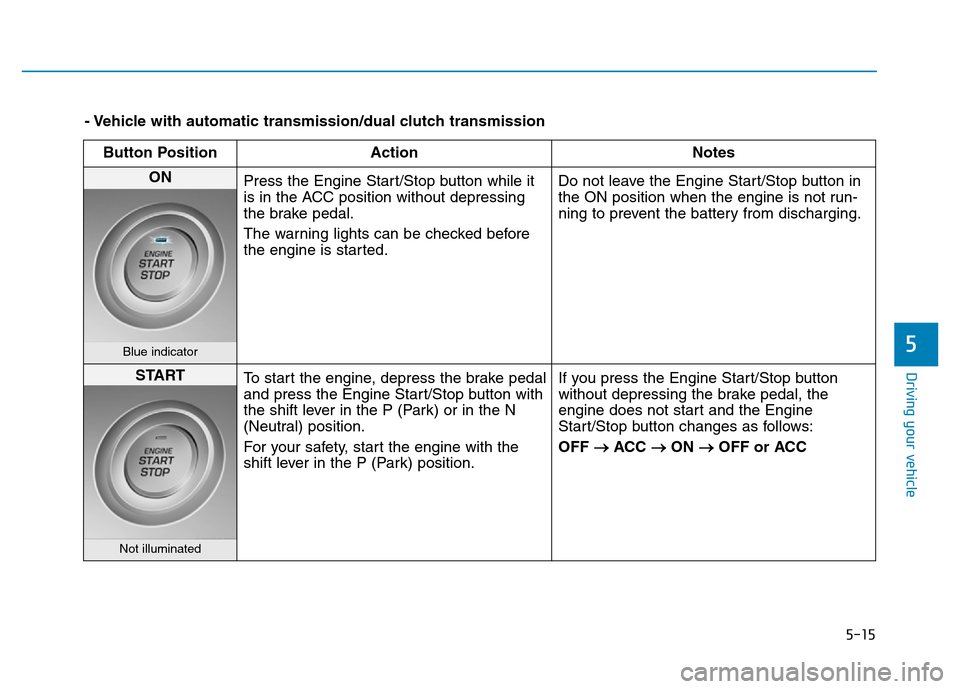
- Vehicle with automatic transmission/dual clutch transmission
Button Position Action Notes
ON
Press the Engine Start/Stop button while it
is in the ACC position without depressing
the brake pedal.
The warning lights can be checked before
the engine is started.Do not leave the Engine Start/Stop button in
the ON position when the engine is not run-
ning to prevent the battery from discharging.
Blue indicator
START
To start the engine, depress the brake pedal
and press the Engine Start/Stop button with
the shift lever in the P (Park) or in the N
(Neutral) position.
For your safety, start the engine with the
shift lever in the P (Park) position.If you press the Engine Start/Stop button
without depressing the brake pedal, the
engine does not start and the Engine
Start/Stop button changes as follows:
OFF
→ACC →ON →OFF or ACC
Not illuminated
Page 433 of 637
5-47
Driving your vehicle
5
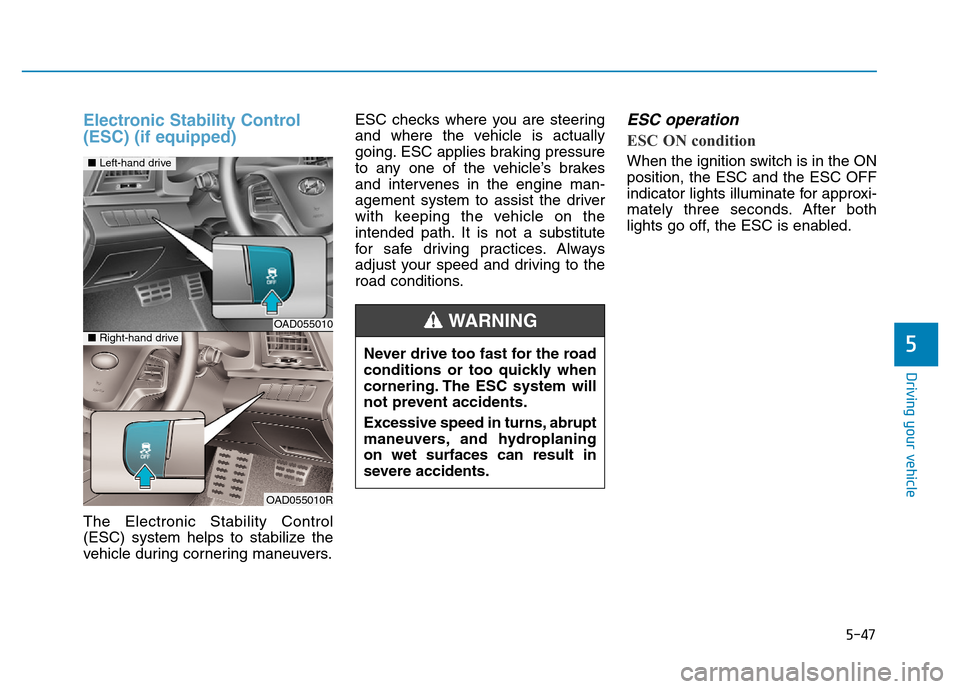
Electronic Stability Control
(ESC) (if equipped)
The Electronic Stability Control
(ESC) system helps to stabilize the
vehicle during cornering maneuvers.ESC checks where you are steering
and where the vehicle is actually
going. ESC applies braking pressure
to any one of the vehicle’s brakes
and intervenes in the engine man-
agement system to assist the driver
with keeping the vehicle on the
intended path. It is not a substitute
for safe driving practices. Always
adjust your speed and driving to the
road conditions.
ESC operation
ESC ON condition
When the ignition switch is in the ON
position, the ESC and the ESC OFF
indicator lights illuminate for approxi-
mately three seconds. After both
lights go off, the ESC is enabled.
OAD055010
OAD055010R
■Left-hand drive
■Right-hand drive
Never drive too fast for the road
conditions or too quickly when
cornering. The ESC system will
not prevent accidents.
Excessive speed in turns, abrupt
maneuvers, and hydroplaning
on wet surfaces can result in
severe accidents.
WARNING
Page 436 of 637
5-50
Driving your vehicle
To prevent damage to the trans-
mission:
• Do not allow wheel(s) of one
axle to spin excessively while
the ESC, ABS, and parking brake
warning lights are displayed.
The repairs would not be cov-
ered by the vehicle warranty.
Reduce engine power and do
not spin the wheel(s) excessive-
ly while these lights are dis-
played.
• When operating the vehicle on a
dynamometer, make sure the
ESC is turned off (ESC OFF light
illuminated).
Information
Turning the ESC off does not affect
ABS or standard brake system opera-
tion.
Vehicle Stability Management
(VSM) (if equipped)
The Vehicle Stability Management
(VSM) is a function of the Electronic
Stability Control (ESC) system. It
helps ensure the vehicle stays stable
when accelerating or braking sud-
denly on wet, slippery and rough
roads where traction over the four
tires can suddenly become uneven.
VSM operation
VSM ON condition
The VSM operates when:
• The Electronic Stability Control
(ESC) is on.
• Vehicle speed is approximately
above 15 km/h (9 mph) on curve
roads.
• Vehicle speed is approximately
above 20 km/h (12 mph) when the
vehicle is braking on rough roads.
When operating
When you apply your brakes under
conditions which may activate the
ESC, you may hear sounds from the
brakes, or feel a corresponding sen-
sation in the brake pedal. This is nor-
mal and it means your VSM is active.
i
NOTICE
Take the following precautions
when using the Vehicle Stability
Management (VSM):
•ALWAYS check the speed and
the distance to the vehicle
ahead. The VSM is not a sub-
stitute for safe driving prac-
tices.
•Never drive too fast for the
road conditions. The VSM sys-
tem will not prevent acci-
dents. Excessive speed in bad
weather, slippery and uneven
roads can result in severe
accidents.
WARNING