indicator Hyundai Elantra 2018 User Guide
[x] Cancel search | Manufacturer: HYUNDAI, Model Year: 2018, Model line: Elantra, Model: Hyundai Elantra 2018Pages: 526, PDF Size: 17.2 MB
Page 102 of 526
3-25
Convenient features of your vehicle
3
Programming HomeLink®
Please note the following:
When programming a garage dooropener, it is advised to park the vehicle
outside of the garage.
It is recommended that a new battery be placed in the hand-held transmitter
of the device being programmed to
HomeLink
®for quicker training and
accurate transmission of the radio-fre-
quency signal.
Some vehicles may require the ignition switch to be placed in the ACC (or
"Accessories") position for program-
ming and/or operation of HomeLink
®.
In the event that there are still pro- gramming difficulties or questions after
following the programming steps listed
below, contact HomeLink
®at:
www.homelink.com or by calling 1-
800-355-3515. Programming
To train most devices, follow these
instructions:
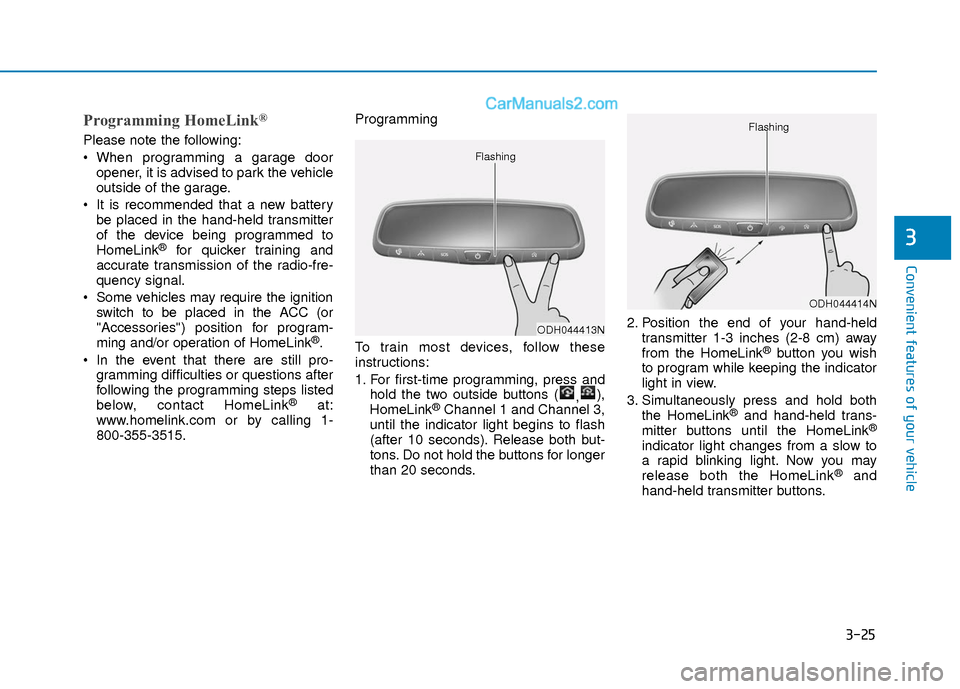
1. For first-time programming, press and
hold the two outside buttons ( ,),
HomeLink®Channel 1 and Channel 3,
until the indicator light begins to flash
(after 10 seconds). Release both but-
tons. Do not hold the buttons for longer
than 20 seconds. 2. Position the end of your hand-held
transmitter 1-3 inches (2-8 cm) away
from the HomeLink
®button you wish
to program while keeping the indicator
light in view.
3. Simultaneously press and hold both the HomeLink
®and hand-held trans-
mitter buttons until the HomeLink®
indicator light changes from a slow to
a rapid blinking light. Now you may
release both the HomeLink
®and
hand-held transmitter buttons.
ODH044413N
Flashing
ODH044414N
Flashing
Page 103 of 526
3-26
Convenient features of your vehicle
Information
Some devices may require you to replace
this Programming step 3 with procedures
noted in the "Gate Operator/Canadian
Programming" chapter. If the
HomeLink
®indicator light does not
change to a rapidly blinking light after
performing these steps, contact
HomeLink
®at www.homelink.com.
4. Press and hold for 5 seconds and release the programmed HomeLink
®
button up to two separate times to
activate the door. If the door does not
activate, press and hold the just-
trained HomeLink
®button and
observe the indicator light.
stantly, programming is complete
and your device should activate
when the HomeLink
®button is
pressed and released.
2 seconds and then turns to a con-
stant light, continue with
"Programming" steps 5-7 to com-
plete the programming of a rolling
code equipped device (most com-
monly a garage door opener). 5. At the garage door opener receiver
(motor-head unit) in the garage, locate
the "learn" or "smart" button. This can
usually be found where the hanging
antenna wire is attached to the motor-
head unit.
6. Firmly press and release the "learn" or "smart" button. (The name and color
of the button vary by manufacturer).
There are 30 seconds to initiate step
7.
7. Return to the vehicle and firmly press, hold for 2 seconds and release the
programmed HomeLink
®button.
Repeat the "press/hold/release"
sequence a second time, and,
depending on the brand of the garage
door opener (or other rolling code
equipped device), repeat this
sequence a third time to complete the
programming process.
HomeLink
®should now activate your
rolling code equipped device.
Gate operator & Canadian programming
During programming, your handheld
transmitter may automatically stop trans-
mitting. Continue to press the Integrated
HomeLink
®Wireless Control System but-
ton (note steps 2 through 3 in the
Programming portion of this document)
while you press and re-press ("cycle")
your handheld transmitter every two sec-
onds until the frequency signal has been
learned. The indicator light will flash
slowly and then rapidly after several sec-
onds upon successful training.
Operating HomeLink®
To operate, simply press and release the
programmed HomeLink®button.
Activation will now occur for the trained
device (i.e. garage door opener, gate
operator, security system, entry door
lock, home/office lighting, etc.). For con-
venience, the hand-held transmitter of
the device may also be used at any time.
i
Page 104 of 526
3-27
Convenient features of your vehicle
3
Reprogramming a single HomeLink®but-
ton
To program a device to HomeLink®using
a HomeLink®button previously trained,
follow these steps:
1. Press and hold the desired HomeLink
®
button. DO NOT release the button.
2. The indicator light will begin to flash after 20 seconds. Without releasing the
HomeLink
®button, proceed with
"Programming" step 2.
For questions or comments, contact
HomeLink
®at www.homelink.comor 1-
800-355-3515.
Erasing HomeLink®buttons
Individual buttons cannot be erased.
However, to erase all three programmed
buttons:
1. Press and hold the two outer HomeLink
®buttons until the indicator
light begins to flash after 10 seconds.
2. Release both buttons. Do not hold for longer than 20 seconds.
The Integrated HomeLink
®Wireless
Control System is now in the training
(learn) mode and can be programmed at
any time following the appropriate steps
in the Programming chapters above. NVS
®is a registered trademark and Z-
Nav™ is a trademark of the Gentex
Corporation, Zeeland, Michigan.
HomeLink
®is a registered trademark
owned by Johnson Controls,
Incorporated, Milwaukee, Wisconsin.
FCC ID: NZLTLMHL4
IC: 4112A-TLMHL4
Information
This device complies with Part 15 of the
FCC Rules.
Operation is subject to the following three
conditions:
1. This device may not cause harmful interference, and
2. This device must accept any interfer- ence received, including interference
that may cause undesired operation.
3. The transceiver has been tested and complies with FCC and Industry
Canada rules. Changes or modifica-
tions not expressly approved by the
party responsible for compliance could
void the user's authority to operate the
device.
Electric chromic mirror (ECM)with compass and HomeLink®
system (for Canada)
Your vehicle may be equipped with a
Gentex Automatic-Dimming Mirror with a
Z-Nav™ Electronic Compass Display
and an Integrated HomeLink
®Wireless
Control System.
During nighttime driving, this feature will
automatically detect and reduce rearview
mirror glare while the compass indicates
the direction the vehicle is pointed. The
HomeLink
®Universal Transceiver allows
you to activate your garage door(s), elec-
tric gate, home lighting, etc.
i
Page 105 of 526
3-28
Convenient features of your vehicle
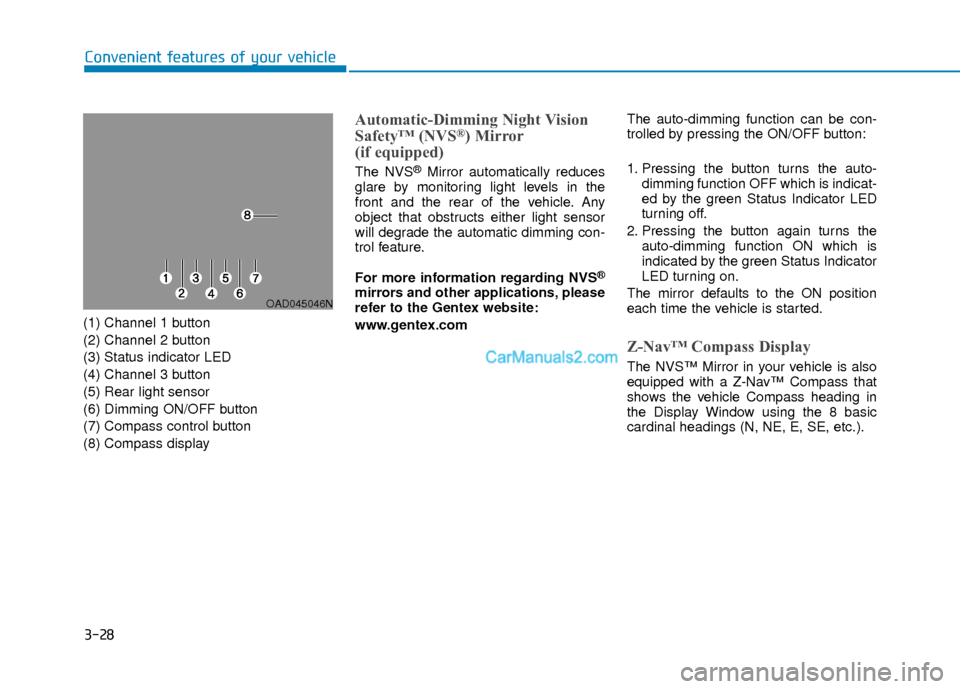
(1) Channel 1 button
(2) Channel 2 button
(3) Status indicator LED
(4) Channel 3 button
(5) Rear light sensor
(6) Dimming ON/OFF button
(7) Compass control button
(8) Compass display
Automatic-Dimming Night Vision
Safety™ (NVS®) Mirror
(if equipped)
The NVS®Mirror automatically reduces
glare by monitoring light levels in the
front and the rear of the vehicle. Any
object that obstructs either light sensor
will degrade the automatic dimming con-
trol feature.
For more information regarding NVS
®
mirrors and other applications, please
refer to the Gentex website:
www.gentex.com The auto-dimming function can be con-
trolled by pressing the ON/OFF button:
1. Pressing the button turns the auto-
dimming function OFF which is indicat-
ed by the green Status Indicator LED
turning off.
2. Pressing the button again turns the auto-dimming function ON which is
indicated by the green Status Indicator
LED turning on.
The mirror defaults to the ON position
each time the vehicle is started.
Z-Nav™ Compass Display
The NVS™ Mirror in your vehicle is also
equipped with a Z-Nav™ Compass that
shows the vehicle Compass heading in
the Display Window using the 8 basic
cardinal headings (N, NE, E, SE, etc.).
OAD045046N
Page 108 of 526
3-31
Convenient features of your vehicle
3
Programming HomeLink®
Please note the following:
When programming a garage dooropener, it is advised to park the vehicle
outside of the garage.
It is recommended that a new battery be placed in the hand-held transmitter
of the device being programmed to
HomeLink
®for quicker training and
accurate transmission of the radio-fre-
quency signal.
Some vehicles may require the ignition switch to be placed in the ACC (or
"Accessories") position for program-
ming and/or operation of HomeLink
®.
In the event that there are still pro- gramming difficulties or questions after
following the programming steps listed
below, contact HomeLink
®at:
www.homelink.com or by calling 1-
800-355-3515.
Rolling code programming
Rolling code devices which are "code-
protected" and manufactured after 1996
may be determined by the following:
Reference the device owner’s manual for verification.
The handheld transmitter appears to program the HomeLink
®Universal
Transceiver but does not activate the
device.
Press and hold the trained HomeLink button. The device has the rolling code
feature if the indicator light flashes rap-
idly and then turns solid after 2 sec-
onds.
To train rolling code devices, follow these
instructions:
1. At the garage door opener receiver (motor-head unit) in the garage, locate
the "learn" or "smart" button. This can
usually be found where the hanging
antenna wire is attached to the motor-
head unit. Exact location and color of
the button may vary by garage door
opener brand. If there is difficulty
locating the training button, reference
the device owner’s manual or please
visit our Web site at
www.homelink.com. 2. Firmly press and release the "learn" or
"smart" button (which activates the
"training light"). You will have 30 sec-
onds to initiate step 3.
3. Return to the vehicle and firmly press, hold for two seconds and then release
the desired HomeLink
®button. Repeat
the "press/hold/release" sequence a
second time to complete the program-
ming. (Some devices may require you
to repeat this sequence a third time to
complete the programming.)
4. Press and hold the just-trained HomeLink
®button and observe the
red Status Indicator LED. If the indica-
tor light stays on constantly, program-
ming is complete and your device
should activate.
5. To program the remaining two HomeLink
®buttons, follow either
steps 1 through 4 above for other
Rolling Code devices or steps 2
through 5 in Standard Programming
for standard devices.
Page 109 of 526
3-32
Convenient features of your vehicle
Standard programming
To train most devices, follow these
instructions:
1. For first-time programming, press andhold the two outside buttons,
HomeLink
®Channel 1 and Channel 3
Buttons, until the indicator light begins
to flash (after 20 seconds). Release
both buttons. Do not hold the buttons
for longer than 30 seconds.
2. Position the end of your hand-held transmitter 1-3 inches (2-8 cm) away
from the HomeLink
®buttons while
keeping the indicator light in view.
3. Simultaneously press and hold both the HomeLink
®and hand-held trans-
mitter button. DO NOT release the but-
tons until step 4 has been completed.
4. While continuing to hold the buttons the red Indicator Status LED will flash
slowly and then rapidly after
HomeLink
®successfully trains to the
frequency signal from the hand-held
transmitter. Release both buttons.
5. Press and hold the just-trained HomeLink
®button and observe the
red Status Indicator LED. If the indica-
tor light stays on constantly, program-
ming is complete and your device
should activate when the HomeLink
®
button is pressed and released. 6. To program the remaining two
HomeLink
®buttons, follow steps 2
through 5.
Gate operator & Canadian programming
During programming, your handheld
transmitter may automatically stop trans-
mitting. Continue to press the Integrated
HomeLink
®Wireless Control System but-
ton (note steps 2 through 4 in the
Standard Programming portion of this
document) while you press and re-press
("cycle") your handheld transmitter every
two seconds until the frequency signal
has been learned. The indicator light will
flash slowly and then rapidly after sever-
al seconds upon successful training.
Operating HomeLink®
To operate, simply press and release the
programmed HomeLink®button.
Activation will now occur for the trained
device (i.e. garage door opener, gate
operator, security system, entry door
lock, home/office lighting, etc.). For con-
venience, the hand-held transmitter of
the device may also be used at any time.
Reprogramming a single HomeLink®but-
ton
To program a new device to a previously
trained HomeLink®button, follow these
steps:
1. Press and hold the desired HomeLink
®button. Do NOT release
until step 4 has been completed.
2. When the indicator light begins to flash slowly (after 20 seconds), posi-
tion the handheld transmitter 1 to 3
inches away from the HomeLink
®sur-
face.
3. Press and hold the handheld transmit- ter button. The HomeLink
®indicator
light will flash, first slowly and then
rapidly.
4. When the indicator light begins to flash rapidly, release both buttons.
5. Press and hold the just-trained HomeLink
®button and observe the
red Status Indicator LED. If the indica-
tor light stays on constantly, program-
ming is complete and your new device
should activate.
Page 110 of 526
3-33
Convenient features of your vehicle
3
Erasing HomeLink®buttons
Individual buttons cannot be erased.
However, to erase all three programmed
buttons:
1. Press and hold the two outerHomeLink
®buttons until the indicator
light begins to flash-after 20 seconds.
2. Release both buttons. Do not hold for longer than 30 seconds.
The Integrated HomeLink
®Wireless
Control System is now in the training
(learn) mode and can be programmed at
any time following the appropriate steps in
the Programming chapters above.
NVS
®is a registered trademark and Z-
Nav™ is a trademark of the Gentex
Corporation, Zeeland, Michigan.
HomeLink
®is a registered trademark
owned by Johnson Controls,
Incorporated, Milwaukee, Wisconsin.
FCC ID: NZLZTVHL3
IC: 4112A-ZTVHL3
Information
This device complies with Part 15 of the
FCC Rules.
Operation is subject to the following three
conditions:
1. This device may not cause harmful interference, and
2. This device must accept any interfer- ence received, including interference
that may cause undesired operation.
3. The transceiver has been tested and complies with FCC and Industry
Canada rules. Changes or modifica-
tions not expressly approved by the
party responsible for compliance could
void the user's authority to operate the
device.
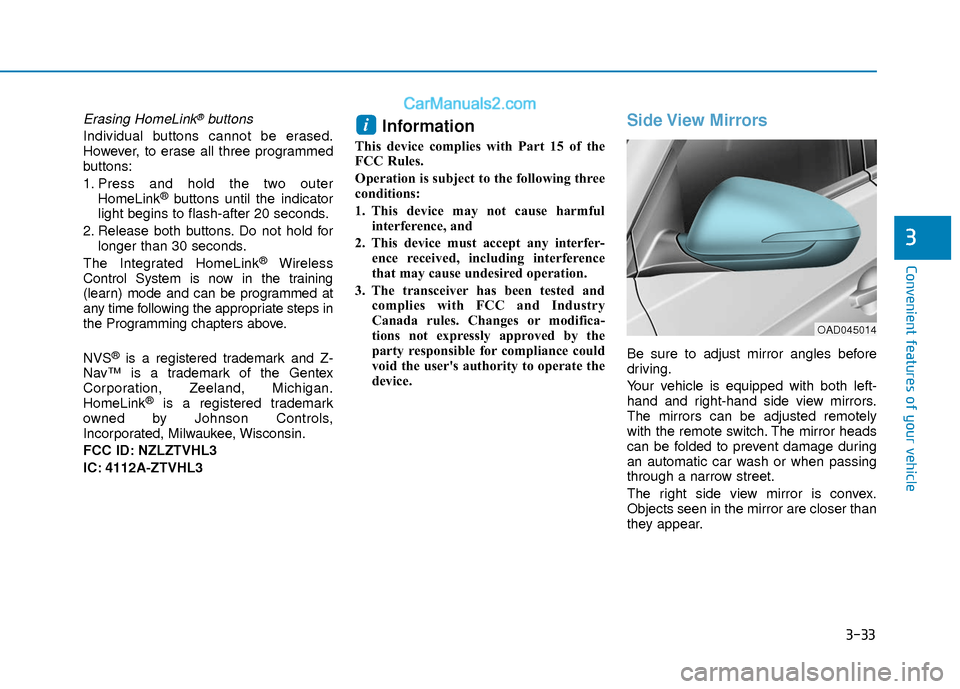
Side View Mirrors
Be sure to adjust mirror angles before
driving.
Your vehicle is equipped with both left-
hand and right-hand side view mirrors.
The mirrors can be adjusted remotely
with the remote switch. The mirror heads
can be folded to prevent damage during
an automatic car wash or when passing
through a narrow street.
The right side view mirror is convex.
Objects seen in the mirror are closer than
they appear.
i
OAD045014
Page 131 of 526
3-54
Convenient features of your vehicle
I
IN
N S
ST
T R
R U
U M
M E
EN
N T
T
C
C L
LU
U S
ST
T E
ER
R
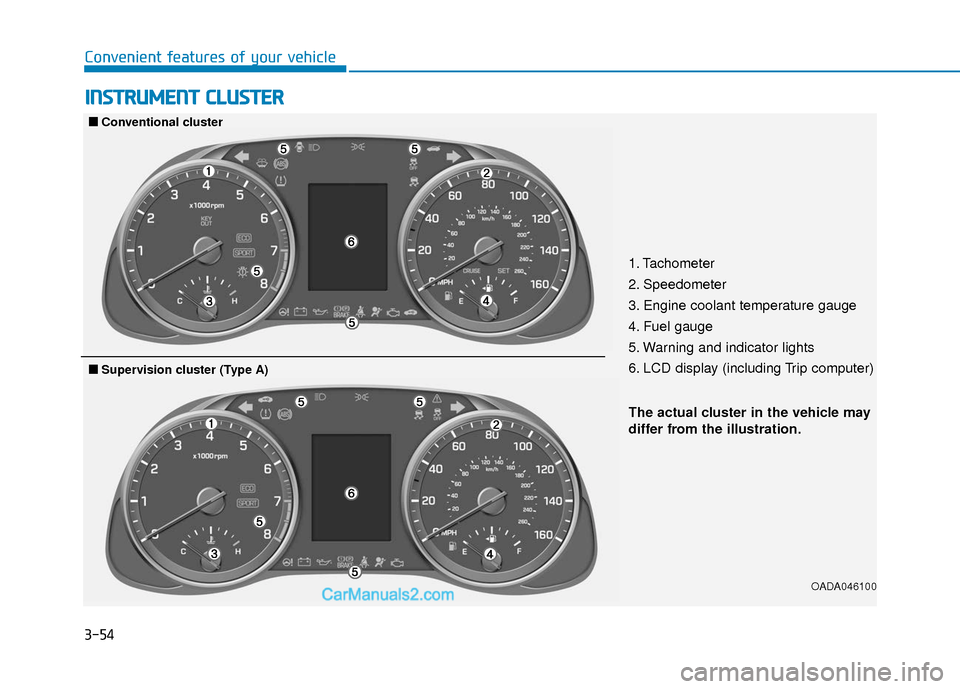
1. Tachometer
2. Speedometer
3. Engine coolant temperature gauge
4. Fuel gauge
5. Warning and indicator lights
6. LCD display (including Trip computer)
OADA046100
■
■
Conventional cluster
The actual cluster in the vehicle may
differ from the illustration.
■
■Supervision cluster (Type A)
Page 132 of 526
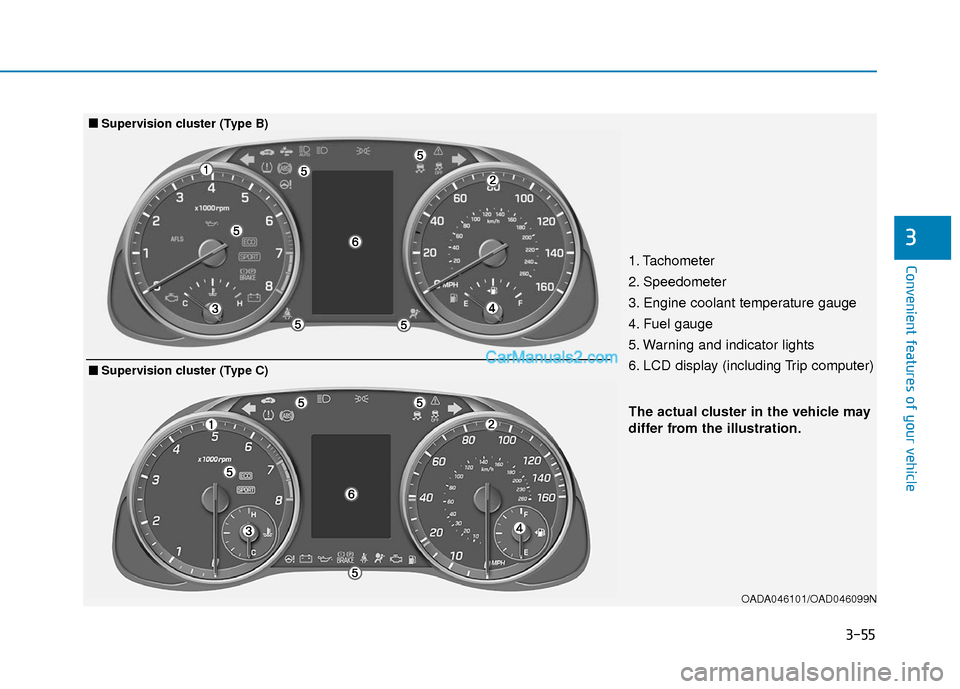
3-55
Convenient features of your vehicle
3
OADA046101/OAD046099N
The actual cluster in the vehicle may
differ from the illustration.
■
■Supervision cluster (Type B)
1. Tachometer
2. Speedometer
3. Engine coolant temperature gauge
4. Fuel gauge
5. Warning and indicator lights
6. LCD display (including Trip computer)
■
■Supervision cluster (Type C)
Page 135 of 526
3-58
Convenient features of your vehicle
If the gauge pointer moves beyond the
normal range area toward the "H"
position, it indicates overheating that
may damage the engine.
Do not continue driving with an over-
heated engine. If your vehicle over-
heats, refer to "If the Engine
Overheats" in chapter 6.
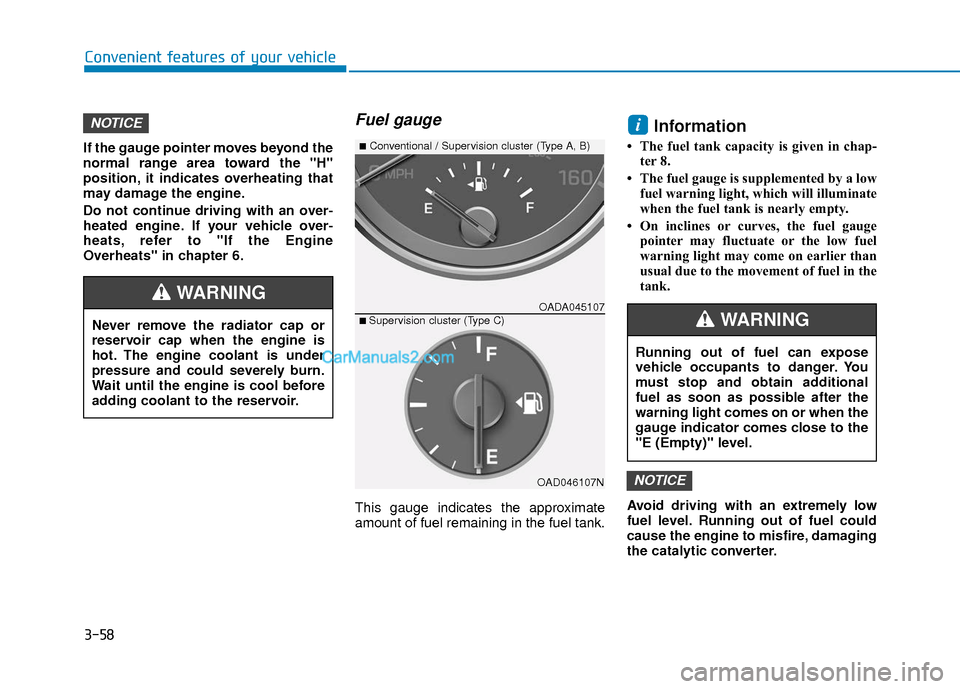
Fuel gauge
This gauge indicates the approximate
amount of fuel remaining in the fuel tank.
Information
• The fuel tank capacity is given in chap-ter 8.
• The fuel gauge is supplemented by a low fuel warning light, which will illuminate
when the fuel tank is nearly empty.
• On inclines or curves, the fuel gauge pointer may fluctuate or the low fuel
warning light may come on earlier than
usual due to the movement of fuel in the
tank.
Avoid driving with an extremely low
fuel level. Running out of fuel could
cause the engine to misfire, damaging
the catalytic converter.
NOTICE
iNOTICE
Running out of fuel can expose
vehicle occupants to danger. You
must stop and obtain additional
fuel as soon as possible after the
warning light comes on or when the
gauge indicator comes close to the
"E (Empty)" level.
WARNINGNever remove the radiator cap or
reservoir cap when the engine is
hot. The engine coolant is under
pressure and could severely burn.
Wait until the engine is cool before
adding coolant to the reservoir.
WARNINGOADA045107
■Conventional / Supervision cluster (Type A, B)
■ Supervision cluster (Type C)
OAD046107N