indicator Hyundai Elantra 2018 Workshop Manual
[x] Cancel search | Manufacturer: HYUNDAI, Model Year: 2018, Model line: Elantra, Model: Hyundai Elantra 2018Pages: 526, PDF Size: 17.2 MB
Page 317 of 526
5-34
Driving your vehicle
Disc Brakes Wear Indicator
When your brake pads are worn and new
pads are required, you will hear a high
pitched warning sound from your front or
rear brakes. You may hear this sound
come and go or it may occur whenever
you depress the brake pedal.
Note that some driving conditions or cli-
mates may cause a brake squeal when
you first apply (or lightly apply) the
brakes. This is normal and does not indi-
cate a problem with your brakes.
To avoid costly brake repairs, do not
continue to drive with worn brake
pads.
Information
Always replace brake pads as complete
front or rear axle sets.
Rear drum brakes
(if equipped)
Your rear drum brakes do not have wear
indicators. Therefore, have the rear brake
linings inspected if you hear a rear brake
rubbing noise. Also have your rear
brakes inspected each time you change
or rotate your tires and when you have
the front brakes replaced.
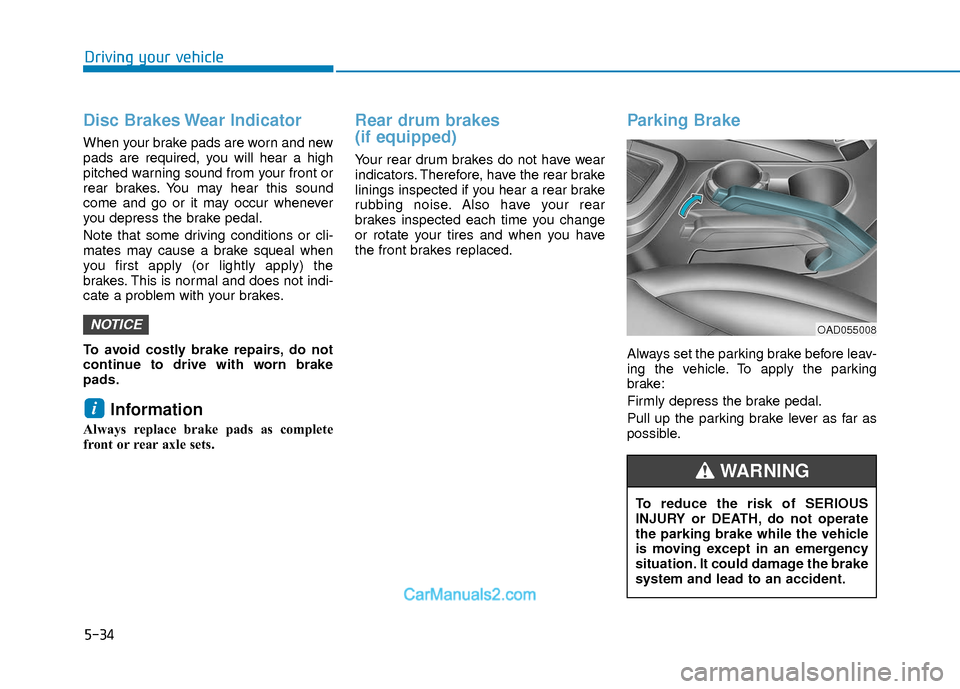
Parking Brake
Always set the parking brake before leav-
ing the vehicle. To apply the parking
brake:
Firmly depress the brake pedal.
Pull up the parking brake lever as far as
possible.
i
NOTICEOAD055008
To reduce the risk of SERIOUS
INJURY or DEATH, do not operate
the parking brake while the vehicle
is moving except in an emergency
situation. It could damage the brake
system and lead to an accident.
WARNING
Page 321 of 526
5-38
Driving your vehicle
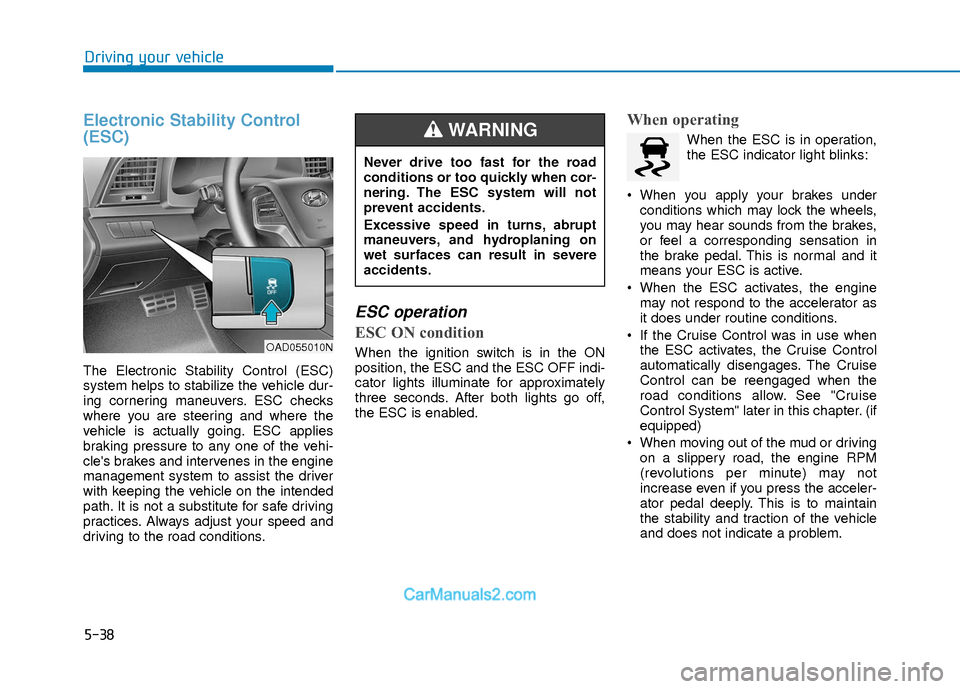
Electronic Stability Control
(ESC)
The Electronic Stability Control (ESC)
system helps to stabilize the vehicle dur-
ing cornering maneuvers. ESC checks
where you are steering and where the
vehicle is actually going. ESC applies
braking pressure to any one of the vehi-
cle's brakes and intervenes in the engine
management system to assist the driver
with keeping the vehicle on the intended
path. It is not a substitute for safe driving
practices. Always adjust your speed and
driving to the road conditions.
ESC operation
ESC ON condition
When the ignition switch is in the ON
position, the ESC and the ESC OFF indi-
cator lights illuminate for approximately
three seconds. After both lights go off,
the ESC is enabled.
When operating
When the ESC is in operation,
the ESC indicator light blinks:
When you apply your brakes under conditions which may lock the wheels,
you may hear sounds from the brakes,
or feel a corresponding sensation in
the brake pedal. This is normal and it
means your ESC is active.
When the ESC activates, the engine may not respond to the accelerator as
it does under routine conditions.
If the Cruise Control was in use when the ESC activates, the Cruise Control
automatically disengages. The Cruise
Control can be reengaged when the
road conditions allow. See "Cruise
Control System" later in this chapter. (if
equipped)
When moving out of the mud or driving on a slippery road, the engine RPM
(revolutions per minute) may not
increase even if you press the acceler-
ator pedal deeply. This is to maintain
the stability and traction of the vehicle
and does not indicate a problem.
OAD055010N
Never drive too fast for the road
conditions or too quickly when cor-
nering. The ESC system will not
prevent accidents.
Excessive speed in turns, abrupt
maneuvers, and hydroplaning on
wet surfaces can result in severe
accidents.
WARNING
Page 322 of 526
5-39
Driving your vehicle
5
ESC OFF condition
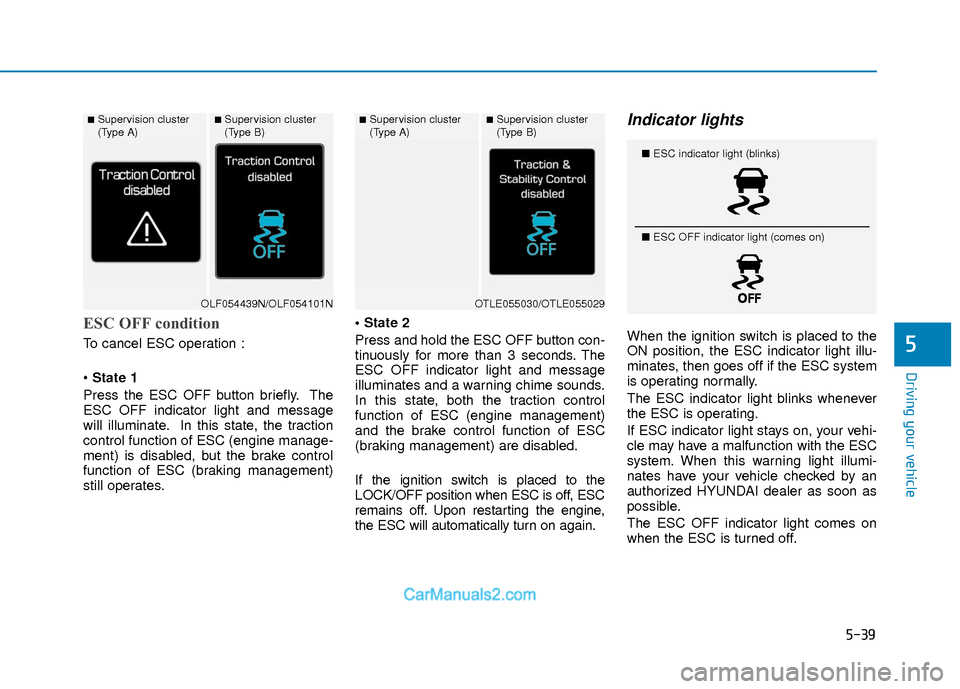
To cancel ESC operation :
State 1
Press the ESC OFF button briefly. The
ESC OFF indicator light and message
will illuminate. In this state, the traction
control function of ESC (engine manage-
ment) is disabled, but the brake control
function of ESC (braking management)
still operates.
Press and hold the ESC OFF button con-
tinuously for more than 3 seconds. The
ESC OFF indicator light and message
illuminates and a warning chime sounds.
In this state, both the traction control
function of ESC (engine management)
and the brake control function of ESC
(braking management) are disabled.
If the ignition switch is placed to the
LOCK/OFF position when ESC is off, ESC
remains off. Upon restarting the engine,
the ESC will automatically turn on again.
Indicator lights
When the ignition switch is placed to the
ON position, the ESC indicator light illu-
minates, then goes off if the ESC system
is operating normally.
The ESC indicator light blinks whenever
the ESC is operating.
If ESC indicator light stays on, your vehi-
cle may have a malfunction with the ESC
system. When this warning light illumi-
nates have your vehicle checked by an
authorized HYUNDAI dealer as soon as
possible.
The ESC OFF indicator light comes on
when the ESC is turned off.
■Supervision cluster
(Type A)■Supervision cluster
(Type B)
OLF054439N/OLF054101N
■Supervision cluster
(Type A)■Supervision cluster
(Type B)
OTLE055030/OTLE055029
■
ESC indicator light (blinks)
■ ESC OFF indicator light (comes on)
Page 323 of 526
5-40
Driving your vehicle
Driving with wheels and tires with dif-
ferent sizes may cause the ESC sys-
tem to malfunction. Before replacing
tires, make sure all four tires and
wheels are the same size. Never drive
the vehicle with different sized wheels
and tires installed.
ESC OFF usage
When Driving
The ESC OFF mode should only be used
briefly to help free the vehicle if stuck in
snow or mud by temporarily stopping
operation of the ESC to maintain wheel
torque.
To turn ESC off while driving, press the
ESC OFF button while driving on a flat
road surface. To prevent damage to the transmis-
sion:
Do not allow wheel(s) of one axle to
spin excessively while the ESC,
ABS, and parking brake warning
lights are displayed. The repairs
would not be covered by the vehicle
warranty. Reduce engine power and
do not spin the wheel(s) excessive-
ly while these lights are displayed.
When operating the vehicle on a dynamometer, make sure the ESC is
turned off (ESC OFF light illuminat-
ed).
Information
Turning the ESC off does not affect ABS
or standard brake system operation.
i
NOTICE
NOTICE
When the ESC is blinking, this indi-
cates the ESC is active:
Drive slowly and NEVER attempt to
accelerate. NEVER turn the ESC off
while the ESC indicator light is
blinking or you may lose control of
the vehicle resulting in an accident.
WARNING
Page 324 of 526
5-41
Driving your vehicle
5
Vehicle Stability Management
(VSM)
The Vehicle Stability Management (VSM)
is a function of the Electronic Stability
Control (ESC) system. It helps ensure
the vehicle stays stable when accelerat-
ing or braking suddenly on wet, slippery
and rough roads where traction over the
four tires can suddenly become
uneven.
VSM operation
VSM ON condition
The VSM operates when:
The Electronic Stability Control (ESC)is on.
Vehicle speed is approximately above 9 mph (15 km/h) on curve roads.
Vehicle speed is approximately above 12 mph (20 km/h) when the vehicle is
braking on rough roads.
When operating
When you apply your brakes under con-
ditions which may activate the ESC, you
may hear sounds from the brakes, or feel
a corresponding sensation in the brake
pedal. This is normal and it means your
VSM is active.
The VSM does not operate when:
Driving on a banked road such asgradient or incline.
Driving rearward.
ESC OFF indicator light is on.
EPS (Electric Power Steering) warn- ing light ( ) is on or blinks.
VSM OFF condition
To cancel VSM operation, press the ESC
OFF button. ESC OFF indicator light ( )
will illuminate.
To turn on VSM, press the ESC OFF but-
ton again. The ESC OFF indicator light
will go out.
Driving with wheels and tires with differ-
ent sizes may cause the ESC system to
malfunction. Before replacing tires, make
sure all four tires and wheels are the
same size. Never drive the vehicle with
different sized tires and wheels installed.
NOTICE
Take the following precautions
when using the Vehicle Stability
Management (VSM):
ALWAYS check the speed and the
distance to the vehicle ahead. The
VSM is not a substitute for safe
driving practices.
Never drive too fast for the road
conditions. The VSM system will
not prevent accidents. Excessive
speed in bad weather, slippery
and uneven roads can result in
severe accidents.
WARNING If ESC indicator light ( ) or EPS
warning light ( )
stays on or blinks, your vehicle may
have a malfunction with the VSM
system. When the warning light illu-
minates, have your vehicle checked
by an authorized HYUNDAI dealer
as soon as possible.
WARNING
Page 326 of 526
5-43
Driving your vehicle
5
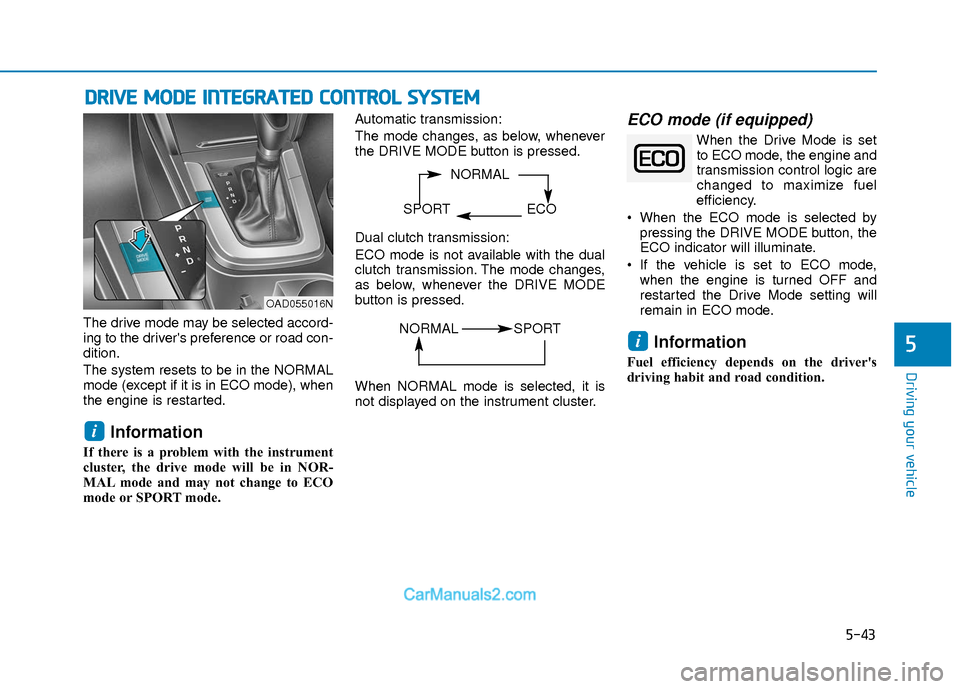
The drive mode may be selected accord-
ing to the driver's preference or road con-
dition.
The system resets to be in the NORMAL
mode (except if it is in ECO mode), when
the engine is restarted.
Information
If there is a problem with the instrument
cluster, the drive mode will be in NOR-
MAL mode and may not change to ECO
mode or SPORT mode. Automatic transmission:
The mode changes, as below, whenever
the DRIVE MODE button is pressed.
Dual clutch transmission:
ECO mode is not available with the dual
clutch transmission. The mode changes,
as below, whenever the DRIVE MODE
button is pressed.
When NORMAL mode is selected, it is
not displayed on the instrument cluster.
ECO mode (if equipped)
When the Drive Mode is set
to ECO mode, the engine and
transmission control logic are
changed to maximize fuel
efficiency.
When the ECO mode is selected by pressing the DRIVE MODE button, the
ECO indicator will illuminate.
If the vehicle is set to ECO mode, when the engine is turned OFF and
restarted the Drive Mode setting will
remain in ECO mode.
Information
Fuel efficiency depends on the driver's
driving habit and road condition.
i
i
D DR
RI
IV
V E
E
M
M O
OD
DE
E
I
IN
N T
TE
EG
G R
RA
A T
TE
ED
D
C
C O
O N
NT
TR
R O
O L
L
S
S Y
Y S
ST
T E
EM
M
NORMAL
SPORT ECO
OAD055016N
NORMAL SPORT
Page 327 of 526
5-44
Driving your vehicle
When the ECO mode is activated:
The acceleration response may beslightly reduced if the accelerator
pedal is depressed moderately.
The air conditioner performance may be limited.
The shift pattern of the automatic transmission/dual clutch transmission
may change.
The engine speed may be lower than when driving in NORMAL mode.
The above situations are normal condi-
tions when the ECO mode is activated to
improve fuel efficiency. Limitation of the ECO mode opera-
tion:
Even though ECO mode is selected and
there is no change in the ECO indicator :
When the coolant temperature is low,
ECO mode will be limited until engine
temperature is at normal operating
temperature.
When driving up a hill, ECO mode will be limited to provide better power
when driving uphill.
When driving the vehicle with the auto- matic transmission/ dual clutch trans-
mission gear shift lever in manual shift
mode, ECO mode will be limited
according to the shift position.SPORT mode
SPORT mode manages the
driving dynamics by automat-
ically adjusting the steering
effort, and the engine and
transmission control logic for enhanced
driver performance.
When SPORT mode is selected by pressing the DRIVE MODE button, the
SPORT indicator will illuminate.
Whenever the engine is restarted, the Drive Mode will revert back to NOR-
MAL mode. If SPORT mode is desired,
re-select SPORT mode from the
DRIVE MODE button.
When SPORT mode is activated: - The engine rpm will tend to remainraised over a certain length of time
even after releasing the accelerator
- Upshifts are delayed when accelerat- ing
Information
In SPORT mode, the fuel efficiency may
decrease.
i
Page 329 of 526
5-46
Driving your vehicle
BSD (Blind Spot Detection) /
LCA (Lane Change Assist)
Operating conditions
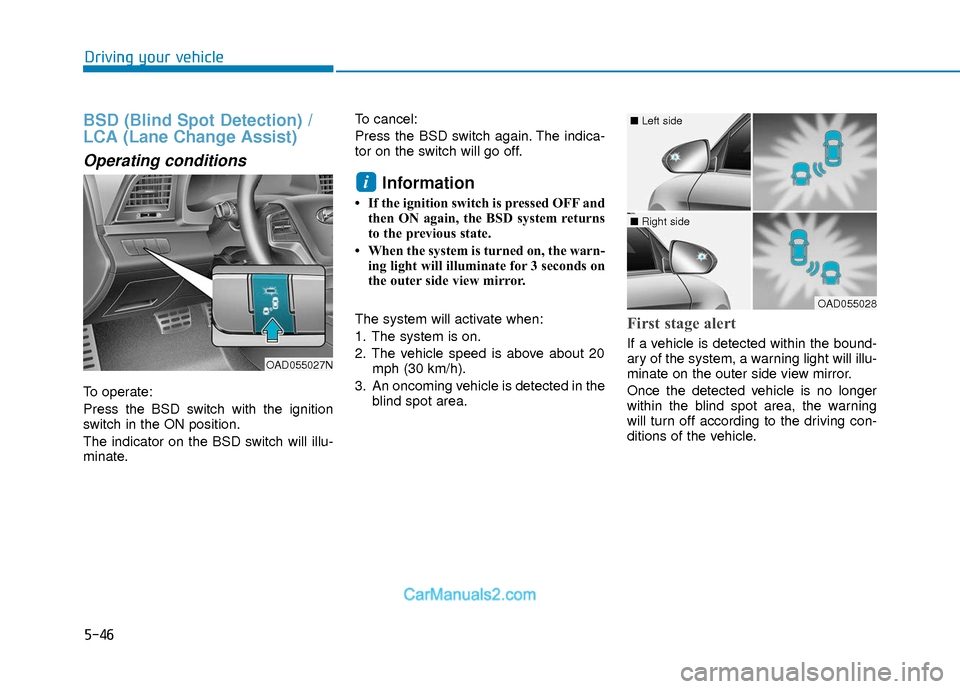
To operate:
Press the BSD switch with the ignition
switch in the ON position.
The indicator on the BSD switch will illu-
minate.To cancel:
Press the BSD switch again. The indica-
tor on the switch will go off.
Information
• If the ignition switch is pressed OFF and
then ON again, the BSD system returns
to the previous state.
• When the system is turned on, the warn- ing light will illuminate for 3 seconds on
the outer side view mirror.
The system will activate when:
1. The system is on.
2. The vehicle speed is above about 20 mph (30 km/h).
3. An oncoming vehicle is detected in the blind spot area.
First stage alert
If a vehicle is detected within the bound-
ary of the system, a warning light will illu-
minate on the outer side view mirror.
Once the detected vehicle is no longer
within the blind spot area, the warning
will turn off according to the driving con-
ditions of the vehicle.
i
OAD055027N
OAD055028
■ Left side
■ Right side
Page 330 of 526
5-47
Driving your vehicle
5
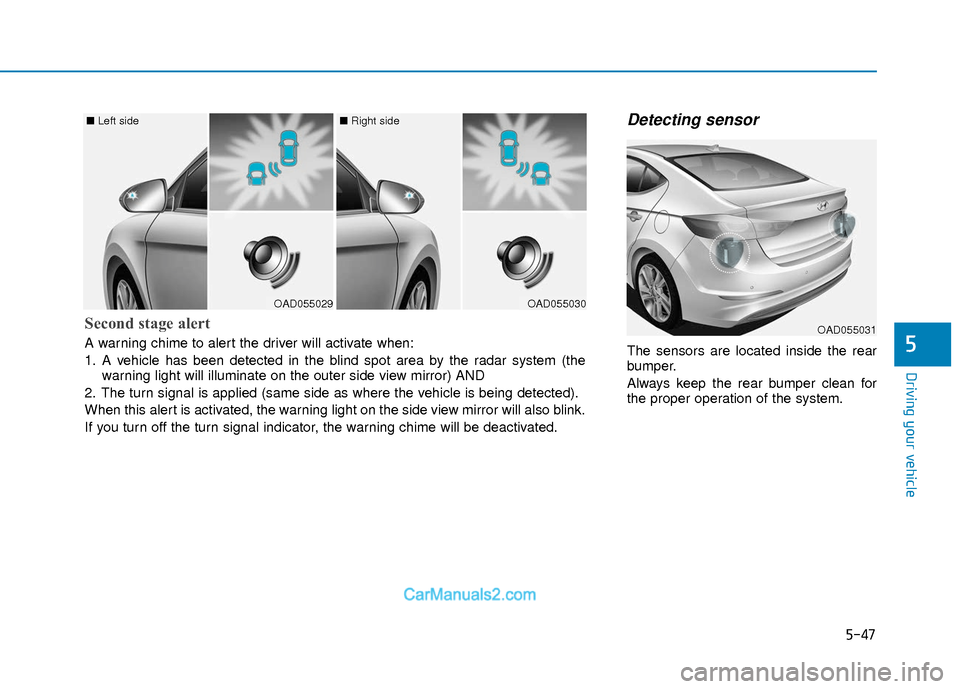
Detecting sensor
The sensors are located inside the rear
bumper.
Always keep the rear bumper clean for
the proper operation of the system.
OAD055029
■ Left side
OAD055030
■ Right side
Second stage alert
A warning chime to alert the driver will activate when:
1. A vehicle has been detected in the blind spot area by the radar system (the
warning light will illuminate on the outer side view mirror) AND
2. The turn signal is applied (same side as where the vehicle is being detected).
When this alert is activated, the warning light on the side view mirror will also blink.
If you turn off the turn signal indicator, the warning chime will be deactivated.OAD055031
Page 333 of 526
5-50
Driving your vehicle
Information
• The warning chime will turn off whenthe detected vehicle moves out of the
sensing area or if your vehicle is moved
away from the detected vehicle.
• The system may not operate properly due to other factors or circumstances.
Always pay attention to your surround-
ings.
• If the sensing area near the rear bumper is blocked by either a wall or barrier or
by a parked vehicle, the system sensing
area may be reduced. The system may not work properly
when the bumper has been dam-
aged, or if the rear bumper has been
replaced or repaired.
The sensing range differs some- what according to the width of the
road. When the road is narrow, the
system may detect other vehicles in
the next lane.
The system may turn off due to strong electromagnetic waves.
Non-operating condition
The BSD indicator on the outer side
view mirror may not illuminate
properly when:
- The outer side view mirror housing isdamaged.
- The mirror is covered with dirt, snow, or debris.
- The window is covered with dirt, snow, or debris.
- The window is tinted.
NOTICEi
The warning light on the outer
side view mirror will illuminate
whenever a vehicle is detected at
the rear side by the system.
To avoid accidents, do not focus
only on the warning light and
neglect to see the surrounding of
the vehicle. (Continued)
(Continued)
Drive safely even though the
vehicle is equipped with a Blind
Spot Detection System (BSD) and
Rear Cross Traffic Alert (RCTA).
Do not solely rely on the system
but check your surrounding
before changing lanes or backing
the vehicle up.
The system may not alert the
driver in some conditions so
always check your surroundings
while driving.
The Blind Spot Detection System
(BSD) and Rear Cross Traffic
Alert (RCTA) are not a substitute
for proper and safe driving prac-
tices. Always drive safely and use
caution when changing lanes or
backing up your vehicle. The
Blind Spot Detection System
(BSD) may not detect every
object alongside the vehicle.
WARNING