motor Hyundai Elantra 2018 User Guide
[x] Cancel search | Manufacturer: HYUNDAI, Model Year: 2018, Model line: Elantra, Model: Hyundai Elantra 2018Pages: 526, PDF Size: 17.2 MB
Page 112 of 526
3-35
Convenient features of your vehicle
3
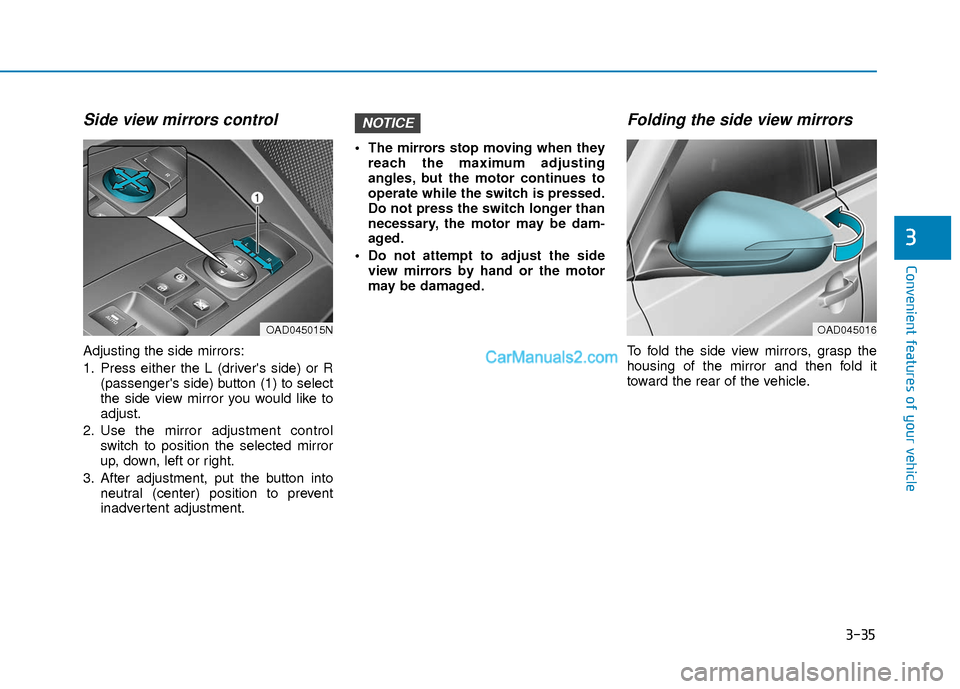
Side view mirrors control
Adjusting the side mirrors:
1. Press either the L (driver's side) or R(passenger's side) button (1) to select
the side view mirror you would like to
adjust.
2. Use the mirror adjustment control switch to position the selected mirror
up, down, left or right.
3. After adjustment, put the button into neutral (center) position to prevent
inadvertent adjustment. The mirrors stop moving when they
reach the maximum adjusting
angles, but the motor continues to
operate while the switch is pressed.
Do not press the switch longer than
necessary, the motor may be dam-
aged.
Do not attempt to adjust the side view mirrors by hand or the motor
may be damaged.
Folding the side view mirrors
To fold the side view mirrors, grasp the
housing of the mirror and then fold it
toward the rear of the vehicle.
NOTICE
OAD045015NOAD045016
Page 119 of 526
3-42
Convenient features of your vehicle
Do not continue to move the sun-roof control lever after the sunroof
is fully opened, closed, or tilted.
Damage to the motor or system
components could occur.
Make sure the sunroof is closed fully when leaving your vehicle.
If the sunroof is open, rain or snow
may leak through the sunroof and
wet the interior as well as allow
theft.
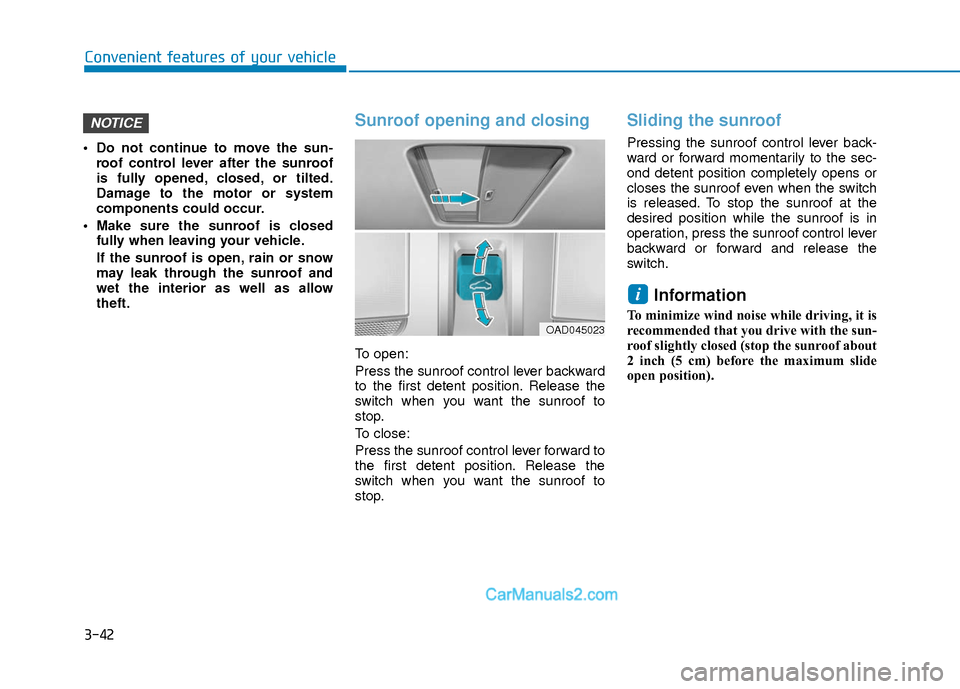
Sunroof opening and closing
To open:
Press the sunroof control lever backward
to the first detent position. Release the
switch when you want the sunroof to
stop.
To close:
Press the sunroof control lever forward to
the first detent position. Release the
switch when you want the sunroof to
stop.
Sliding the sunroof
Pressing the sunroof control lever back-
ward or forward momentarily to the sec-
ond detent position completely opens or
closes the sunroof even when the switch
is released. To stop the sunroof at the
desired position while the sunroof is in
operation, press the sunroof control lever
backward or forward and release the
switch.
Information
To minimize wind noise while driving, it is
recommended that you drive with the sun-
roof slightly closed (stop the sunroof about
2 inch (5 cm) before the maximum slide
open position).
i
NOTICE
OAD045023
Page 120 of 526
3-43
Convenient features of your vehicle
3
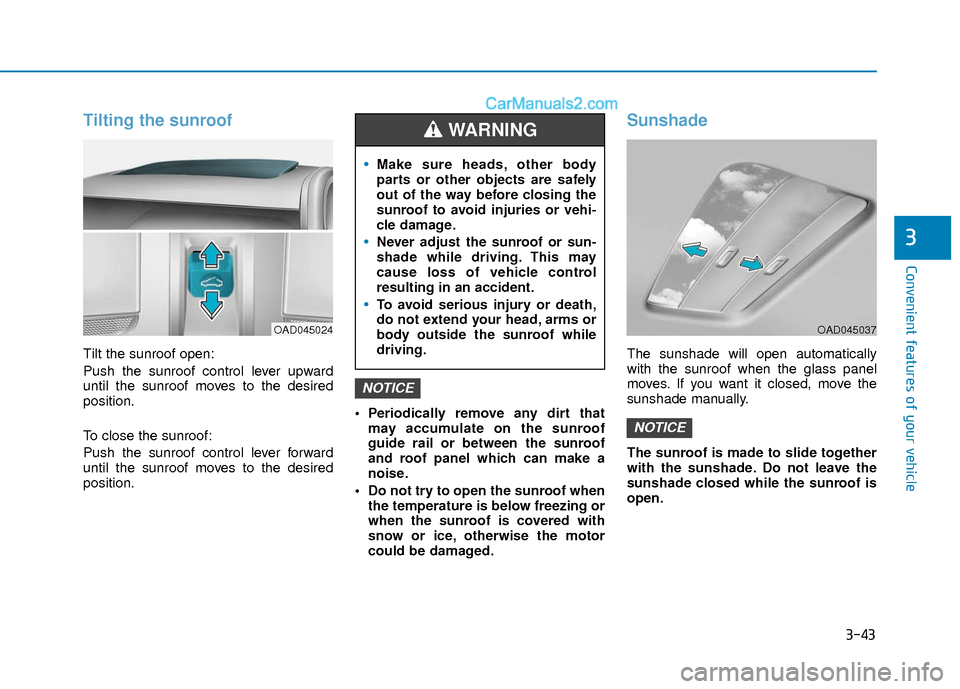
Tilting the sunroof
Tilt the sunroof open:
Push the sunroof control lever upward
until the sunroof moves to the desired
position.
To close the sunroof:
Push the sunroof control lever forward
until the sunroof moves to the desired
position. Periodically remove any dirt that
may accumulate on the sunroof
guide rail or between the sunroof
and roof panel which can make a
noise.
Do not try to open the sunroof when the temperature is below freezing or
when the sunroof is covered with
snow or ice, otherwise the motor
could be damaged.
Sunshade
The sunshade will open automatically
with the sunroof when the glass panel
moves. If you want it closed, move the
sunshade manually.
The sunroof is made to slide together
with the sunshade. Do not leave the
sunshade closed while the sunroof is
open.
NOTICE
NOTICE
OAD045024
Make sure heads, other body
parts or other objects are safely
out of the way before closing the
sunroof to avoid injuries or vehi-
cle damage.
Never adjust the sunroof or sun-
shade while driving. This may
cause loss of vehicle control
resulting in an accident.
To avoid serious injury or death,
do not extend your head, arms or
body outside the sunroof while
driving.
WARNING
OAD045037
Page 252 of 526
4-33
Multimedia System
4
SiriusXM®Satellite Radio
information (if equipped)
Satellite Radio channels :
Enjoy SiriusXM Satellite Radio with a 3-
month trial subscription to the SiriusXM
Select package. You’ll get over 140 chan-
nels, including commercial-free music,
plus all your favorite sports, exclusive
talk, entertainment, and a selection of
premium programming. For more infor-
mation and a complete list of SiriusXM
channels, visit siriusxm.com in the
United States, siriusxm.ca in Canada, or
call SiriusXM at 1-888-539-7474.
Satellite Radio reception factors :
To receive the satellite signal, your vehi-
cle has been equipped with a satellite
radio antenna located on the roof of your
vehicle. The vehicle roof provides the
best location for an unobstructed, open
view of the sky, a requirement of a satel-
lite radio system. Like AM/FM, there are
several factors that can affect satellite
radio reception performance :
Antenna obstructions : For optimal
reception performance, keep the
antenna clear of snow and ice build-up
and keep luggage and other material
as far away from the antenna as possi-
ble.
Terrain : Hills, mountains, tall buildings, bridges, tunnels, freeway overpasses,
parking garages, dense tree foliage
and thunderstorms can interfere with
your reception.
SiriusXM Satellite Radio service :
SiriusXM is a subscription-based satellite
radio service that broadcasts music,
sports, news and entertainment pro-
gramming to radio receivers, which are
available for installation in motor vehicles
or factory installed, as well as for the
home, portable and wireless devices,
and through an Internet connection on a
personal computer.
Vehicles that are equipped with a factory
installed SiriusXM Satellite Radio system
include :
Hardware and an introductory trial sub-scription term, which begins on the
date of sale or lease of the vehicle.
For a small upgrade fee, access to SiriusXM music channels, and other
select channels over the Internet using
any computer connected to the
Internet (U.S. customers only).
For information on extended subscrip-
tion terms, contact SiriusXM at 1-888-
539-7474.
Page 334 of 526
5-51
Driving your vehicle
5
Limitations of the System
The driver must be cautious in the below
situations, because the system may not
detect other vehicles or objects in certain
circumstances.
- The vehicle drives on a curved road orthrough a tollgate.
- The sensor is polluted with rain, snow, mud, etc.
- The rear bumper where the sensor is located is covered with a foreign object
such as a bumper sticker, a bumper
guard, a bike rack, etc.
- The rear bumper is damaged, or the sensor is out of the original default posi-
tion.
- The vehicle height gets lower or higher due to heavy loading in a trunk, abnor-
mal tire pressure, etc.
- The vehicle drives in inclement weather such as heavy rain or snow.
- There is a fixed object near the vehicle, such as a guardrail.
- A big vehicle is near such as a bus or truck.
- A motorcycle or bicycle is near.
- A flat trailer is near. - If the vehicle has started at the same
time as the vehicle next to you and has
accelerated.
- When the other vehicle passes at a very fast speed.
- While changing lanes.
- While going down or up a steep road where the height of the lane is different.
- When the other vehicle approaches very close.
- When a trailer or carrier is installed.
- When the temperature near the rear bumper area is high or low.
- When the sensors are blocked by the other vehicles, walls or parking-lot pil-
lars.
- When the detected vehicle also moves back, as your vehicle drives back.
- If there are small objects in the detect- ing area such as a shopping cart or a
baby stroller.
- If there is a low height vehicle such as a sports car.
- When other vehicles are close to your vehicle.
- When the vehicle in the next lane moves two lanes away from you OR
when the vehicle two lanes away moves
to the next lane from you. - When driving through a narrow road
with many trees or bushes.
- When driving on wet surface.
Information
This device complies with Part 15 of the
FCC rules.
Operation is subject to the following two
conditions:
1. This device may not cause harmful interference, and
2. This device must accept any interfer- ence received, including interference
that may cause undesired operation.
i
Page 341 of 526
5-58
Driving your vehicle
Limitations of the System
The Automatic Emergency Braking
(AEB) system is designed to monitor the
vehicle ahead or a pedestrian in the
roadway through radar signals and cam-
era recognition to warn the driver that a
collision is imminent, and if necessary,
apply emergency braking.
In certain situations, the radar sensor or
the camera may not be able to detect the
vehicle or pedestrian ahead. In these
cases, the AEB system may not operate
normally. The driver must pay careful
attention in the following situations where
the AEB operation may be limited.
Detecting vehicles
The sensor may be limited when:
- The radar sensor or camera is blockedwith a foreign object or debris.
- Inclement weather such as heavy rain or snow obscures the field of view of
the radar sensor or camera.
- There is interference by electromag- netic waves.
- There is severe irregular reflection from the radar sensor.
- The vehicle in front is too small to be detected by the camera recognition
system (for example a motorcycle or a
bicycle, etc.).
- The vehicle in front is an oversize vehi- cle or trailer that is too big to be detect-
ed by the camera recognition system
(for example a tractor trailer, etc.).
- The driver's field of view is not well illu- minated (either too dark or too much
reflection or too much backlight that
obscures the field of view).
- The vehicle in front does not have their rear lights properly turned ON.
- The outside brightness changes sud- denly, for example when entering or
exiting a tunnel.
(Continued)The brake control may be insuffi-
cient, possibly causing a colli-
sion, if a vehicle in front abruptly
stops. Always pay extreme cau-
tion.
Occupants may get injured, if the
vehicle abruptly stops by the acti-
vated AEB system. Pay extreme
caution.
Page 344 of 526
5-61
Driving your vehicle
5
Detecting pedestrians
The sensor may be limited when:
- The pedestrian is not fully detected bythe camera recognition system, for
example, if the pedestrian is leaning
over or is not fully walking upright.
- The pedestrian is moving very quickly or appears abruptly in the camera
detection area.
The pedestrian is wearing clothing that
easily blends into the background,
making it difficult to be detected by the
camera recognition system.
- The outside lighting is too bright (e.g. when driving in bright sunlight or in sun
glare) or too dark (e.g. when driving on
a dark rural road at night).
- It is difficult to detect and distinguish the pedestrian from other objects in the
surroundings, for example, when there
is a group of pedestrians or a large
crowd.Information
In some instances, the AEB system may be
cancelled when subjected to electromag-
netic interference.
Information
This device complies with Part 15 of the
FCC rules.
Operation is subject to the following two
conditions:
1. This device may not cause harmful interference, and
2. This device must accept any interfer- ence received, including interference
that may cause undesired operation.
i
i
Do not use the Automatic
Emergency Braking system when
towing a vehicle. Application of
the AEB system while towing
may adversely affect the safety of
your vehicle or the towing vehi-
cle.
Use extreme caution when the
vehicle in front of you has cargo
that extends rearward from the
cab, or when the vehicle in front
of you has higher ground clear-
ance.
The AEB system is designed to
detect and monitor the vehicle
ahead or detect a pedestrian in
the roadway through radar sig-
nals and camera recognition. It is
not designed to detect bicycles,
motorcycles, or smaller wheeled
objects such as luggage bags,
shopping carts, or strollers.
Never try to test the operation of
the AEB system. Doing so may
cause severe injury or death.
WARNING
Page 367 of 526
5-84
Driving your vehicle
Lane changing
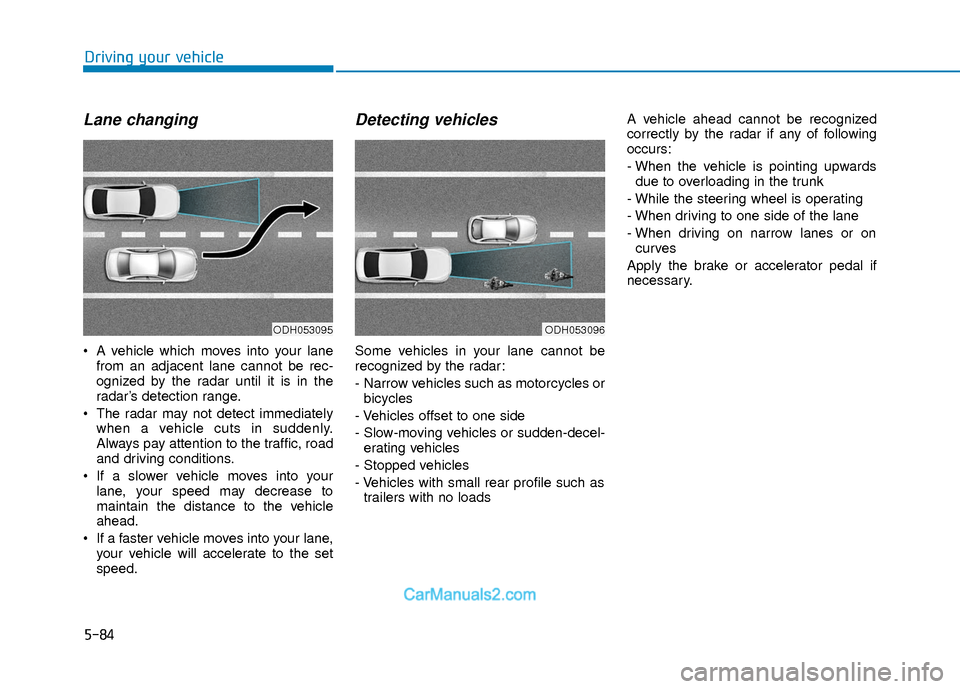
A vehicle which moves into your lanefrom an adjacent lane cannot be rec-
ognized by the radar until it is in the
radar’s detection range.
The radar may not detect immediately when a vehicle cuts in suddenly.
Always pay attention to the traffic, road
and driving conditions.
If a slower vehicle moves into your lane, your speed may decrease to
maintain the distance to the vehicle
ahead.
If a faster vehicle moves into your lane, your vehicle will accelerate to the set
speed.
Detecting vehicles
Some vehicles in your lane cannot be
recognized by the radar:
- Narrow vehicles such as motorcycles orbicycles
- Vehicles offset to one side
- Slow-moving vehicles or sudden-decel- erating vehicles
- Stopped vehicles
- Vehicles with small rear profile such as trailers with no loads A vehicle ahead cannot be recognized
correctly by the radar if any of following
occurs:
- When the vehicle is pointing upwards
due to overloading in the trunk
- While the steering wheel is operating
- When driving to one side of the lane
- When driving on narrow lanes or on curves
Apply the brake or accelerator pedal if
necessary.
ODH053095ODH053096
Page 402 of 526
6-21
What to do in an emergency
6
The Tire Mobility Kit is not designed
or intended as a permanent tire
repair method and is to be used for
one tire only.
This instruction shows you step by
step how to temporarily seal the
puncture simply and reliably.
Read the section "Notes on the safe
use of the Tire Mobility Kit".
Notes on the safe use of theTire Mobility Kit
Park your car at the side of the
road so that you can work with the
Tire Mobility Kit away from moving
traffic.
To be sure your vehicle will not move, even when you’re on fairly
level ground, always set your park-
ing brake.
Only use the Tire Mobility Kit for sealing/inflation passenger car
tires. Only punctured areas located
within the tread region of the tire
can be sealed using the tire mobil-
ity kit.
Do not use on motorcycles, bicy- cles or any other type of tires. When the tire and wheel are dam-
aged, do not use Tire Mobility Kit
for your safety.
Use of the Tire Mobility Kit may not be effective for tire damage larger
than approximately 0.24 inch (6
mm).
Please contact the nearest
HYUNDAI dealership if the tire
cannot be made roadworthy with
the Tire Mobility Kit.
Do not use the Tire Mobility Kit, if a flat tire or an under-inflated tire is
further severely damaged by being
continuously driven.
Do not remove any foreign objects such as nails or screws that have
penetrated the tire.
Provided the car is outdoors, leave the engine running. Otherwise
operating the compressor may
eventually drain the car battery.
Never leave the Tire Mobility Kit unattended while it is being used.
Do not leave the compressor run- ning for more than 10 minutes at a
time or it may overheat. Do not use the Tire Mobility Kit if
the ambient temperature is below
-22°F (-30°C).
sealant, wash the area thoroughly
with plenty of water. If the irritation
persists, seek medical attention.
sealant, flush your eyes for at least
15 minutes. If the irritation persists,
seek medical attention.
In case of swallowing the sealant, rinse the mouth and drink plenty of
water. However, never give any-
thing to an unconscious person
and seek medical attention imme-
diately.
Long time exposure to the sealant may cause damage to bodily tissue
such as kidney, etc.
Page 409 of 526
6-28
What to do in an emergency
The Tire Mobility Kit is not designed
or intended as a permanent tire
repair method and is to be used for
one tire only. This instruction shows
you step by step how to temporarily
seal the puncture simply and reliably.
Read the section "Notes on the safe
use of the Tire Mobility Kit".
Notes on the safe use of the
Tire Mobility Kit
Park your car at the side of the road so that you can work with the
Tire Mobility Kit away from moving
traffic.
To be sure your vehicle will not move, even when you're on fairly
level ground, always set your park-
ing brake.
Only use the Tire Mobility Kit for sealing/inflation passenger car tires.
Only punctured areas located with-
in the tread region of the tire can be
sealed using the tire mobility kit.
Do not use on motorcycles, bicy- cles or any other type of tires.
When the tire and wheel are dam- aged, do not use Tire Mobility Kit
for your safety.
Use of the Tire Mobility Kit may not be effective for tire damage larger
than approximately 6 mm (0.24 in).
If the tire cannot be made roadwor-
thy with the Tire Mobility Kit, we
recommend that you contact an
authorized HYUNDAI dealer.
Do not use the Tire Mobility Kit if a tire is severely damaged by driving run
flat or with insufficient air pressure. Do not remove any foreign objects
such as nails or screws that have
penetrated the tire.
Provided the car is outdoors, leave the engine running. Otherwise
operating the compressor may
eventually drain the car battery.
Never leave the Tire Mobility Kit unattended while it is being used.
Do not leave the compressor run- ning for more than 10 min. at a time
or it may overheat.
Do not use the Tire Mobility Kit if the ambient temperature is below
-30°C (-22°F).
In case of skin contact with the sealant, wash the area thoroughly
with plenty of water. If the irritation
persists, seek medical attention.
In case of eye contact with the sealant, flush your eyes for at least
15 minutes. If the irritation persists,
seek medical attention.
In case of swallowing the sealant, rinse the mouth and drink plenty of
water. However, never give anything
to an unconscious person and seek
medical attention immediately.
Long time exposure to the sealant may cause damage to bodily tissue
such as kidney, etc.
Do not use the TMK if a tire is
severely damaged by driving
run flat or with insufficient air
pressure.
Only punctured areas located
within the tread region of the
tire can be sealed using the
TMK.
WARNING