battery Hyundai Elantra 2018 Owner's Guide
[x] Cancel search | Manufacturer: HYUNDAI, Model Year: 2018, Model line: Elantra, Model: Hyundai Elantra 2018Pages: 526, PDF Size: 17.2 MB
Page 180 of 526
3-103
Convenient features of your vehicle
3
You can activate or deactivate the One
Touch Turn Signal function or choose the
number of blinking (3, 5, or 7) from the
User Settings Mode (Light) on the LCD
display.
For more information, refer to the
"LCD Display" section in this chapter.
Battery saver function
The purpose of this feature is to prevent
the battery from being discharged. The
system automatically turns off the park-
ing lamp when the key is removed
(remote key) or when the driver turns the
engine off (smart key) and opens the
driver-side door.
With this feature, the parking lamps will
turn off automatically if the driver parks
on the side of road at night.
If necessary, to keep the lamps on when
the engine is turned off, perform the fol-
lowing:
1) Open the driver-side door.
2) Turn the parking lamps OFF and ONagain using the light switch on the
steering column.
Headlamp delay function (if equipped)
If the key is removed from the ignition
switch or placed in the ACC position or
the LOCK/OFF position with the head-
lamps ON, the headlamps (and/or park-
ing lamps) remain on for about 5 min-
utes. However, if the driver’s door is
opened and closed, the headlights are
turned off after 15 seconds. Also, with the
engine off if the driver's door is opened
and closed, the headlamps (and/or park-
ing lamps) are turned off after 15 sec-
onds.
The headlamps (and/or parking lamps)
can be turned off by pressing the lock
button on the remote key or smart key
twice or turning the light switch to the
OFF or AUTO position.
You can activate or deactivate the
Headlamp Delay function from the User
Settings Mode (Light) on the LCD dis-
play.
For more information, refer to the
"LCD Display" section in this chapter. If the driver gets out of the vehicle
through other doors (except driver’s
door), the battery saver function does
not operate and the headlamp delay
function does not turn off automati-
cally. Therefore, It causes the battery
to be discharged. In this case, make
sure to turn off the lamp before get-
ting out of the vehicle.
NOTICE
Page 181 of 526
3-104
Convenient features of your vehicle
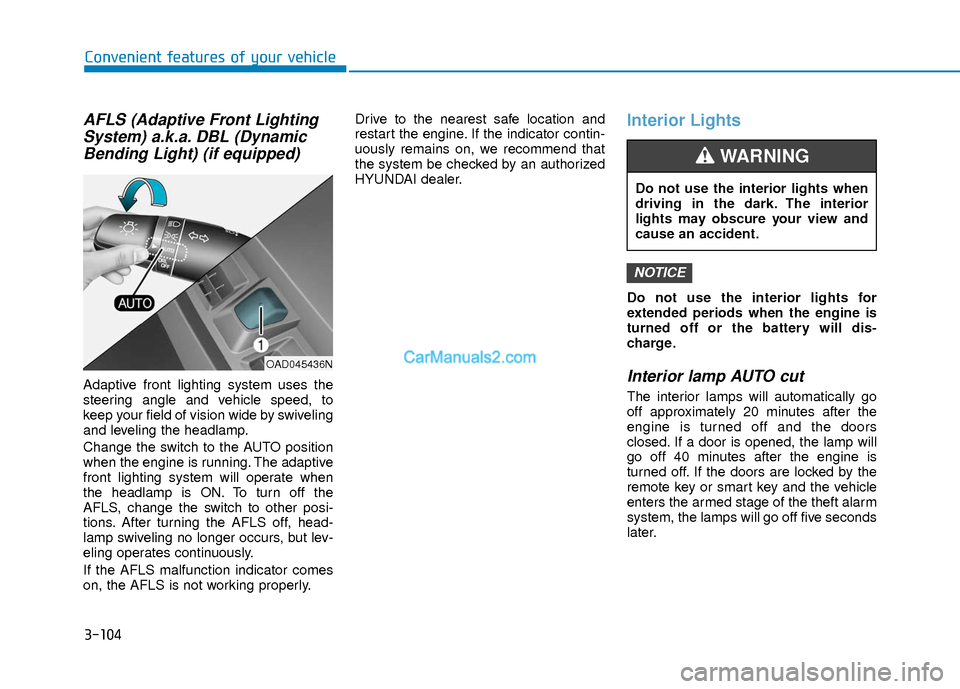
AFLS (Adaptive Front LightingSystem) a.k.a. DBL (DynamicBending Light) (if equipped)
Adaptive front lighting system uses the
steering angle and vehicle speed, to
keep your field of vision wide by swiveling
and leveling the headlamp.
Change the switch to the AUTO position
when the engine is running. The adaptive
front lighting system will operate when
the headlamp is ON. To turn off the
AFLS, change the switch to other posi-
tions. After turning the AFLS off, head-
lamp swiveling no longer occurs, but lev-
eling operates continuously.
If the AFLS malfunction indicator comes
on, the AFLS is not working properly. Drive to the nearest safe location and
restart the engine. If the indicator contin-
uously remains on, we recommend that
the system be checked by an authorized
HYUNDAI dealer.
Interior Lights
Do not use the interior lights for
extended periods when the engine is
turned off or the battery will dis-
charge.
Interior lamp AUTO cut
The interior lamps will automatically go
off approximately 20 minutes after the
engine is turned off and the doors
closed. If a door is opened, the lamp will
go off 40 minutes after the engine is
turned off. If the doors are locked by the
remote key or smart key and the vehicle
enters the armed stage of the theft alarm
system, the lamps will go off five seconds
later.
NOTICE
OAD045436N
Do not use the interior lights when
driving in the dark. The interior
lights may obscure your view and
cause an accident.
WARNING
Page 183 of 526
3-106
Convenient features of your vehicle
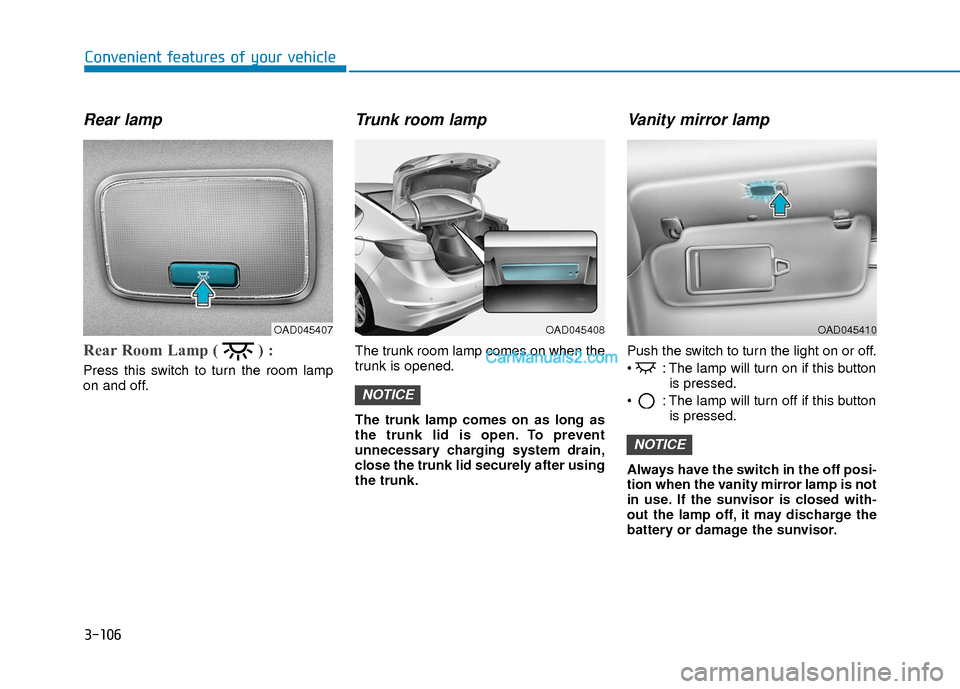
Rear lamp
Rear Room Lamp ( ) :
Press this switch to turn the room lamp
on and off.
Trunk room lamp
The trunk room lamp comes on when the
trunk is opened.
The trunk lamp comes on as long as
the trunk lid is open. To prevent
unnecessary charging system drain,
close the trunk lid securely after using
the trunk.
Vanity mirror lamp
Push the switch to turn the light on or off.
: The lamp will turn on if this buttonis pressed.
: The lamp will turn off if this button is pressed.
Always have the switch in the off posi-
tion when the vanity mirror lamp is not
in use. If the sunvisor is closed with-
out the lamp off, it may discharge the
battery or damage the sunvisor.
NOTICE
NOTICE
OAD045408OAD045407OAD045410
Page 197 of 526
3-120
Convenient features of your vehicle
A
AU
U T
TO
O M
M A
AT
TI
IC
C
C
C L
LI
IM
M A
AT
TE
E
C
C O
O N
NT
TR
R O
O L
L
S
S Y
Y S
ST
T E
EM
M
OAD045310
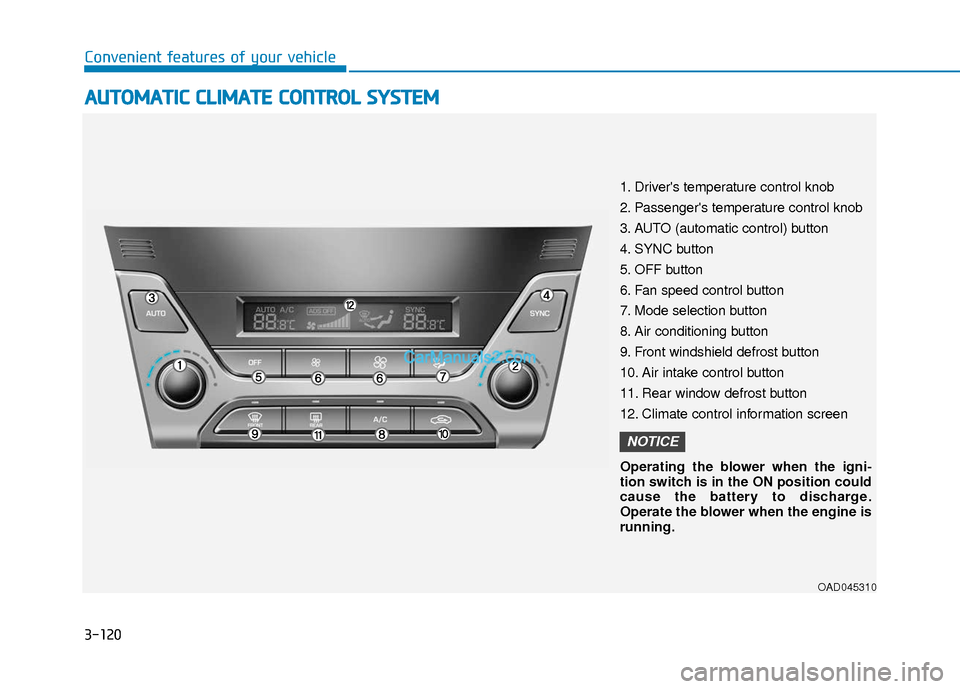
1. Driver's temperature control knob
2. Passenger's temperature control knob
3. AUTO (automatic control) button
4. SYNC button
5. OFF button
6. Fan speed control button
7. Mode selection button
8. Air conditioning button
9. Front windshield defrost button
10. Air intake control button
11. Rear window defrost button
12. Climate control information screen
Operating the blower when the igni-
tion switch is in the ON position could
cause the battery to discharge.
Operate the blower when the engine is
running.
NOTICE
Page 203 of 526
3-126
Convenient features of your vehicle
Temperature conversion
If the battery has been discharged or dis-
connected, the temperature mode dis-
play will reset to Fahrenheit.
To change the temperature unit from °F
to °C or °C to °F:
- On the instrument cluster, go to UserSettings Mode ➝ Other Features ➝
Temperature Unit.
- Press the AUTO button for 3 seconds while pressing the OFF button.
(Automatic climate control system)
Both the temperature unit on the cluster
LCD display and climate control screen
will change.
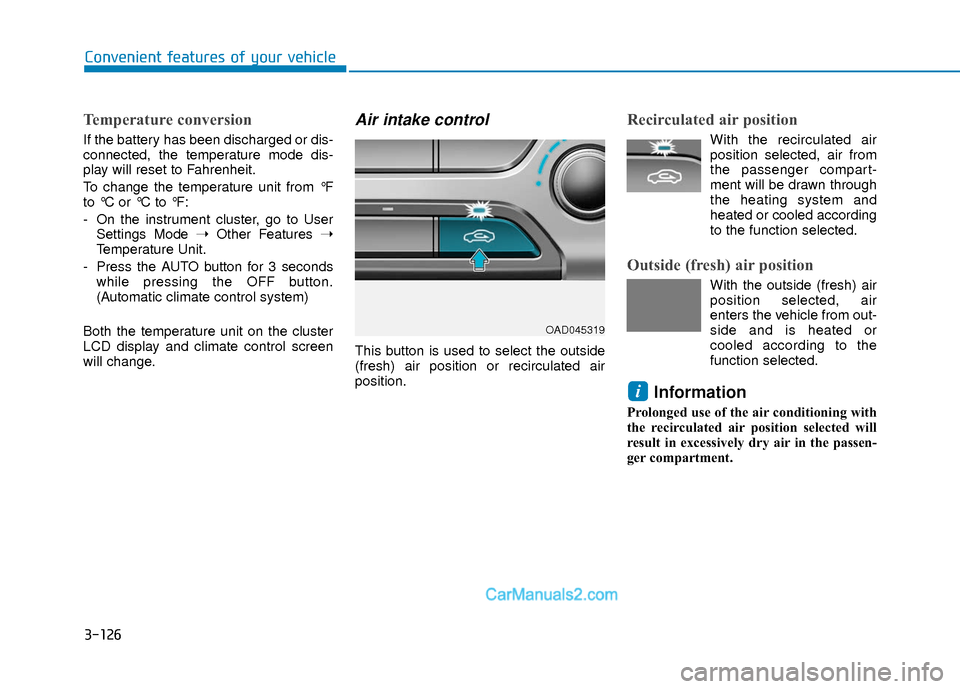
Air intake control
This button is used to select the outside
(fresh) air position or recirculated air
position.
Recirculated air position
With the recirculated air position selected, air from
the passenger compart-
ment will be drawn through
the heating system and
heated or cooled according
to the function selected.
Outside (fresh) air position
With the outside (fresh) air position selected, air
enters the vehicle from out-
side and is heated or
cooled according to the
function selected.
Information
Prolonged use of the air conditioning with
the recirculated air position selected will
result in excessively dry air in the passen-
ger compartment.
i
OAD045319
Page 210 of 526
3-133
Convenient features of your vehicle
3
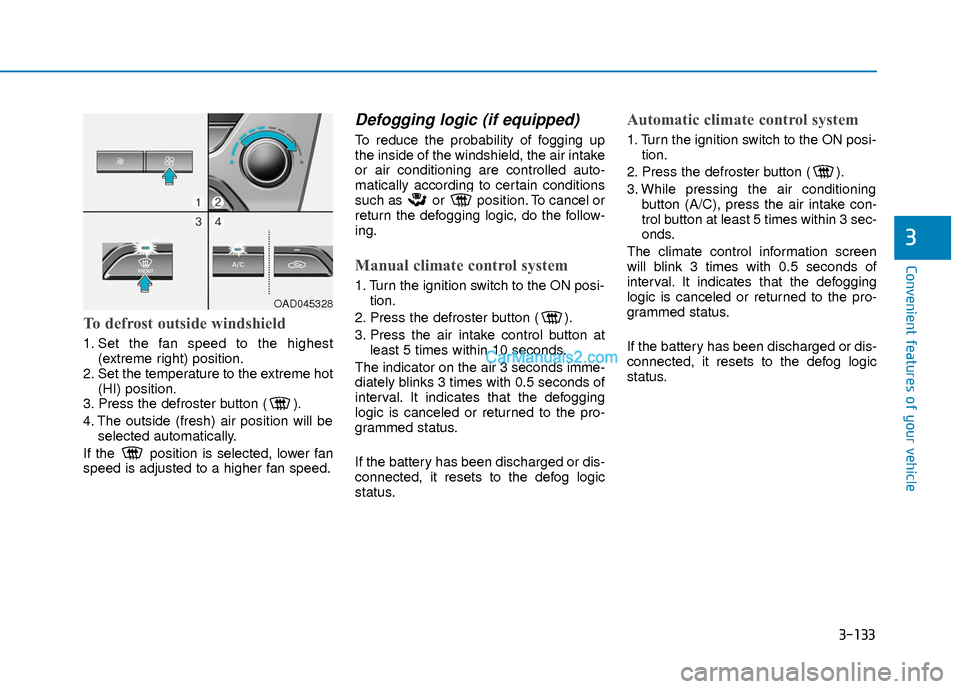
To defrost outside windshield
1. Set the fan speed to the highest(extreme right) position.
2. Set the temperature to the extreme hot (HI) position.
3. Press the defroster button ( ).
4. The outside (fresh) air position will be selected automatically.
If the position is selected, lower fan
speed is adjusted to a higher fan speed.
Defogging logic (if equipped)
To reduce the probability of fogging up
the inside of the windshield, the air intake
or air conditioning are controlled auto-
matically according to certain conditions
such as or position. To cancel or
return the defogging logic, do the follow-
ing.
Manual climate control system
1. Turn the ignition switch to the ON posi- tion.
2. Press the defroster button ( ).
3. Press the air intake control button at least 5 times within 10 seconds.
The indicator on the air 3 seconds imme-
diately blinks 3 times with 0.5 seconds of
interval. It indicates that the defogging
logic is canceled or returned to the pro-
grammed status.
If the battery has been discharged or dis-
connected, it resets to the defog logic
status.
Automatic climate control system
1. Turn the ignition switch to the ON posi- tion.
2. Press the defroster button ( ).
3. While pressing the air conditioning button (A/C), press the air intake con-
trol button at least 5 times within 3 sec-
onds.
The climate control information screen
will blink 3 times with 0.5 seconds of
interval. It indicates that the defogging
logic is canceled or returned to the pro-
grammed status.
If the battery has been discharged or dis-
connected, it resets to the defog logic
status.
OAD045328
Page 217 of 526
3-140
Convenient features of your vehicle
To prevent damage to the Power
Outlets :
Use the power outlet only when theengine is running and remove the
accessory plug after use. Using the
accessory plug for prolonged peri-
ods of time with the engine off could
cause the battery to discharge.
Only use 12V electric accessories which are less than 180 W (Watts) in
electric capacity.
Adjust the air-conditioner or heater to the lowest operating level when
using the power outlet.
Close the cover when not in use. (Continued)(Continued)
Some electronic devices can cause
electronic interference when
plugged into a vehicle’s power out-
let. These devices may cause exces-
sive audio static and malfunctions
in other electronic systems or
devices used in your vehicle.
Push the plug in as far as it will go. If good contact is not made, the
plug may overheat and the fuse may
open.
Plug in battery equipped electri- cal/electronic devices with reverse
current protection. The current from
the battery may flow into the vehi-
cle's electrical/electronic system
and cause system malfunction.
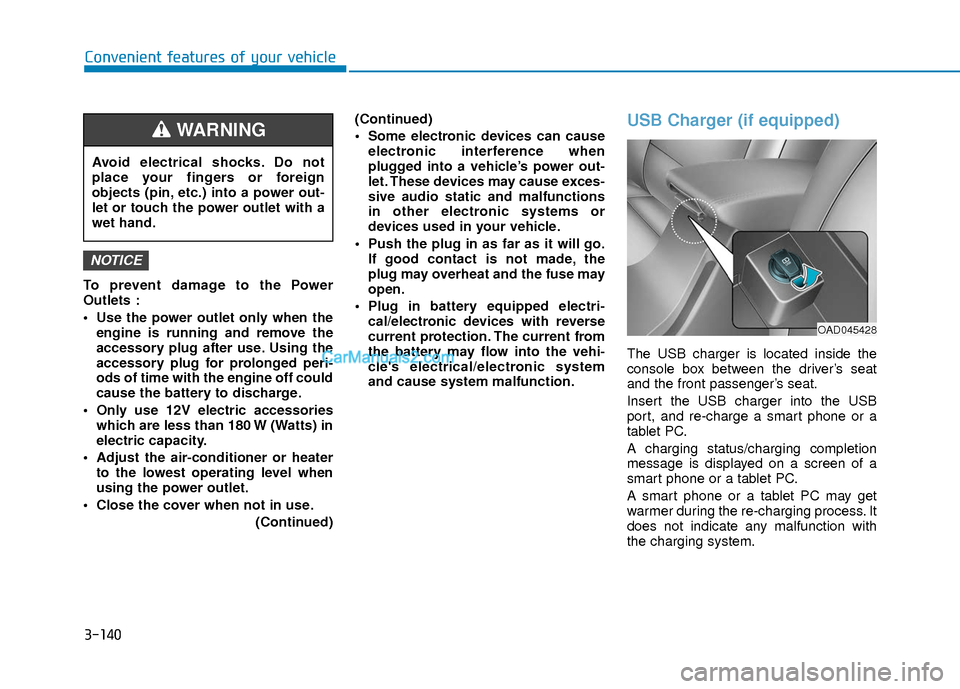
USB Charger (if equipped)
The USB charger is located inside the
console box between the driver’s seat
and the front passenger’s seat.
Insert the USB charger into the USB
port, and re-charge a smart phone or a
tablet PC.
A charging status/charging completion
message is displayed on a screen of a
smart phone or a tablet PC.
A smart phone or a tablet PC may get
warmer during the re-charging process. It
does not indicate any malfunction with
the charging system.
NOTICE
Avoid electrical shocks. Do not
place your fingers or foreign
objects (pin, etc.) into a power out-
let or touch the power outlet with a
wet hand.
WARNING
OAD045428
Page 232 of 526
(Continued)
• For fifth generation iPod®Nano devices,
the iPod®may not be recognized when
the battery level is low. Please charge
the iPod
®for use.
• Search/play orders shown within the iPod
®device may differ with the orders
shown within the audio system.
• If the iPod
®malfunctions due to an iPod®
device defect, reset the iPod®and try
again. (To learn more, refer to your iPod®
manual)
• Some iPod®s may not sync with the
System depending on its version. If the
Media is removed before the Media is
recognized, then the system may not
properly restore the previously operated
mode. (iPad
®charging is not support-
ed.)
Information - Using the AUX device
• If an external device connector is con- nected with the AUX terminal, then
AUX mode will automatically operate.
Once the connector is disconnected, the
previous mode will be restored.
• AUX mode can be used only when an external audio player (camcorder, in-car
DVD player, etc.) has been connected.
• The AUX volume can be controlled sep- arately from other audio modes.
• Connecting a connector jack to the AUX terminal without an external device will
convert the system to AUX mode, but
only output noise. When an external
device is not being used, also remove the
connector jack.
• When the external device power is con- nected to the power jack, playing the
external device may output noise. In
such cases, disconnect the power con-
nection before use.
• Fully insert the AUX cable to the AUX jack upon use.Information - Before using the
Bluetooth®handsfree
What is Bluetooth®?
• Bluetooth®refers to a short-distance
wireless networking technology which
uses a 2.4GHz ~ 2.48GHz frequency to
connect various devices within a certain
distance.
• Supported within PCs, external devices, Bluetooth
®phones, PDAs, various elec-
tronic devices, and automotive environ-
ments, Bluetooth
®allows data to be trans-
mitted at high speeds without having to
use a connector cable.
• Bluetooth
®Handsfree refers to a device
which allows the user to conveniently
make phone calls with Bluetooth
®
mobile phones through the audio system.
• Bluetooth®Handsfree may not be support-
ed in some mobile phones. To learn more
about mobile device compatibility, visit
www
. hyundaiusa.com.
ii
4-13
Multimedia System
4
Page 233 of 526
Information - Precautions for
safe driving
• Bluetooth
®Handsfree is a feature that
enables drivers to practice safe driving.
Connecting the head unit with a
Bluetooth
®phone allows the user to
conveniently make and receive calls and
use contacts. Before using Bluetooth
®,
carefully read the contents of this user’s
manual.
• Excessive use or operations while driv- ing may lead to negligent driving prac-
tices and result in accidents. Refrain
from excessive operations while driving.
• Viewing the screen for prolonged peri- ods of time is dangerous and may lead to
accidents. When driving, view the
screen only for short periods of time.
Information - When connecting
a Bluetooth®phone
• Before connecting the head unit with the mobile phone, check to see that the
mobile phone supports Bluetooth
®fea-
tures.
• Even if the phone supports Bluetooth
®,
the phone will not be found during
device searches if the phone has been set
to hidden state or the Bluetooth
®power
is turned off. Disable the hidden state or
turn on the Bluetooth
®power prior to
searching/connecting with the Head
unit.
• Bluetooth
®phone is automatically con-
nected when the ignition on.
• If you do not want automatic connection with your Bluetooth
®device, turn off
the Bluetooth®feature within your
mobile phone.
• The Handsfree call volume and quality may differ depending on the mobile
phone.
(Continued)(Continued)
• Park the vehicle when connecting the
head unit with the mobile phone.
• Bluetooth
®connection may become
intermittently disconnected in some
mobile phones. Follow these steps to try
again.
1. Within the mobile phone, turn the Bluetooth
®function off/on and try
again.
2. Turn the mobile phone power Off/On and try again.
3. Completely remove the mobile phone battery, reboot, and then again.
4. Reboot the Audio System and try again.
5. Delete all paired devices, pair and try again.
• Handsfree call quality and volume may differ depending on the model of your
mobile phone.
ii
4-14
Multimedia System
Page 244 of 526
4-25
Multimedia System
4
Information
Turn on the car ignition before using this
device. Do not operate the audio system
for long periods of time with the ignition
turned off as such operations may lead to
battery discharge.
Do not subject the device to severeshock or impact. Direct pressure
onto the front side of the monitor
may cause damage to the LCD or
touch screen.
When cleaning the device, make sure to turn off the device and use a
dry and smooth cloth. Never use
rough materials, chemical cloths, or
solvents (alcohol, benzene, thin-
ners, etc.) as such materials may
damage the device panel or cause
color/quality deterioration.
Do not place beverages close to the audio system. Spilling beverages
may lead to system malfunction.
Placing the audio system within an electromagnetic environment may
result in noise interference.
Information
In case of product malfunction, please
contact your dealer or vehicle service cen-
ter.
i
NOTICE
i(Continued)
Do not touch the antenna during
thunder or lightening as such
acts may lead to lightning
induced electric shock.
Do not stop or park in parking-
restricted areas to operate the
product. Such acts could lead to
traffic accidents.
Distracted Driving
Driving while distracted can result
in a loss of vehicle control that may
lead to an accident, severe person-
al injury, and death. The driver’s pri-
mary responsibility is in the safe
and legal operation of a vehicle,
and use of any handheld devices,
other equipment, or vehicle sys-
tems which take the driver’s eyes,
attention and focus away from the
safe operation of a vehicle or which
are not permissible by law should
never be used during operation of
the vehicle.
WARNING