remove Hyundai Elantra 2018 Owner's Guide
[x] Cancel search | Manufacturer: HYUNDAI, Model Year: 2018, Model line: Elantra, Model: Hyundai Elantra 2018Pages: 526, PDF Size: 17.2 MB
Page 211 of 526
3-134
Convenient features of your vehicle
Auto Defogging System (Only
for Automatic Climate Control
System, if equipped)
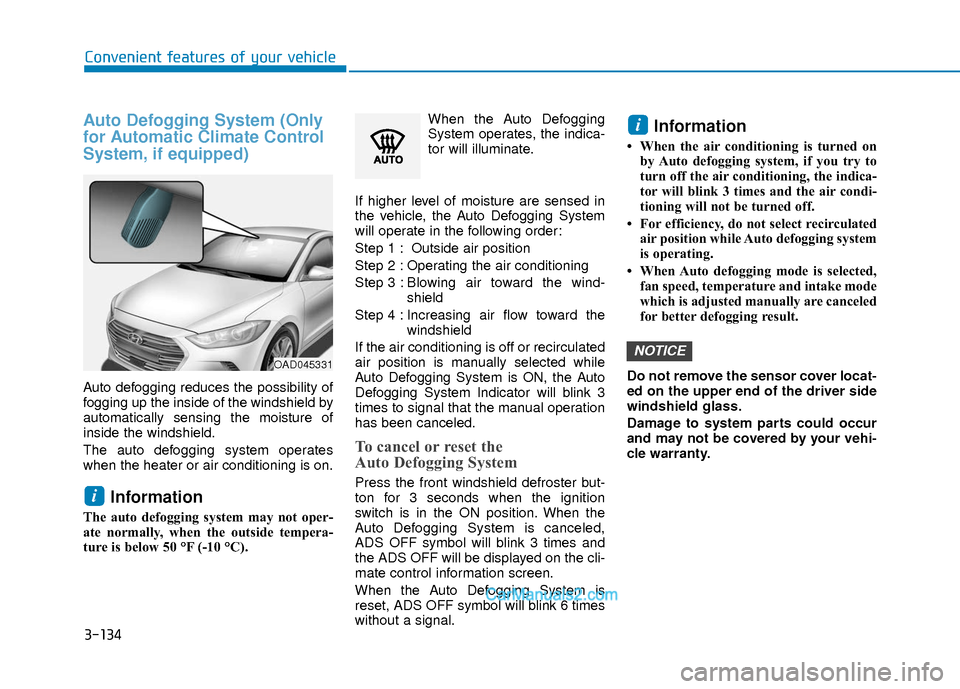
Auto defogging reduces the possibility of
fogging up the inside of the windshield by
automatically sensing the moisture of
inside the windshield.
The auto defogging system operates
when the heater or air conditioning is on.
Information
The auto defogging system may not oper-
ate normally, when the outside tempera-
ture is below 50 °F (-10 °C).When the Auto Defogging
System operates, the indica-
tor will illuminate.
If higher level of moisture are sensed in
the vehicle, the Auto Defogging System
will operate in the following order:
Step 1 : Outside air position
Step 2 : Operating the air conditioning
Step 3 : Blo wing air toward the wind-
shield
Step 4 : Increasing air flow toward the windshield
If the air conditioning is off or recirculated
air position is manually selected while
Auto Defogging System is ON, the Auto
Defogging System Indicator will blink 3
times to signal that the manual operation
has been canceled.
To cancel or reset the
Auto Defogging System
Press the front windshield defroster but-
ton for 3 seconds when the ignition
switch is in the ON position. When the
Auto Defogging System is canceled,
ADS OFF symbol will blink 3 times and
the ADS OFF will be displayed on the cli-
mate control information screen.
When the Auto Defogging System is
reset, ADS OFF symbol will blink 6 times
without a signal.
Information
• When the air conditioning is turned on by Auto defogging system, if you try to
turn off the air conditioning, the indica-
tor will blink 3 times and the air condi-
tioning will not be turned off.
• For efficiency, do not select recirculated air position while Auto defogging system
is operating.
• When Auto defogging mode is selected, fan speed, temperature and intake mode
which is adjusted manually are canceled
for better defogging result.
Do not remove the sensor cover locat-
ed on the upper end of the driver side
windshield glass.
Damage to system parts could occur
and may not be covered by your vehi-
cle warranty.
NOTICE
i
i
OAD045331
Page 215 of 526
3-138
Convenient features of your vehicle
I
IN
N T
TE
ER
R I
IO
O R
R
F
F E
E A
A T
TU
U R
RE
ES
S
Cup Holder
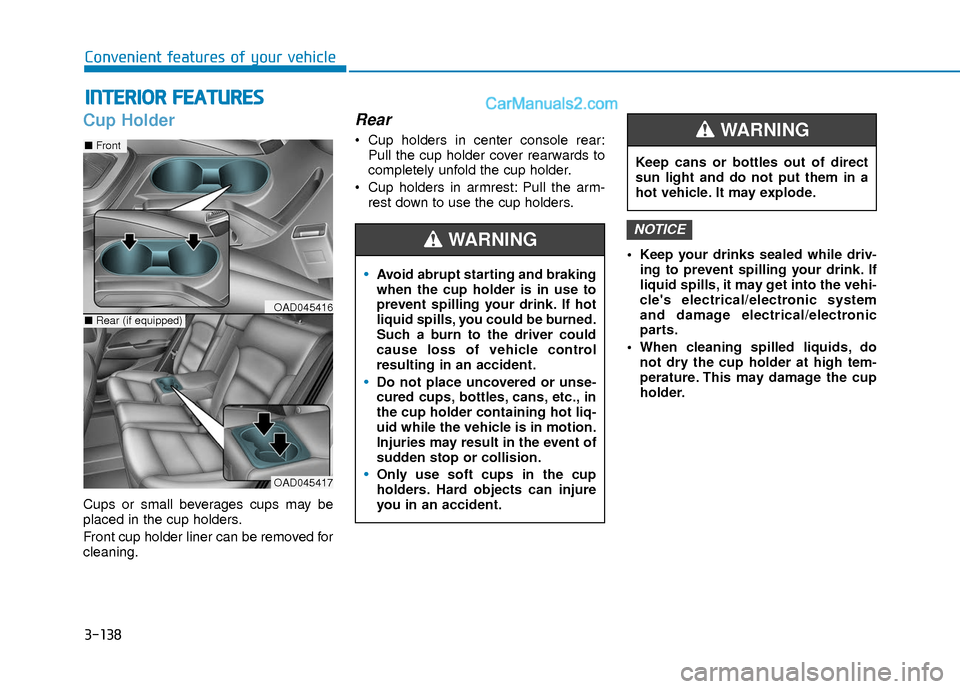
Cups or small beverages cups may be
placed in the cup holders.
Front cup holder liner can be removed for
cleaning.
Rear
Cup holders in center console rear:
Pull the cup holder cover rearwards to
completely unfold the cup holder.
Cup holders in armrest: Pull the arm- rest down to use the cup holders.
Keep your drinks sealed while driv-ing to prevent spilling your drink. If
liquid spills, it may get into the vehi-
cle's electrical/electronic system
and damage electrical/electronic
parts.
When cleaning spilled liquids, do not dry the cup holder at high tem-
perature. This may damage the cup
holder.
NOTICE
Avoid abrupt starting and braking
when the cup holder is in use to
prevent spilling your drink. If hot
liquid spills, you could be burned.
Such a burn to the driver could
cause loss of vehicle control
resulting in an accident.
Do not place uncovered or unse-
cured cups, bottles, cans, etc., in
the cup holder containing hot liq-
uid while the vehicle is in motion.
Injuries may result in the event of
sudden stop or collision.
Only use soft cups in the cup
holders. Hard objects can injure
you in an accident.
WARNING
Keep cans or bottles out of direct
sun light and do not put them in a
hot vehicle. It may explode.
WARNING
OAD045417
■ Front
■Rear (if equipped)OAD045416
Page 217 of 526
3-140
Convenient features of your vehicle
To prevent damage to the Power
Outlets :
Use the power outlet only when theengine is running and remove the
accessory plug after use. Using the
accessory plug for prolonged peri-
ods of time with the engine off could
cause the battery to discharge.
Only use 12V electric accessories which are less than 180 W (Watts) in
electric capacity.
Adjust the air-conditioner or heater to the lowest operating level when
using the power outlet.
Close the cover when not in use. (Continued)(Continued)
Some electronic devices can cause
electronic interference when
plugged into a vehicle’s power out-
let. These devices may cause exces-
sive audio static and malfunctions
in other electronic systems or
devices used in your vehicle.
Push the plug in as far as it will go. If good contact is not made, the
plug may overheat and the fuse may
open.
Plug in battery equipped electri- cal/electronic devices with reverse
current protection. The current from
the battery may flow into the vehi-
cle's electrical/electronic system
and cause system malfunction.
USB Charger (if equipped)
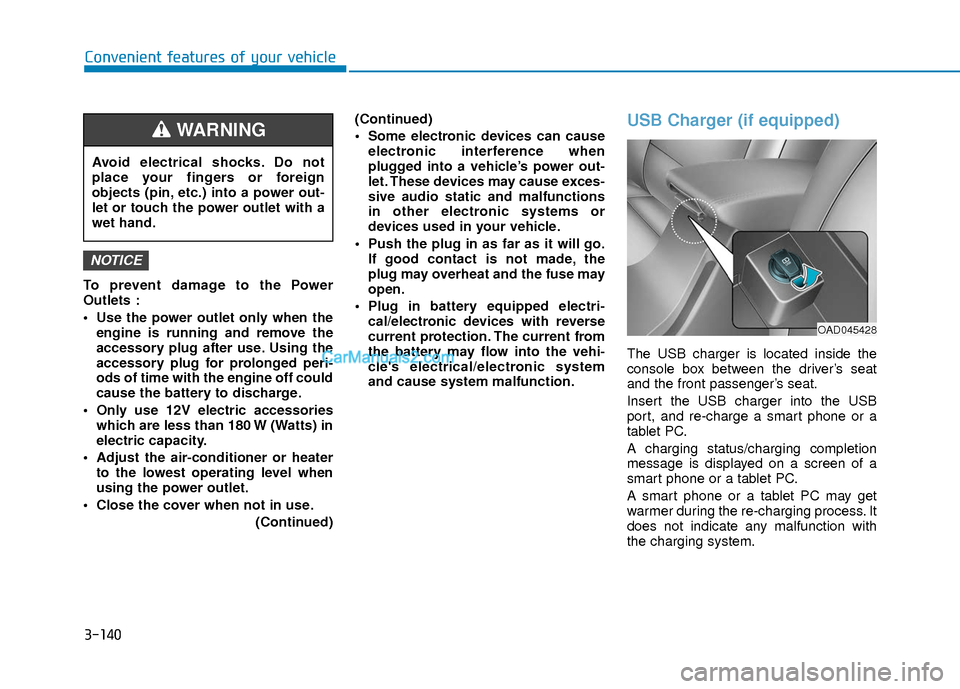
The USB charger is located inside the
console box between the driver’s seat
and the front passenger’s seat.
Insert the USB charger into the USB
port, and re-charge a smart phone or a
tablet PC.
A charging status/charging completion
message is displayed on a screen of a
smart phone or a tablet PC.
A smart phone or a tablet PC may get
warmer during the re-charging process. It
does not indicate any malfunction with
the charging system.
NOTICE
Avoid electrical shocks. Do not
place your fingers or foreign
objects (pin, etc.) into a power out-
let or touch the power outlet with a
wet hand.
WARNING
OAD045428
Page 222 of 526
4-3
Multimedia System
4
Do not clean the inside of the rearglass window with a cleaner or
scraper to remove foreign deposits
as this may cause damage to the
antenna elements.
Avoid adding metallic coatings to the rear glass window. These can
degrade AM and FM broadcast sig-
nals.
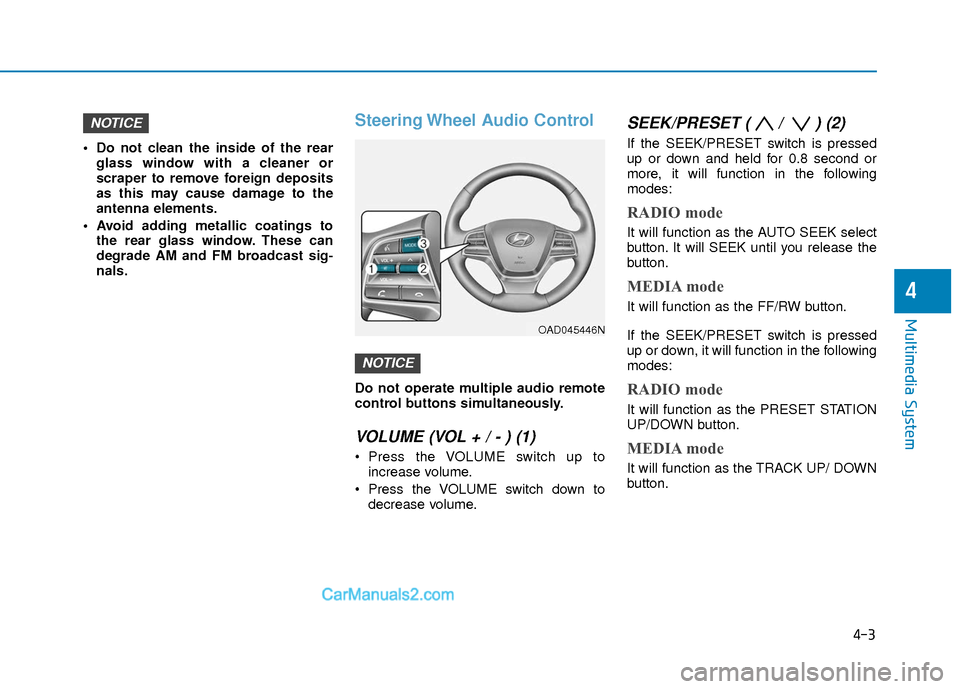
Steering Wheel Audio Control
Do not operate multiple audio remote
control buttons simultaneously.
VOLUME (VOL + / - ) (1)
Press the VOLUME switch up toincrease volume.
Press the VOLUME switch down to decrease volume.
SEEK/PRESET ( / ) (2)
If the SEEK/PRESET switch is pressed
up or down and held for 0.8 second or
more, it will function in the following
modes:
RADIO mode
It will function as the AUTO SEEK select
button. It will SEEK until you release the
button.
MEDIA mode
It will function as the FF/RW button.
If the SEEK/PRESET switch is pressed
up or down, it will function in the following
modes:
RADIO mode
It will function as the PRESET STATION
UP/DOWN button.
MEDIA mode
It will function as the TRACK UP/ DOWN
button.
NOTICE
NOTICE
OAD045446N
Page 232 of 526
(Continued)
• For fifth generation iPod®Nano devices,
the iPod®may not be recognized when
the battery level is low. Please charge
the iPod
®for use.
• Search/play orders shown within the iPod
®device may differ with the orders
shown within the audio system.
• If the iPod
®malfunctions due to an iPod®
device defect, reset the iPod®and try
again. (To learn more, refer to your iPod®
manual)
• Some iPod®s may not sync with the
System depending on its version. If the
Media is removed before the Media is
recognized, then the system may not
properly restore the previously operated
mode. (iPad
®charging is not support-
ed.)
Information - Using the AUX device
• If an external device connector is con- nected with the AUX terminal, then
AUX mode will automatically operate.
Once the connector is disconnected, the
previous mode will be restored.
• AUX mode can be used only when an external audio player (camcorder, in-car
DVD player, etc.) has been connected.
• The AUX volume can be controlled sep- arately from other audio modes.
• Connecting a connector jack to the AUX terminal without an external device will
convert the system to AUX mode, but
only output noise. When an external
device is not being used, also remove the
connector jack.
• When the external device power is con- nected to the power jack, playing the
external device may output noise. In
such cases, disconnect the power con-
nection before use.
• Fully insert the AUX cable to the AUX jack upon use.Information - Before using the
Bluetooth®handsfree
What is Bluetooth®?
• Bluetooth®refers to a short-distance
wireless networking technology which
uses a 2.4GHz ~ 2.48GHz frequency to
connect various devices within a certain
distance.
• Supported within PCs, external devices, Bluetooth
®phones, PDAs, various elec-
tronic devices, and automotive environ-
ments, Bluetooth
®allows data to be trans-
mitted at high speeds without having to
use a connector cable.
• Bluetooth
®Handsfree refers to a device
which allows the user to conveniently
make phone calls with Bluetooth
®
mobile phones through the audio system.
• Bluetooth®Handsfree may not be support-
ed in some mobile phones. To learn more
about mobile device compatibility, visit
www
. hyundaiusa.com.
ii
4-13
Multimedia System
4
Page 233 of 526
Information - Precautions for
safe driving
• Bluetooth
®Handsfree is a feature that
enables drivers to practice safe driving.
Connecting the head unit with a
Bluetooth
®phone allows the user to
conveniently make and receive calls and
use contacts. Before using Bluetooth
®,
carefully read the contents of this user’s
manual.
• Excessive use or operations while driv- ing may lead to negligent driving prac-
tices and result in accidents. Refrain
from excessive operations while driving.
• Viewing the screen for prolonged peri- ods of time is dangerous and may lead to
accidents. When driving, view the
screen only for short periods of time.
Information - When connecting
a Bluetooth®phone
• Before connecting the head unit with the mobile phone, check to see that the
mobile phone supports Bluetooth
®fea-
tures.
• Even if the phone supports Bluetooth
®,
the phone will not be found during
device searches if the phone has been set
to hidden state or the Bluetooth
®power
is turned off. Disable the hidden state or
turn on the Bluetooth
®power prior to
searching/connecting with the Head
unit.
• Bluetooth
®phone is automatically con-
nected when the ignition on.
• If you do not want automatic connection with your Bluetooth
®device, turn off
the Bluetooth®feature within your
mobile phone.
• The Handsfree call volume and quality may differ depending on the mobile
phone.
(Continued)(Continued)
• Park the vehicle when connecting the
head unit with the mobile phone.
• Bluetooth
®connection may become
intermittently disconnected in some
mobile phones. Follow these steps to try
again.
1. Within the mobile phone, turn the Bluetooth
®function off/on and try
again.
2. Turn the mobile phone power Off/On and try again.
3. Completely remove the mobile phone battery, reboot, and then again.
4. Reboot the Audio System and try again.
5. Delete all paired devices, pair and try again.
• Handsfree call quality and volume may differ depending on the model of your
mobile phone.
ii
4-14
Multimedia System
Page 249 of 526
4-30
Multimedia System
(Continued)
•Bluetooth®Wireless Technology connec-
tion may become intermittently discon-
nected in some mobile phones. Follow
these steps to try again.
1) Turn the Bluetooth
®Wireless
Technology function within the mobile
phone off/on and try again.
2) Turn the mobile phone power Off/On and try again.
3) Completely remove the mobile phone battery, reboot, and then try again.
4) Reboot the audio system and try again.
5) Delete all paired devices, pair and try again.
• It is possible to pair up to five Bluetooth
®Wireless Technology devices
to the car system.
• Phone contact names should be saved in English or they may not be displayed
correctly.
• The Handsfree call volume and quality may differ depending on the mobile
phone.
• Only one Bluetooth
®Wireless
Technology device can be connected at a
time.
(Continued)(Continued)
• In some mobile phones, starting the
ignition while talking through
Bluetooth
®Wireless Technology enabled
handsfree call will result in the call
becoming disconnected. (Switch the call
back to your mobile phone when start-
ing the ignition.)
• If the mobile phone is not paired or con- nected, it is not possible to enter Phone
mode. Once a phone is paired or con-
nected, the guidance screen will be dis-
played.
• Bluetooth
®Handsfree may not be sup-
ported in some mobile phones. To learn
more about mobile device compatibility,
visit http://www. hyundai.com/us/en/
content/owners/bluetooth.
• Bluetooth
®Wireless Technology
Handsfree is a feature that enables driv-
ers to practice safe driving. Connecting
the car audio system with a Bluetooth
®
Wireless Technology phone allows the
user to conveniently make calls, receive
calls, and manage the phone book.
Before using the Bluetooth
®Wireless
Technology, carefully read the contents
of this user's manual. Excessive use or operations while
driving may lead to negligent driv-
ing practices and be the cause of
accidents.
Do not operate the device exces- sively while driving.
Viewing the screen for prolonged periods of time while driving is dan-
gerous and may lead to accidents.
NOTICE
Page 287 of 526
5-4
Driving your vehicle
Before Entering the Vehicle
• Be sure all windows, outside mirror(s),and outside lights are clean and unob-
structed.
Remove frost, snow, or ice.
Visually check the tires for uneven wear and damage.
Check under the vehicle for any sign of leaks.
Be sure there are no obstacles behind you if you intend to back up.
Before Starting
Make sure the hood, the trunk, and thedoors are securely closed and locked.
Adjust the position of the seat and steering wheel.
Adjust the inside and outside rearview mirrors.
Verify all the lights work.
Fasten your seatbelt. Check that all passengers have fastened their seat-
belts.
Check the gauges and indicators in the instrument panel and the messages on
the instrument display when the igni-
tion switch is in the ON position.
Check that any items you are carrying are stored properly or fastened down
securely.
CALIFORNIA PROPOSITION 65
WARNING
Engine exhaust and a wide variety
of automobile components includ-
ing components found in the interi-
or furnishings in a vehicle, contain
or emit harmful chemicals known to
the State of California to cause can-
cer and birth defects and reproduc-
tive harm. In addition, certain fluids
contained in vehicles and certain
products of components contain or
emit chemicals known to the State
of California to cause cancer and
birth defects or other reproductive
harm.WARNING
B B
E
EF
FO
O R
RE
E
D
D R
RI
IV
V I
IN
N G
G
Page 290 of 526
5-7
Driving your vehicle
5
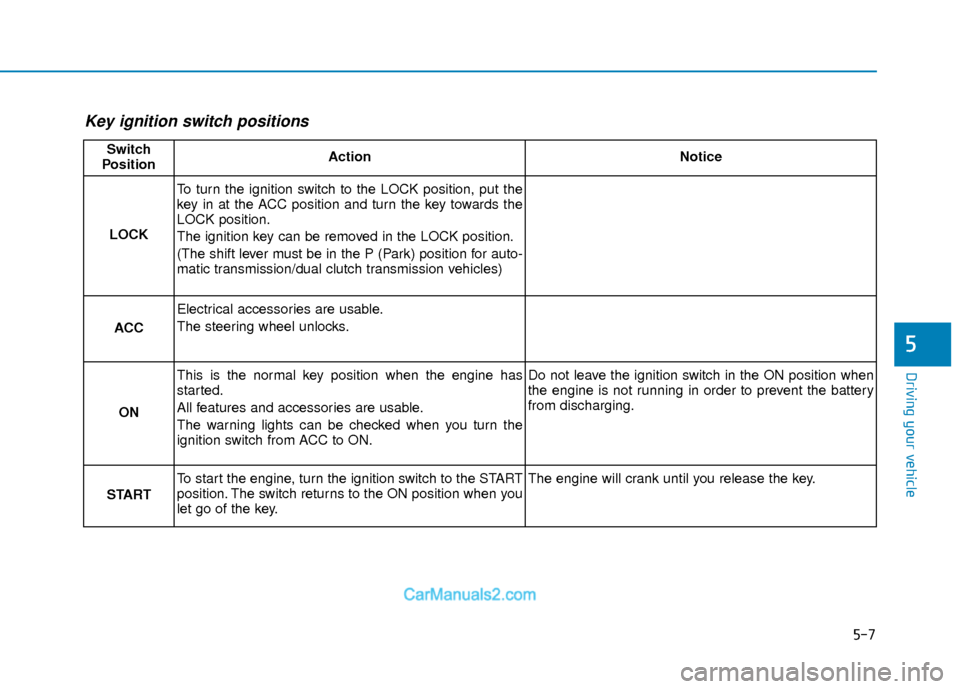
Key ignition switch positions
Switch
PositionActionNotice
LOCK
To turn the ignition switch to the LOCK position, put the
key in at the ACC position and turn the key towards the
LOCK position.
The ignition key can be removed in the LOCK position.
(The shift lever must be in the P (Park) position for auto-
matic transmission/dual clutch transmission vehicles)
ACC
Electrical accessories are usable.
The steering wheel unlocks.
ON
This is the normal key position when the engine has
started.
All features and accessories are usable.
The warning lights can be checked when you turn the
ignition switch from ACC to ON.Do not leave the ignition switch in the ON position when
the engine is not running in order to prevent the battery
from discharging.
START
To start the engine, turn the ignition switch to the START
position. The switch returns to the ON position when you
let go of the key.The engine will crank until you release the key.
Page 305 of 526
5-22
Driving your vehicle
(Continued)
• When driving in Manual Shift Mode,slow down before shifting to a lower
gear. Otherwise, the lower gear may not
be engaged if the engine rpms are out-
side of the allowable range.
Shift-lock system
For your safety, the automatic transmis-
sion has a shift-lock system which pre-
vents shifting the transmission from P
(Park) into R (Reverse) unless the brake
pedal is depressed.
To shift the transmission from P (Park)
into R (Reverse):
1. Depress and hold the brake pedal.
2. Start the engine or place the ignition switch in the ON position.
3. Move the shift lever.
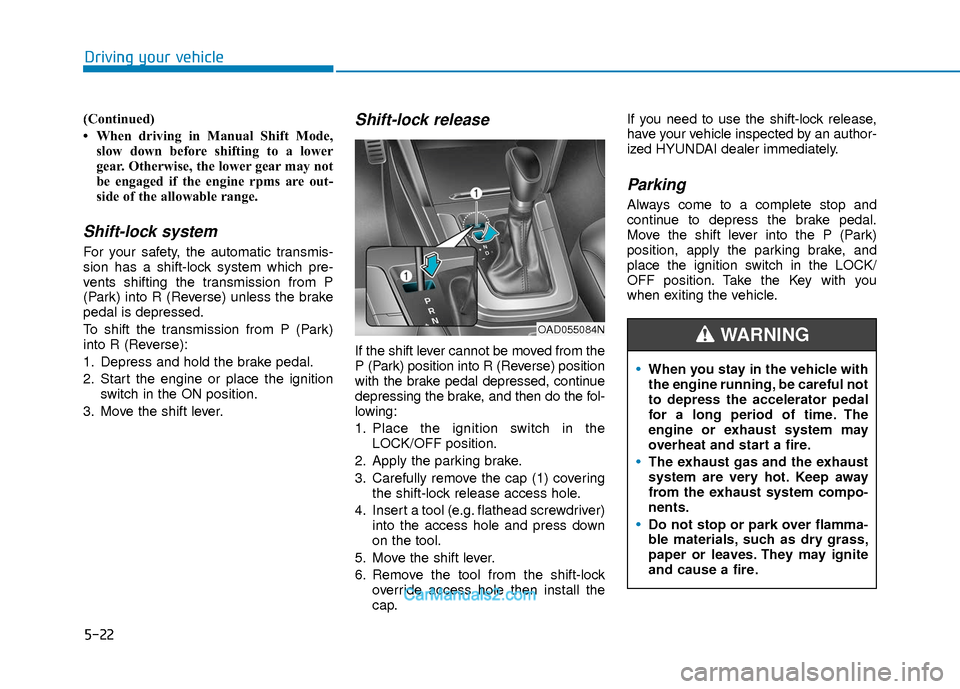
Shift-lock release
If the shift lever cannot be moved from the
P (Park) position into R (Reverse) position
with the brake pedal depressed, continue
depressing the brake, and then do the fol-
lowing:
1. Place the ignition switch in the LOCK/OFF position.
2. Apply the parking brake.
3. Carefully remove the cap (1) covering the shift-lock release access hole.
4. Insert a tool (e.g. flathead screwdriver) into the access hole and press down
on the tool.
5. Move the shift lever.
6. Remove the tool from the shift-lock override access hole then install the
cap. If you need to use the shift-lock release,
have your vehicle inspected by an author-
ized HYUNDAI dealer immediately.
Parking
Always come to a complete stop and
continue to depress the brake pedal.
Move the shift lever into the P (Park)
position, apply the parking brake, and
place the ignition switch in the LOCK/
OFF position. Take the Key with you
when exiting the vehicle.
When you stay in the vehicle with
the engine running, be careful not
to depress the accelerator pedal
for a long period of time. The
engine or exhaust system may
overheat and start a fire.
The exhaust gas and the exhaust
system are very hot. Keep away
from the exhaust system compo-
nents.
Do not stop or park over flamma-
ble materials, such as dry grass,
paper or leaves. They may ignite
and cause a fire.
WARNING OAD055084N