remove Hyundai Elantra 2018 User Guide
[x] Cancel search | Manufacturer: HYUNDAI, Model Year: 2018, Model line: Elantra, Model: Hyundai Elantra 2018Pages: 526, PDF Size: 17.2 MB
Page 120 of 526
3-43
Convenient features of your vehicle
3
Tilting the sunroof
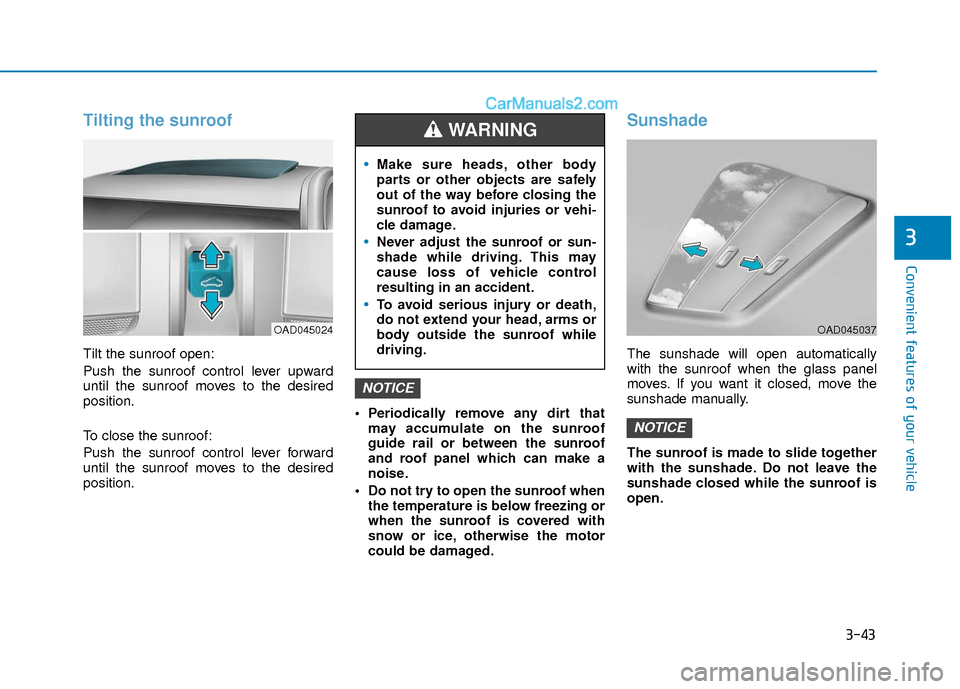
Tilt the sunroof open:
Push the sunroof control lever upward
until the sunroof moves to the desired
position.
To close the sunroof:
Push the sunroof control lever forward
until the sunroof moves to the desired
position. Periodically remove any dirt that
may accumulate on the sunroof
guide rail or between the sunroof
and roof panel which can make a
noise.
Do not try to open the sunroof when the temperature is below freezing or
when the sunroof is covered with
snow or ice, otherwise the motor
could be damaged.
Sunshade
The sunshade will open automatically
with the sunroof when the glass panel
moves. If you want it closed, move the
sunshade manually.
The sunroof is made to slide together
with the sunshade. Do not leave the
sunshade closed while the sunroof is
open.
NOTICE
NOTICE
OAD045024
Make sure heads, other body
parts or other objects are safely
out of the way before closing the
sunroof to avoid injuries or vehi-
cle damage.
Never adjust the sunroof or sun-
shade while driving. This may
cause loss of vehicle control
resulting in an accident.
To avoid serious injury or death,
do not extend your head, arms or
body outside the sunroof while
driving.
WARNING
OAD045037
Page 123 of 526
3-46
Convenient features of your vehicle
Closing the hood
1. Before closing the hood, check the fol-lowing:
must be correctly installed.
bustible material must be removed
from the engine compartment.
2. Return the support rod to its clip to prevent it from ratting.
3. Lower the hood halfway (lifted approx- imately 12 inches (30 cm) from the
closed position) and push down to
securely lock in place. Then double
check to be sure the hood is secure.
If the hood can slightly be raised, it is
not securely locked. Open it again and
close it with more force.
Trunk
Opening the trunk
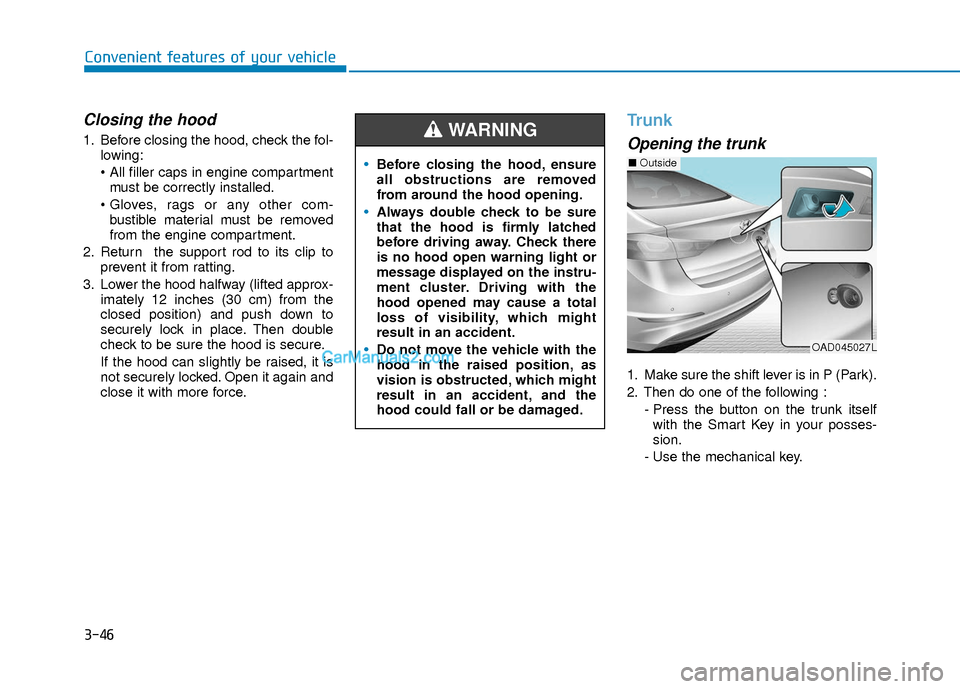
1. Make sure the shift lever is in P (Park).
2. Then do one of the following :
- Press the button on the trunk itselfwith the Smart Key in your posses-
sion.
- Use the mechanical key.
Before closing the hood, ensure
all obstructions are removed
from around the hood opening.
Always double check to be sure
that the hood is firmly latched
before driving away. Check there
is no hood open warning light or
message displayed on the instru-
ment cluster. Driving with the
hood opened may cause a total
loss of visibility, which might
result in an accident.
Do not move the vehicle with the
hood in the raised position, as
vision is obstructed, which might
result in an accident, and the
hood could fall or be damaged.
WARNING
OAD045027L
■ Outside
Page 128 of 526
3-51
Convenient features of your vehicle
3
Information
• The Smart Trunk function will not workif any of the following occurs:
- The smart key is close to a radio trans-mitter such as a radio station or an air-
port which can interfere with normal
operation of the transmitter.
- The smart key is near a mobile two way radio system or a cellular phone.
- Another vehicle's smart key is being operated close to your vehicle.
• The detecting range may decrease or increase when :
- One side of the tire is raised to replacea tire or to inspect the vehicle.
- The vehicle is parked on a slope or unpaved road, etc.
Fuel Filler Door
Opening the fuel filler door
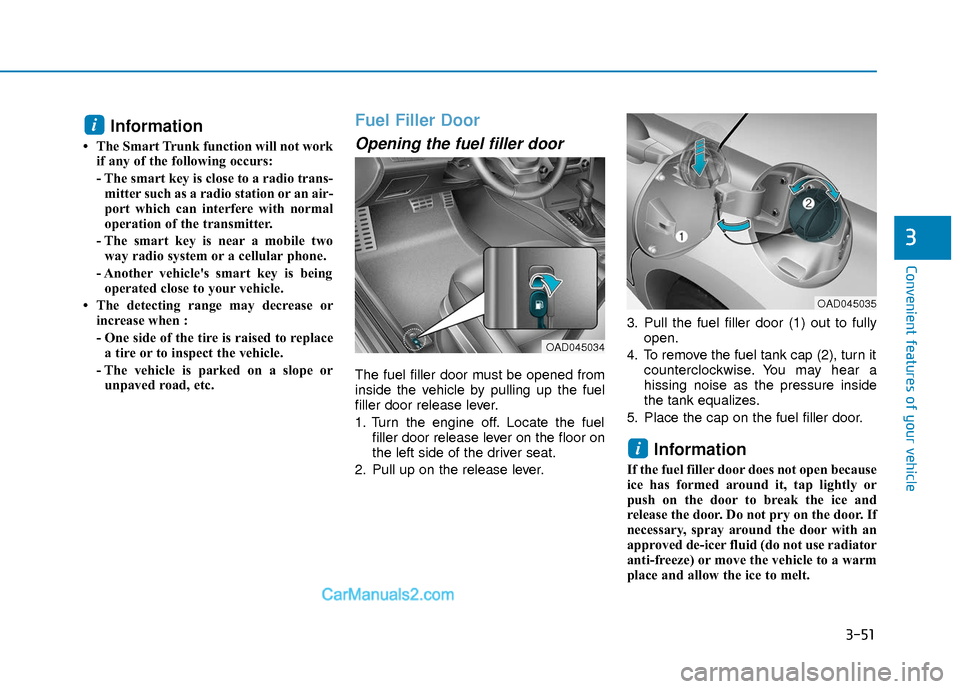
The fuel filler door must be opened from
inside the vehicle by pulling up the fuel
filler door release lever.
1. Turn the engine off. Locate the fuel filler door release lever on the floor on
the left side of the driver seat.
2. Pull up on the release lever. 3. Pull the fuel filler door (1) out to fully
open.
4. To remove the fuel tank cap (2), turn it counterclockwise. You may hear a
hissing noise as the pressure inside
the tank equalizes.
5. Place the cap on the fuel filler door.
Information
If the fuel filler door does not open because
ice has formed around it, tap lightly or
push on the door to break the ice and
release the door. Do not pry on the door. If
necessary, spray around the door with an
approved de-icer fluid (do not use radiator
anti-freeze) or move the vehicle to a warm
place and allow the ice to melt.
i
i
OAD045034
OAD045035
Page 130 of 526
3-53
Convenient features of your vehicle
3
Information
Make sure to refuel your vehicle according
to the "Fuel Requirements" suggested in
the Introduction chapter. Do not spill fuel on the exterior sur-
faces of the vehicle. Any type of fuel
spilled on painted surfaces may
damage the paint.
If the fuel filler cap requires replace- ment, use only a genuine HYUNDAI
cap or the equivalent specified for
your vehicle. An incorrect fuel filler
cap can result in a serious malfunc-
tion of the fuel system or emission
control system.
NOTICE
i
(Continued)
If a fire breaks out during refuel-
ing, leave the vicinity of the vehi-
cle, and immediately contact the
manager of the gas station and
then contact the local fire depart-
ment. Follow any safety instruc-
tions they provide.
If pressurized fuel sprays out, it
can cover your clothes or skin
and thus subject you to the risk
of fire and burns. Always remove
the fuel cap carefully and slowly.
If the cap is venting fuel or if you
hear a hissing sound, wait until
the condition stops before com-
pletely removing the cap.
Always check that the fuel cap is
installed securely to prevent fuel
spillage in the event of an acci-
dent.
Page 135 of 526
3-58
Convenient features of your vehicle
If the gauge pointer moves beyond the
normal range area toward the "H"
position, it indicates overheating that
may damage the engine.
Do not continue driving with an over-
heated engine. If your vehicle over-
heats, refer to "If the Engine
Overheats" in chapter 6.
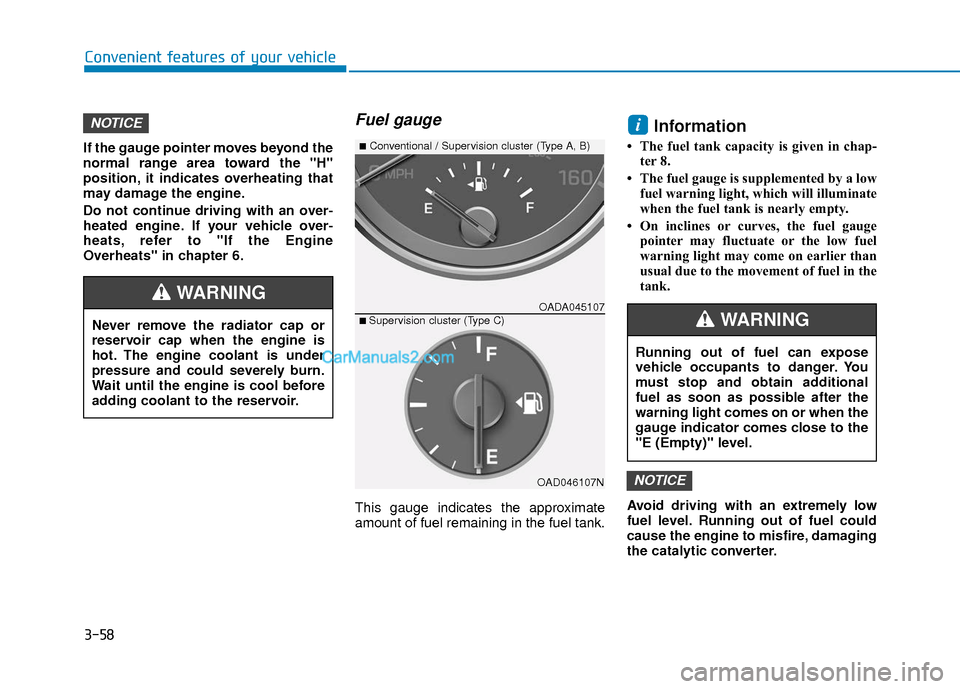
Fuel gauge
This gauge indicates the approximate
amount of fuel remaining in the fuel tank.
Information
• The fuel tank capacity is given in chap-ter 8.
• The fuel gauge is supplemented by a low fuel warning light, which will illuminate
when the fuel tank is nearly empty.
• On inclines or curves, the fuel gauge pointer may fluctuate or the low fuel
warning light may come on earlier than
usual due to the movement of fuel in the
tank.
Avoid driving with an extremely low
fuel level. Running out of fuel could
cause the engine to misfire, damaging
the catalytic converter.
NOTICE
iNOTICE
Running out of fuel can expose
vehicle occupants to danger. You
must stop and obtain additional
fuel as soon as possible after the
warning light comes on or when the
gauge indicator comes close to the
"E (Empty)" level.
WARNINGNever remove the radiator cap or
reservoir cap when the engine is
hot. The engine coolant is under
pressure and could severely burn.
Wait until the engine is cool before
adding coolant to the reservoir.
WARNINGOADA045107
■Conventional / Supervision cluster (Type A, B)
■ Supervision cluster (Type C)
OAD046107N
Page 163 of 526
3-86
Convenient features of your vehicle
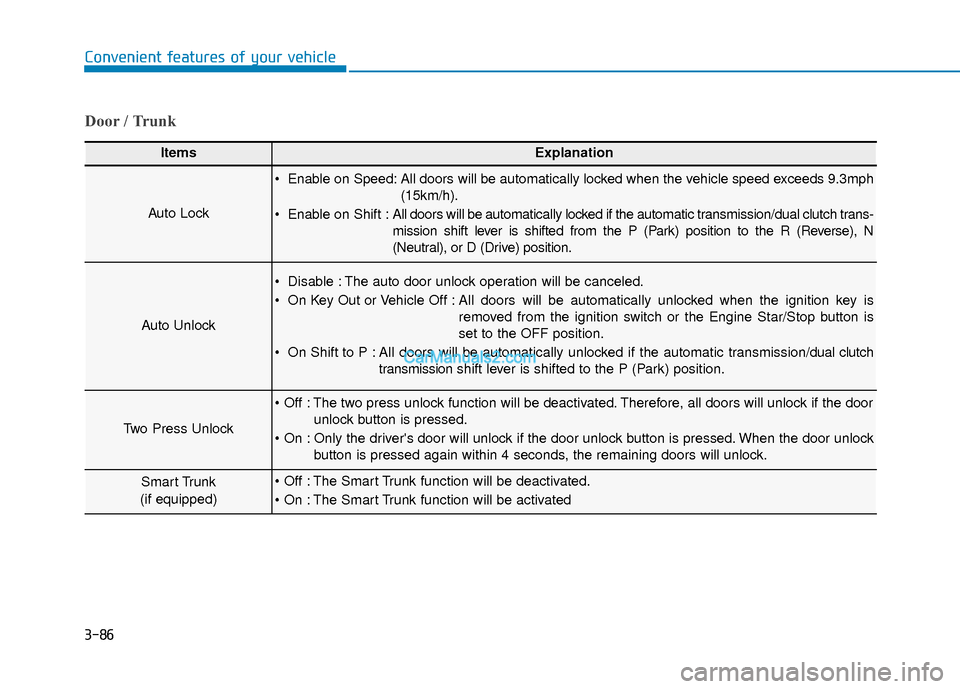
Door / Trunk
ItemsExplanation
Auto Lock
Enable on Speed: All doors will be automatically locked when the vehicle speed exceeds 9.3mph(15km/h).
Enable on Shift : All doors will be automatically locked if the automatic transmission/dual clutch trans-
mission shift lever is shifted from the P (Park) position to the R (Reverse), N
(Neutral), or D (Drive) position.
Auto Unlock
Disable : The auto door unlock operation will be canceled.
On Key Out or Vehicle Off : All doors will be automatically unlocked when the ignition key is
removed from the ignition switch or the Engine Star/Stop button is
set to the OFF position.
On Shift to P : All doors will be automatically unlocked if the automatic transmission/dual clutch transmission shift lever is shifted to the P (Park) position.
Two Press Unlock
The two press unlock function will be deactivated. Therefore, all doors will unlock if the door
unlock button is pressed.
Only the driver's door will unlock if the door unlock button is pressed. When the door unlock button is pressed again within 4 seconds, the remaining doors will unlock.
Smart Trunk
(if equipped) The Smart Trunk function will be deactivated.
The Smart Trunk function will be activated
Page 179 of 526
3-102
Convenient features of your vehicle
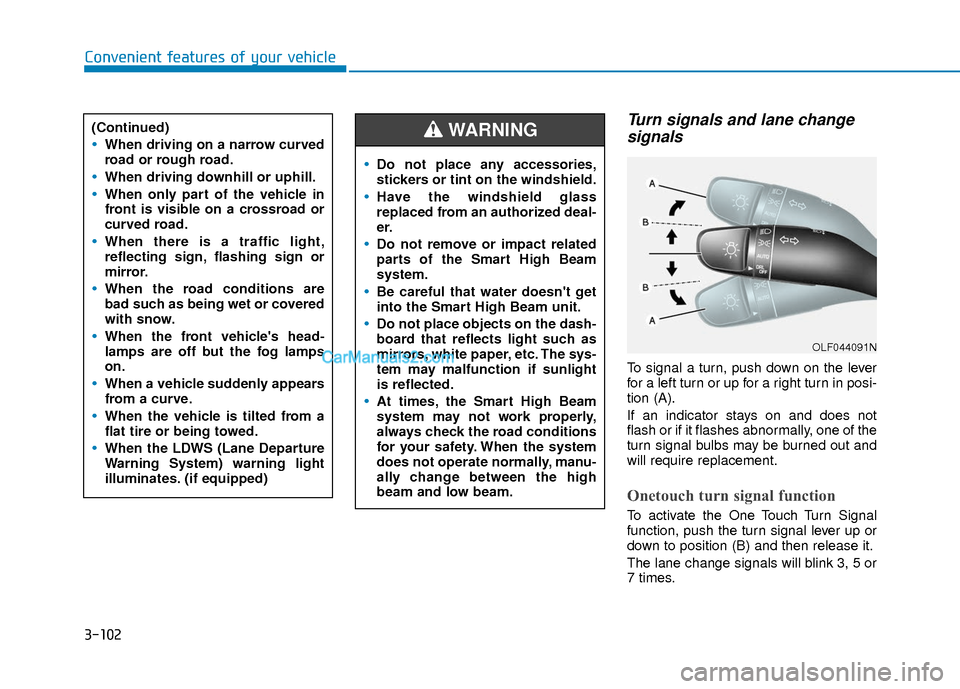
Turn signals and lane changesignals
To signal a turn, push down on the lever
for a left turn or up for a right turn in posi-
tion (A).
If an indicator stays on and does not
flash or if it flashes abnormally, one of the
turn signal bulbs may be burned out and
will require replacement.
Onetouch turn signal function
To activate the One Touch Turn Signal
function, push the turn signal lever up or
down to position (B) and then release it.
The lane change signals will blink 3, 5 or
7 times.
(Continued)
When driving on a narrow curved
road or rough road.
When driving downhill or uphill.
When only part of the vehicle in
front is visible on a crossroad or
curved road.
When there is a traffic light,
reflecting sign, flashing sign or
mirror.
When the road conditions are
bad such as being wet or covered
with snow.
When the front vehicle's head-
lamps are off but the fog lamps
on.
When a vehicle suddenly appears
from a curve.
When the vehicle is tilted from a
flat tire or being towed.
When the LDWS (Lane Departure
Warning System) warning light
illuminates. (if equipped)
OLF044091N
Do not place any accessories,
stickers or tint on the windshield.
Have the windshield glass
replaced from an authorized deal-
er.
Do not remove or impact related
parts of the Smart High Beam
system.
Be careful that water doesn't get
into the Smart High Beam unit.
Do not place objects on the dash-
board that reflects light such as
mirrors, white paper, etc. The sys-
tem may malfunction if sunlight
is reflected.
At times, the Smart High Beam
system may not work properly,
always check the road conditions
for your safety. When the system
does not operate normally, manu-
ally change between the high
beam and low beam.
WARNING
Page 180 of 526
3-103
Convenient features of your vehicle
3
You can activate or deactivate the One
Touch Turn Signal function or choose the
number of blinking (3, 5, or 7) from the
User Settings Mode (Light) on the LCD
display.
For more information, refer to the
"LCD Display" section in this chapter.
Battery saver function
The purpose of this feature is to prevent
the battery from being discharged. The
system automatically turns off the park-
ing lamp when the key is removed
(remote key) or when the driver turns the
engine off (smart key) and opens the
driver-side door.
With this feature, the parking lamps will
turn off automatically if the driver parks
on the side of road at night.
If necessary, to keep the lamps on when
the engine is turned off, perform the fol-
lowing:
1) Open the driver-side door.
2) Turn the parking lamps OFF and ONagain using the light switch on the
steering column.
Headlamp delay function (if equipped)
If the key is removed from the ignition
switch or placed in the ACC position or
the LOCK/OFF position with the head-
lamps ON, the headlamps (and/or park-
ing lamps) remain on for about 5 min-
utes. However, if the driver’s door is
opened and closed, the headlights are
turned off after 15 seconds. Also, with the
engine off if the driver's door is opened
and closed, the headlamps (and/or park-
ing lamps) are turned off after 15 sec-
onds.
The headlamps (and/or parking lamps)
can be turned off by pressing the lock
button on the remote key or smart key
twice or turning the light switch to the
OFF or AUTO position.
You can activate or deactivate the
Headlamp Delay function from the User
Settings Mode (Light) on the LCD dis-
play.
For more information, refer to the
"LCD Display" section in this chapter. If the driver gets out of the vehicle
through other doors (except driver’s
door), the battery saver function does
not operate and the headlamp delay
function does not turn off automati-
cally. Therefore, It causes the battery
to be discharged. In this case, make
sure to turn off the lamp before get-
ting out of the vehicle.
NOTICE
Page 185 of 526
3-108
Convenient features of your vehicle
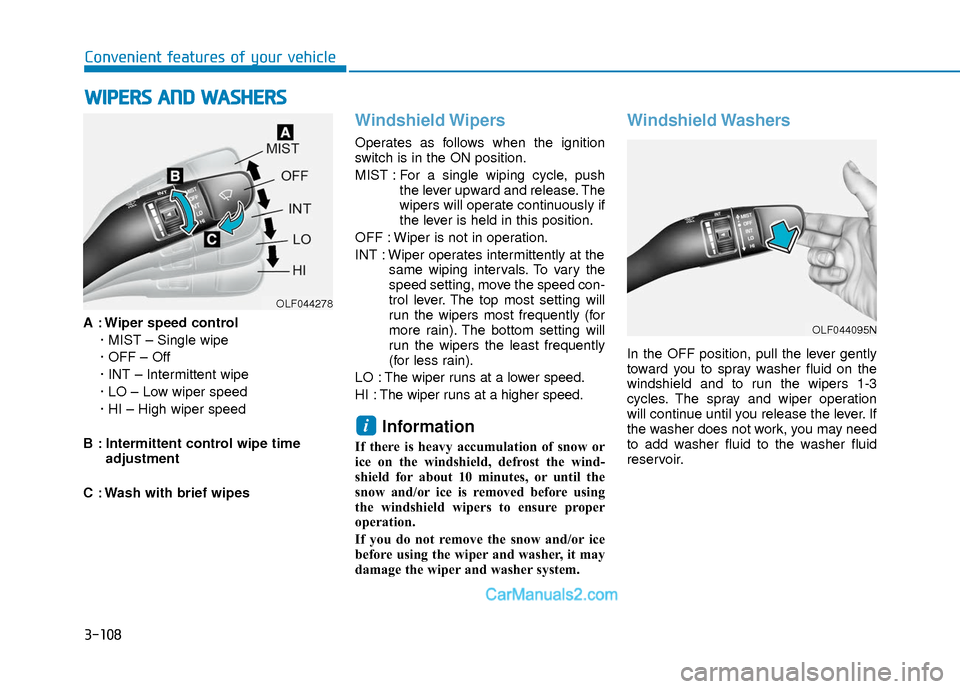
A : Wiper speed control· MIST – Single wipe
· OFF – Off
· INT – Intermittent wipe
· LO – Low wiper speed
· HI – High wiper speed
B : Intermittent control wipe time adjustment
C : Wash with brief wipes
Windshield Wipers
Operates as follows when the ignition
switch is in the ON position.
MIST : For a single wiping cycle, push the lever upward and release. The
wipers will operate continuously if
the lever is held in this position.
OFF : Wiper is not in operation.
INT : Wiper operates intermittently at the same wiping intervals. To vary the
speed setting, move the speed con-
trol lever. The top most setting will
run the wipers most frequently (for
more rain). The bottom setting will
run the wipers the least frequently
(for less rain).
LO : The wiper runs at a lower speed.
HI : The wiper runs at a higher speed.
Information
If there is heavy accumulation of snow or
ice on the windshield, defrost the wind-
shield for about 10 minutes, or until the
snow and/or ice is removed before using
the windshield wipers to ensure proper
operation.
If you do not remove the snow and/or ice
before using the wiper and washer, it may
damage the wiper and washer system.
Windshield Washers
In the OFF position, pull the lever gently
toward you to spray washer fluid on the
windshield and to run the wipers 1-3
cycles. The spray and wiper operation
will continue until you release the lever. If
the washer does not work, you may need
to add washer fluid to the washer fluid
reservoir.
i
W W I
IP
P E
ER
R S
S
A
A N
N D
D
W
W A
AS
SH
H E
ER
R S
S
OLF044278
OLF044095N
Page 187 of 526
3-110
Convenient features of your vehicle
D
DE
EF
FR
R O
O S
ST
T E
ER
R
To prevent damage to the conductors
bonded to the inside surface of the
rear window, never use sharp instru-
ments or window cleaners containing
abrasives to clean the window.
If you want to defrost and defog the
front windshield, refer to the
"Windshield Defrosting and
Defogging" section in this chapter.
Rear Window Defroster
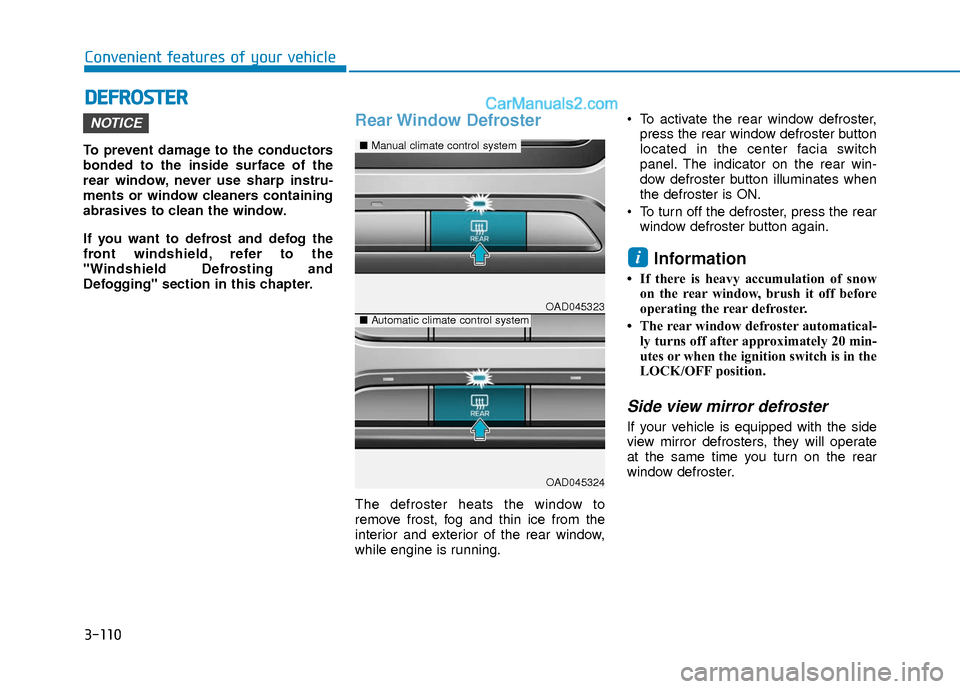
The defroster heats the window to
remove frost, fog and thin ice from the
interior and exterior of the rear window,
while engine is running. To activate the rear window defroster,
press the rear window defroster button
located in the center facia switch
panel. The indicator on the rear win-
dow defroster button illuminates when
the defroster is ON.
To turn off the defroster, press the rear window defroster button again.
Information
• If there is heavy accumulation of snowon the rear window, brush it off before
operating the rear defroster.
• The rear window defroster automatical- ly turns off after approximately 20 min-
utes or when the ignition switch is in the
LOCK/OFF position.
Side view mirror defroster
If your vehicle is equipped with the side
view mirror defrosters, they will operate
at the same time you turn on the rear
window defroster.
i
NOTICE
OAD045323
OAD045324
■ Manual climate control system
■Automatic climate control system