warning Hyundai Elantra 2018 Workshop Manual
[x] Cancel search | Manufacturer: HYUNDAI, Model Year: 2018, Model line: Elantra, Model: Hyundai Elantra 2018Pages: 526, PDF Size: 17.2 MB
Page 81 of 526
3-4
Convenient features of your vehicle
Trunk unlocking
To unlock:
1. Press and hold the Trunk Unlock but-ton (3) on the remote key for more
than one second.
2. The hazard warning lights will blink two times.
Once the trunk is opened and then
closed, the trunk will lock automatically.
Information
• After unlocking the trunk, the trunk will lock automatically.
• The word "HOLD" is written on the button to inform you that you must
press and hold the button for more than
one second.
Panic button (if equipped)
Press and hold the Panic button (4) for
more than one second. The horn sounds
and hazard warning lights flash for about
30 seconds.
To cancel the panic mode, press any but-
ton on the remote key.
Start-up
For more information, refer to the "Key
Ignition Switch" section in chapter 5.
To prevent damaging the remote key:
• Keep the remote key away fromwater or any liquid and fire. If the
inside of the remote key gets damp
(due to drinks or moisture), or is
heated, internal circuit may mal-
function, excluding the car from the
warranty.
Avoid dropping or throwing the remote key.
Protect the remote key from extreme temperatures.
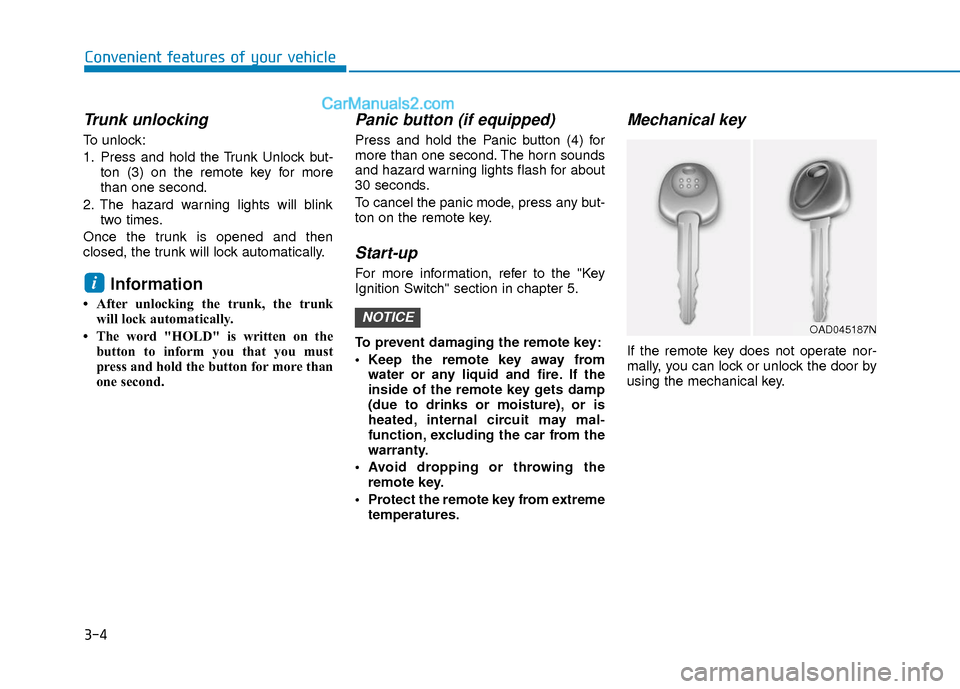
Mechanical key
If the remote key does not operate nor-
mally, you can lock or unlock the door by
using the mechanical key.
NOTICE
i
OAD045187N
Page 83 of 526
3-6
Convenient features of your vehicle
If you suspect your remote key might
have sustained some damage, or you
feel your remote key is not working cor-
rectly contact an authorized HYUNDAI
dealer.
Information
An inappropriately disposed bat-tery can be harmful to the envi-
ronment and human health.
Dispose the battery according to
your local law(s) and regulation.
Smart Key (if equipped)
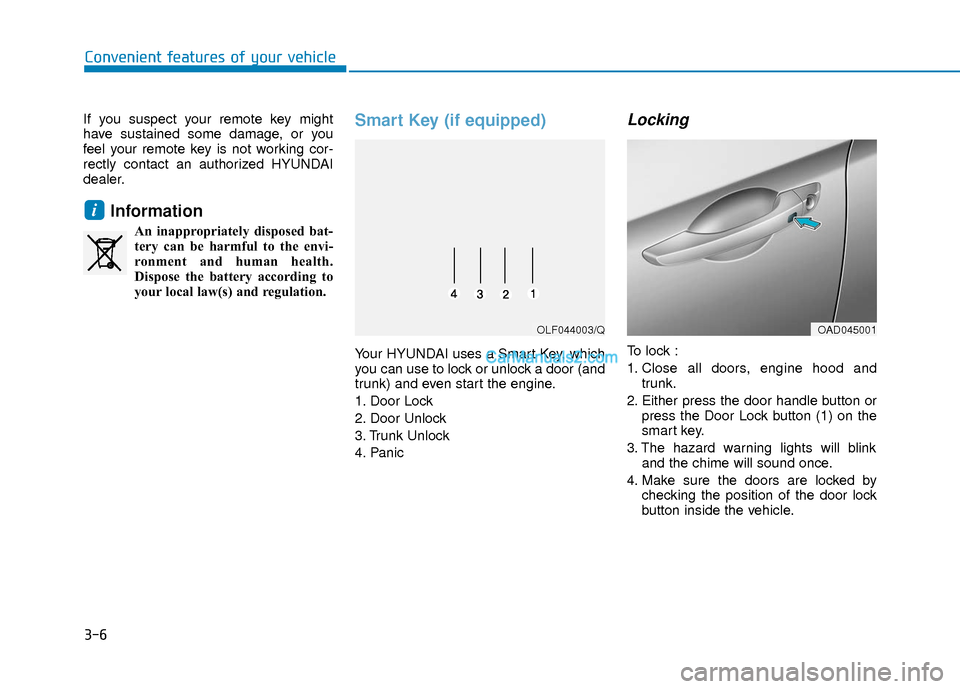
Your HYUNDAI uses a Smart Key, which
you can use to lock or unlock a door (and
trunk) and even start the engine.
1. Door Lock
2. Door Unlock
3. Trunk Unlock
4. Panic
Locking
To lock :
1. Close all doors, engine hood and trunk.
2. Either press the door handle button or press the Door Lock button (1) on the
smart key.
3. The hazard warning lights will blink and the chime will sound once.
4. Make sure the doors are locked by checking the position of the door lock
button inside the vehicle.
i
OLF044003/QOAD045001
Page 84 of 526
3-7
Convenient features of your vehicle
3
Information
The door handle button will only operate
when the smart key is within 28~40 inches
(0.7~1 m) from the outside door handle.
Even though you press the outside door
handle button, the doors will not lock and
the chime will sound for three seconds if
any of the following occur:
The Smart Key is in the vehicle.
The Engine Start/Stop button is in ACCor ON position.
Any door except the trunk is open.
Unlocking
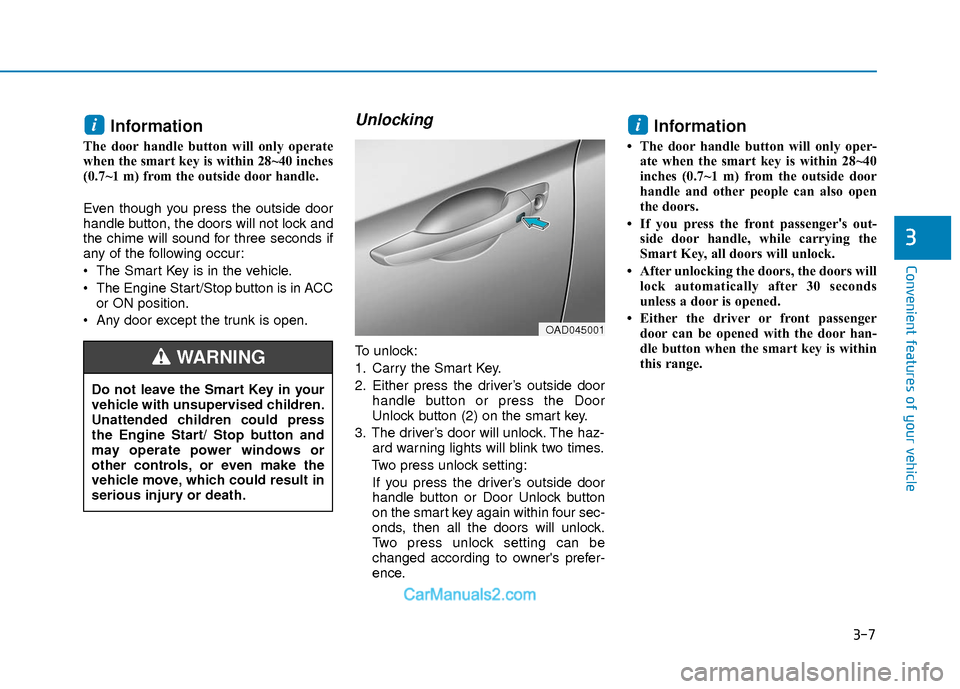
To unlock:
1. Carry the Smart Key.
2. Either press the driver’s outside door handle button or press the Door
Unlock button (2) on the smart key.
3. The driver’s door will unlock. The haz- ard warning lights will blink two times.
Two press unlock setting: If you press the driver’s outside door
handle button or Door Unlock button
on the smart key again within four sec-
onds, then all the doors will unlock.
Two press unlock setting can be
changed according to owner's prefer-
ence.
Information
• The door handle button will only oper- ate when the smart key is within 28~40
inches (0.7~1 m) from the outside door
handle and other people can also open
the doors.
• If you press the front passenger 's out-
side door handle, while carrying the
Smart Key, all doors will unlock.
• After unlocking the doors, the doors will lock automatically after 30 seconds
unless a door is opened.
• Either the driver or front passenger door can be opened with the door han-
dle button when the smart key is within
this range.
ii
Do not leave the Smart Key in your
vehicle with unsupervised children.
Unattended children could press
the Engine Start/ Stop button and
may operate power windows or
other controls, or even make the
vehicle move, which could result in
serious injury or death.
WARNING
OAD045001
Page 85 of 526
3-8
Convenient features of your vehicle
Trunk opening
To open:
1. Carry the smart key.
2. Either press the trunk handle button orpress and hold the Trunk Unlock but-
ton (3) on the smart key for more than
one second.
3. The hazard warning lights will blink two times.
Once the trunk is opened and then
closed, the trunk will lock automatically.
Information
The trunk handle button will only operate
when the smart key is within 28 inches (0.7
m) from the trunk handle.
Panic button
Press and hold the Panic button (4) for
more than one second. The horn sounds
and hazard warning lights blink for about
30 seconds. To cancel the panic mode,
press any button on the Smart Key.
Start-up
You can start the engine without inserting
the key.
For more information, refer to the
"Engine Start/Stop Button" section in
chapter 5.
To prevent damaging the smart key:
Keep the smart key away from any liquid or fire. Internal circuits may
malfunction if the inside of the
remote key gets damp (from liquids
or moisture) or if it is heated. This
can exclude the remote key from
warranty coverage.
Avoid dropping or throwing the smart key.
Protect the smart key from extreme temperatures.
Always have the smart key with you when leaving the vehicle. If the
smart key is left near the vehicle, the
vehicle battery may be discharged.
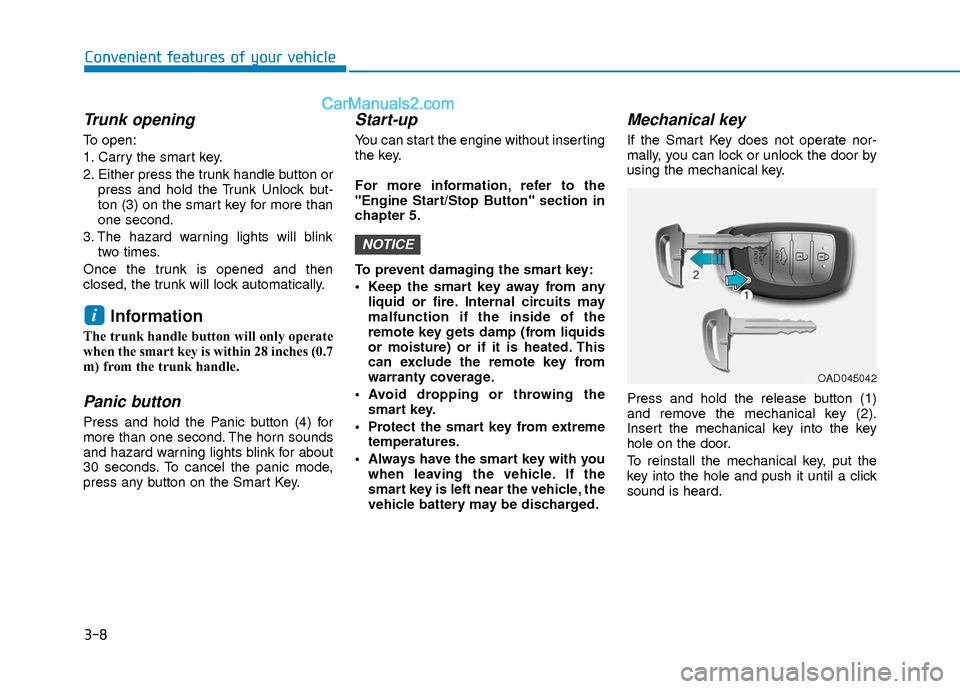
Mechanical key
If the Smart Key does not operate nor-
mally, you can lock or unlock the door by
using the mechanical key.
Press and hold the release button (1)
and remove the mechanical key (2).
Insert the mechanical key into the key
hole on the door.
To reinstall the mechanical key, put the
key into the hole and push it until a click
sound is heard.
NOTICE
i
OAD045042
Page 87 of 526
3-10
Convenient features of your vehicle
Information
An inappropriately disposed bat-tery can be harmful to the envi-
ronment and human health.
Dispose the battery according to
your local law(s) and regulation(s).
Immobilizer System
(if equipped)
The immobilizer system protects your
vehicle from theft. If an improperly coded
key (or other device) is used, the
engine’s fuel system is disabled.
When the ignition switch is placed in the
ON position, the immobilizer system indi-
cator should come on briefly, then go off.
If the indicator starts to blink, the system
does not recognize the coding of the key.
Place the ignition switch to the
LOCK/OFF position, then place the igni-
tion switch to the ON position again.
The system may not recognize your key’s
coding if another immobilizer key or other
metal object (i.e., key chain) is near the
key. The engine may not start because
the metal may interrupt the transponder
signal from transmitting normally. If the system repeatedly does not recog-
nize the coding of the key, it is recom-
mended that you contact your HYUNDAI
dealer.
Do not attempt to alter this system or add
other devices to it. Electrical problems
could result that may make your vehicle
inoperable.
The transponder in your key is an
important part of the immobilizer sys-
tem. It is designed to give years of
trouble-free service, however you
should avoid exposure to moisture,
static electricity and rough handling.
Immobilizer system malfunction could
occur.
Information
This device complies with Part 15 of the
FCC rules.
Operation is subject to the following three
conditions:
1. This device may not cause harmful
interference, and
2. This device must accept any interfer- ence received, including interference
that may cause undesired operation.
3. Changes or modifications not expressly approved by the party responsible for
compliance could void the user's
authority to operate the device.
i
NOTICE
i
In order to prevent theft of your
vehicle, do not leave spare keys
anywhere in your vehicle. Your
immobilizer password is a cus-
tomer unique password and should
be kept confidential.
WARNING
Page 90 of 526
3-13
Convenient features of your vehicle
3
If the inner door handle of the driver's(or front passenger's) door is pulled
when the door lock button is in the lock
position, the button is unlocked and
door opens.
Front doors cannot be locked if the key is in the ignition switch and any front
door is open.
Doors cannot be locked if the smart key is in the vehicle and any door is
open.
Information
If a power door lock ever fails to function
while you are in the vehicle try one or
more of the following techniques to exit:
• Operate the door unlock feature repeat-edly (both electronic and manual) while
simultaneously pulling on the door han-
dle.
• Operate the other door locks and han- dles, front and rear.
• Lower a front window and use the mechanical key to unlock the door from
outside.
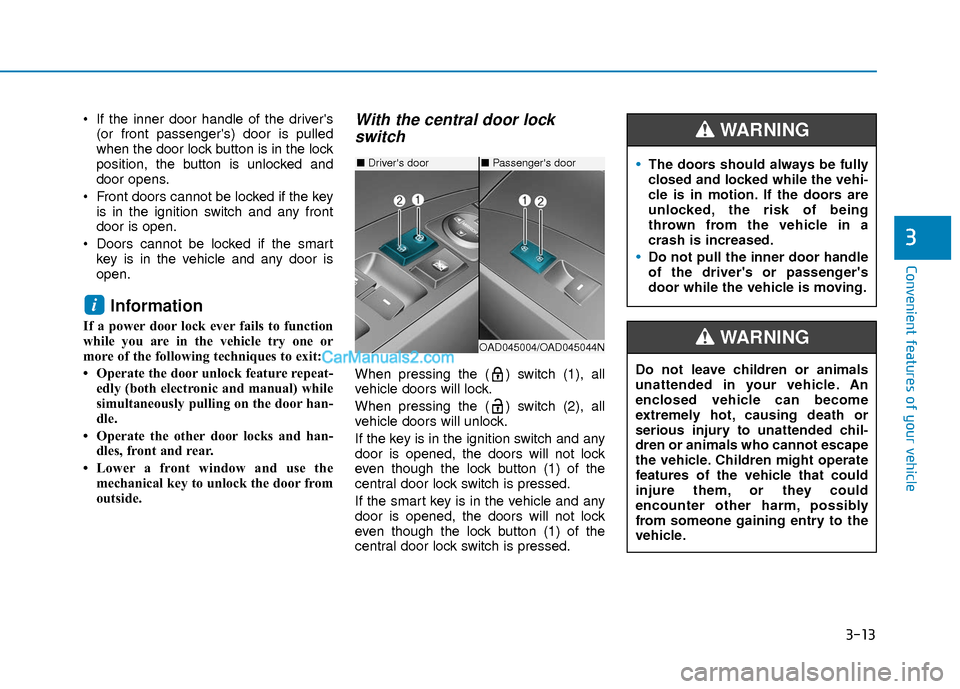
With the central door lockswitch
When pressing the ( ) switch (1), all
vehicle doors will lock.
When pressing the ( ) switch (2), all
vehicle doors will unlock.
If the key is in the ignition switch and any
door is opened, the doors will not lock
even though the lock button (1) of the
central door lock switch is pressed.
If the smart key is in the vehicle and any
door is opened, the doors will not lock
even though the lock button (1) of the
central door lock switch is pressed.
i
■ Driver's door
OAD045004/OAD045044N
■Passenger's doorThe doors should always be fully
closed and locked while the vehi-
cle is in motion. If the doors are
unlocked, the risk of being
thrown from the vehicle in a
crash is increased.
Do not pull the inner door handle
of the driver's or passenger's
door while the vehicle is moving.
WARNING
Do not leave children or animals
unattended in your vehicle. An
enclosed vehicle can become
extremely hot, causing death or
serious injury to unattended chil-
dren or animals who cannot escape
the vehicle. Children might operate
features of the vehicle that could
injure them, or they could
encounter other harm, possibly
from someone gaining entry to the
vehicle.
WARNING
Page 91 of 526
3-14
Convenient features of your vehicle
Auto Door Lock/
Unlock Features
Impact sensing door unlock
All doors will be automatically unlocked
when an impact causes the air bags to
deploy.
Speed sensing door lock
All doors will be automatically locked
when vehicle speed exceeds 9 mph (15
km/h).
All of the doors will be automatically
unlocked after the engine is turned off.
Shift lever auto door lock
All doors will be automatically locked
when shifting the shift lever out of P
(Park) with the engine running.
You can activate or deactivate the Auto
Door Lock/Unlock features from the User
Settings Mode on the LCD display.
For more information, refer to the
"LCD Display" section in this chapter.
Always secure your vehicle.
Leaving your vehicle unlocked
increases the potential risk to you
or others from someone hiding in
your vehicle.
To secure your vehicle, while
depressing the brake, move the
shift lever to the P (Park) position,
engage the parking brake, and
place the ignition switch in the
LOCK/OFF position, close all win-
dows, lock all doors, and always
take the key with you.
WARNING
Opening a door when something is
approaching may cause damage or
injury. Be careful when opening
doors and watch for vehicles,
motorcycles, bicycles or pedestri-
ans approaching the vehicle in the
path of the door.
CAUTION
If you stay in the vehicle for a long
time while the weather is very hot
or cold, there are risks of injuries or
danger to life. Do not lock the vehi-
cle from the outside when someone
is in the vehicle.
WARNING
Page 92 of 526
3-15
Convenient features of your vehicle
T
TH
H E
EF
FT
T -
-A
A L
LA
A R
RM
M
S
S Y
Y S
ST
T E
EM
M
3
Child-Protector Rear Door
locks
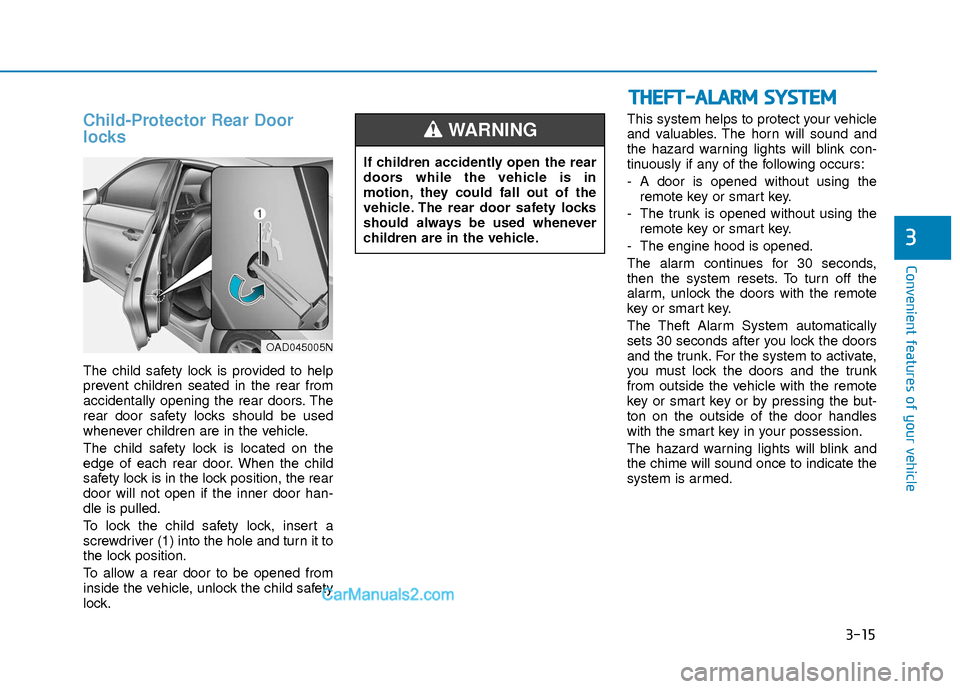
The child safety lock is provided to help
prevent children seated in the rear from
accidentally opening the rear doors. The
rear door safety locks should be used
whenever children are in the vehicle.
The child safety lock is located on the
edge of each rear door. When the child
safety lock is in the lock position, the rear
door will not open if the inner door han-
dle is pulled.
To lock the child safety lock, insert a
screwdriver (1) into the hole and turn it to
the lock position.
To allow a rear door to be opened from
inside the vehicle, unlock the child safety
lock. This system helps to protect your vehicle
and valuables. The horn will sound and
the hazard warning lights will blink con-
tinuously if any of the following occurs:
- A door is opened without using the
remote key or smart key.
- The trunk is opened without using the remote key or smart key.
- The engine hood is opened.
The alarm continues for 30 seconds,
then the system resets. To turn off the
alarm, unlock the doors with the remote
key or smart key.
The Theft Alarm System automatically
sets 30 seconds after you lock the doors
and the trunk. For the system to activate,
you must lock the doors and the trunk
from outside the vehicle with the remote
key or smart key or by pressing the but-
ton on the outside of the door handles
with the smart key in your possession.
The hazard warning lights will blink and
the chime will sound once to indicate the
system is armed.
If children accidently open the rear
doors while the vehicle is in
motion, they could fall out of the
vehicle. The rear door safety locks
should always be used whenever
children are in the vehicle.
WARNING
OAD045005N
Page 93 of 526
3-16
Convenient features of your vehicle
Once the security system is set, opening
any door, the trunk, or the hood without
using the remote key or smart key will
cause the alarm to activate.
The Theft Alarm System will not set if the
hood, the trunk, or any door is not fully
closed. If the system will not set, check
the hood, the trunk, or the doors are fully
closed.
Do not attempt to alter this system or add
other devices to it.
Information
• Do not lock the doors until all passen-gers have left the vehicle. If the remain-
ing passenger leaves the vehicle when
the system is armed, the alarm will be
activated.
• If the vehicle is not disarmed with the remote key or smart key, open the doors
by using the mechanical key and place
the ignition switch in the ON position
(for remote key) or start the engine (for
smart key) by directly pressing the igni-
tion switch with the smart key.
• When the system is disarmed but a door or trunk is not opened within 30 sec-
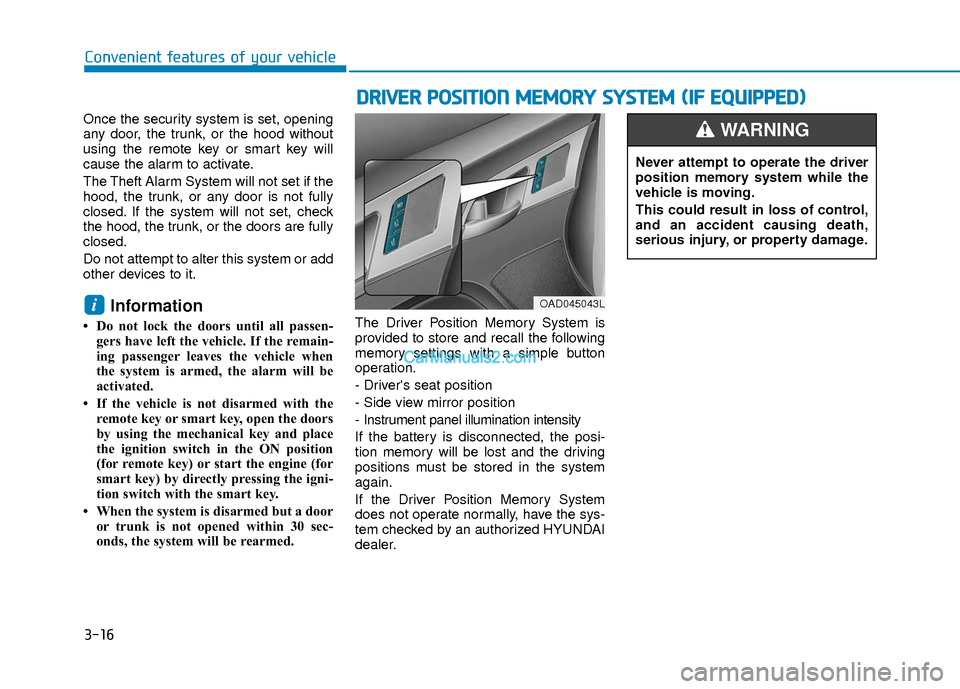
onds, the system will be rearmed. The Driver Position Memory System is
provided to store and recall the following
memory settings with a simple button
operation.
- Driver's seat position
- Side view mirror position
- Instrument panel illumination intensity
If the battery is disconnected, the posi-
tion memory will be lost and the driving
positions must be stored in the system
again.
If the Driver Position Memory System
does not operate normally, have the sys-
tem checked by an authorized HYUNDAI
dealer.
i
D D
R
RI
IV
V E
ER
R
P
P O
O S
SI
IT
T I
IO
O N
N
M
M E
EM
M O
OR
RY
Y
S
S Y
Y S
ST
T E
EM
M
(
( I
IF
F
E
E Q
Q U
UI
IP
P P
PE
ED
D )
)
OAD045043L
Never attempt to operate the driver
position memory system while the
vehicle is moving.
This could result in loss of control,
and an accident causing death,
serious injury, or property damage.
WARNING
Page 95 of 526
3-18
S
ST
T E
EE
ER
R I
IN
N G
G
W
W H
HE
EE
EL
L
Convenient features of your vehicle
If the Electric Power Steering
System does not operate normally,
the warning light ( ) will illumi-
nate on the instrument cluster. You
may steer the vehicle, but it will
require increased steering efforts.
Take your vehicle to an authorized
HYUNDAI dealer and have the sys-
tem checked as soon as possible.
CAUTION
Easy Access Function
When exiting the vehicle the driver’s seat
will move rearward when the engine is
turned off and the shift lever in P (Park).
When entering the vehicle the driver’s
seat will move forward when the ignition
switch is placed to the ACC position.
You can activate or deactivate the Easy
Access Function from the User Settings
Mode on the LCD display.
For more information, refer to the
"LCD Display" section in this chapter.
Electric Power Steering (EPS)
The system assists you with steering the
vehicle. If the engine is turned off or if the
power steering system becomes inoper-
ative, you may still steer the vehicle, but
it will require increased steering effort.
Should you notice any change in the
effort required to steer during normal
vehicle operation, have the system
checked by an authorized HYUNDAI
dealer.
Information
The following symptoms may occur dur-
ing normal vehicle operation:
• The steering effort may be high immedi-
ately after placing the ignition switch in
the ON position.
This happens as the system performs the
EPS system diagnostics. When the diag-
nostics is completed, the steering wheel
will return to its normal condition.
• A click noise may be heard from the EPS relay after the ignition switch is in
the ON or OFF position.
• Motor noise may be heard when the vehicle is at a stop or at a low driving
speed.
• When you operate the steering wheel in low temperature, abnormal noise may
occur. If temperature rises, the noise will
disappear. This is a normal condition.
• When an error is detected from the EPS, the warning light will illuminate on the
instrument cluster and the steering
efforts may be increased. When the fol-
lowing symptoms occur, immediately
drive the vehicle to a safe area and
check it.
i