warning Hyundai Elantra 2018 Repair Manual
[x] Cancel search | Manufacturer: HYUNDAI, Model Year: 2018, Model line: Elantra, Model: Hyundai Elantra 2018Pages: 526, PDF Size: 17.2 MB
Page 96 of 526
3-19
Convenient features of your vehicle
3
Tilt Steering/Telescope Steering
Adjust the steering wheel so it points
toward your chest, not toward your face.
Make sure you can see the instrument
cluster warning lights and gauges. After
adjusting, push the steering wheel both
up and down to be certain it is locked in
position. Always adjust the position of the
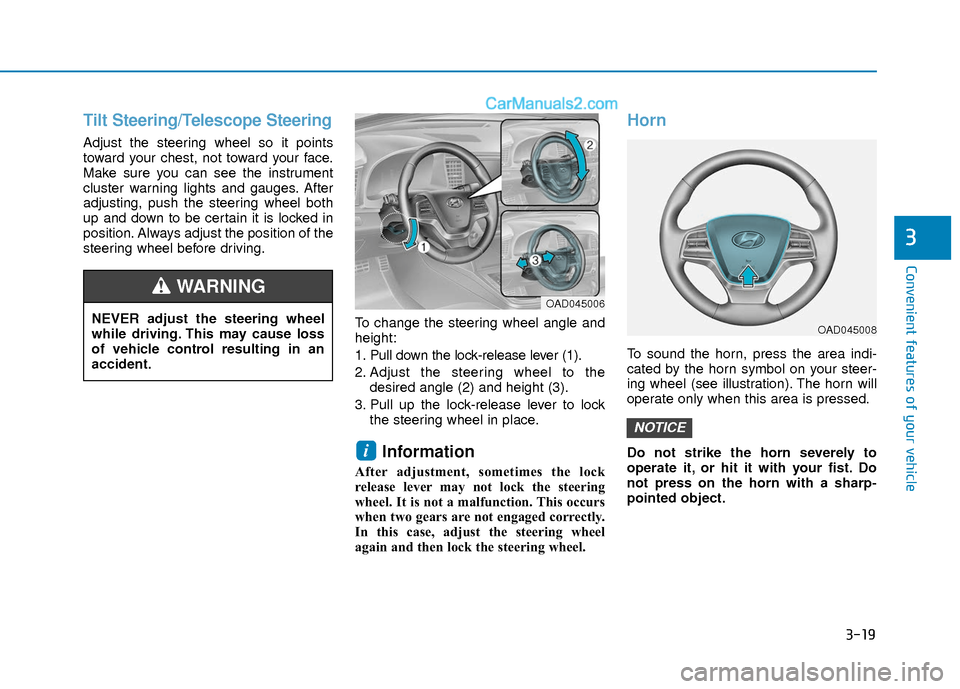
steering wheel before driving.To change the steering wheel angle and
height:
1. Pull down the lock-release lever (1).
2. Adjust the steering wheel to thedesired angle (2) and height (3).
3. Pull up the lock-release lever to lock the steering wheel in place.
Information
After adjustment, sometimes the lock
release lever may not lock the steering
wheel. It is not a malfunction. This occurs
when two gears are not engaged correctly.
In this case, adjust the steering wheel
again and then lock the steering wheel.
Horn
To sound the horn, press the area indi-
cated by the horn symbol on your steer-
ing wheel (see illustration). The horn will
operate only when this area is pressed.
Do not strike the horn severely to
operate it, or hit it with your fist. Do
not press on the horn with a sharp-
pointed object.
NOTICE
i
NEVER adjust the steering wheel
while driving. This may cause loss
of vehicle control resulting in an
accident.
WARNING OAD045006
OAD045008
Page 97 of 526
3-20
Convenient features of your vehicle
Inside Rearview Mirror
Before you start driving, adjust the
rearview mirror to the center on the view
through the rear window.When cleaning the mirror, use a paper
towel or similar material dampened
with glass cleaner. Do not spray glass
cleaner directly on the mirror as that
may cause the liquid cleaner to enter
the mirror housing.
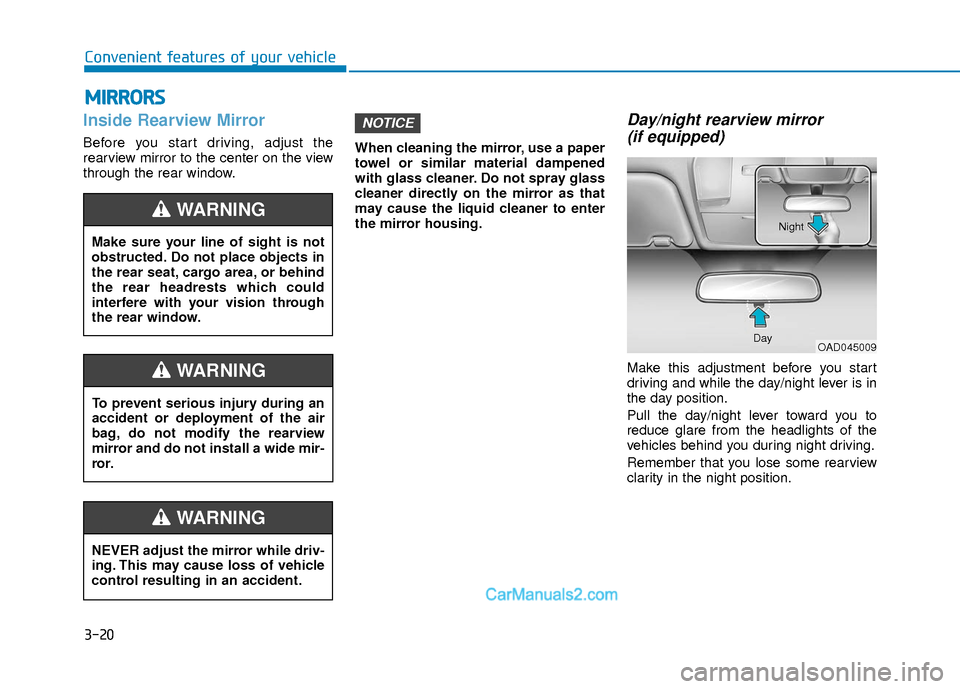
Day/night rearview mirror
(if equipped)
Make this adjustment before you start
driving and while the day/night lever is in
the day position.
Pull the day/night lever toward you to
reduce glare from the headlights of the
vehicles behind you during night driving.
Remember that you lose some rearview
clarity in the night position.
NOTICE
M M I
IR
R R
RO
O R
RS
S
Make sure your line of sight is not
obstructed. Do not place objects in
the rear seat, cargo area, or behind
the rear headrests which could
interfere with your vision through
the rear window.
WARNING
NEVER adjust the mirror while driv-
ing. This may cause loss of vehicle
control resulting in an accident.
WARNING
To prevent serious injury during an
accident or deployment of the air
bag, do not modify the rearview
mirror and do not install a wide mir-
ror.
WARNING
OAD045009
Day Night
Page 101 of 526
3-24
Convenient features of your vehicle
If you need to recalibrate the compass:
1. Press and hold the button for morethan 9 seconds. When the compass
memory is cleared a "C" will appear in
the display.
2. Drive the vehicle in 2 complete circles at less than 5 mph (8 km/h).Integrated HomeLink®Wireless
Control System
The HomeLink®Wireless Control
System can replace up to three hand-
held radio-frequency (RF) transmitters
with a single built-in device. This innova-
tive feature will learn the radio frequency
codes of most current transmitters to
operate devices such as gate operators,
garage door openers, entry door locks,
security systems, even home lighting.
Both standard and rolling code-equipped
transmitters can be programmed by fol-
lowing the outlined procedures.
Additional HomeLink
®information can
be found at: www.homelink.com or by
calling 1-800-355-3515.
Retain the original transmitter of the RF
device you are programming for use in
other vehicles as well as for future
HomeLink
®programming. It is also sug-
gested that upon the sale of the vehicle,
the programmed HomeLink
®buttons be
erased for security purposes.
Before programming HomeLink®to
a garage door opener or gate oper-
ator, make sure people and objects
are out of the way of the device to
prevent potential harm or damage.
Do not use the HomeLink
®with any
garage door opener that lacks the
safety stop and reverse features
required by U.S. federal safety stan-
dards (this includes any garage
door opener model manufactured
before April 1, 1982). A garage door
that cannot detect an object - sig-
naling the door to stop and reverse
- does not meet current U.S. federal
safety standards. Using a garage
door opener without these features
increases the risk of serious injury
or death.
WARNING
Page 107 of 526
3-30
Convenient features of your vehicle
To adjust the Zone setting:
1. Determine the desired Zone Numberbased upon your current location on
the Zone Map.
2. Press and hold the button for more than 3 but less than 6 seconds, the
current Zone Number will appear on
the display.
3. Pressing and holding the button again will cause the numbers to incre-
ment (Note: they will repeat …13, 14,
15, 1, 2, …). Releasing the button
when the desired Zone Number
appears on the display will set the new
Zone.
4. Within about 5 seconds the compass will start displaying a compass head-
ing again.
There are some conditions that can
cause changes to the vehicle magnets,
such as installing a ski rack or a CB
antenna. Body repair work on the vehicle
can also cause changes to the vehicle’s
magnetic field. In these situations, the
compass will need to be re-calibrated to
quickly correct these changes. If you need to recalibrate the compass:
1. Press and hold the button for more
than 6 seconds. When the compass
memory is cleared a "C" will appear in
the display.
2. Drive the vehicle in 2 complete circles at less than 5 mph (8 km/h).
Integrated HomeLink®Wireless
Control System
The HomeLink®Wireless Control System
can replace up to three hand-held radio-
frequency (RF) transmitters with a single
built-in device. This innovative feature will
learn the radio frequency codes of most
current transmitters to operate devices
such as gate operators, garage door
openers, entry door locks, security sys-
tems, even home lighting. Both standard
and rolling code-equipped transmitters
can be programmed by following the out-
lined procedures.
Additional HomeLink
®information can be
found at: www.homelink.com or by calling
1-800-355-3515.
Retain the original transmitter of the RF
device you are programming for use in
other vehicles as well as for future
HomeLink
®programming. It is also sug-
gested that upon the sale of the vehicle,
the programmed HomeLink
®buttons be
erased for security purposes.
Before programming HomeLink®to
a garage door opener or gate oper-
ator, make sure people and objects
are out of the way of the device to
prevent potential harm or damage.
Do not use the HomeLink
®with any
garage door opener that lacks the
safety stop and reverse features
required by U.S. federal safety stan-
dards (this includes any garage
door opener model manufactured
before April 1, 1982). A garage door
that cannot detect an object - sig-
naling the door to stop and reverse
- does not meet current U.S. federal
safety standards. Using a garage
door opener without these features
increases the risk of serious injury
or death.
WARNING
Page 111 of 526
3-34
Convenient features of your vehicle
Use your interior side view mirror or
direct observation to determine the actu-
al distance of following vehicles when
changing lanes.
Do not scrape ice off the mirrorface; this may damage the surface
of the glass.
If the mirror is jammed with ice, do not adjust the mirror by force. Use
an approved spray de-icer (not radi-
ator antifreeze) spray, or a sponge
or soft cloth with very warm water,
or move the vehicle to a warm place
and allow the ice to melt.Blind spot mirror
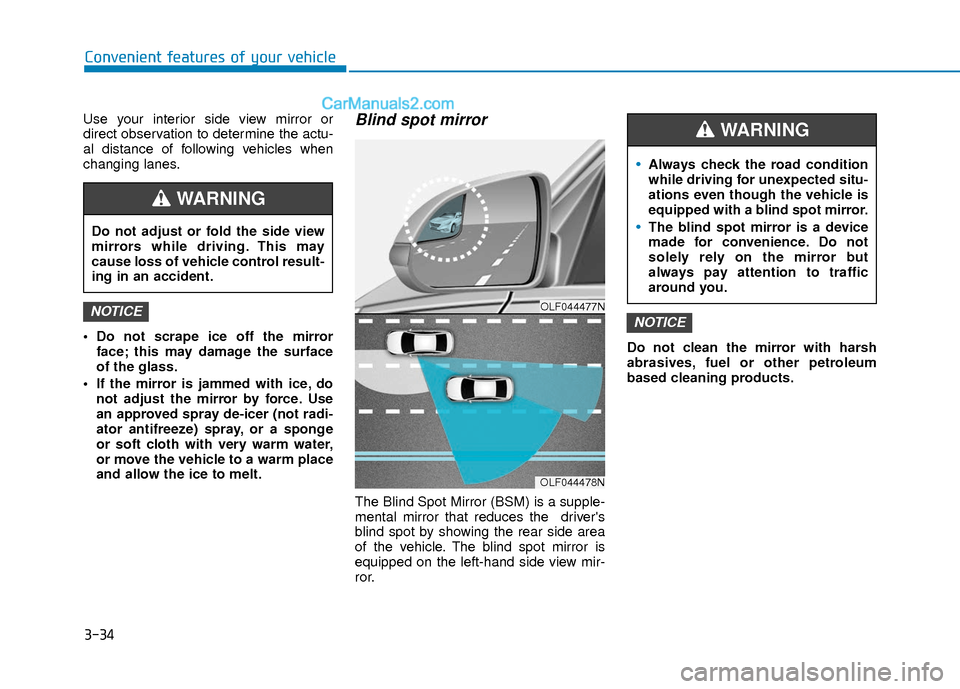
The Blind Spot Mirror (BSM) is a supple-
mental mirror that reduces the driver's
blind spot by showing the rear side area
of the vehicle. The blind spot mirror is
equipped on the left-hand side view mir-
ror. Do not clean the mirror with harsh
abrasives, fuel or other petroleum
based cleaning products.
NOTICENOTICEOLF044477N
OLF044478N
Do not adjust or fold the side view
mirrors while driving. This may
cause loss of vehicle control result-
ing in an accident.
WARNING
Always check the road condition
while driving for unexpected situ-
ations even though the vehicle is
equipped with a blind spot mirror.
The blind spot mirror is a device
made for convenience. Do not
solely rely on the mirror but
always pay attention to traffic
around you.
WARNING
Page 115 of 526
3-38
Convenient features of your vehicle
Power Windows
The ignition switch must be in the ON
position to be able to raise or lower the
windows. Each door has a Power
Window switch to control that door's win-
dow. The driver has a Power Window
Lock switch which can block the opera-
tion of passenger windows. The power
windows will operate for approximately
30 seconds after the ignition switch is
placed in the ACC or LOCK/OFF posi-
tion. However, if the front doors are
opened, the Power Windows cannot be
operated even within the 30 second peri-
od.
Information
• In cold and wet climates, power win-dows may not work properly due to
freezing conditions.
• While driving with the rear windows down or with the sunroof (if equipped)
opened (or partially opened), your vehi-
cle may demonstrate a wind buffeting or
pulsation noise. This noise is normal and
can be reduced or eliminated by taking
the following actions. If the noise occurs
with one or both of the rear windows
down, partially lower both front win-
dows approximately 1 inch (2.5 cm). If
you experience the noise with the sun-
roof open, slightly close the sunroof.
Window opening and closing
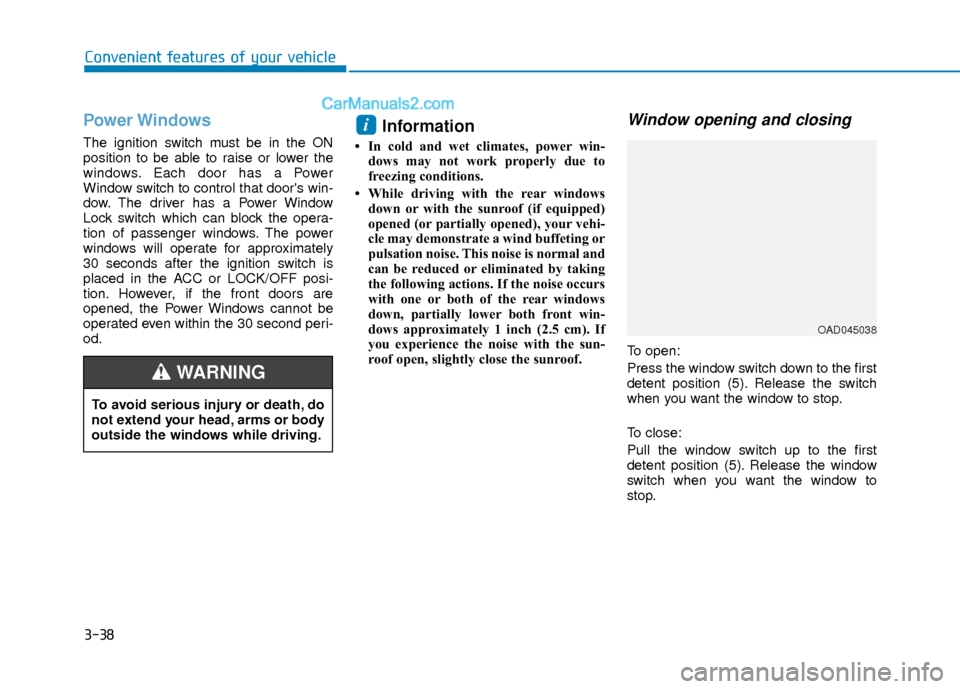
To open:
Press the window switch down to the first
detent position (5). Release the switch
when you want the window to stop.
To close:
Pull the window switch up to the first
detent position (5). Release the window
switch when you want the window to
stop.
i
To avoid serious injury or death, do
not extend your head, arms or body
outside the windows while driving.
WARNING
OAD045038
Page 116 of 526
3-39
Convenient features of your vehicle
3
Auto down window (if equipped)
Pressing the power window switch
momentarily to the second detent posi-
tion (6) completely lowers the window
even when the switch is released. To stop
the window at the desired position while
the window is in operation, pull up or
press down and release the switch.
Auto up/down window (if equipped)
Pressing or pulling up the power window
switch momentarily to the second detent
position (6) completely lowers or lifts the
window even when the switch is
released. To stop the window at the
desired position while the window is in
operation, pull up or press down and
release the switch.
To reset the power windows
If the power windows do not operate nor-
mally, the automatic power window sys-
tem must be reset as follows:
1. Place the ignition switch to the ON
position.
2. Close the window and continue pulling up on the power window switch for at
least one second.
If the power windows do not operate
properly after resetting, have the system
checked by an authorized HYUNDAI
dealer.
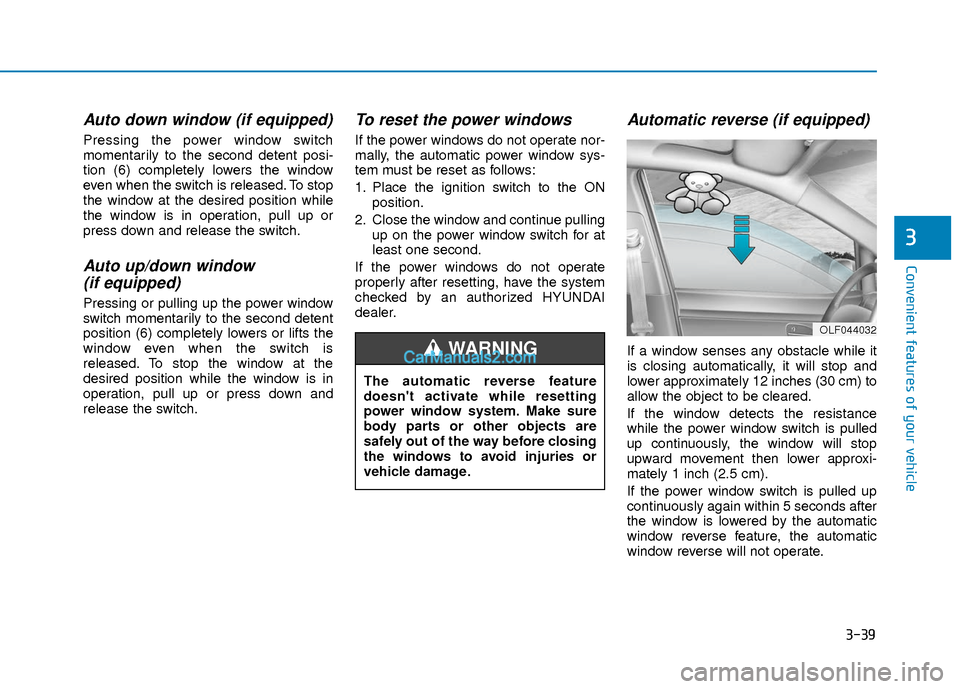
Automatic reverse (if equipped)
If a window senses any obstacle while it
is closing automatically, it will stop and
lower approximately 12 inches (30 cm) to
allow the object to be cleared.
If the window detects the resistance
while the power window switch is pulled
up continuously, the window will stop
upward movement then lower approxi-
mately 1 inch (2.5 cm).
If the power window switch is pulled up
continuously again within 5 seconds after
the window is lowered by the automatic
window reverse feature, the automatic
window reverse will not operate.
OLF044032
The automatic reverse feature
doesn't activate while resetting
power window system. Make sure
body parts or other objects are
safely out of the way before closing
the windows to avoid injuries or
vehicle damage.
WARNING
Page 117 of 526
3-40
Convenient features of your vehicle
Information
The automatic reverse feature is only
active when the "Auto Up" feature is used
by fully pulling up the switch to the second
detent.Do not install any accessories on the
windows. The automatic reverse fea-
ture may not operate.
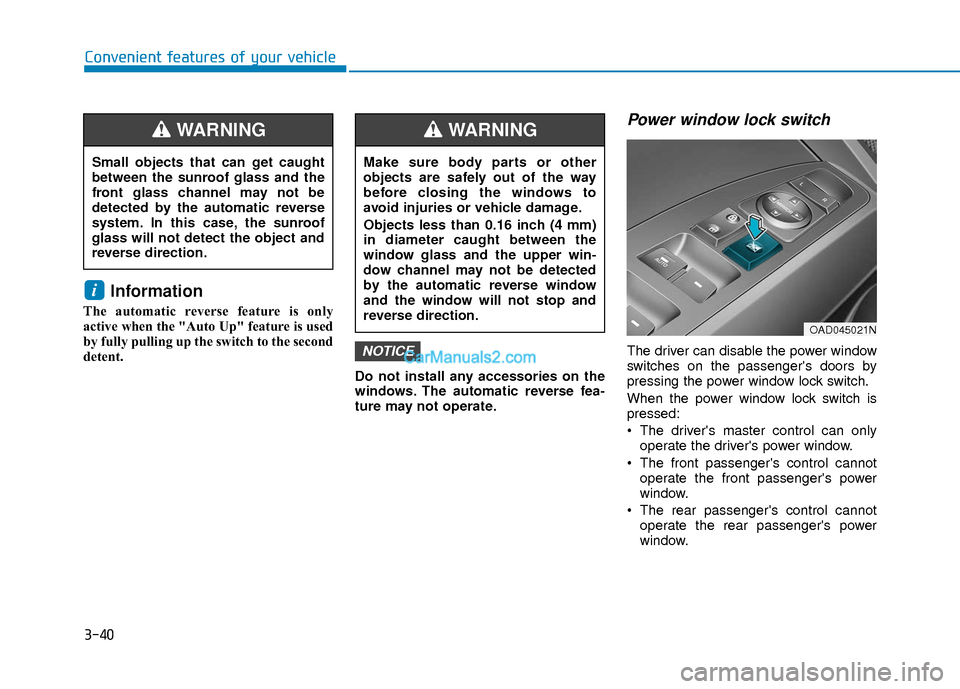
Power window lock switch
The driver can disable the power window
switches on the passenger's doors by
pressing the power window lock switch.
When the power window lock switch is
pressed:
The driver's master control can onlyoperate the driver's power window.
The front passenger's control cannot operate the front passenger's power
window.
The rear passenger's control cannot operate the rear passenger's power
window.NOTICE
i
OAD045021N
Make sure body parts or other
objects are safely out of the way
before closing the windows to
avoid injuries or vehicle damage.
Objects less than 0.16 inch (4 mm)
in diameter caught between the
window glass and the upper win-
dow channel may not be detected
by the automatic reverse window
and the window will not stop and
reverse direction.
WARNING
Small objects that can get caught
between the sunroof glass and the
front glass channel may not be
detected by the automatic reverse
system. In this case, the sunroof
glass will not detect the object and
reverse direction.
WARNING
Page 118 of 526
3-41
Convenient features of your vehicle
3
To prevent possible damage to thepower window system, do not open
or close two windows or more at the
same time. This will also ensure the
longevity of the fuse.
Never try to operate the main switch on the driver's door and the individ-
ual door window switch in opposite
directions at the same time. If this is
done, the window will stop and can-
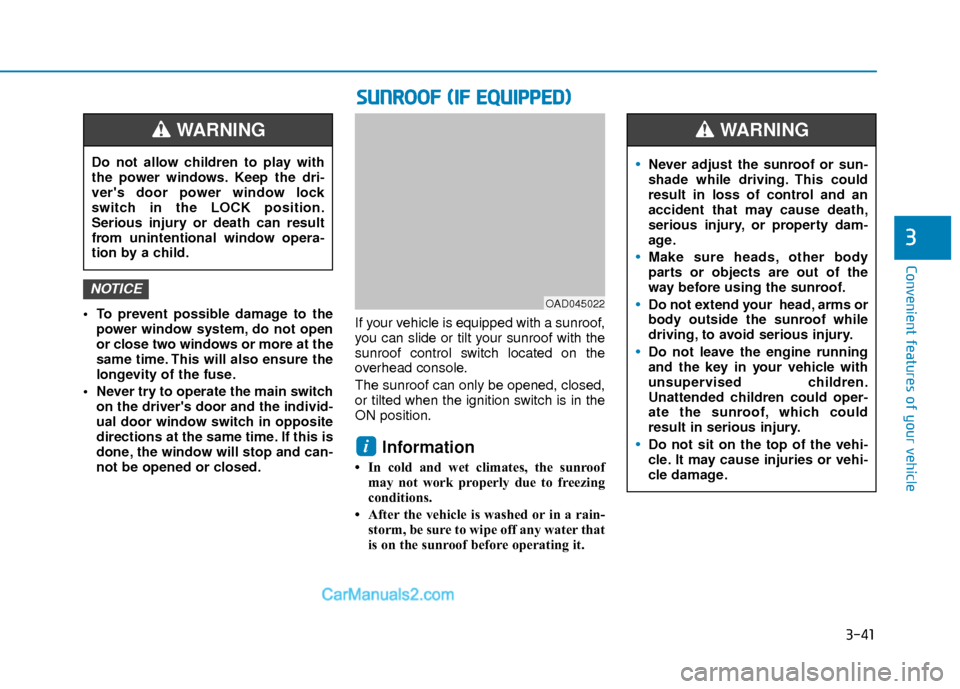
not be opened or closed. If your vehicle is equipped with a sunroof,
you can slide or tilt your sunroof with the
sunroof control switch located on the
overhead console.
The sunroof can only be opened, closed,
or tilted when the ignition switch is in the
ON position.
Information
• In cold and wet climates, the sunroof
may not work properly due to freezing
conditions.
• After the vehicle is washed or in a rain- storm, be sure to wipe off any water that
is on the sunroof before operating it.
i
NOTICE
S SU
U N
NR
RO
O O
OF
F
(
( I
IF
F
E
E Q
Q U
UI
IP
P P
PE
ED
D )
)
OAD045022
Never adjust the sunroof or sun-
shade while driving. This could
result in loss of control and an
accident that may cause death,
serious injury, or property dam-
age.
Make sure heads, other body
parts or objects are out of the
way before using the sunroof.
Do not extend your head, arms or
body outside the sunroof while
driving, to avoid serious injury.
Do not leave the engine running
and the key in your vehicle with
unsupervised children.
Unattended children could oper-
ate the sunroof, which could
result in serious injury.
Do not sit on the top of the vehi-
cle. It may cause injuries or vehi-
cle damage.
WARNING
Do not allow children to play with
the power windows. Keep the dri-
ver's door power window lock
switch in the LOCK position.
Serious injury or death can result
from unintentional window opera-
tion by a child.
WARNING
Page 120 of 526
3-43
Convenient features of your vehicle
3
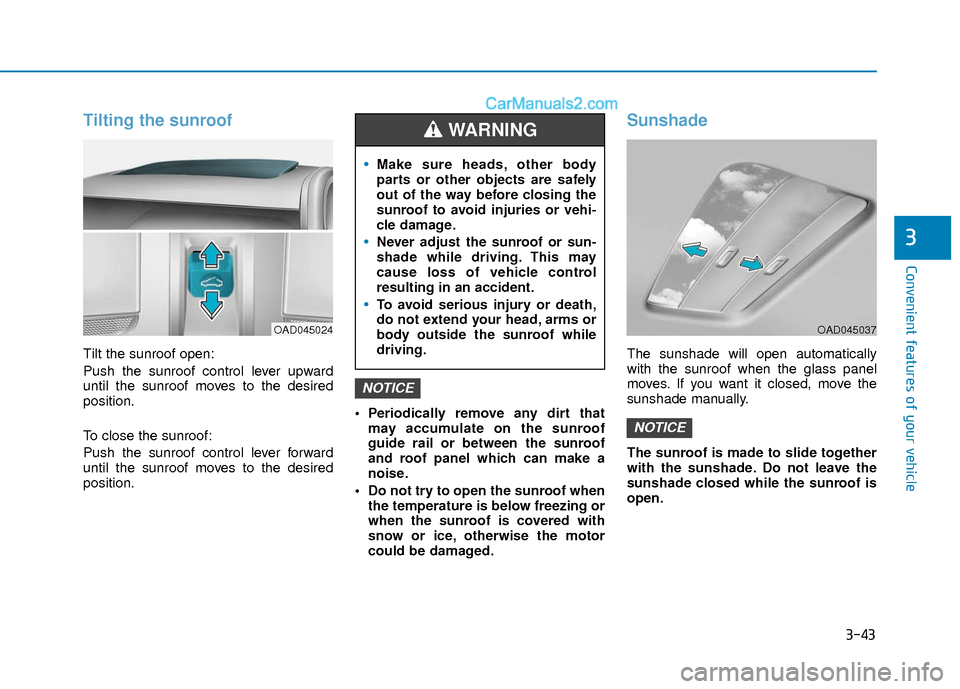
Tilting the sunroof
Tilt the sunroof open:
Push the sunroof control lever upward
until the sunroof moves to the desired
position.
To close the sunroof:
Push the sunroof control lever forward
until the sunroof moves to the desired
position. Periodically remove any dirt that
may accumulate on the sunroof
guide rail or between the sunroof
and roof panel which can make a
noise.
Do not try to open the sunroof when the temperature is below freezing or
when the sunroof is covered with
snow or ice, otherwise the motor
could be damaged.
Sunshade
The sunshade will open automatically
with the sunroof when the glass panel
moves. If you want it closed, move the
sunshade manually.
The sunroof is made to slide together
with the sunshade. Do not leave the
sunshade closed while the sunroof is
open.
NOTICE
NOTICE
OAD045024
Make sure heads, other body
parts or other objects are safely
out of the way before closing the
sunroof to avoid injuries or vehi-
cle damage.
Never adjust the sunroof or sun-
shade while driving. This may
cause loss of vehicle control
resulting in an accident.
To avoid serious injury or death,
do not extend your head, arms or
body outside the sunroof while
driving.
WARNING
OAD045037