warning light Hyundai Elantra 2018 Manual Online
[x] Cancel search | Manufacturer: HYUNDAI, Model Year: 2018, Model line: Elantra, Model: Hyundai Elantra 2018Pages: 526, PDF Size: 17.2 MB
Page 345 of 526
5-62
Driving your vehicle
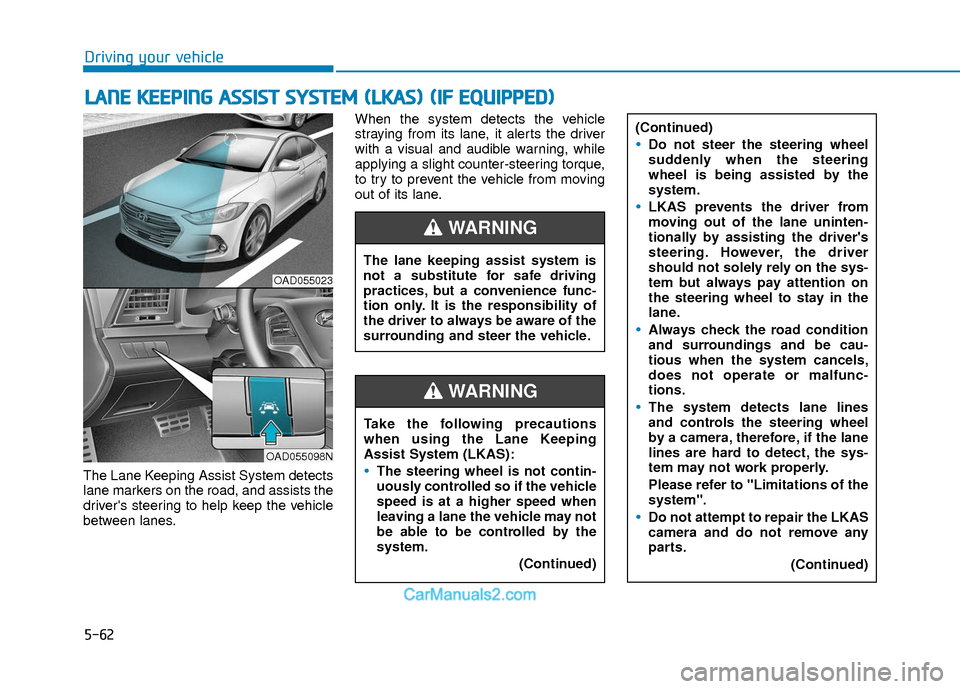
The Lane Keeping Assist System detects
lane markers on the road, and assists the
driver's steering to help keep the vehicle
between lanes.When the system detects the vehicle
straying from its lane, it alerts the driver
with a visual and audible warning, while
applying a slight counter-steering torque,
to try to prevent the vehicle from moving
out of its lane.
L L
A
A N
N E
E
K
K E
EE
EP
P I
IN
N G
G
A
A S
SS
SI
IS
S T
T
S
S Y
Y S
ST
T E
EM
M
(
( L
L K
K A
A S
S)
)
(
( I
IF
F
E
E Q
Q U
UI
IP
P P
PE
ED
D )
)
OAD055023
OAD055098N
The lane keeping assist system is
not a substitute for safe driving
practices, but a convenience func-
tion only. It is the responsibility of
the driver to always be aware of the
surrounding and steer the vehicle.
WARNING
Take the following precautions
when using the Lane Keeping
Assist System (LKAS):
The steering wheel is not contin-
uously controlled so if the vehicle
speed is at a higher speed when
leaving a lane the vehicle may not
be able to be controlled by the
system.
(Continued)
WARNING
(Continued)
Do not steer the steering wheel
suddenly when the steering
wheel is being assisted by the
system.
LKAS prevents the driver from
moving out of the lane uninten-
tionally by assisting the driver's
steering. However, the driver
should not solely rely on the sys-
tem but always pay attention on
the steering wheel to stay in the
lane.
Always check the road condition
and surroundings and be cau-
tious when the system cancels,
does not operate or malfunc-
tions.
The system detects lane lines
and controls the steering wheel
by a camera, therefore, if the lane
lines are hard to detect, the sys-
tem may not work properly.
Please refer to "Limitations of the
system".
Do not attempt to repair the LKAS
camera and do not remove any
parts.(Continued)
Page 346 of 526
5-63
Driving your vehicle
5
LKAS Operation
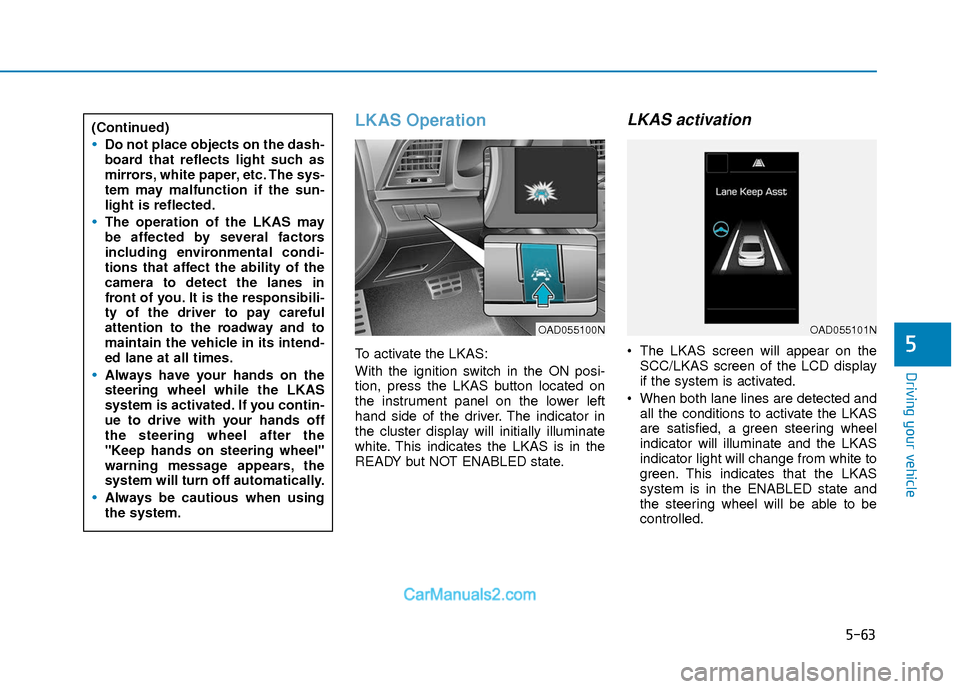
To activate the LKAS:
With the ignition switch in the ON posi-
tion, press the LKAS button located on
the instrument panel on the lower left
hand side of the driver. The indicator in
the cluster display will initially illuminate
white. This indicates the LKAS is in the
READY but NOT ENABLED state.
LKAS activation
The LKAS screen will appear on theSCC/LKAS screen of the LCD display
if the system is activated.
When both lane lines are detected and all the conditions to activate the LKAS
are satisfied, a green steering wheel
indicator will illuminate and the LKAS
indicator light will change from white to
green. This indicates that the LKAS
system is in the ENABLED state and
the steering wheel will be able to be
controlled.
(Continued)
Do not place objects on the dash-
board that reflects light such as
mirrors, white paper, etc. The sys-
tem may malfunction if the sun-
light is reflected.
The operation of the LKAS may
be affected by several factors
including environmental condi-
tions that affect the ability of the
camera to detect the lanes in
front of you. It is the responsibili-
ty of the driver to pay careful
attention to the roadway and to
maintain the vehicle in its intend-
ed lane at all times.
Always have your hands on the
steering wheel while the LKAS
system is activated. If you contin-
ue to drive with your hands off
the steering wheel after the
"Keep hands on steering wheel"
warning message appears, the
system will turn off automatically.
Always be cautious when using
the system.
OAD055100NOAD055101N
Page 349 of 526
5-66
Driving your vehicle
The LKAS system will not be in the
ENABLED state and the steering
wheel will not be assisted when:
Vehicle speed is below 40 mph (60 km/h) and over 110 mph (180
km/h).
Only one lane line is detected.
The turn signal is turned on before changing a lane. If you change lanes
without the turn signal on, the steering
wheel might be controlled.
The hazard warning flasher is on.
The width of the lane is below 10 feet (3.1 m) and over 15 feet (4.5
m).
ESC (Electronic Stability Control) is activated.
The vehicle is driven on a sharp curve.
The vehicle brakes suddenly.
The vehicle makes sharp lane changes.
Information
When the system is turned on or right
after changing a lane, drive in the middle
of the lane. If not, the system will not pro-
vide steering assist function.
Limitations of the System
The LKAS may operate prematurely
even if the vehicle does not depart from
the intended lane, OR, the LKAS may not
warn you if the vehicle leaves the intend-
ed lane under the following circum-
stances:
The lanes ahead are not visible due torain, snow, water on the road, dam-
aged or stained road surface, or other
factors.
The brightness outside changes sud- denly such as when entering or exiting
a tunnel.
The brightness outside is too low such as when the headlamps are not on at
night or the vehicle is going through a
tunnel.
It is difficult to distinguish the lane marking from the road surface or the
lane marking is faded or not clearly
marked.
Driving on a steep grade, over a hill, or when driving on a curved road.
When light coming from a street light or an oncoming vehicle is reflected on a
wet road surface such as a puddle in
the road.
The windshield or the LKAS camera lens is blocked with dirt or debris. The field of view in front is obstructed
by sun glare.
The lanes are incomplete or the area is in a construction zone.
There are more than two lane lines on the road in front of you.
The lane markings are not clearly visi- ble from the road.
The lane width is too wide or too nar- row. See previous page.
The windshield glass is fogged up; a clear view of the road is obstructed.
There are markings on the road sur- face that look like a lane line that is
inadvertently being detected by the
camera.
There is a boundary structure in the roadway such as a concrete barrier,
guardrail and reflector post that is
inadvertently being detected by the
camera.
There is not enough distance between you and the vehicle in front to be able
to detect the lane line or the vehicle
ahead is driving on the lane line.
The adverse road conditions cause excessive vehicle vibrations while driv-
ing.
i
Page 351 of 526
5-68
Driving your vehicle
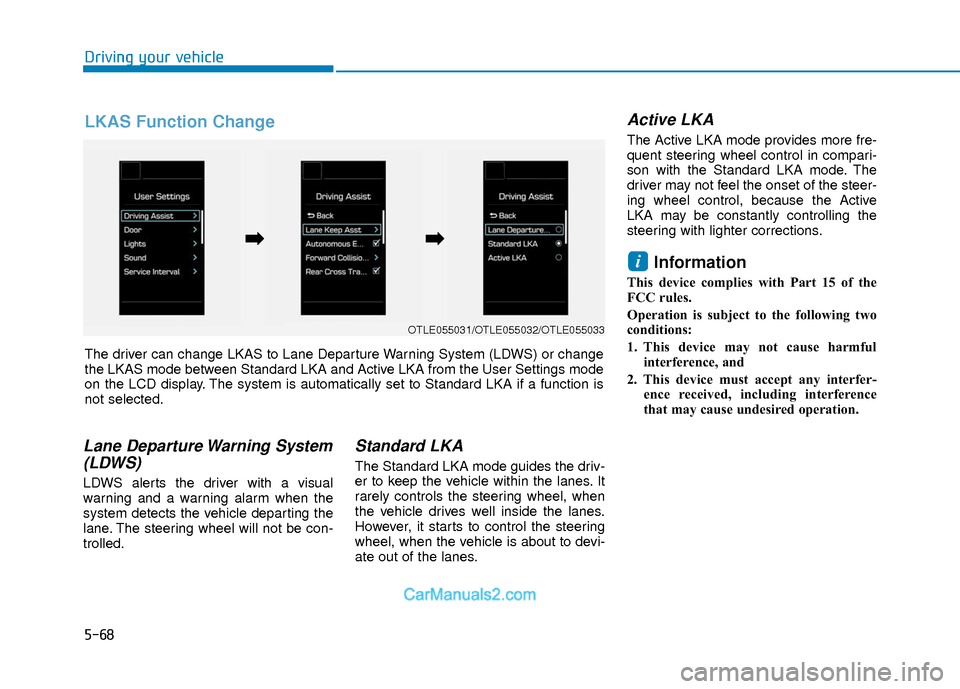
Lane Departure Warning System(LDWS)
LDWS alerts the driver with a visual
warning and a warning alarm when the
system detects the vehicle departing the
lane. The steering wheel will not be con-
trolled.
Standard LKA
The Standard LKA mode guides the driv-
er to keep the vehicle within the lanes. It
rarely controls the steering wheel, when
the vehicle drives well inside the lanes.
However, it starts to control the steering
wheel, when the vehicle is about to devi-
ate out of the lanes.
Active LKA
The Active LKA mode provides more fre-
quent steering wheel control in compari-
son with the Standard LKA mode. The
driver may not feel the onset of the steer-
ing wheel control, because the Active
LKA may be constantly controlling the
steering with lighter corrections.
Information
This device complies with Part 15 of the
FCC rules.
Operation is subject to the following two
conditions:
1. This device may not cause harmful
interference, and
2. This device must accept any interfer- ence received, including interference
that may cause undesired operation.
i
OTLE055031/OTLE055032/OTLE055033
The driver can change LKAS to Lane Departure Warning System (LDWS) or change
the LKAS mode between Standard LKA and Active LKA from the User Settings mode
on the LCD display. The system is automatically set to Standard LKA if a function is
not selected.
➡ ➡ ➡
➡
LKAS Function Change
Page 352 of 526
5-69
Driving your vehicle
5
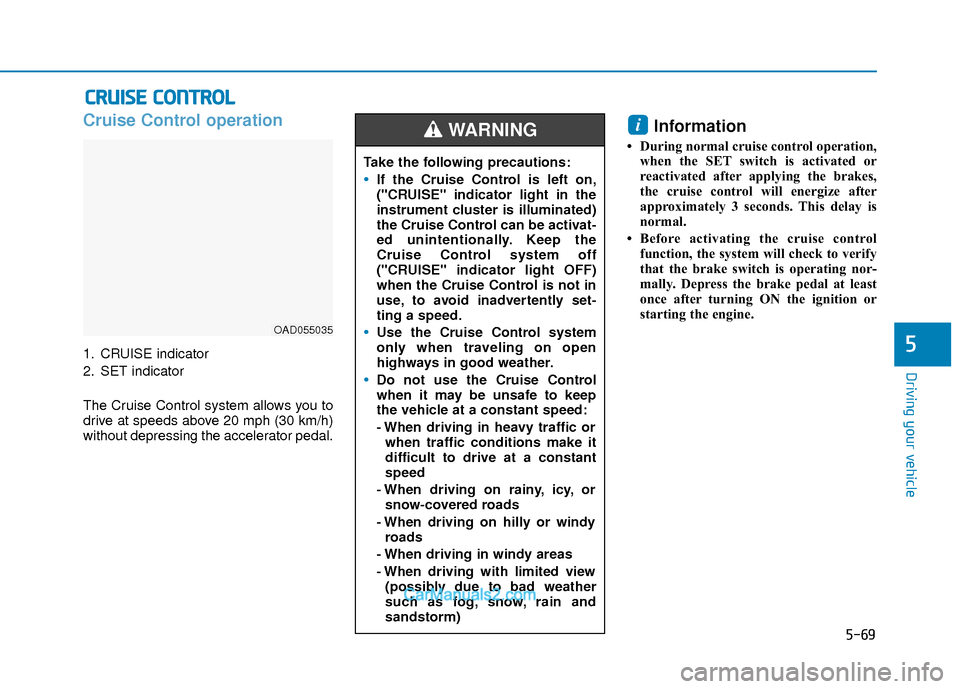
Cruise Control operation
1. CRUISE indicator
2. SET indicator
The Cruise Control system allows you to
drive at speeds above 20 mph (30 km/h)
without depressing the accelerator pedal.
Information
• During normal cruise control operation,when the SET switch is activated or
reactivated after applying the brakes,
the cruise control will energize after
approximately 3 seconds. This delay is
normal.
• Before activating the cruise control function, the system will check to verify
that the brake switch is operating nor-
mally. Depress the brake pedal at least
once after turning ON the ignition or
starting the engine.
i
C CR
R U
U I
IS
S E
E
C
C O
O N
NT
TR
R O
O L
L
OAD055035
Take the following precautions:
If the Cruise Control is left on,
("CRUISE" indicator light in the
instrument cluster is illuminated)
the Cruise Control can be activat-
ed unintentionally. Keep the
Cruise Control system off
("CRUISE" indicator light OFF)
when the Cruise Control is not in
use, to avoid inadvertently set-
ting a speed.
Use the Cruise Control system
only when traveling on open
highways in good weather.
Do not use the Cruise Control
when it may be unsafe to keep
the vehicle at a constant speed:
- When driving in heavy traffic or
when traffic conditions make it
difficult to drive at a constant
speed
- When driving on rainy, icy, or snow-covered roads
- When driving on hilly or windy roads
- When driving in windy areas
- When driving with limited view (possibly due to bad weather
such as fog, snow, rain and
sandstorm)
WARNING
Page 356 of 526
5-73
Driving your vehicle
5
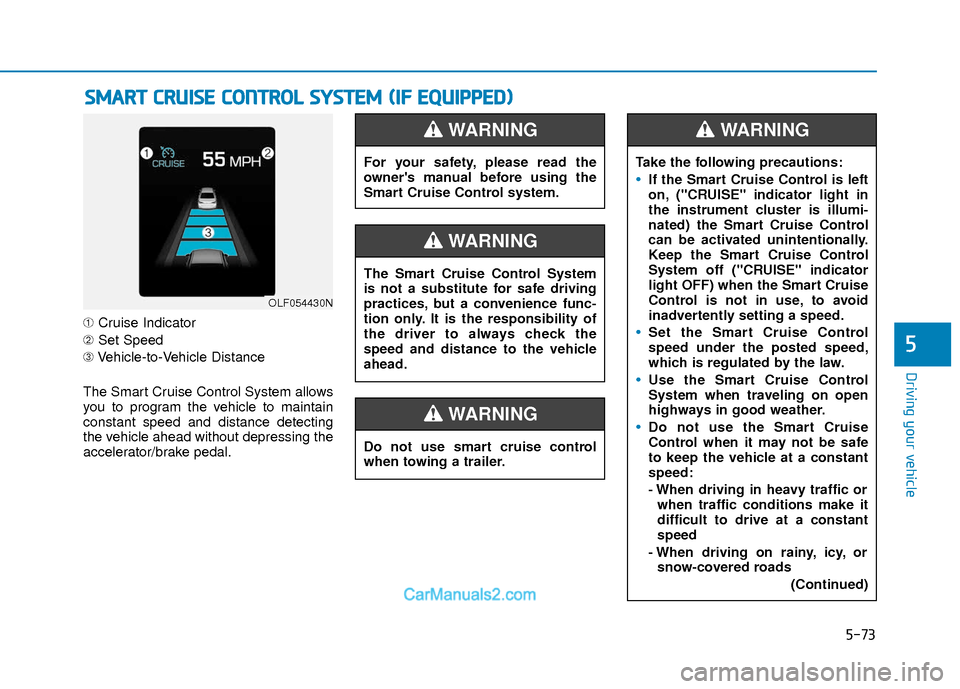
➀Cruise Indicator
➁ Set Speed
➂ Vehicle-to-Vehicle Distance
The Smart Cruise Control System allows
you to program the vehicle to maintain
constant speed and distance detecting
the vehicle ahead without depressing the
accelerator/brake pedal.
S S M
M A
AR
RT
T
C
C R
R U
U I
IS
S E
E
C
C O
O N
NT
TR
R O
O L
L
S
S Y
Y S
ST
T E
EM
M
(
( I
IF
F
E
E Q
Q U
UI
IP
P P
PE
ED
D )
)
OLF054430N
For your safety, please read the
owner's manual before using the
Smart Cruise Control system.
WARNING
Do not use smart cruise control
when towing a trailer.
WARNING
The Smart Cruise Control System
is not a substitute for safe driving
practices, but a convenience func-
tion only. It is the responsibility of
the driver to always check the
speed and distance to the vehicle
ahead.
WARNING
Take the following precautions:
If the Smart Cruise Control is left
on, ("CRUISE" indicator light in
the instrument cluster is illumi-
nated) the Smart Cruise Control
can be activated unintentionally.
Keep the Smart Cruise Control
System off ("CRUISE" indicator
light OFF) when the Smart Cruise
Control is not in use, to avoid
inadvertently setting a speed.
Set the Smart Cruise Control
speed under the posted speed,
which is regulated by the law.
Use the Smart Cruise Control
System when traveling on open
highways in good weather.
Do not use the Smart Cruise
Control when it may not be safe
to keep the vehicle at a constant
speed:
- When driving in heavy traffic or
when traffic conditions make it
difficult to drive at a constant
speed
- When driving on rainy, icy, or snow-covered roads
(Continued)
WARNING
Page 370 of 526
5-87
Driving your vehicle
5
Hazardous Driving Conditions
When hazardous driving elements are
encountered such as water, snow, ice,
mud and sand, take the below sugges-
tions:
Drive cautiously and keep a longerbraking distance.
Avoid abrupt braking or steering.
When your vehicle is stuck in snow, mud, or sand, use second gear.
Accelerate slowly to avoid unneces-
sary wheel spin.
Put sand, rock salt, tire chains or other non-slip materials under the wheels to
provide additional traction while the
vehicle becomes stuck in ice, snow, or
mud.
Rocking the Vehicle
If it is necessary to rock the vehicle to
free it from snow, sand, or mud, first turn
the steering wheel right and left to clear
the area around your front wheels. Then,
shift back and forth between R (Reverse)
and a forward gear.
Try to avoid spinning the wheels, and do
not race the engine.
To prevent transmission wear, wait until
the wheels stop spinning before shifting
gears. Release the accelerator pedal
while shifting, and press lightly on the
accelerator pedal while the transmission
is in gear. Slowly spinning the wheels in
forward and reverse directions causes a
rocking motion that may free the vehicle.
Information
The ESC system must be turned OFF
before rocking the vehicle.
i
S SP
P E
EC
CI
IA
A L
L
D
D R
RI
IV
V I
IN
N G
G
C
C O
O N
ND
DI
IT
T I
IO
O N
NS
S
Downshifting with an automatic
transmission/dual clutch transmis-
sion while driving on slippery sur-
faces can cause an accident. The
sudden change in tire speed could
cause the tires to skid. Be careful
when downshifting on slippery sur-
faces.
WARNING
If the vehicle is stuck and excessive
wheel spin occurs, the temperature
in the tires can increase very quick-
ly. If the tires become damaged, a
tire blow out or tire explosion can
occur. This condition is dangerous -
you and others may be injured. Do
not attempt this procedure if people
or objects are anywhere near the
vehicle.
If you attempt to free the vehicle,
the vehicle can overheat quickly,
possibly causing an engine com-
partment fire or other damage. Try
to avoid spinning the wheels as
much as possible to prevent over-
heating of either the tires or the
engine. DO NOT allow the vehicle to
spin the wheels above 35 mph (56
km/h).
WARNING
Page 373 of 526
5-90
Driving your vehicle
W
WI
IN
N T
TE
ER
R
D
D R
RI
IV
V I
IN
N G
G
The severe weather conditions of winter
quickly wear out tires and cause other
problems. To minimize winter driving
problems, you should take the following
suggestions:
Snow or Icy Conditions
You need to keep sufficient distance
between your vehicle and the vehicle in
front of you.
Apply the brakes gently. Speeding, rapid
acceleration, sudden brake applications,
and sharp turns are potentially very haz-
ardous practices. During deceleration,
use engine braking to the fullest extent.
Sudden brake applications on snowy or
icy roads may cause the vehicle to skid.
To drive your vehicle in deep snow, it may
be necessary to use snow tires or to
install tire chains on your tires.
Always carry emergency equipment.
Some of the items you may want to carry
include tire chains, tow straps or chains,
a flashlight, emergency flares, sand, a
shovel, jumper cables, a window scraper,
gloves, ground cloth, coveralls, a blanket,
etc.
Snow tires
If you mount snow tires on your vehicle,
make sure to use radial tires of the same
size and load range as the original tires.
Mount snow tires on all four wheels to
balance your vehicle’s handling in all
weather conditions. The traction provided
by snow tires on dry roads may not be as
high as your vehicle's original equipment
tires. Check with the tire dealer for maxi-
mum speed recommendations.
Information
Do not install studded tires without first
checking local, state and municipal regula-
tions for possible restrictions against their
use.
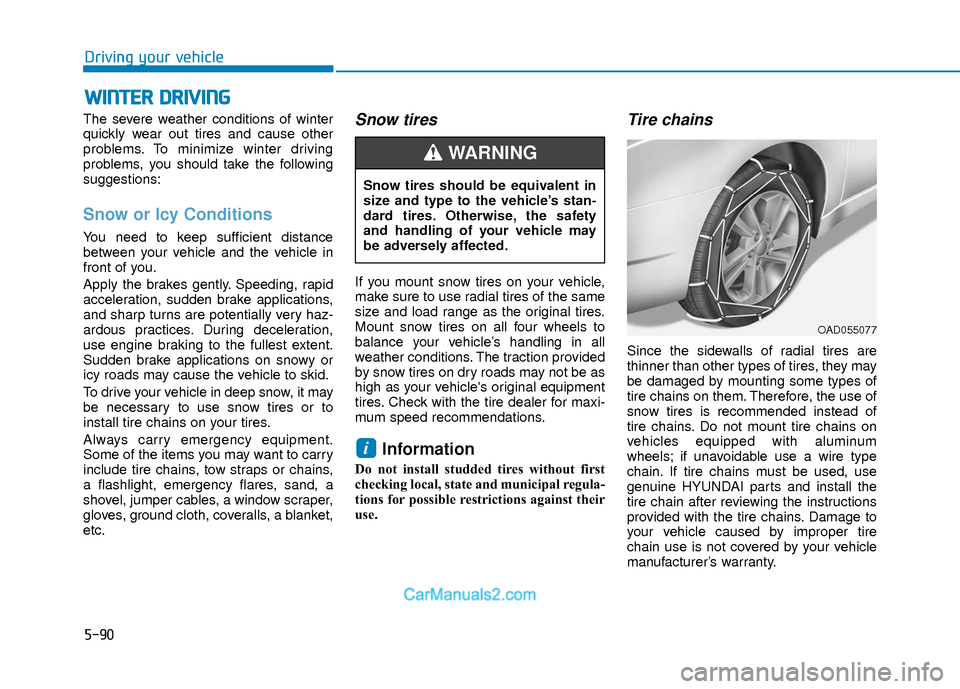
Tire chains
Since the sidewalls of radial tires are
thinner than other types of tires, they may
be damaged by mounting some types of
tire chains on them. Therefore, the use of
snow tires is recommended instead of
tire chains. Do not mount tire chains on
vehicles equipped with aluminum
wheels; if unavoidable use a wire type
chain. If tire chains must be used, use
genuine HYUNDAI parts and install the
tire chain after reviewing the instructions
provided with the tire chains. Damage to
your vehicle caused by improper tire
chain use is not covered by your vehicle
manufacturer’s warranty.
i
Snow tires should be equivalent in
size and type to the vehicle’s stan-
dard tires. Otherwise, the safety
and handling of your vehicle may
be adversely affected.
WARNING
OAD055077
Page 383 of 526
6-2
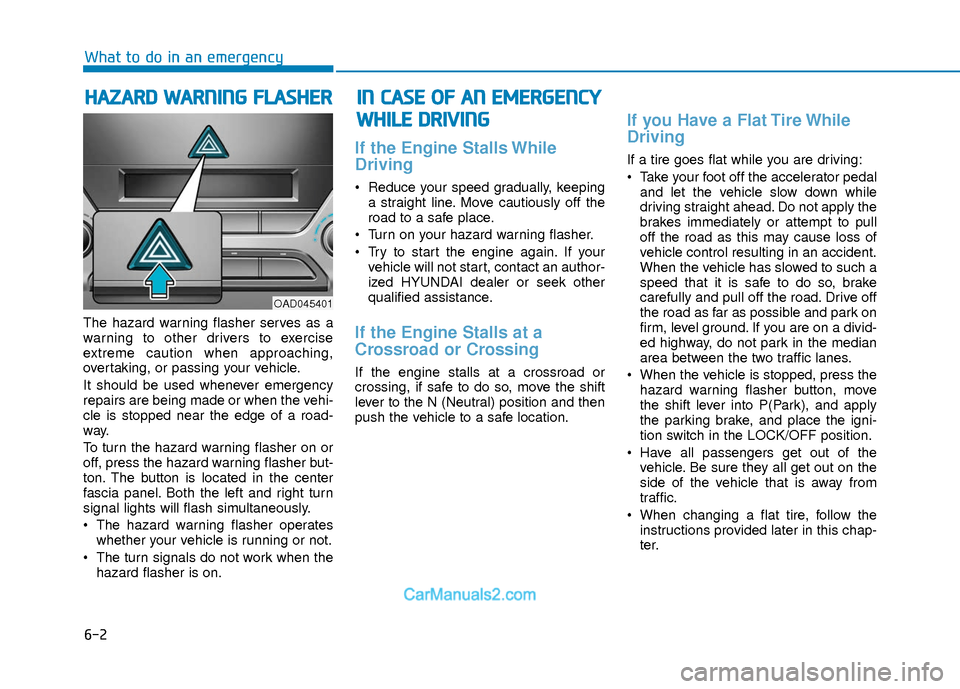
The hazard warning flasher serves as a
warning to other drivers to exercise
extreme caution when approaching,
overtaking, or passing your vehicle.
It should be used whenever emergency
repairs are being made or when the vehi-
cle is stopped near the edge of a road-
way.
To turn the hazard warning flasher on or
off, press the hazard warning flasher but-
ton. The button is located in the center
fascia panel. Both the left and right turn
signal lights will flash simultaneously.
• The hazard warning flasher operates
whether your vehicle is running or not.
The turn signals do not work when the hazard flasher is on.
If the Engine Stalls While
Driving
Reduce your speed gradually, keepinga straight line. Move cautiously off the
road to a safe place.
Turn on your hazard warning flasher.
Try to start the engine again. If your vehicle will not start, contact an author-
ized HYUNDAI dealer or seek other
qualified assistance.
If the Engine Stalls at a
Crossroad or Crossing
If the engine stalls at a crossroad or
crossing, if safe to do so, move the shift
lever to the N (Neutral) position and then
push the vehicle to a safe location.
If you Have a Flat Tire While
Driving
If a tire goes flat while you are driving:
Take your foot off the accelerator pedaland let the vehicle slow down while
driving straight ahead. Do not apply the
brakes immediately or attempt to pull
off the road as this may cause loss of
vehicle control resulting in an accident.
When the vehicle has slowed to such a
speed that it is safe to do so, brake
carefully and pull off the road. Drive off
the road as far as possible and park on
firm, level ground. If you are on a divid-
ed highway, do not park in the median
area between the two traffic lanes.
When the vehicle is stopped, press the hazard warning flasher button, move
the shift lever into P(Park), and apply
the parking brake, and place the igni-
tion switch in the LOCK/OFF position.
Have all passengers get out of the vehicle. Be sure they all get out on the
side of the vehicle that is away from
traffic.
When changing a flat tire, follow the instructions provided later in this chap-
ter.
H HA
AZ
ZA
A R
RD
D
W
W A
AR
RN
N I
IN
N G
G
F
F L
LA
A S
SH
H E
ER
R
What to do in an emergency
I
IN
N
C
C A
A S
SE
E
O
O F
F
A
A N
N
E
E M
M E
ER
R G
G E
EN
N C
CY
Y
W
W H
HI
IL
L E
E
D
D R
RI
IV
V I
IN
N G
G
OAD045401
Page 385 of 526
6-4
What to do in an emergency
Information
An inappropriately disposed bat-tery can be harmful to the envi-
ronment and human health.
Dispose the battery according to
your local law(s) or regulations.
To prevent damage to your vehicle:
• Only use a 12-volt power supply (battery or jumper system) to jump
start your vehicle.
Do not attempt to jump start your vehicle by push-starting.
Jump starting procedure
1. Position the vehicles close enough that the jumper cables will reach, but
do not allow the vehicles to touch.
2. Avoid fans or any moving parts in the engine compartment at all times, even
when the vehicles are turned off.
3. Turn off all electrical devices such as radios, lights, air conditioning, etc. Put
the vehicles in P (Park) and set the
parking brakes. Turn both vehicles
OFF.
NOTICE
i
To prevent SERIOUS INJURY or
DEATH to you or bystanders,
always follow these precautions
when working near or handling the
battery:
Always read and follow
instructions carefully when
handling a battery.
Wear eye protection
designed to protect the
eyes from acid splashes.
Keep all flames, sparks, or
smoking materials away
from the battery.
Hydrogen is always present in battery cells, is highly
combustible, and may
explode if ignited.
Keep batteries out of reach
of children.
(Continued)
WARNING (Continued)Batteries contain sulfuric
acid which is highly corro-
sive. Do not allow acid to
contact your eyes, skin or
clothing.
If acid gets into your eyes, flush
your eyes with clean water for at
least 15 minutes and get immediate
medical attention. If acid gets on
your skin, thoroughly wash the
area. If you feel pain or a burning
sensation, get medical attention
immediately.
When lifting a plastic-cased bat-
tery, excessive pressure on the
case may cause battery acid to
leak. Lift with a battery carrier or
with your hands on opposite cor-
ners.
Do not attempt to jump start your
vehicle if your battery is frozen.
NEVER attempt to recharge the
battery when the vehicle's battery
cables are connected to the bat-
tery.
The electrical ignition system
works with high voltage. NEVER
touch these components with the
engine running or when the igni-
tion switch is in the ON position.
Pb