battery Hyundai Elantra 2018 Owner's Manual
[x] Cancel search | Manufacturer: HYUNDAI, Model Year: 2018, Model line: Elantra, Model: Hyundai Elantra 2018Pages: 526, PDF Size: 17.2 MB
Page 10 of 526
F10
Introduction
This vehicle is equipped with an event
data recorder (EDR). The main purpose
of an EDR is to record, in certain crash
or near crash-like situations, such as
an air bag deployment or hitting a road
obstacle, data that will assist in under-
standing how a vehicle’s systems per-
formed. The EDR is designed to record
data related to vehicle dynamics and
safety systems for a short period of
time, typically 30 seconds or less. The
EDR in this vehicle is designed to
record such data as:
were operating;
senger safety belts were buckled/
fastened;
depressing the accelerator and/or
brake pedal; and,
These data can help provide a better
understanding of the circumstances
in which crashes and injuries occur.
NOTE: EDR data are recorded by your
vehicle only if a non-trivial crash situ-
ation occurs; no data are recorded by
the EDR under normal driving condi-
tions and no personal data (e.g.,
name, gender, age, and crash loca-
tion) are recorded. However, other
parties, such as law enforcement,
could combine the EDR data with the
type of personally identifying data
routinely acquired during a crash
investigation.
To read data recorded by an EDR, spe-
cial equipment is required, and
access to the vehicle or the EDR is
needed. In addition to the vehicle
manufacturer, other parties, such as
law enforcement, that have the special
equipment, can read the information if
they have access to the vehicle or the
EDR.
V V
E
EH
H I
IC
C L
LE
E
D
D A
A T
TA
A
C
C O
O L
LL
LE
E C
CT
T I
IO
O N
N
A
A N
N D
D
E
E V
V E
EN
N T
T
D
D A
A T
TA
A
R
R E
EC
CO
O R
RD
D E
ER
R S
S
CALIFORNIA PROPOSITION 65
WARNING
Items contained in motor vehicles
or emitted from them are known to
the State of California to cause can-
cer and birth defects or reproduc-
tive harm. These include:
Gasoline and its vapors
Engine exhaust
Used engine oil
Interior passenger compartment
components and materials
Component parts which are sub-
ject to heat and wear
In addition, battery posts, terminals
and related accessories contain
lead, lead compounds and other
chemicals known to the State of
California to cause cancer and
reproductive harm.
WARNING
Page 17 of 526
1-6
Your vehicle at a glance
E
EN
N G
GI
IN
N E
E
C
C O
O M
M P
PA
A R
RT
TM
M E
EN
N T
T
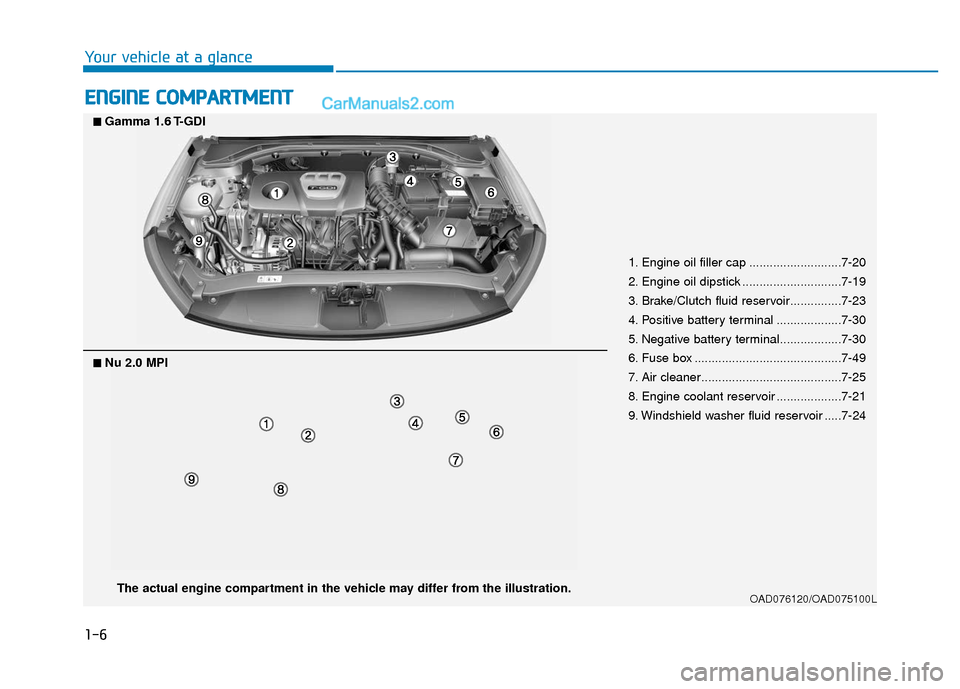
1. Engine oil filler cap ...........................7-20
2. Engine oil dipstick .............................7-19
3. Brake/Clutch fluid reservoir...............7-23
4. Positive battery terminal ...................7-30
5. Negative battery terminal..................7-30
6. Fuse box ...........................................7-49
7. Air cleaner.........................................7-25
8. Engine coolant reservoir ...................7-21
9. Windshield washer fluid reservoir .....7-24
OAD076120/OAD075100LThe actual engine compartment in the vehicle may differ from the illustration.
■
■Nu 2.0 MPI
■
■Gamma 1.6 T-GDI
Page 24 of 526
2-7
Safety system of your vehicle
2
Power adjustment (for driver's seat, if equipped)
The front seat can be adjusted by using
the control switches located on the out-
side of the seat cushion. Before driving,
adjust the seat to the proper position so
that you can easily control the steering
wheel, foot pedals and controls on the
instrument panel.
To prevent damage to the seats:
Always stop adjusting the seats
when the seat has been adjusted as
far forward or rearward as possible.
Do not adjust the seats longer than necessary when the engine is
turned off. This may result in unnec-
essary battery drain.
Do not operate two or more seats at the same time. This may result in an
electrical malfunction.
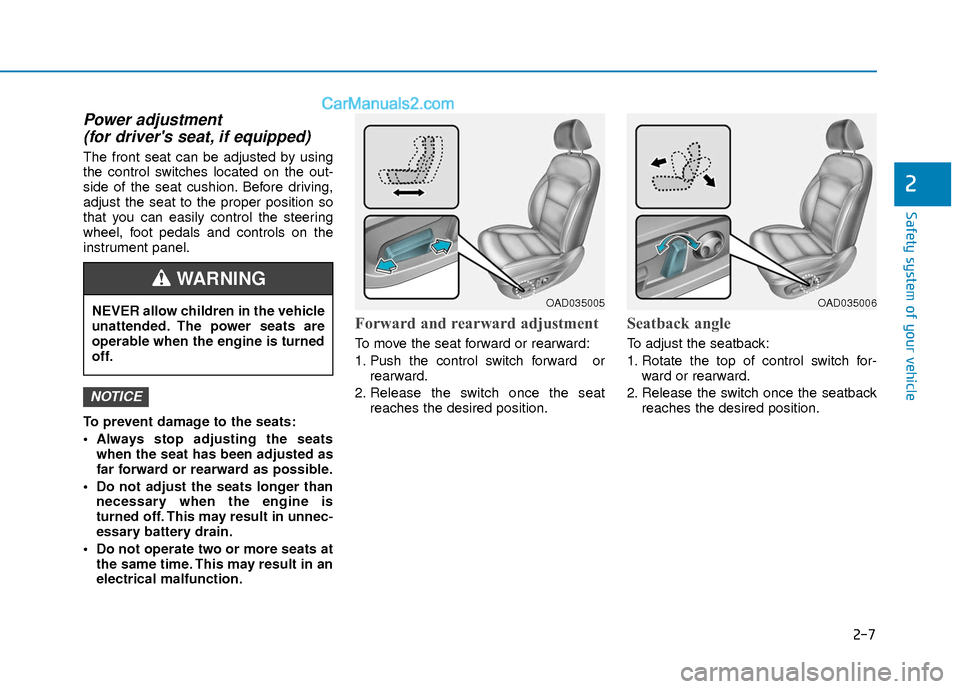
Forward and rearward adjustment
To move the seat forward or rearward:
1. Push the control switch forward or rearward.
2. Release the switch once the seat reaches the desired position.
Seatback angle
To adjust the seatback:
1. Rotate the top of control switch for-ward or rearward.
2. Release the switch once the seatback reaches the desired position.
NOTICE
NEVER allow children in the vehicle
unattended. The power seats are
operable when the engine is turned
off.
WARNING
OAD035005OAD035006
Page 82 of 526
3-5
Convenient features of your vehicle
3
Remote key precautions
The remote key will not work if any of the
following occur:
The key is in the ignition switch.
You exceed the operating distance limit(about 90 feet [30 m]).
The remote key battery is weak.
Other vehicles or objects may be blocking the signal.
The weather is extremely cold.
The remote key is close to a radio transmitter such as a radio station or
an airport which can interfere with nor-
mal operation of the remote key.
When the remote key does not work cor-
rectly, open and close the door with the
mechanical key. If you have a problem
with the remote key contact an author-
ized HYUNDAI dealer.
If the remote key is in close proximity to
your mobile phone, the signal could be
blocked by your mobile phones normal
operational signals. This is especially
important when the phone is active such
as making and receiving calls, text mes-
saging, and/or sending/receiving emails.
Avoid placing the remote key and your
mobile phone in the same pants or jack-
et pocket and always try to maintain an
adequate distance between the two
devices.Information
This device complies with Part 15 of the
FCC rules.
Operation is subject to the following three
conditions:
1. This device may not cause harmful interference, and
2. This device must accept any interfer- ence received, including interference
that may cause undesired operation.
3. Changes or modifications not expressly approved by the party responsible for
compliance could void the user’s
authority to operate the device.
Keep the remote key away from elec-
tromagnetic materials that blocks
electromagnetic waves to the key sur-
face.
Battery replacement
If the remote key is not working properly,
try replacing the battery with a new one.
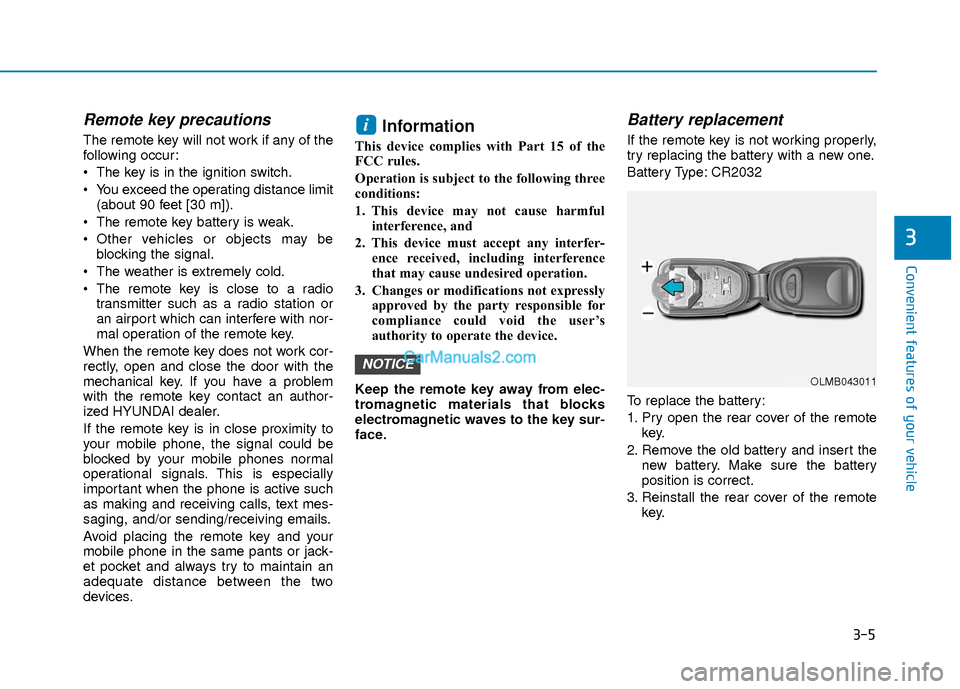
Battery Type: CR2032
To replace the battery:
1. Pry open the rear cover of the remote key.
2. Remove the old battery and insert the new battery. Make sure the battery
position is correct.
3. Reinstall the rear cover of the remote key.
NOTICE
i
OLMB043011
Page 83 of 526
3-6
Convenient features of your vehicle
If you suspect your remote key might
have sustained some damage, or you
feel your remote key is not working cor-
rectly contact an authorized HYUNDAI
dealer.
Information
An inappropriately disposed bat-tery can be harmful to the envi-
ronment and human health.
Dispose the battery according to
your local law(s) and regulation.
Smart Key (if equipped)
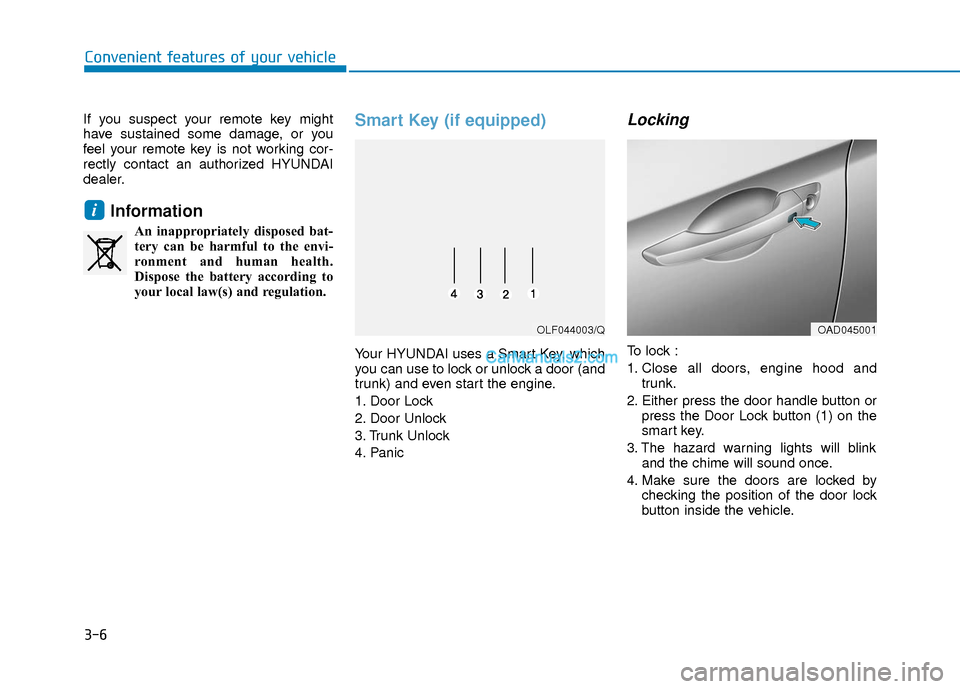
Your HYUNDAI uses a Smart Key, which
you can use to lock or unlock a door (and
trunk) and even start the engine.
1. Door Lock
2. Door Unlock
3. Trunk Unlock
4. Panic
Locking
To lock :
1. Close all doors, engine hood and trunk.
2. Either press the door handle button or press the Door Lock button (1) on the
smart key.
3. The hazard warning lights will blink and the chime will sound once.
4. Make sure the doors are locked by checking the position of the door lock
button inside the vehicle.
i
OLF044003/QOAD045001
Page 85 of 526
3-8
Convenient features of your vehicle
Trunk opening
To open:
1. Carry the smart key.
2. Either press the trunk handle button orpress and hold the Trunk Unlock but-
ton (3) on the smart key for more than
one second.
3. The hazard warning lights will blink two times.
Once the trunk is opened and then
closed, the trunk will lock automatically.
Information
The trunk handle button will only operate
when the smart key is within 28 inches (0.7
m) from the trunk handle.
Panic button
Press and hold the Panic button (4) for
more than one second. The horn sounds
and hazard warning lights blink for about
30 seconds. To cancel the panic mode,
press any button on the Smart Key.
Start-up
You can start the engine without inserting
the key.
For more information, refer to the
"Engine Start/Stop Button" section in
chapter 5.
To prevent damaging the smart key:
Keep the smart key away from any liquid or fire. Internal circuits may
malfunction if the inside of the
remote key gets damp (from liquids
or moisture) or if it is heated. This
can exclude the remote key from
warranty coverage.
Avoid dropping or throwing the smart key.
Protect the smart key from extreme temperatures.
Always have the smart key with you when leaving the vehicle. If the
smart key is left near the vehicle, the
vehicle battery may be discharged.
Mechanical key
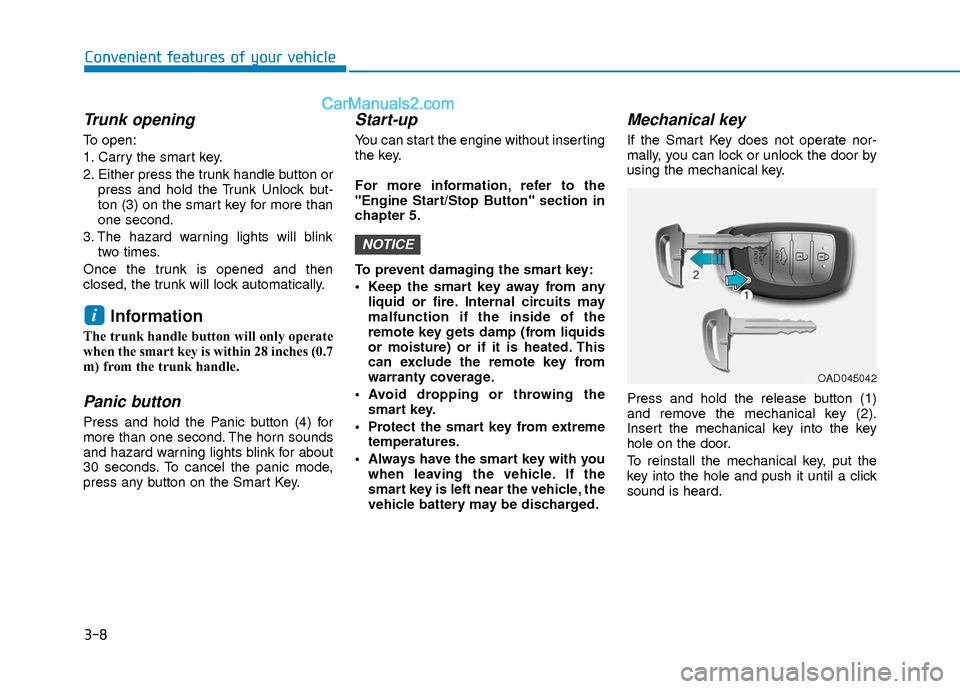
If the Smart Key does not operate nor-
mally, you can lock or unlock the door by
using the mechanical key.
Press and hold the release button (1)
and remove the mechanical key (2).
Insert the mechanical key into the key
hole on the door.
To reinstall the mechanical key, put the
key into the hole and push it until a click
sound is heard.
NOTICE
i
OAD045042
Page 86 of 526
3-9
Convenient features of your vehicle
3
Loss of a smart key
A maximum of two Smart Keys can be
registered to a single vehicle. If you hap-
pen to lose your smart key, you should
immediately take the vehicle and remain-
ing keys to your authorized HYUNDAI
dealer or tow the vehicle, if necessary.
Smart key precautions
The smart key will not work if any of the
following occur:
The smart key is close to a radio trans-mitter such as a radio station or an air-
port which can interfere with normal
operation of the transmitter.
The smart key is near a mobile two way radio system or a cellular phone.
Another vehicle’s smart key is being operated close to your vehicle.
When the smart key does not work cor-
rectly, open and close the door with the
mechanical key. If you have a problem
with the smart key, contact an authorized
HYUNDAI dealer.
If the smart key is in close proximity to
your mobile phone, the signal could be
blocked by your mobile phones normal
operational signals. This is especially
important when the phone is active such
as making and receiving calls, text mes-
saging, and/or sending/receiving emails. Avoid placing the smart key and your
mobile phone in the same pants or jack-
et pocket and always try to maintain an
adequate distance between the two
devices.
Information
This device complies with Part 15 of the
FCC rules.
Operation is subject to the following three
conditions:
1. This device may not cause harmful
interference, and
2. This device must accept any interfer- ence received, including interference
that may cause undesired operation.
3. Changes or modifications not expressly approved by the party responsible for
compliance could void the user 's
authority to operate the device.
Battery replacement
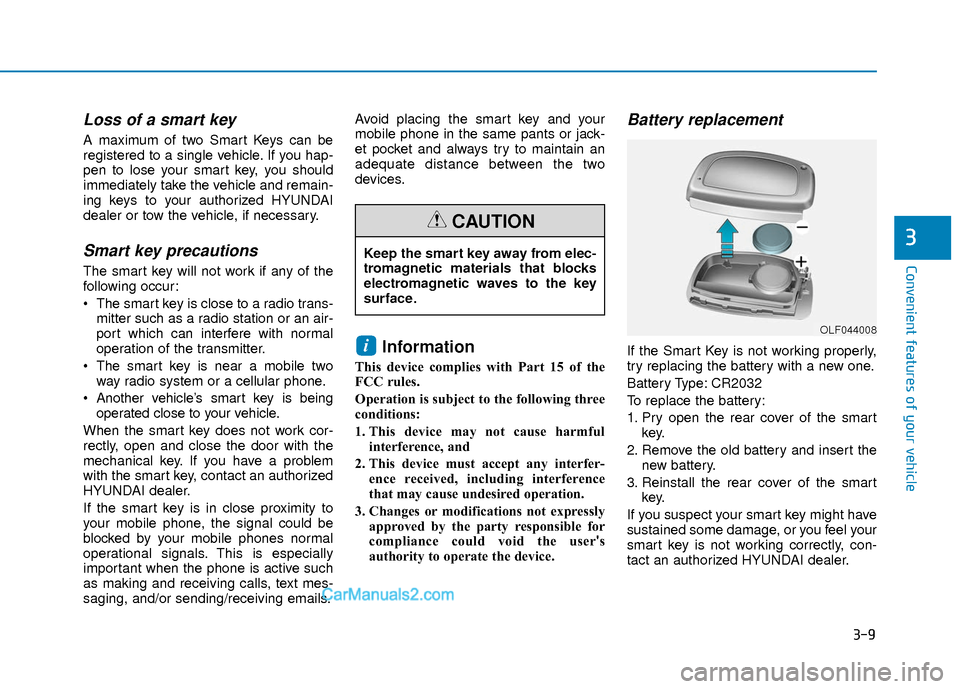
If the Smart Key is not working properly,
try replacing the battery with a new one.
Battery Type: CR2032
To replace the battery:
1. Pry open the rear cover of the smart key.
2. Remove the old battery and insert the new battery.
3. Reinstall the rear cover of the smart key.
If you suspect your smart key might have
sustained some damage, or you feel your
smart key is not working correctly, con-
tact an authorized HYUNDAI dealer.i
Keep the smart key away from elec-
tromagnetic materials that blocks
electromagnetic waves to the key
surface.
CAUTION
OLF044008
Page 87 of 526
3-10
Convenient features of your vehicle
Information
An inappropriately disposed bat-tery can be harmful to the envi-
ronment and human health.
Dispose the battery according to
your local law(s) and regulation(s).
Immobilizer System
(if equipped)
The immobilizer system protects your
vehicle from theft. If an improperly coded
key (or other device) is used, the
engine’s fuel system is disabled.
When the ignition switch is placed in the
ON position, the immobilizer system indi-
cator should come on briefly, then go off.
If the indicator starts to blink, the system
does not recognize the coding of the key.
Place the ignition switch to the
LOCK/OFF position, then place the igni-
tion switch to the ON position again.
The system may not recognize your key’s
coding if another immobilizer key or other
metal object (i.e., key chain) is near the
key. The engine may not start because
the metal may interrupt the transponder
signal from transmitting normally. If the system repeatedly does not recog-
nize the coding of the key, it is recom-
mended that you contact your HYUNDAI
dealer.
Do not attempt to alter this system or add
other devices to it. Electrical problems
could result that may make your vehicle
inoperable.
The transponder in your key is an
important part of the immobilizer sys-
tem. It is designed to give years of
trouble-free service, however you
should avoid exposure to moisture,
static electricity and rough handling.
Immobilizer system malfunction could
occur.
Information
This device complies with Part 15 of the
FCC rules.
Operation is subject to the following three
conditions:
1. This device may not cause harmful
interference, and
2. This device must accept any interfer- ence received, including interference
that may cause undesired operation.
3. Changes or modifications not expressly approved by the party responsible for
compliance could void the user's
authority to operate the device.
i
NOTICE
i
In order to prevent theft of your
vehicle, do not leave spare keys
anywhere in your vehicle. Your
immobilizer password is a cus-
tomer unique password and should
be kept confidential.
WARNING
Page 93 of 526
3-16
Convenient features of your vehicle
Once the security system is set, opening
any door, the trunk, or the hood without
using the remote key or smart key will
cause the alarm to activate.
The Theft Alarm System will not set if the
hood, the trunk, or any door is not fully
closed. If the system will not set, check
the hood, the trunk, or the doors are fully
closed.
Do not attempt to alter this system or add
other devices to it.
Information
• Do not lock the doors until all passen-gers have left the vehicle. If the remain-
ing passenger leaves the vehicle when
the system is armed, the alarm will be
activated.
• If the vehicle is not disarmed with the remote key or smart key, open the doors
by using the mechanical key and place
the ignition switch in the ON position
(for remote key) or start the engine (for
smart key) by directly pressing the igni-
tion switch with the smart key.
• When the system is disarmed but a door or trunk is not opened within 30 sec-
onds, the system will be rearmed. The Driver Position Memory System is
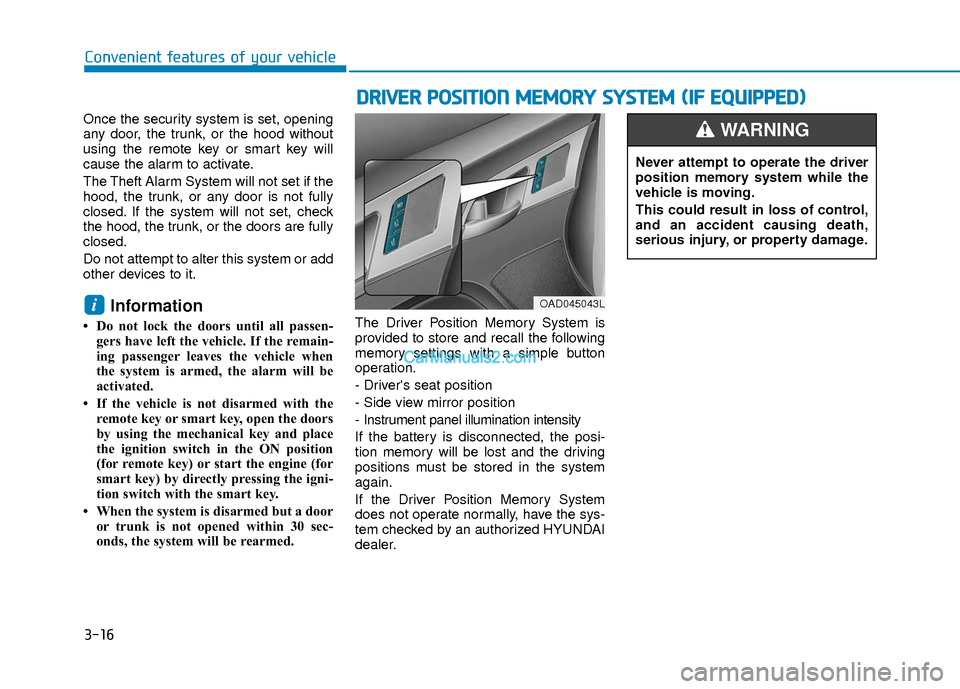
provided to store and recall the following
memory settings with a simple button
operation.
- Driver's seat position
- Side view mirror position
- Instrument panel illumination intensity
If the battery is disconnected, the posi-
tion memory will be lost and the driving
positions must be stored in the system
again.
If the Driver Position Memory System
does not operate normally, have the sys-
tem checked by an authorized HYUNDAI
dealer.
i
D D
R
RI
IV
V E
ER
R
P
P O
O S
SI
IT
T I
IO
O N
N
M
M E
EM
M O
OR
RY
Y
S
S Y
Y S
ST
T E
EM
M
(
( I
IF
F
E
E Q
Q U
UI
IP
P P
PE
ED
D )
)
OAD045043L
Never attempt to operate the driver
position memory system while the
vehicle is moving.
This could result in loss of control,
and an accident causing death,
serious injury, or property damage.
WARNING
Page 102 of 526
3-25
Convenient features of your vehicle
3
Programming HomeLink®
Please note the following:
When programming a garage dooropener, it is advised to park the vehicle
outside of the garage.
It is recommended that a new battery be placed in the hand-held transmitter
of the device being programmed to
HomeLink
®for quicker training and
accurate transmission of the radio-fre-
quency signal.
Some vehicles may require the ignition switch to be placed in the ACC (or
"Accessories") position for program-
ming and/or operation of HomeLink
®.
In the event that there are still pro- gramming difficulties or questions after
following the programming steps listed
below, contact HomeLink
®at:
www.homelink.com or by calling 1-
800-355-3515. Programming
To train most devices, follow these
instructions:
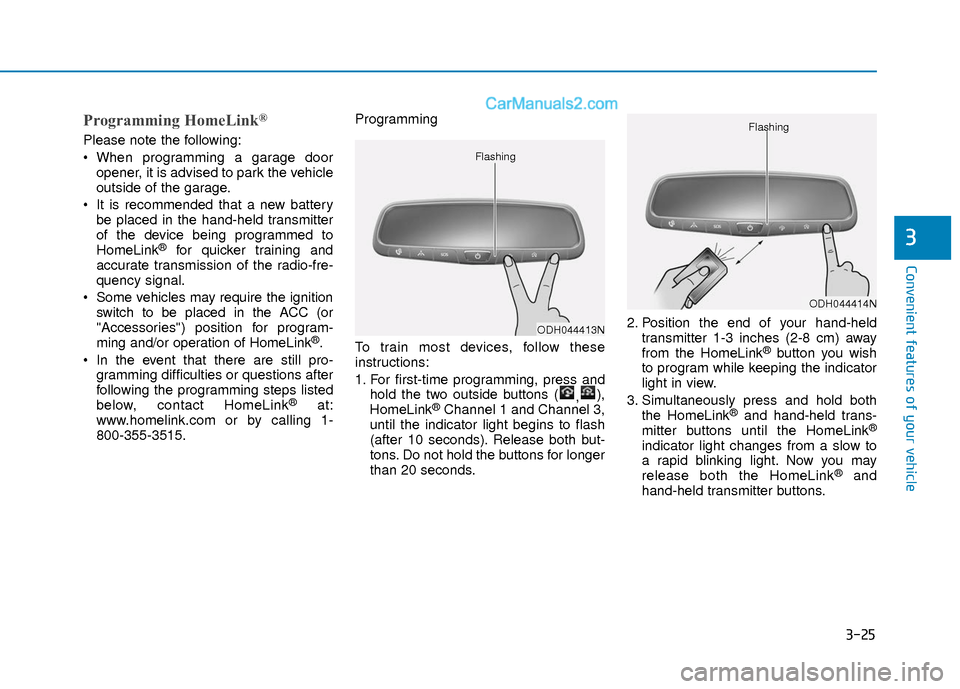
1. For first-time programming, press and
hold the two outside buttons ( ,),
HomeLink®Channel 1 and Channel 3,
until the indicator light begins to flash
(after 10 seconds). Release both but-
tons. Do not hold the buttons for longer
than 20 seconds. 2. Position the end of your hand-held
transmitter 1-3 inches (2-8 cm) away
from the HomeLink
®button you wish
to program while keeping the indicator
light in view.
3. Simultaneously press and hold both the HomeLink
®and hand-held trans-
mitter buttons until the HomeLink®
indicator light changes from a slow to
a rapid blinking light. Now you may
release both the HomeLink
®and
hand-held transmitter buttons.
ODH044413N
Flashing
ODH044414N
Flashing