snow Hyundai Elantra 2018 Owner's Manual
[x] Cancel search | Manufacturer: HYUNDAI, Model Year: 2018, Model line: Elantra, Model: Hyundai Elantra 2018Pages: 526, PDF Size: 17.2 MB
Page 119 of 526
3-42
Convenient features of your vehicle
Do not continue to move the sun-roof control lever after the sunroof
is fully opened, closed, or tilted.
Damage to the motor or system
components could occur.
Make sure the sunroof is closed fully when leaving your vehicle.
If the sunroof is open, rain or snow
may leak through the sunroof and
wet the interior as well as allow
theft.
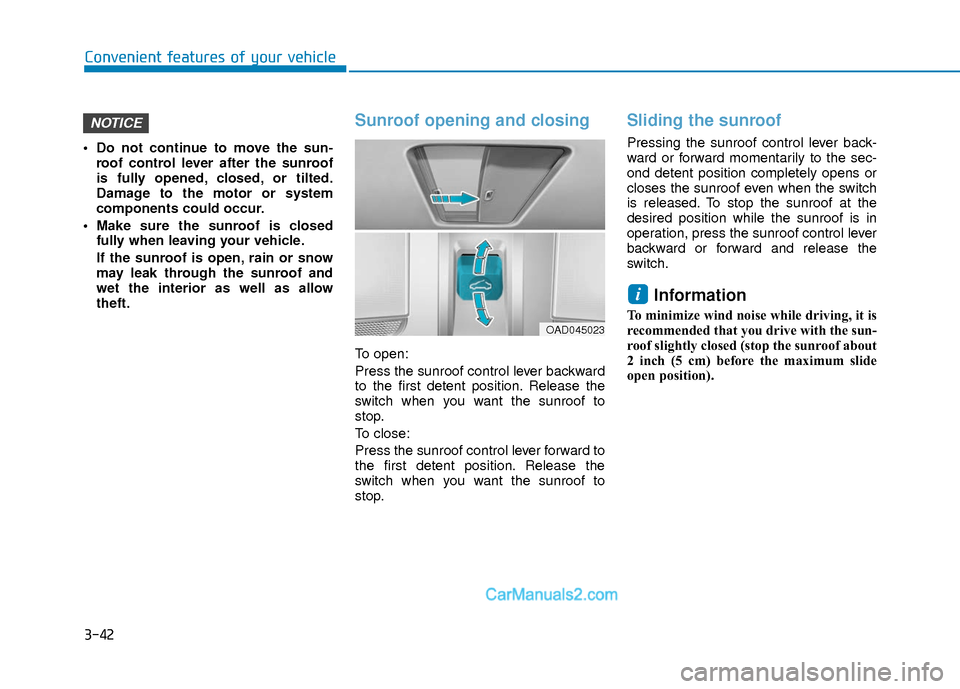
Sunroof opening and closing
To open:
Press the sunroof control lever backward
to the first detent position. Release the
switch when you want the sunroof to
stop.
To close:
Press the sunroof control lever forward to
the first detent position. Release the
switch when you want the sunroof to
stop.
Sliding the sunroof
Pressing the sunroof control lever back-
ward or forward momentarily to the sec-
ond detent position completely opens or
closes the sunroof even when the switch
is released. To stop the sunroof at the
desired position while the sunroof is in
operation, press the sunroof control lever
backward or forward and release the
switch.
Information
To minimize wind noise while driving, it is
recommended that you drive with the sun-
roof slightly closed (stop the sunroof about
2 inch (5 cm) before the maximum slide
open position).
i
NOTICE
OAD045023
Page 120 of 526
3-43
Convenient features of your vehicle
3
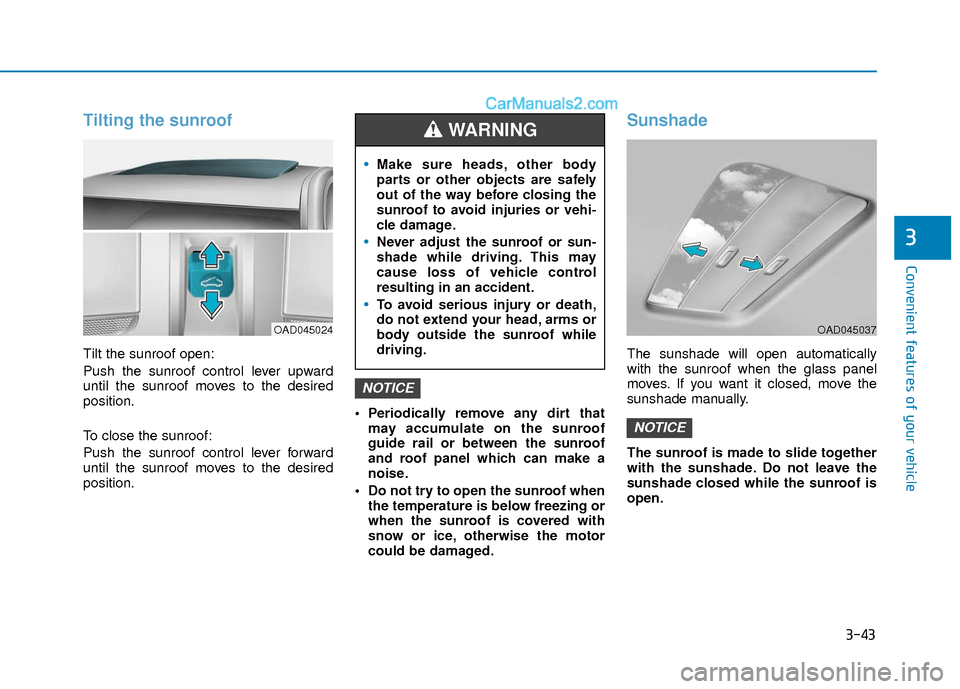
Tilting the sunroof
Tilt the sunroof open:
Push the sunroof control lever upward
until the sunroof moves to the desired
position.
To close the sunroof:
Push the sunroof control lever forward
until the sunroof moves to the desired
position. Periodically remove any dirt that
may accumulate on the sunroof
guide rail or between the sunroof
and roof panel which can make a
noise.
Do not try to open the sunroof when the temperature is below freezing or
when the sunroof is covered with
snow or ice, otherwise the motor
could be damaged.
Sunshade
The sunshade will open automatically
with the sunroof when the glass panel
moves. If you want it closed, move the
sunshade manually.
The sunroof is made to slide together
with the sunshade. Do not leave the
sunshade closed while the sunroof is
open.
NOTICE
NOTICE
OAD045024
Make sure heads, other body
parts or other objects are safely
out of the way before closing the
sunroof to avoid injuries or vehi-
cle damage.
Never adjust the sunroof or sun-
shade while driving. This may
cause loss of vehicle control
resulting in an accident.
To avoid serious injury or death,
do not extend your head, arms or
body outside the sunroof while
driving.
WARNING
OAD045037
Page 143 of 526
3-66
Convenient features of your vehicle
This warning light remains ON
after blinking for approximately 60
seconds, or repeatedly blinks ON
and OFF in 3 second intervals:
When there is a malfunction with the
TPMS.
In this case, have your vehicle inspected
by an authorized HYUNDAI dealer.
For more information, refer to "Tire
Pressure Monitoring System (TPMS)"
in chapter 6.
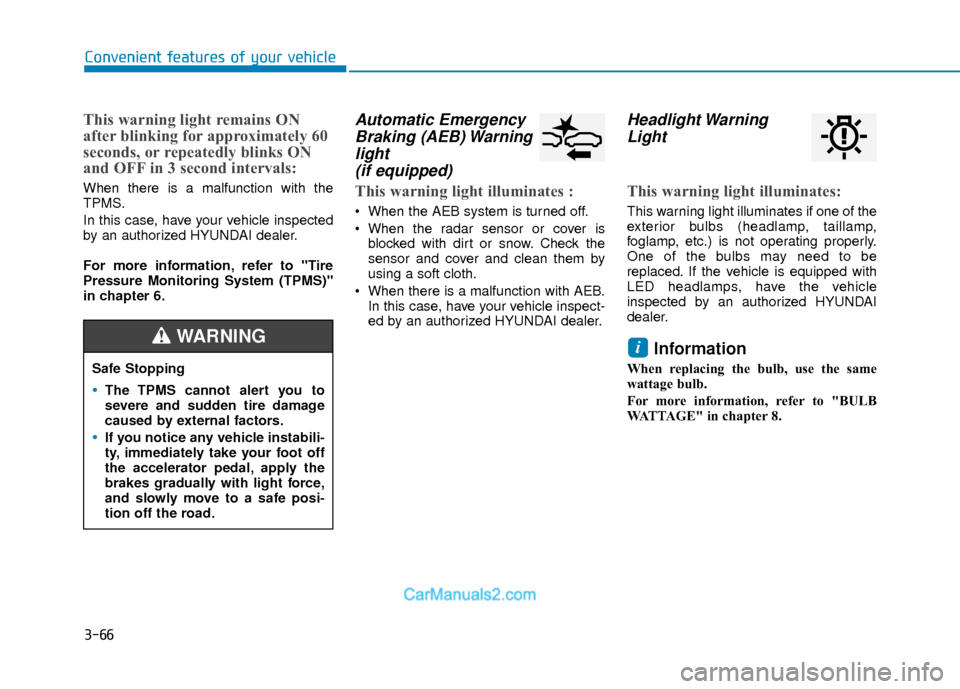
Automatic EmergencyBraking (AEB) Warninglight (if equipped)
This warning light illuminates :
When the AEB system is turned off.
When the radar sensor or cover is
blocked with dirt or snow. Check the
sensor and cover and clean them by
using a soft cloth.
When there is a malfunction with AEB. In this case, have your vehicle inspect-
ed by an authorized HYUNDAI dealer.
Headlight WarningLight
This warning light illuminates:
This warning light illuminates if one of the
exterior bulbs (headlamp, taillamp,
foglamp, etc.) is not operating properly.
One of the bulbs may need to be
replaced. If the vehicle is equipped with
LED headlamps, have the vehicle
inspected by an authorized HYUNDAI
dealer.
Information
When replacing the bulb, use the same
wattage bulb.
For more information, refer to "BULB
WATTAGE" in chapter 8.
i
Safe Stopping
The TPMS cannot alert you to
severe and sudden tire damage
caused by external factors.
If you notice any vehicle instabili-
ty, immediately take your foot off
the accelerator pedal, apply the
brakes gradually with light force,
and slowly move to a safe posi-
tion off the road.
WARNING
Page 156 of 526
3-79
Convenient features of your vehicle
3
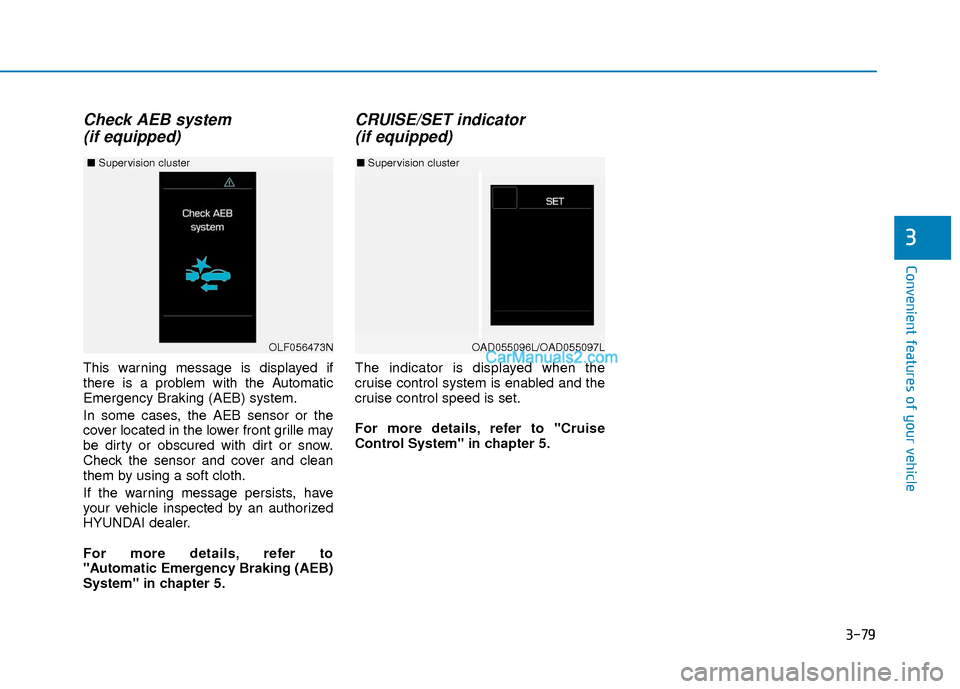
Check AEB system (if equipped)
This warning message is displayed if
there is a problem with the Automatic
Emergency Braking (AEB) system.
In some cases, the AEB sensor or the
cover located in the lower front grille may
be dirty or obscured with dirt or snow.
Check the sensor and cover and clean
them by using a soft cloth.
If the warning message persists, have
your vehicle inspected by an authorized
HYUNDAI dealer.
For more details, refer to
"Automatic Emergency Braking (AEB)
System" in chapter 5.
CRUISE/SET indicator (if equipped)
The indicator is displayed when the
cruise control system is enabled and the
cruise control speed is set.
For more details, refer to "Cruise
Control System" in chapter 5.
OAD055096L/OAD055097L
■ Supervision cluster
OLF056473N
■ Supervision cluster
Page 178 of 526
3-101
Convenient features of your vehicle
3
3. The Smart High Beam will turn onwhen vehicle speed is above
25 mph (40km/h).
Smart High Beam is operating, the
Smart High Beam will turn off and the
high beam will be on continuously. The
smart high beam ( ) indicator will
turn off.
when the Smart High Beam is oper-
ating, the Smart High Beam will turn
off.
4. If the light switch is placed to the head- lamp position, the Smart High Beam
will turn off and the low beam will be
on continuously.
The high beam switches to low beam in
the below conditions.
- When the Smart High Beam is off.
- When the light switch is not in the AUTO position.
- When the headlamp is detected from the on-coming vehicle.
- When the tail lamp is detected from the front vehicle.
- When the surrounding is bright enough high beams are not needed.
- When streetlights or other lights are detected.
- When vehicle speed is below 15 mph (24 km/h).
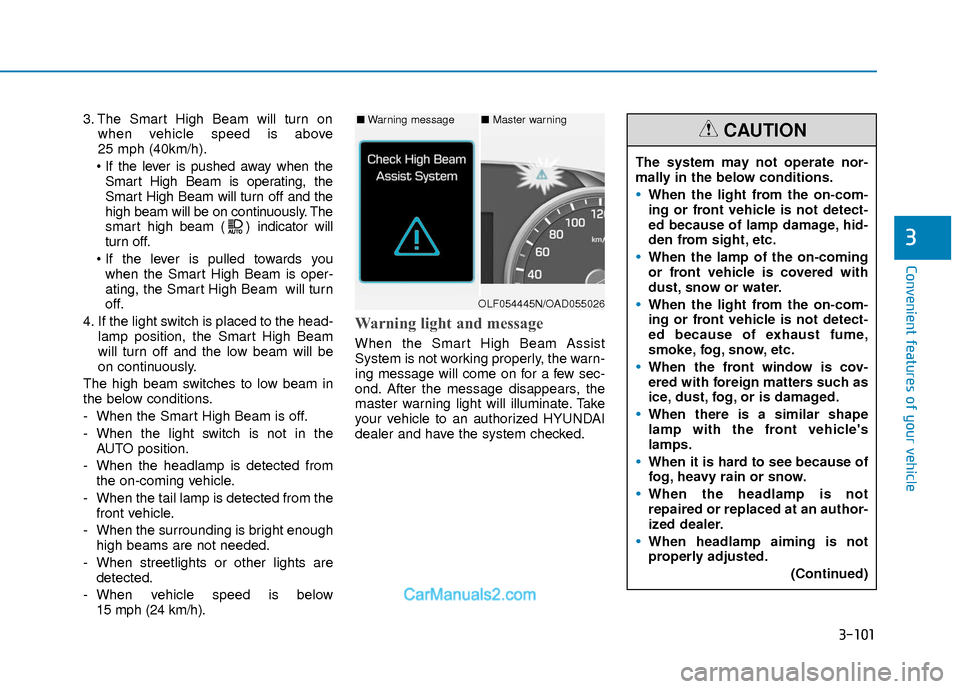
Warning light and message
When the Smart High Beam Assist
System is not working properly, the warn-
ing message will come on for a few sec-
ond. After the message disappears, the
master warning light will illuminate. Take
your vehicle to an authorized HYUNDAI
dealer and have the system checked.
The system may not operate nor-
mally in the below conditions.
When the light from the on-com-
ing or front vehicle is not detect-
ed because of lamp damage, hid-
den from sight, etc.
When the lamp of the on-coming
or front vehicle is covered with
dust, snow or water.
When the light from the on-com-
ing or front vehicle is not detect-
ed because of exhaust fume,
smoke, fog, snow, etc.
When the front window is cov-
ered with foreign matters such as
ice, dust, fog, or is damaged.
When there is a similar shape
lamp with the front vehicle's
lamps.
When it is hard to see because of
fog, heavy rain or snow.
When the headlamp is not
repaired or replaced at an author-
ized dealer.
When headlamp aiming is not
properly adjusted.
(Continued)
CAUTION■Warning message■ Master warning
OLF054445N/OAD055026
Page 179 of 526
3-102
Convenient features of your vehicle
Turn signals and lane changesignals
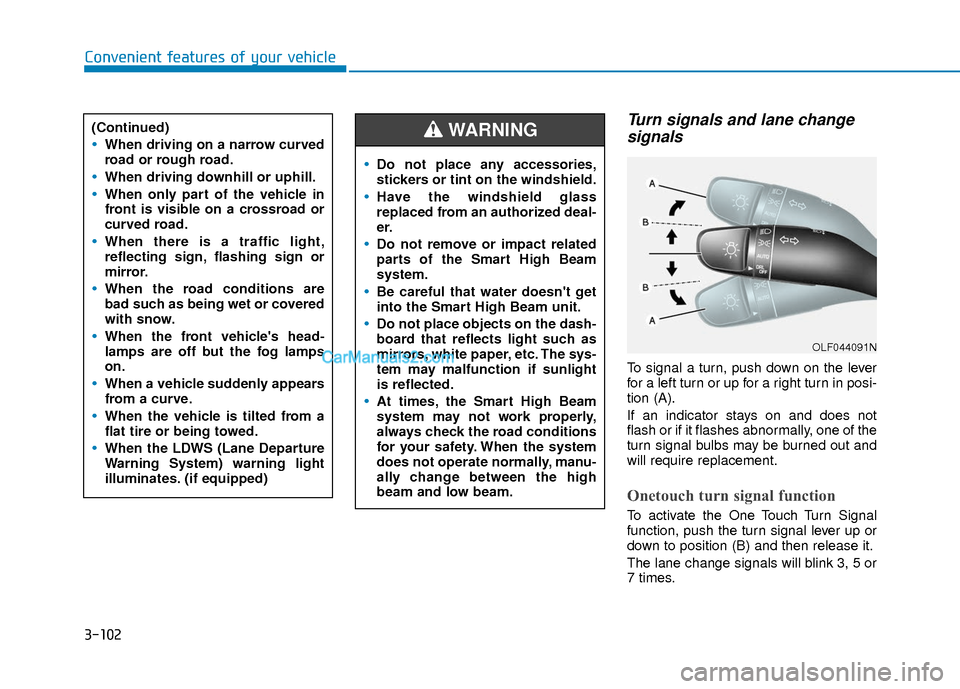
To signal a turn, push down on the lever
for a left turn or up for a right turn in posi-
tion (A).
If an indicator stays on and does not
flash or if it flashes abnormally, one of the
turn signal bulbs may be burned out and
will require replacement.
Onetouch turn signal function
To activate the One Touch Turn Signal
function, push the turn signal lever up or
down to position (B) and then release it.
The lane change signals will blink 3, 5 or
7 times.
(Continued)
When driving on a narrow curved
road or rough road.
When driving downhill or uphill.
When only part of the vehicle in
front is visible on a crossroad or
curved road.
When there is a traffic light,
reflecting sign, flashing sign or
mirror.
When the road conditions are
bad such as being wet or covered
with snow.
When the front vehicle's head-
lamps are off but the fog lamps
on.
When a vehicle suddenly appears
from a curve.
When the vehicle is tilted from a
flat tire or being towed.
When the LDWS (Lane Departure
Warning System) warning light
illuminates. (if equipped)
OLF044091N
Do not place any accessories,
stickers or tint on the windshield.
Have the windshield glass
replaced from an authorized deal-
er.
Do not remove or impact related
parts of the Smart High Beam
system.
Be careful that water doesn't get
into the Smart High Beam unit.
Do not place objects on the dash-
board that reflects light such as
mirrors, white paper, etc. The sys-
tem may malfunction if sunlight
is reflected.
At times, the Smart High Beam
system may not work properly,
always check the road conditions
for your safety. When the system
does not operate normally, manu-
ally change between the high
beam and low beam.
WARNING
Page 185 of 526
3-108
Convenient features of your vehicle
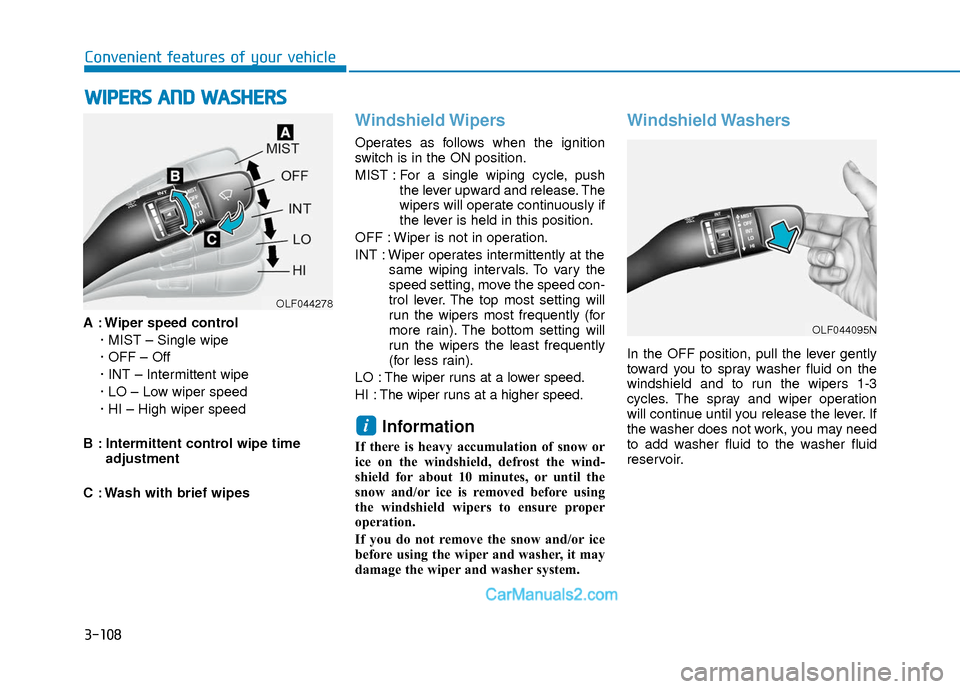
A : Wiper speed control· MIST – Single wipe
· OFF – Off
· INT – Intermittent wipe
· LO – Low wiper speed
· HI – High wiper speed
B : Intermittent control wipe time adjustment
C : Wash with brief wipes
Windshield Wipers
Operates as follows when the ignition
switch is in the ON position.
MIST : For a single wiping cycle, push the lever upward and release. The
wipers will operate continuously if
the lever is held in this position.
OFF : Wiper is not in operation.
INT : Wiper operates intermittently at the same wiping intervals. To vary the
speed setting, move the speed con-
trol lever. The top most setting will
run the wipers most frequently (for
more rain). The bottom setting will
run the wipers the least frequently
(for less rain).
LO : The wiper runs at a lower speed.
HI : The wiper runs at a higher speed.
Information
If there is heavy accumulation of snow or
ice on the windshield, defrost the wind-
shield for about 10 minutes, or until the
snow and/or ice is removed before using
the windshield wipers to ensure proper
operation.
If you do not remove the snow and/or ice
before using the wiper and washer, it may
damage the wiper and washer system.
Windshield Washers
In the OFF position, pull the lever gently
toward you to spray washer fluid on the
windshield and to run the wipers 1-3
cycles. The spray and wiper operation
will continue until you release the lever. If
the washer does not work, you may need
to add washer fluid to the washer fluid
reservoir.
i
W W I
IP
P E
ER
R S
S
A
A N
N D
D
W
W A
AS
SH
H E
ER
R S
S
OLF044278
OLF044095N
Page 186 of 526
3-109
Convenient features of your vehicle
3
D
DR
RI
IV
V E
ER
R
A
A S
SS
SI
IS
S T
T
S
S Y
Y S
ST
T E
EM
M
To prevent possible damage to the
washer pump, do not operate the
washer when the fluid reservoir is
empty.
To prevent possible damage to the wipers or windshield, do not oper-
ate the wipers when the windshield
is dry.
To prevent damage to the wiper arms and other components, do not
attempt to move the wipers manual-
ly.
To prevent possible damage to the wipers and washer system, use anti-
freezing washer fluids in the winter
season or cold weather.
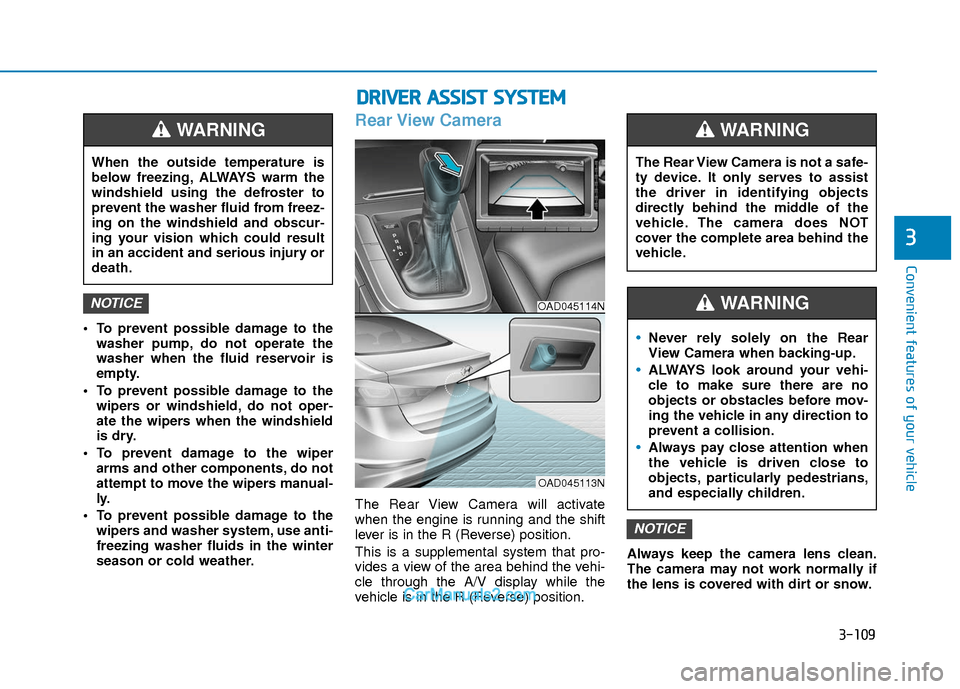
Rear View Camera
The Rear View Camera will activate
when the engine is running and the shift
lever is in the R (Reverse) position.
This is a supplemental system that pro-
vides a view of the area behind the vehi-
cle through the A/V display while the
vehicle is in the R (Reverse) position. Always keep the camera lens clean.
The camera may not work normally if
the lens is covered with dirt or snow.
NOTICE
NOTICE
When the outside temperature is
below freezing, ALWAYS warm the
windshield using the defroster to
prevent the washer fluid from freez-
ing on the windshield and obscur-
ing your vision which could result
in an accident and serious injury or
death.
WARNING
The Rear View Camera is not a safe-
ty device. It only serves to assist
the driver in identifying objects
directly behind the middle of the
vehicle. The camera does NOT
cover the complete area behind the
vehicle.
WARNING
Never rely solely on the Rear
View Camera when backing-up.
ALWAYS look around your vehi-
cle to make sure there are no
objects or obstacles before mov-
ing the vehicle in any direction to
prevent a collision.
Always pay close attention when
the vehicle is driven close to
objects, particularly pedestrians,
and especially children.
WARNING OAD045114N
OAD045113N
Page 187 of 526
3-110
Convenient features of your vehicle
D
DE
EF
FR
R O
O S
ST
T E
ER
R
To prevent damage to the conductors
bonded to the inside surface of the
rear window, never use sharp instru-
ments or window cleaners containing
abrasives to clean the window.
If you want to defrost and defog the
front windshield, refer to the
"Windshield Defrosting and
Defogging" section in this chapter.
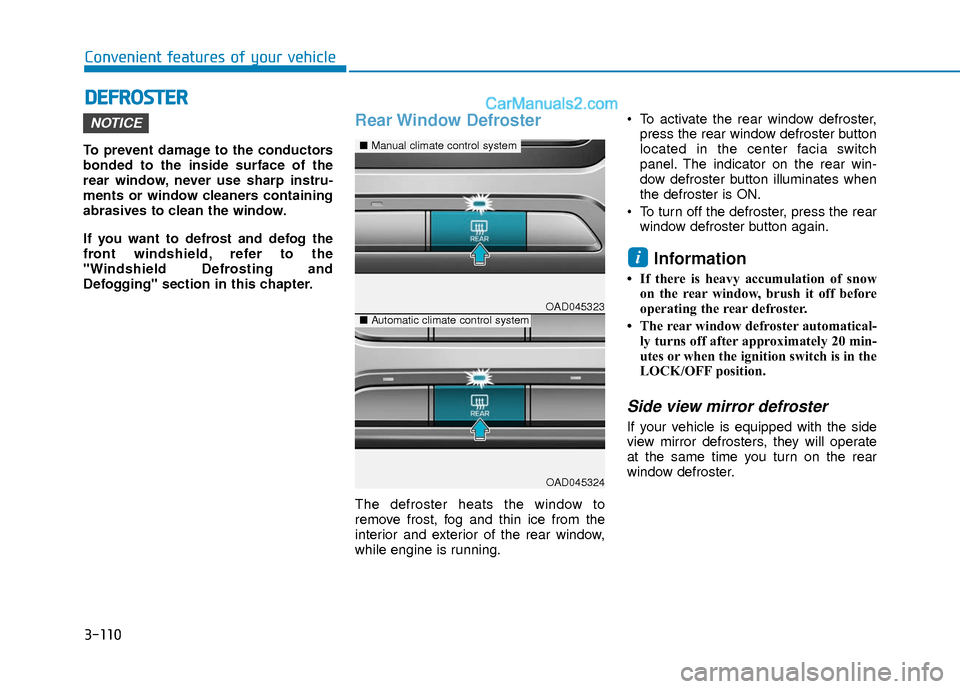
Rear Window Defroster
The defroster heats the window to
remove frost, fog and thin ice from the
interior and exterior of the rear window,
while engine is running. To activate the rear window defroster,
press the rear window defroster button
located in the center facia switch
panel. The indicator on the rear win-
dow defroster button illuminates when
the defroster is ON.
To turn off the defroster, press the rear window defroster button again.
Information
• If there is heavy accumulation of snowon the rear window, brush it off before
operating the rear defroster.
• The rear window defroster automatical- ly turns off after approximately 20 min-
utes or when the ignition switch is in the
LOCK/OFF position.
Side view mirror defroster
If your vehicle is equipped with the side
view mirror defrosters, they will operate
at the same time you turn on the rear
window defroster.
i
NOTICE
OAD045323
OAD045324
■ Manual climate control system
■Automatic climate control system
Page 208 of 526
3-131
Convenient features of your vehicle
3
Air Conditioning refrigerantlabel
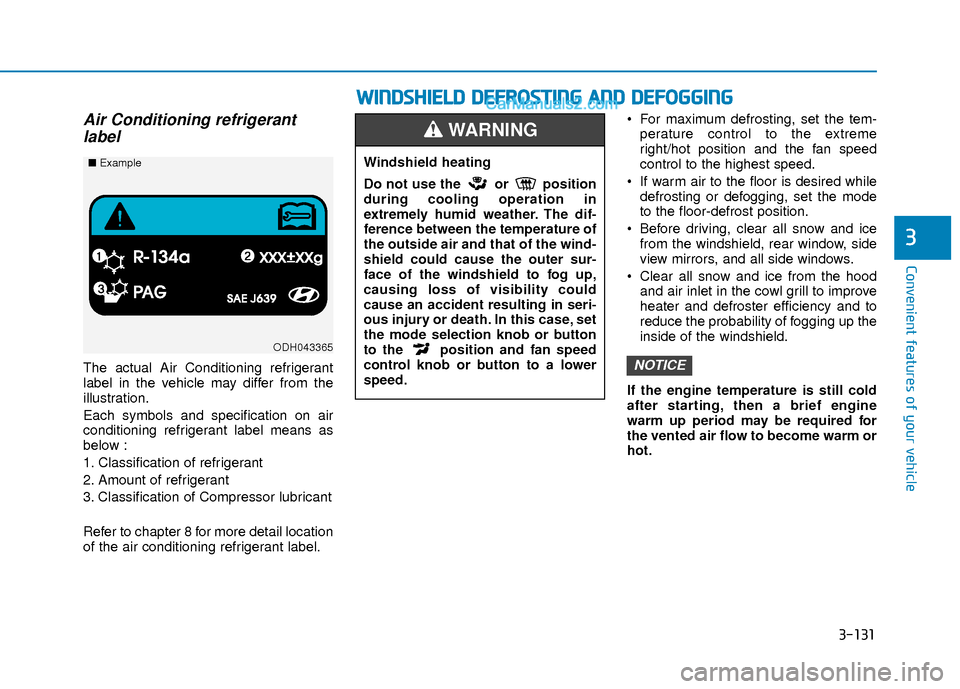
The actual Air Conditioning refrigerant
label in the vehicle may differ from the
illustration.
Each symbols and specification on air
conditioning refrigerant label means as
below :
1. Classification of refrigerant
2. Amount of refrigerant
3. Classification of Compressor lubricant
Refer to chapter 8 for more detail location
of the air conditioning refrigerant label. For maximum defrosting, set the tem-
perature control to the extreme
right/hot position and the fan speed
control to the highest speed.
If warm air to the floor is desired while defrosting or defogging, set the mode
to the floor-defrost position.
Before driving, clear all snow and ice from the windshield, rear window, side
view mirrors, and all side windows.
Clear all snow and ice from the hood and air inlet in the cowl grill to improve
heater and defroster efficiency and to
reduce the probability of fogging up the
inside of the windshield.
If the engine temperature is still cold
after starting, then a brief engine
warm up period may be required for
the vented air flow to become warm or
hot.NOTICE
ODH043365
■ Example
W
WI
IN
N D
DS
SH
H I
IE
E L
LD
D
D
D E
EF
FR
R O
O S
ST
T I
IN
N G
G
A
A N
N D
D
D
D E
EF
FO
O G
GG
GI
IN
N G
G
Windshield heating
Do not use the or position
during cooling operation in
extremely humid weather. The dif-
ference between the temperature of
the outside air and that of the wind-
shield could cause the outer sur-
face of the windshield to fog up,
causing loss of visibility could
cause an accident resulting in seri-
ous injury or death. In this case, set
the mode selection knob or button
to the position and fan speed
control knob or button to a lower
speed.
WARNING