phone Hyundai Elantra 2019 User Guide
[x] Cancel search | Manufacturer: HYUNDAI, Model Year: 2019, Model line: Elantra, Model: Hyundai Elantra 2019Pages: 535, PDF Size: 16.83 MB
Page 228 of 535
3-144
Convenient features of your vehicle
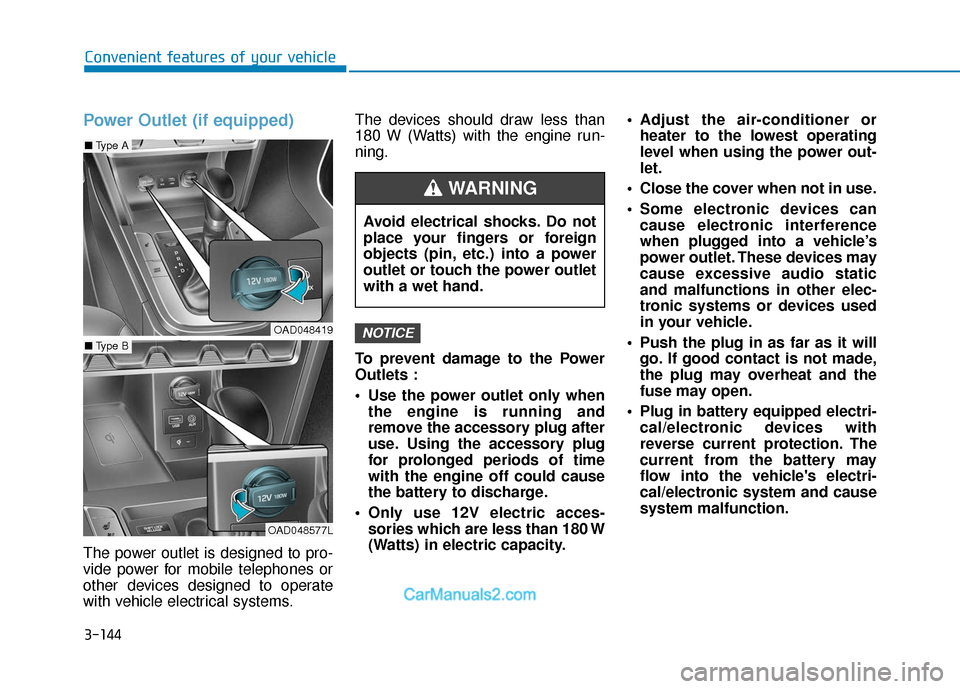
Power Outlet (if equipped)
The power outlet is designed to pro-
vide power for mobile telephones or
other devices designed to operate
with vehicle electrical systems.The devices should draw less than
180 W (Watts) with the engine run-
ning.
To prevent damage to the Power
Outlets :
Use the power outlet only when
the engine is running and
remove the accessory plug after
use. Using the accessory plug
for prolonged periods of time
with the engine off could cause
the battery to discharge.
Only use 12V electric acces- sories which are less than 180 W
(Watts) in electric capacity. Adjust the air-conditioner or
heater to the lowest operating
level when using the power out-
let.
Close the cover when not in use.
Some electronic devices can cause electronic interference
when plugged into a vehicle’s
power outlet. These devices may
cause excessive audio static
and malfunctions in other elec-
tronic systems or devices used
in your vehicle.
Push the plug in as far as it will go. If good contact is not made,
the plug may overheat and the
fuse may open.
Plug in battery equipped electri- cal/electronic devices with
reverse current protection. The
current from the battery may
flow into the vehicle's electri-
cal/electronic system and cause
system malfunction.
NOTICE
Avoid electrical shocks. Do not
place your fingers or foreign
objects (pin, etc.) into a power
outlet or touch the power outlet
with a wet hand.
WARNING
OAD048419
OAD048577L
■ Type B
■Type A
Page 229 of 535
![Hyundai Elantra 2019 User Guide 3-145
Convenient features of your vehicle
3
Wireless Cellular Phone
Charging System (if equipped)
[A]: Indicator light, [B]: Charging pad
On certain models, the vehicle
comes equipped with a wireless](/img/35/14536/w960_14536-228.png "Hyundai Elantra 2019 User Guide 3-145
Convenient features of your vehicle
3
Wireless Cellular Phone
Charging System (if equipped)
[A]: Indicator light, [B]: Charging pad
On certain models, the vehicle
comes equipped with a wireless")
3-145
Convenient features of your vehicle
3
Wireless Cellular Phone
Charging System (if equipped)
[A]: Indicator light, [B]: Charging pad
On certain models, the vehicle
comes equipped with a wireless cel-
lular phone charger.
The system is available when all
doors are closed, and when the igni-
tion switch is ON.
To charge a cellular phone
The wireless cellular phone charging
system charges only the Qi-enabled
cellular phones ( ). Read the label
on the cellular phone accessory
cover or visit your cellular phone
manufacturer's website to check
whether your cellular phone supports
the Qi technology.
The wireless charging process starts
when you put a Qi-enabled cellular
phone on the wireless charging unit.
1. Remove other items, including thesmart key, from the wireless charg-
ing unit. If not, the wireless charg-
ing process may be interrupted.
Place the cellular phone on the
center of the charging pad ( ).
2. The indicator light is orange when the cellular phone is charging. The
indicator light turns green when
phone charging is complete.
3. You can turn ON or OFF the wire- less charging function in the user
settings mode on the instrument
cluster. For further information,
refer to the "LCD Display Modes"
in this chapter. If your cellular phone is not charging:
- Slightly change the position of the
cellular phone on the charging
pad.
- Make sure the indicator light is orange.
The indicator light will blink orange for
10 seconds if there is a malfunction in
the wireless charging system.
In this case, temporarily stop the
charging process, and re-attempt to
charge your cellular phone again.
The system warns you with a mes-
sage on the LCD display if the cellular
phone is still on the wireless charging
unit after the engine is turned OFF
and the front door is opened.
Information
For some manufacturers' cellular
phones, the system may not warn you
even though the cellular phone is left
on the wireless charging unit. This is
due to the particular characteristic of
the cellular phone and not a malfunc-
tion of the wireless charging.
i
OAD048575L
Page 230 of 535
3-146
Convenient features of your vehicle
The wireless cellular phone charging system may not sup-
port certain cellular phones,
which are not verified for the Qi
specification ( ).
When placing your cellular phone on the charging mat,
position the phone in the middle
of the mat for optimal charging
performance. If your cell phone
is off to the side, the charging
rate may be less and in some
cases the cell phone may experi-
ence higher heat conduction.
In some cases, the wireless charging may stop temporarily
when the Remote Key or Smart
Key is used, either when starting
the vehicle or locking/unlocking
the doors, etc.
When charging certain cellular phones, the charging indicator
may not change to green when
the cell phone is fully charged.
The wireless charging process may temporarily stop, when tem-
perature abnormally increases/
decreases inside the wireless cel-
lular phone charging system. Stop
the charging cellular phone and
wait until temperature falls to a
certain level.
The wireless charging process may temporarily stop when there
is any metallic item, such as a
coin, between the wireless cellular
phone charging system and the
cellular phone.
When charging some cellular phones with a self-protection fea-
ture, the wireless charging speed
may decrease and the wireless
charging may stop.
If the cellular phone has a thick cover, the wireless charging may
not be possible.
If the cell phone is not completely contacting the charging pad, wire-
less charging may not operate
properly.
Some magnetic items like credit cards, phone cards or rail tickets
may be damaged if left with the
cellular phone during the charging
process. When any cellular phone without a
wireless charging function or a
metallic object is placed on the
charging pad, a small noise may
sound. This small sound is due to
the vehicle discerning compatibil-
ity of the object placed on the
charging pad. It does not affect
your vehicle or the cellular phone
in any way.
Information
If the ignition switch is in the LOCK/
OFF position, the charging also stops.
Information
This device complies with part 15 of
the FCC Rules.
Operation is subject to the following
two conditions:
1. This device may not cause harmful interference, and
2. This device must accept any inter- ference received, including inter-
ference that may cause undesired
operation.
i
i
NOTICE
Page 231 of 535
3-147
Convenient features of your vehicle
3
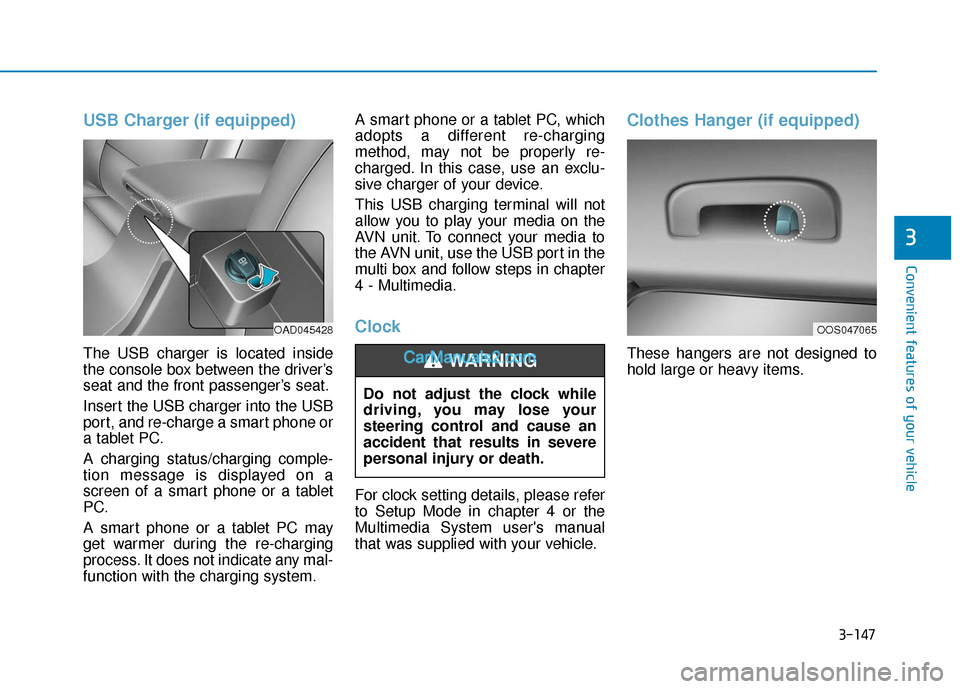
USB Charger (if equipped)
The USB charger is located inside
the console box between the driver’s
seat and the front passenger’s seat.
Insert the USB charger into the USB
port, and re-charge a smart phone or
a tablet PC.
A charging status/charging comple-
tion message is displayed on a
screen of a smart phone or a tablet
PC.
A smart phone or a tablet PC may
get warmer during the re-charging
process. It does not indicate any mal-
function with the charging system.A smart phone or a tablet PC, which
adopts a different re-charging
method, may not be properly re-
charged. In this case, use an exclu-
sive charger of your device.
This USB charging terminal will not
allow you to play your media on the
AVN unit. To connect your media to
the AVN unit, use the USB port in the
multi box and follow steps in chapter
4 - Multimedia.
Clock
For clock setting details, please refer
to Setup Mode in chapter 4 or the
Multimedia System user's manual
that was supplied with your vehicle.
Clothes Hanger (if equipped)
These hangers are not designed to
hold large or heavy items.
Do not adjust the clock while
driving, you may lose your
steering control and cause an
accident that results in severe
personal injury or death.WARNING
OAD045428OOS047065
Page 236 of 535
4-4
Multimedia System
MODE (3)
Press the MODE button to toggle
through Radio, XM or AUX modes.
MUTE ( ) (4)
Press the MUTE button to mute thesound.
Press the MUTE button again to activate the sound.
Information
Detailed information for audio control
buttons is described later in this chap-
ter or in the Car Multimedia User's
Manual that was supplied with this
vehicle
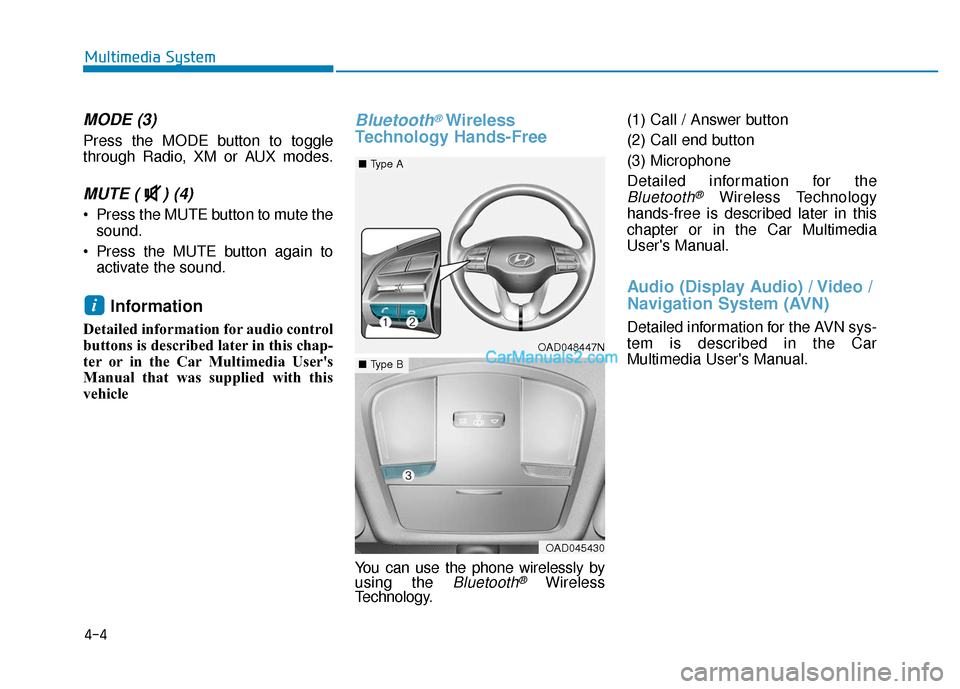
Bluetooth®Wireless
Technology Hands-Free
You can use the phone wirelessly by
using the Bluetooth®Wireless
Technology. (1) Call / Answer button
(2) Call end button
(3) Microphone
Detailed information for the
Bluetooth®Wireless Technology
hands-free is described later in this
chapter or in the Car Multimedia
User's Manual.
Audio (Display Audio) / Video /
Navigation System (AVN)
Detailed information for the AVN sys-
tem is described in the Car
Multimedia User's Manual.
i
OAD048447N
■ Type A
OAD045430
■Type B
Page 529 of 535
I-7
Highway driving ...........................................................5-136
Hill-start assist control (HAC)........................................5-49
Hood........................................................................\
........3-43
Horn ........................................................................\
........3-22
How to use this manual ....................................................F-6
If the engine doesn't turn over or turns over slowly.........6-4
If the engine overheats ......................................................6-7
If the engine stalls at a crossroad or crossing...................6-3
If the engine stalls while driving ......................................6-3
If the engine turns over normally but doesn't start ...........6-4
If the engine will not start.................................................6-4
If you have a flat tire ......................................................6-15
If you have a flat tire while driving ..................................6-3
Ignition switchEngine Start/Stop button ..............................................5-9
Key ignition switch ......................................................5-6
Immobilizer System ........................................................3-11
Impact sensing door unlock ............................................3-15
Improtant safety precautions.............................................2-2 Air bag hazards ............................................................2-2
Always wear your seat belt ..........................................2-2
Control your speed .......................................................2-3
Driver distraction..........................................................2-2
Keep your vehicle in safe condition.............................2-3
Restrain all children .....................................................2-2 In case of emergency while driving..................................6-3
Inside rearview mirror ....................................................3-23
Instrument cluster ...........................................................3-53
Gauges ........................................................................\
3-56
Instrument panel illumination ....................................3-55
LCD display messages ...............................................3-73
Transmission shift indicator .......................................3-60
Trip computer....................................................3-91,3- 95
Warnings and indicator lights.....................................3-61
Instrument panel fuse replacement .................................7-54
Instrument panel overview ...............................................1-5
Interior care .....................................................................7-8\
0
Interior features Clock ........................................................................\
3-147
Clothes hanger ..........................................................3-147
Cup holder ................................................................3-142
Floor mat anchor(s) ..................................................3-148
Power outlet..............................................................3-144
Sunvisor ....................................................................3-14\
3
USB charger .............................................................3-147
Wireless cellular phone charging system .................3-145
Interior lights.................................................................3-106 Interior lamp AUTO cut ...........................................3-106
Interior overview...............................................................1-4
I
Index
I
Page 535 of 535
I-13
Vanity mirror lamp........................................................3-108
Vehicle break-in process ...................................................F-9
Vehicle certification label ...............................................8-10
Vehicle data collection and event data recorders ...........F-10
Vehicle identification number (VIN) ..............................8-10
Vehicle load limit ..........................................................5-141Tire loading information label..................................5-142
Vehicle modifications .......................................................F-9
Vehicle stability management (VSM).............................5-48
Volume and weight ...........................................................8-6
Warnings and indicator lights .........................................3-61
Washer fluid ....................................................................7-28\
Welcome system ...........................................................3-108
Wheel alignment and tire balance ..................................7-42
Wheel replacement .........................................................7-43
Windows ........................................................................\
.3-34 Auto down window ....................................................3-36
Auto up/down window ...............................................3-36
Automatic reverse ......................................................3-37
Power window lock switch ........................................3-38
To reset the power windows.......................................3-36
Windshield defrosting and defogging ...........................3-134
Windshield washers.......................................................3-111 Windshield wipers.........................................................3-110
Winter driving ...............................................................5-137
Snow tires .................................................................5-137
Tire chains ................................................................5-137
Wiper blades replacement ...............................................7-33
Wipers and washers ......................................................3-110 Windshield washers ..................................................3-111
Windshield wipers ....................................................3-110
Wireless cellular phone charging system......................3-145
I
Index
V
W