air HYUNDAI ELANTRA 2021 Workshop Manual
[x] Cancel search | Manufacturer: HYUNDAI, Model Year: 2021, Model line: ELANTRA, Model: HYUNDAI ELANTRA 2021Pages: 570, PDF Size: 52.21 MB
Page 159 of 570
05
5-23
-If you use a smart phone cover that
uses wir
eless communication or is
made of metal, the digital key NFC
function may not work properly.
Remove the smart phone cover
before using the digital key NFC
function.
• The vehicle may not be controlled by
the smartphone if any of the following
occurs:
- Basic and necessary functions o f
the smartphone manufacturer are
operating. (General call, urgent
call, audio or NFC payment)
- Wireless earphone is oper
ating.
(General call, urgent call or audio)
- The digital ke
y app function such
as basic setting or app launching
is limited by prior policy according
to the manufacturer while using a
smartphone produced by domestic
and foreign manufactures.
à If y
ou change the smartphone
number, you should modify the user
account information on the HYUNDAI
customer web site to use the digital
key app.
à If the v
ehicle owner changes
the smartphone device, the new
smartphone should be registered in
the car after deleting the registered
digital key(smartphone).
à If a shar
er changes or resets the
smartphone, the key should be re-
shared from owner.
à Some older smartphones may no
t
work properly. Please check the
available smartphone models with
your dealer.
à NFC an
tenna position on the
smartphone can be confirmed
on each smartphone’s manual or
contact to customer service center
of the smartphone manufacturer.
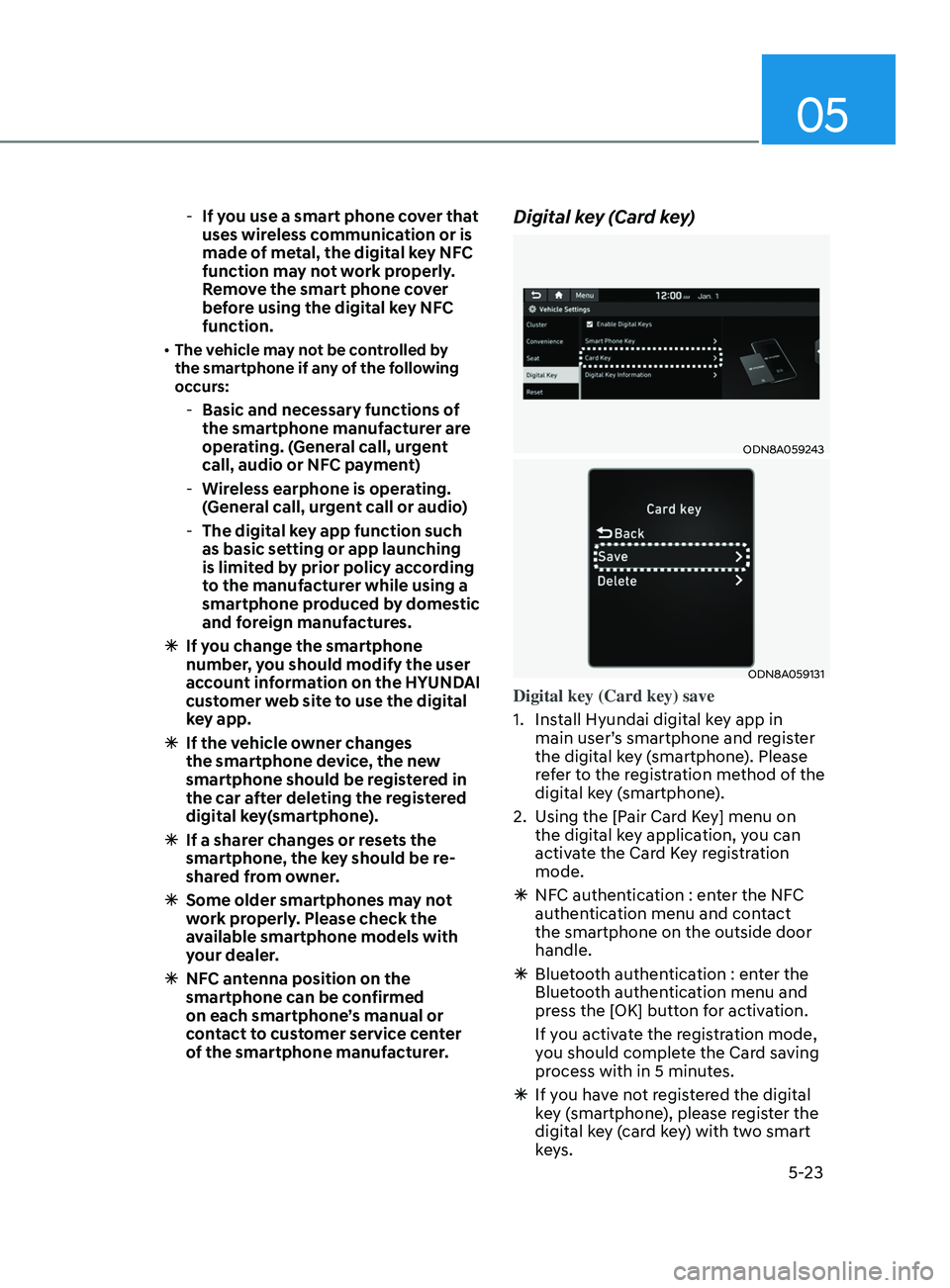
Digital key (Card key)
ODN8A059243
ODN8A059131
Digital key (Card key) save
1.
Install Hyundai digital k
ey app in
main user’s smartphone and register
the digital key (smartphone). Please
refer to the registration method of the
digital key (smartphone).
2.
Using the [P
air Card Key] menu on
the digital key application, you can
activate the Card Key registration
mode.
à NFC authen
tication : enter the NFC
authentication menu and contact
the smartphone on the outside door
handle.
à Bluet
ooth authentication : enter the
Bluetooth authentication menu and
press the [OK] button for activation.
If you activate the registration mode,
you should complete the Card saving
process with in 5 minutes.
à If you ha
ve not registered the digital
key (smartphone), please register the
digital key (card key) with two smart
keys.
Page 166 of 570
Convenient Features
5-30
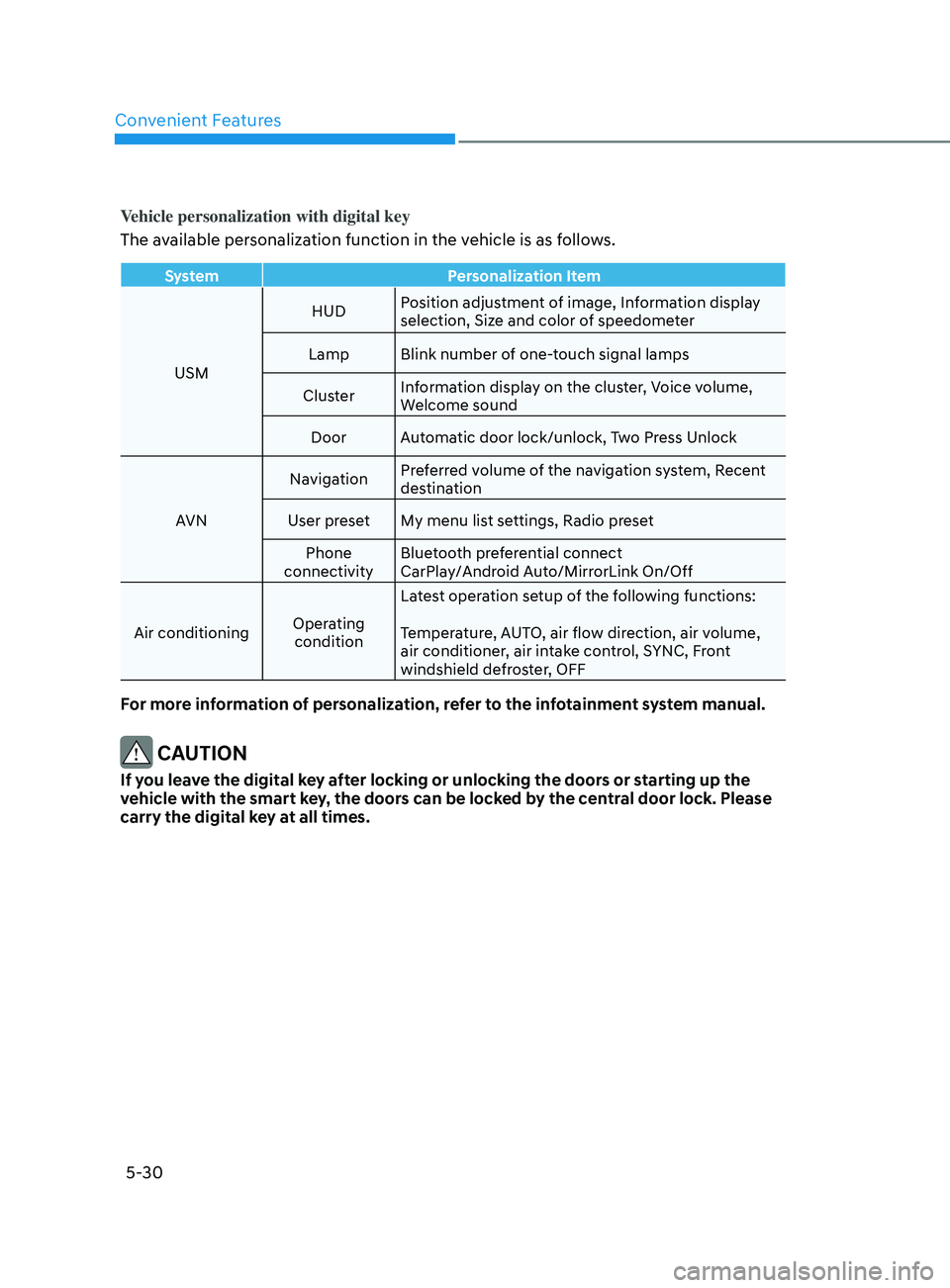
Vehicle personalization with digital key
The available personalization function in the vehicle is as follows.
SystemPersonalization Item
USM HUD
Position adjustment of image, Information display
selection, Size and color of speedometer
Lamp Blink number of one-touch signal lamps
Cluster Information display on the cluster, Voice volume,
Welcome sound
Door Automatic door lock/unlock, Two Press Unlock
AVN Navigation
Preferred volume of the navigation system, Recent
destination
User preset My menu list settings, Radio preset Phone
connectivity Bluetooth preferential connect
CarPlay/Android Auto/MirrorLink On/Off
Air conditioning Operating
condition Latest operation setup of the following functions:
Temperature, AUTO, air flow direction, air volume,
air conditioner, air intake control, SYNC, Front
windshield defroster, OFF
For more information of personalization, refer to the infotainment system manual.
CAUTION
If you leave the digital key after locking or unlocking the doors or starting up the
vehicle with the smart key, the doors can be locked by the central door lock. Please
carry the digital key at all times.
Page 171 of 570
05
5-35
Automatic Door Lock and Unlock
Features
Impact sensing door unlock system
(if equipped)
All doors will be automatically unlocked
when an impact causes the air bags to
deploy.
You can activate or deactivate the Auto
Door Lock/Unlock features from the User
Settings Mode on the LCD display.
For more details, refer to “LCD Display”
in chapter 4. If your vehicle is equipped
with additional navigation, please refer
to the infotainment system manual
separately supplied.
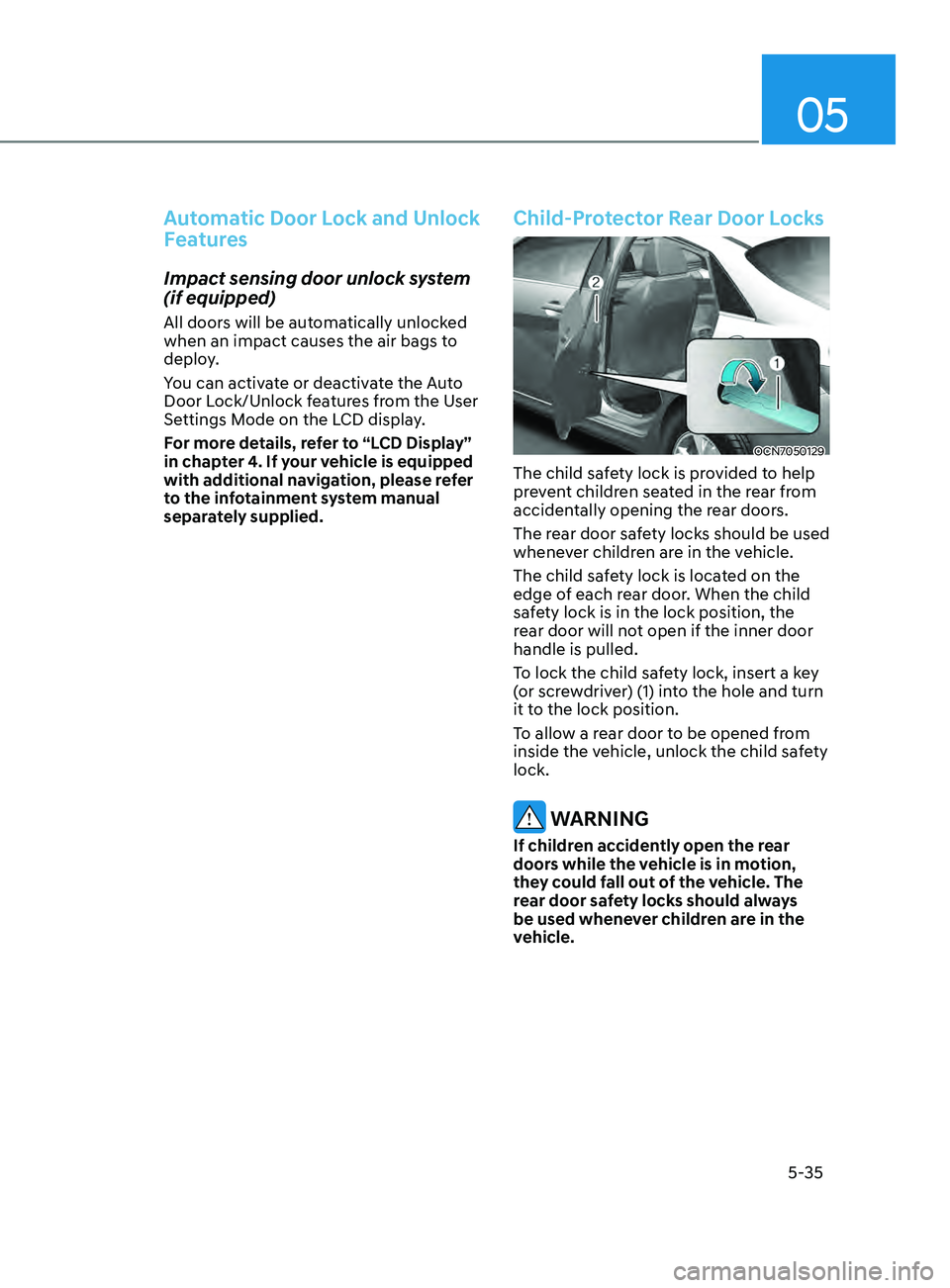
Child-Protector Rear Door Locks
OCN7050129
The child safety lock is provided to help
prevent children seated in the rear from
accidentally opening the rear doors.
The rear door safety locks should be used
whenever children are in the vehicle.
The child safety lock is located on the
edge of each rear door. When the child
safety lock is in the lock position, the
rear door will not open if the inner door
handle is pulled.
To lock the child safety lock, insert a key
(or screwdriver) (1) into the hole and turn
it to the lock position.
To allow a rear door to be opened from
inside the vehicle, unlock the child safety
lock.
WARNING
If children accidently open the rear
doors while the vehicle is in motion,
they could fall out of the vehicle. The
rear door safety locks should always
be used whenever children are in the
vehicle.
Page 177 of 570
05
5-41
mirrorS
Inside Rearview Mirror
Before driving your vehicle, check to
see that your inside rearview mirror is
properly positioned. Adjust the rearview
mirror so that the view through the rear
window is properly centered.
WARNING
Make sure your line of sight is not
obstructed. Do not place objects in the
rear seat, cargo area, or behind the rear
head restraints which could interfere
with your vision through the rear
window.
WARNING
To prevent serious injury during an
accident or deployment of the air bag,
do not modify the rearview mirror and
do not install a wide mirror.
WARNING
NEVER adjust the mirror while driving.
This may cause loss of vehicle control
resulting in an accident.
NOTICE
When cleaning the mirror, use a paper
towel or similar material dampened
with glass cleaner. Do not spray glass
cleaner directly on the mirror as this
may cause the liquid cleaner to enter
the mirror housing.
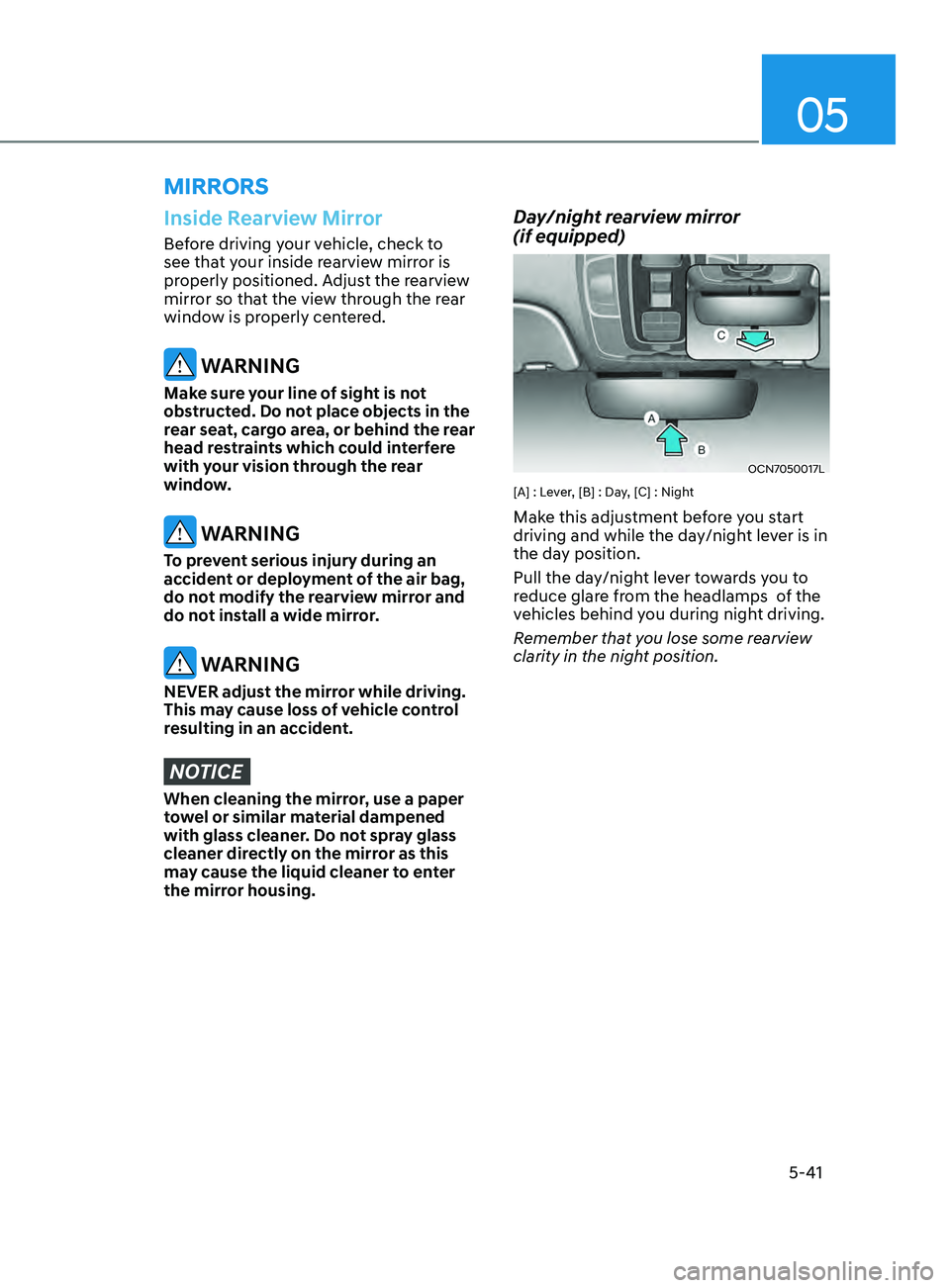
Day/night rearview mirror
(if equipped)
OCN7050017L
[A] : Lever, [B] : Day, [C] : Night
Make this adjustment before you start
driving and while the day/night lever is in
the day position.
Pull the day/night lever towards you to
reduce glare from the headlamps of the
vehicles behind you during night driving.
Remember that you lose some rearview
clarity in the night position.
Page 201 of 570
05
5-65
Information
• If you press the door unlock button
(2), the Smart Trunk release function
will be deactivated temporarily. But,
if you do not open any door for 30
seconds, the smart trunk function will
be activated again.
• If you press the trunk open button
(3) for more than 1 second, the trunk
opens.
• If you press the door lock button (1) or
trunk open button (3) when the Smart
Trunk release function is not in the
Detect and Alert stage, the smart trunk
function will not be deactivated.
• In case you have deactivated the Smart
Trunk function by pressing the smart
key button and opened a door, the
Smart Trunk release function can be
activated again by closing and locking
all doors.
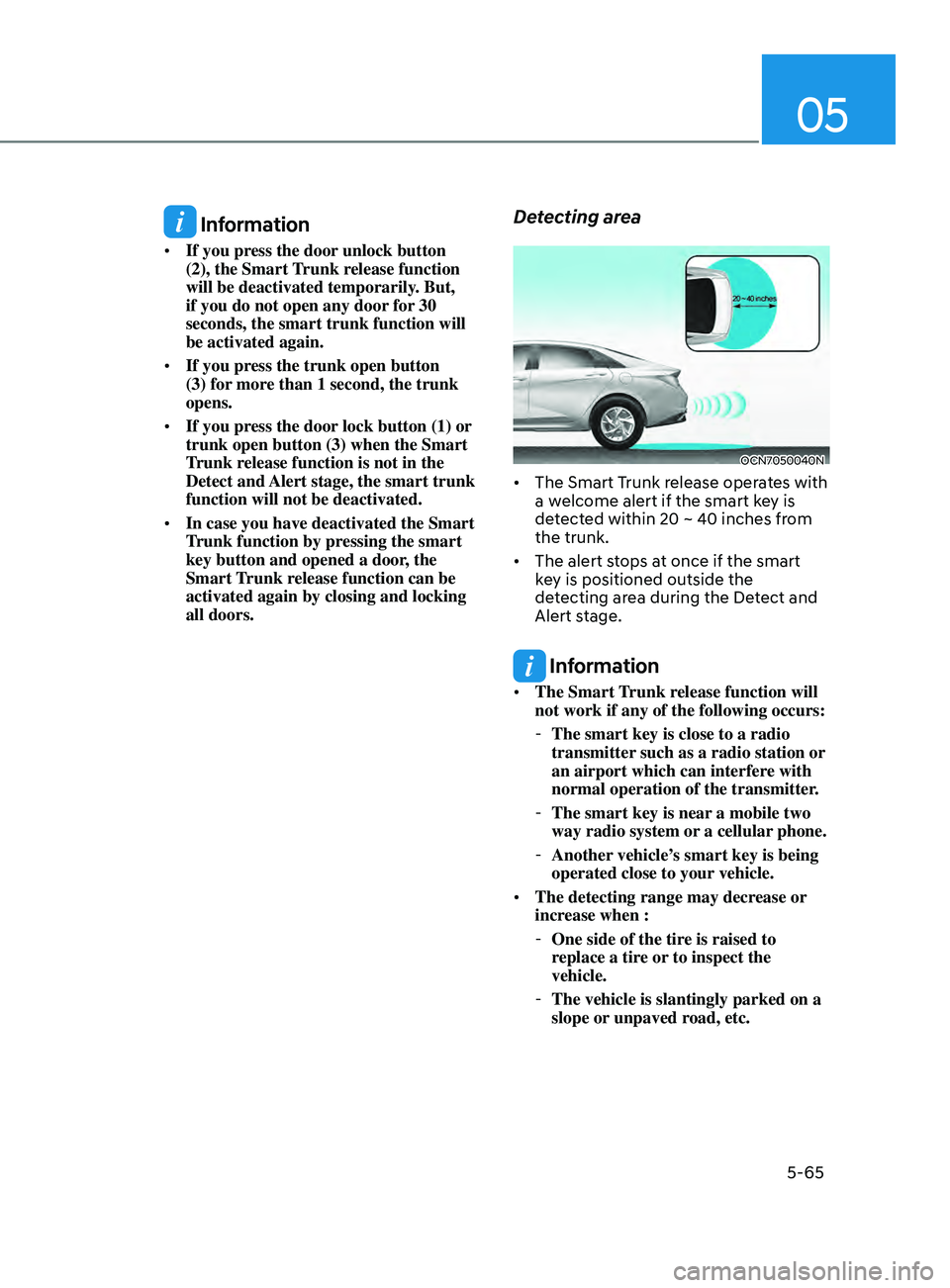
Detecting area
OCN7050040N
• The Smart Trunk release operates with
a welcome alert if the smart key is
detected within 20 ~ 40 inches from
the trunk.
• The alert stops at once if the smart
key is positioned outside the
detecting area during the Detect and
Alert stage.
Information
• The Smart Trunk release function will
not work if any of the following occurs:
-The smart key is close to a radio
transmitter such as a radio station or
an airport which can interfere with
normal operation of the transmitter.
- The smart key is near a mobile two
way radio system or
a cellular phone.
-Another vehicle’
s smart key is being
operated close to your vehicle.
• The detecting range may decrease or
increase when :
-One side of the tire is raised to
r
eplace a tire or to inspect the
vehicle.
- The vehicle is slantingly parked on a
slope or unpaved r
oad, etc.
Page 210 of 570
Convenient Features5 -74
Limitations of the function
High Beam Assist may not work properly
in the following situations:
• Light from a vehicle is not detected
because of lamp damage, or because
it is hidden from sight, etc.
• Headlamp of a vehicle is covered with
dust, snow or water.
• A vehicle’s headlamps are off but the
fog lamps are on and etc.
• There is a lamp that has a similar
shape as a vehicle’s lamp.
• Headlamps have been damaged or
not repaired properly.
• Headlamps are not aimed properly.
• Driving on a narrow curved road,
rough road, uphill or downhill.
• Vehicle in front is partially visible on a
crossroad or curved road.
• There is a traffic light, reflecting sign,
flashing sign or mirror ahead.
• There is a temporary reflector or flash
ahead (construction area).
• The road conditions are bad such as
being wet, iced or covered with snow.
• A vehicle suddenly appears from a
curve.
• The vehicle is tilted from a flat tire or
is being towed.
• Light from a vehicle is not detected
because of exhaust fume, smoke, fog,
snow, etc.
For more details on the limitations
of the front view camera, refer to
“Forward Collision-Avoidance Assist
(FCA)” section in chapter 7. WARNING
• At times, High Beam Assist may not
work properly. It is the responsibility
of the driver for safe driving
practices and always check the road
conditions for your safety.
• When High Beam Assist does
not operate normally, change
the headlamp position manually
between high beam and low beam.
Page 217 of 570
05
5-81
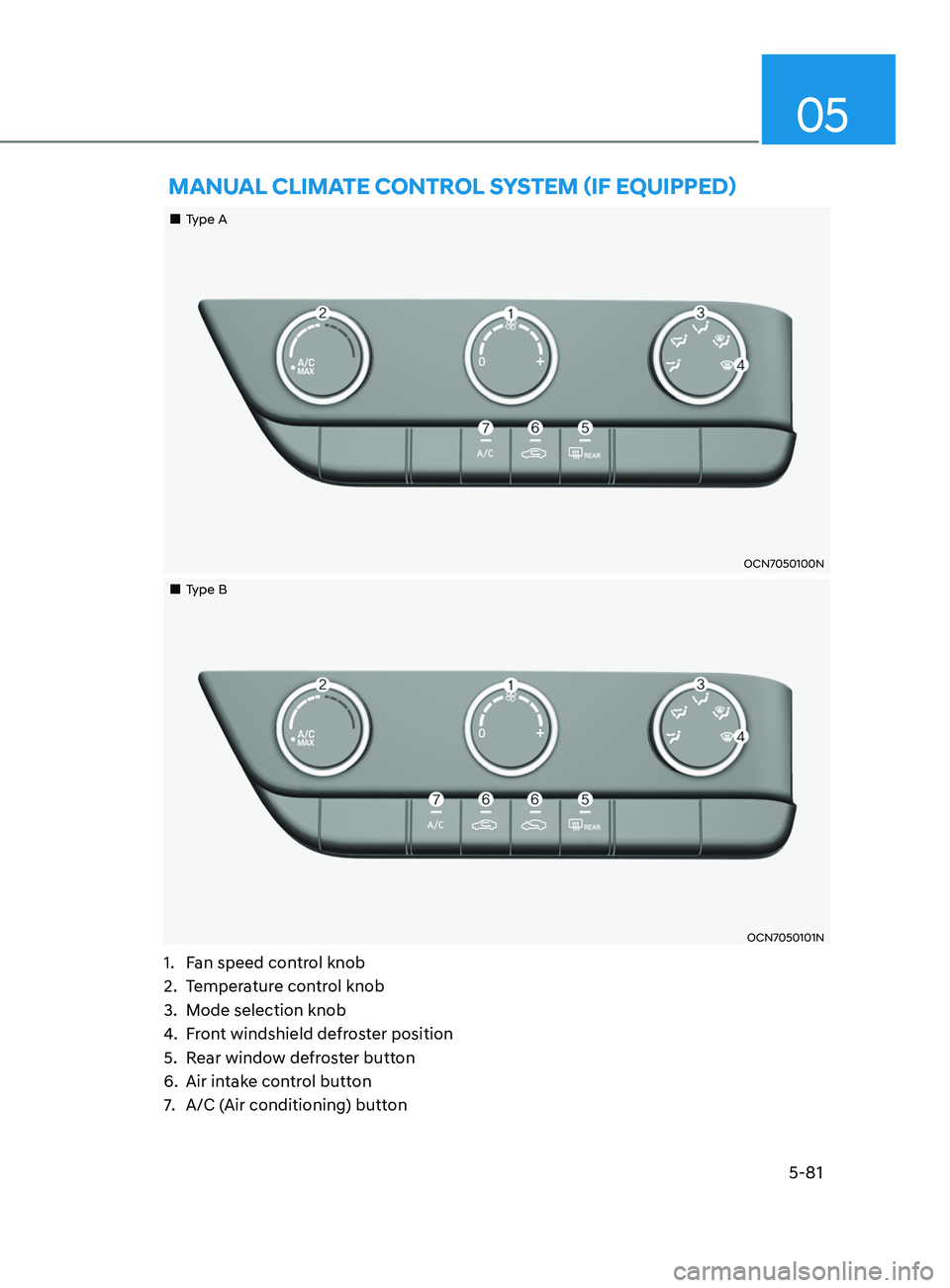
mAnuAl ClimATe C onTr ol SySTem (if e quipped)
„„Type A
OCN7050100N
„„Type B
OCN7050101N
1. Fan speed control knob
2.
Temper
ature control knob
3.
Mode selection knob
4.
Fr
ont windshield defroster position
5.
Rear windo
w defroster button
6.
Air intak
e control button
7.
A/C (Air conditioning
) button
Page 218 of 570
Convenient Features5-82
Heating and Air Conditioning
1. Start the engine.
2.
Set the mode t
o the desired position.
To improve the effectiveness of
heating and cooling, select the mode
according to the following:
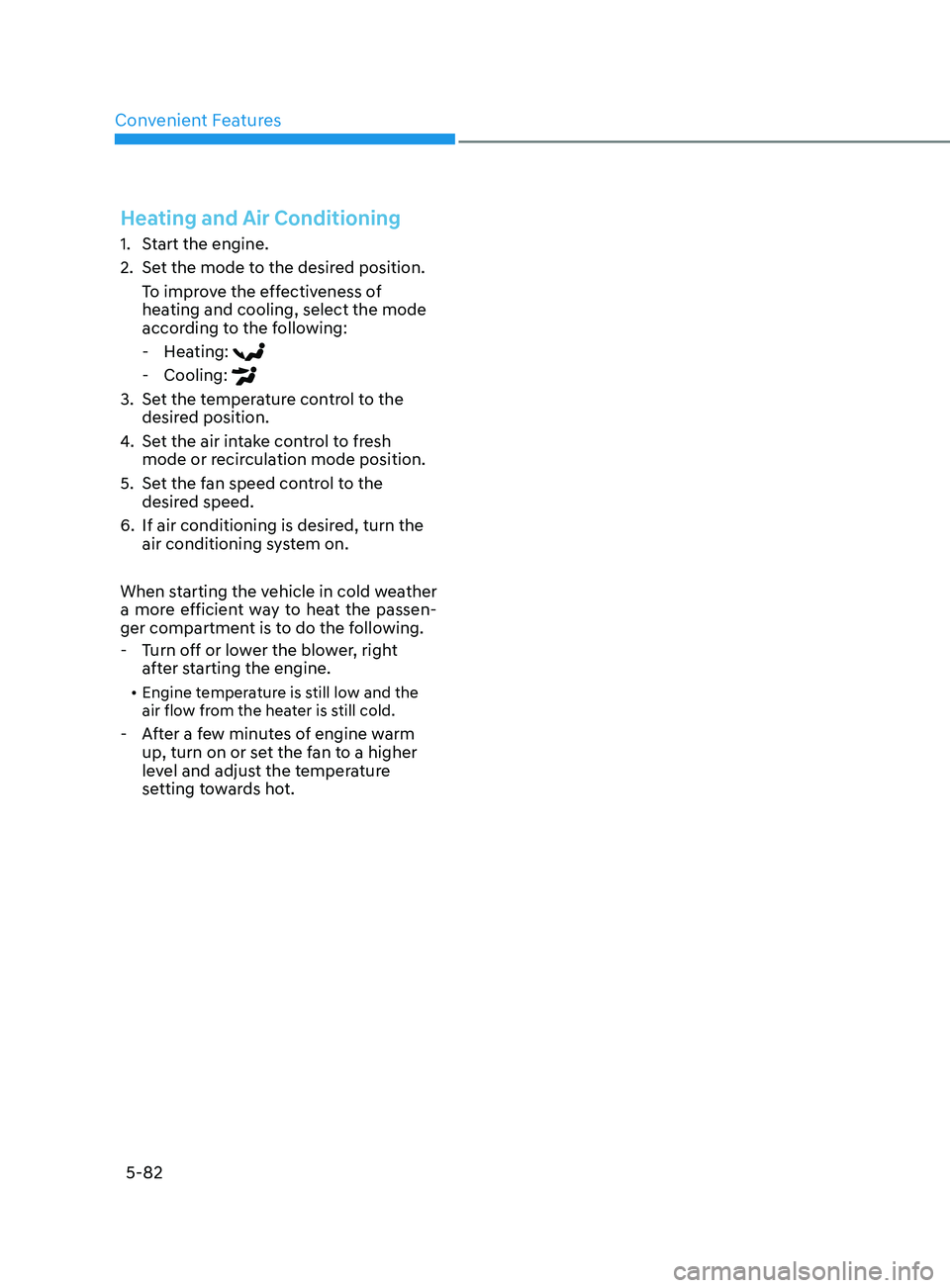
- Hea
ting:
- Cooling:
3. Set the temperature control to the
desired position.
4.
Set the air in
take control to fresh
mode or recirculation mode position.
5.
Set the f
an speed control to the
desired speed.
6.
If air conditioning is desired, turn the
air conditioning s
ystem on.
When starting the vehicle in cold weather
a more efficient way to heat the passen-
ger compartment is to do the following.
- Turn o
ff or lower the blower, right
after starting the engine.
• Engine temperature is still low and the
air flow from the heater is still cold.
- After a few minutes of engine warm
up, turn on or se t the fan to a higher
level and adjust the temperature
setting towards hot.
Page 220 of 570
Convenient Features
5-84
OCN7050102
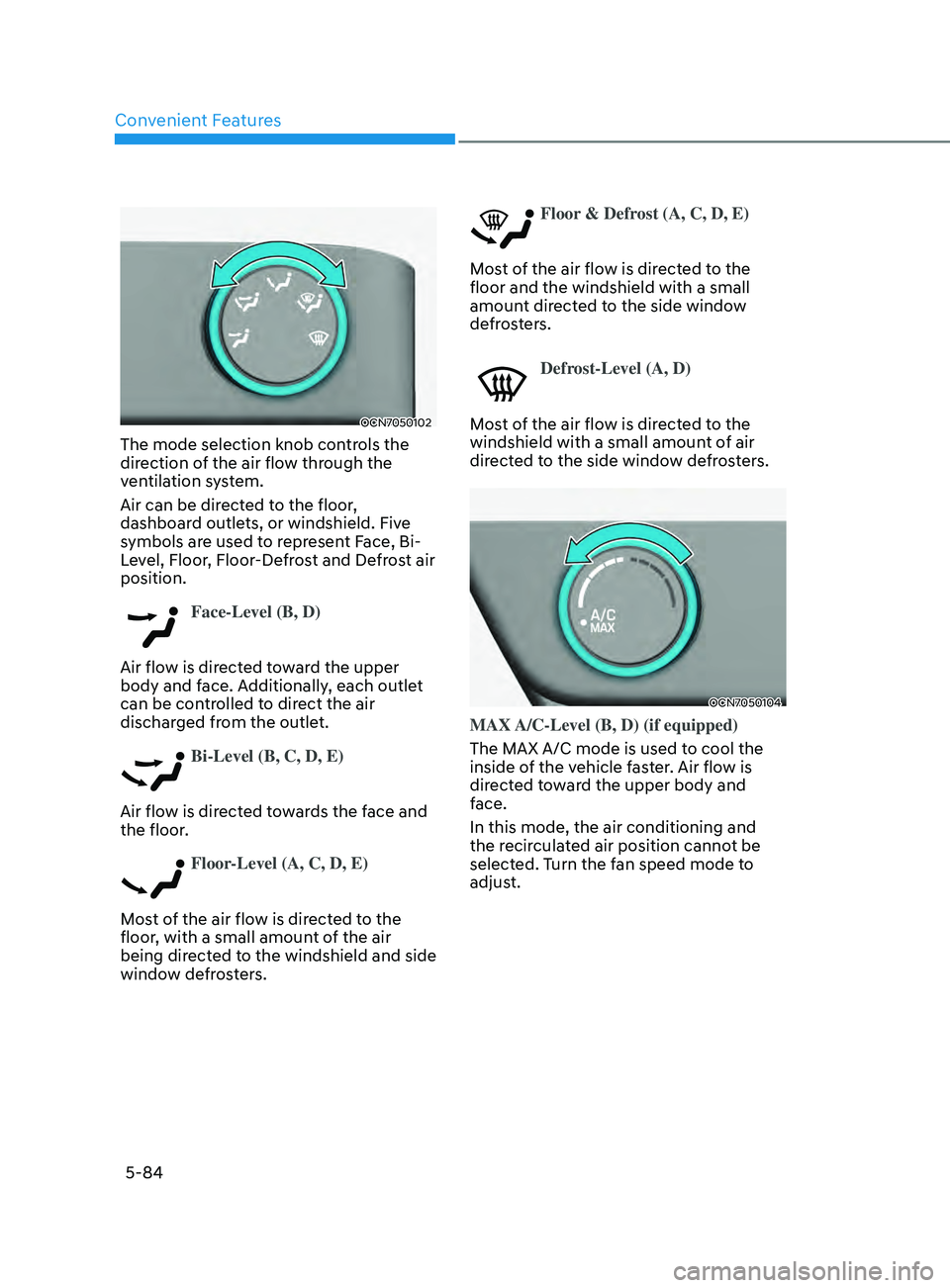
The mode selection knob controls the
direction of the air flow through the
ventilation system.
Air can be directed to the floor,
dashboard outlets, or windshield. Five
symbols are used to represent Face, Bi-
Level, Floor, Floor-Defrost and Defrost air
position.
Face-Level (B, D)
Air flow is directed toward the upper
body and face. Additionally, each outlet
can be controlled to direct the air
discharged from the outlet.
Bi-Level (B, C, D, E)
Air flow is directed towards the face and
the floor.
Floor-Level (A, C, D, E)
Most of the air flow is directed to the
floor, with a small amount of the air
being directed to the windshield and side
window defrosters.
Floor & Defrost (A, C, D, E)
Most of the air flow is directed to the
floor and the windshield with a small
amount directed to the side window
defrosters.
Defrost-Level (A, D)
Most of the air flow is directed to the
windshield with a small amount of air
directed to the side window defrosters.
OCN7050104
MAX A/C-Level (B, D) (if equipped)
The MAX A/C mode is used to cool the
inside of the vehicle faster. Air flow is
directed toward the upper body and
face.
In this mode, the air conditioning and
the recirculated air position cannot be
selected. Turn the fan speed mode to
adjust.
Page 221 of 570
05
5-85
Instrument panel vents
OCN7050106
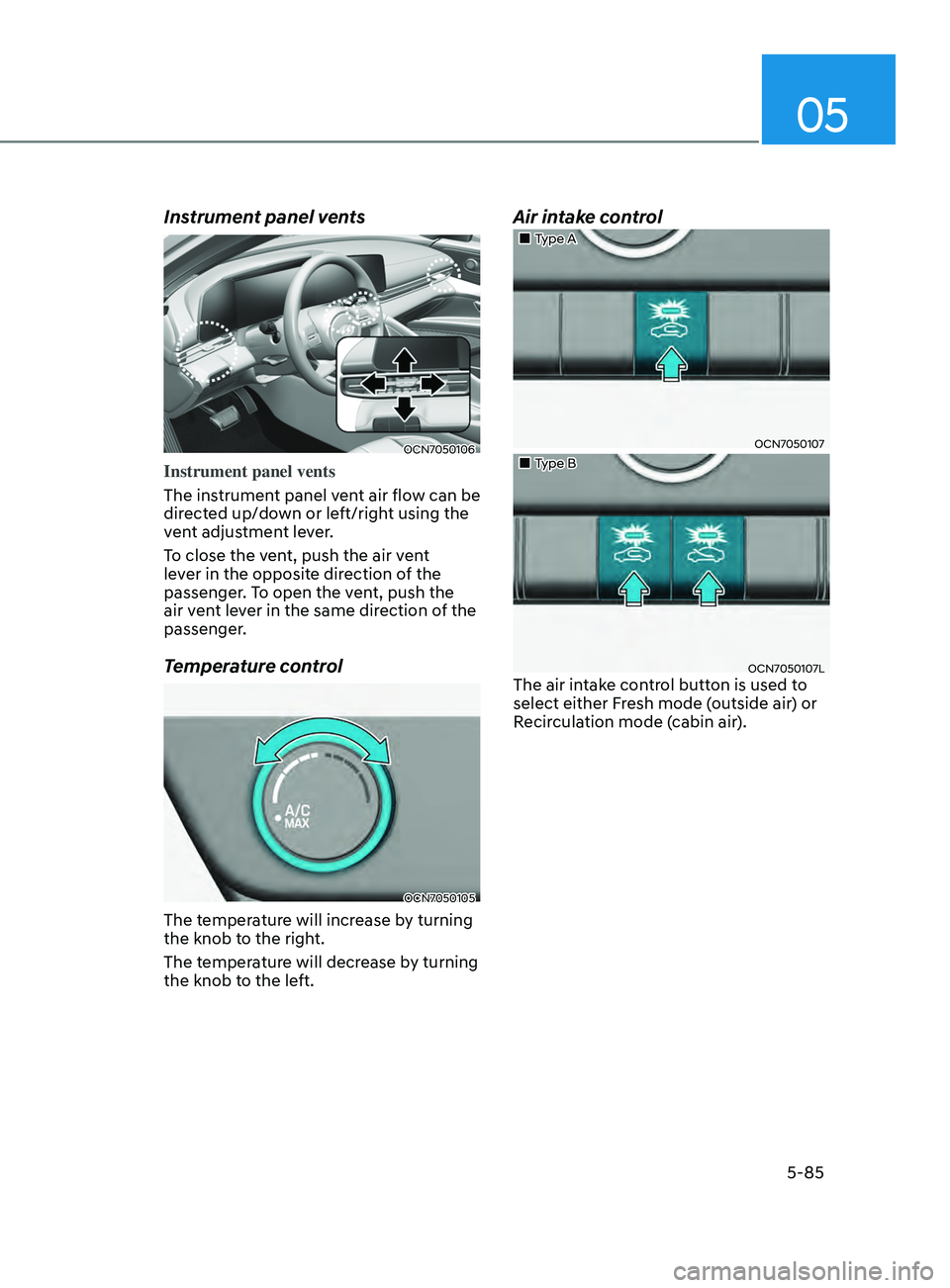
Instrument panel vents
The instrument panel vent air flow can be
directed up/down or left/right using the
vent adjustment lever.
To close the vent, push the air vent
lever in the opposite direction of the
passenger. To open the vent, push the
air vent lever in the same direction of the
passenger.
Temperature control
OCN7050105
The temperature will increase by turning
the knob to the right.
The temperature will decrease by turning
the knob to the left.
Air intake control
„„Type A
OCN7050107
„„Type B
OCN7050107LThe air intake control button is used to
select either Fresh mode (outside air) or
Recirculation mode (cabin air).