display Hyundai Elantra Coupe 2014 User Guide
[x] Cancel search | Manufacturer: HYUNDAI, Model Year: 2014, Model line: Elantra Coupe, Model: Hyundai Elantra Coupe 2014Pages: 550, PDF Size: 45.11 MB
Page 212 of 550
Features of your vehicle
126 4
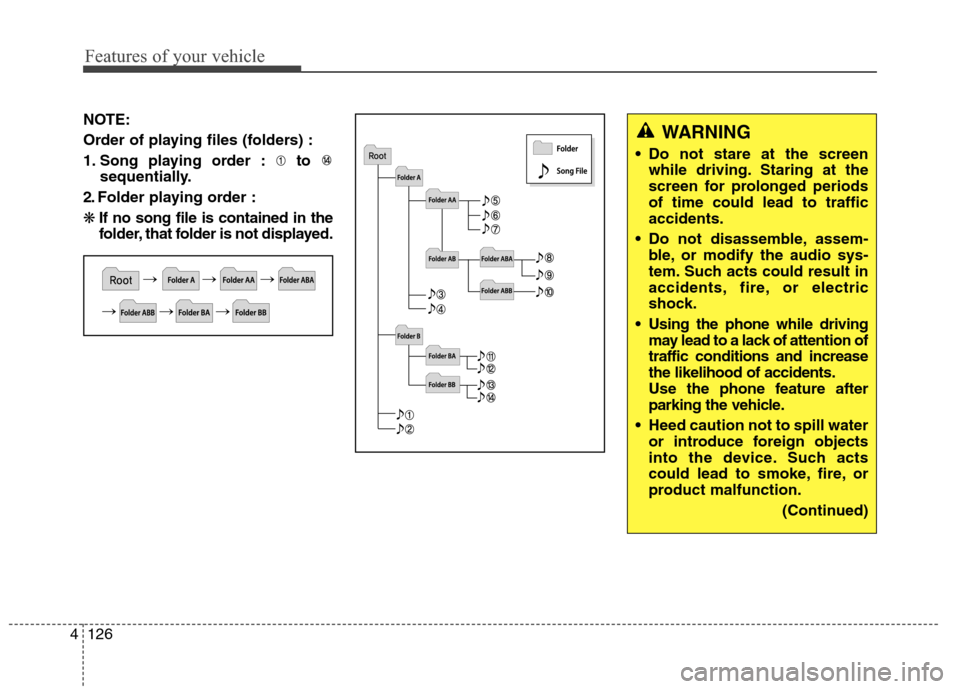
NOTE:
Order of playing files (folders) :
1. Song playing order : to
sequentially.
2. Folder playing order :
❋If no song file is contained in the
folder, that folder is not displayed.WARNING
Do not stare at the screen
while driving. Staring at the
screen for prolonged periods
of time could lead to traffic
accidents.
Do not disassemble, assem-
ble, or modify the audio sys-
tem. Such acts could result in
accidents, fire, or electric
shock.
Using the phone while driving
may lead to a lack of attention of
traffic conditions and increase
the likelihood of accidents.
Use the phone feature after
parking the vehicle.
Heed caution not to spill water
or introduce foreign objects
into the device. Such acts
could lead to smoke, fire, or
product malfunction.
(Continued)
Page 223 of 550
4137
Features of your vehicle
SYSTEM CONTROLLERS
AND FUNCTIONS
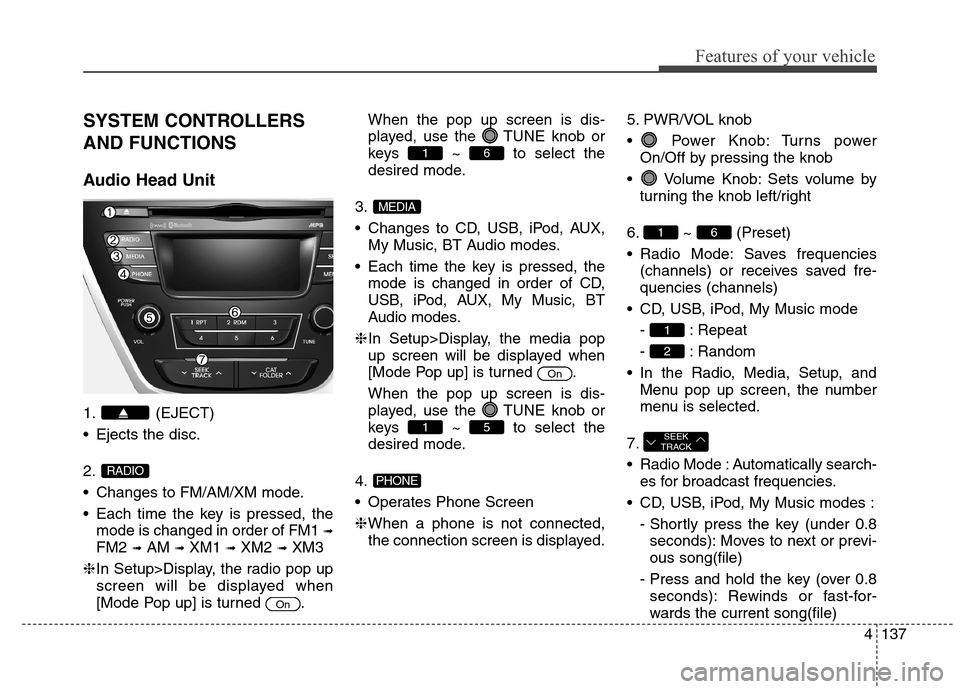
Audio Head Unit
1. (EJECT)
Ejects the disc.
2.
Changes to FM/AM/XM mode.
Each time the key is pressed, the
mode is changed in order of FM1
➟
FM2 ➟AM ➟XM1 ➟XM2 ➟XM3
❈In Setup>Display, the radio pop up
screen will be displayed when
[Mode Pop up] is turned .When the pop up screen is dis-
played, use the TUNE knob or
keys ~ to select the
desired mode.
3.
Changes to CD, USB, iPod, AUX,
My Music, BT Audio modes.
Each time the key is pressed, the
mode is changed in order of CD,
USB, iPod, AUX, My Music, BT
Audio modes.
❈In Setup>Display, the media pop
up screen will be displayed when
[Mode Pop up] is turned .
When the pop up screen is dis-
played, use the TUNE knob or
keys ~ to select the
desired mode.
4.
Operates Phone Screen
❈When a phone is not connected,
the connection screen is displayed.5. PWR/VOL knob
Power Knob: Turns power
On/Off by pressing the knob
Volume Knob: Sets volume by
turning the knob left/right
6. ~ (Preset)
Radio Mode: Saves frequencies
(channels) or receives saved fre-
quencies (channels)
CD, USB, iPod, My Music mode
- : Repeat
- : Random
In the Radio, Media, Setup, and
Menu pop up screen, the number
menu is selected.
7.
Radio Mode : Automatically search-
es for broadcast frequencies.
CD, USB, iPod, My Music modes :
- Shortly press the key (under 0.8
seconds): Moves to next or previ-
ous song(file)
- Press and hold the key (over 0.8
seconds): Rewinds or fast-for-
wards the current song(file)
SEEK
TRACK
2
1
61
PHONE
51
On
MEDIA
61
On
RADIO
Page 224 of 550
Features of your vehicle
138 4
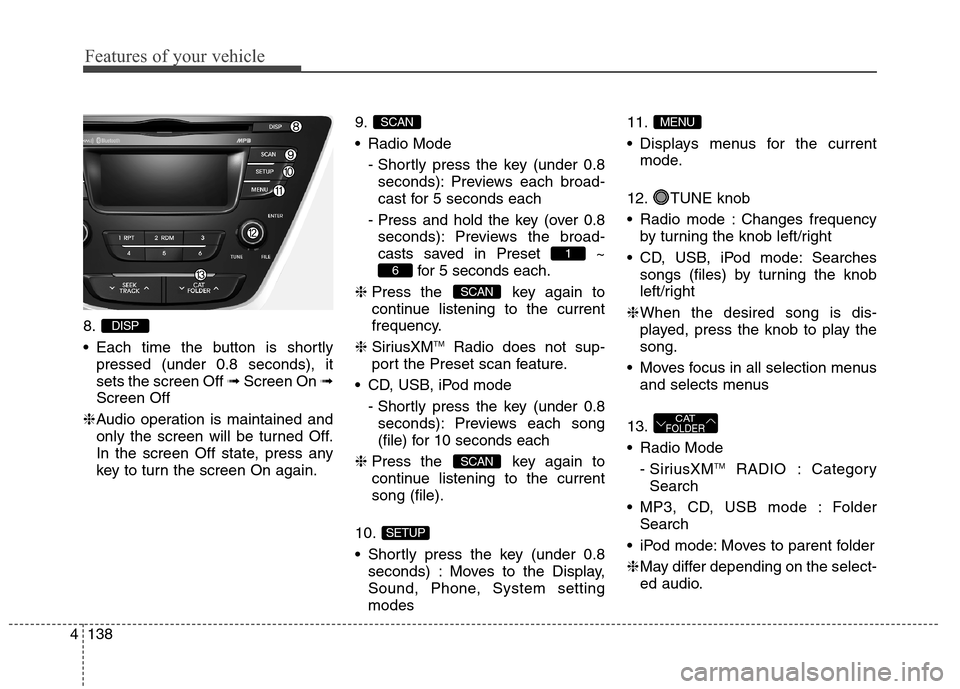
8.
Each time the button is shortly
pressed (under 0.8 seconds), it
sets the screen Off ➟Screen On ➟
Screen Off
❈Audio operation is maintained and
only the screen will be turned Off.
In the screen Off state, press any
key to turn the screen On again.9.
Radio Mode
- Shortly press the key (under 0.8
seconds): Previews each broad-
cast for 5 seconds each
- Press and hold the key (over 0.8
seconds): Previews the broad-
casts saved in Preset ~
for 5 seconds each.
❈Press the key again to
continue listening to the current
frequency.
❈SiriusXM
TMRadio does not sup-
port the Preset scan feature.
CD, USB, iPod mode
- Shortly press the key (under 0.8
seconds): Previews each song
(file) for 10 seconds each
❈Press the key again to
continue listening to the current
song (file).
10.
Shortly press the key (under 0.8
seconds) : Moves to the Display,
Sound, Phone, System setting
modes11.
Displays menus for the current
mode.
12. TUNE knob
Radio mode : Changes frequency
by turning the knob left/right
CD, USB, iPod mode: Searches
songs (files) by turning the knob
left/right
❈When the desired song is dis-
played, press the knob to play the
song.
Moves focus in all selection menus
and selects menus
13.
Radio Mode
- SiriusXM
TMRADIO : Category
Search
MP3, CD, USB mode : Folder
Search
iPod mode: Moves to parent folder
❈May differ depending on the select-
ed audio.
CATFOLDER
MENU
SETUP
SCAN
SCAN
6
1
SCAN
DISP
Page 228 of 550
Features of your vehicle
142 4
SYSTEM CONTROLLERS
AND FUNCTIONS
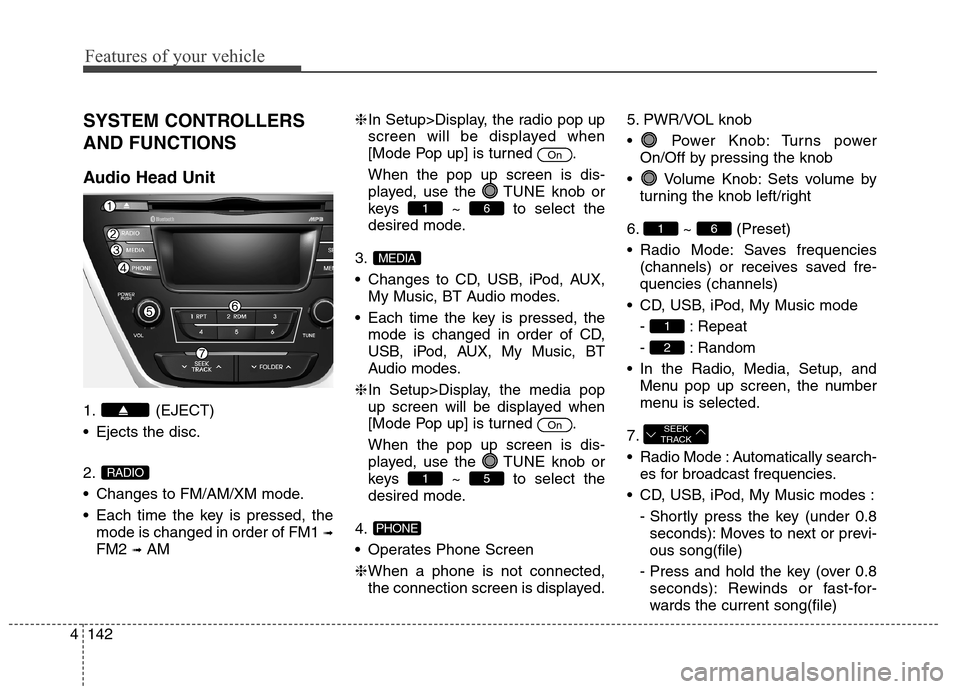
Audio Head Unit
1. (EJECT)
Ejects the disc.
2.
Changes to FM/AM/XM mode.
Each time the key is pressed, the
mode is changed in order of FM1
➟
FM2 ➟AM❈In Setup>Display, the radio pop up
screen will be displayed when
[Mode Pop up] is turned .
When the pop up screen is dis-
played, use the TUNE knob or
keys ~ to select the
desired mode.
3.
Changes to CD, USB, iPod, AUX,
My Music, BT Audio modes.
Each time the key is pressed, the
mode is changed in order of CD,
USB, iPod, AUX, My Music, BT
Audio modes.
❈In Setup>Display, the media pop
up screen will be displayed when
[Mode Pop up] is turned .
When the pop up screen is dis-
played, use the TUNE knob or
keys ~ to select the
desired mode.
4.
Operates Phone Screen
❈When a phone is not connected,
the connection screen is displayed.5. PWR/VOL knob
Power Knob: Turns power
On/Off by pressing the knob
Volume Knob: Sets volume by
turning the knob left/right
6. ~ (Preset)
Radio Mode: Saves frequencies
(channels) or receives saved fre-
quencies (channels)
CD, USB, iPod, My Music mode
- : Repeat
- : Random
In the Radio, Media, Setup, and
Menu pop up screen, the number
menu is selected.
7.
Radio Mode : Automatically search-
es for broadcast frequencies.
CD, USB, iPod, My Music modes :
- Shortly press the key (under 0.8
seconds): Moves to next or previ-
ous song(file)
- Press and hold the key (over 0.8
seconds): Rewinds or fast-for-
wards the current song(file)
SEEK
TRACK
2
1
61
PHONE
51
On
MEDIA
61
On
RADIO
Page 229 of 550
4143
Features of your vehicle
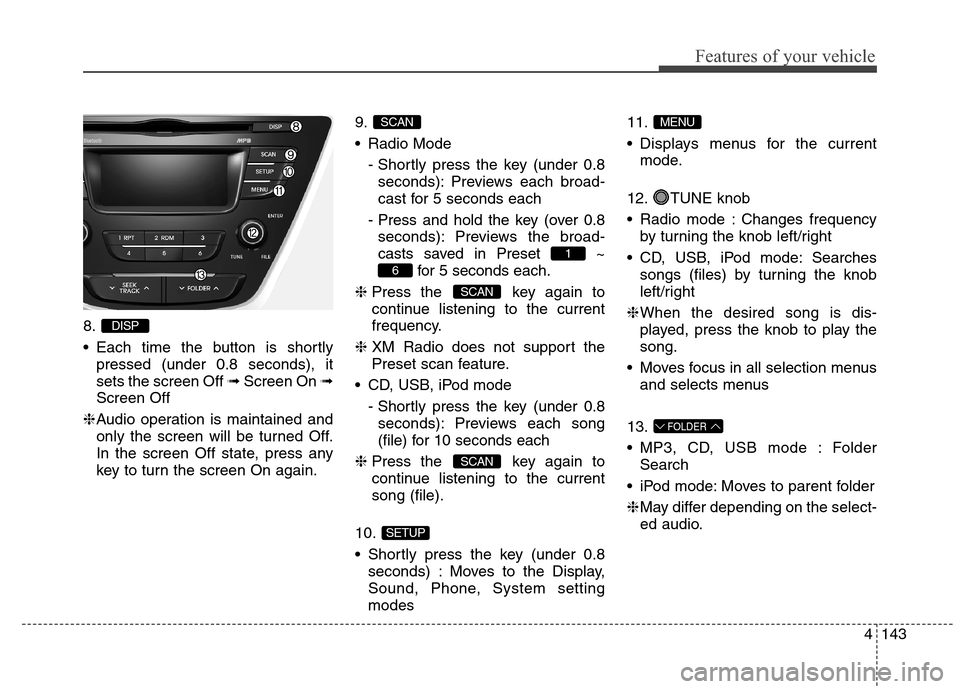
8.
Each time the button is shortly
pressed (under 0.8 seconds), it
sets the screen Off ➟Screen On ➟
Screen Off
❈Audio operation is maintained and
only the screen will be turned Off.
In the screen Off state, press any
key to turn the screen On again.9.
Radio Mode
- Shortly press the key (under 0.8
seconds): Previews each broad-
cast for 5 seconds each
- Press and hold the key (over 0.8
seconds): Previews the broad-
casts saved in Preset ~
for 5 seconds each.
❈Press the key again to
continue listening to the current
frequency.
❈XM Radio does not support the
Preset scan feature.
CD, USB, iPod mode
- Shortly press the key (under 0.8
seconds): Previews each song
(file) for 10 seconds each
❈Press the key again to
continue listening to the current
song (file).
10.
Shortly press the key (under 0.8
seconds) : Moves to the Display,
Sound, Phone, System setting
modes11.
Displays menus for the current
mode.
12. TUNE knob
Radio mode : Changes frequency
by turning the knob left/right
CD, USB, iPod mode: Searches
songs (files) by turning the knob
left/right
❈When the desired song is dis-
played, press the knob to play the
song.
Moves focus in all selection menus
and selects menus
13.
MP3, CD, USB mode : Folder
Search
iPod mode: Moves to parent folder
❈May differ depending on the select-
ed audio.
FOLDER
MENU
SETUP
SCAN
SCAN
6
1
SCAN
DISP
Page 231 of 550
![Hyundai Elantra Coupe 2014 User Guide 4145
Features of your vehicle
SETUP
Display Settings
Press the key Select
[Display] through TUNE knob or
key Select menu through
TUNE knob
Mode Pop up
[Mode Pop up] Changes
/
selection mode
Durin](/img/35/14621/w960_14621-230.png "Hyundai Elantra Coupe 2014 User Guide 4145
Features of your vehicle
SETUP
Display Settings
Press the key Select
[Display] through TUNE knob or
key Select menu through
TUNE knob
Mode Pop up
[Mode Pop up] Changes
/
selection mode
Durin")
4145
Features of your vehicle
SETUP
Display Settings
Press the key Select
[Display] through TUNE knob or
key Select menu through
TUNE knob
Mode Pop up
[Mode Pop up] Changes
/
selection mode
During On state, press the
or key to display the mode
change pop up screen.
Text Scroll
[Text Scroll] Set /
: Maintains scroll
: Scrolls only one (1) time.
Media Display
When playing an MP3 file, select the
desired display info from ‘Folder/File’
or ‘Album/Artist/Song’.
Off
On
OffOn
MEDIA
RADIO
OffOn
1
SETUP
Page 234 of 550
![Hyundai Elantra Coupe 2014 User Guide Features of your vehicle
148 4
SYSTEM SETTINGS
Press the key Select [System]
through tune knob or key Select
menu through TUNE knob
Memory Information
Displays currently used memory and
total syste](/img/35/14621/w960_14621-233.png "Hyundai Elantra Coupe 2014 User Guide Features of your vehicle
148 4
SYSTEM SETTINGS
Press the key Select [System]
through tune knob or key Select
menu through TUNE knob
Memory Information
Displays currently used memory and
total syste")
Features of your vehicle
148 4
SYSTEM SETTINGS
Press the key Select [System]
through tune knob or key Select
menu through TUNE knob
Memory Information
Displays currently used memory and
total system memory.
Select [Memory Information] OK
The currently used memory is dis-
played on the left side while the total
system memory is displayed on the
right side.
Prompt Feedback
This feature is used to change voice
command feedback between Normal
and Expert modes.
Select [Prompt Feedback] Set
through
TUNEknob
Normal(On) : This mode is for
beginner users and provides
detailed instructions during voice
command operation. Expert(Off) :This mode is for expert
users and omits some information
during voice command operation.
(When using Expert mode, guid-
ance instructions can be heard
through the [Help] or [Menu] com-
mands.
Language
This menu is used to set the display
and voice recognition language.
Select [Language] Set through TUNE
knob
❈The system will reboot after the
language is changed.
❈Language support by region
- English, Francais, Espanol
4
SETUP
Page 237 of 550
4151
Features of your vehicle
SIRIUSXMTMRADIO
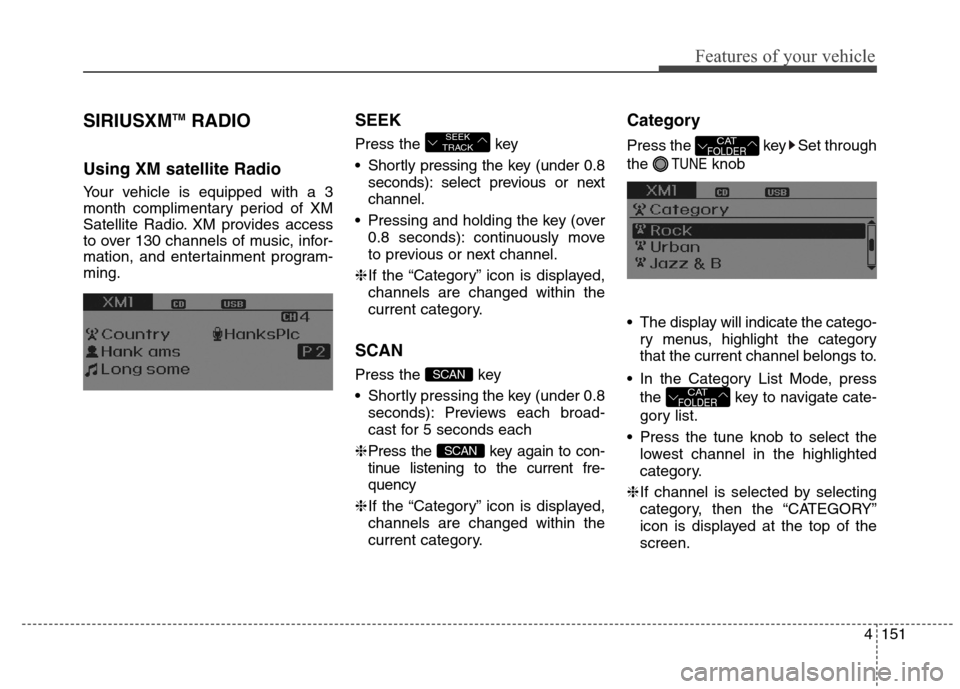
Using XM satellite Radio
Your vehicle is equipped with a 3
month complimentary period of XM
Satellite Radio. XM provides access
to over 130 channels of music, infor-
mation, and entertainment program-
ming.
SEEK
Press the key
Shortly pressing the key (under 0.8
seconds): select previous or next
channel.
Pressing and holding the key (over
0.8 seconds): continuously move
to previous or next channel.
❈If the “Category” icon is displayed,
channels are changed within the
current category.
SCAN
Press the key
Shortly pressing the key (under 0.8
seconds): Previews each broad-
cast for 5 seconds each
❈Press the key again to con-
tinue listening to the current fre-
quency
❈If the “Category” icon is displayed,
channels are changed within the
current category.
Category
Press the key Set through
the
TUNEknob
The display will indicate the catego-
ry menus, highlight the category
that the current channel belongs to.
In the Category List Mode, press
the key to navigate cate-
gory list.
Press the tune knob to select the
lowest channel in the highlighted
category.
❈If channel is selected by selecting
category, then the “CATEGORY”
icon is displayed at the top of the
screen.
CATFOLDER
CATFOLDER
SCAN
SCAN
SEEK
TRACK
Page 238 of 550
Features of your vehicle
152 4
Preset
Press the ~ key
Shortly pressing the key (under 0.8
seconds): Plays the frequency
saved in the corresponding key.
Pressing and holding the key (over
0.8 seconds): Pressing and holding
the desired key from
~
will save the current broadcast to
the selected key and sound a
BEEP.
Tune
Rotate TUNE knob : Changes
the channel number or scrolls cate-
gory list.
Press TUNE knob : Selects the
menu.
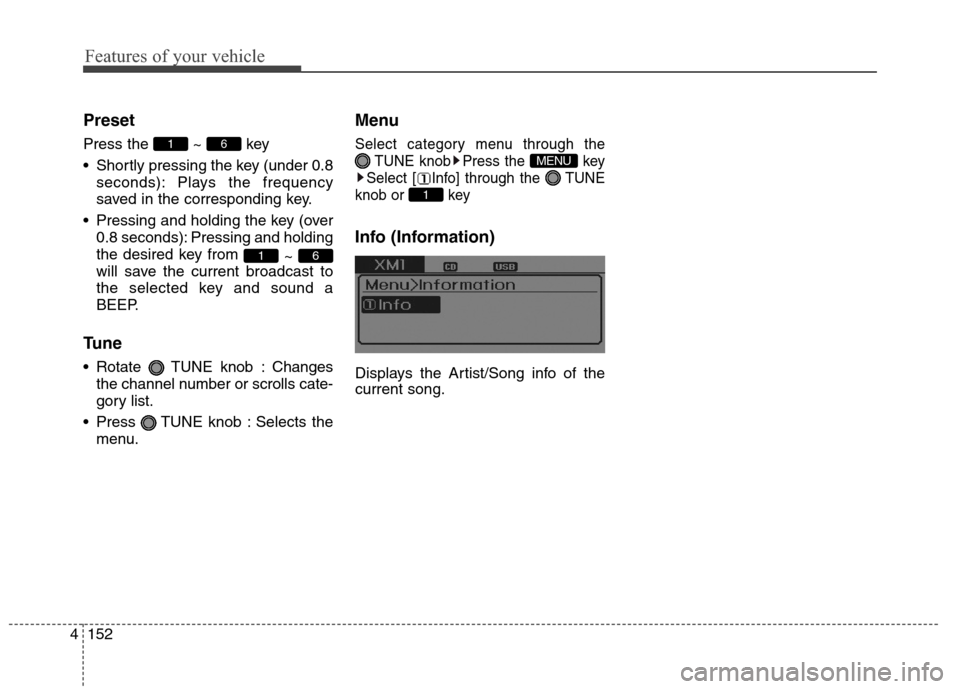
Menu
Select category menu through the
TUNE knob Press the key
Select [ Info] through the TUNE
knob or key
Info (Information)
Displays the Artist/Song info of the
current song.
1
MENU
61
61
Page 239 of 550
4153
Features of your vehicle
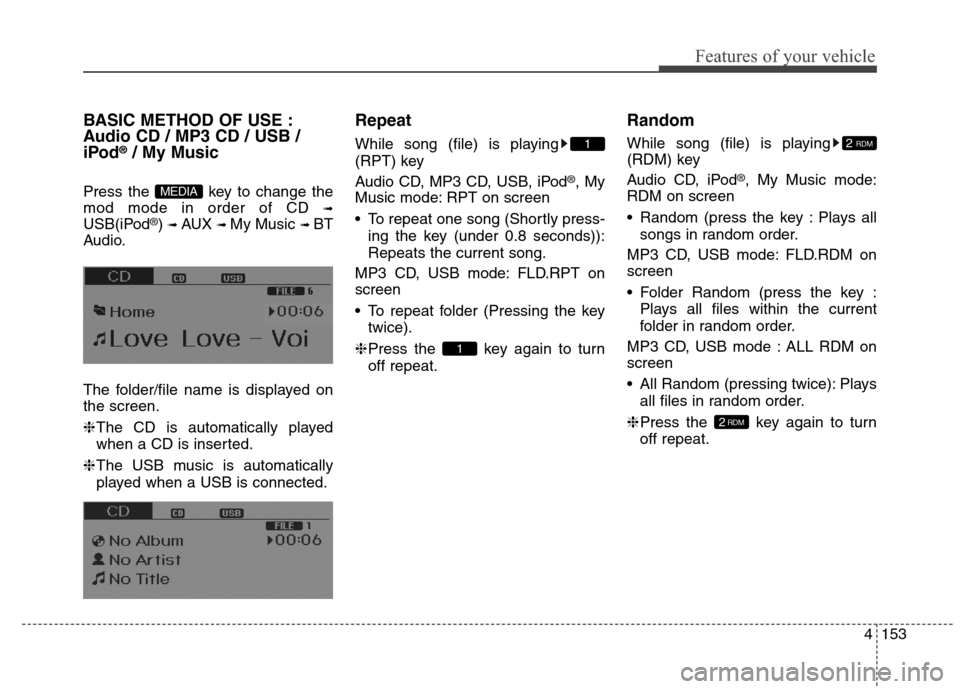
BASIC METHOD OF USE :
Audio CD / MP3 CD / USB /
iPod
®/ My Music
Press the key to change the
mod mode in order of CD
➟
USB(iPod®) ➟ AUX ➟ My Music ➟ BT
Audio.
The folder/file name is displayed on
the screen.
❈The CD is automatically played
when a CD is inserted.
❈The USB music is automatically
played when a USB is connected.
Repeat
While song (file) is playing
(RPT) key
Audio CD, MP3 CD, USB, iPod
®, My
Music mode: RPT on screen
To repeat one song (Shortly press-
ing the key (under 0.8 seconds)):
Repeats the current song.
MP3 CD, USB mode: FLD.RPT on
screen
To repeat folder (Pressing the key
twice).
❈Press the key again to turn
off repeat.
Random
While song (file) is playing
(RDM) key
Audio CD, iPod
®, My Music mode:
RDM on screen
Random (press the key : Plays all
songs in random order.
MP3 CD, USB mode: FLD.RDM on
screen
Folder Random (press the key :
Plays all files within the current
folder in random order.
MP3 CD, USB mode : ALL RDM on
screen
All Random (pressing twice): Plays
all files in random order.
❈Press the key again to turn
off repeat.
2RDM
2 RDM
1
1
MEDIA