display HYUNDAI ELANTRA GT 2014 User Guide
[x] Cancel search | Manufacturer: HYUNDAI, Model Year: 2014, Model line: ELANTRA GT, Model: HYUNDAI ELANTRA GT 2014Pages: 476, PDF Size: 31.71 MB
Page 166 of 476
481
Features of your vehicle
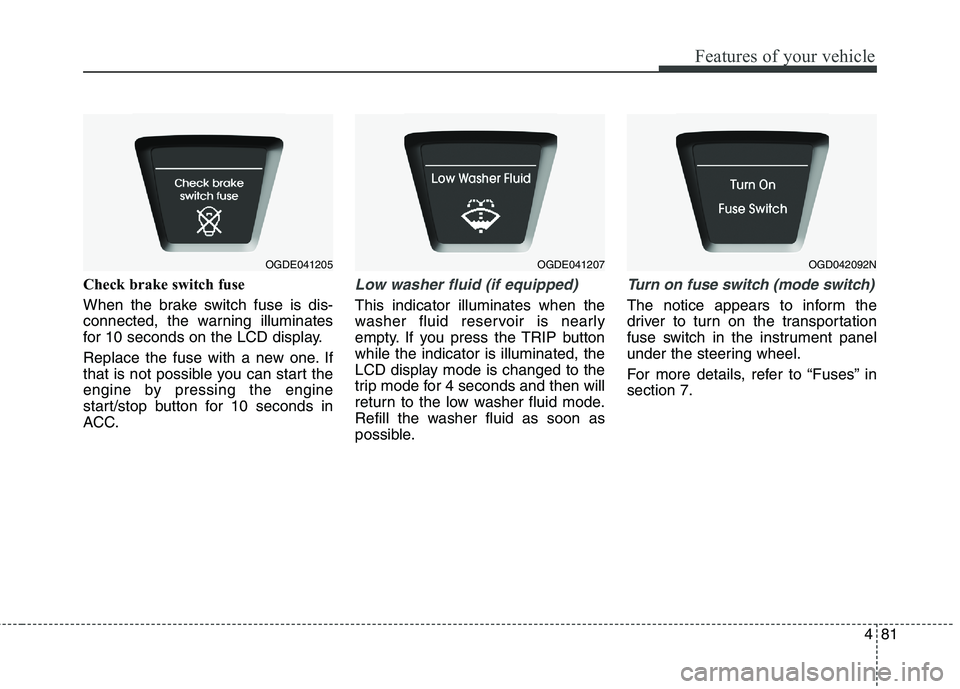
Check brake switch fuse
When the brake switch fuse is dis-
connected, the warning illuminates
for 10 seconds on the LCD display.
Replace the fuse with a new one. If
that is not possible you can start the
engine by pressing the engine
start/stop button for 10 seconds in
ACC.Low washer fluid (if equipped)
This indicator illuminates when the
washer fluid reservoir is nearly
empty. If you press the TRIP button
while the indicator is illuminated, the
LCD display mode is changed to the
trip mode for 4 seconds and then will
return to the low washer fluid mode.
Refill the washer fluid as soon as
possible.
Turn on fuse switch (mode switch)
The notice appears to inform the
driver to turn on the transportation
fuse switch in the instrument panel
under the steering wheel.
For more details, refer to “Fuses” in
section 7.
OGDE041205OGDE041207OGD042092N
Page 191 of 476
Features of your vehicle
106 4
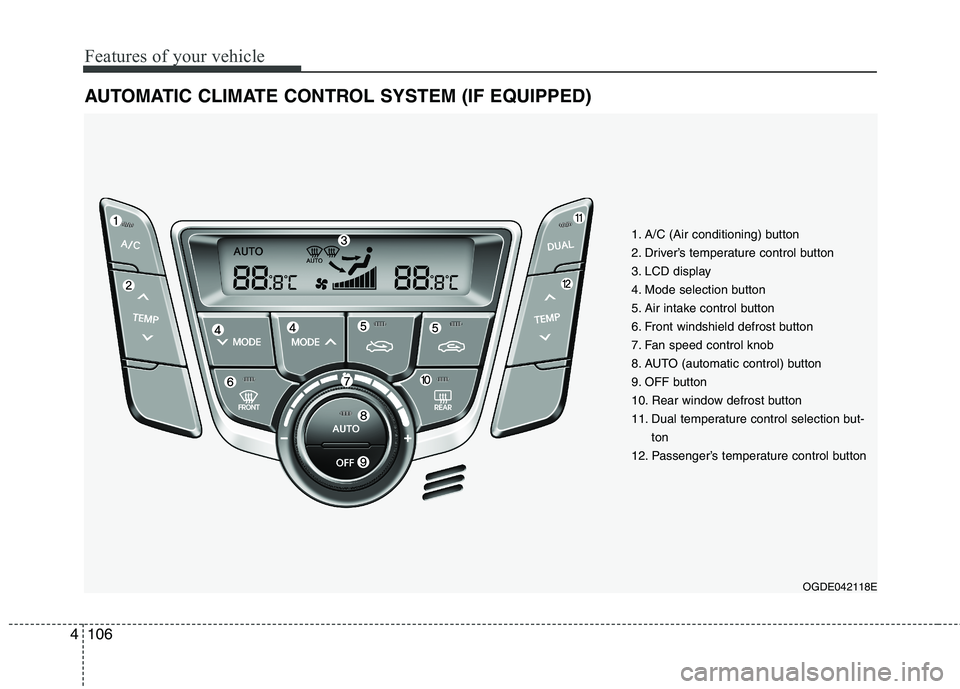
AUTOMATIC CLIMATE CONTROL SYSTEM (IF EQUIPPED)
OGDE042118E
1. A/C (Air conditioning) button
2. Driver’s temperature control button
3. LCD display
4. Mode selection button
5. Air intake control button
6. Front windshield defrost button
7. Fan speed control knob
8. AUTO (automatic control) button
9. OFF button
10. Rear window defrost button
11. Dual temperature control selection but-
ton
12. Passenger’s temperature control button
Page 195 of 476
Features of your vehicle
110 4
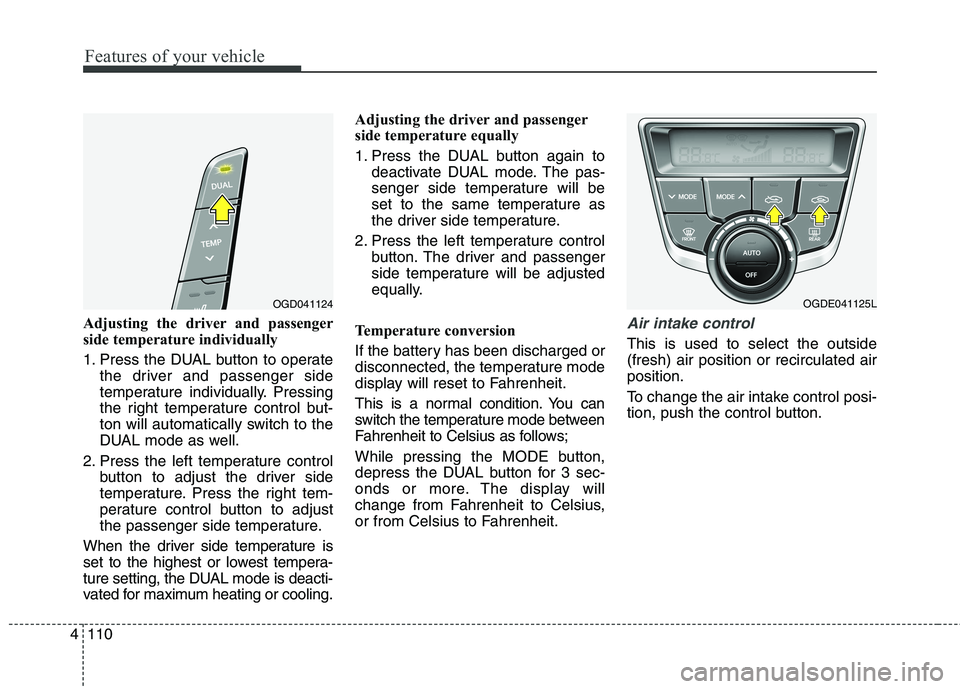
Adjusting the driver and passenger
side temperature individually
1. Press the DUAL button to operate
the driver and passenger side
temperature individually. Pressing
the right temperature control but-
ton will automatically switch to the
DUAL mode as well.
2. Press the left temperature control
button to adjust the driver side
temperature. Press the right tem-
perature control button to adjust
the passenger side temperature.
When the driver side temperature is
set to the highest or lowest tempera-
ture setting, the DUAL mode is deacti-
vated for maximum heating or cooling.Adjusting the driver and passenger
side temperature equally
1. Press the DUAL button again to
deactivate DUAL mode. The pas-
senger side temperature will be
set to the same temperature as
the driver side temperature.
2. Press the left temperature control
button. The driver and passenger
side temperature will be adjusted
equally.
Temperature conversion
If the battery has been discharged or
disconnected, the temperature mode
display will reset to Fahrenheit.
This is a normal condition. You can
switch the temperature mode between
Fahrenheit to Celsius as follows;
While pressing the MODE button,
depress the DUAL button for 3 sec-
onds or more. The display will
change from Fahrenheit to Celsius,
or from Celsius to Fahrenheit.Air intake control
This is used to select the outside
(fresh) air position or recirculated air
position.
To change the air intake control posi-
tion, push the control button.
OGD041124OGDE041125L
Page 218 of 476
4133
Features of your vehicle
SYSTEM CONTROLLERS
AND FUNCTIONS
❈Display and settings may differ
depending on the selected audio.
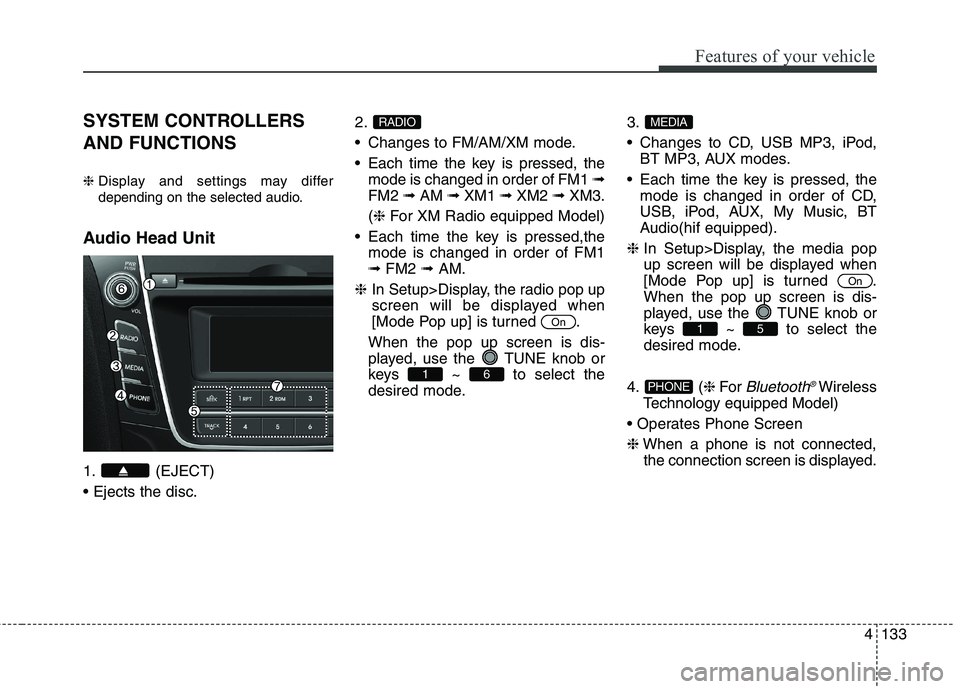
Audio Head Unit
1. (EJECT)
2.
Changes to FM/AM/XM mode.
Each time the key is pressed, the
mode is changed in order of FM1 ➟
FM2 ➟AM ➟XM1 ➟XM2 ➟XM3.
(❈For XM Radio equipped Model)
Each time the key is pressed,the
mode is changed in order of FM1
➟FM2 ➟AM.
❈In Setup>Display, the radio pop up
screen will be displayed when
[Mode Pop up] is turned .
When the pop up screen is dis-
played, use the TUNE knob or
keys ~ to select the
desired mode.3.
Changes to CD, USB MP3, iPod,
BT MP3, AUX modes.
Each time the key is pressed, the
mode is changed in order of CD,
USB, iPod, AUX, My Music, BT
Audio(hif equipped).
❈In Setup>Display, the media pop
up screen will be displayed when
[Mode Pop up] is turned .
When the pop up screen is dis-
played, use the TUNE knob or
keys ~ to select the
desired mode.
4. (❈For
Bluetooth®Wireless
Technology equipped Model)
❈When a phone is not connected,
the connection screen is displayed.PHONE
51
On
MEDIA
61
On
RADIO
Page 220 of 476
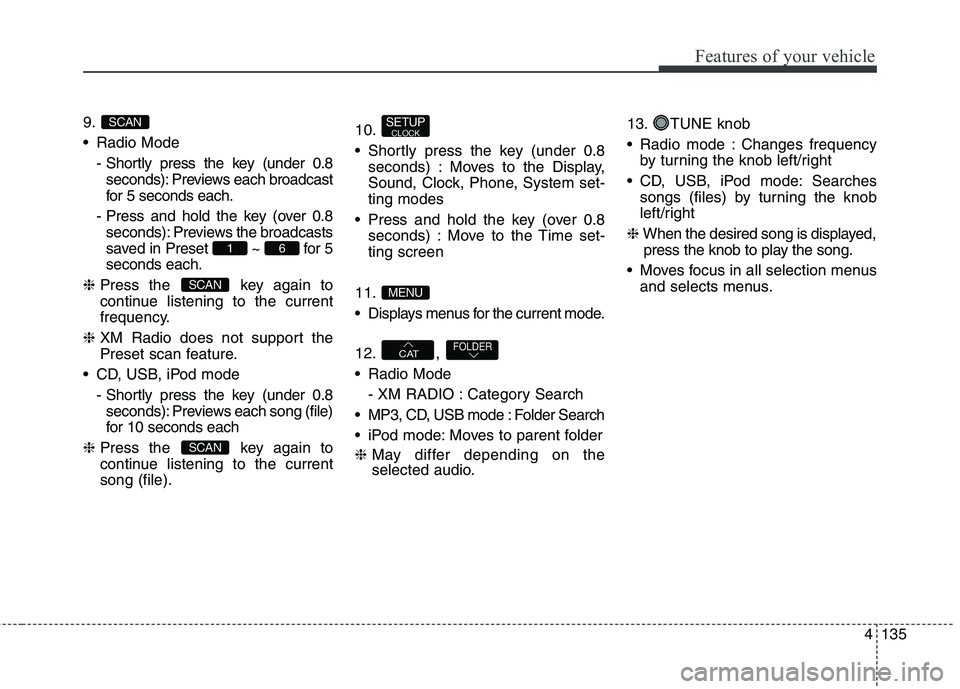
4135
Features of your vehicle
9.
Radio Mode
- Shortly press the key (under 0.8
seconds): Previews each broadcast
for 5 seconds each.
- Press and hold the key (over 0.8
seconds): Previews the broadcasts
saved in Preset ~ for 5
seconds each.
❈Press the key again to
continue listening to the current
frequency.
❈XM Radio does not support the
Preset scan feature.
CD, USB, iPod mode
- Shortly press the key (under 0.8
seconds): Previews each song (file)
for 10 seconds each
❈Press the key again to
continue listening to the current
song (file).10.
Shortly press the key (under 0.8
seconds) : Moves to the Display,
Sound, Clock, Phone, System set-
ting modes
Press and hold the key (over 0.8
seconds) : Move to the Time set-
ting screen
11.
Displays menus for the current mode.
12. ,
Radio Mode
- XM RADIO : Category Search
MP3, CD, USB mode : Folder Search
iPod mode: Moves to parent folder
❈May differ depending on the
selected audio.13. TUNE knob
Radio mode : Changes frequency
by turning the knob left/right
CD, USB, iPod mode: Searches
songs (files) by turning the knob
left/right
❈When the desired song is displayed,
press the knob to play the song.
Moves focus in all selection menus
and selects menus.
FOLDERCAT
MENU
SETUPCLOCK
SCAN
SCAN
61
SCAN
Page 222 of 476
![HYUNDAI ELANTRA GT 2014 User Guide 4137
Features of your vehicle
DISPLAY SETTINGS
Press the key Select [Display]
through TUNE knob or key
Select menu through TUNE knobMode Pop up
[Mode Pop up] Changes /
selection mode
During On s](/img/35/56097/w960_56097-221.png "HYUNDAI ELANTRA GT 2014 User Guide 4137
Features of your vehicle
DISPLAY SETTINGS
Press the key Select [Display]
through TUNE knob or key
Select menu through TUNE knobMode Pop up
[Mode Pop up] Changes /
selection mode
During On s")
4137
Features of your vehicle
DISPLAY SETTINGS
Press the key Select [Display]
through TUNE knob or key
Select menu through TUNE knobMode Pop up
[Mode Pop up] Changes /
selection mode
During On state, press the
or key to display the mode
change pop up screen.
Text Scroll
[Text Scroll] Set /
: Maintains scroll
: Scrolls only one (1) time.
Media Display
When playing an MP3 file, select the
desired display info from ‘Folder/File’
or ‘Album/Artist/Song’.
Off
On
OffOn
MEDIA
RADIO
OffOn
1
SETUP
Page 224 of 476
![HYUNDAI ELANTRA GT 2014 User Guide 4139
Features of your vehicle
Voice Recognition Volume
(❈For
Bluetooth®Wireless Technology
equipped Model)
Adjusts voice recognition volume.
Select [Voice Recognition Vol.] Set
volume of TUNE kno](/img/35/56097/w960_56097-223.png "HYUNDAI ELANTRA GT 2014 User Guide 4139
Features of your vehicle
Voice Recognition Volume
(❈For
Bluetooth®Wireless Technology
equipped Model)
Adjusts voice recognition volume.
Select [Voice Recognition Vol.] Set
volume of TUNE kno")
4139
Features of your vehicle
Voice Recognition Volume
(❈For
Bluetooth®Wireless Technology
equipped Model)
Adjusts voice recognition volume.
Select [Voice Recognition Vol.] Set
volume of TUNE knobBlue Link Voice Volume
(❈For TMU supported Model)
Sets the Blue Link voice recognition
volume.
❈While using Blue Link voice recog-
nition, turning the tune knob will
display the volume control popup
screen.
❈May differ depending on the
selected audio.
Page 226 of 476
![HYUNDAI ELANTRA GT 2014 User Guide 4141
Features of your vehicle
Time Format
This function is used to set the 12/24
hour time format of the audio system.
Select [Time Format] Set 12Hr /
24Hr through TUNE knob
Clock Display when Power](/img/35/56097/w960_56097-225.png "HYUNDAI ELANTRA GT 2014 User Guide 4141
Features of your vehicle
Time Format
This function is used to set the 12/24
hour time format of the audio system.
Select [Time Format] Set 12Hr /
24Hr through TUNE knob
Clock Display when Power")
4141
Features of your vehicle
Time Format
This function is used to set the 12/24
hour time format of the audio system.
Select [Time Format] Set 12Hr /
24Hr through TUNE knob
Clock Display when Power is OFF
Select [Clock Disp.(Pwr Off) Set
/ through TUNE knob
: Displays time/date on screen
: Turn off.140
Off
On
OffOn
Page 227 of 476
![HYUNDAI ELANTRA GT 2014 User Guide Features of your vehicle
142 4
PHONE SETUP
(IF EQUIPPED)
Press the key Select [Phone]
through TUNE knob or key
Select menu through TUNE knobPair Phone
Select [Pair Phone] Set through
TUNE knob
â](/img/35/56097/w960_56097-226.png "HYUNDAI ELANTRA GT 2014 User Guide Features of your vehicle
142 4
PHONE SETUP
(IF EQUIPPED)
Press the key Select [Phone]
through TUNE knob or key
Select menu through TUNE knobPair Phone
Select [Pair Phone] Set through
TUNE knob
â")
Features of your vehicle
142 4
PHONE SETUP
(IF EQUIPPED)
Press the key Select [Phone]
through TUNE knob or key
Select menu through TUNE knobPair Phone
Select [Pair Phone] Set through
TUNE knob
➀Search for device names as dis-
played on your mobile phone and
connect.
➁Input the passkey displayed on the
screen. (Passkey : 0000)
❈The device name and passkey will
be displayed on the screen for up
to 3 minutes. If pairing is not com-
pleted within the 3 minutes, the
mobile phone pairing process will
automatically be canceled.
➂Pairing completion is displayed.
❈In some mobile phones, pairing
will automatically be followed by
connection.
❈It is possible to pair up to five
Bluetooth®Wireless Technology
enabled mobile phones.
3
SETUP
CAUTION
To pair a Bluetooth®Wireless
Technology enabled mobile
phone, authentication and con-
nection processes are first
required. As a result, you can-
not pair your mobile phone
while driving the vehicle. First
park your vehicle before use.
Page 228 of 476
![HYUNDAI ELANTRA GT 2014 User Guide 4143
Features of your vehicle
Phone List
The names of up to 5 paired phones
will be displayed.
A [ ] is displayed in front of the cur-
rently connected phone.
Select the desired name to setup the
sele](/img/35/56097/w960_56097-227.png "HYUNDAI ELANTRA GT 2014 User Guide 4143
Features of your vehicle
Phone List
The names of up to 5 paired phones
will be displayed.
A [ ] is displayed in front of the cur-
rently connected phone.
Select the desired name to setup the
sele")
4143
Features of your vehicle
Phone List
The names of up to 5 paired phones
will be displayed.
A [ ] is displayed in front of the cur-
rently connected phone.
Select the desired name to setup the
selected phone.
Select [Phone List] Select mobile
phone through TUNE knob Select
[Connect Phone]
➀Select a mobile phone that is not
currently connected.
➁Connect the selected mobile phone.
➂Connection completion is displayed.
❈If a phone is already connected,
disconnect the currently connect-
ed phone and select a new phone
to connect.
Select [Phone List] Select mobile
phone through TUNE knob Select
[Disconnect Phone]
➀Select the currently connected
mobile phone.
➁Disconnect the selected mobile
phone.
➂Disconnection completion is dis-
played.