warning light HYUNDAI ELANTRA GT 2014 Owner's Manual
[x] Cancel search | Manufacturer: HYUNDAI, Model Year: 2014, Model line: ELANTRA GT, Model: HYUNDAI ELANTRA GT 2014Pages: 476, PDF Size: 31.71 MB
Page 93 of 476
Features of your vehicle
8 4
✽
✽
NOTICE
• The button will only operate when
the smart key is within 28~40in.
(0.7~1m) from the outside door
handle.
• Even though you press the outside
door handle button, the doors will
not lock and the chime will sound
for 3 seconds if any of following
occur:
- The smart key is in the vehicle.
- The engine start/stop button is
in ACC or ON position.
- Any door except the tailgate is
open.
Using the button on the smart key
1 Close all doors, engine hood and
tailgate.
2. Press the lock button(1).
3. The hazard warning lights will blink
and the chime will sound once.
4. Make sure that doors are locked
by pulling the outside door handle.
Unlocking
Using the door handle button
1. Carry the smart key.
2. Press the button of the driver's
outside door handle.
3. The driver’s door will unlock. The
hazard warning lights will blink and
the chime will sound two times.
4. Press the button once more within
4 seconds.
5. All doors and the tailgate will
unlock and the hazard warning
lights will blink and the chime will
sound two times.
❈If you press the button of the front
passenger’s outside door handle
while carrying the smart key, all
doors will unlock.
✽ ✽
NOTICE
• The button will only operate when
the smart key is within 28~40in.
(0.7~1m) from the outside door
handle.
• When the smart key is recognized
in the area of 28~40in. (0.7~1m)
from the front outside door han-
dle, other people can also open the
doors.
• After unlocking the driver’s door
or all doors, the door(s) will lock
automatically unless the door is
opened.
Page 94 of 476
49
Features of your vehicle
Using the button on the smart key
1. Press the unlock button (2) of the
smart key.
2. The driver’s door will unlock. The
hazard warning lights will blink and
the chime will sound two times.
3. Press the unlock button (2) once
more within 4 seconds.
4. All doors and the tailgate will
unlock. The hazard warning lights
will blink and the chime will sound
two times.
✽ ✽
NOTICE
After pressing the button, the doors
will lock automatically unless any
door is opened within 30 seconds.
✽ ✽
NOTICE
You can activate or deactivate the
Two Turn Unlock function. Refer to
"User settings" in this section.
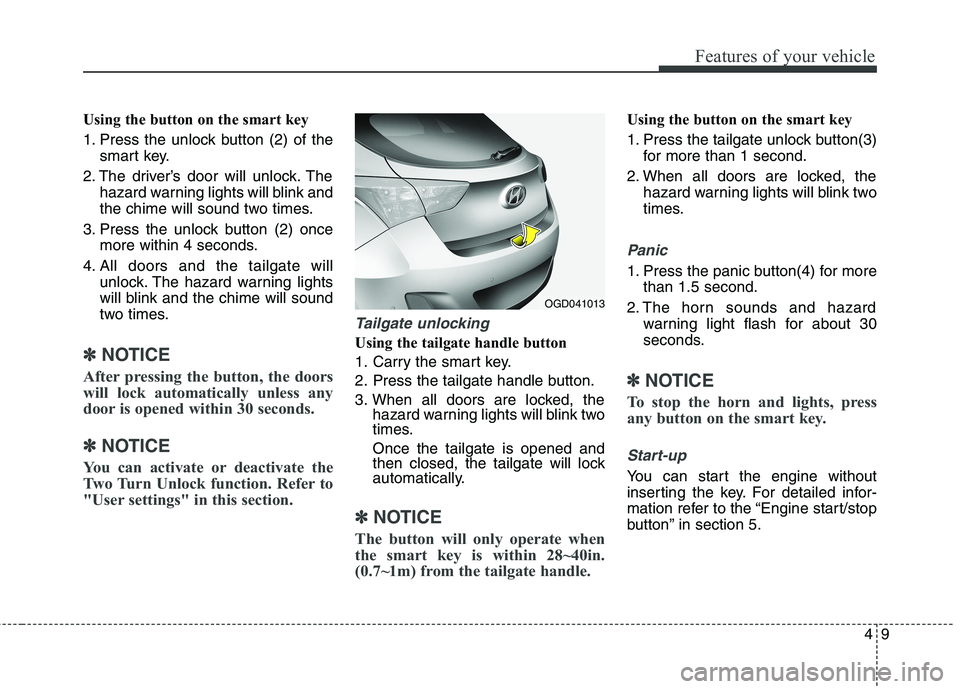
Tailgate unlocking
Using the tailgate handle button
1. Carry the smart key.
2. Press the tailgate handle button.
3. When all doors are locked, the
hazard warning lights will blink two
times.
Once the tailgate is opened and
then closed, the tailgate will lock
automatically.
✽ ✽
NOTICE
The button will only operate when
the smart key is within 28~40in.
(0.7~1m) from the tailgate handle.
Using the button on the smart key
1. Press the tailgate unlock button(3)
for more than 1 second.
2. When all doors are locked, the
hazard warning lights will blink two
times.
Panic
1. Press the panic button(4) for more
than 1.5 second.
2. The horn sounds and hazard
warning light flash for about 30
seconds.
✽ ✽
NOTICE
To stop the horn and lights, press
any button on the smart key.
Start-up
You can start the engine without
inserting the key. For detailed infor-
mation refer to the “Engine start/stop
button” in section 5.
OGD041013
Page 99 of 476
Features of your vehicle
14 4
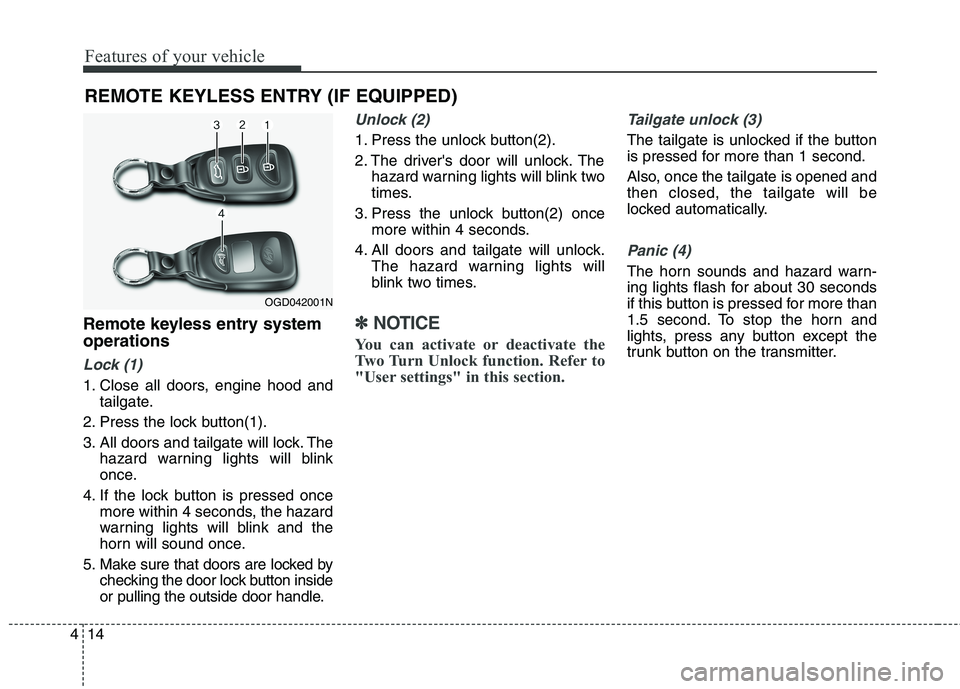
Remote keyless entry system
operations
Lock (1)
1. Close all doors, engine hood and
tailgate.
2. Press the lock button(1).
3. All doors and tailgate will lock. The
hazard warning lights will blink
once.
4. If the lock button is pressed once
more within 4 seconds, the hazard
warning lights will blink and the
horn will sound once.
5. Make sure that doors are locked by
checking the door lock button inside
or pulling the outside door handle.
Unlock (2)
1. Press the unlock button(2).
2. The driver's door will unlock. The
hazard warning lights will blink two
times.
3. Press the unlock button(2) once
more within 4 seconds.
4. All doors and tailgate will unlock.
The hazard warning lights will
blink two times.
✽ ✽
NOTICE
You can activate or deactivate the
Two Turn Unlock function. Refer to
"User settings" in this section.
Tailgate unlock (3)
The tailgate is unlocked if the button
is pressed for more than 1 second.
Also, once the tailgate is opened and
then closed, the tailgate will be
locked automatically.
Panic (4)
The horn sounds and hazard warn-
ing lights flash for about 30 seconds
if this button is pressed for more than
1.5 second. To stop the horn and
lights, press any button except the
trunk button on the transmitter.
REMOTE KEYLESS ENTRY (IF EQUIPPED)
OGD042001N
Page 102 of 476
417
Features of your vehicle
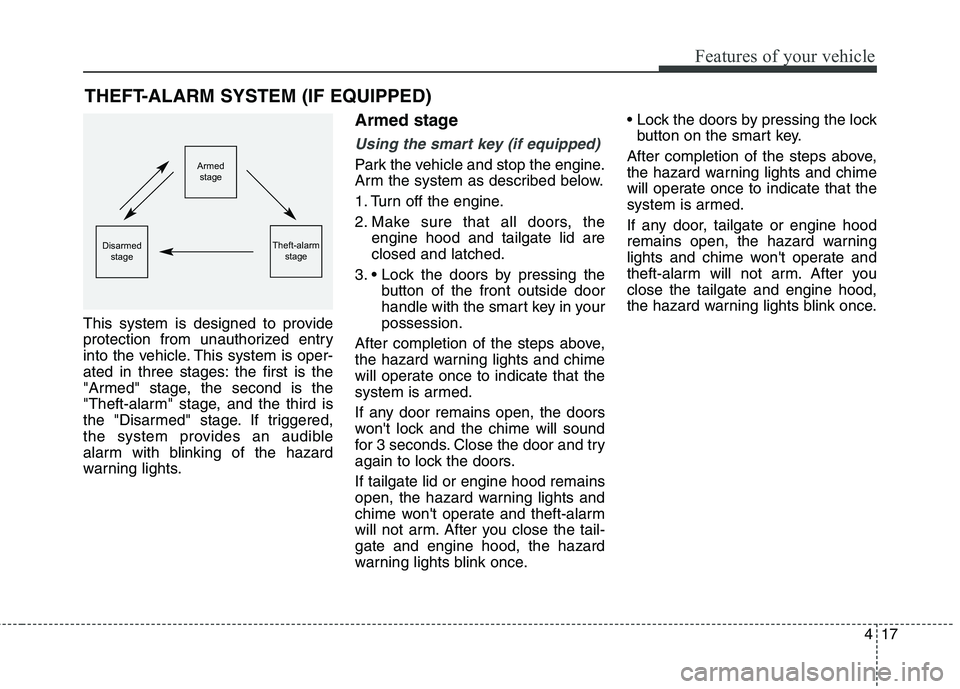
This system is designed to provide
protection from unauthorized entry
into the vehicle. This system is oper-
ated in three stages: the first is the
"Armed" stage, the second is the
"Theft-alarm" stage, and the third is
the "Disarmed" stage. If triggered,
the system provides an audible
alarm with blinking of the hazard
warning lights.
Armed stage
Using the smart key (if equipped)
Park the vehicle and stop the engine.
Arm the system as described below.
1. Turn off the engine.
2. Make sure that all doors, the
engine hood and tailgate lid are
closed and latched.
3.
button of the front outside door
handle with the smart key in your
possession.
After completion of the steps above,
the hazard warning lights and chime
will operate once to indicate that the
system is armed.
If any door remains open, the doors
won't lock and the chime will sound
for 3 seconds. Close the door and try
again to lock the doors.
If tailgate lid or engine hood remains
open, the hazard warning lights and
chime won't operate and theft-alarm
will not arm. After you close the tail-
gate and engine hood, the hazard
warning lights blink once.
button on the smart key.
After completion of the steps above,
the hazard warning lights and chime
will operate once to indicate that the
system is armed.
If any door, tailgate or engine hood
remains open, the hazard warning
lights and chime won't operate and
theft-alarm will not arm. After you
close the tailgate and engine hood,
the hazard warning lights blink once.
THEFT-ALARM SYSTEM (IF EQUIPPED)
Armed
stage
Theft-alarm
stageDisarmed
stage
Page 103 of 476
Features of your vehicle
18 4
Using the transmitter (if equipped)
Park the vehicle and stop the engine.
Arm the system as described below.
1. Turn off the engine and remove
the ignition key from the ignition
switch.
2. Make sure that all doors, the
engine hood and tailgate are
closed and latched.
3. Lock the doors by pressing the
lock button on the transmitter.
After completion of the steps above,
the hazard warning lights will blink
once to indicate that the system is
armed.
If any door, tailgate or engine hood
remains open, the hazard warning
lights won't operate and theft-alarm
will not arm. After you close all doors,
tailgate and engine hood, the hazard
warning lights blink once.
Using the mechanical key
Park the vehicle and stop the engine.
Arm the system as described below.
1. Turn off the engine and remove
the key from the ignition switch(if
equipped).
2. Make sure that all doors, the
engine hood and tailgate are
closed and latched.
3. Lock the doors by inserting the key
into the key hole on the front out-
side door handle and turning the
key toward the front of the vehicle.
If any door, tailgate or engine hood
remains open, the theft-alarm will not
arm.
✽ ✽
NOTICE
If you lock or unlock the doors by
using the mechanical key, the haz-
ard warning light won't operate.
Do not arm the system until all
passengers have left the vehicle. If
the system is armed while a pas-
senger(s) remains in the vehicle,
the alarm may be activated when
the remaining passenger(s) leave
the vehicle. If any door (or trunk)
or engine hood is opened within
30 seconds after the system
enters the armed stage, the sys-
tem is disarmed to prevent an
unnecessary alarm.
Page 104 of 476
419
Features of your vehicle
Theft-alarm stage
The alarm will be activated if any of
the following occurs while the system
is armed.
transmitter, smart key or mechanical
key.
using the transmitter, smart key.
The horn will sound and the hazard
warning lights will blink continuously
for approximately 30 seconds. The
alarm will repeat once more unless
the system is disarmed. To turn off
the system, unlock the doors with the
mechanical key or transmitter or
smart key.
Disarmed stage
Using the smart key (if equipped)
The system will be disarmed when
the doors are unlocked by pressing
the unlock button on the smart key or
pressing the lock/unlock button of the
front outside door handle with the
smart key in your possession.
After unlocking the doors, the hazard
warning lights and chime will operate
twice to indicate that the system is
disarmed.
After unlocking the doors, if any door
is not opened within 30 seconds, the
system will be rearmed.
Using the transmitter (if equipped)
The system will be disarmed when
the doors are unlocked by pressing
the unlock button on the transmitter.
After unlocking the doors, the hazard
warning lights will blink twice to indi-
cate that the system is disarmed.
After unlocking the doors, if any door
is not opened within 30 seconds, the
system will be rearmed.
Using the mechanical key
The system will be disarmed when
the doors are unlocked with the
mechanical key.
✽ ✽
NOTICE
If you lock or unlock the doors by
using the mechanical key, the haz-
ard warning light and chime sound
won't operate.
Page 117 of 476
Features of your vehicle
32 4
HOOD
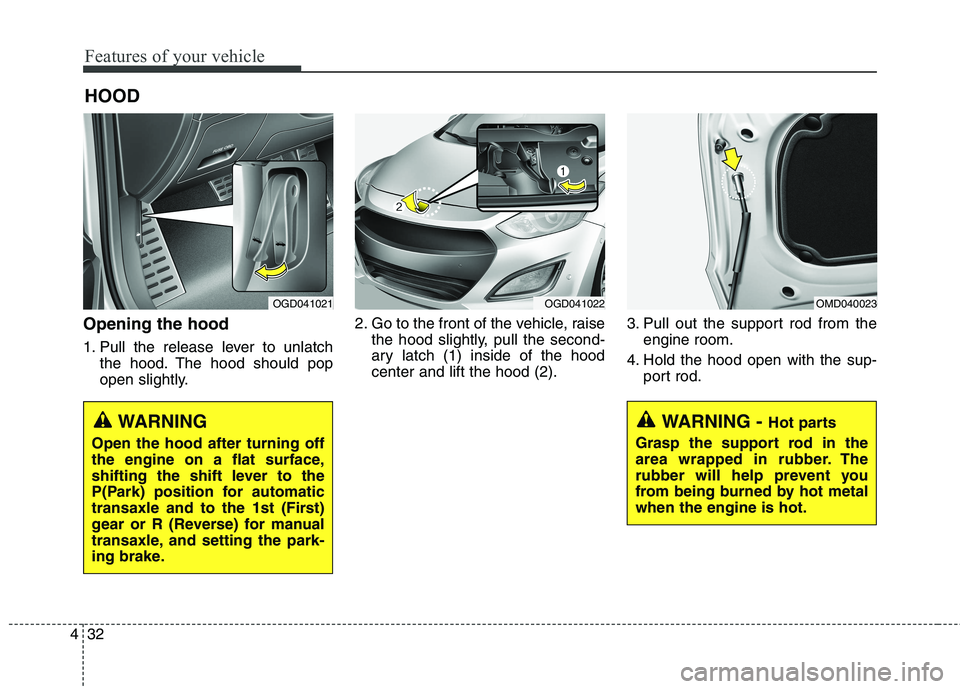
Opening the hood
1. Pull the release lever to unlatch
the hood. The hood should pop
open slightly.2. Go to the front of the vehicle, raise
the hood slightly, pull the second-
ary latch (1) inside of the hood
center and lift the hood (2).3. Pull out the support rod from the
engine room.
4. Hold the hood open with the sup-
port rod.
OGD041021OGD041022OMD040023
WARNING - Hot parts
Grasp the support rod in the
area wrapped in rubber. The
rubber will help prevent you
from being burned by hot metal
when the engine is hot.WARNING
Open the hood after turning off
the engine on a flat surface,
shifting the shift lever to the
P(Park) position for automatic
transaxle and to the 1st (First)
gear or R (Reverse) for manual
transaxle, and setting the park-
ing brake.
Page 120 of 476
435
Features of your vehicle
Closing the fuel filler lid
1. To install the cap, turn it clockwise
fully until it “clicks” one time. This
indicates that the cap is securely
tightened.
2. Close the fuel filler lid and push it
in lightly making sure that it is
securely closed.WARNING - Refueling
If pressurized fuel sprays out,
it can cover your clothes or
skin and thus subject you to
the risk of fire and burns.
Always remove the fuel cap
carefully and slowly. If the cap
is venting fuel or if you hear a
hissing sound, wait until the
condition stops before com-
pletely removing the cap.
Do not "top off" after the noz-
zle automatically shuts off
when refueling.
Tighten the cap until it clicks
one time, otherwise the
Malfunction Indicator Light
will illuminate.
Always check that the fuel cap
is installed securely to pre-
vent fuel spillage in the event
of an accident.WARNING - Refueling
dangers
Automotive fuels are flammable
materials. When refueling, please
note the following guidelines
carefully. Failure to follow these
guidelines may result in severe
personal injury, severe burns or
death by fire or explosion.
Read and follow all warnings
posted at the gas station facility.
Before refueling, note the
location of the Emergency
Gasoline Shut-Off, if available,
at the gas station facility.
Before touching the fuel noz-
zle, you should eliminate
potentially dangerous static
electricity discharge by touch-
ing another metal part of the
vehicle, a safe distance away
from the fuel filler neck, noz-
zle, or other gas source.
(Continued)
Page 128 of 476
443
Features of your vehicle
Electric power steering (EPS)
The power steering uses an electric
motor to assist you in steering the
vehicle. If the engine is off or if the
power steering system becomes
inoperative, the vehicle may still be
steered, but it will require increased
steering effort.
The motor driven power steering is
controlled by a power steering con-
trol unit which senses the steering
wheel torque and vehicle speed to
command the motor.
The steering becomes slightly heav-
ier as the vehicle’s speed increases
and becomes lighter as the vehicle’s
speed decreases for optimum steer-
ing control.
Should you notice any change in the
effort required to steer during normal
vehicle operation, have the power
steering checked by an authorized
HYUNDAI dealer.
✽ ✽
NOTICE
The following may occur during
normal vehicle operation:
• The EPS warning light does not
illuminate when turning the igni-
tion to the ON position.
• The steering gets heavy immedi-
ately after turning the ignition
switch on. This happens as the sys-
tem performs the EPS system
diagnostics. When the diagnostics
are completed, the steering wheel
will return to its normal condition.
• A click noise may be heard from
the EPS relay after the ignition
switch is turned to the ON or
LOCK (OFF) position.
• A motor noise may be heard when
the vehicle is at a stop or at a low
driving speed.
• When the vehicle is stationary, if
you turn the steering wheel all the
way to the left or right repeatedly,
the steering wheel assist may tem-
porarily be reduced, not a system
malfunction. As time passes. The
steering wheel return to normal
operation.
(Continued)(Continued)
• When you operate the steering
wheel in very low temperatures,
system noise may occur. When the
temperature rises, the noise will dis-
appear. This is a normal condition.
• When the charging system warn-
ing light comes on or the system
voltage is low, the steering wheel
assist may be reduced.
STEERING WHEEL
Page 129 of 476
Features of your vehicle
44 4
✽
✽
NOTICE
If the Electric Power Steering sys-
tem does not operate normally, EPS
assist will stop to prevent accidents
and the EPS warning light on the
cluster will illuminate or blink. Take
your vehicle to an authorized
HYUNDAI dealer and have the
vehicle checked as soon as possible.
Tilt and telescope steering
Tilt steering allows you to adjust the
steering wheel before you drive. You
can also raise it to give your body
more room when you exit and enter
the vehicle.
The steering wheel should be posi-
tioned so that it is comfortable for
you to drive, while permitting you to
see the instrument panel warning
lights and gauges.
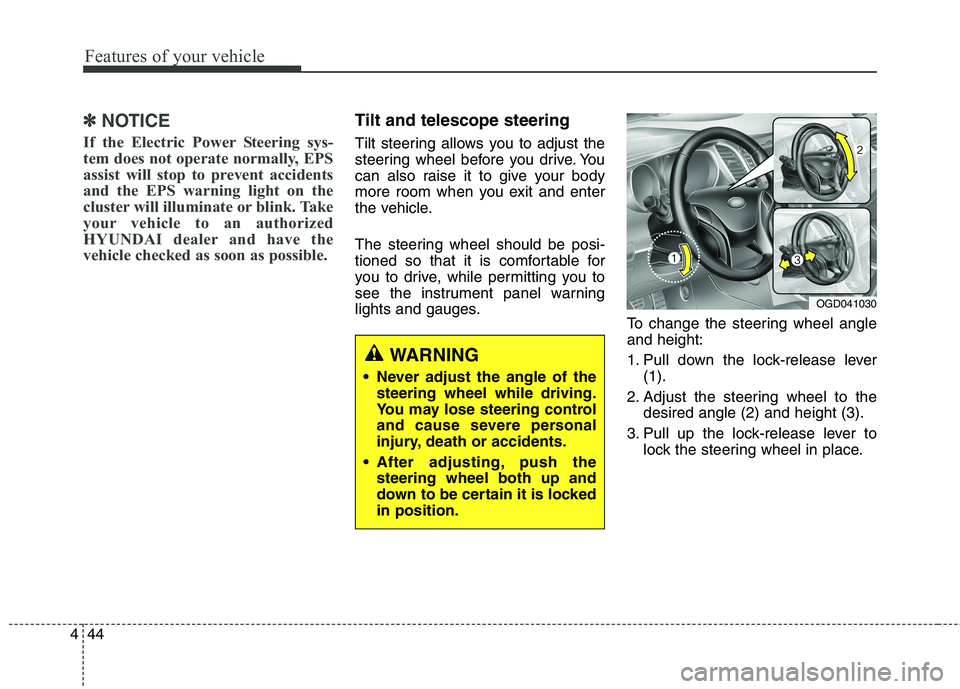
To change the steering wheel angle
and height:
1. Pull down the lock-release lever
(1).
2. Adjust the steering wheel to the
desired angle (2) and height (3).
3. Pull up the lock-release lever to
lock the steering wheel in place.
OGD041030
WARNING
Never adjust the angle of the
steering wheel while driving.
You may lose steering control
and cause severe personal
injury, death or accidents.
After adjusting, push the
steering wheel both up and
down to be certain it is locked
in position.