lock HYUNDAI ELANTRA GT 2014 Owner's Guide
[x] Cancel search | Manufacturer: HYUNDAI, Model Year: 2014, Model line: ELANTRA GT, Model: HYUNDAI ELANTRA GT 2014Pages: 476, PDF Size: 31.71 MB
Page 98 of 476
413
Features of your vehicle
1. Pry open the rear cover of the
smart key.
2. Replace the battery with a new
battery (CR2032). When replacing
the battery, make sure the battery
position.
3. Install the battery in the reverse
order of removal.
you years of trouble-free use, how-
ever it can malfunction if exposed
to moisture or static electricity. If
you are unsure how to use or
replace the battery, contact an
authorized HYUNDAI dealer.
the smart key to malfunction. Be
sure to use the correct battery.
don't drop it, get it wet, or expose it
to heat or sunlight.
An inappropriately dis-
posed battery can be harm-
ful to the environment and
human health. Dispose the
battery according to your
local law(s) or regulation.
Door lock/unlock in an emer-
gency situation
If the smart key does not operate
normally, you can lock or unlock the
doors by using the mechanical key.
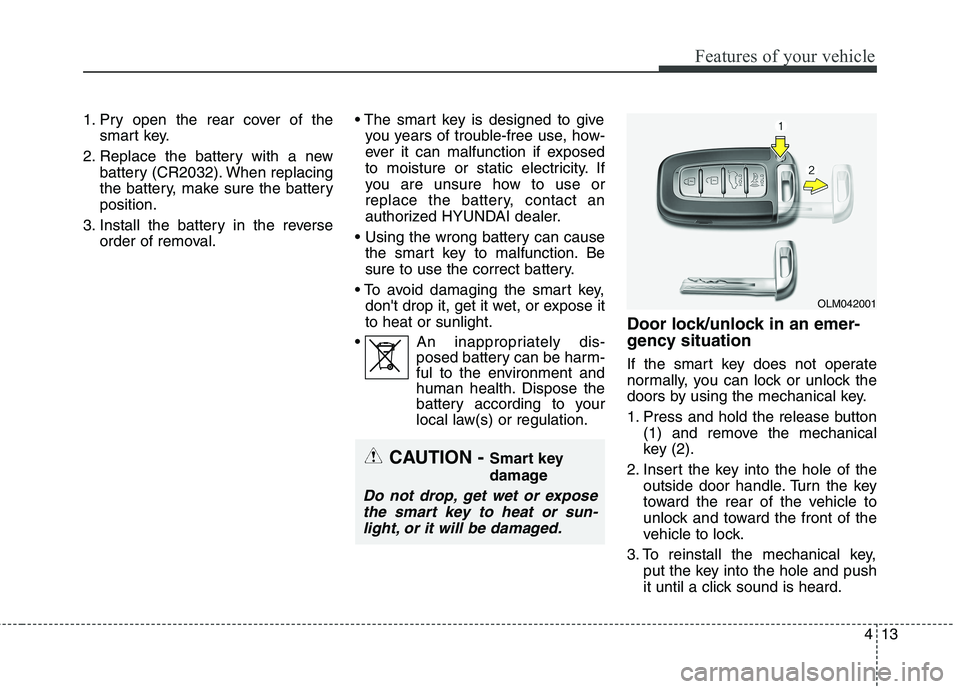
1. Press and hold the release button
(1) and remove the mechanical
key (2).
2. Insert the key into the hole of the
outside door handle. Turn the key
toward the rear of the vehicle to
unlock and toward the front of the
vehicle to lock.
3. To reinstall the mechanical key,
put the key into the hole and push
it until a click sound is heard.
OLM042001
CAUTION - Smart key
damage
Do not drop, get wet or expose
the smart key to heat or sun-
light, or it will be damaged.
Page 99 of 476
Features of your vehicle
14 4
Remote keyless entry system
operations
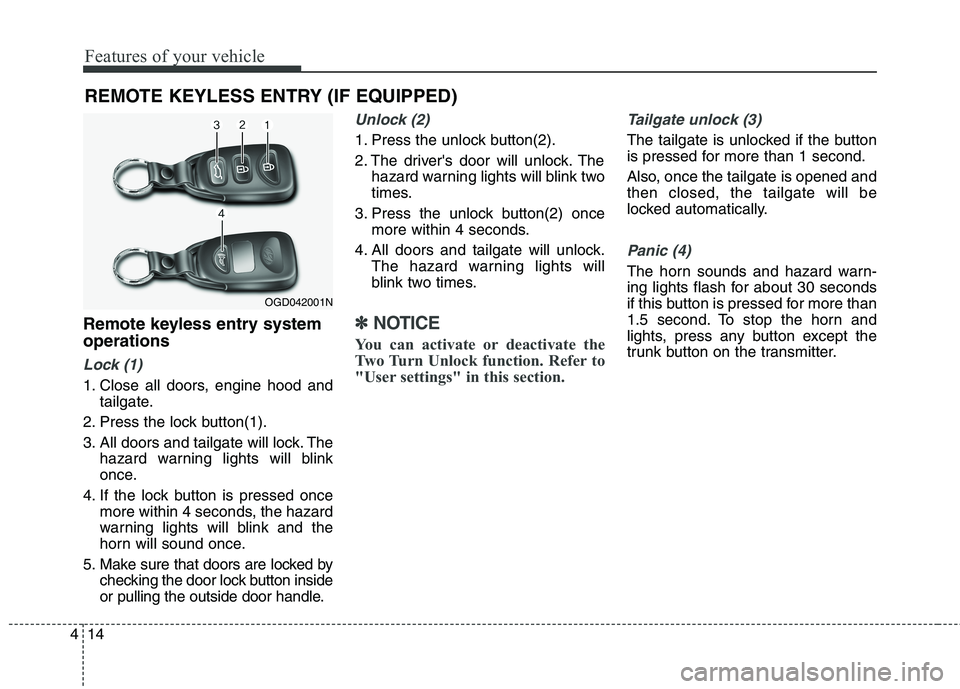
Lock (1)
1. Close all doors, engine hood and
tailgate.
2. Press the lock button(1).
3. All doors and tailgate will lock. The
hazard warning lights will blink
once.
4. If the lock button is pressed once
more within 4 seconds, the hazard
warning lights will blink and the
horn will sound once.
5. Make sure that doors are locked by
checking the door lock button inside
or pulling the outside door handle.
Unlock (2)
1. Press the unlock button(2).
2. The driver's door will unlock. The
hazard warning lights will blink two
times.
3. Press the unlock button(2) once
more within 4 seconds.
4. All doors and tailgate will unlock.
The hazard warning lights will
blink two times.
✽ ✽
NOTICE
You can activate or deactivate the
Two Turn Unlock function. Refer to
"User settings" in this section.
Tailgate unlock (3)
The tailgate is unlocked if the button
is pressed for more than 1 second.
Also, once the tailgate is opened and
then closed, the tailgate will be
locked automatically.
Panic (4)
The horn sounds and hazard warn-
ing lights flash for about 30 seconds
if this button is pressed for more than
1.5 second. To stop the horn and
lights, press any button except the
trunk button on the transmitter.
REMOTE KEYLESS ENTRY (IF EQUIPPED)
OGD042001N
Page 100 of 476
415
Features of your vehicle
Transmitter precautions
✽ ✽
NOTICE
The transmitter will not work if any
of following occur:
• The ignition key is in the ignition
switch.
• You exceed the operating distance
limit (about 90 feet [30 m]).
• The battery in the transmitter is
weak.
• Other vehicles or objects may be
blocking the signal.
• The weather is extremely cold.
• The transmitter is close to a radio
transmitter such as a radio station
or an airport which can interfere
with normal operation of the
transmitter.
When the transmitter does not work
correctly, open and close the door
with the ignition key. If you have a
problem with the transmitter, contact
an authorized HYUNDAI dealer.
(Continued)(Continued)
• If the transmitter is in close prox-
imity to your cell phone or smart
phone, the signal from the trans-
mitter could be blocked by normal
operation of your cell phone or
smart phone. This is especially
important when the phone is
active such as making call, receiv-
ing calls, text messaging, and/or
sending/receiving emails. Avoid
placing the transmitter and your
cell phone or smart phone in the
same pants or jacket pocket and
maintain adequate distance
between the two devices.
This device complies with Part 15
of the FCC rules.
Operation is subject to the following
two conditions:
1. This device may not cause harm-
ful interference, and
2. This device must accept any inter-
ference received, including inter-
ference that may cause undesired
operation.
CAUTION
Keep the transmitter away from
water or any liquid. If the key-
less entry system is inoperative
due to exposure to water or liq-
uids, it will not be covered by
your manufacturer’s vehicle
warranty.
CAUTION
Changes or modifications not
expressly approved by the party
responsible for compliance
could void the user’s authority
to operate the equipment. If the
keyless entry system is inopera-
tive due to changes or modifica-
tions not expressly approved by
the party responsible for com-
pliance, it will not be covered by
your manufacturer’s vehicle
warranty.
Page 102 of 476
417
Features of your vehicle
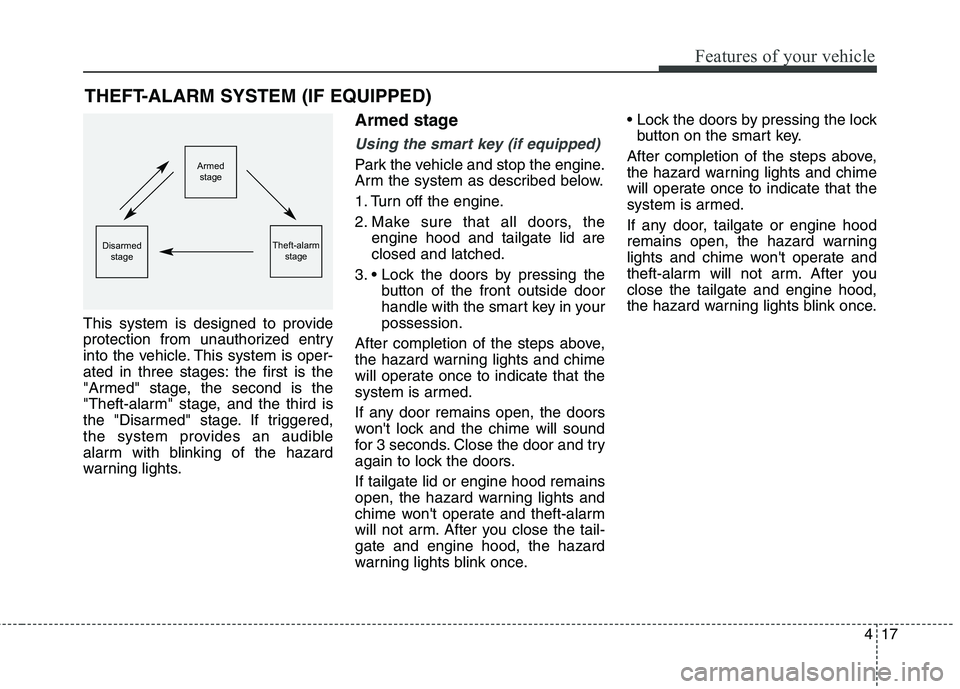
This system is designed to provide
protection from unauthorized entry
into the vehicle. This system is oper-
ated in three stages: the first is the
"Armed" stage, the second is the
"Theft-alarm" stage, and the third is
the "Disarmed" stage. If triggered,
the system provides an audible
alarm with blinking of the hazard
warning lights.
Armed stage
Using the smart key (if equipped)
Park the vehicle and stop the engine.
Arm the system as described below.
1. Turn off the engine.
2. Make sure that all doors, the
engine hood and tailgate lid are
closed and latched.
3.
button of the front outside door
handle with the smart key in your
possession.
After completion of the steps above,
the hazard warning lights and chime
will operate once to indicate that the
system is armed.
If any door remains open, the doors
won't lock and the chime will sound
for 3 seconds. Close the door and try
again to lock the doors.
If tailgate lid or engine hood remains
open, the hazard warning lights and
chime won't operate and theft-alarm
will not arm. After you close the tail-
gate and engine hood, the hazard
warning lights blink once.
button on the smart key.
After completion of the steps above,
the hazard warning lights and chime
will operate once to indicate that the
system is armed.
If any door, tailgate or engine hood
remains open, the hazard warning
lights and chime won't operate and
theft-alarm will not arm. After you
close the tailgate and engine hood,
the hazard warning lights blink once.
THEFT-ALARM SYSTEM (IF EQUIPPED)
Armed
stage
Theft-alarm
stageDisarmed
stage
Page 103 of 476
Features of your vehicle
18 4
Using the transmitter (if equipped)
Park the vehicle and stop the engine.
Arm the system as described below.
1. Turn off the engine and remove
the ignition key from the ignition
switch.
2. Make sure that all doors, the
engine hood and tailgate are
closed and latched.
3. Lock the doors by pressing the
lock button on the transmitter.
After completion of the steps above,
the hazard warning lights will blink
once to indicate that the system is
armed.
If any door, tailgate or engine hood
remains open, the hazard warning
lights won't operate and theft-alarm
will not arm. After you close all doors,
tailgate and engine hood, the hazard
warning lights blink once.
Using the mechanical key
Park the vehicle and stop the engine.
Arm the system as described below.
1. Turn off the engine and remove
the key from the ignition switch(if
equipped).
2. Make sure that all doors, the
engine hood and tailgate are
closed and latched.
3. Lock the doors by inserting the key
into the key hole on the front out-
side door handle and turning the
key toward the front of the vehicle.
If any door, tailgate or engine hood
remains open, the theft-alarm will not
arm.
✽ ✽
NOTICE
If you lock or unlock the doors by
using the mechanical key, the haz-
ard warning light won't operate.
Do not arm the system until all
passengers have left the vehicle. If
the system is armed while a pas-
senger(s) remains in the vehicle,
the alarm may be activated when
the remaining passenger(s) leave
the vehicle. If any door (or trunk)
or engine hood is opened within
30 seconds after the system
enters the armed stage, the sys-
tem is disarmed to prevent an
unnecessary alarm.
Page 104 of 476
419
Features of your vehicle
Theft-alarm stage
The alarm will be activated if any of
the following occurs while the system
is armed.
transmitter, smart key or mechanical
key.
using the transmitter, smart key.
The horn will sound and the hazard
warning lights will blink continuously
for approximately 30 seconds. The
alarm will repeat once more unless
the system is disarmed. To turn off
the system, unlock the doors with the
mechanical key or transmitter or
smart key.
Disarmed stage
Using the smart key (if equipped)
The system will be disarmed when
the doors are unlocked by pressing
the unlock button on the smart key or
pressing the lock/unlock button of the
front outside door handle with the
smart key in your possession.
After unlocking the doors, the hazard
warning lights and chime will operate
twice to indicate that the system is
disarmed.
After unlocking the doors, if any door
is not opened within 30 seconds, the
system will be rearmed.
Using the transmitter (if equipped)
The system will be disarmed when
the doors are unlocked by pressing
the unlock button on the transmitter.
After unlocking the doors, the hazard
warning lights will blink twice to indi-
cate that the system is disarmed.
After unlocking the doors, if any door
is not opened within 30 seconds, the
system will be rearmed.
Using the mechanical key
The system will be disarmed when
the doors are unlocked with the
mechanical key.
✽ ✽
NOTICE
If you lock or unlock the doors by
using the mechanical key, the haz-
ard warning light and chime sound
won't operate.
Page 106 of 476
421
Features of your vehicle
Operating door locks from
outside the vehicle
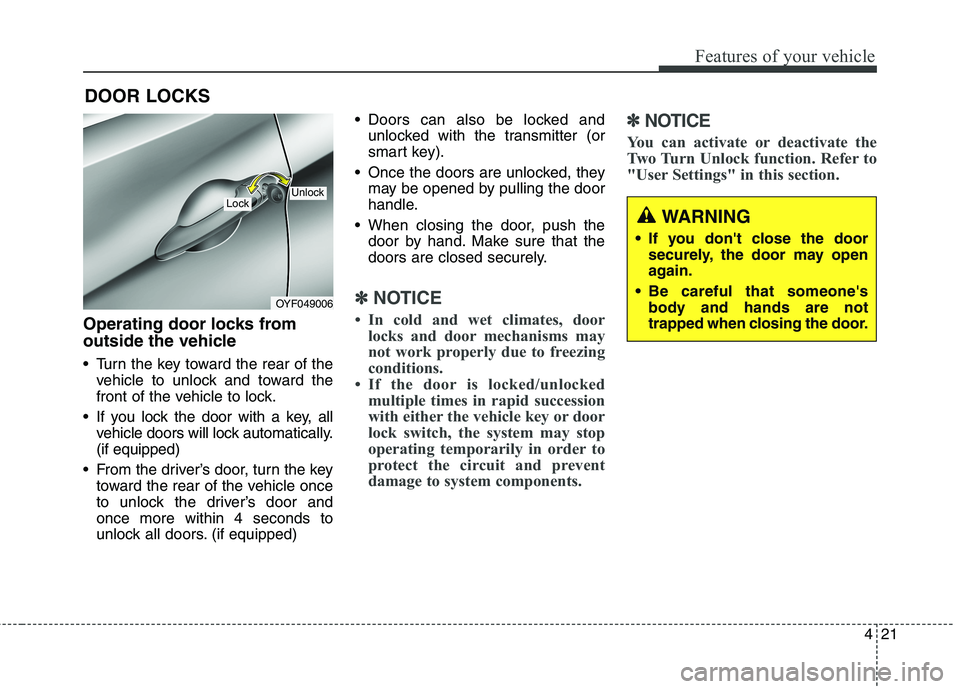
Turn the key toward the rear of the
vehicle to unlock and toward the
front of the vehicle to lock.
If you lock the door with a key, all
vehicle doors will lock automatically.
(if equipped)
From the driver’s door, turn the key
toward the rear of the vehicle once
to unlock the driver’s door and
once more within 4 seconds to
unlock all doors. (if equipped) Doors can also be locked and
unlocked with the transmitter (or
smart key).
Once the doors are unlocked, they
may be opened by pulling the door
handle.
When closing the door, push the
door by hand. Make sure that the
doors are closed securely.
✽ ✽
NOTICE
• In cold and wet climates, door
locks and door mechanisms may
not work properly due to freezing
conditions.
• If the door is locked/unlocked
multiple times in rapid succession
with either the vehicle key or door
lock switch, the system may stop
operating temporarily in order to
protect the circuit and prevent
damage to system components.
✽ ✽
NOTICE
You can activate or deactivate the
Two Turn Unlock function. Refer to
"User Settings" in this section.
DOOR LOCKS
OYF049006
LockUnlock
WARNING
If you don't close the door
securely, the door may open
again.
Be careful that someone's
body and hands are not
trapped when closing the door.
Page 107 of 476
Features of your vehicle
22 4
Operating door locks from
inside the vehicle
With the door lock button
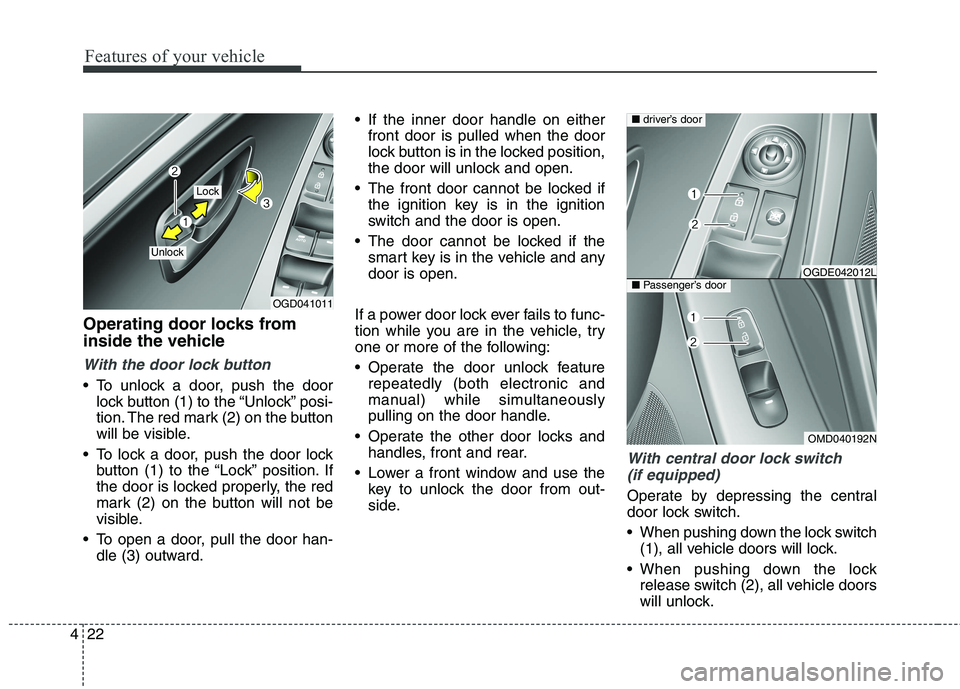
To unlock a door, push the door
lock button (1) to the “Unlock” posi-
tion. The red mark (2) on the button
will be visible.
To lock a door, push the door lock
button (1) to the “Lock” position. If
the door is locked properly, the red
mark (2) on the button will not be
visible.
To open a door, pull the door han-
dle (3) outward. If the inner door handle on either
front door is pulled when the door
lock button is in the locked position,
the door will unlock and open.
The front door cannot be locked if
the ignition key is in the ignition
switch and the door is open.
The door cannot be locked if the
smart key is in the vehicle and any
door is open.
If a power door lock ever fails to func-
tion while you are in the vehicle, try
one or more of the following:
Operate the door unlock feature
repeatedly (both electronic and
manual) while simultaneously
pulling on the door handle.
Operate the other door locks and
handles, front and rear.
Lower a front window and use the
key to unlock the door from out-
side.
With central door lock switch
(if equipped)
Operate by depressing the central
door lock switch.
When pushing down the lock switch
(1), all vehicle doors will lock.
When pushing down the lock
release switch (2), all vehicle doors
will unlock.
OGD041011
Lock
Unlock
OMD040192N
■driver’s door
■Passenger’s doorOGDE042012L
Page 108 of 476
423
Features of your vehicle
If the key is in the ignition switch
and front door is open, the doors
will not lock even though the cen-
tral door lock switch (1) is pressed.
If the smart key is in the vehicle
and any door is open, the doors
will not lock even though the cen-
tral door lock switch (1) is pressed.✽ ✽
NOTICE
You can select some auto door
lock/unlock features in “User
Settings” as follows;
• Speed sensing auto door lock
• Auto door unlock when the igni-
tion key is removed from the igni-
tion switch or engine is turned off.
• Auto door lock/unlock by shifting
the shift lever out of P(Park) or
into P(Park).
For more information, refer to
“User Settings” in this section.
WARNING - Doors
The doors should always be
fully closed and locked while
the vehicle is in motion to pre-
vent accidental opening of the
door. Locked doors will also
discourage potential intruders
when the vehicle stops or
slows.
Be careful when opening
doors and watch for vehicles,
motorcycles, bicycles or
pedestrians approaching the
vehicle in the path of the door.
Opening a door when some-
thing is approaching can
cause damage or injury.
WARNING - Unlocked
vehicles
Leaving your vehicle unlocked
can invite theft or possible harm
to you or others from someone
hiding in your vehicle while you
are gone. Always remove the
ignition key, engage the parking
brake, close all windows and
lock all doors when leaving
your vehicle unattended.
WARNING - Unattended
children
An enclosed vehicle can become
extremely hot, causing death or
severe injury to unattended chil-
dren or animals who cannot
escape the vehicle. Furthermore,
children might operate features
of the vehicle that could injure
them, or they could encounter
other harm, possibly from some-
one gaining entry to the vehicle.
Never leave children or animals
unattended in your vehicle.
Page 109 of 476
Features of your vehicle
24 4
Child-protector rear door lock
The child safety lock is provided to
help prevent children from acciden-
tally opening the rear doors from
inside the vehicle. The rear door
safety locks should be used whenev-
er children are in the vehicle.
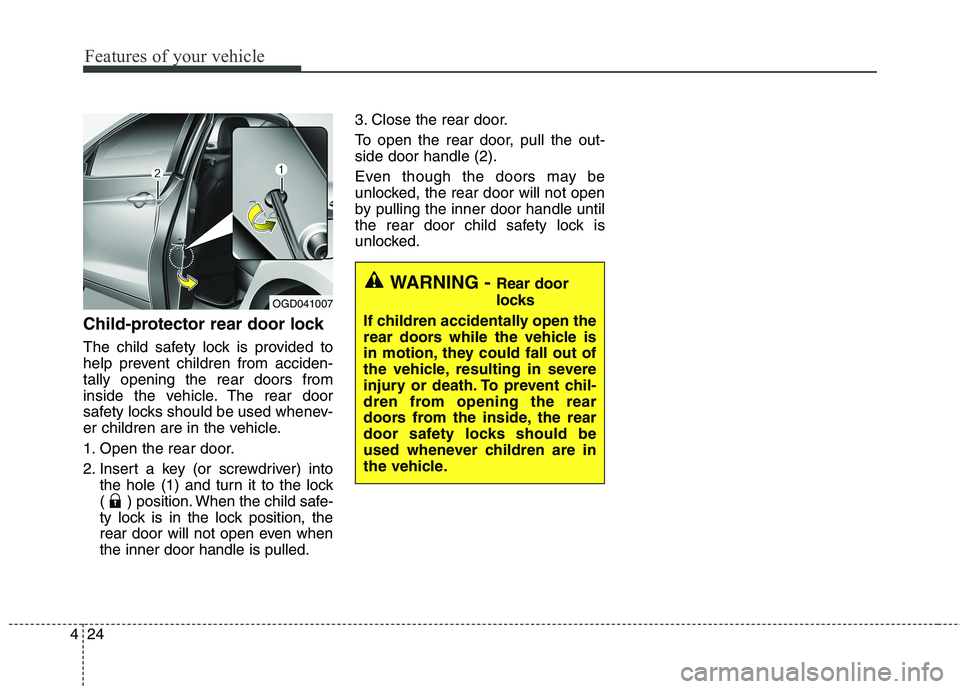
1. Open the rear door.
2. Insert a key (or screwdriver) into
the hole (1) and turn it to the lock
( ) position. When the child safe-
ty lock is in the lock position, the
rear door will not open even when
the inner door handle is pulled.3. Close the rear door.
To open the rear door, pull the out-
side door handle (2).
Even though the doors may be
unlocked, the rear door will not open
by pulling the inner door handle until
the rear door child safety lock is
unlocked.
OGD041007
WARNING - Rear door
locks
If children accidentally open the
rear doors while the vehicle is
in motion, they could fall out of
the vehicle, resulting in severe
injury or death. To prevent chil-
dren from opening the rear
doors from the inside, the rear
door safety locks should be
used whenever children are in
the vehicle.