lock HYUNDAI ELANTRA GT 2014 Workshop Manual
[x] Cancel search | Manufacturer: HYUNDAI, Model Year: 2014, Model line: ELANTRA GT, Model: HYUNDAI ELANTRA GT 2014Pages: 476, PDF Size: 31.71 MB
Page 129 of 476
Features of your vehicle
44 4
✽
✽
NOTICE
If the Electric Power Steering sys-
tem does not operate normally, EPS
assist will stop to prevent accidents
and the EPS warning light on the
cluster will illuminate or blink. Take
your vehicle to an authorized
HYUNDAI dealer and have the
vehicle checked as soon as possible.
Tilt and telescope steering
Tilt steering allows you to adjust the
steering wheel before you drive. You
can also raise it to give your body
more room when you exit and enter
the vehicle.
The steering wheel should be posi-
tioned so that it is comfortable for
you to drive, while permitting you to
see the instrument panel warning
lights and gauges.
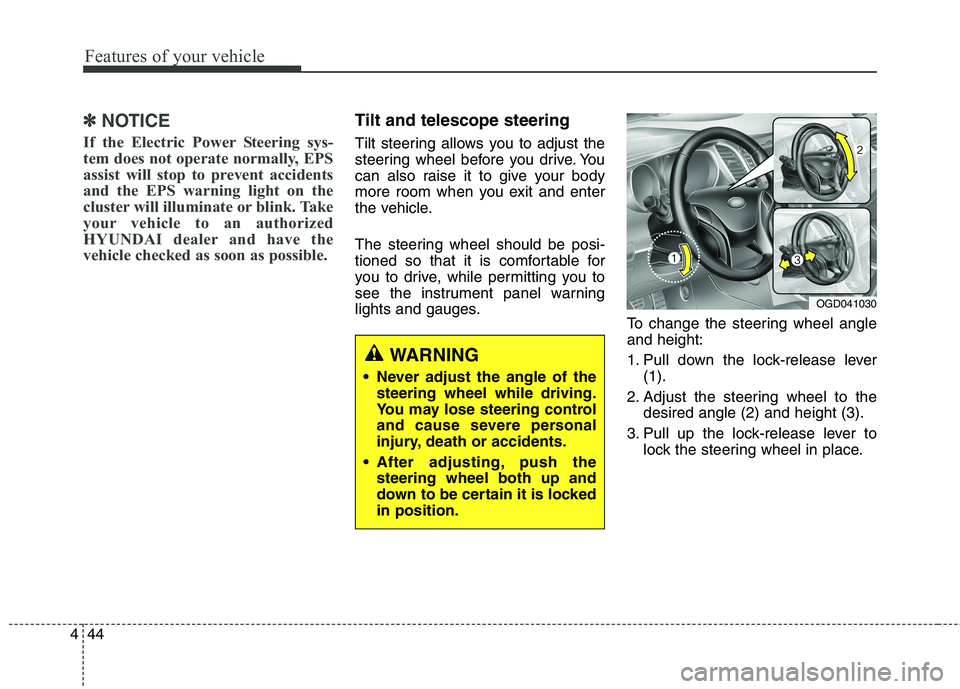
To change the steering wheel angle
and height:
1. Pull down the lock-release lever
(1).
2. Adjust the steering wheel to the
desired angle (2) and height (3).
3. Pull up the lock-release lever to
lock the steering wheel in place.
OGD041030
WARNING
Never adjust the angle of the
steering wheel while driving.
You may lose steering control
and cause severe personal
injury, death or accidents.
After adjusting, push the
steering wheel both up and
down to be certain it is locked
in position.
Page 137 of 476
Features of your vehicle
52 4
Rolling code programming
To train a garage door opener (or
other rolling code equipped devices)
with the rolling code feature, follow
these instructions after completing
the “Programming” portion of this
text. (A second person may make the
following training procedures quicker
& easier.)
4. Locate the “learn” or “smart” but-
ton on the device’s motor head
unit. Exact location and color of
the button may vary by product
brand. If there is difficulty locating
the “learn” or “smart” button, refer-
ence the device’s owner’s manual
or contact HomeLink at 1-800-
355-3515 or on the internet at
www.homelink.com.
5. Press and release the “learn” or
“smart” button on the device’s
motor head unit.You have 30
seconds to complete step num-
ber 6.6. Return to the vehicle and firmly
press and release the pro-
grammed HomeLink button up to
three times. The rolling code
equipped device should now rec-
ognize the HomeLink signal and
activate when the HomeLink but-
ton is pressed. The remaining two
buttons may now be programmed
if this has not previously been
done. Refer to the “Programming”
portion of this text.Operating HomeLink
To operate, simply press the pro-
grammed HomeLink button.
Activation will now occur for the
trained product (garage door, securi-
ty system, entry door lock, estate
gate, or home or office lighting). For
convenience, the hand-held trans-
mitter of the device may also be used
at any time. The HomeLink Wireless
Controls System (once programmed)
or the original hand-held transmitter
may be used to activate the device
(e.g. garage door, entry door lock,
etc.). In the event that there are still
programming difficulties, contact
HomeLink at 1-800-355-3515 or on
the internet at www.homelink.com.
Page 150 of 476
465
Features of your vehicle
Auto door lock
Off - The auto door lock operation
will be canceled.
Speed - All doors will be automati-
cally locked when the vehi-
cle speed exceeds 9.3mph
(15km/h).
Shift Lever - All doors will be auto-
matically locked if the
shift lever is shifted from
the P (Park) position to
the R (Reverse), N
(Neutral) or D (Drive)
position. (for automatic
transaxle shift lever)Auto door unlock
Off - The auto door unlock operation
will be canceled.
Key Out - All doors will be automati-
cally unlocked when the
ignition key is removed
from ignition switch (or
engine is turned OFF).
Shift Lever - All doors will be auto-
matically unlocked if the
shift lever is shifted to
the P (Park) position.
(for automatic transaxle)Two Press Unlock
Off - The two press unlock function
will be deactivated. Therefore,
all doors will unlock if the door
is unlocked.
On - The driver’s door will unlock if
the door is unlocked. When the
door is unlocked again within 4
seconds, all doors will unlock.
Horn feedback (if equipped)
On - After locking the door by press-
ing the lock button on the trans-
mitter, if you press the lock but-
ton again within 4 seconds, the
warning sound will operate
once to indicate that all doors
are locked.
Off - The Horn feedback operation
will be canceled.
Page 153 of 476
Features of your vehicle
68 4
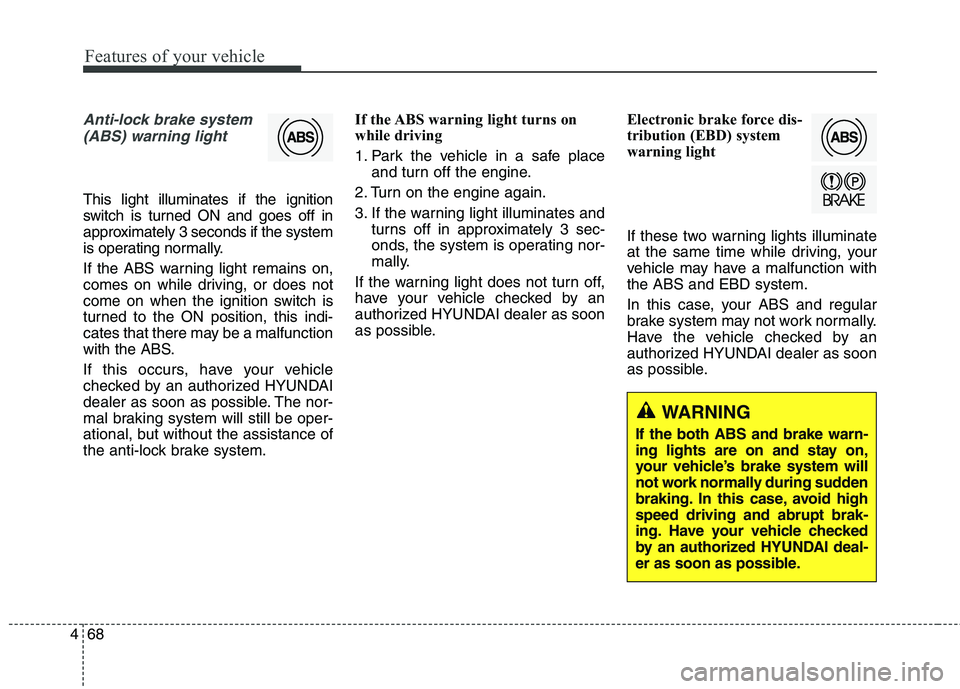
Anti-lock brake system
(ABS) warning light
This light illuminates if the ignition
switch is turned ON and goes off in
approximately 3 seconds if the system
is operating normally.
If the ABS warning light remains on,
comes on while driving, or does not
come on when the ignition switch is
turned to the ON position, this indi-
cates that there may be a malfunction
with the ABS.
If this occurs, have your vehicle
checked by an authorized HYUNDAI
dealer as soon as possible. The nor-
mal braking system will still be oper-
ational, but without the assistance of
the anti-lock brake system.If the ABS warning light turns on
while driving
1. Park the vehicle in a safe place
and turn off the engine.
2. Turn on the engine again.
3. If the warning light illuminates and
turns off in approximately 3 sec-
onds, the system is operating nor-
mally.
If the warning light does not turn off,
have your vehicle checked by an
authorized HYUNDAI dealer as soon
as possible.Electronic brake force dis-
tribution (EBD) system
warning light
If these two warning lights illuminate
at the same time while driving, your
vehicle may have a malfunction with
the ABS and EBD system.
In this case, your ABS and regular
brake system may not work normally.
Have the vehicle checked by an
authorized HYUNDAI dealer as soon
as possible.
WARNING
If the both ABS and brake warn-
ing lights are on and stay on,
your vehicle’s brake system will
not work normally during sudden
braking. In this case, avoid high
speed driving and abrupt brak-
ing. Have your vehicle checked
by an authorized HYUNDAI deal-
er as soon as possible.
Page 162 of 476
477
Features of your vehicle
Electronic power steer-
ing (EPS) system
warning light
This indicator comes on after the
ignition key is turned to the ON posi-
tion and then it will go out.
This indicator also comes on when
the EPS needs repairs. If it comes on
while driving, have your vehicle
inspected by an authorized HYUNDAI
dealer.
Steering effort may increase if this
lamp illuminates. See EPS system in
this section.
Key reminder warning chime
(if equipped)
Without smart key
If the driver’s door is opened while
the ignition key is left in the ignition
switch (ACC or LOCK position), the
key reminder warning chime will
sound. This helps prevent you from
locking your keys in the vehicle. The
chime sounds until the key is
removed from the ignition switch or
the driver’s door is closed.
With smart key
If the driver’s door is opened while
the smart key is in the vehicle with
the engine start/stop button in ACC,
the key reminder warning chime will
sound.
The chime sounds until the driver’s
door is closed.
Engine coolant tempera-
ture warning light
The warning light illuminates if the
temperature of the engine coolant is
above 257±4.5°F (125±2.5°C).
Do not continue driving with an over-
heated engine. If your vehicle over-
heats, refer to “Overheating” in sec-
tion 6.
✽ ✽
NOTICE
If the engine coolant temperature
warning light illuminates, it indi-
cates overheating that may damage
the engine.
Page 168 of 476
483
Features of your vehicle
Battery saver function
The purpose of this feature is to
prevent the battery from being dis-
charged. The system automatically
turns off the parking lights when
the driver removes the ignition key
(smart key : turns off the engine)
and opens the driver-side door.
With this feature, the parking lights
will be turned off automatically if
the driver parks on the side of road
at night.
If necessary, to keep the lights on
when the ignition key is removed
(smart key : turns off the engine),
perform the following:
1) Open the driver-side door.
2) Turn the parking lights OFF and
ON again using the light switch
on the steering column.
Headlamp delay (if equipped)
If you turn the ignition switch to the
ACC or OFF position with the head-
lights ON, the headlights remain on
for about 5 minutes. However, if the
driver’s door is opened and closed,
the headlights are turned off after 15
seconds.
The headlights can be turned off by
pressing the lock button on the trans-
mitter (or smart key) twice or turning
the light switch to the OFF or Auto
position.
However, if you turn the light switch
to the Auto position when it is dark
outside, the headlights will not be
turned off.
You can activate or deactivate this
feature. Refer to “User Settings” in
this section.
LIGHTING
CAUTION
If the driver gets out of the vehi-
cle through other doors (other
than the driver's door), the bat-
tery saver function does not
operate and the headlamp delay
does not turn off automatically.
This will cause the battery to be
discharged. In this case, make
sure to turn off the lamp before
getting out of the vehicle.
Page 169 of 476
Features of your vehicle
84 4
Headlamp welcome function
(if equipped)
When the headlight switch is in the
ON or AUTO position and all doors
(and trunk) are closed and locked, if
you press the door unlock button on
the transmitter (or the smart key), the
headlights will come on for about 15
seconds. At this time, if you press the
door lock button on the transmitter
(or smart key) the headlights will turn
off immediately.
You can activate or deactivate this
feature. Refer to “User Settings” in
this section.
Daytime running light
(if equipped)
Daytime Running Lights (DRL) can
make it easier for others to see the
front of your vehicle during the day.
DRL can be helpful in many different
driving conditions, and it is especially
helpful after dawn and before sunset.
The DRL system will turn OFF when:
The headlights are ON.
Engine stops.
The multifuntion switch is in the
“DRL OFF” position.
The parking brake is applied.
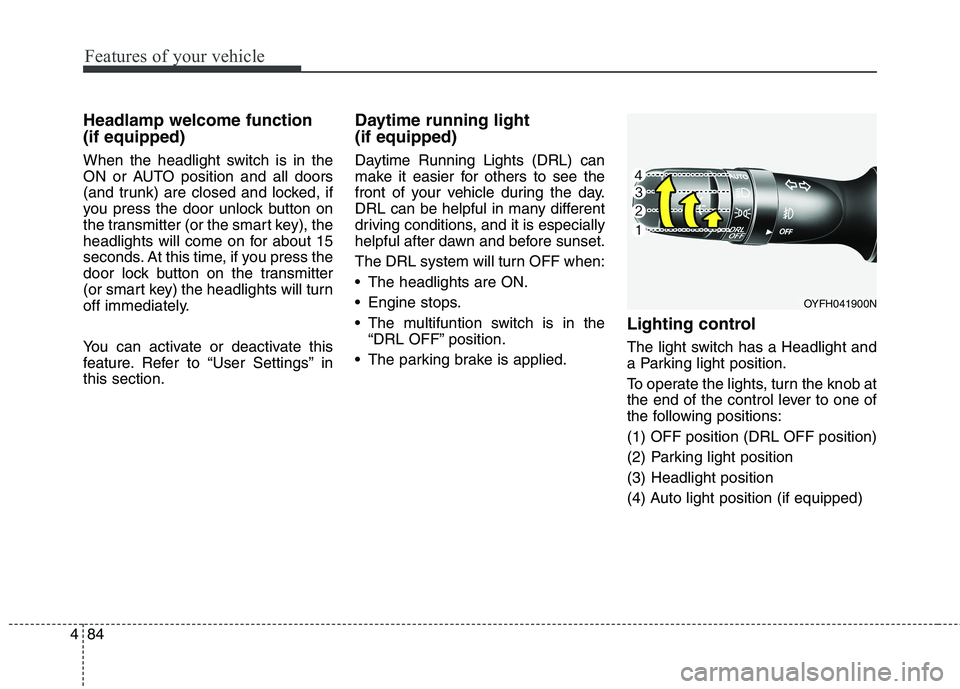
Lighting control
The light switch has a Headlight and
a Parking light position.
To operate the lights, turn the knob at
the end of the control lever to one of
the following positions:
(1) OFF position (DRL OFF position)
(2) Parking light position
(3) Headlight position
(4) Auto light position (if equipped)
OYFH041900N
Page 177 of 476
Features of your vehicle
92 4
Automatic turn off function
(if equipped)
The interior lights automatically turn
off approximately 20 minutes after
the ignition switch is turned off.
If your vehicle is equipped with the
theft alarm system, the interior lights
automatically turn off approximately
5 seconds after the system is in the
armed stage.
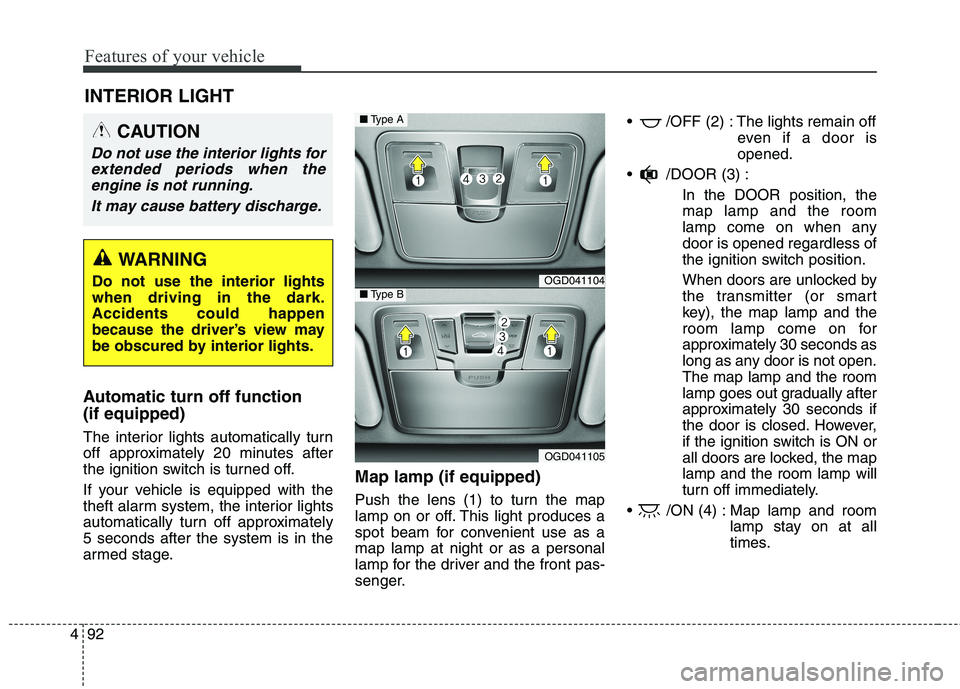
Map lamp (if equipped)
Push the lens (1) to turn the map
lamp on or off. This light produces a
spot beam for convenient use as a
map lamp at night or as a personal
lamp for the driver and the front pas-
senger. /OFF (2) : The lights remain off
even if a door is
opened.
/DOOR (3) :
In the DOOR position, the
map lamp and the room
lamp come on when any
door is opened regardless of
the ignition switch position.
When doors are unlocked by
the transmitter (or smart
key), the map lamp and the
room lamp come on for
approximately 30 seconds as
long as any door is not open.
The map lamp and the room
lamp goes out gradually after
approximately 30 seconds if
the door is closed. However,
if the ignition switch is ON or
all doors are locked, the map
lamp and the room lamp will
turn off immediately.
/ON (4) : Map lamp and room
lamp stay on at all
times.
INTERIOR LIGHT
CAUTION
Do not use the interior lights for
extended periods when the
engine is not running.
It may cause battery discharge.
WARNING
Do not use the interior lights
when driving in the dark.
Accidents could happen
because the driver’s view may
be obscured by interior lights.OGD041104
OGD041105
■Type A
■Type B
Page 180 of 476
495
Features of your vehicle
Headlamp welcome
When the headlight(light switch in
the headlight or AUTO position) is on
and all doors (and tailgate) are
locked and closed, the headlight,
position light and tail light will come
on for 15 seconds if any of the below
is performed.
- When the door unlock button is
pressed on the transmitter.
- When the door unlock button is
pressed on the smart key.
At this time, if you press the door lock
button (on the transmitter or smart
key), the lights will turn off immedi-
ately.
Interior light
When the interior light switch is in the
DOOR position and all doors (and
tailgate) are locked and closed, the
room lamp will come on for 30 sec-
onds if any of the below is per-
formed.
- When the door unlock button is
pressed on the transmitter.
- When the door unlock button is
pressed on the smart key.
- When the button of the outside
door handle is pressed.
At this time, if you press the door lock
button, the lamps will turn off imme-
diately.
WELCOME SYSTEM (IF EQUIPPED)
Page 188 of 476
4103
Features of your vehicle
System operation
Ventilation
1. Set the mode to the position.
2. Set the air intake control to the
outside (fresh) air position.
3. Set the temperature control to the
desired position.
4. Set the fan speed control to the
desired speed.
Heating
1. Set the mode to the position.
2. Set the air intake control to the
outside (fresh) air position.
3. Set the temperature control to the
desired position.
4. Set the fan speed control to the
desired speed.
5. If dehumidified heating is desired,
turn the air conditioning system (if
equipped) on.
If the windshield fogs up, set the
mode to the or position.Operation Tips
To prevent dust or unpleasant
fumes from entering the vehicle
through the ventilation system,
temporarily set the air intake con-
trol to the recirculated air position.
Be sure to return the control to the
fresh air position when the irritation
has passed to keep fresh air in the
vehicle. This will help keep the driv-
er alert and comfortable.
Air for the heating/cooling system
is drawn in through the grilles just
ahead of the windshield. Care
should be taken that these are not
blocked by leaves, snow, ice or
other obstructions.
To prevent interior fog on the wind-
shield, set the air intake control to
the fresh air position and fan speed
to the desired position, turn on the
air conditioning system, and adjust
the temperature control to desired
temperature.
Air conditioning
All HYUNDAI Air Conditioning
Systems are filled with environmen-
tally friendly R-134a refrigerant which
does not damage the ozone layer.
1. Start the engine. Push the air con-
ditioning button.
2. Set the mode to the position.
3. Set the air intake control to the
recirculated air position. However,
prolonged operation of the recircu-
lated air position will excessively
dry the air. In this case, change the
air position.
4. Adjust the fan speed control and
temperature control to maintain
maximum comfort.
When maximum cooling is desired,
set the temperature control to the
extreme left position then set the
fan speed control to the highest
speed.