navigation HYUNDAI ELANTRA GT 2019 Owners Manual
[x] Cancel search | Manufacturer: HYUNDAI, Model Year: 2019, Model line: ELANTRA GT, Model: HYUNDAI ELANTRA GT 2019Pages: 486, PDF Size: 78.59 MB
Page 16 of 486
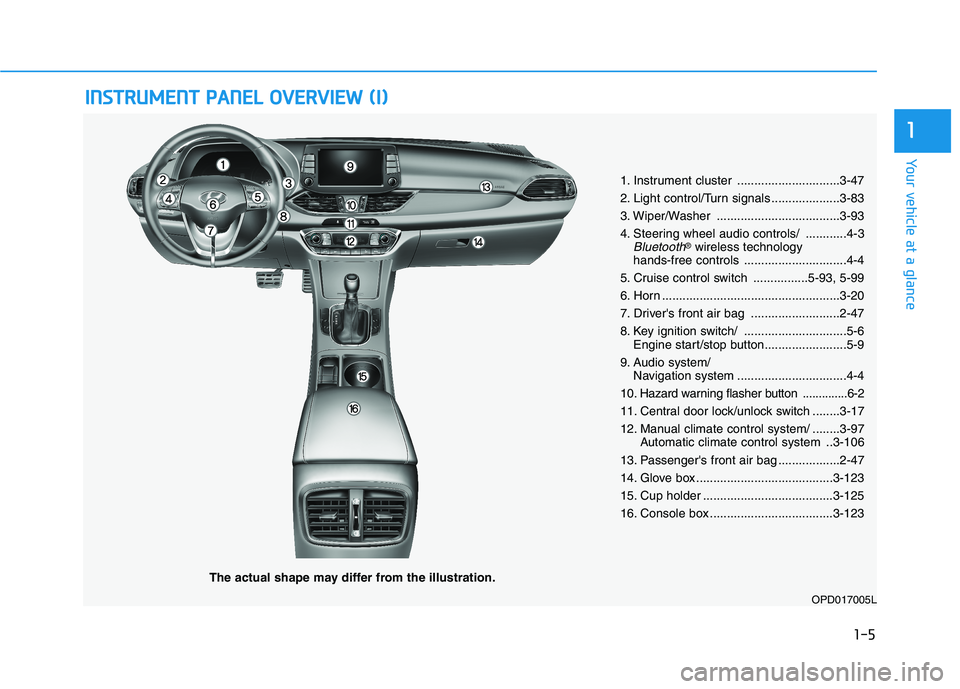
IINN SSTT RR UU MM EENN TT PP AA NN EELL OO VVEERR VV IIEE WW (( II))
The actual shape may differ from the illustration.
1-5
Your vehicle at a glance
1
1. Instrument cluster ..............................3-47
2. Light control/Turn signals ....................3-83
3. Wiper/Washer ....................................3-93
4. Steering wheel audio controls/ ............4-3
Bluetooth®
wireless technology
hands-free controls ..............................4-4
5. Cruise control switch ................5-93, 5-99
6. Horn ....................................................3-20
7. Driver's front air bag ..........................2-47
8. Key ignition switch/ ..............................5-6 Engine start/stop button........................5-9
9. Audio system/ Navigation system ................................4-4
10
. Hazard warning flasher button ..............6-2
11. Central door lock/unlock switch ........3-17
12. Manual climate control system/ ........3-97 Automatic climate control system ..3-106
13. Passenger's front air bag ..................2-47
14. Glove box ........................................3-123
15. Cup holder ......................................3-125
16. Console box ....................................3-123
OPD017005L
Page 20 of 486
2-2
You will find many safety precautions and recommendations throughoutthis section, and throughout this
manual. The safety precautions inthis section are among the most
important.
Always Wear Your Seat Belt
A seat belt is your best protection in
all types of accidents. Air bags are
designed to supplement seat belts,
not replace them. So even though
your vehicle is equipped with air
bags, ALWAYS make sure you and
your passengers wear your seat
belts, and wear them properly.
Restrain All Children
All children under age 13 should ride
in your vehicle properly restrained in
a rear seat, not the front seat. Infantsand small children should be
restrained in an appropriate child
restraint. Larger children should usea booster seat with the lap/shoulder
belt until they can use the seat belt
properly without a booster seat.
Air Bag Hazards
While air bags can save lives, they
can also cause serious or fatal
injuries to occupants who sit tooclose to them, or who are not prop-
erly restrained. Infants, young chil-
dren, and shorter adults are at the
greatest risk of being injured by an
inflating air bag. Follow all instruc-
tions and warnings in this manual.
Driver Distraction
Driver distraction presents a serious
and potentially deadly danger, espe-
cially for inexperienced drivers.
Safety should be the first concern
when behind the wheel and drivers
need to be aware of the wide array of
potential distractions, such as
drowsiness, reaching for objects,
eating, personal grooming, other
passengers, and using cellular
phones.
Drivers can become distracted when
they take their eyes and attention offthe road or their hands off the wheel
to focus on activities other than driv-
ing. To reduce your risk of distractionor getting into an accident:
• ALWAYS set up your mobile
devices (i.e., MP3 players, phones,
navigation units, etc.) when your
vehicle is parked or safely stopped.
IIMM PPOO RRTTAA NN TT SS AA FFEE TT YY PP RR EECCAA UU TTIIOO NNSS
Safety system of your vehicle
Page 108 of 486
3-23
Convenient features of your vehicle
3
BlueLink®center (if equipped)
For details, refer to the BlueLink®
Owner's Guide, Navigation Manual
or Audio Manual.
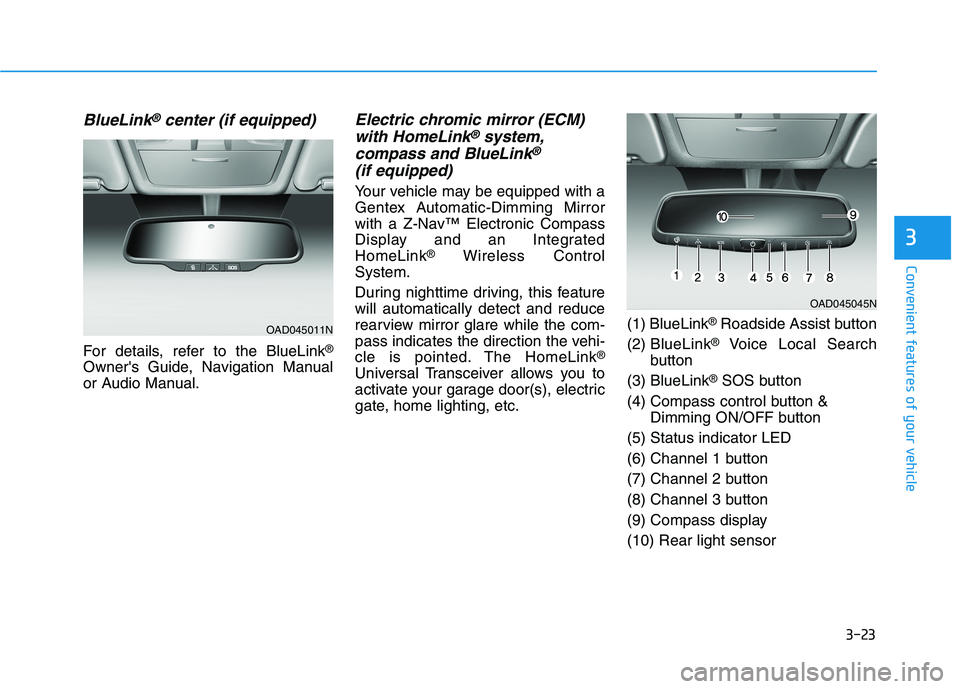
Electric chromic mirror (ECM) with HomeLink®system,
compass and BlueLink®
(if equipped)
Your vehicle may be equipped with a
Gentex Automatic-Dimming Mirror
with a Z-Nav™ Electronic Compass
Display and an IntegratedHomeLink ®
Wireless Control
System.
During nighttime driving, this feature will automatically detect and reduce
rearview mirror glare while the com-
pass indicates the direction the vehi-
cle is pointed. The HomeLink ®
Universal Transceiver allows you to
activate your garage door(s), electric
gate, home lighting, etc. (1) BlueLink
®
Roadside Assist button
(2) BlueLink ®
Voice Local Search
button
(3) BlueLink ®
SOS button
(4) Compass control button & Dimming ON/OFF button
(5) Status indicator LED
(6) Channel 1 button
(7) Channel 2 button
(8) Channel 3 button
(9) Compass display(10) Rear light sensor
OAD045045N
OAD045011N
Page 133 of 486
3-48
Convenient features of your vehicle
Instrument Cluster Control
Adjusting instrument clusterillumination
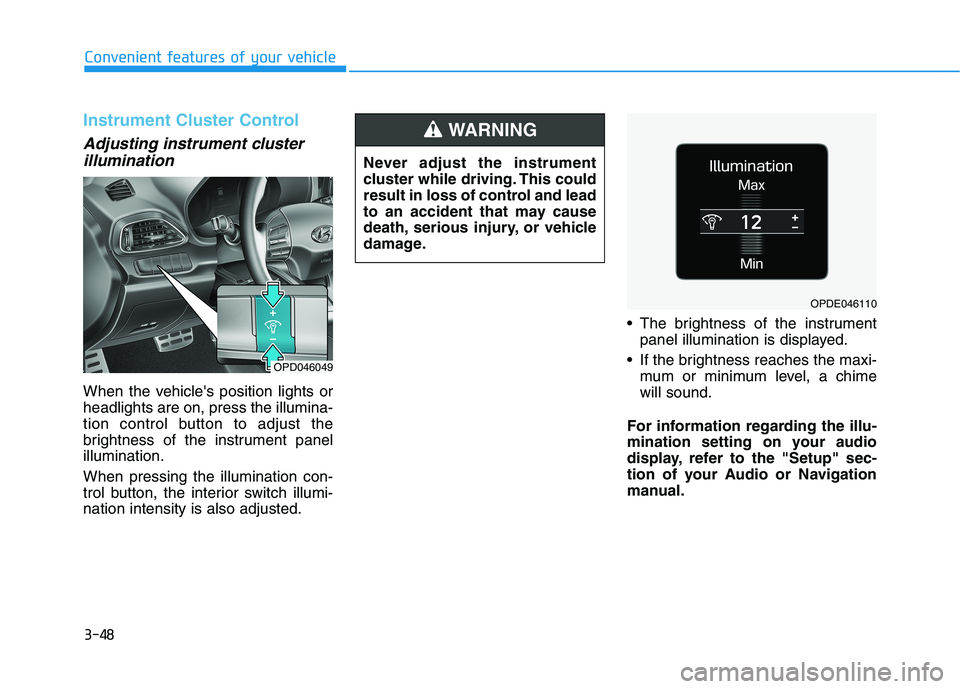
When the vehicle's position lights or headlights are on, press the illumina-
tion control button to adjust the
brightness of the instrument panelillumination. When pressing the illumination con-
trol button, the interior switch illumi-nation intensity is also adjusted. The brightness of the instrument
panel illumination is displayed.
If the brightness reaches the maxi- mum or minimum level, a chimewill sound.
For information regarding the illu-
mination setting on your audio
display, refer to the "Setup" sec-
tion of your Audio or Navigation
manual.
Never adjust the instrument
cluster while driving. This could
result in loss of control and lead
to an accident that may cause
death, serious injury, or vehicle
damage.
WARNING
OPD046049
OPDE046110
Page 157 of 486
3-72
Convenient features of your vehicle
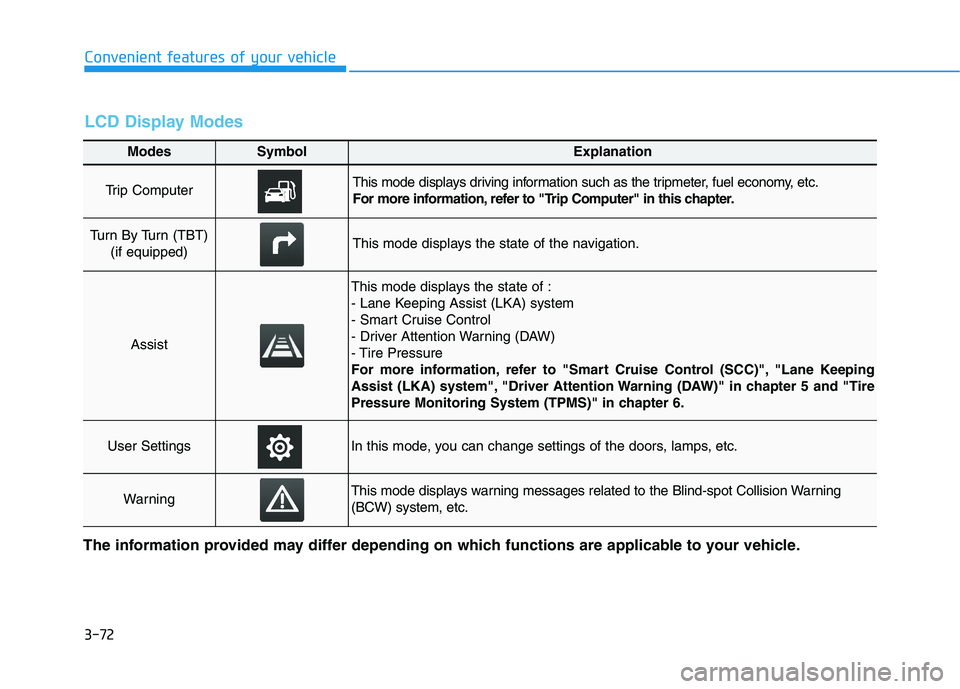
Modes SymbolExplanation
Trip Computer This mode displays driving information such as the tripmeter, fuel economy, etc.
For more information, refer to "Trip Computer" in this chapter.
Turn By Turn (TBT) (if equipped)This mode displays the state of the navigation.
Assist
This mode displays the state of :
- Lane Keeping Assist (LKA) system
- Smart Cruise Control
- Driver Attention Warning (DAW)
- Tire Pressure
For more information, refer to "Smart Cruise Control (SCC)", "Lane Keeping
Assist (LKA) system", "Driver Attention Warning (DAW)" in chapter 5 and "Tire
Pressure Monitoring System (TPMS)" in chapter 6.
User SettingsIn this mode, you can change settings of the doors, lamps, etc.
WarningThis mode displays warning messages related to the Blind-spot Collision Warning (BCW) system, etc.
The information provided may differ depending on which functions are applicable to your vehicle.
LCD Display Modes
Page 159 of 486
3-74
Convenient features of your vehicle
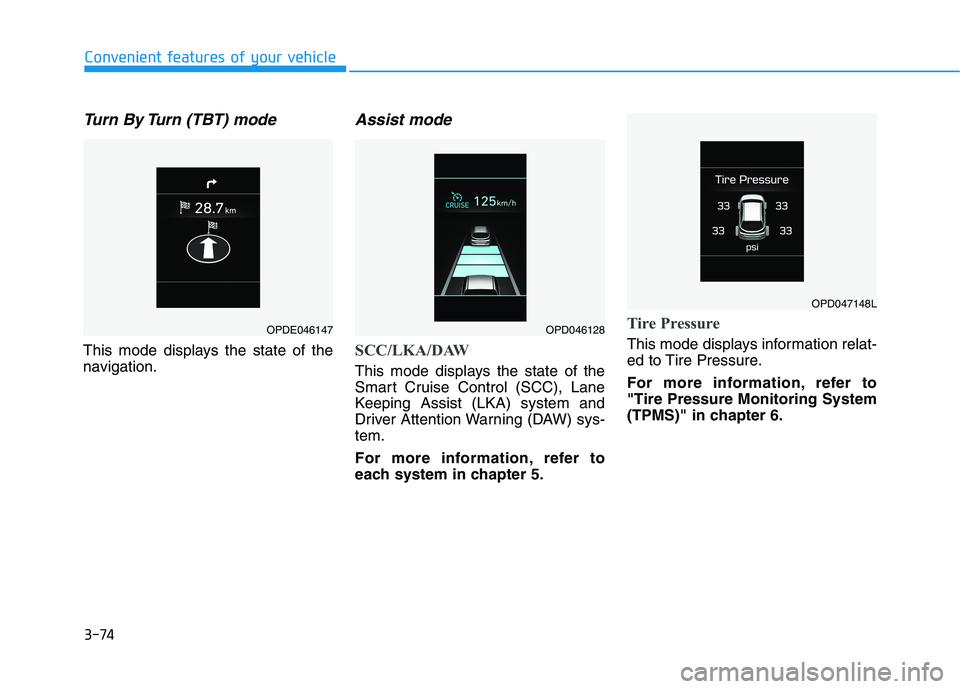
Turn By Turn (TBT) mode
This mode displays the state of the
navigation.
Assist mode
SCC/LKA/DAW
This mode displays the state of the
Smart Cruise Control (SCC), Lane
Keeping Assist (LKA) system and
Driver Attention Warning (DAW) sys-tem.
For more information, refer to
each system in chapter 5.
Tire Pressure
This mode displays information relat-
ed to Tire Pressure.
For more information, refer to "Tire Pressure Monitoring System
(TPMS)" in chapter 6.
OPDE046147OPD046128
OPD047148L
Page 215 of 486
3-130
Convenient features of your vehicle
(Continued)
The wireless charging processmay temporarily stop, when tem-
perature abnormally increasesinside the wireless cellular
phone charging system. The
wireless charging process
restarts, when temperature falls
to a certain level.
The wireless charging process may temporarily stop when
there is any metallic item, such
as a coin, between the wireless
cellular phone charging system
and a cellular phone.Clock
Vehicles with Audio system
Select the [SETUP]button on the
audio system ➟Select [Date/Time].
Set time: Set the time displayed on the audio screen.
Time format: Choose between 12- hour and 24-hour time formats.
Vehicles with Navigation system
Select the Settings menu on the
Navigation system ➟Select
[Date/Time].
GPS time: Displays time according to the received GNSS time.
24-hour: Switches to 12 hour or 24 hour.
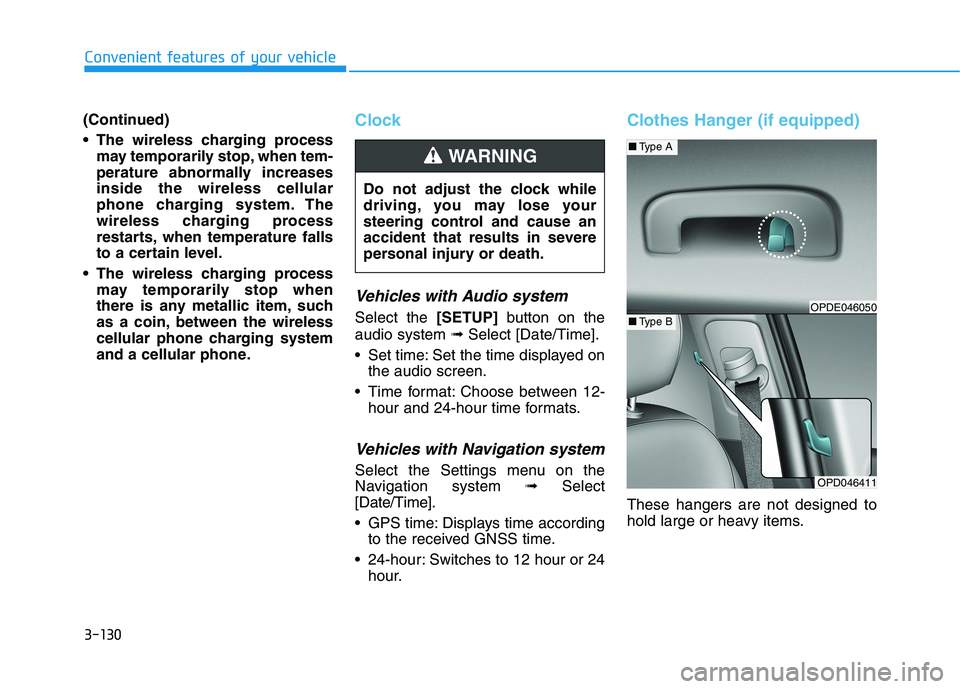
Clothes Hanger (if equipped)
These hangers are not designed to
hold large or heavy items.
Do not adjust the clock while
driving, you may lose your
steering control and cause an
accident that results in severe
personal injury or death.
WARNING
OPD046411
■
Type A
■Type BOPDE046050
Page 218 of 486
Multimedia System
Multimedia System.................................................4-2AUX, USB and iPod ®
Port ...............................................4-2
Antenna ...............................................................................4-3
Steering Wheel Audio Controls ......................................4-3
Bluetooth®Wireless Technology Hands-Free ...........4-4
Audio (Display Audio) / Video /
Navigation System (AVN).................................................4-4
4
Page 221 of 486
4-4
Multimedia System
RADIO mode
It will function as the PRESET STA-
TION UP/DOWN button.
MEDIA mode
It will function as the TRACK UP/
DOWN button.
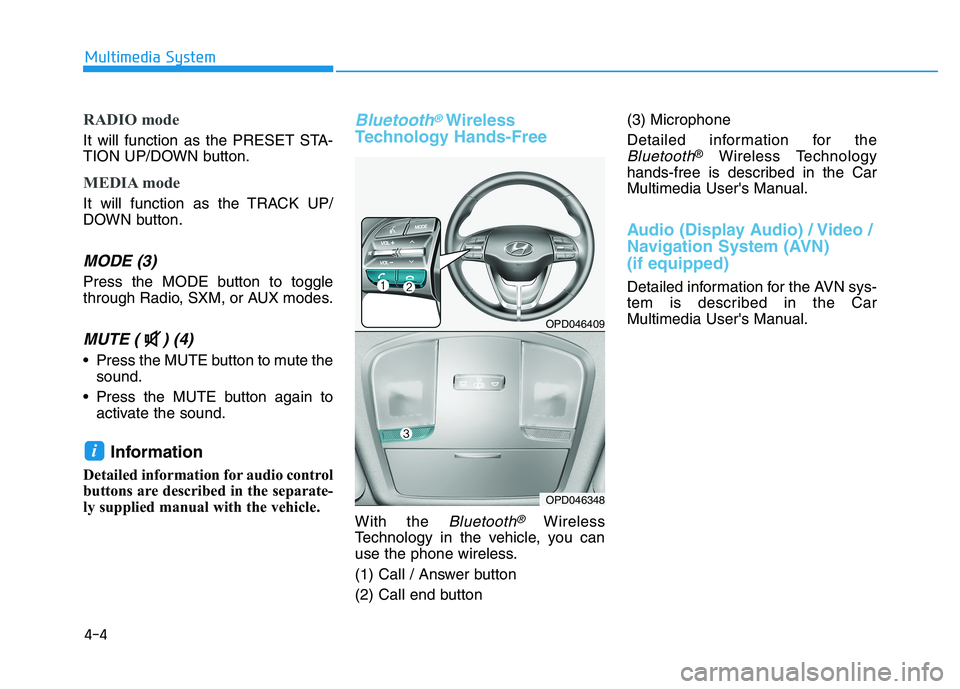
MODE (3)
Press the MODE button to toggle
through Radio, SXM, or AUX modes.
MUTE ( ) (4)
Press the MUTE button to mute thesound.
Press the MUTE button again to activate the sound.
Information
Detailed information for audio control
buttons are described in the separate-
ly supplied manual with the vehicle.
Bluetooth®Wireless
Technology Hands-Free
With the Bluetooth®Wireless
Technology in the vehicle, you can
use the phone wireless.
(1) Call / Answer button
(2) Call end button (3) Microphone
Detailed information for the
Bluetooth®
Wireless Technology
hands-free is described in the Car
Multimedia User's Manual.
Audio (Display Audio) / Video /
Navigation System (AVN) (if equipped)
Detailed information for the AVN sys-
tem is described in the Car
Multimedia User's Manual.
i
OPD046409
OPD046348
Page 360 of 486
6-12
What to do in an emergency
The TPMS Malfunction Indicator
may illuminate after blinking for
one minute if the vehicle is near
electric power supply cables or
radio transmitters such as police
stations, government and public
offices, broadcasting stations,
military installations, airports,
transmitting towers, etc.
Additionally, the TPMS Malfunction
Indicator may illuminate if snow
chains are used or electronic
devices such as computers, charg-
ers, remote starters, navigation,
etc. This may interfere with normal
operation of the TPMS.
Changing a Tire with TPMS
If you have a flat tire, the Low Tire Pressure and LCD position indicator
will come on. Have the flat tire
repaired by an authorized HYUNDAI
dealer as soon as possible orreplace the flat tire with the spare
tire. The spare tire does not come with a
tire pressure monitoring sensor.
When the low pressure tire or the flat
tire is replaced with the spare tire,
the Low Tire Pressure LCD position
indicator will remain on. Also, theTPMS Malfunction Indicator will illu-
minate after blinking for one minute if
the vehicle is driven at speed above
25 km/h (15.5 mph) for approximate-
ly 20 minutes.Once the original tire equipped with
a tire pressure monitoring sensor isreinflated to the recommended pres-
sure and reinstalled on the vehicle,
the Low Tire Pressure LCD position
indicator and TPMS Malfunction
Indicator will go off within a few min-
utes of driving. If the indicators do not disappear
after a few minutes, please visit an
authorized HYUNDAI dealer. Each wheel is equipped with a tire pressure sensor mounted inside the
tire behind the valve stem (except for
the spare tire). You must use TPMS
specific wheels. It is recommended
that you always have your tires serv-
iced by an authorized HYUNDAI
dealer.
NOTICE
Never use a puncture-repairing
agent not approved by HYUNDAIdealer to repair and/or inflate a
low pressure tire. Tire sealant
not approved by HYUNDAI deal-
er may damage the tire pressure
sensor.
CAUTION