trunk HYUNDAI ELANTRA HYBRID 2021 Owners Manual
[x] Cancel search | Manufacturer: HYUNDAI, Model Year: 2021, Model line: ELANTRA HYBRID, Model: HYUNDAI ELANTRA HYBRID 2021Pages: 555, PDF Size: 56.08 MB
Page 32 of 555
2-3
02
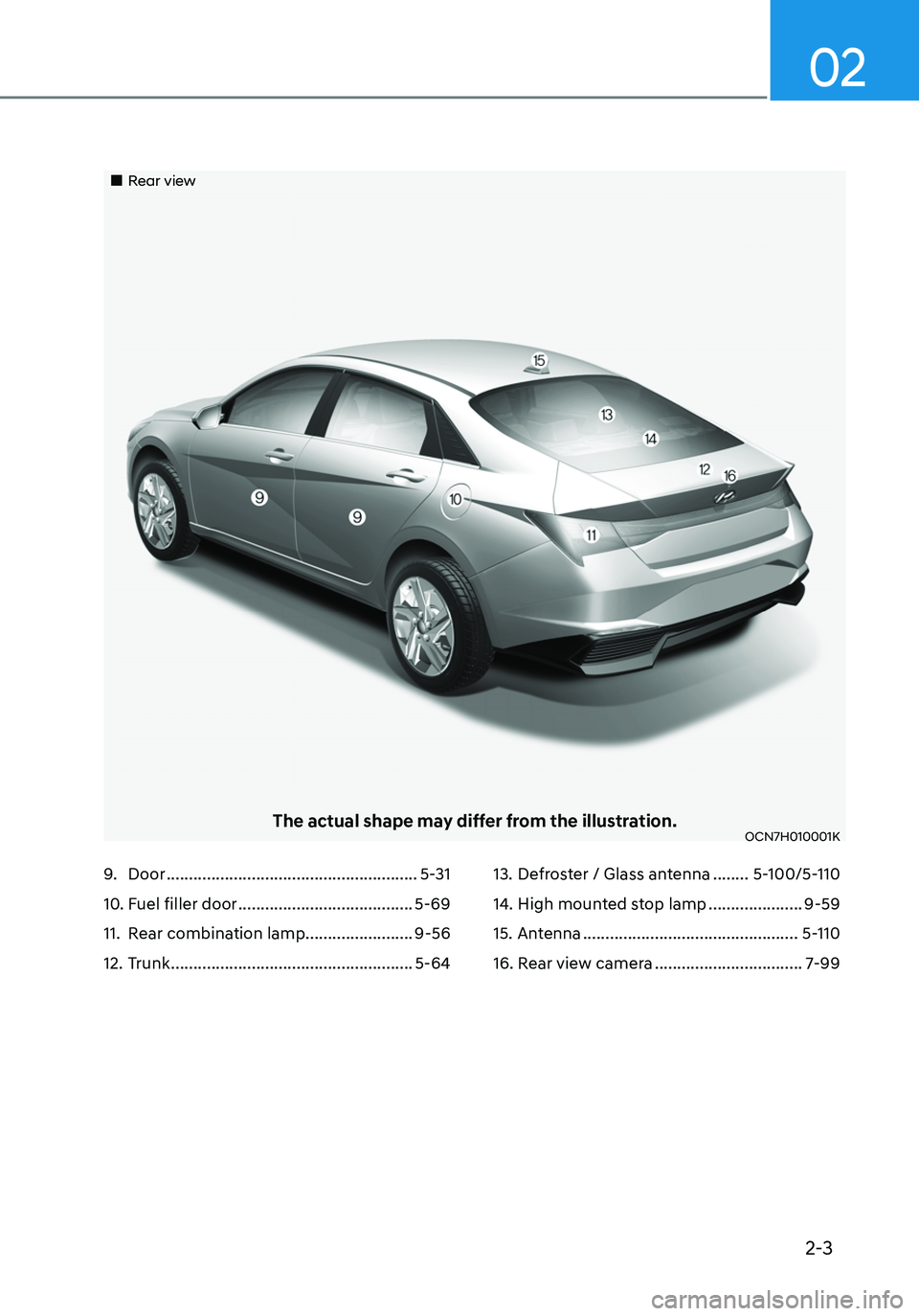
9. Door ........................................................5-31
10. Fuel filler door .......................................5-69
11. Rear combination lamp........................9-56
12. Trunk ......................................................5-64
13. Defroster / Glass antenna ........5-100/5-110
14. High mounted stop lamp .....................9-59
15. Antenna ................................................5-110
16. Rear view camera .................................7-99
„„Rear view
The actual shape may differ from the illustration.OCN7H010001K
Page 33 of 555
2-4
Vehicle Information
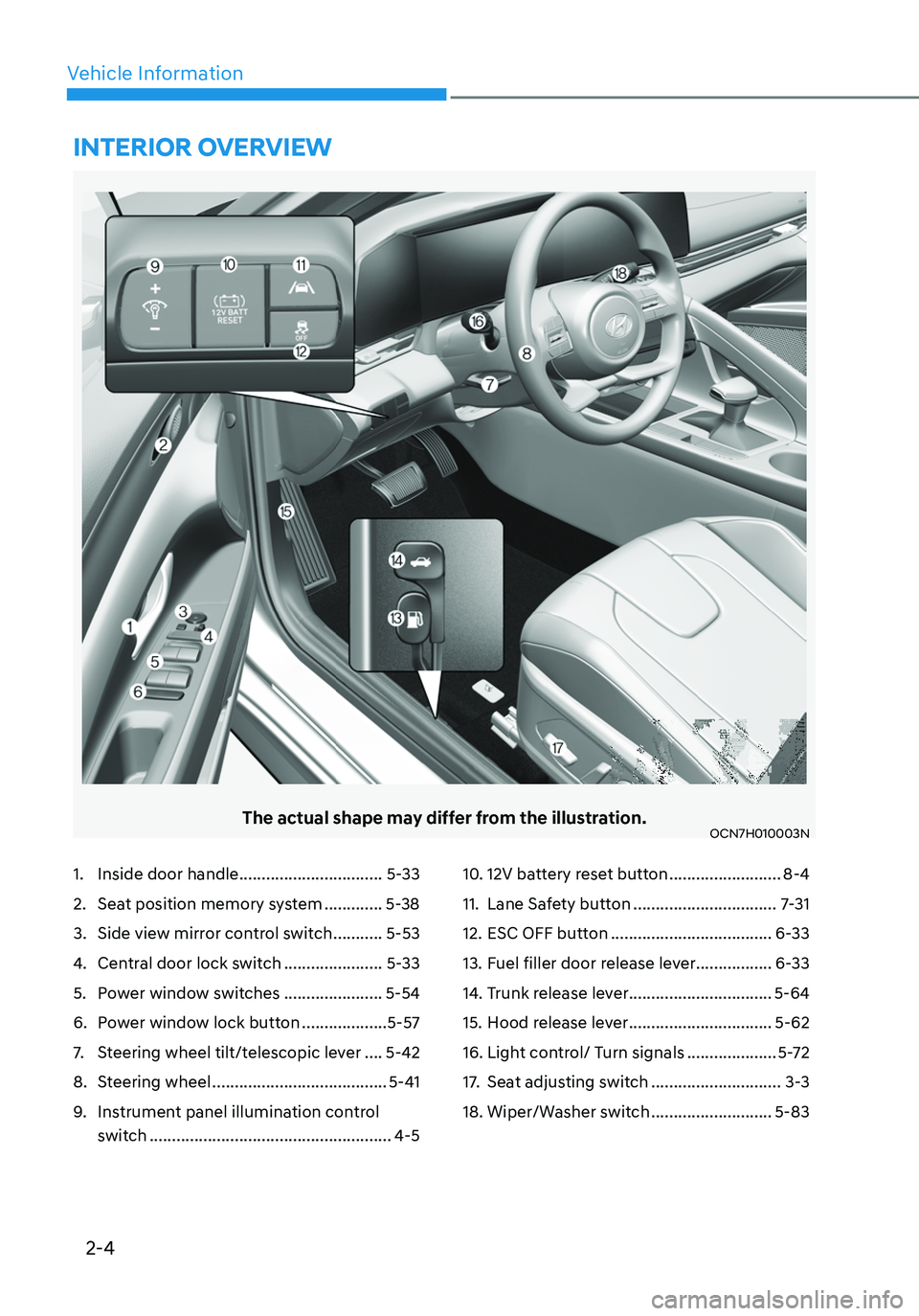
The actual shape may differ from the illustration.OCN7H010003N
1. Inside door handle ................................5-33
2. Seat position memory system .............5-38
3. Side view mirror control switch ...........5-53
4. Central door lock switch ......................5-33
5. Power window switches ......................5-54
6. Power window lock button ...................5-57
7. Steering wheel tilt/telescopic lever ....5-42
8. Steering wheel .......................................5-41
9. Instrument panel illumination control
switch
......................................................4-5
10. 12V battery reset button .........................8-4
11. Lane Safety button ................................7-31
12. ESC OFF button ....................................6-33
13. Fuel filler door release lever .................6-33
14. Trunk release lever ................................5-64
15. Hood release lever ................................5-62
16. Light control/ Turn signals ....................5-72
17. Seat adjusting switch .............................3-3
18. Wiper/Washer switch ...........................5-83
INTERIOR OVERVIEW
Page 37 of 555
Vehicle Information
2-8
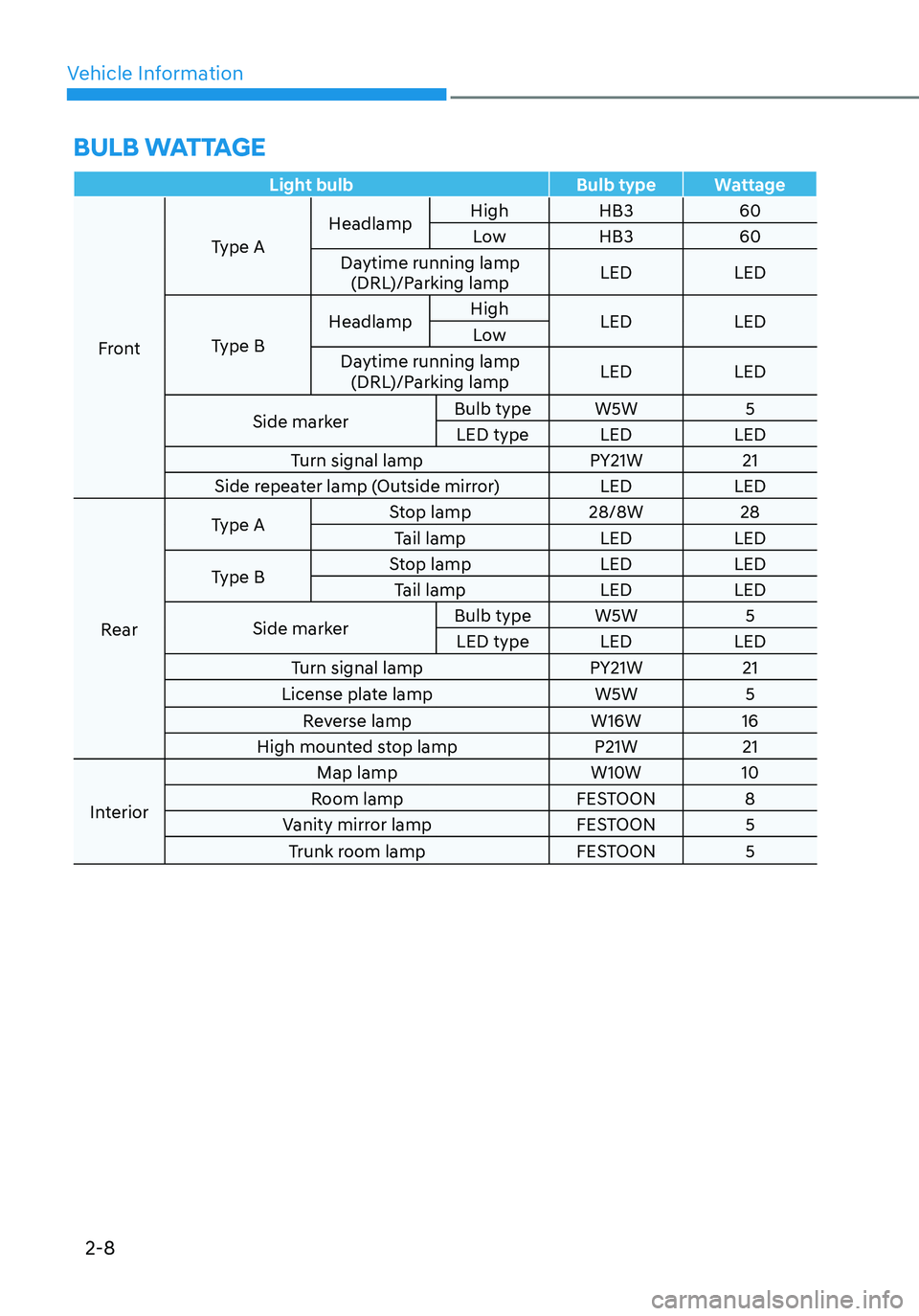
BULB WATTAGE
Light bulbBulb typeWattage
Front Type A
Headlamp
High
HB3 60
Low HB3 60
Daytime running lamp (DRL)/Parking lamp LED
LED
Type B Headlamp
High
LED LED
Low
Daytime running lamp (DRL)/Parking lamp LED
LED
Side marker Bulb type
W5W 5
LED type LEDLED
Turn signal lamp PY21W21
Side repeater lamp (Outside mirror) LEDLED
Rear Type A
Stop lamp
28/8W28
Tail lamp LEDLED
Type B Stop lamp
LEDLED
Tail lamp LEDLED
Side marker Bulb type
W5W 5
LED type LEDLED
Turn signal lamp PY21W21
License plate lamp W5W5
Reverse lamp W16W16
High mounted stop lamp P21W21
Interior Map lamp
W10W10
Room lamp FESTOON8
Vanity mirror lamp FESTOON5
Trunk room lamp FESTOON5
Page 55 of 555
3-10
Rear Seats
Folding the rear seat (if equipped)
The rear seatbacks can be folded to
facilitate carrying long items or to
increase the luggage capacity of the
vehicle.
WARNING
• Never allow passengers to sit on top
of the folded down seatback while
the vehicle is moving. This is not a
proper seating position and no seat
belts are available for use. This could
result in serious injury or death in
case of an accident or sudden stop.
• Objects carried on the folded down
seatback should not extend higher
than the top of the front seatbacks.
This could allow cargo to slide
forward and cause injury or damage
during sudden stops.
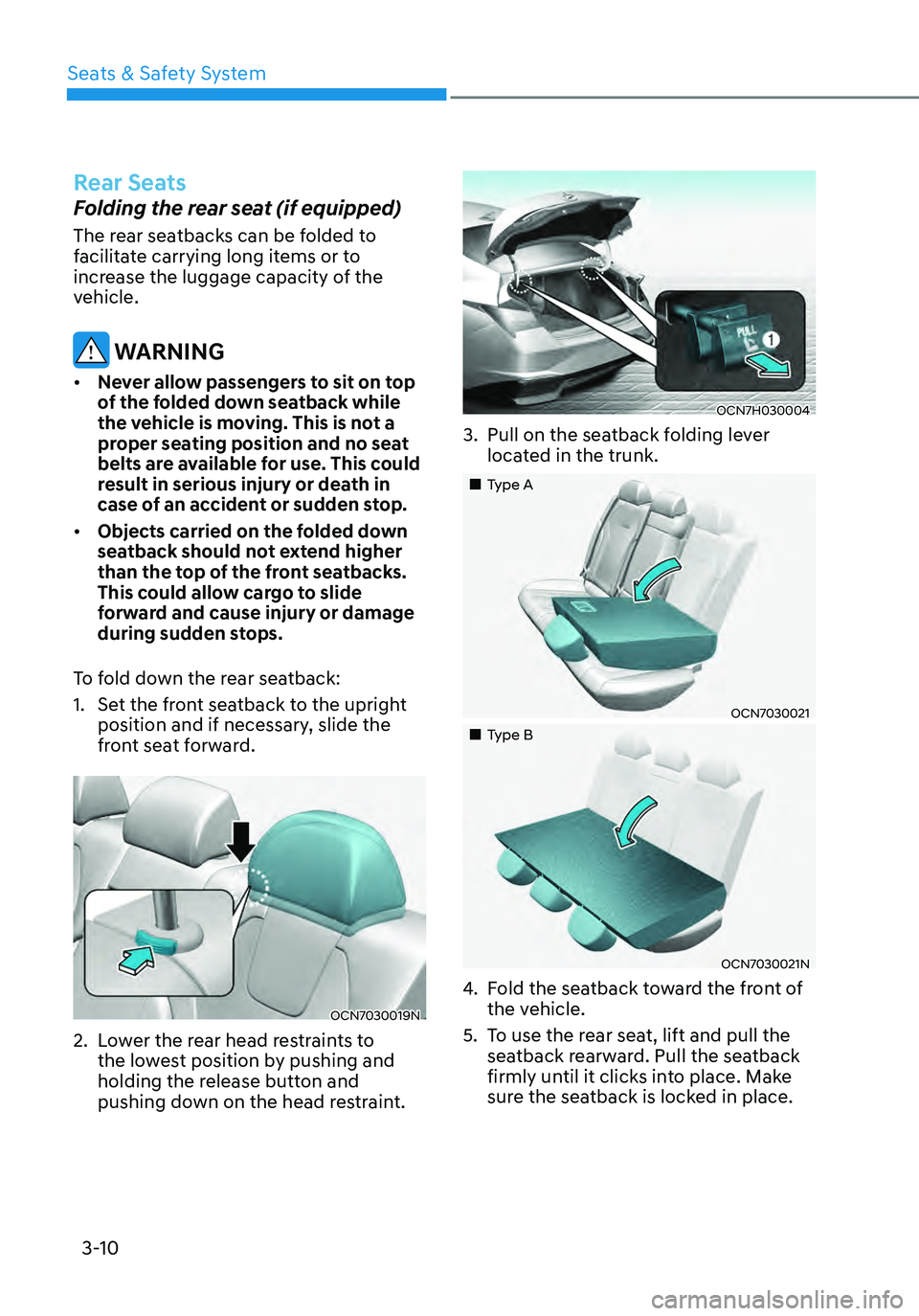
To fold down the rear seatback:
1. Set the front seatback to the upright
position and if necessary, slide the
front seat forward.
OCN7030019N
2. Lower the rear head restraints to
the lowest position by pushing and
holding the release button and
pushing down on the head restraint.
OCN7H030004
3. Pull on the seatback folding lever
located in the trunk.
„„Type A
OCN7030021
„„Type B
OCN7030021N
4. Fold the seatback toward the front of
the vehicle.
5. To use the rear seat, lift and pull the
seatback rearward. Pull the seatback
firmly until it clicks into place. Make
sure the seatback is locked in place.
Seats & Safety System
Page 103 of 555

High Beam Assist indicator light ........................................................................\
..4-18
Forward Collision-Avoidance Assist Warning Light ............................................4-18
Lane Keep Assist Indicator Light ........................................................................\
.. 4-19
Cruise Indicator Light
........................................................................\
...................4-19
SPORT Mode Indicator Light ........................................................................\
........4-19
SMART Mode Indicator Light ........................................................................\
.......4-19
Icy Road Warning Light ........................................................................\
................4-19
LCD Display Messages ........................................................................\
...................4-20
Shift to P or N to start engine (for smart key system) .......................................4-20
Shift to P (for smart key system and intelligent variable transmission) ...........4-20
Low key battery (for smart key system) ..............................................................4-20
Press brake pedal to start engine (for smart key system and intelligent
variable transmission)........................................................................\
.................. 4-20
Press clutch pedal to start engine (for smart key system and manual
transmission)
........................................................................\
................................4-20
Key not in vehicle (for smart key system) ...........................................................4-20
Key not detected (for smart key system) ............................................................4-20
Press START button again (for smart key system)
.............................................4-20
12V battery discharging due to additional electrical devices ...........................4-21
Press START button with key (for smart key system) .........................................4-21
Check BRAKE SWITCH fuse (for smart key system and automatic
transmission/intelligent variable transmission) ..................................................4-21
Door, Hood, Trunk Open Indicator ....................................................................... 4-21
Sunroof Open
........................................................................\
................................4-21
Low Pressure ........................................................................\
................................4-22
Lights Mode ........................................................................\
.................................. 4-22
Wiper
........................................................................\
............................................4-22
Heated Steering Wheel turned off ......................................................................4-22
Low washer fluid ........................................................................\
..........................4-22
Low fuel ........................................................................\
........................................4-23
Engine Overheated ........................................................................\
......................4-23
Check headlight (if equipped) ........................................................................\
....4-23
Check headlight (Low) ........................................................................\
................4-23
Check turn signal ........................................................................\
.........................4-23
Check brake light ........................................................................\
.........................4-23
Check daytime running light ........................................................................\
.......4-24
Check high mounted stop lamp ........................................................................\
.4-24
Check headlight LED ........................................................................\
...................4-24
Check Forward Collision-Avoidance Assist system ...........................................4-24
Check Lane Keeping Assist system ....................................................................4-24
Check Blind-Spot Collision Warning system ......................................................4-24
Check Driver Attention Warning system
............................................................4-25
4
Page 122 of 555
04
4-21
12V battery discharging due to
additional electrical devices
This message is displayed if the 12V
battery voltage is weak due to any
non-factory electrical accessories (ex.
dashboard camera) while parking. Be
careful that the battery is not discharged.
If the message appears after removing
the non-factory electrical accessories,
we recommend that you have the vehicle
inspected by an authorized HYUNDAI
dealer.
Press START button with key
(for smart key system)
This warning message is displayed if you
press the Engine Start/Stop button while
the warning message "Key not detected"
is displayed.
At this time, the immobilizer indicator
light blinks.
Check BRAKE SWITCH fuse (for
smart key system and automatic
transmission/intelligent variable
transmission)
This warning message is displayed if the
brake switch fuse is disconnected.
You need to replace the fuse with a new
one before starting the engine.
If that is not possible, you can start the
engine by pressing the Engine Start/
Stop button for 10 seconds in the ACC
position.
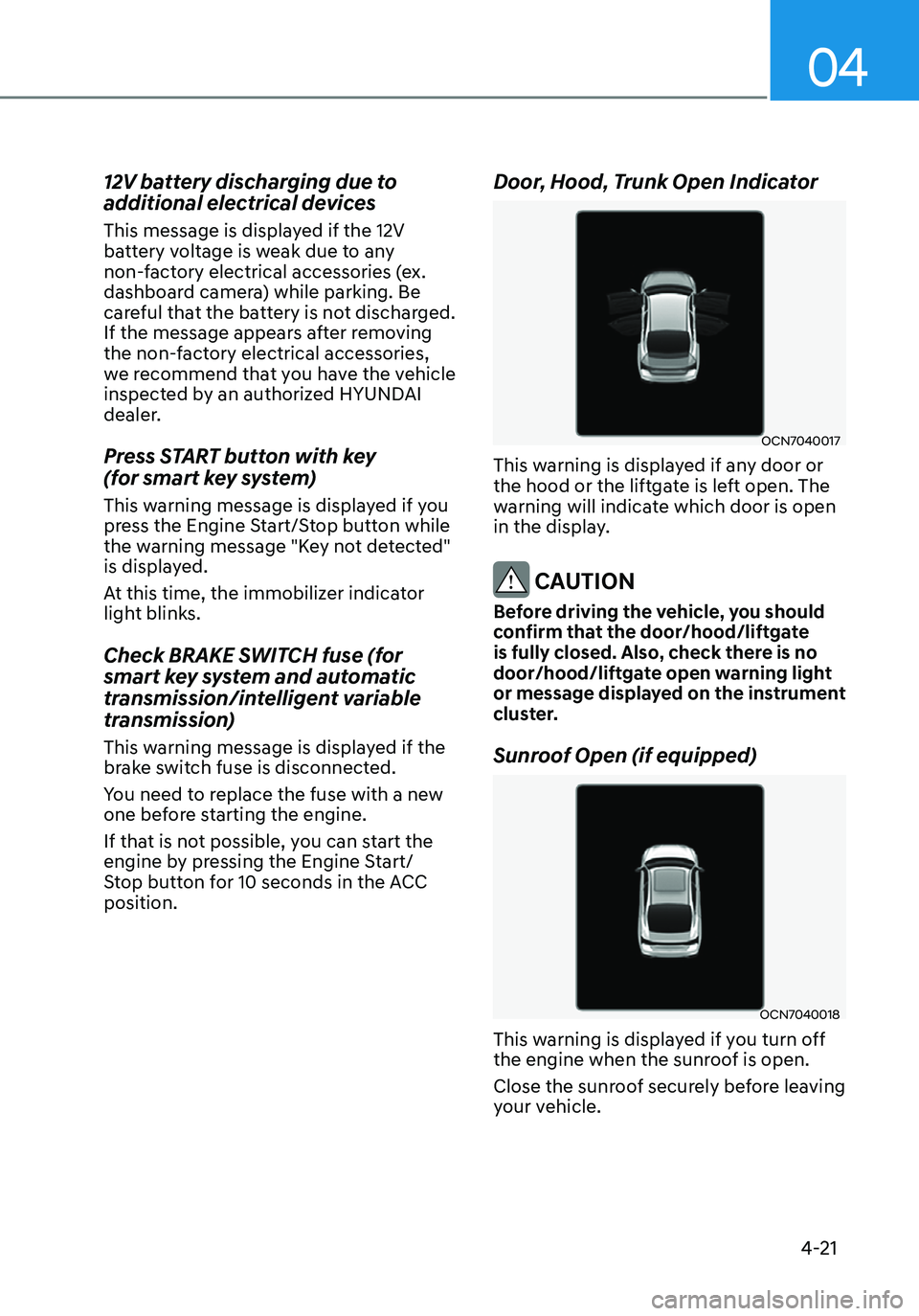
Door, Hood, Trunk Open Indicator
OCN7040017
This warning is displayed if any door or
the hood or the liftgate is left open. The
warning will indicate which door is open
in the display.
CAUTION
Before driving the vehicle, you should
confirm that the door/hood/liftgate
is fully closed. Also, check there is no
door/hood/liftgate open warning light
or message displayed on the instrument
cluster.
Sunroof Open (if equipped)
OCN7040018
This warning is displayed if you turn off
the engine when the sunroof is open.
Close the sunroof securely before leaving
your vehicle.
Page 134 of 555
04
4-33
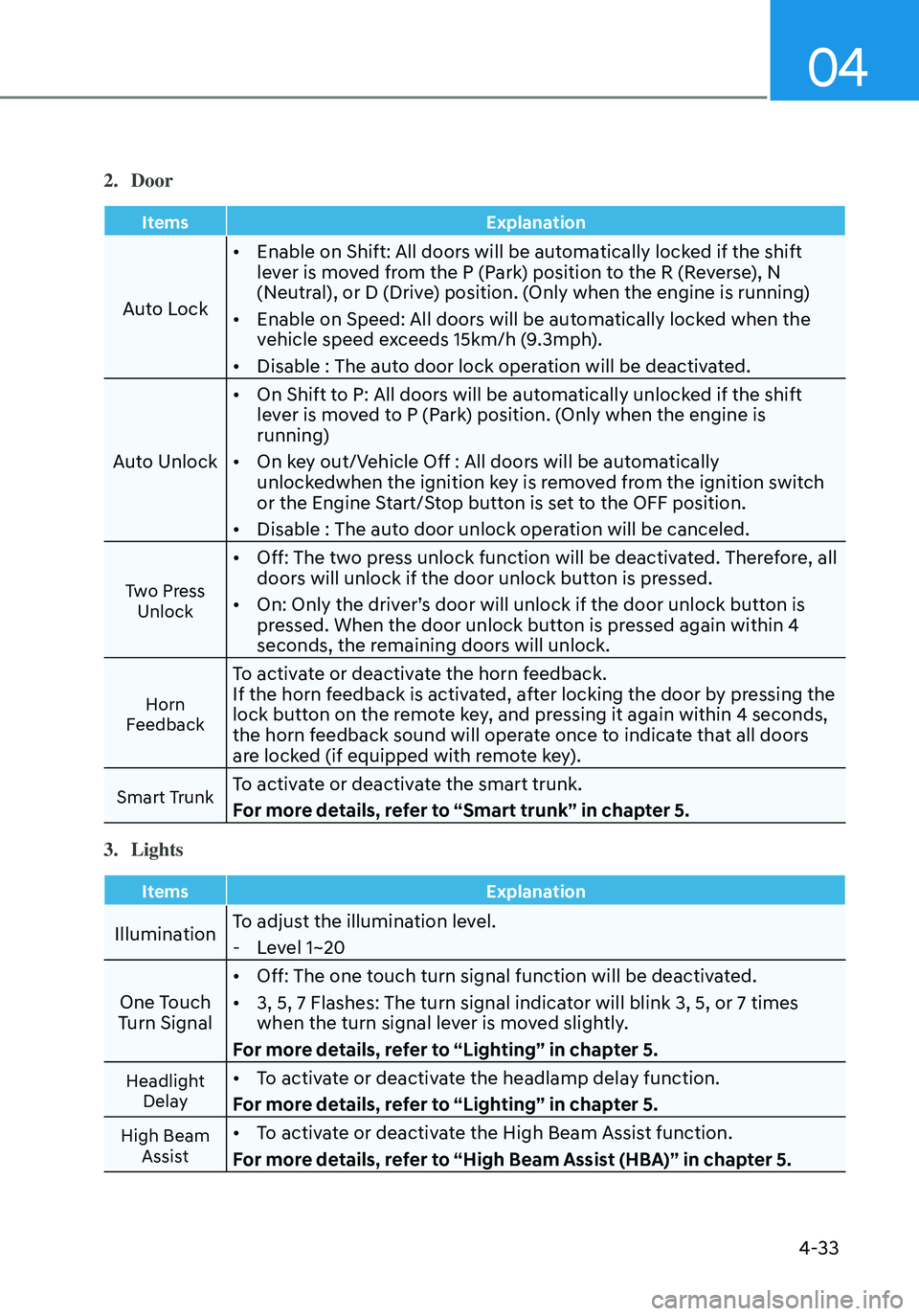
2. Door
ItemsExplanation
Auto Lock•
Enable on Shift: All doors will be automatically locked if the shift
lever is moved from the P (Park) position to the R (Reverse), N
(Neutral), or D (Drive) position. (Only when the engine is running)
• Enable on Speed: All doors will be automatically locked when the
vehicle speed exceeds 15km/h (9.3mph).
• Disable : The auto door lock operation will be deactivated.
Auto Unlock •
On Shift to P: All doors will be automatically unlocked if the shift
lever is moved to P (Park) position. (Only when the engine is
running)
• On key out/Vehicle Off : All doors will be automatically
unlockedwhen the ignition key is removed from the ignition switch
or the Engine Start/Stop button is set to the OFF position.
• Disable : The auto door unlock operation will be canceled.
Two Press
Unlock
• Off: The two press unlock function will be deactivated. Therefore, all
doors will unlock if the door unlock button is pressed.
• On: Only the driver’s door will unlock if the door unlock button is
pressed. When the door unlock button is pressed again within 4
seconds, the remaining doors will unlock.
Horn
Feedback
To activate or deactivate the horn feedback.
If the horn feedback is activated, after locking the door by pressing the
lock button on the remote key, and pressing it again within 4 seconds,
the horn feedback sound will operate once to indicate that all doors
are locked (if equipped with remote key).
Smart TrunkTo activate or deactivate the smart trunk.
For more details, refer to “Smart trunk” in chapter 5.
3. Lights
Items Explanation
IlluminationTo adjust the illumination level. -
Level 1~20
One Touch
Turn Signal •
Off: The one touch turn signal function will be deactivated.
• 3, 5, 7 Flashes: The turn signal indicator will blink 3, 5, or 7 times
when the turn signal lever is moved slightly.
For more details, refer to “Lighting” in chapter 5.
Headlight Delay• To activate or deactivate the headlamp delay function.
For more details, refer to “Lighting” in chapter 5.
High Beam Assist• To activate or deactivate the High Beam Assist function.
For more details, refer to “High Beam Assist (HBA)” in chapter 5.
Page 149 of 555
Instrument Cluster
4-48
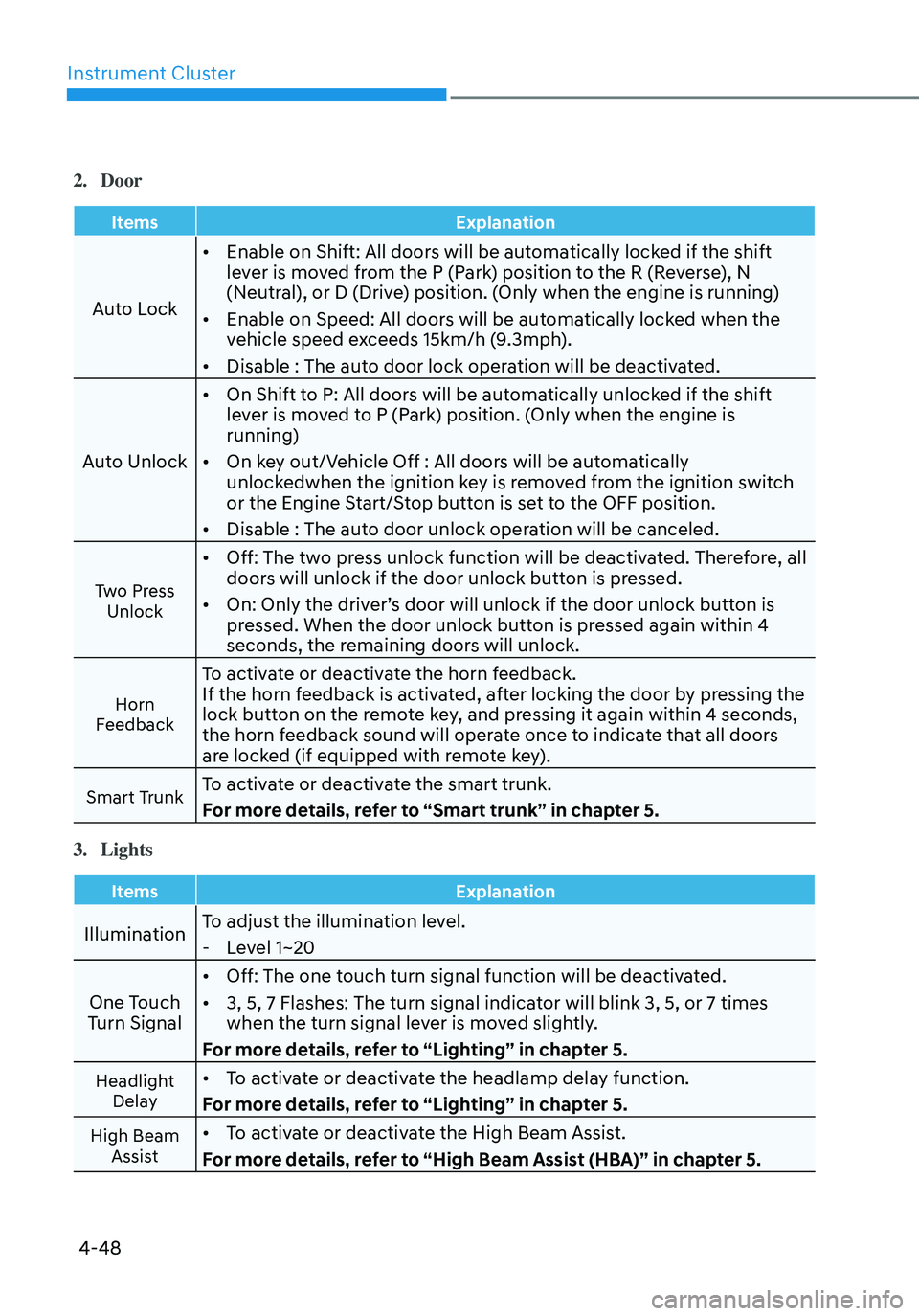
2. Door
ItemsExplanation
Auto Lock•
Enable on Shift: All doors will be automatically locked if the shift
lever is moved from the P (Park) position to the R (Reverse), N
(Neutral), or D (Drive) position. (Only when the engine is running)
• Enable on Speed: All doors will be automatically locked when the
vehicle speed exceeds 15km/h (9.3mph).
• Disable : The auto door lock operation will be deactivated.
Auto Unlock •
On Shift to P: All doors will be automatically unlocked if the shift
lever is moved to P (Park) position. (Only when the engine is
running)
• On key out/Vehicle Off : All doors will be automatically
unlockedwhen the ignition key is removed from the ignition switch
or the Engine Start/Stop button is set to the OFF position.
• Disable : The auto door unlock operation will be canceled.
Two Press
Unlock
• Off: The two press unlock function will be deactivated. Therefore, all
doors will unlock if the door unlock button is pressed.
• On: Only the driver’s door will unlock if the door unlock button is
pressed. When the door unlock button is pressed again within 4
seconds, the remaining doors will unlock.
Horn
Feedback
To activate or deactivate the horn feedback.
If the horn feedback is activated, after locking the door by pressing the
lock button on the remote key, and pressing it again within 4 seconds,
the horn feedback sound will operate once to indicate that all doors
are locked (if equipped with remote key).
Smart TrunkTo activate or deactivate the smart trunk.
For more details, refer to “Smart trunk” in chapter 5.
3. Lights
Items Explanation
IlluminationTo adjust the illumination level. -
Level 1~20
One Touch
Turn Signal •
Off: The one touch turn signal function will be deactivated.
• 3, 5, 7 Flashes: The turn signal indicator will blink 3, 5, or 7 times
when the turn signal lever is moved slightly.
For more details, refer to “Lighting” in chapter 5.
Headlight Delay• To activate or deactivate the headlamp delay function.
For more details, refer to “Lighting” in chapter 5.
High Beam Assist• To activate or deactivate the High Beam Assist.
For more details, refer to “High Beam Assist (HBA)” in chapter 5.
Page 154 of 555

5.Convenient Features
Convenient Features
Accessing Your Vehicle ........................................................................\
..........5-4Remote Key ........................................................................\
.......................................5-4
Smart Key ........................................................................\
...........................................5 -7
Immobilizer System ........................................................................\
........................5-14
Hyundai Digital Key ........................................................................\
.........................5-15
Door Locks ........................................................................\
.............................5-31Operating Door Locks from Outside the Vehicle ..................................................5-31
Operating Door Locks from Inside the Vehicle ....................................................5-33
Automatic Door Lock and Unlock Features ..........................................................5-35
Child-Protector Rear Door Locks ........................................................................\
..5-35
Rear Occupant Alert (ROA) System .......................................................................5-36
Theft –Alarm System ........................................................................\
...........5-37
Driver position memory system
..................................................................5-38Storing memory positions ........................................................................\
.............5-38
Recalling memory positions ........................................................................\
..........5-38
Driver position memory system reset ...................................................................5-39
Easy access function ........................................................................\
......................5-40
Steering Wheel ........................................................................\
......................5-41Electric Power Steering (EPS) ........................................................................\
.........5-41
Tilt Steering / Telescope Steering ........................................................................\
.5-42
Horn ........................................................................\
................................................. 5-43
Mirrors ........................................................................\
..................................5-44Inside Rearview Mirror ........................................................................\
...................5-44
Side View Mirrors ........................................................................\
...........................5-52
Windows ........................................................................\
...............................5-54Power Windows ........................................................................\
..............................5-55
Sunroof ........................................................................\
.................................5-58Sunroof opening and closing ........................................................................\
........5-59
Tilting the sunroof ........................................................................\
..........................5-60
Sunshade ........................................................................\
........................................5-60
Resetting the sunroof ........................................................................\
.....................5-61
Sunroof open warning ........................................................................\
....................5-61
Hood ........................................................................\
.....................................5-62
Trunk
........................................................................\
.....................................5-64Emergency trunk safety release ........................................................................\
....5-65
Smart Trunk release ........................................................................\
.......................5-66
5
Page 157 of 555
Convenient Features
5-4
Remote Key (if equipped)
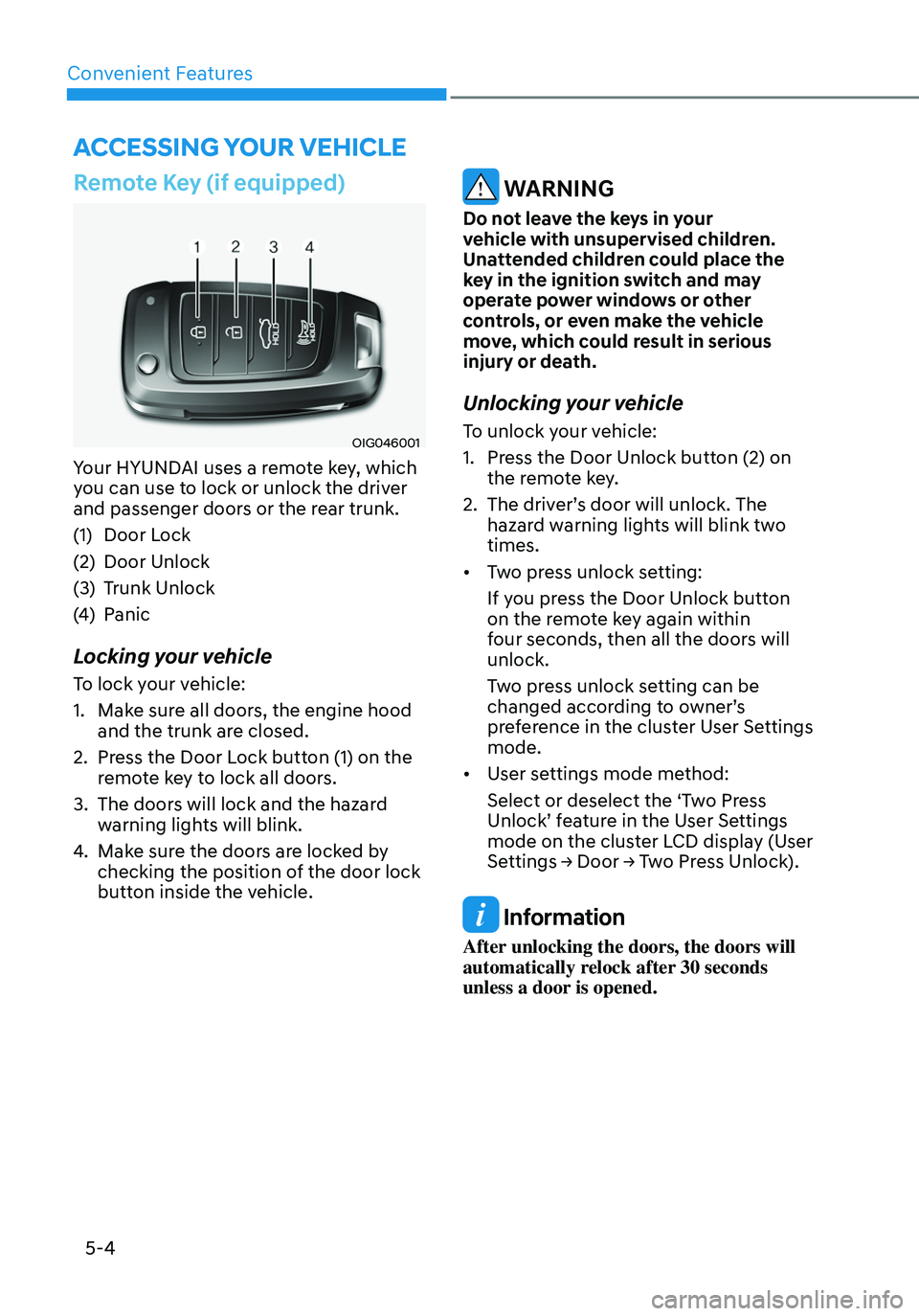
OIG046001
Your HYUNDAI uses a remote key, which
you can use to lock or unlock the driver
and passenger doors or the rear trunk.
(1) Door Lock
(2) Door Unlock
(3) Trunk Unlock
(4) Panic
Locking your vehicle
To lock your vehicle:
1. Make sure all doors, the engine hood
and the trunk are closed.
2. Press the Door Lock button (1) on the
remote key to lock all doors.
3. The doors will lock and the hazard
warning lights will blink.
4. Make sure the doors are locked by
checking the position of the door lock
button inside the vehicle.
WARNING
Do not leave the keys in your
vehicle with unsupervised children.
Unattended children could place the
key in the ignition switch and may
operate power windows or other
controls, or even make the vehicle
move, which could result in serious
injury or death.
Unlocking your vehicle
To unlock your vehicle:
1. Press the Door Unlock button (2) on
the remote key.
2. The driver’s door will unlock. The
hazard warning lights will blink two
times.
• Two press unlock setting:
If you press the Door Unlock button
on the remote key again within
four seconds, then all the doors will
unlock.
Two press unlock setting can be
changed according to owner’s
preference in the cluster User Settings
mode.
• User settings mode method:
Select or deselect the ‘Two Press
Unlock’ feature in the User Settings
mode on the cluster LCD display (User
Settings → Door → Two Press Unlock).
Information
After unlocking the doors, the doors will
automatically relock after 30 seconds
unless a door is opened.
ACCESSING YOUR VEHICLE