start stop button HYUNDAI ELANTRA HYBRID 2022 User Guide
[x] Cancel search | Manufacturer: HYUNDAI, Model Year: 2022, Model line: ELANTRA HYBRID, Model: HYUNDAI ELANTRA HYBRID 2022Pages: 529, PDF Size: 38.79 MB
Page 108 of 529
Instrument Cluster
4-10
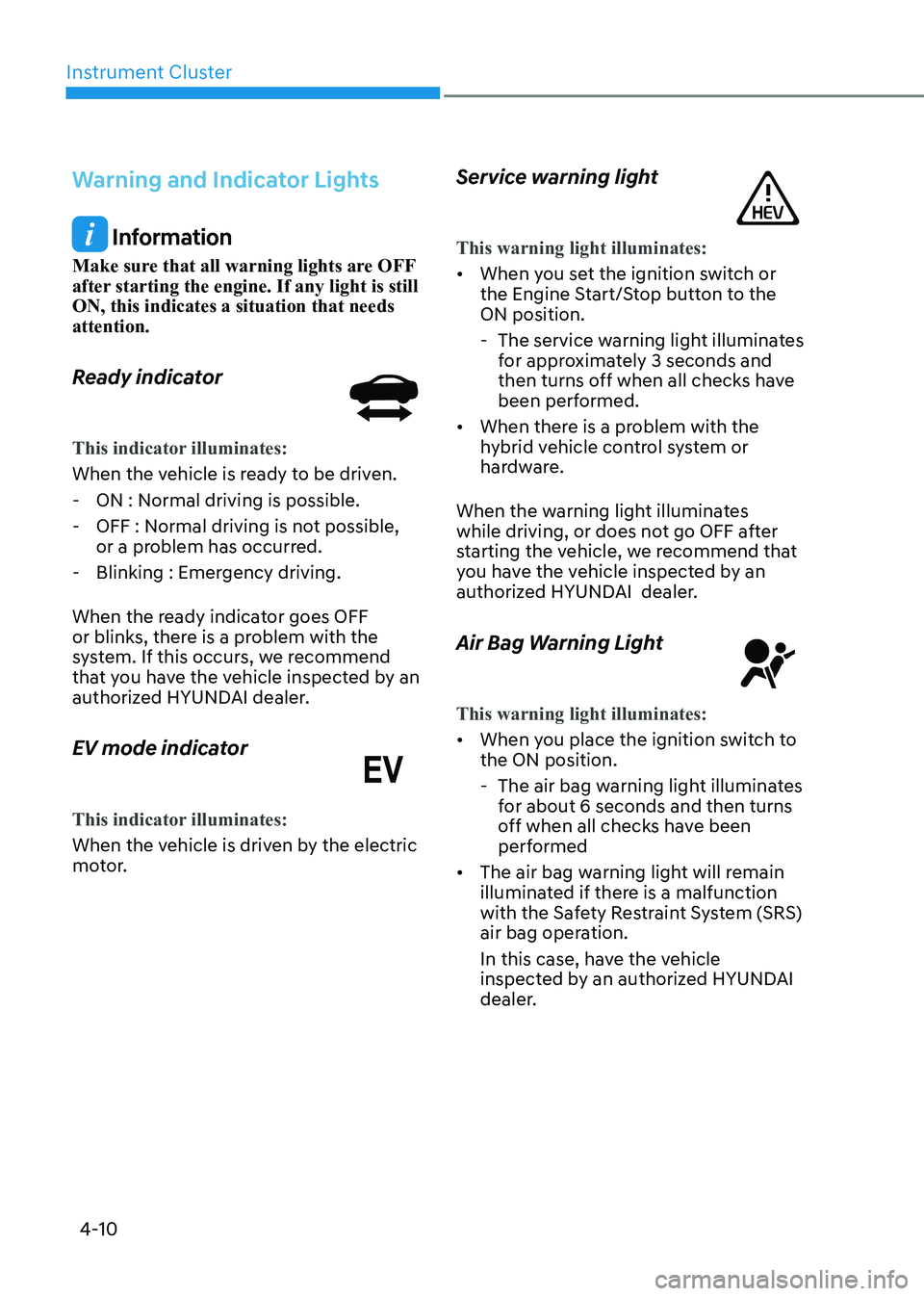
Warning and Indicator Lights
Information
Make sure that all warning lights are OFF
after starting the engine. If any light is still ON, this indicates a situation that needs attention.
Ready indicator
This indicator illuminates:
When the vehicle is ready to be driven. - ON : Normal driving is possible.
- OFF : Normal driving is not possible, or a problem has occurred.
- Blinking : Emergency driving.
When the ready indicator goes OFF
or blinks, there is a problem with the
system. If this occurs, we recommend
that you have the vehicle inspected by an
authorized HYUNDAI dealer.
EV mode indicator
This indicator illuminates:
When the vehicle is driven by the electric
motor. Service warning light
This warning light illuminates:
•
When you set the ignition switch or
the Engine Start/Stop button to the ON position.
- The service warning light illuminates
for approximately 3 seconds and
then turns off when all checks have
been performed.
• When there is a problem with the
hybrid vehicle control system or
hardware.
When the warning light illuminates
while driving, or does not go OFF after
starting the vehicle, we recommend that
you have the vehicle inspected by an
authorized HYUNDAI dealer.
Air Bag Warning Light
This warning light illuminates:
• When you place the ignition switch to the ON position.
- The air bag warning light illuminates for about 6 seconds and then turns
off when all checks have been
performed
• The air bag warning light will remain
illuminated if there is a malfunction
with the Safety Restraint System (SRS)
air bag operation.
In this case, have the vehicle
inspected by an authorized HYUNDAI
dealer.
Page 110 of 529
Instrument Cluster
4-12
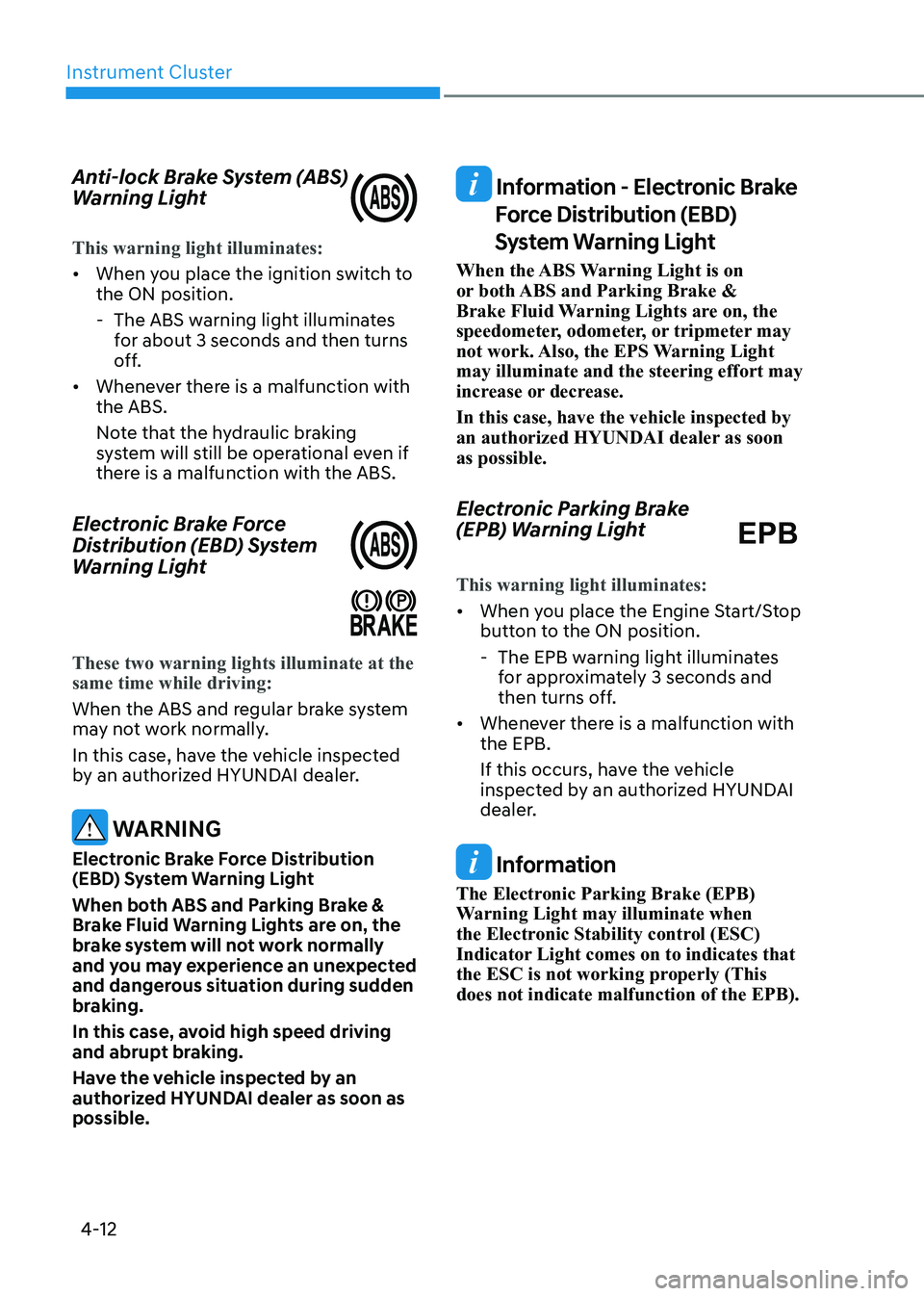
Anti-lock Brake System (ABS)
Warning Light
This warning light illuminates:
•
When you place the ignition switch to the ON position.
- The ABS warning light illuminates for about 3 seconds and then turns
off.
• Whenever there is a malfunction with the ABS.
Note that the hydraulic braking
system will still be operational even if
there is a malfunction with the ABS.
Electronic Brake Force
Distribution (EBD) System
Warning Light
These two warning lights illuminate at the same time while driving:
When the ABS and regular brake system
may not work normally.
In this case, have the vehicle inspected
by an authorized HYUNDAI dealer.
WARNING
Electronic Brake Force Distribution
(EBD) System Warning Light
When both ABS and Parking Brake &
Brake Fluid Warning Lights are on, the
brake system will not work normally
and you may experience an unexpected
and dangerous situation during sudden
braking.
In this case, avoid high speed driving
and abrupt braking.
Have the vehicle inspected by an
authorized HYUNDAI dealer as soon as possible.
Information - Electronic Brake Force Distribution (EBD)
System Warning Light
When the ABS Warning Light is on
or both ABS and Parking Brake &
Brake Fluid Warning Lights are on, the
speedometer, odometer, or tripmeter may
not work. Also, the EPS Warning Light may illuminate and the steering effort may
increase or decrease. In this case, have the vehicle inspected by
an authorized HYUNDAI dealer as soon as possible.
Electronic Parking Brake
(EPB) Warning Light EPB
This warning light illuminates:
• When you place the Engine Start/Stop
button to the ON position.
- The EPB warning light illuminates for approximately 3 seconds and
then turns off.
• Whenever there is a malfunction with the EPB.
If this occurs, have the vehicle
inspected by an authorized HYUNDAI
dealer.
Information
The Electronic Parking Brake (EPB)
Warning Light may illuminate when
the Electronic Stability control (ESC)
Indicator Light comes on to indicates that
the ESC is not working properly (This does not indicate malfunction of the EPB).
Page 114 of 529
Instrument Cluster
4-16
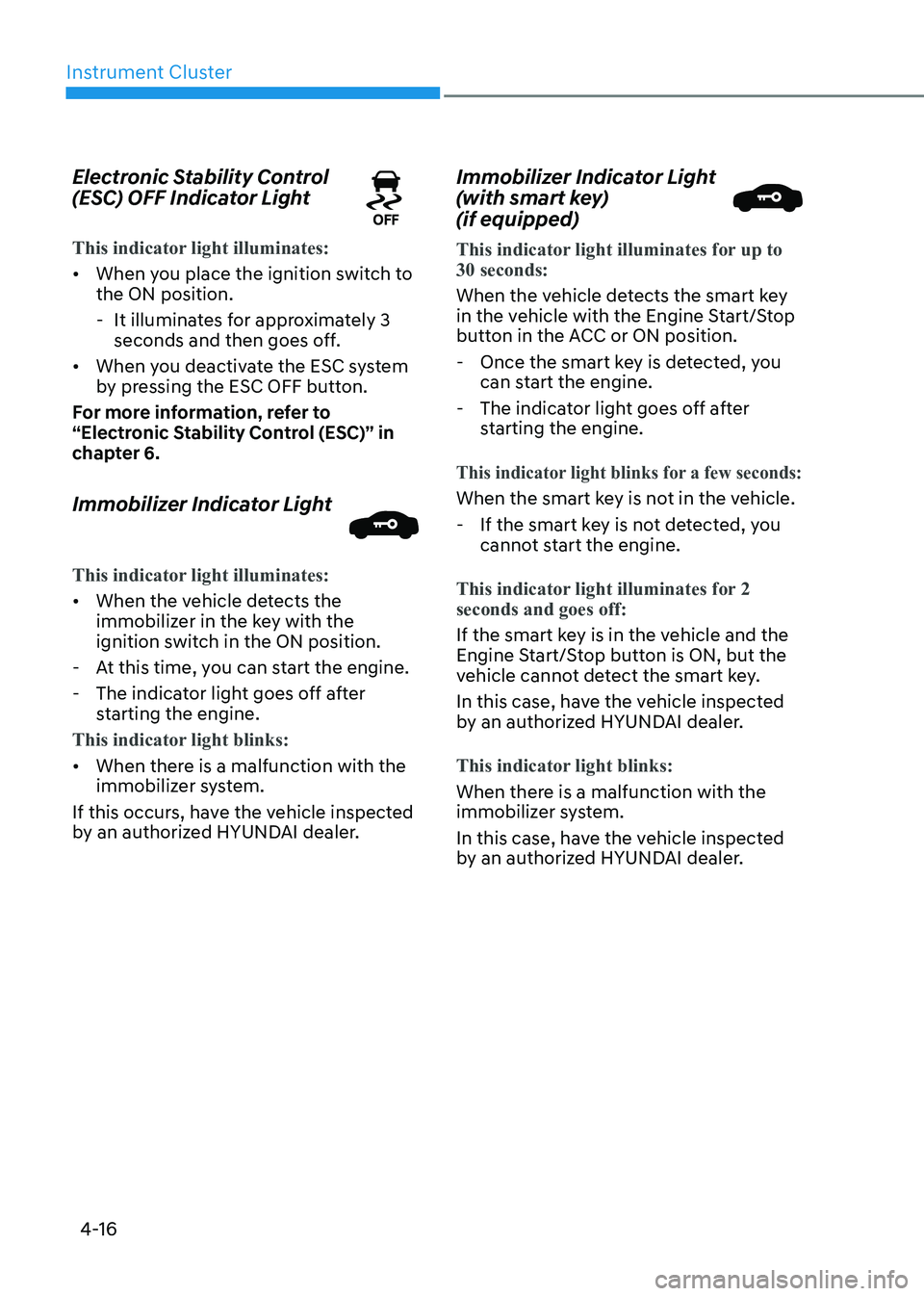
Electronic Stability Control
(ESC) OFF Indicator Light
This indicator light illuminates:
•
When you place the ignition switch to the ON position.
- It illuminates for approximately 3 seconds and then goes off.
• When you deactivate the ESC system
by pressing the ESC OFF button.
For more information, refer to
“Electronic Stability Control (ESC)” in
chapter 6.
Immobilizer Indicator Light
This indicator light illuminates:
• When the vehicle detects the
immobilizer in the key with the
ignition switch in the ON position.
- At this time, you can start the engine.
- The indicator light goes off after starting the engine.
This indicator light blinks:
• When there is a malfunction with the
immobilizer system.
If this occurs, have the vehicle inspected
by an authorized HYUNDAI dealer. Immobilizer Indicator Light
(with smart key) (if equipped)
This indicator light illuminates for up to 30 seconds:
When the vehicle detects the smart key
in the vehicle with the Engine Start/Stop
button in the ACC or ON position.
- Once the smart key is detected, you can start the engine.
- The indicator light goes off after starting the engine.
This indicator light blinks for a few seconds:
When the smart key is not in the vehicle.
- If the smart key is not detected, you cannot start the engine.
This indicator light illuminates for 2 seconds and goes off:
If the smart key is in the vehicle and the
Engine Start/Stop button is ON, but the
vehicle cannot detect the smart key.
In this case, have the vehicle inspected
by an authorized HYUNDAI dealer.
This indicator light blinks:
When there is a malfunction with the
immobilizer system.
In this case, have the vehicle inspected
by an authorized HYUNDAI dealer.
Page 115 of 529
04
4-17
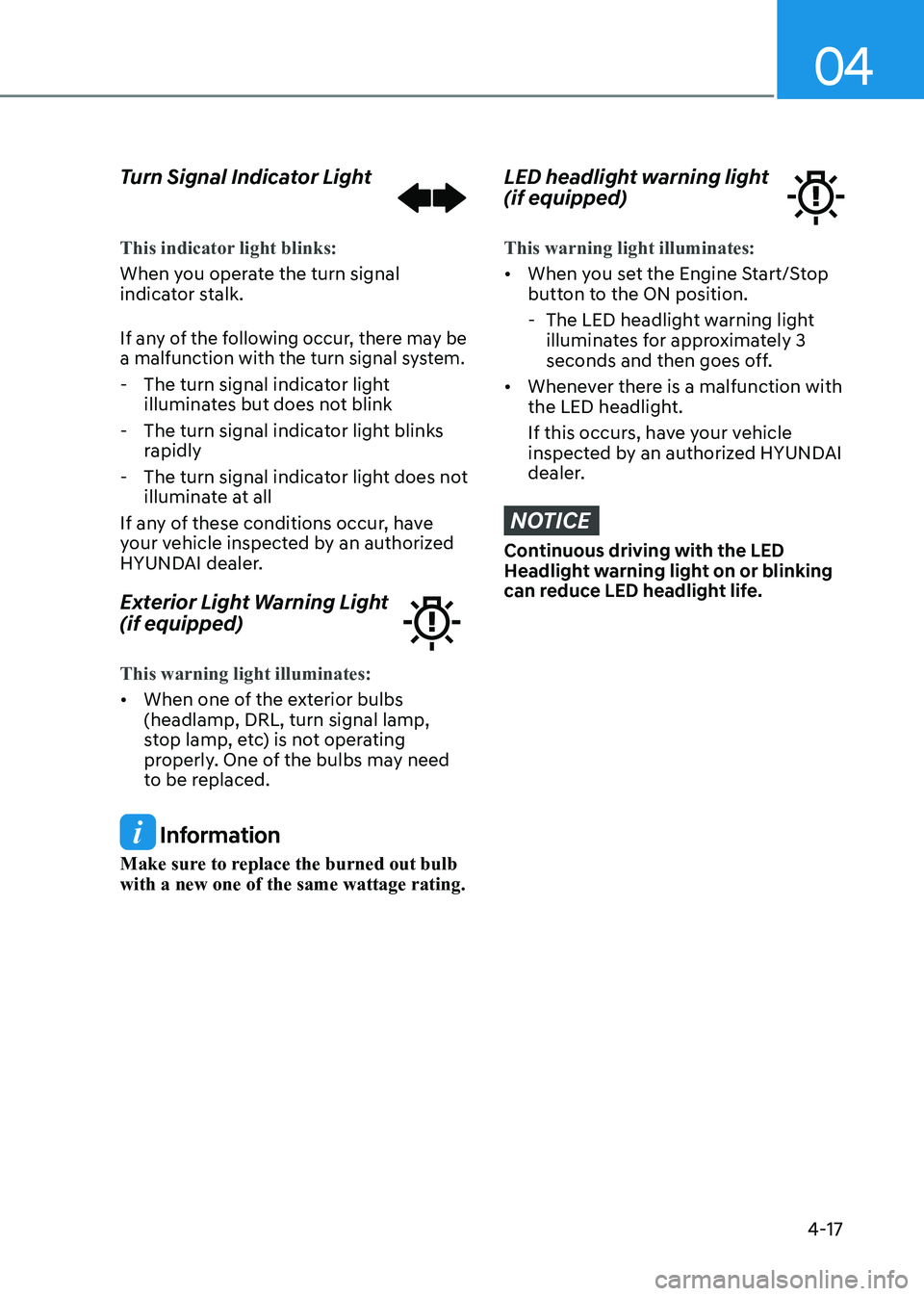
Turn Signal Indicator Light
This indicator light blinks:
When you operate the turn signal
indicator stalk.
If any of the following occur, there may be
a malfunction with the turn signal system.
- The turn signal indicator light
illuminates but does not blink
- The turn signal indicator light blinks rapidly
- The turn signal indicator light does not illuminate at all
If any of these conditions occur, have
your vehicle inspected by an authorized
HYUNDAI dealer.
Exterior Light Warning Light (if equipped)
This warning light illuminates:
• When one of the exterior bulbs (headlamp, DRL, turn signal lamp,
stop lamp, etc) is not operating
properly. One of the bulbs may need
to be replaced.
Information
Make sure to replace the burned out bulb with a new one of the same wattage rating.
LED headlight warning light (if equipped)
This warning light illuminates:
• When you set the Engine Start/Stop
button to the ON position.
- The LED headlight warning light illuminates for approximately 3
seconds and then goes off.
• Whenever there is a malfunction with
the LED headlight.
If this occurs, have your vehicle
inspected by an authorized HYUNDAI
dealer.
NOTICE
Continuous driving with the LED
Headlight warning light on or blinking
can reduce LED headlight life.
Page 117 of 529

04
4-19
High Beam Indicator Light
This indicator light illuminates:
•
When the headlights are on and in the high beam position.
• When the turn signal lever is pulled
into the Flash-to-Pass position.
Light ON Indicator Light
This indicator light illuminates:
When the tail lights or headlamps are on.
High Beam Assist indicator
light (if equipped)
This indicator light illuminates:
• When the High Beam is on with the
light switch in the AUTO light position.
• If your vehicle detects oncoming or
preceding vehicles, High Beam Assist
system will switch the high beam to
low beam automatically.
For more information, refer to "High
Beam Assist (HBA)" in chapter 5. Forward Collision-Avoidance
Assist Warning Light (if equipped)
This warning light illuminates:
•
When you set the ignition switch or
Engine Start/Stop button to the ON position.
- It illuminates for approximately 3 seconds and then goes off.
• When there is a malfunction with
FCA. In this case, have your vehicle
inspected by an authorized dealer of
HYUNDAI.
For more information, refer to "Forward
Collision-Avoidance Assist (FCA)" in
chapter 6.
Lane Keep Assist Indicator
Light (if equipped)
This indicator light illuminates:
• [Green] When you activate the lane
departure warning system by pressing
the LKA button and all of the system
operating conditions are satisfied.
• [White] When system operating
conditions are not satisfied or when
the sensor does not detect the lane line.
• [Yellow] When there is a malfunction
with Lane Keeping Assist system.
In this case, have your vehicle inspected
by an authorized HYUNDAI dealer.
For more information, refer to "Lane
Keeping Assist (LKA)" in chapter 6.
Page 118 of 529
Instrument Cluster
4-20
LCD Display Messages
Shift to P or N to start engine
(for smart key system)
This warning message is displayed if
you try to start the engine with the shift
button not in the P (Park) or N (Neutral) position.
Information
You can start the engine with the shift
button in the N (Neutral) position. But, for
your safety, have you start the engine with
the shift button in the P (Park) position.
Shift to P (for smart key system and
dual clutch transmission)
This message is displayed if you try to
turn off the engine without the shift
button in P (Park) position.
If this occurs, the Engine Start/Stop
button turns to the ACC position (If you
press the Engine Start/Stop button once
more, it will turn to the ON position).
Low key battery
(for smart key system)
This warning message is displayed if the
battery of the smart key is discharged
while changing the Engine Start/Stop
button to the OFF position.
Press brake pedal to start engine
(for smart key system and dual
clutch transmission)
This warning message is displayed if the
Engine Start/Stop button changes to
the ACC position twice by pressing the
button repeatedly without depressing
the brake pedal.
You can start the vehicle by depressing
the brake pedal and then pressing the
Engine Start/Stop button. Key not in vehicle
(for smart key system)
This warning message is displayed if the
smart key is not in the vehicle when you
press the Engine Start/Stop button.
When attempting to start the vehicle,
always have the smart key with you.
Key not detected
(for smart key system)
This warning message is displayed if the
smart key is not detected when you press
the Engine Start/Stop button.
Press START button again
(for smart key system)
This message is displayed if you were
unable to start the vehicle when the
Engine Start/Stop button was pressed.
If this occurs, attempt to start the engine
by pressing the Engine Start/Stop button again.
If the warning message appears each
time you press the Engine Start/Stop
button, have your vehicle inspected by
an authorized HYUNDAI dealer.
Page 119 of 529
04
4-21
12V battery discharging due to
additional electrical devices
This message is displayed if the 12V
battery voltage is weak due to any
non-factory electrical accessories (ex.
dashboard camera) while parking. Be
careful that the battery is not discharged.
If the message appears after removing
the non-factory electrical accessories,
we recommend that you have the vehicle
inspected by an authorized HYUNDAI
dealer.
Press START button with key
(for smart key system)
This warning message is displayed if you
press the Engine Start/Stop button while
the warning message "Key not detected"
is displayed.
At this time, the immobilizer indicator
light blinks.
Check BRAKE SWITCH fuse (for
smart key system and dual clutch
transmission)
This warning message is displayed if the
brake switch fuse is disconnected.
You need to replace the fuse with a new
one before starting the engine.
If that is not possible, you can start the
engine by pressing the Engine Start/
Stop button for 10 seconds in the ACC position.
Door, Hood, Trunk Open Indicator
OCN7040017
This warning is displayed if any door or
the hood or the liftgate is left open. The
warning will indicate which door is open
in the display.
CAUTION
Before driving the vehicle, you should
confirm that the door/hood/liftgate
is fully closed. Also, check there is no
door/hood/liftgate open warning light
or message displayed on the instrument
cluster.
Sunroof Open (if equipped)
OCN7040018
This warning is displayed if you turn off
the engine when the sunroof is open.
Close the sunroof securely before leaving
your vehicle.
Page 131 of 529
04
4-33
2. Door
ItemsExplanation
Auto Lock•
Disable : The auto door lock operation will be deactivated.
• Enable on Speed: All doors will be automatically locked when the
vehicle speed exceeds 15 km/h (9 mph).
• Enable on Shift: All doors will be automatically locked if the
automatic transmission shift button is pressed from the P (Park)
position to the R (Reverse), N (Neutral), or D (Drive) position. (Only
when the engine is running.)
Auto Unlock •
Disable : The auto door unlock operation will be canceled.
• On key out/Vehicle Off : All doors will be automatically unlocked
when the ignition key is removed from the ignition switch or the
Engine Start/Stop button is set to the OFF position.
• On Shift to P: All doors will be automatically unlocked if the
automatic transmission shift button is pressed to P (Park) position.
(Only when the engine is running.)
Two Press Unlock •
Off: The two press unlock function will be deactivated. Therefore,
all doors will unlock if the door unlock button is pressed.
• On: Only the driver’s door will unlock if the door unlock button is
pressed. When the door unlock button is pressed again within 4
seconds, the remaining doors will unlock.
Horn Feedback To activate or deactivate the horn feedback.
If the horn feedback is activated, after locking the door by pressing
the lock button on the remote key, and pressing it again within 4
seconds, the horn feedback sound will operate once to indicate that
all doors are locked (if equipped with remote key).
Smart Trunk To activate or deactivate the smart trunk.
For more information, refer to “Smart trunk” in chapter 5.
3. Lights
Items
Explanation
IlluminationTo adjust the illumination level.
Level 1~20
One Touch Turn Signal •
Off: The one touch turn signal function will be deactivated.
• 3, 5, 7 Flashes: The turn signal indicator will blink 3, 5, or 7 times
when the turn signal lever is moved slightly.
For more information, refer to “Lighting” in chapter 5.
Ambient Light
Brightness To adjust the brightness of the ambient light.
Headlight Delay To activate or deactivate the headlamp delay function.
For more information, refer to “Lighting” in chapter 5.
High Beam Assist To activate or deactivate the High Beam Assist function.
For more information, refer to “High Beam Assist (HBA)” in
chapter 5.
Page 136 of 529
Instrument Cluster
4-38
Automatic reset
To automatically reset the average fuel
economy after refueling, select the "Fuel
Econ. Reset" mode in the User Settings
menu on the LCD display.
- After Ignition: When the engine has been OFF for 4 hours or longer the
average fuel economy will reset
automatically.
- After Refueling: The average fuel economy will reset automatically after
adding 6 liters (1.6 gallons) of fuel or
more and after driving speed exceeds
1 km/h (1 mph).
Information
The vehicle must be driven for a minimum of 300 meters (0.19 miles) since the last
ignition key cycle before the average fuel
economy will be recalculated.
Instant Fuel Economy (2)
The instantaneous fuel economy is
displayed according to the bar graph in
the LCD display while driving.
Accumulated Info display
ODN8A050346C
This display shows the accumulated trip
distance (1), the average fuel economy
(2), and the total driving time (3).
The information is accumulated starting
from the last reset. To reset the information, press and
hold the OK button when viewing the
Accumulated driving info. The trip
distance, the average fuel economy,
and total driving time will reset
simultaneously.
The accumulated driving information will
continue to be counted while the engine
is still running (for example, when the
vehicle is in traffic or stopped at a stop
light).
Information
The vehicle must be driven for a minimum of 300 meters (0.19 miles) since the last
ignition key cycle before the average fuel
economy will be recalculated.
Drive Info display
ODN8A050347C
This display shows the trip distance (1),
the average fuel economy (2), and the
total driving time (3).
The information is combined for each
ignition cycle. However, when the engine
has been OFF for 4 hours or longer the
Drive Info screen will reset.
To manually reset the information, press
and hold the OK button when viewing
the Drive Info. The trip distance, the
average fuel economy, and total driving
time will reset simultaneously.
The driving information will continue
to be counted while the engine is still
running (for example, when the vehicle is
in traffic or stopped at a stop light).
Page 144 of 529
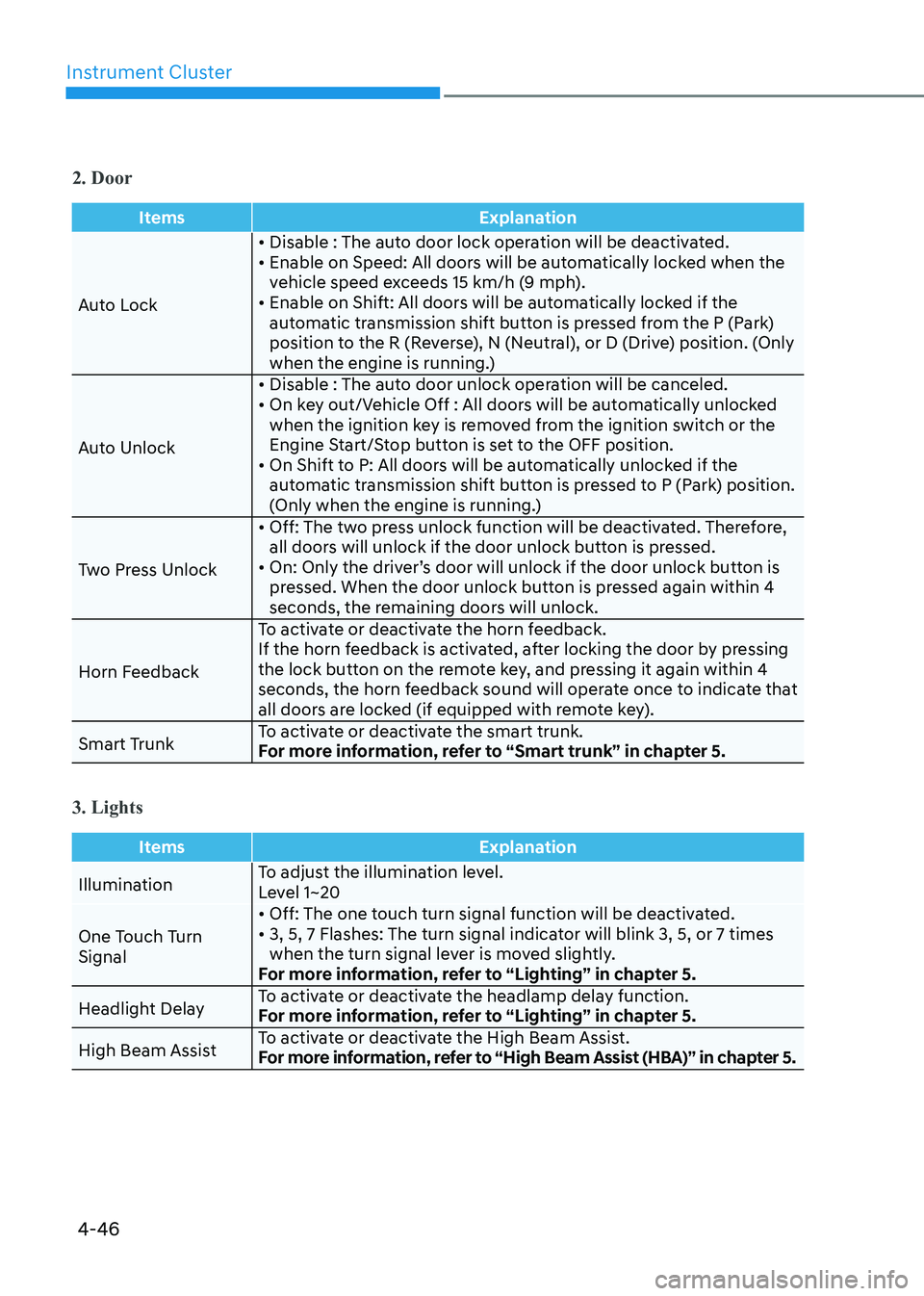
Instrument Cluster
4-46
2. Door
ItemsExplanation
Auto Lock• Disable : The auto door lock operation will be deactivated.
• Enable on Speed: All doors will be automatically locked when the
vehicle speed exceeds 15 km/h (9 mph).
• Enable on Shift: All doors will be automatically locked if the
automatic transmission shift button is pressed from the P (Park)
position to the R (Reverse), N (Neutral), or D (Drive) position. (Only
when the engine is running.)
Auto Unlock • Disable : The auto door unlock operation will be canceled.
• On key out/Vehicle Off : All doors will be automatically unlocked
when the ignition key is removed from the ignition switch or the
Engine Start/Stop button is set to the OFF position.
• On Shift to P: All doors will be automatically unlocked if the automatic transmission shift button is pressed to P (Park) position.
(Only when the engine is running.)
Two Press Unlock • Off: The two press unlock function will be deactivated. Therefore,
all doors will unlock if the door unlock button is pressed.
• On: Only the driver’s door will unlock if the door unlock button is pressed. When the door unlock button is pressed again within 4
seconds, the remaining doors will unlock.
Horn Feedback To activate or deactivate the horn feedback.
If the horn feedback is activated, after locking the door by pressing
the lock button on the remote key, and pressing it again within 4
seconds, the horn feedback sound will operate once to indicate that
all doors are locked (if equipped with remote key).
Smart Trunk To activate or deactivate the smart trunk.
For more information, refer to “Smart trunk” in chapter 5.
3. Lights
Items
Explanation
IlluminationTo adjust the illumination level.
Level 1~20
One Touch Turn Signal • Off: The one touch turn signal function will be deactivated.
• 3, 5, 7 Flashes: The turn signal indicator will blink 3, 5, or 7 times
when the turn signal lever is moved slightly.
For more information, refer to “Lighting” in chapter 5.
Headlight Delay To activate or deactivate the headlamp delay function.
For more information, refer to “Lighting” in chapter 5.
High Beam Assist To activate or deactivate the High Beam Assist.
For more information, refer to “High Beam Assist (HBA)” in chapter 5.