key HYUNDAI ELANTRA SEL 2021 Repair Manual
[x] Cancel search | Manufacturer: HYUNDAI, Model Year: 2021, Model line: ELANTRA SEL, Model: HYUNDAI ELANTRA SEL 2021Pages: 570, PDF Size: 52.21 MB
Page 250 of 570
![HYUNDAI ELANTRA SEL 2021 Repair Manual Convenient Features
5-114
Wireless Cellular Phone
Charging System (if equipped)
OCN7050070
[A] : Charging pad
There is a wireless cellular phone charger
inside the front console.
The system is ava](/img/35/56089/w960_56089-249.png "HYUNDAI ELANTRA SEL 2021 Repair Manual Convenient Features
5-114
Wireless Cellular Phone
Charging System (if equipped)
OCN7050070
[A] : Charging pad
There is a wireless cellular phone charger
inside the front console.
The system is ava")
Convenient Features
5-114
Wireless Cellular Phone
Charging System (if equipped)
OCN7050070
[A] : Charging pad
There is a wireless cellular phone charger
inside the front console.
The system is available when all doors
are closed, and when the ignition switch
is in the ACC/ON position.
To charge a cellular phone
The wireless cellular phone charging
system charges only the Qi-enabled
cellular phones. Read the label on the
cellular phone accessory cover or visit
your cellular phone manufacturer’s
website to check whether your cellular
phone supports the Qi technology.
The wireless charging process starts
when you put a Qi-enabled cellular
phone on the wireless charging unit.
1.
Remo
ve other items, including the
smart key, from the wireless charging
unit. If not, the wireless charging
process may be interrupted. Place the
cellular phone on the center of the
charging pad (
).
2.
When charging s
tarts, a charging
icon is displayed on the infotainment
system screen. However, depending
on the infotainment system screen,
the wireless charging icon may not be
displayed. See the infotainment web
manual for details.
3.
You can turn ON or OFF the wir
eless
charging function in the user settings
mode on the instrument cluster. For
further information, refer to the “LCD
Display Modes” in this chapter.
The system warns you with a message
on the LCD display if the cellular phone
is still on the wireless charging unit after
the engine is turned OFF and the front
door is opened.
Page 251 of 570
5-115
05
Information
For some manufacturers’ cellular phones,
the system may not warn you even though
the cellular phone is left on the wireless
charging unit. This is due to the particular
characteristic of the cellular phone and
not a malfunction of the wireless charging.
NOTICE
• The wireless cellular phone charging
system may not support certain
cellular phones, which are not
verified for the Qi specification (
).
•
When placing your c
ellular phone
on the charging mat, position the
phone in the middle of the mat for
optimal charging performance. If
your cellular phone is off to the side,
the charging rate may be less and in
some cases the cellular phone may
experience higher heat conduction.
•
In some cases, the wireless char
ging
may stop temporarily when the
Remote Key or Smart Key is used,
either when starting the vehicle or
locking/unlocking the doors, etc.
•
The wireless char
ging process may
temporarily stop, when temperature
abnormally increases inside the
wireless cellular phone charging
system. Stop the charging cellular
phone and wait until temperature
falls to a certain level.
•
The wireless char
ging process may
temporarily stop when there is
any metallic item, such as a coin,
between the wireless cellular phone
charging system and the cellular
phone. •
When charging some c
ellular phones
with a self-protection feature,
the wireless charging speed may
decrease and the wireless charging
may stop.
•
If the c
ellular phone has a thick
cover, the wireless charging may not
be possible.
•
If the c
ellular phone is not
completely contacting the charging
pad, wireless charging may not
operate properly.
• Some magnetic it ems like credit
cards, phone cards or rail tickets may
be damaged if left with the cellular
phone during the charging process.
•
When any c
ellular phone without
a wireless charging function or a
metallic object is placed on the
charging pad, a small noise may
sound. This small sound is due to the
vehicle discerning compatibility of
the object placed on the charging
pad. It does not affect your vehicle or
the cellular phone in any way.
Information
If the ignition switch is in the LOCK/ OFF
position, the charging also stops.
Information
This device complies with part 15 of the
FCC Rules.
Operation is subject to the following two
conditions:
1.
This device may not cause harmful
interference, and
2.
This device must accept any
interference r
eceived, including
interference that may cause undesired
operation.
Page 260 of 570

6
6. While Driving
Before Driving ........................................................................\
........................6-4Before Entering the Vehicle ........................................................................\
.............6-4
Bef ore Starting ........................................................................\
................................. 6-4
Ignition Switch ........................................................................\
.......................6-5Key Ignition Switch ........................................................................\
.......................... 6-5
Engine S tart/Stop Button ........................................................................\
................ 6-8
Intelligent variable transmission ..................................................................6-12Intelligent variable transmission operation ...........................................................6-12
P arking ........................................................................\
............................................. 6-
17
Good driving practices
........................................................................\
.................... 6-
18
Brake System ........................................................................\
........................6-19Power Brakes ........................................................................\
...................................6-19
Disc Brak es Wear Indicator........................................................................\
.............6-19
Parking brake
........................................................................\
.................................. 6-
20
Electronic Parking Brake (EPB)
........................................................................\
..... 6-22
A
uto Hold
........................................................................\
.....................................
...6-26
Anti-lock Brake System (ABS) ..................................................................... 6-29Electronic Stability Control (ESC) ........................................................................\
.. 6-31
V ehicle Stability Management (VSM) .................................................................. 6-
33
Hill-Start Assist Control (HAC)
........................................................................\
....... 6-
34
Good Braking Practices
........................................................................\
................. 6-
34
ISG (Idle Stop and Go) system..................................................................... 6-35To Activate the ISG System ........................................................................\
............6-35
T o Deactivate the ISG System ........................................................................\
....... 6-37
ISG System Malfunction
........................................................................\
................ 6-
37
Battery Sensor Deactivation
........................................................................\
.......... 6-
38
Drive Mode Integrated Control System ......................................................6-39Drive Mode ........................................................................\
..................................... 6-39
Smart shift on trip comput er ........................................................................\
......... 6-42
Special Driving Conditions ........................................................................\
..6-43Hazardous Driving Conditions ........................................................................\
...... 6-43
Rocking the V ehicle ........................................................................\
....................... 6-43
Smoo
th Cornering
........................................................................\
.......................... 6-44
Driving a
t Night
........................................................................\
.............................. 6-44
Driving in the Rain ........................................................................\
.......................... 6-44
Driving in Flooded Ar
eas
........................................................................\
................ 6-45
High
way Driving
........................................................................\
............................. 6-45
Page 264 of 570
06
6-5
Key Ignition Switch (if equipped)
WARNING
To reduce the risk of SERIOUS INJURY or
DEATH, take the following precautions:
• NEVER allow children or any person
who is unfamiliar with the vehicle to
touch the ignition switch or related
parts. Unexpected and sudden
vehicle movement can occur.
• NEVER reach through the steering
wheel for the ignition switch, or any
other control, while the vehicle is in
motion. The presence of your hand
or arm in this area may cause a loss
of vehicle control resulting in an
accident.
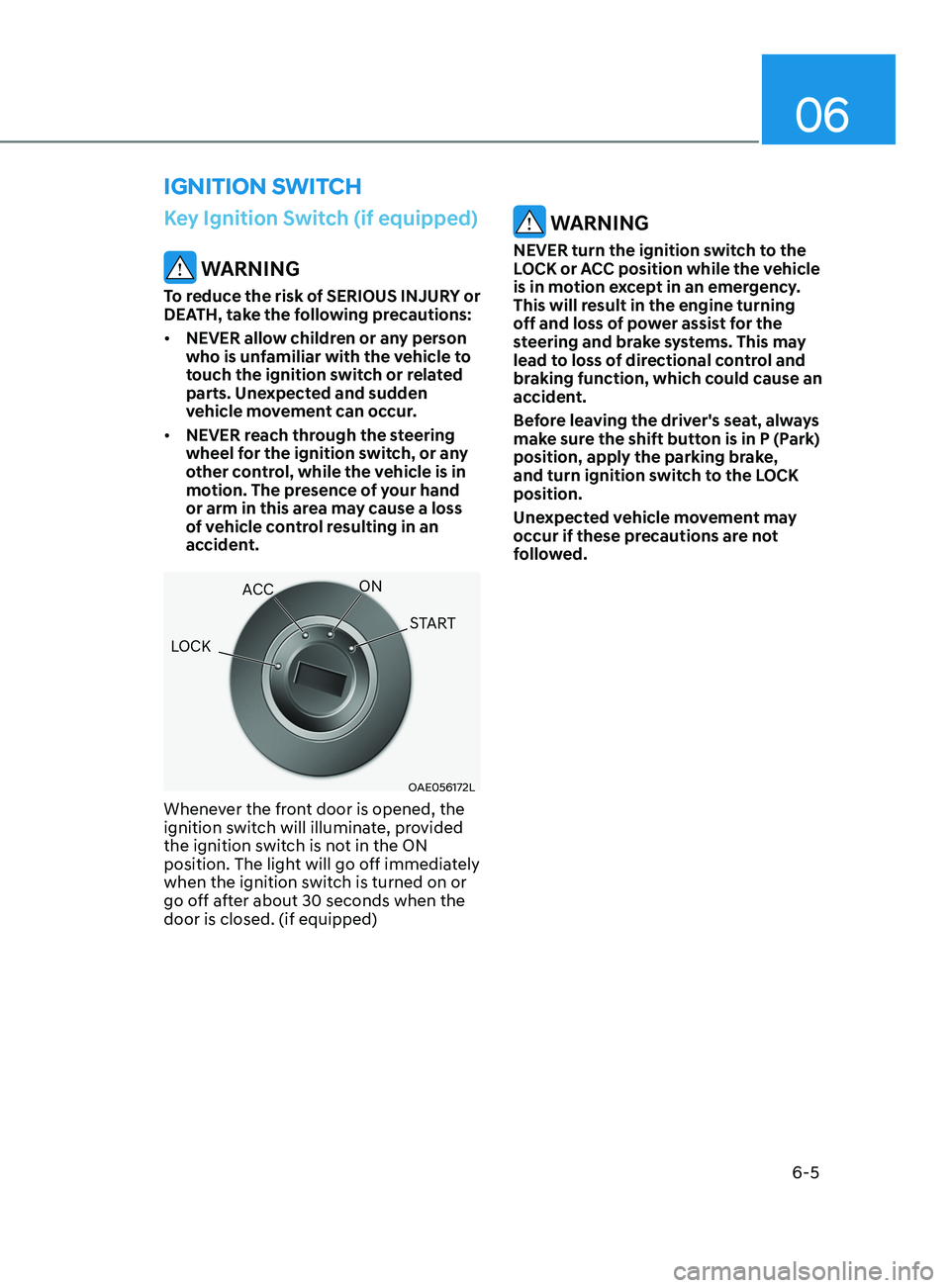
OAE056172L
Whenever the front door is opened, the
ignition switch will illuminate, provided
the ignition switch is not in the ON
position. The light will go off immediately
when the ignition switch is turned on or
go off after about 30 seconds when the
door is closed. (if equipped)
WARNING
NEVER turn the ignition switch to the
LOCK or ACC position while the vehicle
is in motion except in an emergency.
This will result in the engine turning
off and loss of power assist for the
steering and brake systems. This may
lead to loss of directional control and
braking function, which could cause an
accident.
Before leaving the driver's seat, always
make sure the shift button is in P (Park)
position, apply the parking brake,
and turn ignition switch to the LOCK
position.
Unexpected vehicle movement may
occur if these precautions are not
followed.
ignition Switch
LOCK ACC
ON
START
Page 265 of 570
6-6
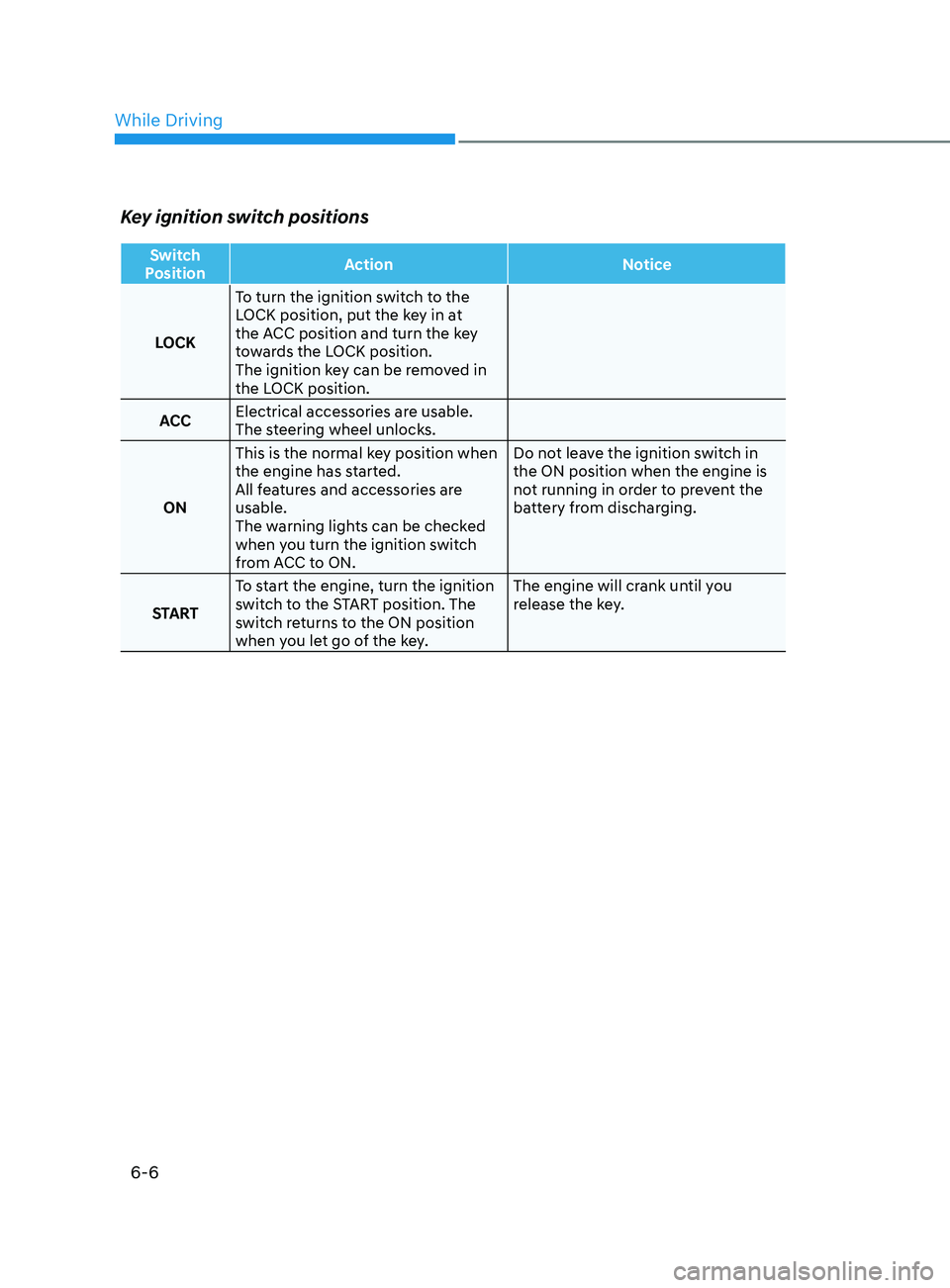
Key ignition switch positions
Switch
Position Action
Notice
LOCK To turn the ignition switch to the
LOCK position, put the key in at
the ACC position and turn the key
towards the LOCK position.
The ignition key can be removed in
the LOCK position.
ACC Electrical accessories are usable.
The steering wheel unlocks.
ON This is the normal key position when
the engine has started.
All features and accessories are
usable.
The warning lights can be checked
when you turn the ignition switch
from ACC to ON. Do not leave the ignition switch in
the ON position when the engine is
not running in order to prevent the
battery from discharging.
START To start the engine, turn the ignition
switch to the START position. The
switch returns to the ON position
when you let go of the key. The engine will crank until you
release the key.
While Driving
Page 266 of 570
06
6 -7
Starting the engine
WARNING
Always wear appropriate shoes when
operating your vehicle.
Unsuitable shoes, such as high heels,
ski boots, sandals, flip-flops, etc., may
interfere with your ability to use the
brake and accelerator pedals.
Vehicle with intelligent variable
transmission:
1.
Make sur
e the parking brake is
applied.
2.
Make sur
e the shift lever is in P (Park).
3.
Depress the br
ake pedal.
4.
Turn the ignition s
witch to the START
position. Hold the key (maximum of
10 seconds) until the engine starts and
release it.
Information
• It is best to maintain a moderate engine
speed until the vehicle engine comes
up to normal operating temperature.
Avoid harsh or abrupt acceleration or
deceleration while the engine is still
cold.
• Whether the engine is cold or warm,
always start the vehicle with your foot
on the brake pedal. Do not depress the
accelerator while starting the vehicle.
Do not rev the engine while warming
it up.
NOTICE
To prevent damage to the vehicle:
• Do not hold the ignition key in the
START position for more than 10
seconds. Wait 5 to 10 seconds before
trying again.
• Do not push or tow your vehicle to
start the engine.
Turning off the engine
1. Stop the vehicle and depress the
br
ake pedal fully.
2.
Shift the gear to P (P
ark).
3.
Turn the ignition s
witch to the off
position and apply the parking brake.
Page 267 of 570
6-8
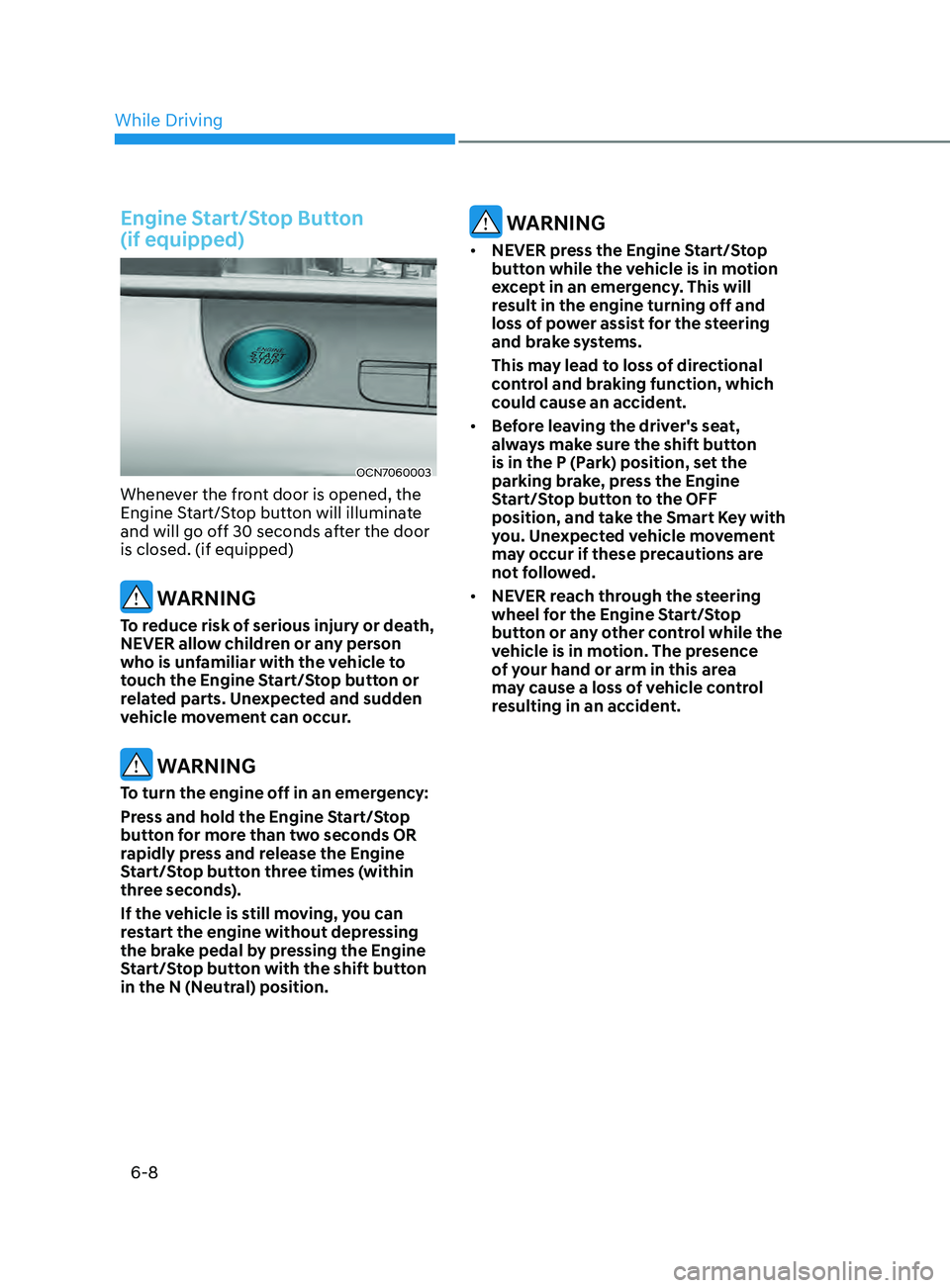
Engine Start/Stop Button
(if equipped)
OCN7060003
Whenever the front door is opened, the
Engine Start/Stop button will illuminate
and will go off 30 seconds after the door
is closed. (if equipped)
WARNING
To reduce risk of serious injury or death,
NEVER allow children or any person
who is unfamiliar with the vehicle to
touch the Engine Start/Stop button or
related parts. Unexpected and sudden
vehicle movement can occur.
WARNING
To turn the engine off in an emergency:
Press and hold the Engine Start/Stop
button for more than two seconds OR
rapidly press and release the Engine
Start/Stop button three times (within
three seconds).
If the vehicle is still moving, you can
restart the engine without depressing
the brake pedal by pressing the Engine
Start/Stop button with the shift button
in the N (Neutral) position.
WARNING
• NEVER press the Engine Start/Stop
button while the vehicle is in motion
except in an emergency. This will
result in the engine turning off and
loss of power assist for the steering
and brake systems.
This may lead to loss of directional
control and braking function, which
could cause an accident.
• Before leaving the driver's seat,
always make sure the shift button
is in the P (Park) position, set the
parking brake, press the Engine
Start/Stop button to the OFF
position, and take the Smart Key with
you. Unexpected vehicle movement
may occur if these precautions are
not followed.
• NEVER reach through the steering
wheel for the Engine Start/Stop
button or any other control while the
vehicle is in motion. The presence
of your hand or arm in this area
may cause a loss of vehicle control
resulting in an accident.
While Driving
Page 269 of 570
6-10
Starting the engine
WARNING
• Always wear appropriate shoes when
operating your vehicle.
Unsuitable shoes, such as high heels,
ski boots, sandals, flip-flops, etc.,
may interfere with your ability to use
the brake and accelerator pedals.
• Do not start the vehicle with the
accelerator pedal depressed. The
vehicle can move and lead to an
accident.
• Wait until the engine rpm is normal.
The vehicle may suddenly move if
the brake pedal is released when the
rpm is high.
Information
• The engine will start by pressing the
Engine Start/Stop button, only when
the smart key is in the vehicle.
• Even if the smart key is in the vehicle,
if it is far away from the driver, the
engine may not start.
• When the Engine Start/Stop button
is in the ACC or ON position, if any
door is open, the system checks for the
smart key. If the smart key is not in the
vehicle, the “
” indicator will blink
and the warning "Key not in vehicle"
will come on and if all doors are closed,
the chime will also sound for about
5 seconds. Keep the smart key in the
vehicle when using the ACC position or
if the vehicle engine is ON. Vehicle with intelligent variable
transmission:
1.
Alwa
ys carry the smart key with you.
2.
Make sur
e the parking brake is
applied.
3.
Make sur
e the shift lever is in P (Park).
4.
Depress the br
ake pedal.
5.
Press the E
ngine Start/Stop button.
Information
•
Do not wait for the engine to warm up
while the vehicle remains stationary.
Start driving at moderate engine
speeds. (Aggressive accelerating and
decelerating should be avoided.)
• Always start the vehicle with your foot
on the brake pedal. Do not depress the
accelerator while starting the vehicle.
Do not rev the engine while warming
it up.
While Driving
Page 270 of 570
06
6-11
NOTICE
To prevent damage to the vehicle:
• If the engine stalls while you are in
motion, do not attempt to move the
shift button to the P (Park) position.
If traffic and road conditions permit,
you may put the shift button in the N
(Neutral) position while the vehicle
is still moving and press the Engine
Start/Stop button in an attempt to
restart the engine.
• Do not push or tow your vehicle to
start the engine.
NOTICE
To prevent damage to the vehicle:
When the stop lamp switch fuse is
blown, you can't start the engine
normally. Replace the fuse with a new
one. If you are not able to replace
the fuse, you can start the engine by
pressing and holding the Engine Start/
Stop button for 10 seconds with the
Engine Start/Stop button in the ACC
position.
Do not press the Engine Start/Stop
button for more than 10 seconds except
when the stop lamp switch fuse is
blown.
For your safety always depress the
brake pedal before starting the engine.
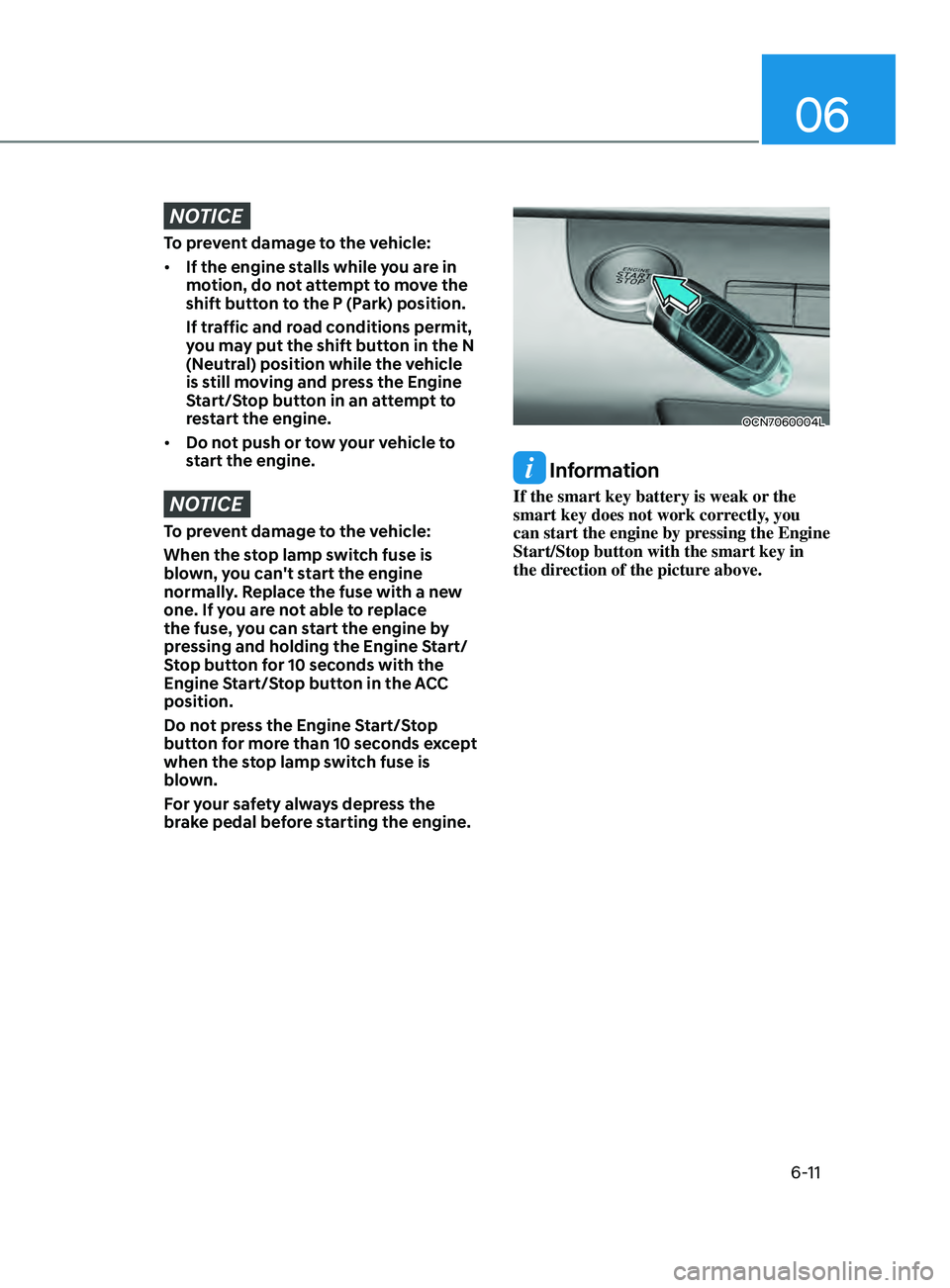
OCN7060004L
Information
If the smart key battery is weak or the
smart key does not work correctly, you
can start the engine by pressing the Engine
Start/Stop button with the smart key in
the direction of the picture above.
Page 276 of 570
06
6-17
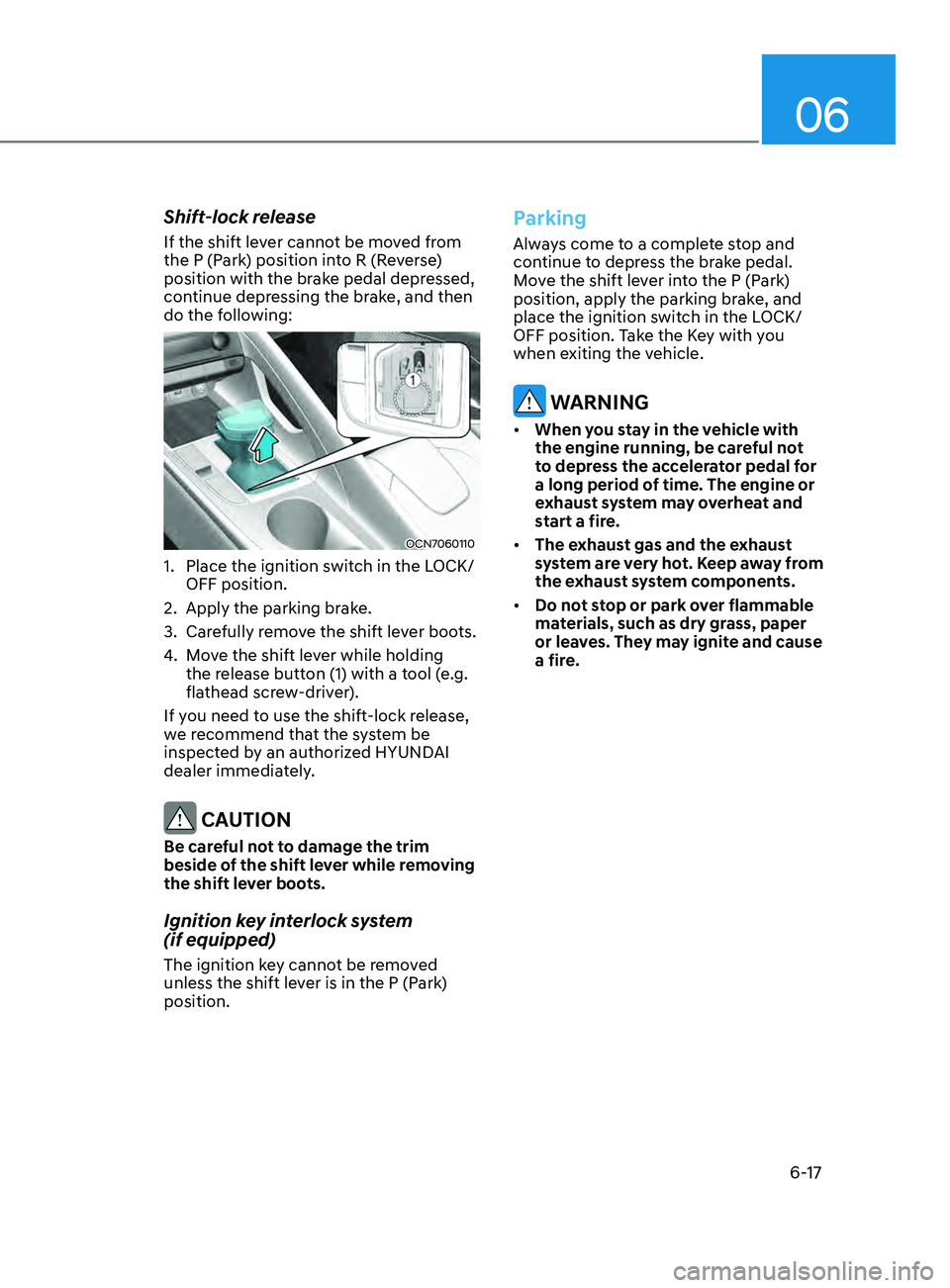
Shift-lock release
If the shift lever cannot be moved from
the P (Park) position into R (Reverse)
position with the brake pedal depressed,
continue depressing the brake, and then
do the following:
OCN7060110
1. Place the ignition switch in the LOCK/
OFF position.
2.
Apply the parking brak
e.
3.
Care
fully remove the shift lever boots.
4.
Mo
ve the shift lever while holding
the release button (1) with a tool (e.g.
flathead screw-driver).
If you need to use the shift-lock release,
we recommend that the system be
inspected by an authorized HYUNDAI
dealer immediately.
CAUTION
Be careful not to damage the trim
beside of the shift lever while removing
the shift lever boots.
Ignition key interlock system
(if equipped)
The ignition key cannot be removed
unless the shift lever is in the P (Park)
position.
Parking
Always come to a complete stop and
continue to depress the brake pedal.
Move the shift lever into the P (Park)
position, apply the parking brake, and
place the ignition switch in the LOCK/
OFF position. Take the Key with you
when exiting the vehicle.
WARNING
• When you stay in the vehicle with
the engine running, be careful not
to depress the accelerator pedal for
a long period of time. The engine or
exhaust system may overheat and
start a fire.
• The exhaust gas and the exhaust
system are very hot. Keep away from
the exhaust system components.
• Do not stop or park over flammable
materials, such as dry grass, paper
or leaves. They may ignite and cause
a fire.