engine HYUNDAI ELANTRA SPORT 2019 Workshop Manual
[x] Cancel search | Manufacturer: HYUNDAI, Model Year: 2019, Model line: ELANTRA SPORT, Model: HYUNDAI ELANTRA SPORT 2019Pages: 534, PDF Size: 51.51 MB
Page 156 of 534
3-71
Convenient features of your vehicle
3
Icy Road Warning Light(if equipped)
This warning light is to warn the driv-
er the road may be icy.
When the temperature on the out-
side temperature gauge is approxi-
mately below 40°F (4°C), the Icy
Road Warning Light and Outside
Temperature Gauge blinks and then
illuminates. Also, the warning chime
sounds 1 time.
You can activate or deactivate Icy
Road Warning function from the UserSettings mode in the cluster LCD dis-
play (if equipped with supervisioncluster).
Information
If the icy road warning light appears
while driving, you should drive more
attentively and safely refraining from
over-speeding, rapid acceleration,
sudden braking or sharp turning, etc.
Electronic Stability Control (ESC) Indicator
Light
This indicator light illuminates:
Once you turn the ignition switch or the Engine Start/Stop button to the ON position.
- It illuminates for approximately 3seconds and then goes off.
When there is a malfunction with the ESC system.
In this case, have your vehicle
inspected by an authorized
HYUNDAI dealer.
This indicator light blinks:
While the ESC is operating.
For more details, refer to
"Electronic Stability Control
(ESC)" in chapter 5.
Electronic Stability
Control (ESC) OFF
Indicator Light
This indicator light illuminates:
Once you turn the ignition switch or the Engine Start/Stop button to the ON position.
- It illuminates for approximately 3seconds and then goes off.
When you deactivate the ESC sys- tem by pressing the ESC OFF but- ton.
For more details, refer to
"Electronic Stability Control
(ESC)" in chapter 5.
i
Page 157 of 534
3-72
Convenient features of your vehicle
Immobilizer IndicatorLight (without smart
key) (if equipped)
This indicator light illuminates:
When the vehicle detects the immobilizer in the key with the igni-
tion switch in the ON position.
- At this time, you can start theengine.
- The indicator light goes off after starting the engine.
This indicator light blinks:
When there is a malfunction with the immobilizer system.
In this case, have the vehicle
inspected by an authorized
HYUNDAI dealer.
Immobilizer Indicator
Light (with smart key)
(if equipped)
This indicator light illuminates for
up to 30 seconds:
When the vehicle detects the smart
key in the vehicle with the Engine
Start/Stop button in the ACC or ONposition.
- At this time, you can start the engine.
- The indicator light goes off after starting the engine.
This indicator light blinks for a few
seconds:
When the smart key is not in the
vehicle.
- At this time, you cannot start theengine.
This indicator light illuminates for
2 seconds and goes off:
If the smart key is in the vehicle and
the Engine Start/Stop button is ON,
but the vehicle cannot detect the
smart key.
In this case, have your vehicle
inspected by an authorized
HYUNDAI dealer.
This indicator light blinks:
When there is a malfunction withthe immobilizer system.
In this case, have your vehicle
inspected by an authorized
HYUNDAI dealer.
Page 160 of 534
3-75
Convenient features of your vehicle
3
LCD Display Messages (if equipped)
Shift to P or N to start engine(for smart key system and auto-
matic transmission/dual clutch transmission)
This warning message is displayed if
you try to start the engine with the
shift lever not in the P (Park) or N
(Neutral) position.
Information
You can start the engine with the shift
lever in the N (Neutral) position. But,
for your safety, we recommend that
you start the engine with the shift
lever in the P (Park) position.
Shift to P (for smart key system)
This message is displayed if you try
to turn off the engine without the shift
lever in P (Park) position.
At this time, the Engine Start/Stop
button turns to the ACC position (If
you press the Engine Start/Stop but-
ton once more, it will turn to the ONposition).
Press START button again (for smart key system)
This message is displayed if you
were unable to start the vehicle when
the Start/Stop button was pressed.
If this occurs, attempt to start the
engine by pressing the Start/Stop
button again.
If the warning message appears
each time you press the Start/Stop
button, have your vehicle inspected
by an authorized Hyundai dealer.
Press brake pedal to start engine
(for smart key systemand auto-matic transmission/dual clutch
transmission)
This warning message is displayed if
the Engine Start/Stop button
changes to the ACC position twice
by pressing the button repeatedly
without depressing the brake pedal.
In order to start the vehicle, press the
brake pedal to start the engine.
Press clutch pedal to startengine (for smart key system
and manual transmission)
This warning message is displayed if
the Engine Start/Stop button is in the
ACC position twice by pressing the
button repeatedly without depressingthe clutch pedal.
Depress the clutch pedal to start the
engine.
Press START button with key(for smart key system)
This warning message is displayed if
you press the Engine Start/Stop but-
ton while the warning message "Key
not detected" is shown.
At this time, the immobilizer indicator
light blinks.
Low Key Battery
(for smart key system)
This warning message is displayed if
the battery of the smart key is dis-
charged when the Engine Start/Stop
button changes to the OFF position.
i
Page 161 of 534
3-76
Convenient features of your vehicle
Key not detected (for smart key system)
This warning message is displayed if
the smart key is not detected when
you press the Engine Start/Stop but-ton.
Key not in vehicle (for smart key system)
This warning message is displayed if
the smart key is not in the vehicle
when you press the Engine
Start/Stop button.
When attempting to start the vehicle,
always have the smart key with you.
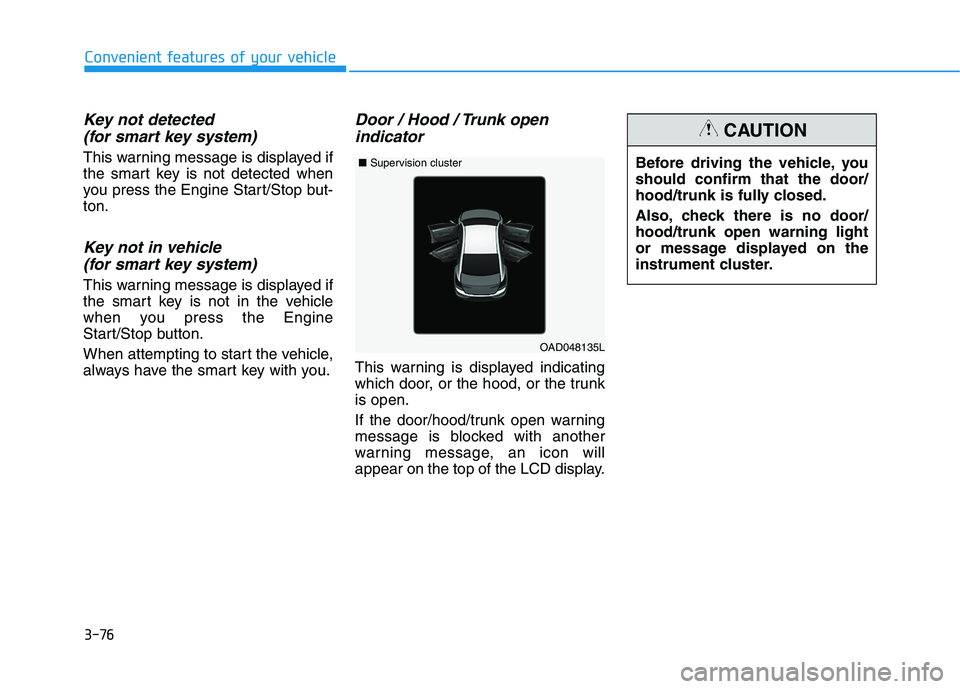
Door / Hood / Trunk open indicator
This warning is displayed indicating
which door, or the hood, or the trunkis open.
If the door/hood/trunk open warning
message is blocked with another
warning message, an icon will
appear on the top of the LCD display. Before driving the vehicle, youshould confirm that the door/
hood/trunk is fully closed.
Also, check there is no door/ hood/trunk open warning light
or message displayed on the
instrument cluster.
CAUTION
OAD048135L
■
Supervision cluster
Page 162 of 534
3-77
Convenient features of your vehicle
3
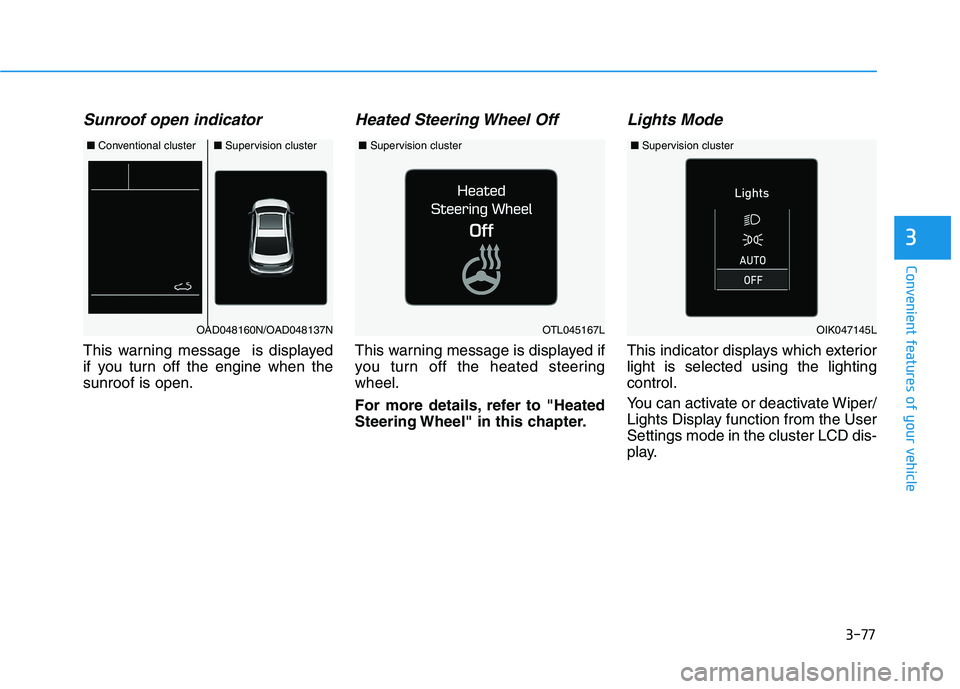
Sunroof open indicator
This warning message is displayed
if you turn off the engine when thesunroof is open.
Heated Steering Wheel Off
This warning message is displayed if
you turn off the heated steeringwheel.
For more details, refer to "Heated
Steering Wheel" in this chapter.
Lights Mode
This indicator displays which exteriorlight is selected using the lightingcontrol.
You can activate or deactivate Wiper/
Lights Display function from the UserSettings mode in the cluster LCD dis-
play.
■Conventional cluster■ Supervision cluster
OAD048160N/OAD048137NOTL045167L
■Supervision cluster
OIK047145L
■Supervision cluster
Page 163 of 534
3-78
Convenient features of your vehicle
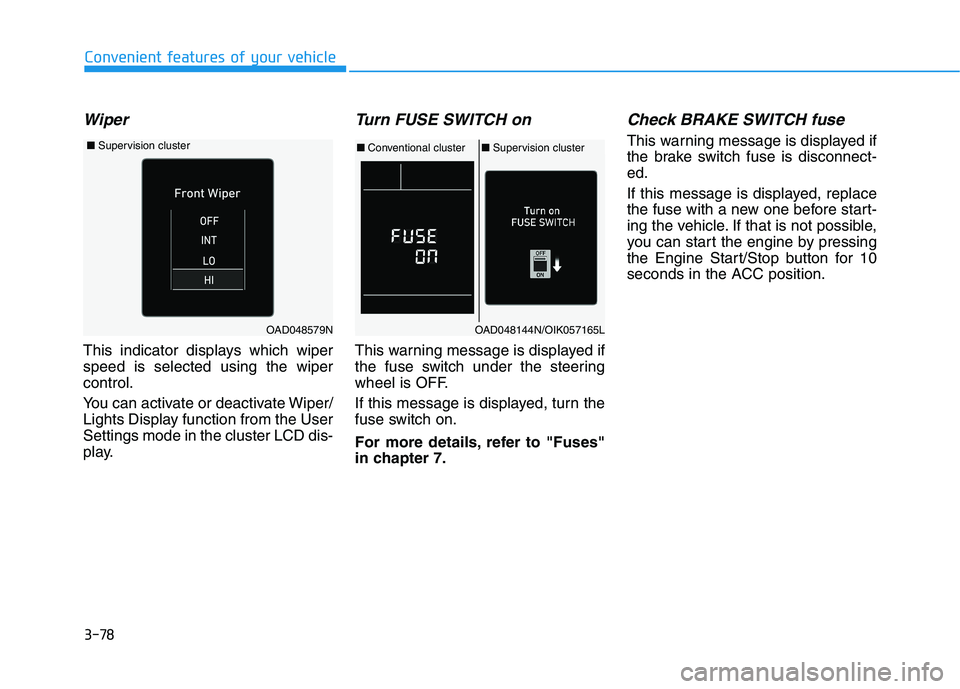
Wiper
This indicator displays which wiper speed is selected using the wipercontrol.
You can activate or deactivate Wiper/
Lights Display function from the UserSettings mode in the cluster LCD dis-
play.
Turn FUSE SWITCH on
This warning message is displayed if
the fuse switch under the steering
wheel is OFF.
If this message is displayed, turn the
fuse switch on.
For more details, refer to "Fuses"
in chapter 7.
Check BRAKE SWITCH fuse
This warning message is displayed if
the brake switch fuse is disconnect-ed.
If this message is displayed, replace
the fuse with a new one before start-
ing the vehicle. If that is not possible,
you can start the engine by pressing
the Engine Start/Stop button for 10
seconds in the ACC position.
OAD048144N/OIK057165L
■Conventional cluster ■Supervision cluster
OAD048579N
■ Supervision cluster
Page 164 of 534
3-79
Convenient features of your vehicle
3
Low Washer Fluid (if equipped)
This warning message is displayedon the service reminder mode if
the washer fluid level in the reser-
voir is nearly empty.
If this warning message is dis- played, have the washer fluid
reservoir refilled.
Low Fuel
This warning message is displayed ifthe fuel tank is almost out of fuel.
When this message is displayed, the
vehicle range is approximately 30
miles.
When this message is displayed, the
low fuel level warning light in thecluster will come on.
It is recommended to look for the nearest fueling station and refuel as
soon as possible.
Engine has overheated
This warning message is displayed
when the engine coolant tempera-
ture is above 120°C (248°F). This
means that the engine is overheated
and may be damaged.
If your vehicle is overheated, refer
to "Overheating" in chapter 6.
Check headlight
This warning message is displayed if
the headlamps are not operating
properly. The headlamp bulb mayneed to be replaced.
In addition, if a specific lamp(turn
signal lamp etc.) is not operating
properly, the warning message
according to a specific lamp (turn
signal lamp etc.) is displayed. A cor-
responding bulb may need to bereplaced.
When replacing the bulb, use the
same wattage bulb.
For more details, refer to "BULB
WATTAGE" in chapter 8.
NOTICE
Page 173 of 534
3-88
Convenient features of your vehicle
Door
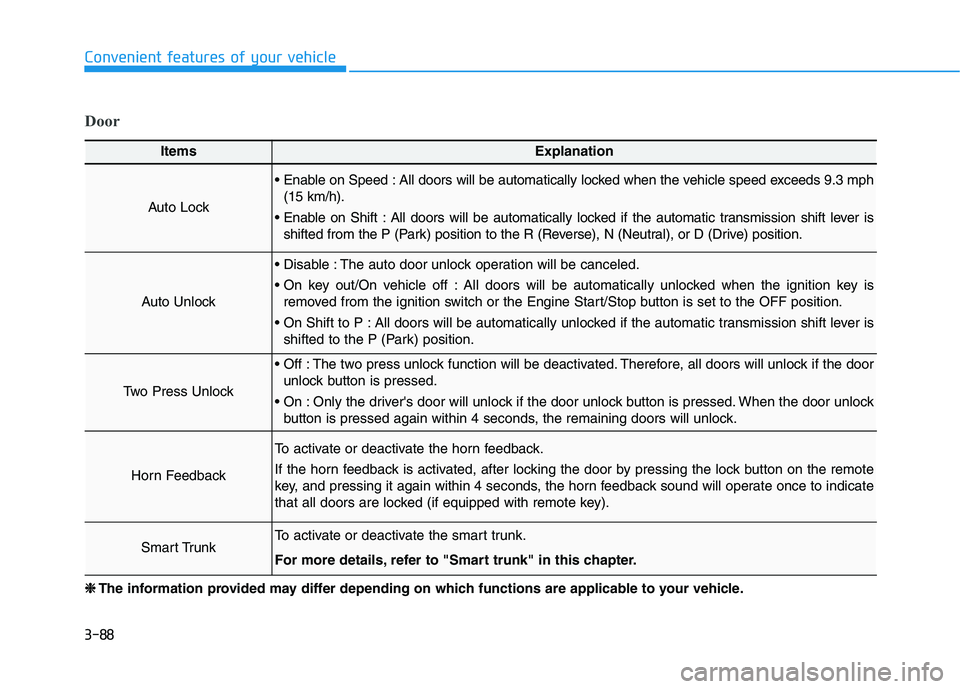
ItemsExplanation
Auto Lock
Enable on Speed : All doors will be automatically locked when the vehicle speed exceeds 9.3 mph(15 km/h).
Enable on Shift : All doors will be automatically locked if the automatic transmission shift lever is shifted from the P (Park) position to the R (Reverse), N (Neutral), or D (Drive) position.
Auto Unlock
Disable : The auto door unlock operation will be canceled.
On key out/On vehicle off : All doors will be automatically unlocked when the ignition key isremoved from the ignition switch or the Engine Start/Stop button is set to the OFF position.
On Shift to P : All doors will be automatically unlocked if the automatic transmission shift lever is shifted to the P (Park) position.
Two Press Unlock
Off : The two press unlock function will be deactivated. Therefore, all doors will unlock if the doorunlock button is pressed.
On : Only the driver's door will unlock if the door unlock button is pressed. When the door unlock button is pressed again within 4 seconds, the remaining doors will unlock.
Horn Feedback
To activate or deactivate the horn feedback.
If the horn feedback is activated, after locking the door by pressing the lock button on the remote
key, and pressing it again within 4 seconds, the horn feedback sound will operate once to indicate
that all doors are locked (if equipped with remote key).
Smart TrunkTo activate or deactivate the smart trunk.
For more details, refer to "Smart trunk" in this chapter.
❈❈ The information provided may differ depending on which functions are applicable to your vehicle.
Page 175 of 534
3-90
Convenient features of your vehicle
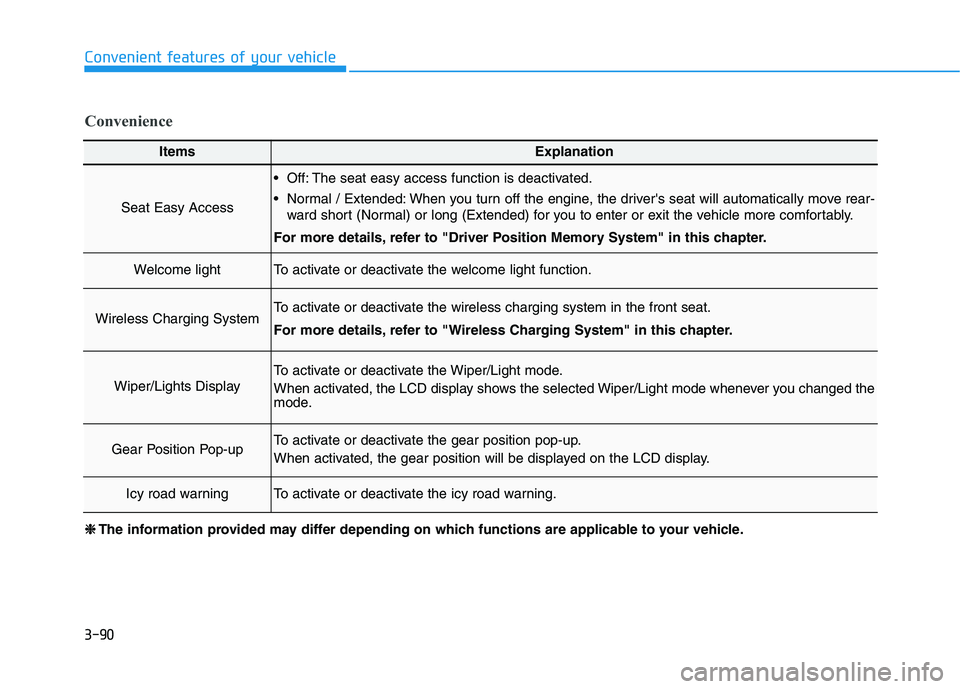
ItemsExplanation
Seat Easy Access
Off: The seat easy access function is deactivated.
Normal / Extended: When you turn off the engine, the driver's seat will automatically move rear-ward short (Normal) or long (Extended) for you to enter or exit the vehicle more comfortably.
For more details, refer to "Driver Position Memory System" in this chapter.
Welcome lightTo activate or deactivate the welcome light function.
Wireless Charging SystemTo activate or deactivate the wireless charging system in the front seat.
For more details, refer to "Wireless Charging System" in this chapter.
Wiper/Lights Display
To activate or deactivate the Wiper/Light mode.
When activated, the LCD display shows the selected Wiper/Light mode whenever you changed the
mode.
Gear Position Pop-upTo activate or deactivate the gear position pop-up.
When activated, the gear position will be displayed on the LCD display.
Icy road warningTo activate or deactivate the icy road warning.
Convenience
❈❈ The information provided may differ depending on which functions are applicable to your vehicle.
Page 177 of 534
3-92
Convenient features of your vehicle
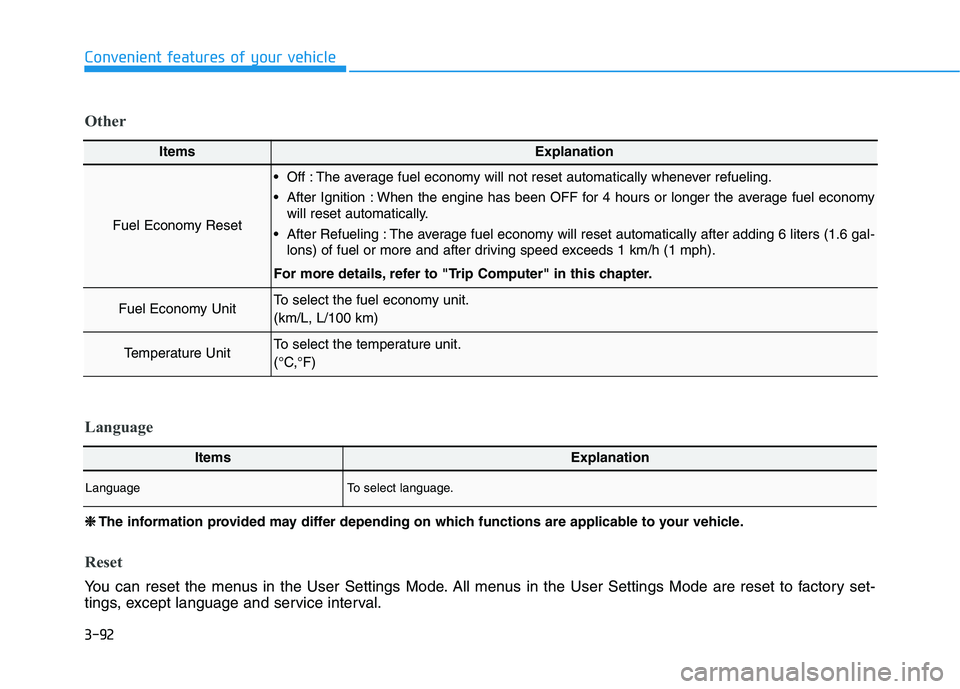
ItemsExplanation
Fuel Economy Reset
Off : The average fuel economy will not reset automatically whenever refueling.
After Ignition : When the engine has been OFF for 4 hours or longer the average fuel economywill reset automatically.
After Refueling : The average fuel economy will reset automatically after adding 6 liters (1.6 gal- lons) of fuel or more and after driving speed exceeds 1 km/h (1 mph).
For more details, refer to "Trip Computer" in this chapter.
Fuel Economy UnitTo select the fuel economy unit. (km/L, L/100 km)
Temperature UnitTo select the temperature unit.
(°C,°F)
Other
❈❈ The information provided may differ depending on which functions are applicable to your vehicle.
Reset
You can reset the menus in the User Settings Mode. All menus in the User Settings Mode are reset to factory set-
tings, except language and service interval.
ItemsExplanation
LanguageTo select language.
Language