air condition HYUNDAI ENTOURAGE 2009 User Guide
[x] Cancel search | Manufacturer: HYUNDAI, Model Year: 2009, Model line: ENTOURAGE, Model: HYUNDAI ENTOURAGE 2009Pages: 402, PDF Size: 9.08 MB
Page 114 of 402
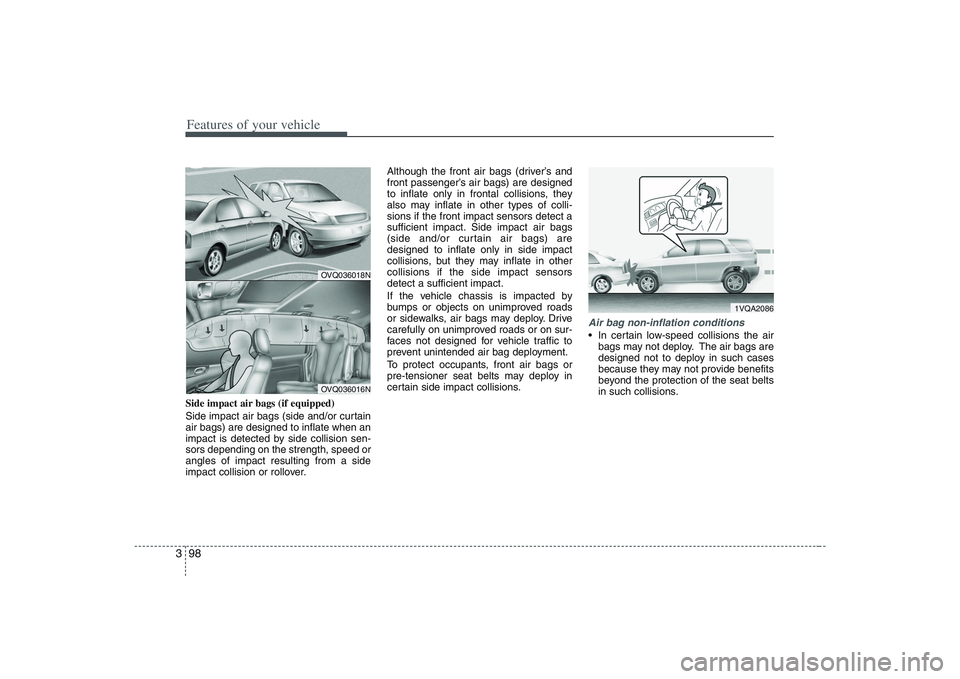
Features of your vehicle98 3Side impact air bags (if equipped)
Side impact air bags (side and/or curtain
air bags) are designed to inflate when an
impact is detected by side collision sen-
sors depending on the strength, speed or
angles of impact resulting from a side
impact collision or rollover.Although the front air bags (driver’s and
front passenger’s air bags) are designed
to inflate only in frontal collisions, they
also may inflate in other types of colli-
sions if the front impact sensors detect a
sufficient impact. Side impact air bags
(side and/or curtain air bags) are
designed to inflate only in side impact
collisions, but they may inflate in other
collisions if the side impact sensors
detect a sufficient impact.
If the vehicle chassis is impacted by
bumps or objects on unimproved roads
or sidewalks, air bags may deploy. Drive
carefully on unimproved roads or on sur-
faces not designed for vehicle traffic to
prevent unintended air bag deployment.
To protect occupants, front air bags or
pre-tensioner seat belts may deploy in
certain side impact collisions.
Air bag non-inflation conditions In certain low-speed collisions the air
bags may not deploy. The air bags are
designed not to deploy in such cases
because they may not provide benefits
beyond the protection of the seat belts
in such collisions.
OVQ036018NOVQ036016N
1VQA2086
Page 154 of 402
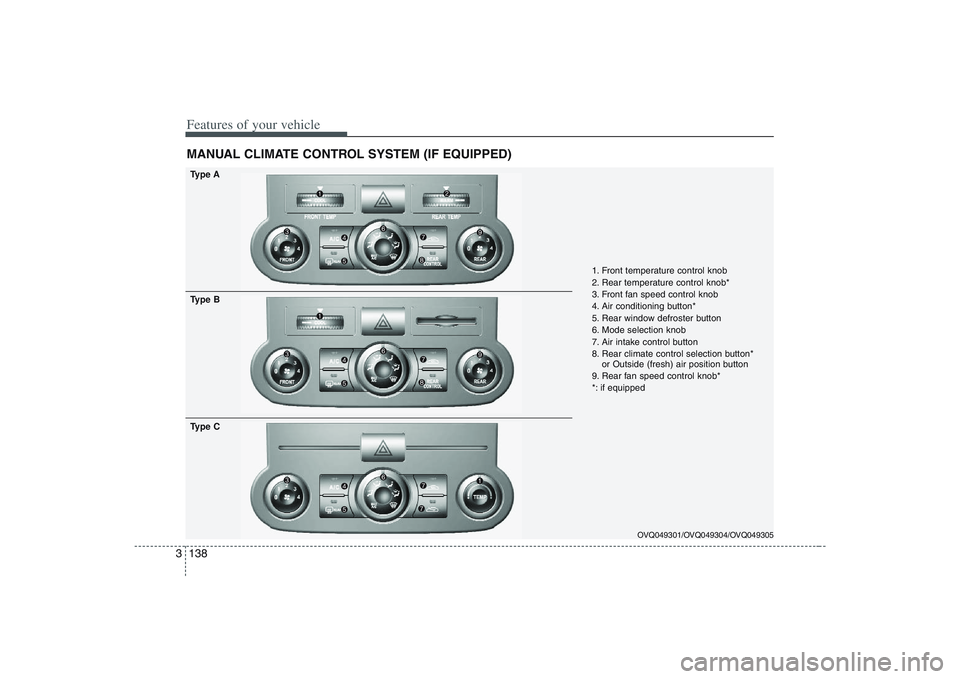
Features of your vehicle138 3MANUAL CLIMATE CONTROL SYSTEM (IF EQUIPPED)
OVQ049301/OVQ049304/OVQ049305
1. Front temperature control knob
2. Rear temperature control knob*
3. Front fan speed control knob
4. Air conditioning button*
5. Rear window defroster button
6. Mode selection knob
7. Air intake control button
8. Rear climate control selection button*
or Outside (fresh) air position button
9. Rear fan speed control knob*
*: if equipped
Type A
Type B
Type C
Page 159 of 402
3 143
Features of your vehicle
✽ ✽
NOTICEIt should be noted that prolonged oper-
ation of the heating in recirculated air
position will cause fogging of the wind-
shield and side windows and the air
within the passenger compartment will
become stale.
In addition, prolonged use of the air
conditioning with the “recirculated air
position” selected, will result in exces-
sively dry air in the passenger compart-
ment.
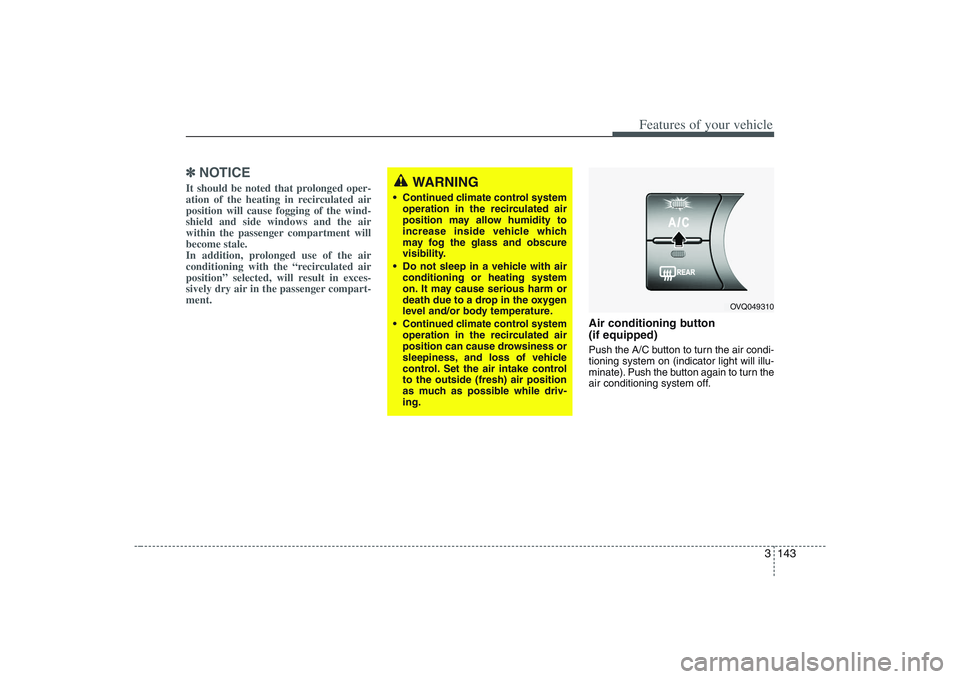
Air conditioning button
(if equipped) Push the A/C button to turn the air condi-
tioning system on (indicator light will illu-
minate). Push the button again to turn the
air conditioning system off.
WARNING
Continued climate control system
operation in the recirculated air
position may allow humidity to
increase inside vehicle which
may fog the glass and obscure
visibility.
Do not sleep in a vehicle with air
conditioning or heating system
on. It may cause serious harm or
death due to a drop in the oxygen
level and/or body temperature.
Continued climate control system
operation in the recirculated air
position can cause drowsiness or
sleepiness, and loss of vehicle
control. Set the air intake control
to the outside (fresh) air position
as much as possible while driv-
ing.
OVQ049310
Page 160 of 402
Features of your vehicle144 3
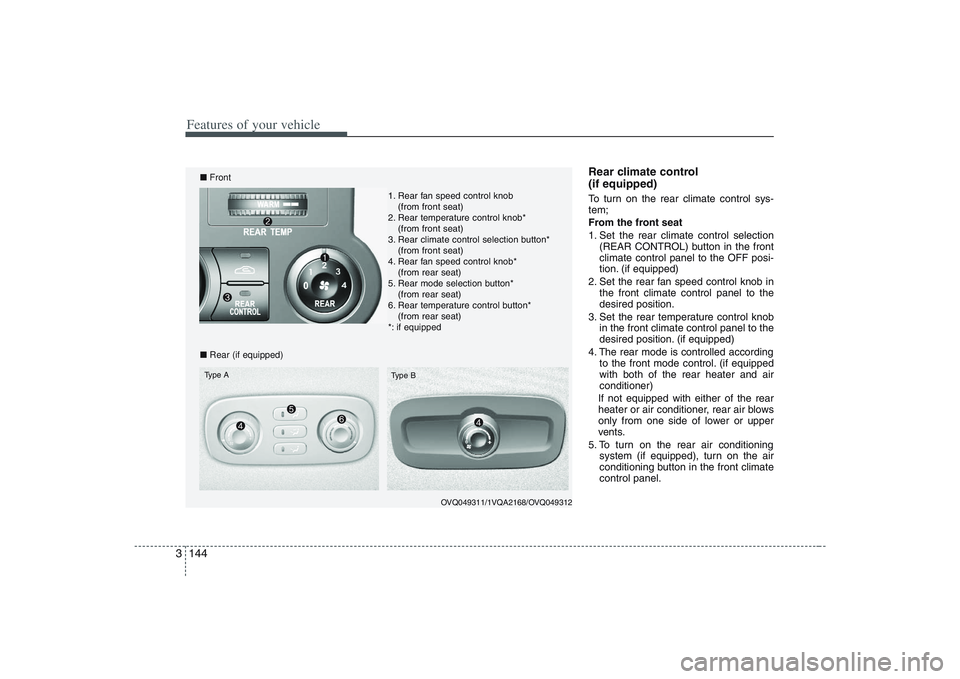
Rear climate control
(if equipped)To turn on the rear climate control sys-
tem;
From the front seat
1. Set the rear climate control selection
(REAR CONTROL) button in the front
climate control panel to the OFF posi-
tion. (if equipped)
2. Set the rear fan speed control knob in
the front climate control panel to the
desired position.
3. Set the rear temperature control knob
in the front climate control panel to the
desired position. (if equipped)
4. The rear mode is controlled according
to the front mode control. (if equipped
with both of the rear heater and air
conditioner)
If not equipped with either of the rear
heater or air conditioner, rear air blows
only from one side of lower or upper
vents.
5. To turn on the rear air conditioning
system (if equipped), turn on the air
conditioning button in the front climate
control panel.
OVQ049311/1VQA2168/OVQ049312
■Front
■Rear (if equipped)Type A
Type B
1. Rear fan speed control knob
(from front seat)
2. Rear temperature control knob*
(from front seat)
3. Rear climate control selection button*
(from front seat)
4. Rear fan speed control knob*
(from rear seat)
5. Rear mode selection button*
(from rear seat)
6. Rear temperature control button*
(from rear seat)
*: if equipped
Page 161 of 402
3 145
Features of your vehicle
From the rear seat (if equipped)
1. Set the rear climate control selection
(REAR CONTROL) button in the front
climate control panel to the ON posi-
tion.
2. Set the rear fan speed control knob on
the rear climate control panel to the
desired position.
3. Set the rear temperature control knob
on the rear climate control panel to the
desired position. (if equipped)
4. Select the desired rear mode button
on the rear climate control panel. (if
equipped)
If not equipped with either of the rear
heater or air conditioner, rear air blows
only from one side of lower or upper
vents.
5. To turn on the rear air conditioning
system (if equipped), turn on the air
conditioning button in the front climate
control panel.
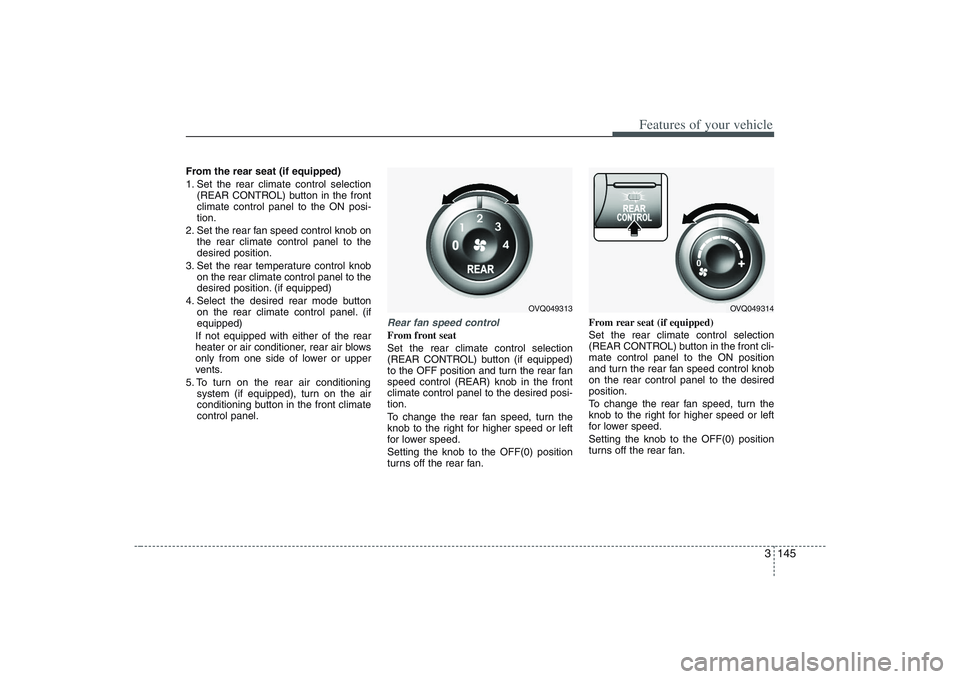
Rear fan speed controlFrom front seat
Set the rear climate control selection
(REAR CONTROL) button (if equipped)
to the OFF position and turn the rear fan
speed control (REAR) knob in the front
climate control panel to the desired posi-
tion.
To change the rear fan speed, turn the
knob to the right for higher speed or left
for lower speed.
Setting the knob to the OFF(0) position
turns off the rear fan.From rear seat (if equipped)
Set the rear climate control selection
(REAR CONTROL) button in the front cli-
mate control panel to the ON position
and turn the rear fan speed control knob
on the rear control panel to the desired
position.
To change the rear fan speed, turn the
knob to the right for higher speed or left
for lower speed.
Setting the knob to the OFF(0) position
turns off the rear fan.
OVQ049313
OVQ049314
Page 162 of 402
Features of your vehicle146 3Rear temperature control
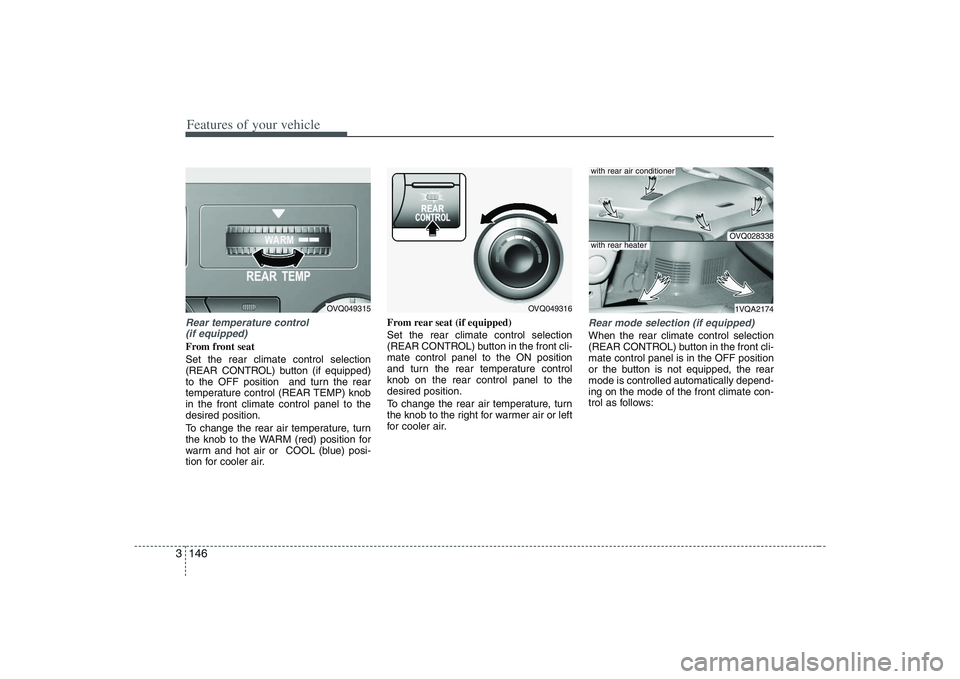
(if equipped)From front seat
Set the rear climate control selection
(REAR CONTROL) button (if equipped)
to the OFF position and turn the rear
temperature control (REAR TEMP) knob
in the front climate control panel to the
desired position.
To change the rear air temperature, turn
the knob to the WARM (red) position for
warm and hot air or COOL (blue) posi-
tion for cooler air.From rear seat (if equipped)
Set the rear climate control selection
(REAR CONTROL) button in the front cli-
mate control panel to the ON position
and turn the rear temperature control
knob on the rear control panel to the
desired position.
To change the rear air temperature, turn
the knob to the right for warmer air or left
for cooler air.
Rear mode selection (if equipped)When the rear climate control selection
(REAR CONTROL) button in the front cli-
mate control panel is in the OFF position
or the button is not equipped, the rear
mode is controlled automatically depend-
ing on the mode of the front climate con-
trol as follows:
OVQ049315
OVQ049316
OVQ0283381VQA2174
with rear air conditionerwith rear heater
Page 163 of 402
3 147
Features of your vehicle
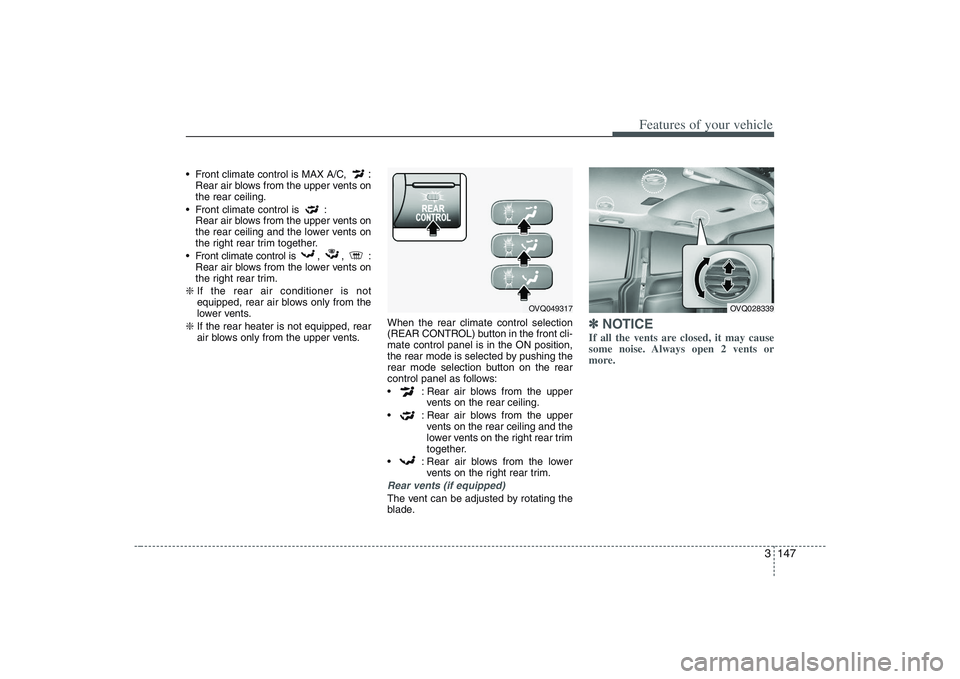
Front climate control is MAX A/C,
:
Rear air blows from the upper vents on
the rear ceiling.
Front climate control is :
Rear air blows from the upper vents on
the rear ceiling and the lower vents on
the right rear trim together.
Front climate control is , , :
Rear air blows from the lower vents on
the right rear trim.
❇ If the rear air conditioner is not
equipped, rear air blows only from the
lower vents.
❇ If the rear heater is not equipped, rear
air blows only from the upper vents.When the rear climate control selection
(REAR CONTROL) button in the front cli-
mate control panel is in the ON position,
the rear mode is selected by pushing the
rear mode selection button on the rear
control panel as follows:
: Rear air blows from the upper
vents on the rear ceiling.
: Rear air blows from the upper
vents on the rear ceiling and the
lower vents on the right rear trim
together.
: Rear air blows from the lower
vents on the right rear trim.
Rear vents (if equipped)The vent can be adjusted by rotating the
blade.
✽ ✽
NOTICEIf all the vents are closed, it may cause
some noise. Always open 2 vents or
more.
OVQ049317
OVQ028339
Page 164 of 402
Features of your vehicle148 3System operationVentilation1. Set the mode to the position.
2. Set the air intake control to the outside
(fresh) air position.
3. Set the temperature control to the
desired position.
4. Set the fan speed control to the
desired speed.Heating1. Set the mode to the position.
2. Set the air intake control to the outside
(fresh) air position.
3. Set the temperature control to the
desired position.
4. Set the fan speed control to the
desired speed.
5. If dehumidified heating is desired, turn
the air conditioning system (if
equipped) on.
If the windshield fogs up, set the mode
to the
,
position.
Air conditioning (if equipped) All Hyundai Air Conditioning Systems are
filled with environmentally friendly
R-134a refrigerant which is not damag-
ing to the ozone layer.
1. Start the engine. Push the air condi-
tioning button.
2. Set the mode to the position.
3. Set the air intake control to the outside
air or recirdulation air position.
4. Set the temperature control to the
desired position.
5. Set the fan speed control to the
desired speed.
6. Adjust the fan speed control and tem-
perature control to maintain maximum
comfort.
When maximum cooling is desired, set
the temperature control to the COOL
(blue) position, set the air intake con-
trol to the recirculated air position, then
set the fan speed control to the highest
speed.
CAUTION
When using the air conditioning
system, monitor the temperature
gauge closely while driving up
hills or in heavy traffic when out-
side temperatures are high. Air
conditioning system operation
may cause engine overheating.
Continue to use the blower fan
but turn the air conditioning sys-
tem off if the temperature gauge
indicates engine overheating.
When opening the windows in
humid weather air conditioning
may create water droplets inside
the vehicle. Since excessive
water droplets may cause dam-
age to electrical equipment, air
conditioning should only be run
with the windows closed.
Page 165 of 402

3 149
Features of your vehicle
Air conditioning system opera-
tion tips If the vehicle has been parked in direct
sunlight during hot weather, open the
windows for a short time to let the hot
air inside the vehicle escape.
To help reduce moisture inside of win-
dows on rainy humid days, decrease
the humidity inside the vehicle by oper-
ating the air conditioning system.
During air conditioning system opera-
tion, you may occasionally notice a
slight change in engine speed as the
air conditioning compressor cycles on.
This is a normal system operation
characteristic.
Use the air conditioning system every
month if only for a few minutes to
ensure maximum system perform-
ance.
When using the air conditioning sys-
tem, you may notice clear water drip-
ping (or even puddling) on the ground
under the passenger side of the vehi-
cle. This is a normal system operation
characteristic. Operating the air conditioning system
in the recirculated air position does
provide maximum cooling, however,
continual operation in this mode may
cause the air inside the vehicle to
become stale.
Checking the amount of air con-
ditioner refrigerant and compres-
sor lubricantWhen the amount of refrigerant is low,
the performance of the air conditioning is
reduced. Overfilling also has a bad influ-
ence on the air conditioning system.
Therefore, if abnormal operation is
found, have the system inspected by an
authorized Hyundai dealer.
CAUTION
When the performance of the air
conditioning system is reduced it is
important that the correct type and
amount of oil and refrigerant is
used. Otherwise, damage to the
compressor and abnormal system
operation may occur.
CAUTION
The air conditioning system should
be serviced by an authorized
Hyundai dealer. Improper service
may cause serious injury.
Page 166 of 402
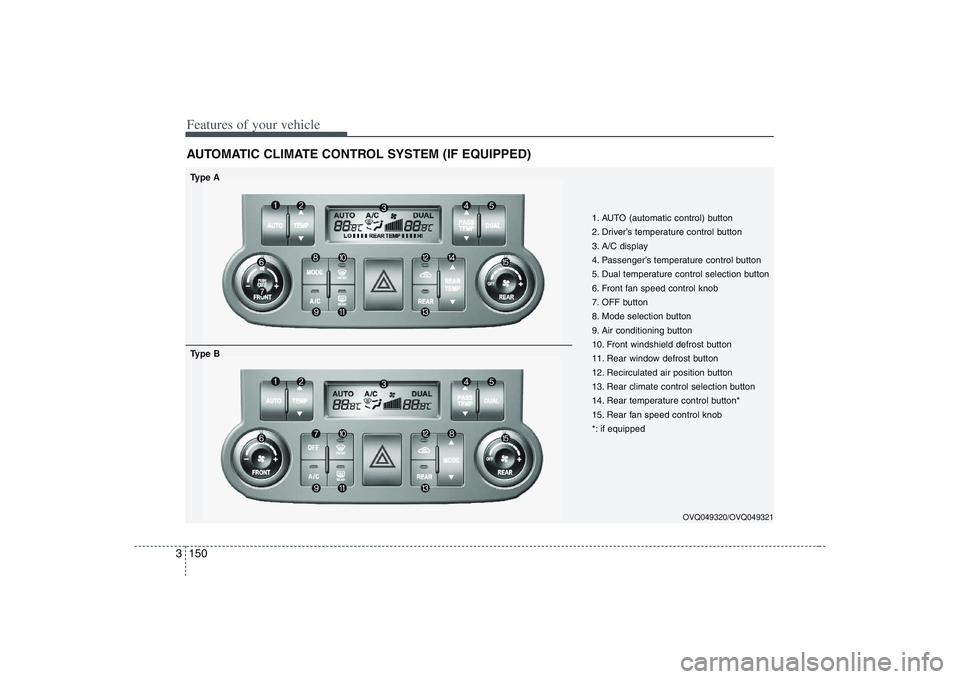
Features of your vehicle150 3AUTOMATIC CLIMATE CONTROL SYSTEM (IF EQUIPPED)
1. AUTO (automatic control) button
2. Driver’s temperature control button
3. A/C display
4. Passenger’s temperature control button
5. Dual temperature control selection button
6. Front fan speed control knob
7. OFF button
8. Mode selection button
9. Air conditioning button
10. Front windshield defrost button
11. Rear window defrost button
12. Recirculated air position button
13. Rear climate control selection button
14. Rear temperature control button*
15. Rear fan speed control knob
*: if equipped
Type A
OVQ049320/OVQ049321
Type B