air conditioning HYUNDAI ENTOURAGE 2009 User Guide
[x] Cancel search | Manufacturer: HYUNDAI, Model Year: 2009, Model line: ENTOURAGE, Model: HYUNDAI ENTOURAGE 2009Pages: 402, PDF Size: 9.08 MB
Page 173 of 402
3 157
Features of your vehicle
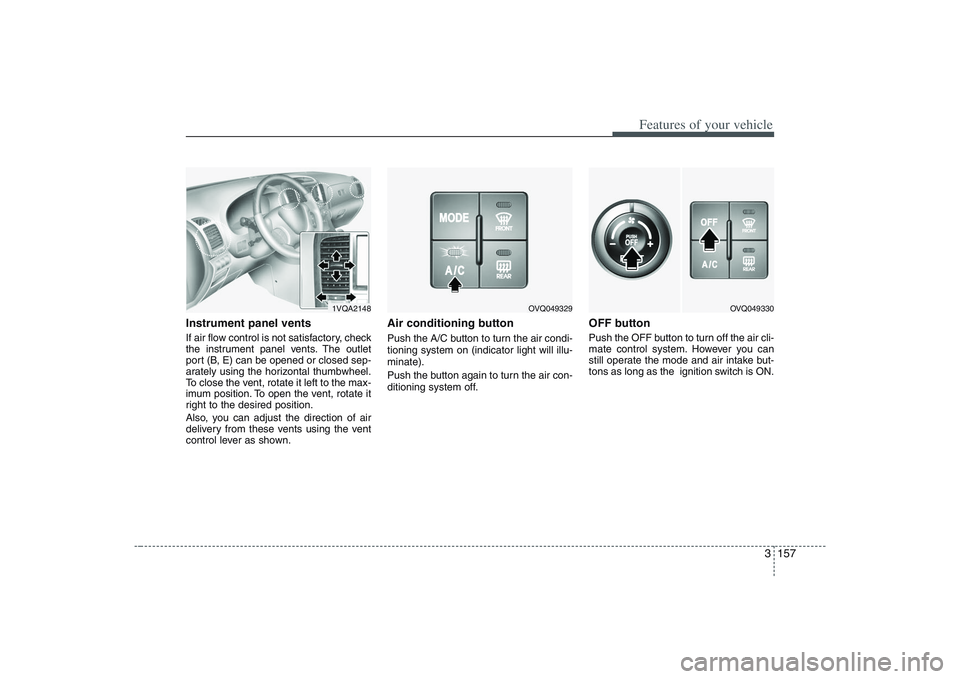
Instrument panel ventsIf air flow control is not satisfactory, check
the instrument panel vents. The outlet
port (B, E) can be opened or closed sep-
arately using the horizontal thumbwheel.
To close the vent, rotate it left to the max-
imum position. To open the vent, rotate it
right to the desired position.
Also, you can adjust the direction of air
delivery from these vents using the vent
control lever as shown.
Air conditioning button Push the A/C button to turn the air condi-
tioning system on (indicator light will illu-
minate).
Push the button again to turn the air con-
ditioning system off.
OFF buttonPush the OFF button to turn off the air cli-
mate control system. However you can
still operate the mode and air intake but-
tons as long as the ignition switch is ON.
1VQA2148
OVQ049329
OVQ049330
Page 174 of 402
Features of your vehicle158 3
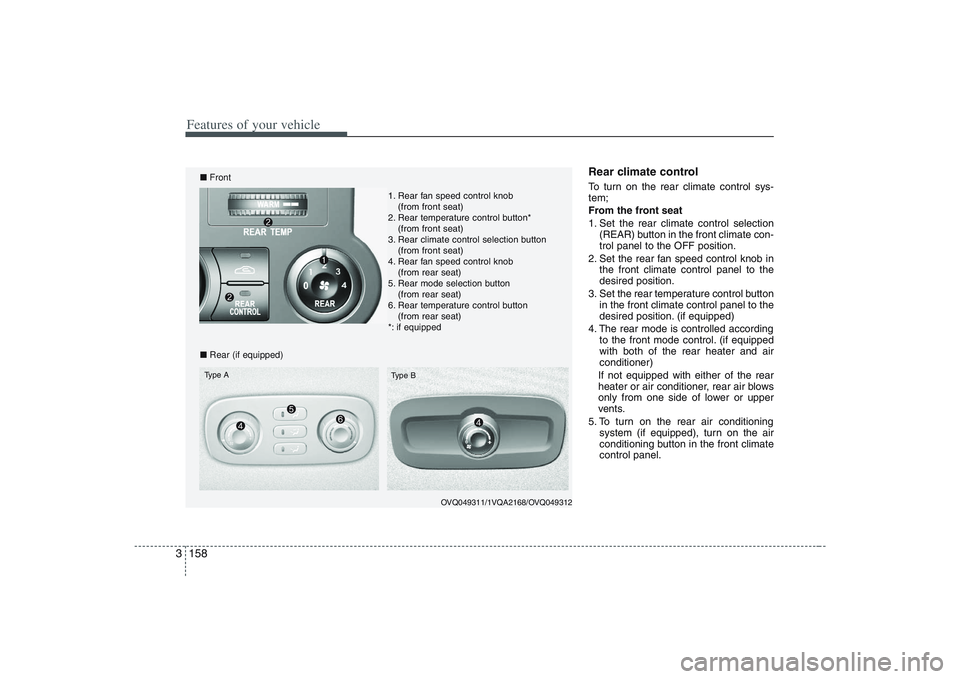
Rear climate control To turn on the rear climate control sys-
tem;
From the front seat
1. Set the rear climate control selection
(REAR) button in the front climate con-
trol panel to the OFF position.
2. Set the rear fan speed control knob in
the front climate control panel to the
desired position.
3. Set the rear temperature control button
in the front climate control panel to the
desired position. (if equipped)
4. The rear mode is controlled according
to the front mode control. (if equipped
with both of the rear heater and air
conditioner)
If not equipped with either of the rear
heater or air conditioner, rear air blows
only from one side of lower or upper
vents.
5. To turn on the rear air conditioning
system (if equipped), turn on the air
conditioning button in the front climate
control panel.
OVQ049311/1VQA2168/OVQ049312
■Front
■Rear (if equipped)Type A
Type B
1. Rear fan speed control knob
(from front seat)
2. Rear temperature control button*
(from front seat)
3. Rear climate control selection button
(from front seat)
4. Rear fan speed control knob
(from rear seat)
5. Rear mode selection button
(from rear seat)
6. Rear temperature control button
(from rear seat)
*: if equipped
Page 175 of 402
3 159
Features of your vehicle
From the rear seat (if equipped)
1. Set the rear climate control selection
(REAR) button in the front climate con-
trol panel to the ON position.
2. Set the rear fan speed control knob on
the rear climate control panel to the
desired position.
3. Set the rear temperature control knob
on the rear climate control panel to the
desired position. (if equipped)
4. Select the desired rear mode button
on the rear climate control panel. (if
equipped)
If not equipped with either of the rear
heater or air conditioner, rear air blows
only from one side of lower or upper
vents.
5. To turn on the rear air conditioning
system (if equipped), turn on the air
conditioning button in the front climate
control panel.
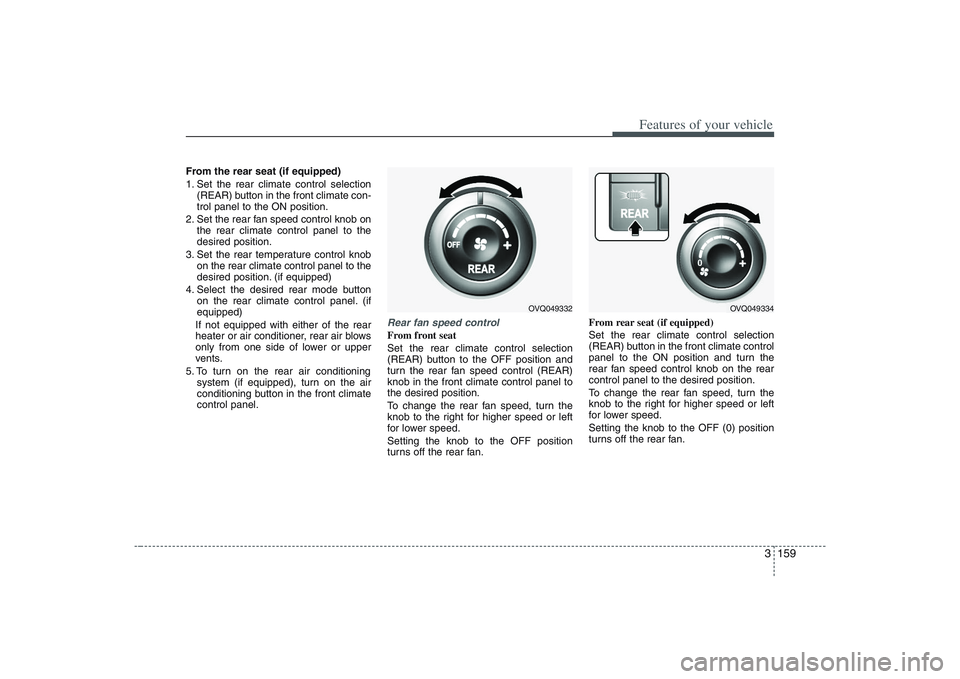
Rear fan speed controlFrom front seat
Set the rear climate control selection
(REAR) button to the OFF position and
turn the rear fan speed control (REAR)
knob in the front climate control panel to
the desired position.
To change the rear fan speed, turn the
knob to the right for higher speed or left
for lower speed.
Setting the knob to the OFF position
turns off the rear fan.From rear seat (if equipped)
Set the rear climate control selection
(REAR) button in the front climate control
panel to the ON position and turn the
rear fan speed control knob on the rear
control panel to the desired position.
To change the rear fan speed, turn the
knob to the right for higher speed or left
for lower speed.
Setting the knob to the OFF (0) position
turns off the rear fan.
OVQ049332
OVQ049334
Page 178 of 402
Features of your vehicle162 3System operationVentilation1. Set the mode to the position.
2. Set the air intake control to the outside
(fresh) air position.
3. Set the temperature control to the
desired position.
4. Set the fan speed control to the
desired speed.Heating1. Set the mode to the position.
2. Set the air intake control to the outside
(fresh) air position.
3. Set the temperature control to the
desired position.
4. Set the fan speed control to the
desired speed.
5. If dehumidified heating is desired, turn
the air conditioning system on.
If the windshield fogs up, set the mode
to the
, position.
Air conditioning All Hyundai Air Conditioning Systems are
filled with environmentally friendly
R-134a refrigerant which is not damag-
ing to the ozone layer.
1. Start the engine. Push the air condi-
tioning button.
2. Set the mode to the position.
3. Set the air intake control to the outside
air or recirculated air position.
4. Set the temperature control to the
desired position.
5. Set the fan speed control to the
desired speed.
6. Adjust the fan speed control and tem-
perature control to maintain maximum
comfort.
the temperature control to the minimum
LO (17°C/62°F) and set the air intake
to the recirculated air position, then set
the fan speed control to the highest
speed.
CAUTION
When using the air conditioning
system, monitor the temperature
gauge closely while driving up
hills or in heavy traffic when out-
side temperatures are high. Air
conditioning system operation
may cause engine overheating.
Continue to use the blower fan
but turn the air conditioning sys-
tem off if the temperature gauge
indicates engine overheating.
When opening the windows in
humid weather air conditioning
may create water droplets inside
the vehicle. Since excessive
water droplets may cause dam-
age to electrical equipment, air
conditioning should only be run
with the windows closed.
Page 179 of 402
3 163
Features of your vehicle
Air conditioning system opera-
tion tips If the vehicle has been parked in direct
sunlight during hot weather, open the
windows for a short time to let the hot
air inside the vehicle escape.
To help reduce moisture inside of win-
dows on rainy humid days, decrease
the humidity inside the vehicle by oper-
ating the air conditioning system.
During air conditioning system opera-
tion, you may occasionally notice a
slight change in engine speed as the
air conditioning compressor cycles on.
This is a normal system operation
characteristic.
Use the air conditioning system every
month if only for a few minutes to
ensure maximum system perform-
ance.
When using the air conditioning sys-
tem, you may notice clear water drip-
ping (or even puddling) on the ground
under the passenger side of the vehi-
cle. This is a normal system operation
characteristic. Operating the air conditioning system
in the recirculated air position does
provide maximum cooling, however,
continual operation in this mode may
cause the air inside the vehicle to
become stale.
Checking the amount of air con-
ditioner refrigerant and compres-
sor lubricantWhen the amount of refrigerant is low,
the performance of the air conditioning is
reduced. Overfilling also has a bad influ-
ence on the air conditioning system.
Therefore, if abnormal operation is
found, have the system inspected by an
authorized Hyundai dealer.
CAUTION
The air conditioning system should
be serviced by an authorized
Hyundai dealer. Improper service
may cause serious injury.
CAUTION
When the performance of the air
conditioning system is reduced it is
important that the correct type and
amount of oil and refrigerant is
used. Otherwise, damage to the
compressor and abnormal system
operation may occur.
Page 180 of 402
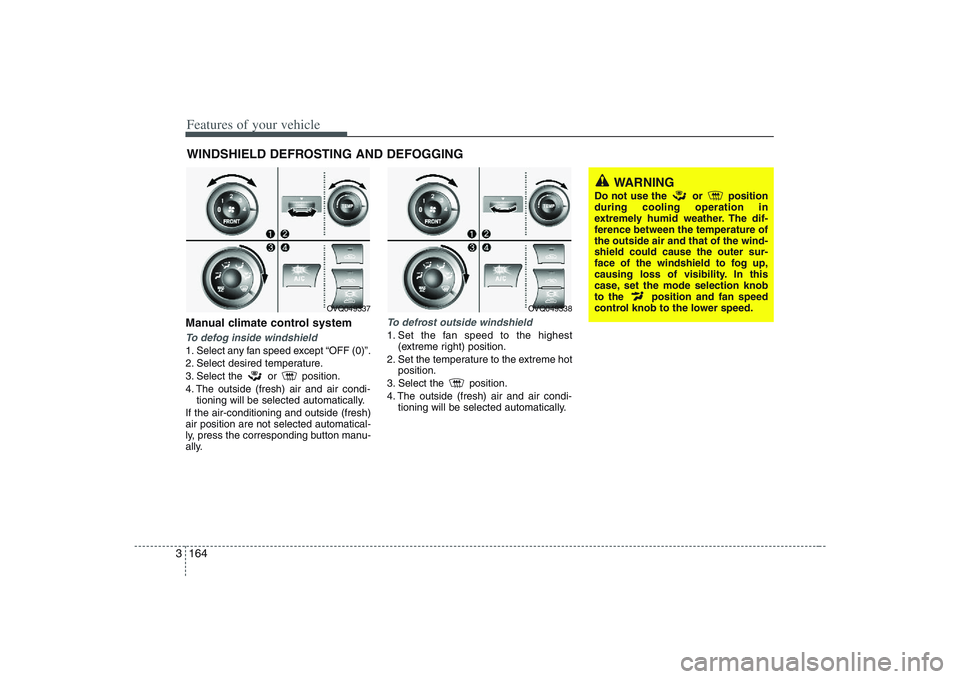
Features of your vehicle164 3Manual climate control systemTo defog inside windshield 1. Select any fan speed except “OFF (0)”.
2. Select desired temperature.
3. Select the or position.
4. The outside (fresh) air and air condi-
tioning will be selected automatically.
If the air-conditioning and outside (fresh)
air position are not selected automatical-
ly, press the corresponding button manu-
ally.
To defrost outside windshield 1. Set the fan speed to the highest
(extreme right) position.
2. Set the temperature to the extreme hot
position.
3. Select the position.
4. The outside (fresh) air and air condi-
tioning will be selected automatically.
WINDSHIELD DEFROSTING AND DEFOGGING
WARNING
Do not use the or position
during cooling operation in
extremely humid weather. The dif-
ference between the temperature of
the outside air and that of the wind-
shield could cause the outer sur-
face of the windshield to fog up,
causing loss of visibility. In this
case, set the mode selection knob
to the position and fan speed
control knob to the lower speed.
OVQ049338
OVQ049337
Page 181 of 402
3 165
Features of your vehicle
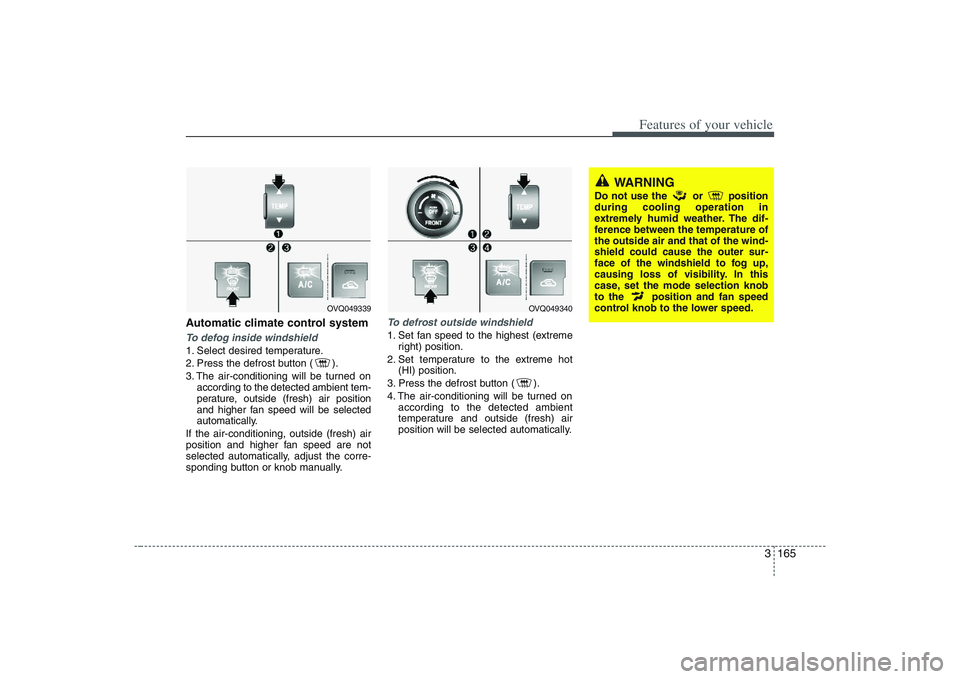
Automatic climate control systemTo defog inside windshield 1. Select desired temperature.
2. Press the defrost button ( ).
3. The air-conditioning will be turned on
according to the detected ambient tem-
perature, outside (fresh) air position
and higher fan speed will be selected
automatically.
If the air-conditioning, outside (fresh) air
position and higher fan speed are not
selected automatically, adjust the corre-
sponding button or knob manually.
To defrost outside windshield 1. Set fan speed to the highest (extreme
right) position.
2. Set temperature to the extreme hot
(HI) position.
3. Press the defrost button ( ).
4. The air-conditioning will be turned on
according to the detected ambient
temperature and outside (fresh) air
position will be selected automatically.
WARNING
Do not use the or position
during cooling operation in
extremely humid weather. The dif-
ference between the temperature of
the outside air and that of the wind-
shield could cause the outer sur-
face of the windshield to fog up,
causing loss of visibility. In this
case, set the mode selection knob
to the position and fan speed
control knob to the lower speed.
OVQ049340
OVQ049339
Page 182 of 402
Features of your vehicle166 3 For maximum defrosting, set the tem-
perature control to the extreme
right/hot position and the fan speed
control to the highest speed.
If warm air to the floor is desired while
defrosting or defogging, set the mode
to the floor-defrost position.
Before driving, clear all snow and ice
from the windshield, rear window, out-
side rear view mirrors, and all side win-
dows.
Clear all snow and ice from the hood
and air inlet in the cowl grill to improve
heater and defroster efficiency and to
reduce the probability of fogging up
inside of the windshield.
Defogging logicManual climate control systemTo reduce the probability of fogging up
the inside of the windshield, the air intake
control is set to the outside (fresh) air
position automatically if any of following
occur. The mode is selected to the or
while the system is activated. The ignition switch is turned on while
the mode is selected to the or
.
In this case, the air conditioning will auto-
matically operate if the mode is selected
to the or (while the fan is operat-
ed).
If you don’t want the air-conditioning or
outside (fresh) air position, press the cor-
responding button to cancel the opera-
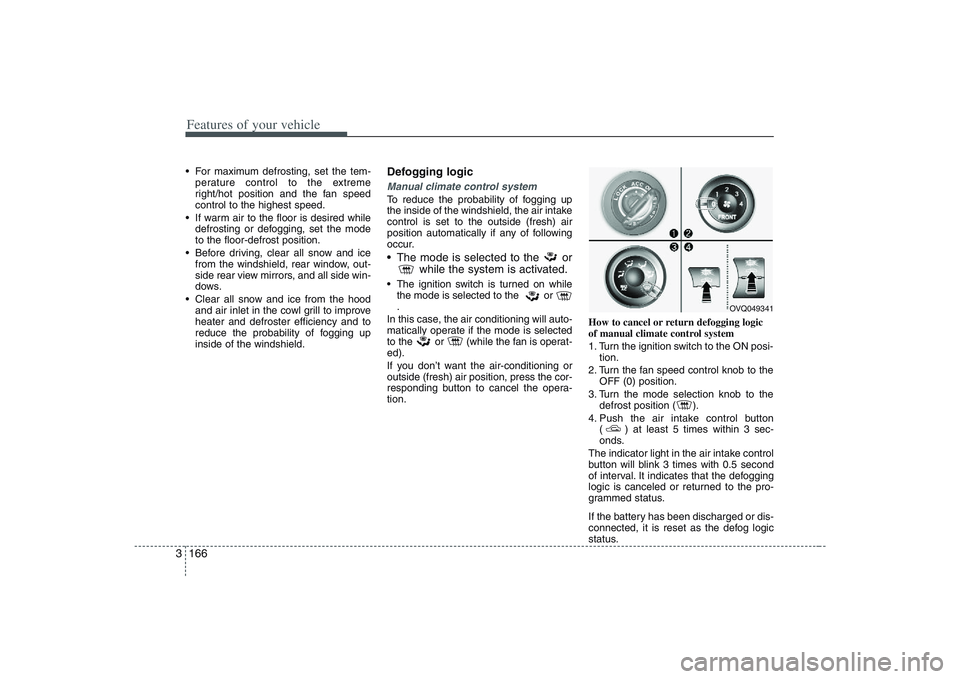
tion.How to cancel or return defogging logic
of manual climate control system
1. Turn the ignition switch to the ON posi-
tion.
2. Turn the fan speed control knob to the
OFF (0) position.
3. Turn the mode selection knob to the
defrost position ( ).
4. Push the air intake control button
( ) at least 5 times within 3 sec-
onds.
The indicator light in the air intake control
button will blink 3 times with 0.5 second
of interval. It indicates that the defogging
logic is canceled or returned to the pro-
grammed status.
If the battery has been discharged or dis-
connected, it is reset as the defog logic
status.
OVQ049341
Page 183 of 402
3 167
Features of your vehicle
Automatic climate control systemTo reduce the probability of fogging up
inside of the windshield, the air intake
control is set to outside (fresh) air posi-
tion automatically if any of following
occur.
The ignition switch is turned on while
the mode is selected to the
,
.
The OFF button is pushed.
The mode is selected to the or
position.
In this case, the air conditioning will auto-
matically operate if the mode is selected
to the (while the fan is operated) or
.
If you don’t want the air-conditioning or
outside (fresh) air position, press the cor-
responding button to cancel the opera-
tion.
If the mode is selected to the posi-
tion, higher fan speed will be selected
automatically regardless of the fan speed
control knob adjustment.How to cancel or return defogging logic
of automatic climate control system
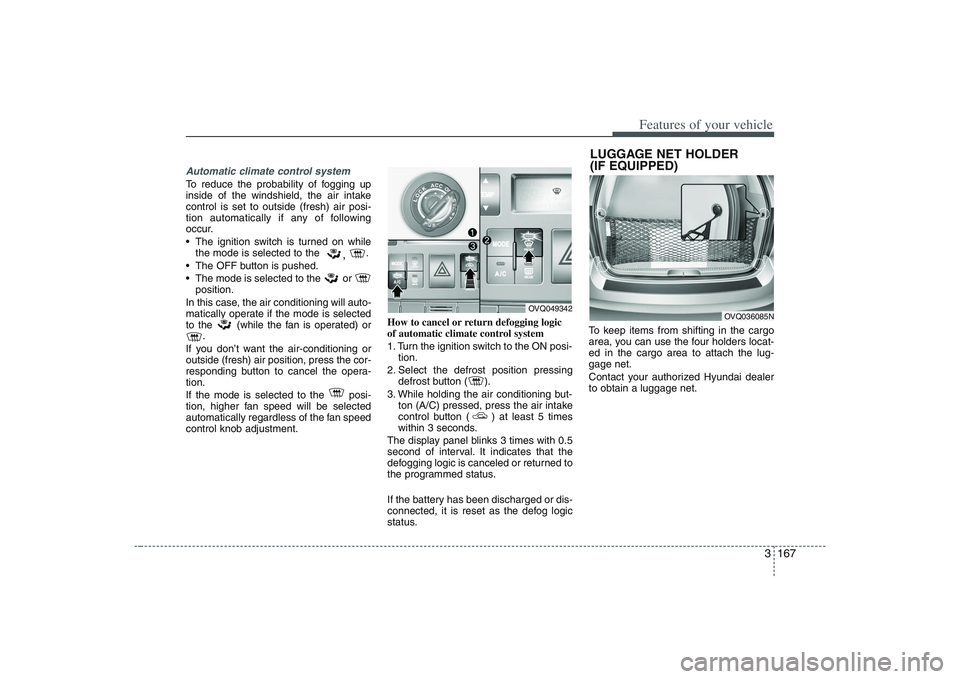
1. Turn the ignition switch to the ON posi-
tion.
2. Select the defrost position pressing
defrost button ( ).
3. While holding the air conditioning but-
ton (A/C) pressed, press the air intake
control button ( ) at least 5 times
within 3 seconds.
The display panel blinks 3 times with 0.5
second of interval. It indicates that the
defogging logic is canceled or returned to
the programmed status.
If the battery has been discharged or dis-
connected, it is reset as the defog logic
status.To keep items from shifting in the cargo
area, you can use the four holders locat-
ed in the cargo area to attach the lug-
gage net.
Contact your authorized Hyundai dealer
to obtain a luggage net.
OVQ049342
LUGGAGE NET HOLDER
(IF EQUIPPED)
OVQ036085N
Page 323 of 402
65
Maintenance
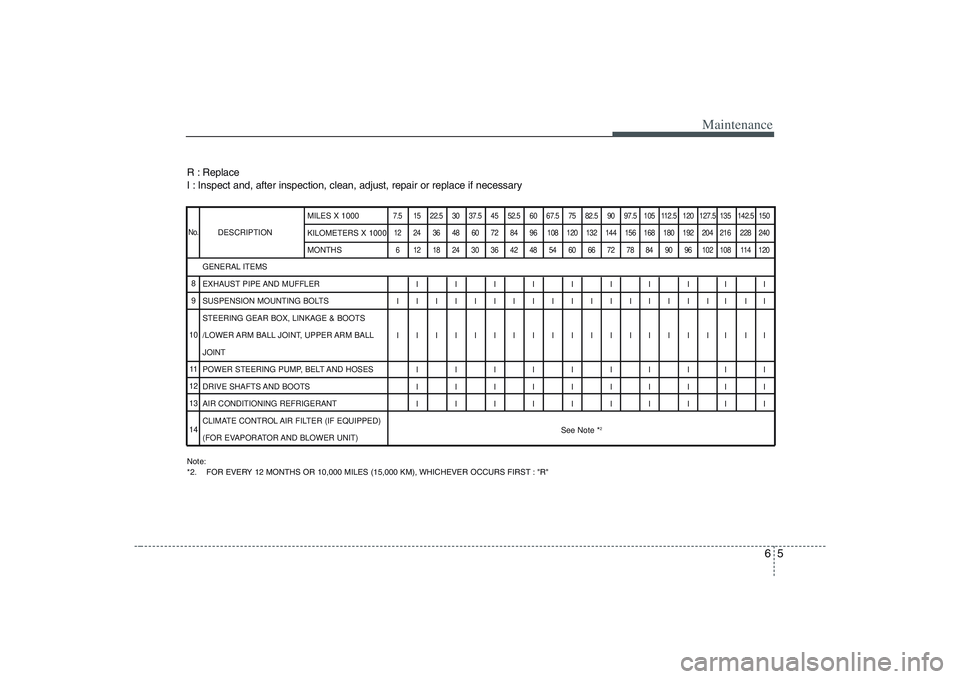
R : Replace
I : Inspect and, after inspection, clean, adjust, repair or replace if necessaryNote:
*2. FOR EVERY 12 MONTHS OR 10,000 MILES (15,000 KM), WHICHEVER OCCURS FIRST : "R"DESCRIPTION
7.5 15 22.5 30 37.5 45 52.5 60 67.5 75 82.5 90 97.5 105 112.5 120 127.5 135 142.5 150
12 24 36 48 60 72 84 96 108 120 132 144 156 168 180 192 204 216 228 240
6 121824303642485460667278849096102108114120
IIIIIIIIII
IIIIIIIIIIIIIIIIII II
IIIIIIIIIIIIIIIIII II
IIIIIIIIII
IIIIIIIIII
IIIIIIIIII
See Note *
2
GENERAL ITEMS
EXHAUST PIPE AND MUFFLER
SUSPENSION MOUNTING BOLTS
STEERING GEAR BOX, LINKAGE & BOOTS
/LOWER ARM BALL JOINT, UPPER ARM BALL
JOINT
POWER STEERING PUMP, BELT AND HOSES
DRIVE SHAFTS AND BOOTS
AIR CONDITIONING REFRIGERANT
CLIMATE CONTROL AIR FILTER (IF EQUIPPED)
(FOR EVAPORATOR AND BLOWER UNIT)MILES X 1000
KILOMETERS X 1000
MONTHS
No.8
9
10
11
12
13
14