heater HYUNDAI ENTOURAGE 2009 User Guide
[x] Cancel search | Manufacturer: HYUNDAI, Model Year: 2009, Model line: ENTOURAGE, Model: HYUNDAI ENTOURAGE 2009Pages: 402, PDF Size: 9.08 MB
Page 177 of 402

3 161
Features of your vehicle
Front climate control is :
Rear air blows from the upper vents on
the rear ceiling.
Front climate control is :
Rear air blows from the upper vents on
the rear ceiling and the lower vents on
the right rear trim together.
Front climate control is , ,
:
Rear air blows from the lower vents on
the right rear trim together.
❇ If the rear air conditioner is not
equipped, rear air blows only from the
lower vents.
❇ If the rear heater is not equipped, rear
air blows only from the upper vents.When the rear climate control selection
(REAR) button in the front climate control
panel is in the ON position, the rear
mode is selected by pushing the rear
mode selection button on the rear control
panel as follows:
: Rear air blows from the upper
vents on the rear ceiling.
: Rear air blows from the upper
vents on the rear ceiling and the
lower vents on the right rear trim
together.
: Rear air blows from the lower
vents on the right rear trim.
Rear vents (if equipped)The vent can be adjusted by rotating the
blade.
✽ ✽
NOTICEIf all the vents are closed, it may cause
some noise. Always open 2 vents or
more.
OVQ049336
OVQ028339
Page 182 of 402
Features of your vehicle166 3 For maximum defrosting, set the tem-
perature control to the extreme
right/hot position and the fan speed
control to the highest speed.
If warm air to the floor is desired while
defrosting or defogging, set the mode
to the floor-defrost position.
Before driving, clear all snow and ice
from the windshield, rear window, out-
side rear view mirrors, and all side win-
dows.
Clear all snow and ice from the hood
and air inlet in the cowl grill to improve
heater and defroster efficiency and to
reduce the probability of fogging up
inside of the windshield.
Defogging logicManual climate control systemTo reduce the probability of fogging up
the inside of the windshield, the air intake
control is set to the outside (fresh) air
position automatically if any of following
occur. The mode is selected to the or
while the system is activated. The ignition switch is turned on while
the mode is selected to the or
.
In this case, the air conditioning will auto-
matically operate if the mode is selected
to the or (while the fan is operat-
ed).
If you don’t want the air-conditioning or
outside (fresh) air position, press the cor-
responding button to cancel the opera-
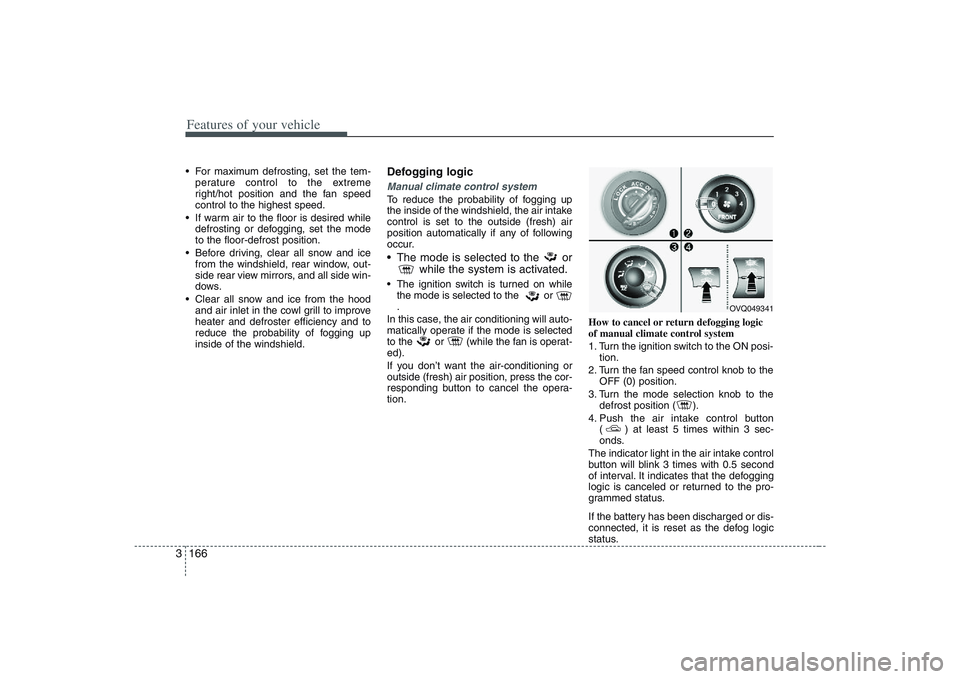
tion.How to cancel or return defogging logic
of manual climate control system
1. Turn the ignition switch to the ON posi-
tion.
2. Turn the fan speed control knob to the
OFF (0) position.
3. Turn the mode selection knob to the
defrost position ( ).
4. Push the air intake control button
( ) at least 5 times within 3 sec-
onds.
The indicator light in the air intake control
button will blink 3 times with 0.5 second
of interval. It indicates that the defogging
logic is canceled or returned to the pro-
grammed status.
If the battery has been discharged or dis-
connected, it is reset as the defog logic
status.
OVQ049341
Page 195 of 402
3 179
Features of your vehicle
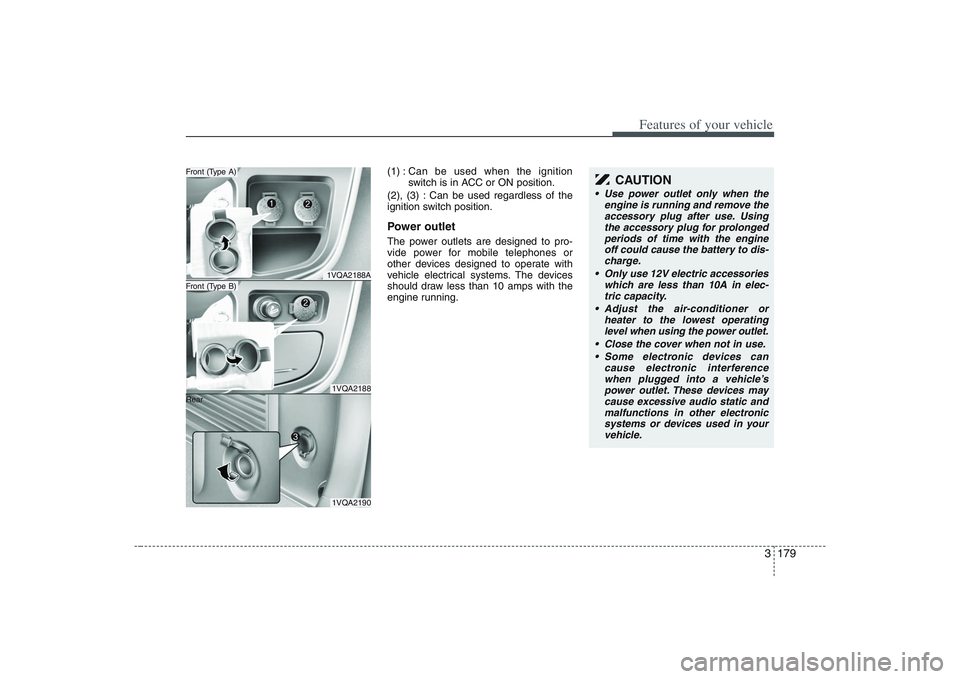
(1) :Can be used when the ignition
switch is in ACC or ON position.
(2), (3) : Can be used regardless of the
ignition switch position.Power outletThe power outlets are designed to pro-
vide power for mobile telephones or
other devices designed to operate with
vehicle electrical systems. The devices
should draw less than 10 amps with the
engine running.
1VQA2188A1VQA21881VQA2190
Front (Type B)Front (Type A)
Rear
CAUTION
Use power outlet only when the
engine is running and remove the
accessory plug after use. Using
the accessory plug for prolonged
periods of time with the engine
off could cause the battery to dis-
charge.
Only use 12V electric accessories
which are less than 10A in elec-
tric capacity.
Adjust the air-conditioner or
heater to the lowest operating
level when using the power outlet.
Close the cover when not in use.
Some electronic devices can
cause electronic interference
when plugged into a vehicle’s
power outlet. These devices may
cause excessive audio static and
malfunctions in other electronic
systems or devices used in your
vehicle.
Page 206 of 402
Features of your vehicle190 3
CAUTION IN USING
USB DEVICE
• To use an external USB device,
make sure the device is not
mounted when starting up the
vehicle and mount the device
after starting up.
If you start the vehicle when the
USB device is mounted, it may
damage the USB device. (USB is
not ESA)
If the vehicle is started up or
turned off while the external USB
device is connected, the external
USB device may not work.
It may not play inauthentic MP3 or
WMA files.
1) It can only play MP3 files with
the compression rate between
8Kbps~320Kbps.
2) It can only play WMA music
files with the compression rate
between 8Kbps~320Kbps.
Take cautions for static electricity
when mounting or dismounting
the external USB device.
An encoded MP3 PLAYER is not
recognizable.
(Continued)
(Continued)
Depending on the condition of
the external USB device, the con-
nected external USB device can
be unrecognizable.
When the formatted byte/sector
setting of External USB devices is
not either 512BYTE or 2048BYTE,
then the device will not be recog-
nized.
Use only a USB device formatted
to FAT 12/16/32.
USB devices without USB IF
authentication may not be recog-
nizable.
Make sure the USB connection
terminal does not come in contact
with a human body or any object.
If you repeat mounting or dis-
mounting USB device in a short
period of time, it may break the
device.
You might hear a strange noise
when mounting or dismounting a
USB device.
(Continued)
(Continued)
If you dismount the external USB
device during playback in USB
mode, the external USB device can
be damaged or malfunction.
Therefore, mount the external USB
device when the engine is turned
off or in another mode.
Depending on the type and capac-
ity of the external USB device or
the type of the files stored in the
device, there is a difference in the
time taken for recognition of the
device, but this is not an indicator
of trouble and you only have to
wait.
Do not use the USB device for other
purposes than playing music files.
Use of USB accessories such as
recharger or heater using USB I/F
may lower performance or cause
trouble.
If you use devices such as a USB
hub you purchased separately,
the vehicle’s audio system may
not recognize the USB device.
Connect the USB device directly
to the multimedia terminal of the
vehicle.
(Continued)
Page 221 of 402
3205
Features of your vehicle
CAUTION IN USING
USB DEVICE
To use an external USB device,
make sure the device is not
mounted when starting up the
vehicle and mount the device
after starting up.
If you start the vehicle when the
USB device is mounted, it may
damage the USB device. (USB is
not ESA)
If the vehicle is started up or
turned off while the external USB
device is connected, the external
USB device may not work.
It may not play inauthentic MP3 or
WMA files.
1) It can only play MP3 files with
the compression rate between
8Kbps~320Kbps.
2) It can only play WMA music
files with the compression rate
between 8Kbps~320Kbps.
Take cautions for static electricity
when mounting or dismounting
the external USB device.
An encoded MP3 PLAYER is not
recognizable.
(Continued)
(Continued)
Depending on the condition of
the external USB device, the con-
nected external USB device can
be unrecognizable.
When the formatted byte/sector
setting of External USB devices is
not either 512BYTE or 2048BYTE,
then the device will not be recog-
nized.
Use Only a USB device formatted
to FAT 12/16/32.
USB devices without USB IF
authentication may not be recog-
nizable.
Make sure the USB connection
terminal does not come in contact
with a human body or any object.
If you repeat mounting or dis-
mounting USB device in a short
period of time, it may break the
device.
You might hear a strange noise
when mounting or dismounting a
USB device.
(Continued)
(Continued)
If you dismount the external USB
device during playback in USB
mode, the external USB device can
be damaged or malfunction.
Therefore, mount the external USB
device when the engine is turned
off or in another mode.
Depending on the type and capac-
ity of the external USB device or
the type of the files stored in the
device, there is a difference in the
time taken for recognition of the
device, but this is not an indicator
of trouble and you only have to
wait.
Do not use the USB device for other
purposes than playing music files.
Use of USB accessories such as
recharger or heater using USB I/F
may lower performance or cause
trouble.
If you use devices such as a USB
hub you purchased separately,
the vehicle’s audio system may
not recognize the USB device.
Connect the USB device directly
to the multimedia terminal of the
vehicle.
(Continued)
Page 300 of 402
What to do in an emergency6 55. Start the engine of the vehicle with the
booster battery and let it run at 2,000
rpm, then start the engine of the vehi-
cle with the discharged battery.If the cause of your battery discharging is
not apparent, you should have your vehi-
cle checked by an Authorized Hyundai
Dealer.Push-starting Vehicles equipped with automatic
transaxle cannot be push-started.
Follow the directions in this section for
jump-starting.If your temperature gauge indicates over-
heating, if you experience a loss of
power, or if you hear a loud knocking or
pinging noise, the engine has probably
overheated. Should any of these symp-
toms occur, use the following procedure:
1. Turn on the hazard warning flasher,
then drive to the nearest safe location
and stop your vehicle; set the auto-
matic transaxle in P (Park) and apply
the parking brake.
2. Make sure the air conditioner is off.
3. If coolant or steam is boiling out of the
radiator, stop the engine and call an
Authorized Hyundai Dealer for assis-
tance.
If coolant is not boiling out, allow the
engine to idle and open the hood to
permit the engine to cool gradually.
If the temperature does not go down
with the engine idling, stop the engine
and allow sufficient time for it to cool.4. The coolant level should then be
checked. If the level in the reservoir is
low, look for leaks at the radiator
hoses and connections, heater hoses
and connections, radiator, and water
pump. If you find a major leak or
another problem that may have
caused the engine to overheat, do not
operate the engine until it has been
corrected. Call an Authorized Hyundai
Dealer for assistance. If you do not
find a leak or other problem, carefully
add coolant to the reservoir.
If the engine frequently overheats, have
the cooling system checked and repaired
by an Authorized Hyundai Dealer.
CAUTION
Never tow a vehicle to start it
because the sudden surge forward
when the engine starts could cause
a collision with the tow vehicle.
CAUTION
- Battery cables
Do not connect the jumper cable
from the negative terminal of the
booster battery to the negative ter-
minal of the discharged battery.
This can cause the discharged bat-
tery to overheat and crack, releas-
ing battery acid.
IF THE ENGINE OVERHEATS
WARNING
- Removing
radiator cap
Do not remove the radiator cap
when the engine and radiator are
hot. Scalding hot coolant and steam
may blow out under pressure. This
could cause serious injury.
Page 327 of 402
69
Maintenance
OWNER MAINTENANCE Owner maintenance schedule The following lists are vehicle checks and
inspections that should be performed by
the owner or an Authorized Hyundai
Dealer at the frequencies indicated to
help ensure safe, dependable operation
of your vehicle.
Any adverse conditions should be
brought to the attention of your dealer as
soon as possible.
These Owner Maintenance Checks are
generally not covered by warranties and
you may be charged for labor, parts and
lubricants used.When you stop for fuel: Check the engine oil level.
Check coolant level in coolant reser-
voir.
Check the windshield washer fluid
level.
Look for low or under-inflated tires.
While operating your vehicle: Note any changes in the sound of the
exhaust or any smell of exhaust fumes
in the vehicle.
Check for vibrations in the steering
wheel. Notice any increased steering
effort or looseness in the steering
wheel, or change in its straight-ahead
position.
Notice if your vehicle constantly turns
slightly or “pulls” to one side when trav-
eling on smooth, level roads.
When stopping, listen and check for
unusual sounds, pulling to one side,
increased brake pedal travel or “hard-
to-push” brake pedal.
If any slipping or changes in the oper-
ation of your transaxle occurs, check
the transaxle fluid level.
Check automatic transaxle P (Park)
function.
Check parking brake.
Check for fluid leaks under your vehicle
(water dripping from the air condition-
ing system during or after use is nor-
mal).
At least monthly: Check coolant level in the coolant
recovery reservoir.
Check the operation of all exterior
lights, including the stoplights, turn sig-
nals and hazard warning flashers.
Check the inflation pressures of all
tires including the spare.At least twice a year
(i.e., every Spring and Fall): Check radiator, heater and air condi-
tioning hoses for leaks or damage.
Check windshield washer spray and
wiper operation. Clean wiper blades
with clean cloth dampened with wash-
er fluid.
Check headlight alignment.
Check muffler, exhaust pipes, shields
and clamps.
Check the lap/shoulder belts for wear
and function.
Check for worn tires and loose wheel
lug nuts.
WARNING
Be careful when checking your
engine coolant level when the
engine is hot. Scalding hot coolant
and steam may blow out under
pressure. This could cause burns or
other serious injury.
Page 331 of 402
613
Maintenance
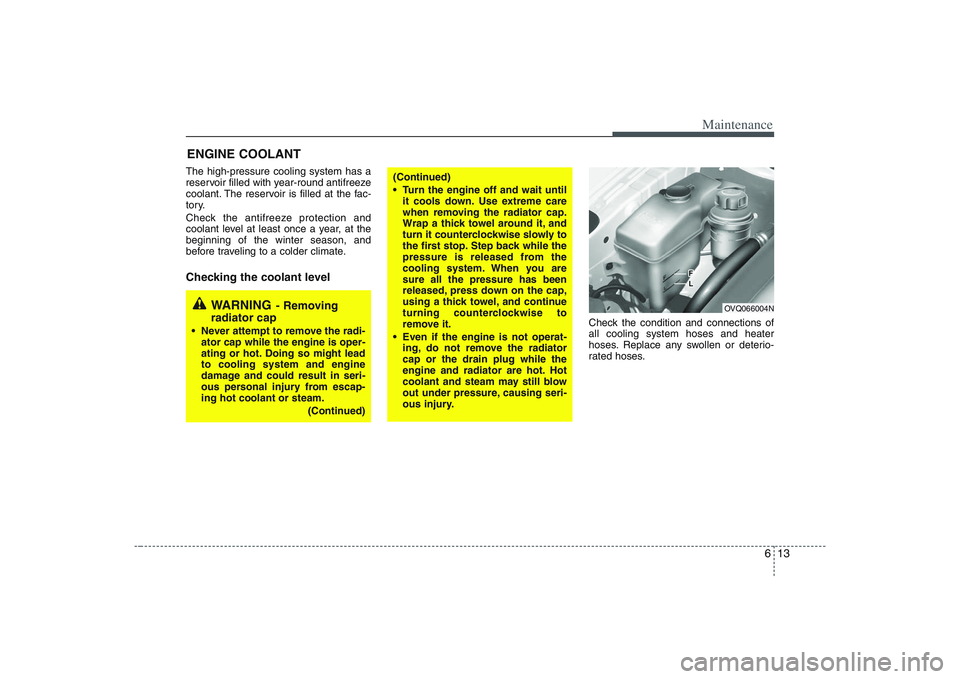
ENGINE COOLANTThe high-pressure cooling system has a
reservoir filled with year-round antifreeze
coolant. The reservoir is filled at the fac-
tory.
Check the antifreeze protection and
coolant level at least once a year, at the
beginning of the winter season, and
before traveling to a colder climate.Checking the coolant level
Check the condition and connections of
all cooling system hoses and heater
hoses. Replace any swollen or deterio-
rated hoses.
WARNING
- Removing
radiator cap
Never attempt to remove the radi-
ator cap while the engine is oper-
ating or hot. Doing so might lead
to cooling system and engine
damage and could result in seri-
ous personal injury from escap-
ing hot coolant or steam.
(Continued)
(Continued)
Turn the engine off and wait until
it cools down. Use extreme care
when removing the radiator cap.
Wrap a thick towel around it, and
turn it counterclockwise slowly to
the first stop. Step back while the
pressure is released from the
cooling system. When you are
sure all the pressure has been
released, press down on the cap,
using a thick towel, and continue
turning counterclockwise to
remove it.
Even if the engine is not operat-
ing, do not remove the radiator
cap or the drain plug while the
engine and radiator are hot. Hot
coolant and steam may still blow
out under pressure, causing seri-
ous injury.
OVQ066004N
Page 340 of 402
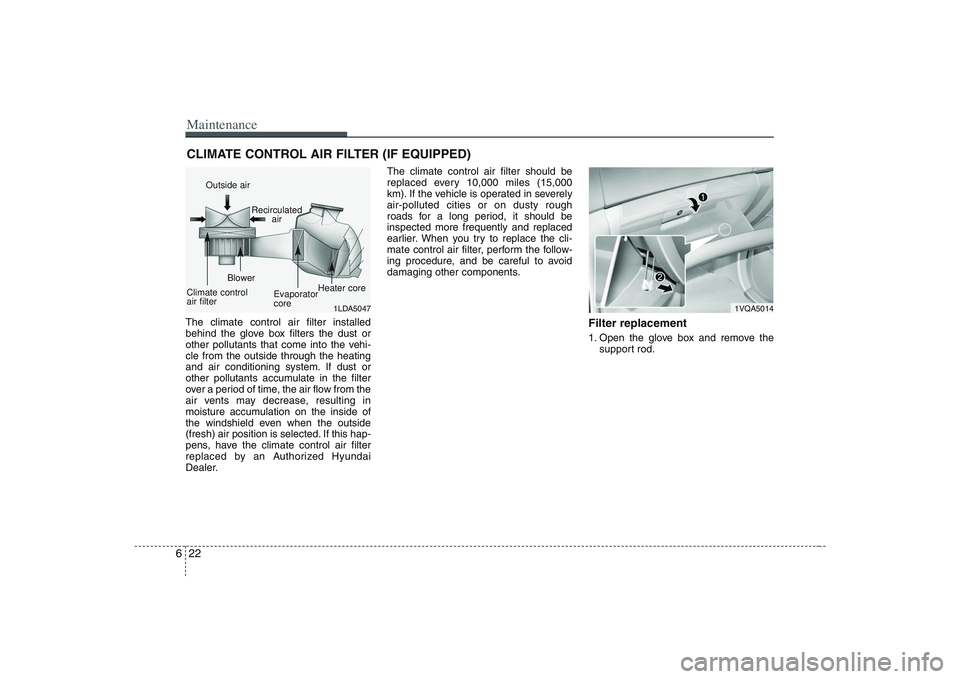
Maintenance22 6CLIMATE CONTROL AIR FILTER (IF EQUIPPED)The climate control air filter installed
behind the glove box filters the dust or
other pollutants that come into the vehi-
cle from the outside through the heating
and air conditioning system. If dust or
other pollutants accumulate in the filter
over a period of time, the air flow from the
air vents may decrease, resulting in
moisture accumulation on the inside of
the windshield even when the outside
(fresh) air position is selected. If this hap-
pens, have the climate control air filter
replaced by an Authorized Hyundai
Dealer.The climate control air filter should be
replaced every 10,000 miles (15,000
km). If the vehicle is operated in severely
air-polluted cities or on dusty rough
roads for a long period, it should be
inspected more frequently and replaced
earlier. When you try to replace the cli-
mate control air filter, perform the follow-
ing procedure, and be careful to avoid
damaging other components.
Filter replacement1. Open the glove box and remove the
support rod.
1LDA5047
Outside air
Recirculated
air
Climate control
air filterBlower
Evaporator
coreHeater core
1VQA5014