reset HYUNDAI ENTOURAGE 2009 User Guide
[x] Cancel search | Manufacturer: HYUNDAI, Model Year: 2009, Model line: ENTOURAGE, Model: HYUNDAI ENTOURAGE 2009Pages: 402, PDF Size: 9.08 MB
Page 182 of 402
Features of your vehicle166 3 For maximum defrosting, set the tem-
perature control to the extreme
right/hot position and the fan speed
control to the highest speed.
If warm air to the floor is desired while
defrosting or defogging, set the mode
to the floor-defrost position.
Before driving, clear all snow and ice
from the windshield, rear window, out-
side rear view mirrors, and all side win-
dows.
Clear all snow and ice from the hood
and air inlet in the cowl grill to improve
heater and defroster efficiency and to
reduce the probability of fogging up
inside of the windshield.
Defogging logicManual climate control systemTo reduce the probability of fogging up
the inside of the windshield, the air intake
control is set to the outside (fresh) air
position automatically if any of following
occur. The mode is selected to the or
while the system is activated. The ignition switch is turned on while
the mode is selected to the or
.
In this case, the air conditioning will auto-
matically operate if the mode is selected
to the or (while the fan is operat-
ed).
If you don’t want the air-conditioning or
outside (fresh) air position, press the cor-
responding button to cancel the opera-
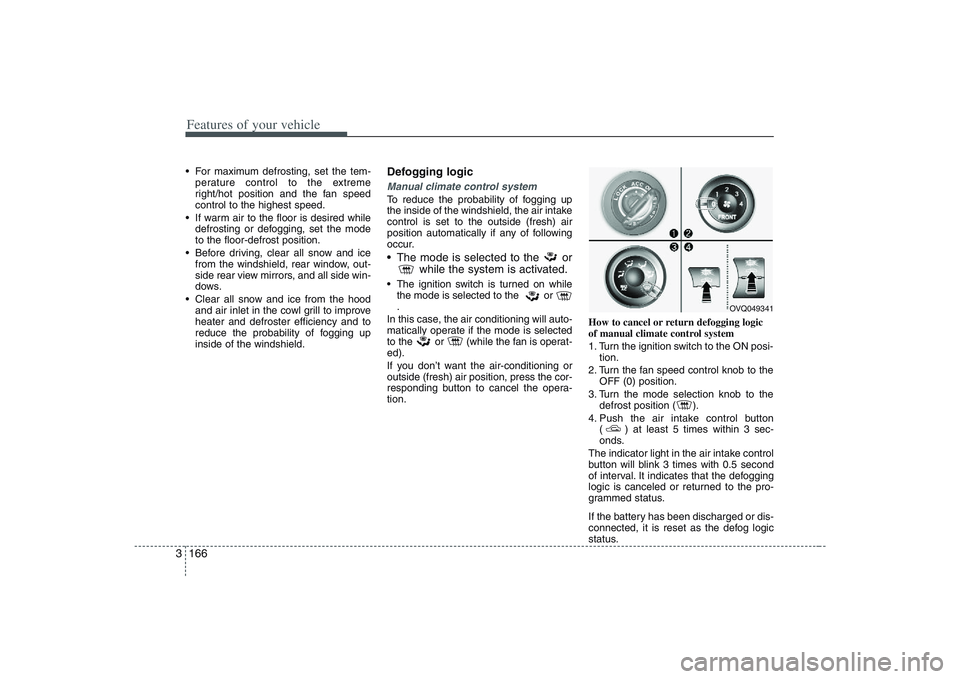
tion.How to cancel or return defogging logic
of manual climate control system
1. Turn the ignition switch to the ON posi-
tion.
2. Turn the fan speed control knob to the
OFF (0) position.
3. Turn the mode selection knob to the
defrost position ( ).
4. Push the air intake control button
( ) at least 5 times within 3 sec-
onds.
The indicator light in the air intake control
button will blink 3 times with 0.5 second
of interval. It indicates that the defogging
logic is canceled or returned to the pro-
grammed status.
If the battery has been discharged or dis-
connected, it is reset as the defog logic
status.
OVQ049341
Page 183 of 402
3 167
Features of your vehicle
Automatic climate control systemTo reduce the probability of fogging up
inside of the windshield, the air intake
control is set to outside (fresh) air posi-
tion automatically if any of following
occur.
The ignition switch is turned on while
the mode is selected to the
,
.
The OFF button is pushed.
The mode is selected to the or
position.
In this case, the air conditioning will auto-
matically operate if the mode is selected
to the (while the fan is operated) or
.
If you don’t want the air-conditioning or
outside (fresh) air position, press the cor-
responding button to cancel the opera-
tion.
If the mode is selected to the posi-
tion, higher fan speed will be selected
automatically regardless of the fan speed
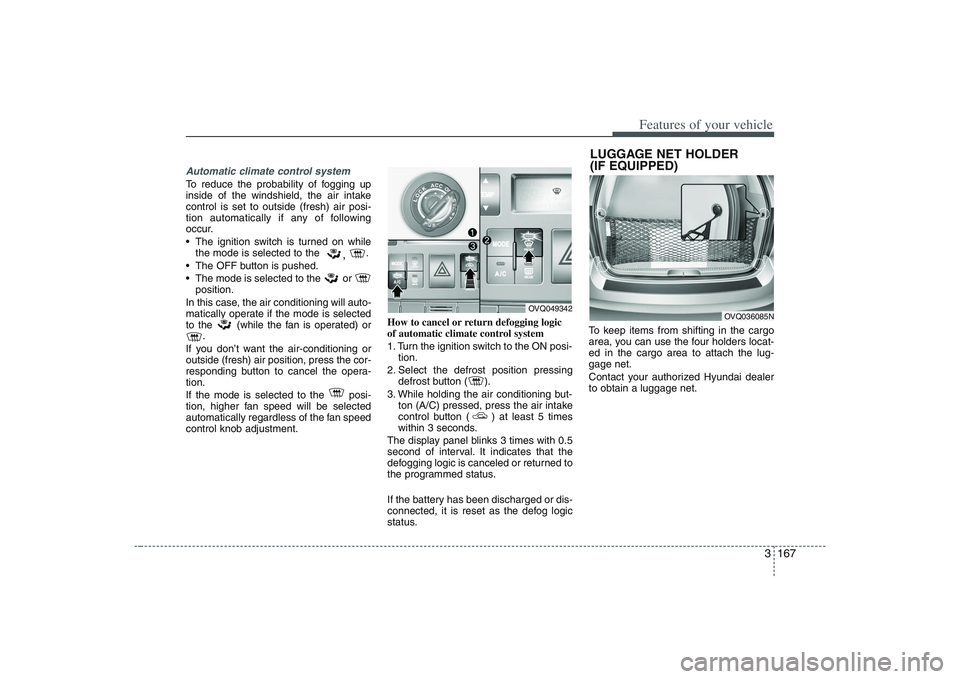
control knob adjustment.How to cancel or return defogging logic
of automatic climate control system
1. Turn the ignition switch to the ON posi-
tion.
2. Select the defrost position pressing
defrost button ( ).
3. While holding the air conditioning but-
ton (A/C) pressed, press the air intake
control button ( ) at least 5 times
within 3 seconds.
The display panel blinks 3 times with 0.5
second of interval. It indicates that the
defogging logic is canceled or returned to
the programmed status.
If the battery has been discharged or dis-
connected, it is reset as the defog logic
status.To keep items from shifting in the cargo
area, you can use the four holders locat-
ed in the cargo area to attach the lug-
gage net.
Contact your authorized Hyundai dealer
to obtain a luggage net.
OVQ049342
LUGGAGE NET HOLDER
(IF EQUIPPED)
OVQ036085N
Page 196 of 402
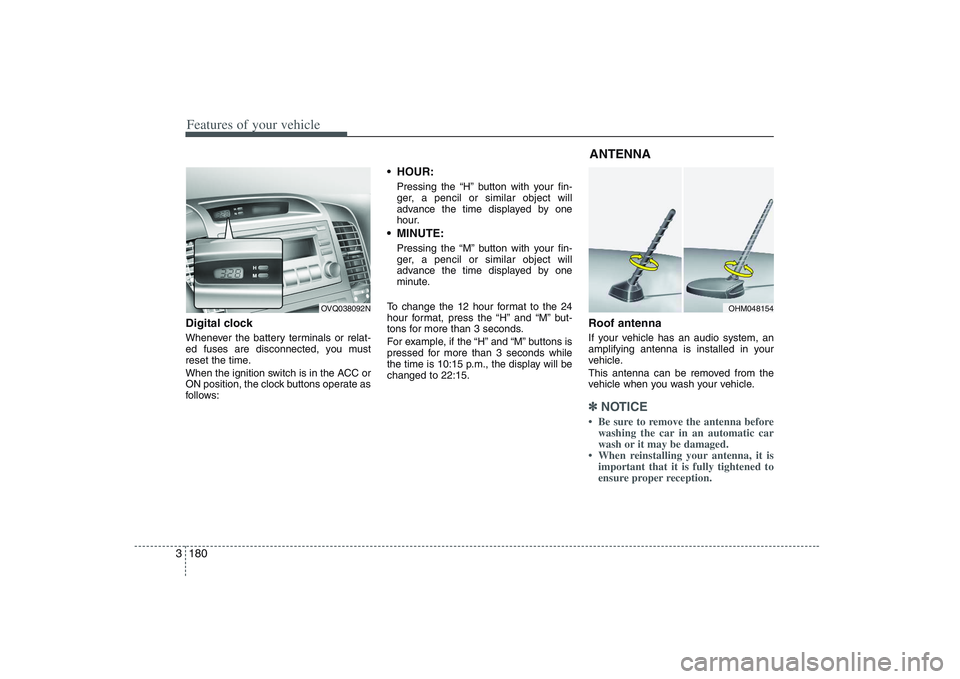
Features of your vehicle180 3Digital clockWhenever the battery terminals or relat-
ed fuses are disconnected, you must
reset the time.
When the ignition switch is in the ACC or
ON position, the clock buttons operate as
follows:
HOUR:Pressing the “H” button with your fin-
ger, a pencil or similar object will
advance the time displayed by one
hour. MINUTE:Pressing the “M” button with your fin-
ger, a pencil or similar object will
advance the time displayed by one
minute.
To change the 12 hour format to the 24
hour format, press the “H” and “M” but-
tons for more than 3 seconds.
For example, if the “H” and “M” buttons is
pressed for more than 3 seconds while
the time is 10:15 p.m., the display will be
changed to 22:15.
Roof antennaIf your vehicle has an audio system, an
amplifying antenna is installed in your
vehicle.
This antenna can be removed from the
vehicle when you wash your vehicle.✽ ✽
NOTICE• Be sure to remove the antenna before
washing the car in an automatic car
wash or it may be damaged.
• When reinstalling your antenna, it is
important that it is fully tightened to
ensure proper reception.
OVQ038092N
OHM048154
ANTENNA
Page 201 of 402
3185
Features of your vehicle
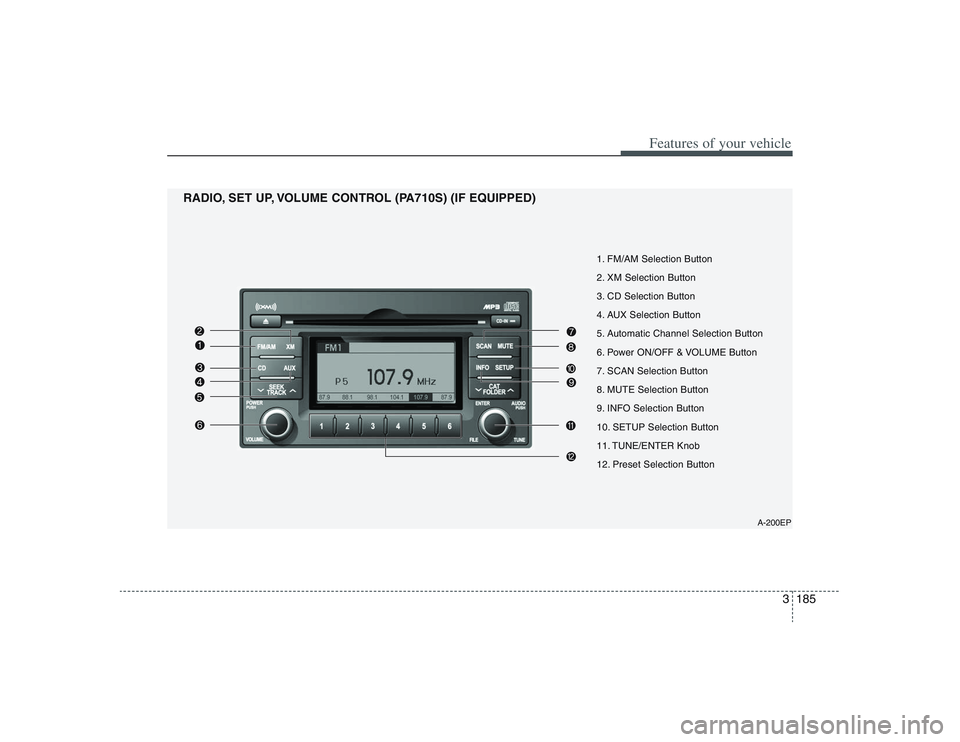
1. FM/AM Selection Button
2. XM Selection Button
3. CD Selection Button
4. AUX Selection Button
5. Automatic Channel Selection Button
6. Power ON/OFF & VOLUME Button
7. SCAN Selection Button
8. MUTE Selection Button
9. INFO Selection Button
10. SETUP Selection Button
11. TUNE/ENTER Knob
12. Preset Selection Button
RADIO, SET UP, VOLUME CONTROL (PA710S) (IF EQUIPPED)
A-200EP
Page 202 of 402
Features of your vehicle186 31. FM/AM Selection ButtonTurns to FM mode and toggles FM1 and
FM2 and AM when the button is pressed
each time.2. XM Selection ButtonTurns to XM mode, and toggles in the
order of XM1
➟XM2
➟XM3
➟...➟XM1...
when the button is pressed each time.
3. CD Selection ButtonIf there is a CD in the CDP DECK it plays
the CD.
Press CD button to automatically insert
CD when the disc is ejected from the
deck by pressing CD EJECT.4. AUX Selection ButtonIf the auxiliary device is connected, it
turns to AUX MODE to play the sound
from the auxiliary player.
If no Disc and auxiliary device is connected,
it displays "NO Media" for 5 seconds and
returns to the previous mode.
5. Automatic Channel Selection
Button When the [SEEK ] button is pressed,
it reduces the band frequency to auto-
matically select a channel. Stops at the
previous frequency if no channel is
found.
When the [SEEK ] button is pressed,
it increases the band frequency to auto-
matically select a channel. Stops at the
previous frequency if no channel is
found.6. Power ON/OFF & Volume
Control ButtonTurns the set on/off when the IGNITION
SWITCH is on ACC or ON. If the button
is turned to the right, it increases the vol-
ume and left, decreases the volume.7. SCAN Selection ButtonWhen the button is pressed, it automati-
cally only [SCAN] up. The sound hearing
for 5 secondsper all searched station
preset.
8. MUTE Selection ButtonWhen inputting [MUTE] button, indicate
"AUDIO MUTE" at the some time with out-
put [MUTE].9. INFO Selection ButtonDisplays the information of the channel
currently played by XM.10. SETUP Selection ButtonPress this button to turn to the SCROLL,
SDVC, XM and adjustment mode.
If no action is taken for 5 seconds after
pressing the button, it will return to the play
mode.(After entering SETUP mode, move
between items using the left, right and
PUSH functions of the [TUNE] button.)
The setup item changes from SCROLL
➟
SDVC
➟XM
➟SCROLL
➟...
Page 203 of 402
3187
Features of your vehicle
11. TUNE/ENTER KnobTurn this button clockwise by one notch
to increase frequency by 200KHz(AM:
10KHz) from current frequency.
Turn this button counterclockwise by one
notch to decrease frequency by 200KHz
(AM:10KHz)from current frequency.
Press this button while holding SETUP
button to activate / inactivate the item to.
Select SETUP item using left and right
function of the Tune button.12. Preset Selection ButtonPush [1]~[6] buttons less than 0.8 second
to play the channel saved in each button.
Push preset button for 0.8 second or
longer to save current channel to the
respective button with a beep.
Page 212 of 402
Features of your vehicle196 3✽
✽
NOTICE FOR USING iPod
DEVICE• Some iPod models might not sup-
port the communication protocol
and the files will not be played.
(iPod models supported: Mini, 4G,
Photo, Nano, 5G)
• The order of search or playback of
songs in the iPod can be different
from the order searched in the
audio system.
• If the iPod crashes due to its own
trouble, reset the iPod. (Reset:
Refer to iPod manual)
• An iPod may not operate normally
on low battery.
CAUTION IN USING
iPod DEVICE
You need the power cable exclu-
sive for an iPod in order to oper-
ate an iPod with the buttons on
the audio system. The PC cable
provided by Apple may cause a
malfunction and do not use it for
vehicle use.
When connecting the device with
an iPod cable, push in the jack
fully to not interfere with commu-
nication.
When adjusting the sound effects
of an iPod and the audio system,
the sound effects of both devices
will overlap and might reduce or
distort the quality of the sound.
Deactivate (turn off) the equalizer
function of an iPod when adjust-
ing the audio system’s volume,
and turn off the equalizer of the
audio system when using the
equalizer of an iPod.
(Continued)
(Continued)
When the iPod cable is connected,
the system can be switched to the
AUX mode even without the iPod
device and can cause noise.
Disconnect the iPod cable when
you are not using the iPod device.
When the iPod is not used for the
audio system, the iPod cable has
to be separate from iPod devies.
Origin display of iPod may not be
displayed.
Page 215 of 402
3199
Features of your vehicle
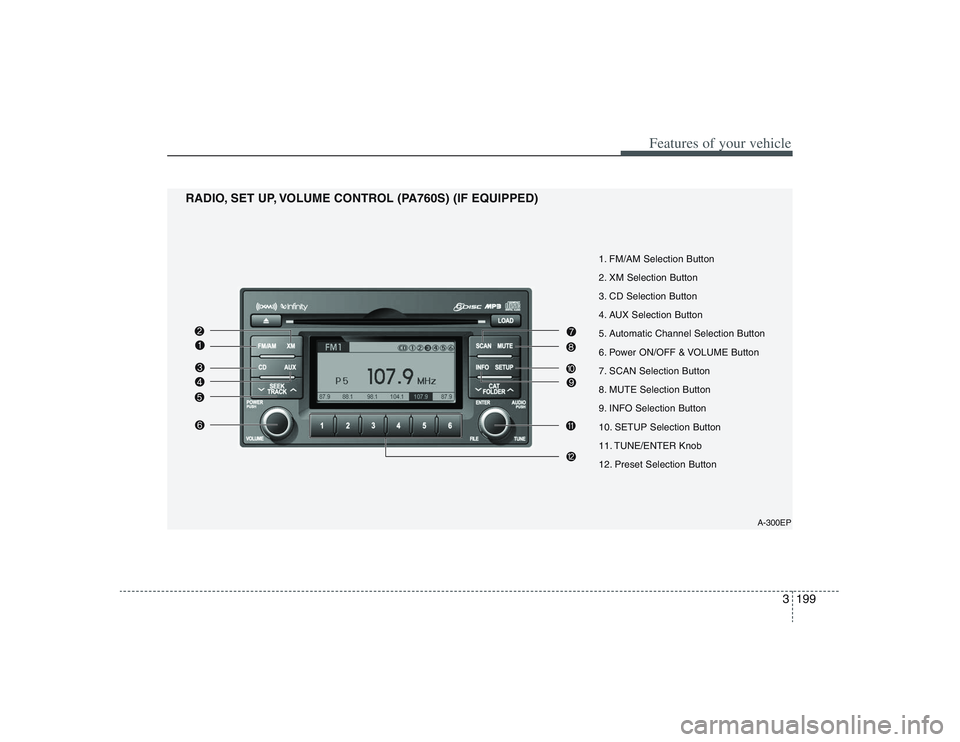
A-300EP
1. FM/AM Selection Button
2. XM Selection Button
3. CD Selection Button
4. AUX Selection Button
5. Automatic Channel Selection Button
6. Power ON/OFF & VOLUME Button
7. SCAN Selection Button
8. MUTE Selection Button
9. INFO Selection Button
10. SETUP Selection Button
11. TUNE/ENTER Knob
12. Preset Selection Button
RADIO, SET UP, VOLUME CONTROL (PA760S) (IF EQUIPPED)
Page 216 of 402
Features of your vehicle200 31. FM Selection ButtonTurns to FM/AM mode and toggles FM1
and FM2 and AM when the button is
pressed each time.2. XM Selection ButtonTurns to XM mode, and toggles in the
order of XM1
➟XM2
➟XM3
➟...➟XM1...
when the button is pressed each time.
3. CD Selection ButtonIf there is a CD in the CDP DECK it plays
the CD.
Press CD button to automatically insert
CD when the disc is ejected from the
deck by pressing CD EJECT.4. AUX Selection ButtonIf the auxiliary device is connected, it
turns to AUX MODE to play the sound
from the auxiliary player.
If no Disc and auxiliary device is connected,
it displays "NO Media" for 5 seconds and
returns to the previous mode.
5. Automatic Channel Selection
Button When the [SEEK ] button is pressed,
it reduces the band frequency to auto-
matically select a channel. Stops at the
previous frequency if no channel is
found.
When the [SEEK ] button is pressed,
it increases the band frequency to auto-
matically select a channel. Stops at the
previous frequency if no channel is
found.6. Power ON/OFF & Volume
Control ButtonTurns the set on/off when the IGNITION
SWITCH is on ACC or ON. If the button
is turned to the right, it increases the vol-
ume and left, decreases the volume.7. SCAN Selection ButtonWhen the button is pressed, it automati-
cally only [SCAN] up. The sound hearing
for 5 secondsper all searched station
preset.
8. MUTE Selection ButtonWhen inputting [MUTE] button, indicate
"AUDIO MUTE" at the some time with out-
put [MUTE].9. INFO Selection ButtonDisplays the information of the channel
currently played by XM.10. SETUP Selection ButtonPress this button to turn to the SCROLL,
SDVC, XM and adjustment mode.
If no action is taken for 5 seconds after
pressing the button, it will return to the play
mode.(After entering SETUP mode, move
between items using the left, right and
PUSH functions of the [TUNE] button.)
The setup item changes from SCROLL
➟
SDVC
➟XM
➟SCROLL
➟...
Page 217 of 402
3201
Features of your vehicle
11. TUNE/ENTER KnobTurn this button clockwise by one notch
to increase frequency by 200kHz(AM:
10KHz) from current frequency.
Turn this button counterclockwise by one
notch to decrease frequency by 200kHz
(AM:10KHz)from current frequency.
Press this button while holding SETUP
button to activate / inactivate the item to.
Select SETUP item using left and right
function of the Tune button.12. Preset Selection ButtonPush [1]~[6] buttons less than 0.8 second
to play the channel saved in each button.
Push preset button for 0.8 second or
longer to save the current channel to the
respective button with a beep.