light HYUNDAI ENTOURAGE 2009 Repair Manual
[x] Cancel search | Manufacturer: HYUNDAI, Model Year: 2009, Model line: ENTOURAGE, Model: HYUNDAI ENTOURAGE 2009Pages: 402, PDF Size: 9.08 MB
Page 187 of 402
3 171
Features of your vehicle
Rolling code programmingTo train a garage door opener (or other
rolling code equipped devices) with the
rolling code feature, follow these instruc-
tions after completing the “Programming”
portion of this text. (A second person
may make the following training proce-
dures quicker & easier.)
4. Locate the “learn” or “smart” button on
the device’s motor head unit. Exact
location and color of the button may
vary by product brand. If there is diffi-
culty locating the “learn” or “smart” but-
ton, reference the device’s owner’s
manual or contact HomeLink at 1-800-
355-3515 or on the internet at
www.homelink.com.
5. Press and release the “learn” or
“smart” button on the device’s motor
head unit. You have 30 seconds to
complete step number 6.
6. Return to the vehicle and firmly press
and release the programmed
HomeLink button up to three times.
The rolling code equipped device
should now recognize the HomeLink
signal and activate when the
HomeLink button is pressed. The
remaining two buttons may now be
programmed if this has not previously
been done. Refer to the
“Programming” portion of this text.
Operating HomeLink To operate, simply press the pro-
grammed HomeLink button. Activation
will now occur for the trained product
(garage door, security system, entry door
lock, estate gate, or home or office light-
ing). For convenience, the hand-held
transmitter of the device may also be
used at any time. The HomeLink
Wireless Controls System (once pro-
grammed) or the original hand-held
transmitter may be used to activate the
device (e.g. garage door, entry door lock,
etc.). In the event that there are still pro-
gramming difficulties, contact HomeLink
at 1-800-355-3515 or on the internet at
www.homelink.com.
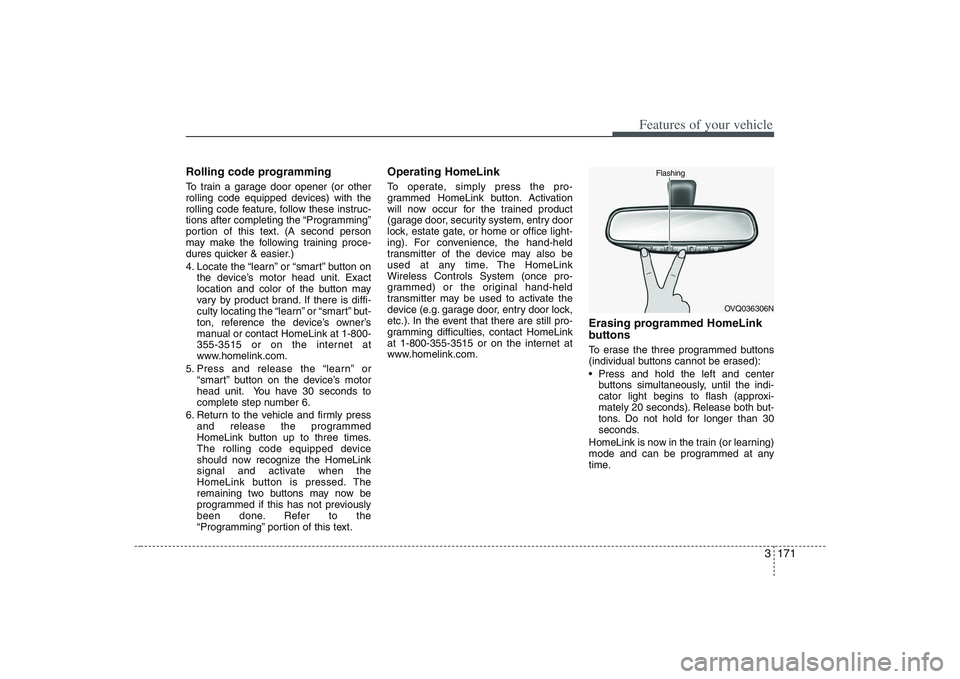
Erasing programmed HomeLink
buttonsTo erase the three programmed buttons
(individual buttons cannot be erased):
Press and hold the left and center
buttons simultaneously, until the indi-
cator light begins to flash (approxi-
mately 20 seconds). Release both but-
tons. Do not hold for longer than 30
seconds.
HomeLink is now in the train (or learning)
mode and can be programmed at any
time.
OVQ036306N Flashing
Page 188 of 402
Features of your vehicle172 3Reprogramming a single
HomeLink buttonTo program a device to HomeLink using
a HomeLink button previously trained,
follow these steps:
1. Press and hold the desired HomeLink
button. Do NOT release until step 4
has been completed.
2. When the indicator light begins to flash
slowly (after 20 seconds), position the
hand-held transmitter 1 to 3 inches
away from the HomeLink surface.
3. Press and hold the hand-held trans-
mitter button (or press and “cycle” - as
described in “Canadian Programming”
above).
4. The HomeLink indicator light will flash,
first slowly and then rapidly. When the
indicator light begins to flash rapidly,
release both buttons.
The previous device has now been
erased and the new device can be acti-
vated by pushing the HomeLink button
that has just been programmed. This pro-
cedure will not affect any other pro-
grammed HomeLink buttons.
Gate operator programming &
canadian programmingDuring programming, your hand-held
transmitter may automatically stop trans-
mitting. Continue to press and hold the
HomeLink button (note steps 2 through 4
in the “Programming” portion of this text)
while you press and re-press (“cycle”)
your handheld transmitter every two sec-
onds until the frequency signal has been
learned. The indicator light will flash
slowly and then rapidly after several sec-
onds upon successful training.
AccessoriesIf you would like additional information on
the HomeLink Wireless Control System,
HomeLink compatible products, or to
purchase other accessories such as the
HomeLink® Lighting Package, please
contact HomeLink at 1-800-355-3515 or
on the internet at www.homelink.com.
This device complies with Part 15 of
the FCC rules.Operation is subject to
the following two conditions:
1. This device may not cause harmful
interference, and
2. This device must accept any interfer-
ence received, including interference
that may cause undesired operation.
CAUTION
If programming a garage door
opener or gate, it is advised to
unplug the device during the
“cycling” process to prevent possi-
ble motor burn-up.
WARNING
The HomeLink transmitter has been
tested and complies with FCC and
DOC/MDC rules. Changes or modifi-
cations not expressly approved by
the party responsible for compli-
ance could void the user’s authority
to operate the equipment.
IC: 4112104541A Gentex
MODEL/FCC ID: NZLSTDHL3
Page 189 of 402
3 173
Features of your vehicle
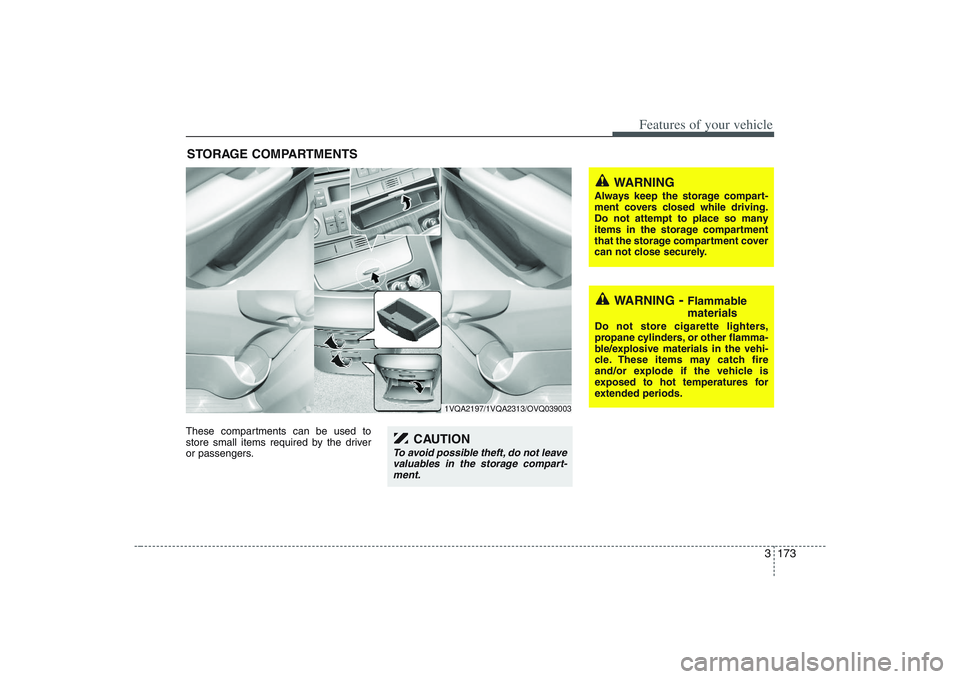
These compartments can be used to
store small items required by the driver
or passengers.STORAGE COMPARTMENTS
WARNING
- Flammable
materials
Do not store cigarette lighters,
propane cylinders, or other flamma-
ble/explosive materials in the vehi-
cle. These items may catch fire
and/or explode if the vehicle is
exposed to hot temperatures for
extended periods.
WARNING
Always keep the storage compart-
ment covers closed while driving.
Do not attempt to place so many
items in the storage compartment
that the storage compartment cover
can not close securely.
1VQA2197/1VQA2313/OVQ039003
CAUTION
To avoid possible theft, do not leave
valuables in the storage compart-
ment.
Page 191 of 402
3 175
Features of your vehicle
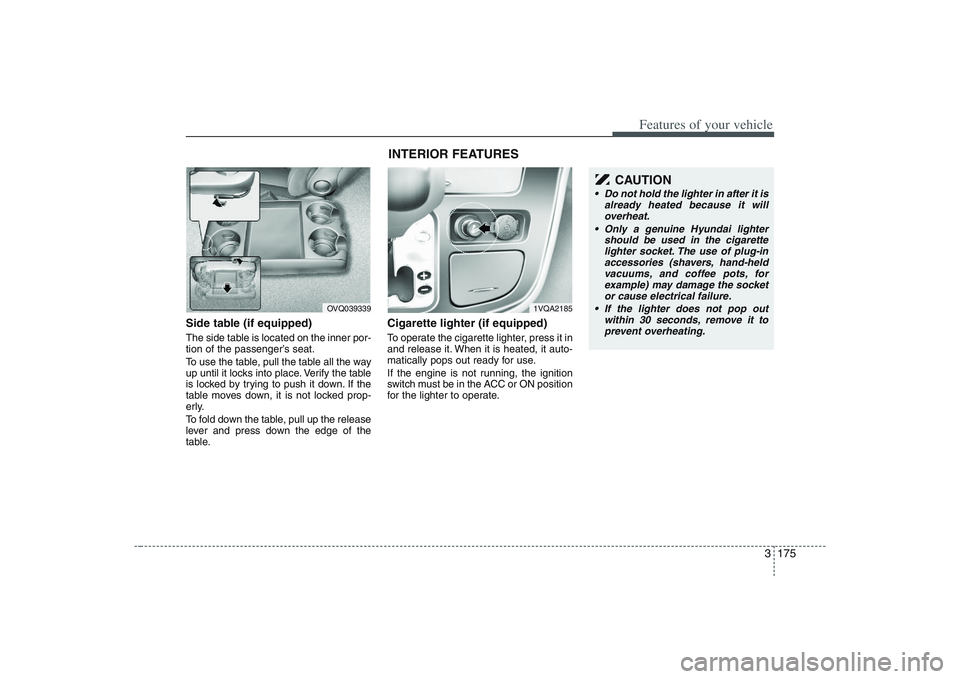
Side table (if equipped)The side table is located on the inner por-
tion of the passenger’s seat.
To use the table, pull the table all the way
up until it locks into place. Verify the table
is locked by trying to push it down. If the
table moves down, it is not locked prop-
erly.
To fold down the table, pull up the release
lever and press down the edge of the
table.
Cigarette lighter (if equipped)To operate the cigarette lighter, press it in
and release it. When it is heated, it auto-
matically pops out ready for use.
If the engine is not running, the ignition
switch must be in the ACC or ON position
for the lighter to operate.
OVQ039339
1VQA2185
CAUTION
Do not hold the lighter in after it is
already heated because it will
overheat.
Only a genuine Hyundai lighter
should be used in the cigarette
lighter socket. The use of plug-in
accessories (shavers, hand-held
vacuums, and coffee pots, for
example) may damage the socket
or cause electrical failure.
If the lighter does not pop out
within 30 seconds, remove it to
prevent overheating.
INTERIOR FEATURES
Page 193 of 402
3 177
Features of your vehicle
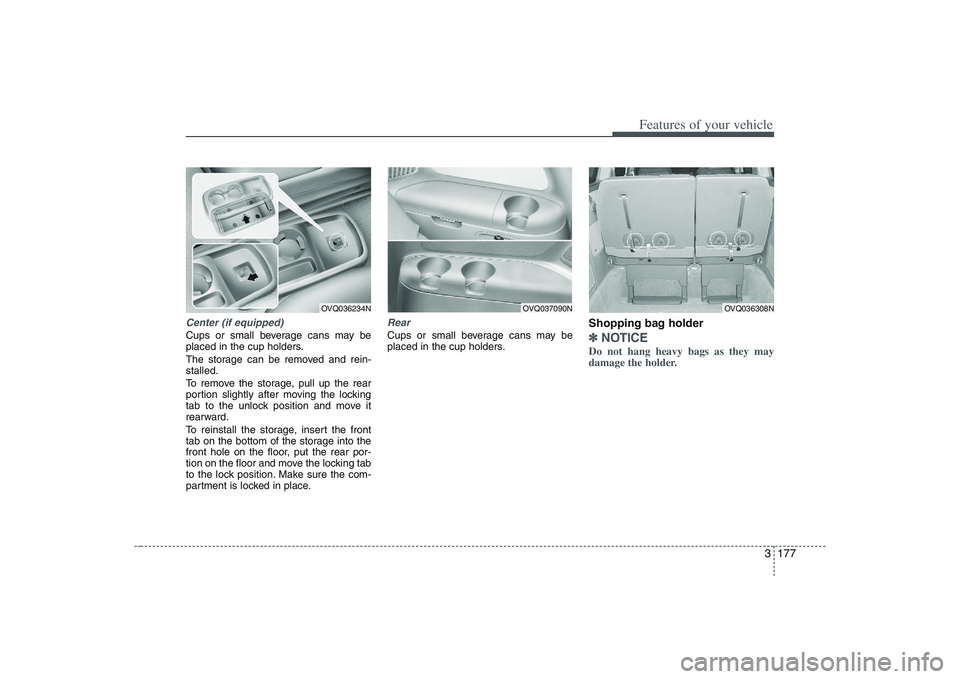
Center (if equipped)Cups or small beverage cans may be
placed in the cup holders.
The storage can be removed and rein-
stalled.
To remove the storage, pull up the rear
portion slightly after moving the locking
tab to the unlock position and move it
rearward.
To reinstall the storage, insert the front
tab on the bottom of the storage into the
front hole on the floor, put the rear por-
tion on the floor and move the locking tab
to the lock position. Make sure the com-
partment is locked in place.
RearCups or small beverage cans may be
placed in the cup holders.
Shopping bag holder ✽ ✽
NOTICEDo not hang heavy bags as they may
damage the holder.
OVQ036234N
OVQ037090N
OVQ036308N
Page 194 of 402
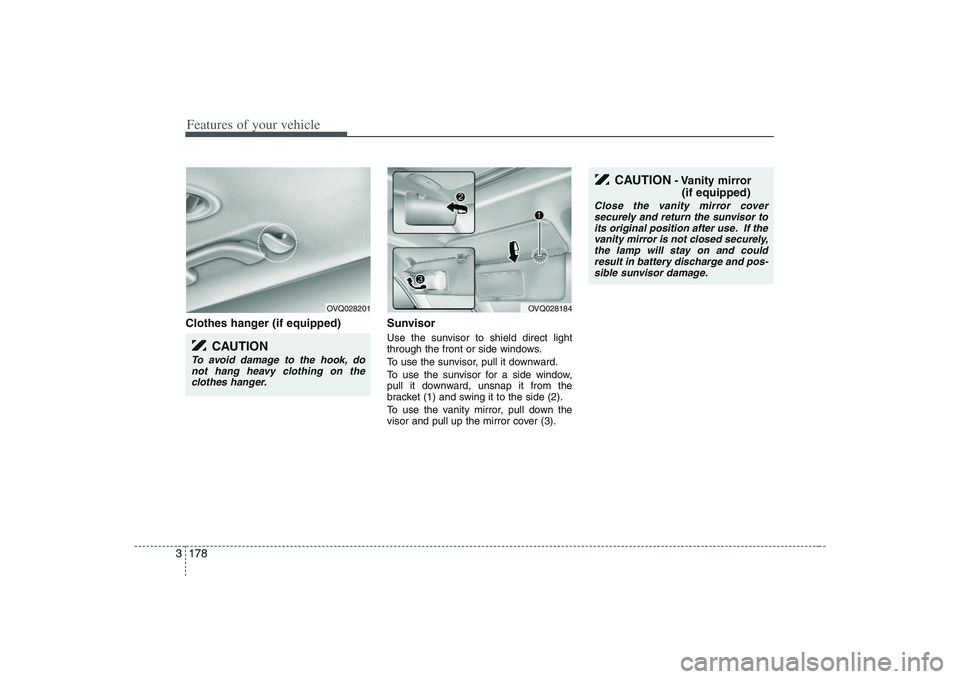
Features of your vehicle178 3Clothes hanger (if equipped) Sunvisor
Use the sunvisor to shield direct light
through the front or side windows.
To use the sunvisor, pull it downward.
To use the sunvisor for a side window,
pull it downward, unsnap it from the
bracket (1) and swing it to the side (2).
To use the vanity mirror, pull down the
visor and pull up the mirror cover (3).
OVQ028201
CAUTION
To avoid damage to the hook, do
not hang heavy clothing on the
clothes hanger.
OVQ028184
CAUTION
- Vanity mirror
(if equipped)
Close the vanity mirror cover
securely and return the sunvisor to
its original position after use. If the
vanity mirror is not closed securely,
the lamp will stay on and could
result in battery discharge and pos-
sible sunvisor damage.
Page 205 of 402
3189
Features of your vehicle
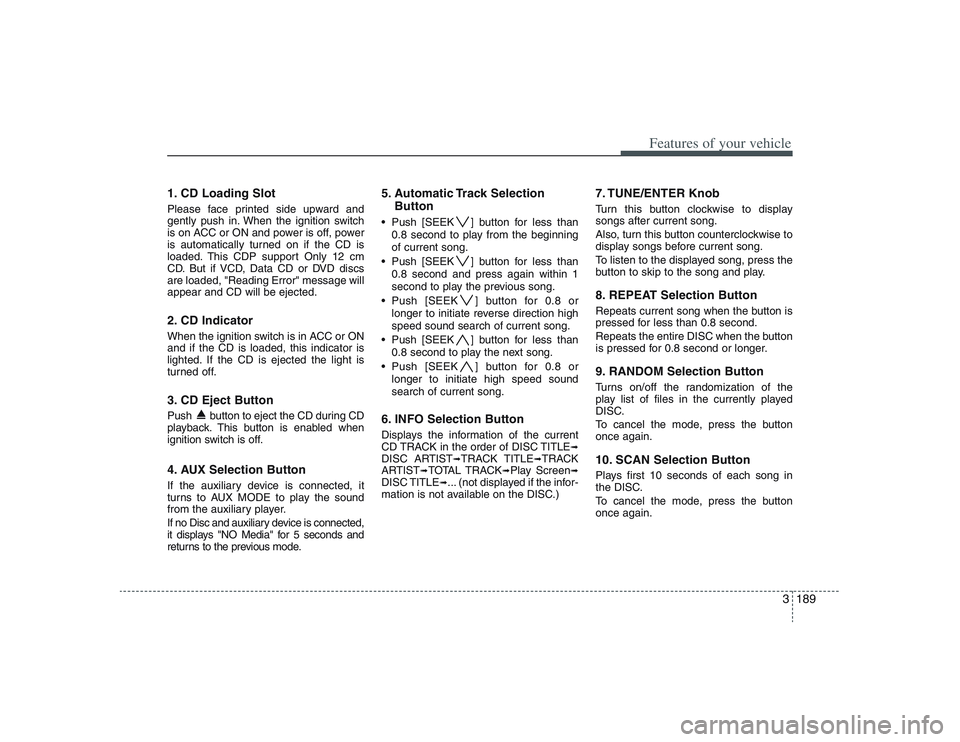
1. CD Loading SlotPlease face printed side upward and
gently push in. When the ignition switch
is on ACC or ON and power is off, power
is automatically turned on if the CD is
loaded. This CDP support Only 12 cm
CD. But if VCD, Data CD or DVD discs
are loaded, "Reading Error" message will
appear and CD will be ejected.2. CD Indicator When the ignition switch is in ACC or ON
and if the CD is loaded, this indicator is
lighted. If the CD is ejected the light is
turned off.3. CD Eject ButtonPush button to eject the CD during CD
playback. This button is enabled when
ignition switch is off.4. AUX Selection ButtonIf the auxiliary device is connected, it
turns to AUX MODE to play the sound
from the auxiliary player.
If no Disc and auxiliary device is connected,
it displays "NO Media" for 5 seconds and
returns to the previous mode.
5. Automatic Track Selection
Button Push [SEEK ] button for less than
0.8 second to play from the beginning
of current song.
Push [SEEK ] button for less than
0.8 second and press again within 1
second to play the previous song.
Push [SEEK ] button for 0.8 or
longer to initiate reverse direction high
speed sound search of current song.
Push [SEEK ] button for less than
0.8 second to play the next song.
Push [SEEK ] button for 0.8 or
longer to initiate high speed sound
search of current song.6. INFO Selection ButtonDisplays the information of the current
CD TRACK in the order of DISC TITLE
➟
DISC ARTIST
➟TRACK TITLE
➟TRACK
ARTIST
➟TOTAL TRACK
➟Play Screen
➟
DISC TITLE
➟... (not displayed if the infor-
mation is not available on the DISC.)
7. TUNE/ENTER KnobTurn this button clockwise to display
songs after current song.
Also, turn this button counterclockwise to
display songs before current song.
To listen to the displayed song, press the
button to skip to the song and play.8. REPEAT Selection ButtonRepeats current song when the button is
pressed for less than 0.8 second.
Repeats the entire DISC when the button
is pressed for 0.8 second or longer.9. RANDOM Selection ButtonTurns on/off the randomization of the
play list of files in the currently played
DISC.
To cancel the mode, press the button
once again.10. SCAN Selection ButtonPlays first 10 seconds of each song in
the DISC.
To cancel the mode, press the button
once again.
Page 219 of 402
3203
Features of your vehicle
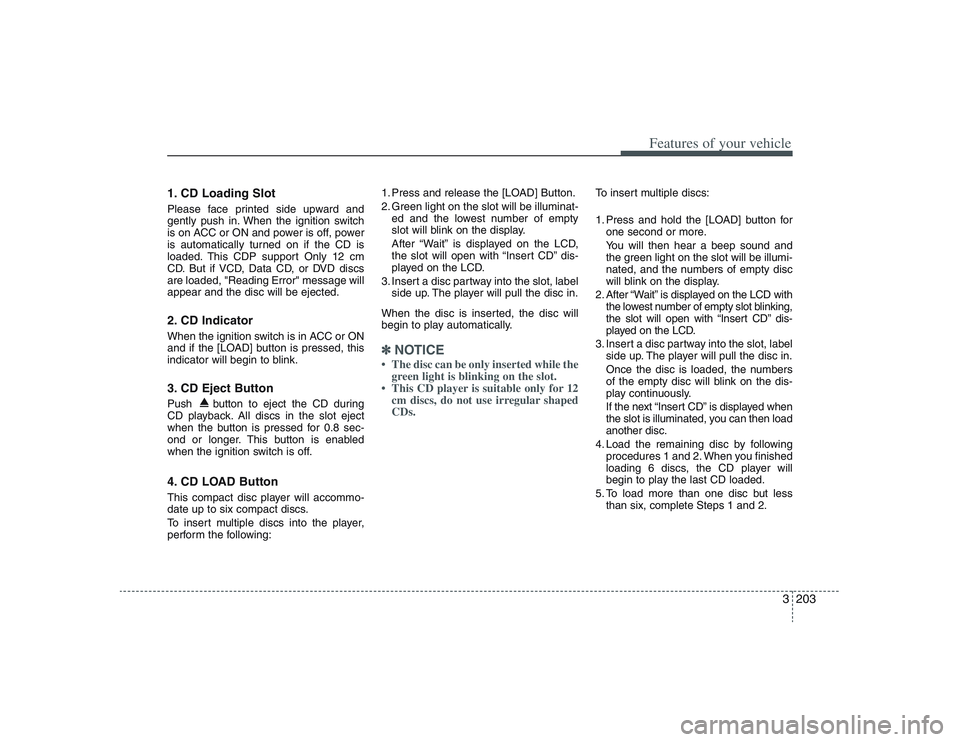
1. CD Loading SlotPlease face printed side upward and
gently push in. When the ignition switch
is on ACC or ON and power is off, power
is automatically turned on if the CD is
loaded. This CDP support Only 12 cm
CD. But if VCD, Data CD, or DVD discs
are loaded, "Reading Error" message will
appear and the disc will be ejected.2. CD Indicator When the ignition switch is in ACC or ON
and if the [LOAD] button is pressed, this
indicator will begin to blink.3. CD Eject ButtonPush button to eject the CD during
CD playback. All discs in the slot eject
when the button is pressed for 0.8 sec-
ond or longer. This button is enabled
when the ignition switch is off.4. CD LOAD ButtonThis compact disc player will accommo-
date up to six compact discs.
To insert multiple discs into the player,
perform the following:1. Press and release the [LOAD] Button.
2. Green light on the slot will be illuminat-
ed and the lowest number of empty
slot will blink on the display.
After “Wait” is displayed on the LCD,
the slot will open with “Insert CD” dis-
played on the LCD.
3. Insert a disc partway into the slot, label
side up. The player will pull the disc in.
When the disc is inserted, the disc will
begin to play automatically.
✽ ✽
NOTICE• The disc can be only inserted while the
green light is blinking on the slot.
• This CD player is suitable only for 12
cm discs, do not use irregular shaped
CDs.
To insert multiple discs:
1. Press and hold the [LOAD] button for
one second or more.
You will then hear a beep sound and
the green light on the slot will be illumi-
nated, and the numbers of empty disc
will blink on the display.
2. After “Wait” is displayed on the LCD with
the lowest number of empty slot blinking,
the slot will open with “Insert CD” dis-
played on the LCD.
3. Insert a disc partway into the slot, label
side up. The player will pull the disc in.
Once the disc is loaded, the numbers
of the empty disc will blink on the dis-
play continuously.
If the next “Insert CD” is displayed when
the slot is illuminated, you can then load
another disc.
4. Load the remaining disc by following
procedures 1 and 2. When you finished
loading 6 discs, the CD player will
begin to play the last CD loaded.
5. To load more than one disc but less
than six, complete Steps 1 and 2.
Page 230 of 402
Features of your vehicle214 3The Rear Seat Entertainment (RSE)
System is a compact, built-in, easy-to-use
entertainment system designed to provide
family fun while you are on the road. Enjoy
great quality sound from the vehicle
speakers, or have a private, quiet viewing
with the wireless headphones.
The display unit is mounted to the ceiling
in the rear passenger area of the vehicle,
allowing rear-seat passengers to play
DVD movies, video CDs or music CDs.
Users may also plug in a game platform or
VHS player. Headphones, game car-
tridges and other accessories can be kept
neatly out of the way in the 3rd-row arm-
rest compartment.System OverviewThe RSE System includes a mounted
color monitor with a built-in audio/video
control panel and a DVD player. It also
includes a remote control and two (2)
sets of battery-operated wireless head-
phones.
Connections / SetupThe RSE system is designed to make
your time on the road more enjoyable.
Please follow these instructions carefully
to get the most out of your RSE.
✽ ✽
NOTICERSE operation is prevented during the
first 2 seconds after the ignition switch is
turned to ignition on or accessory mode.
REAR SEAT ENTERTAINMENT SYSTEM / DVD PLAYER (IF EQUIPPED)
CAUTION
Refrain from using food or drinks
near the RSE, the wireless head-
phones or the remote control.
Direct sunlight may interfere with
the headphone's operation and
performance.
Normal RSE operation cannot be
guaranteed with duplicated discs.
In order to prevent inadvertent
battery discharge, the RSE will
remain in standby mode when
ignition switch is turn to ignition
ON or accessory mode.
Use of rear seat entertainment
system without the engine run-
ning will reduce battery power.
CAUTION
Disclaimer: The RSE system is pro-
grammed to the regional display
formats for your region (NTSC or
PAL). Please note that your RSE will
not read DVDs from a different
region.
Page 251 of 402
43
Driving your vehicle
Before entering vehicle:• Be sure that all windows, outside mir-
ror(s), and outside lights are clean.
Check the condition of the tires.
Check under the vehicle for any sign of
leaks.
Be sure there are no obstacles behind
you if you intend to back up.Necessary inspections Fluid levels, such as engine oil, engine
coolant, brake fluid, and washer fluid
should be checked on a regular basis,
with the exact interval depending on the
fluid. Further details are provided in
Section 6, Maintenance.
Before starting Close and lock all doors.
Position the seat so that all controls are
easily reached.
Adjust the inside and outside rearview
mirrors.
Be sure that all lights work.
Check all gauges.
Check the operation of warning lights
when the ignition switch is turned to
the ON position.
Release the parking brake and make
sure the brake warning light goes out.
For safe operation, be sure you are famil-
iar with your vehicle and its equipment.
PROPOSITION 65 WARN-
ING
Engine exhaust and a wide variety
of automobile components and
parts, including components found
in the interior furnishings in a vehi-
cle, contain or emit chemicals
known to the State of California to
cause cancer and birth defects and
reproductive harm. In addition, cer-
tain fluids contained in vehicles
and certain products of component
wear contain or emit chemicals
known to the State of California to
cause cancer and birth defects or
other reproductive harm.
BEFORE DRIVING